Manufacturing Processes Patient Education Website Template
Formwork is a single-column landing page template built for vacuum forming service providers. It presents your capabilities as a data-rich industry report, guiding visitors from process education through material comparisons to a gated report download. The Forest Trust color system and Dashboard Pro theme create a shop-floor aesthetic that feels credible, technical, and conversion-focused.
by Rocket studio
Quick summary
Formwork transforms a vacuum forming service page into a compelling industry report. Visitors scroll through process education, proprietary production data, and material comparisons before reaching a gated download form. The design feels like a well-maintained factory floor: precise, deliberate, and grounded in real production knowledge.
Who this template is for
This template is built for vacuum forming service providers who sell to technical buyers. It works best when your audience arrives with real engineering questions, not just general curiosity.
- Product designers prototyping enclosures on tight deadlines who need quick process validation
- Packaging engineers evaluating vacuum forming against injection molding on cost-per-unit
- Operations managers at medical device companies specifying PETG trays for cleanroom environments
What problem this template solves
Most manufacturing service pages list capabilities without proving them. Technical buyers need evidence, not bullet points. This template replaces the typical capabilities brochure with a structured, data-led narrative that earns trust before asking for contact details.
- Buyers leave generic service pages unconvinced because there is no production data to back the claims
- A gated report approach captures qualified leads while giving visitors a real reason to share their work email
- Secondary visitors who are not ready to convert still get a quick-reference PDF, so lighter intent is captured without friction
What you get with this template
You get a fully structured single-column landing page that reads like a white paper and converts like a lead-generation tool. Every section is purposeful and built around a specific stage of the buyer's decision.
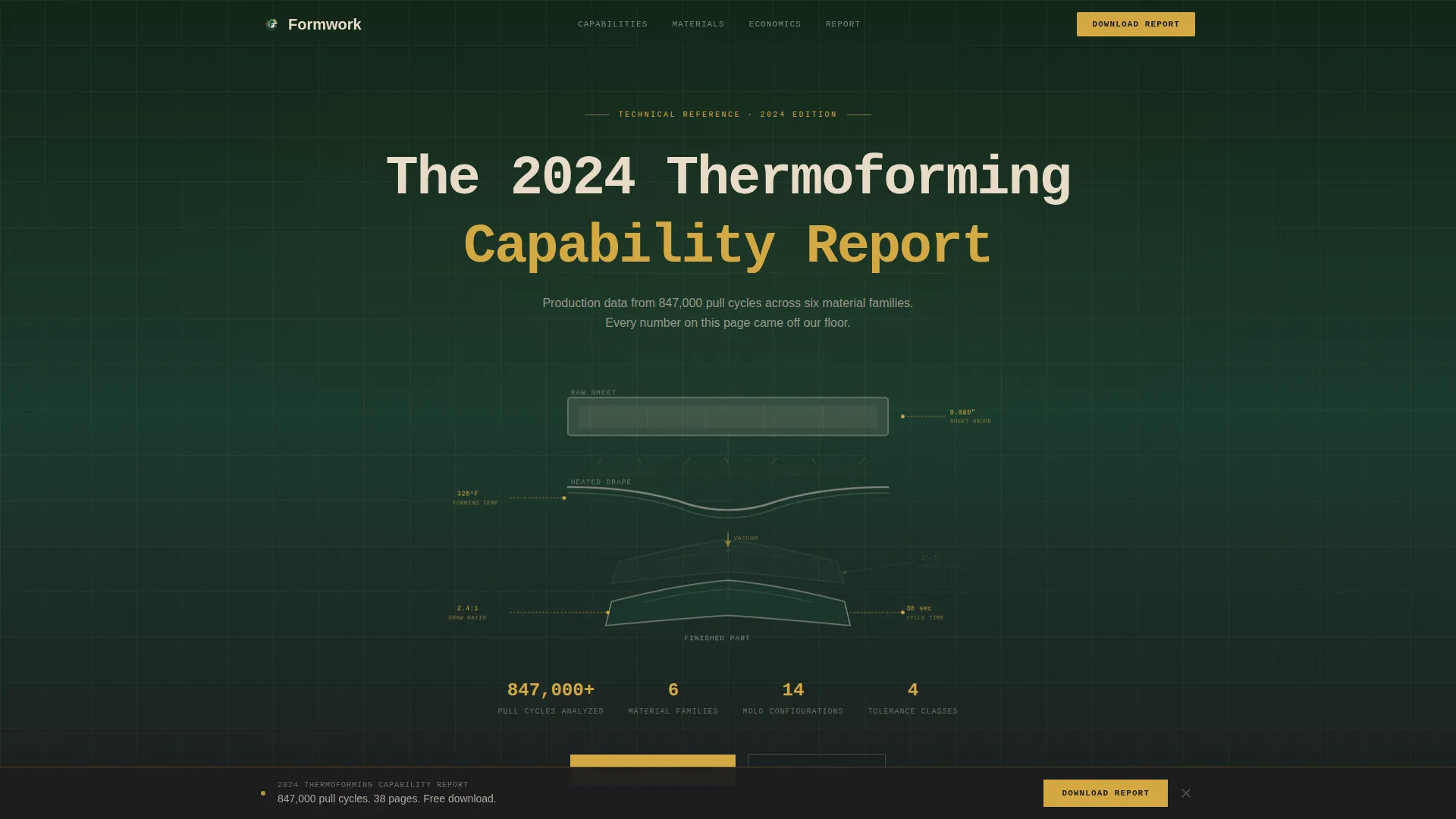
- An exploded-view hero section with technical annotation callouts covering sheet thickness, draw ratio, draft angle, and cycle time
- A chapter-by-chapter data narrative including material comparison tables, cycle time benchmarks, tolerance charts, and a vacuum forming versus injection molding breakdown
- Two conversion paths: a gated full-report form and an ungated quick-reference PDF download for lighter-intent visitors
Feature list
This section covers the core built-in components and layout capabilities delivered with the Formwork template.
Exploded View Hero Section
The header presents a technical illustration of a vacuum-formed part deconstructed into its lifecycle layers. A raw thermoplastic sheet, a heated drape, and a finished trimmed part are suspended in space against mill green. Thin amber annotation lines connect each stage to data callouts for sheet thickness, draw ratio, draft angle, and cycle time.
Industry Report Scroll Structure
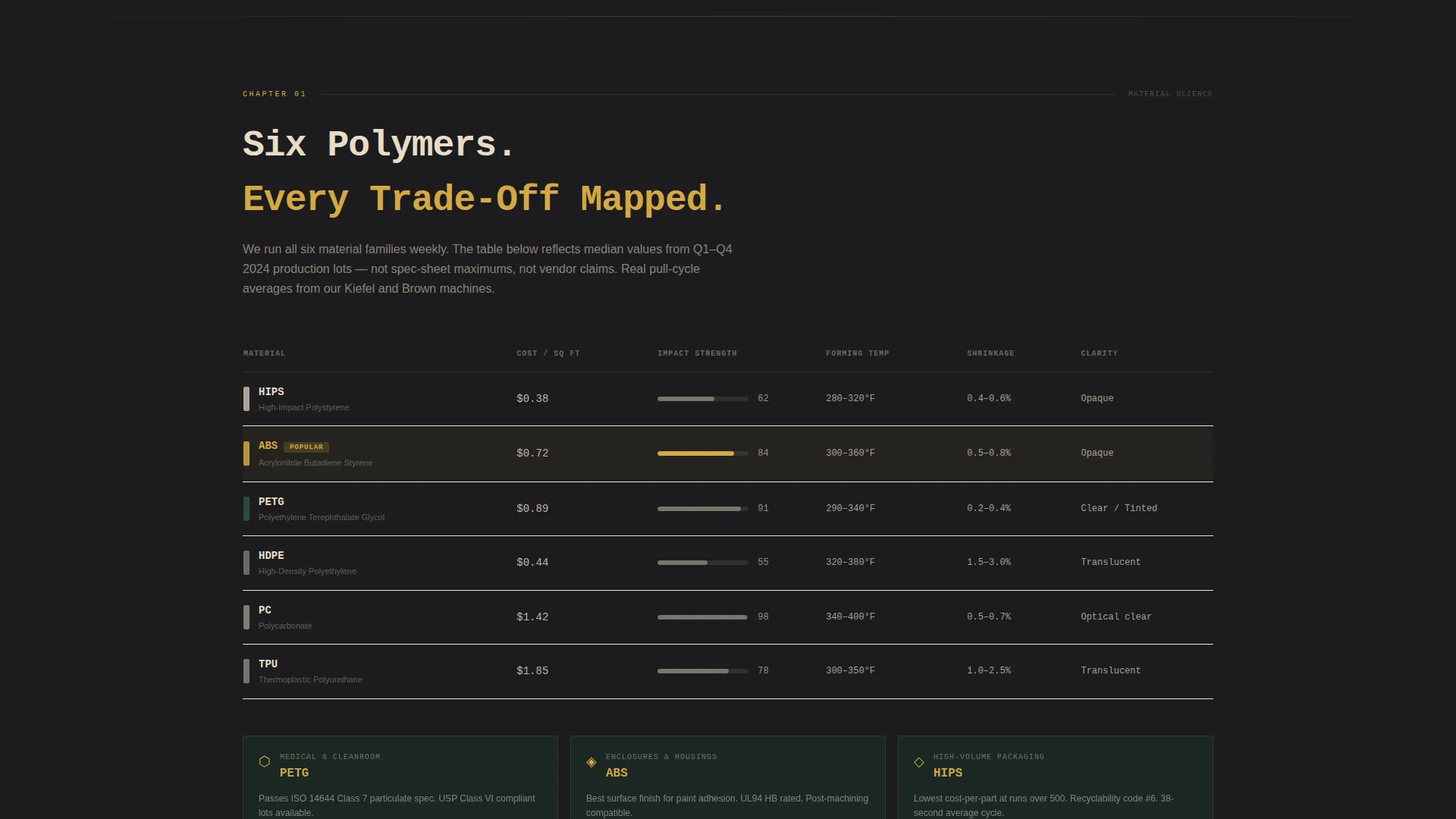
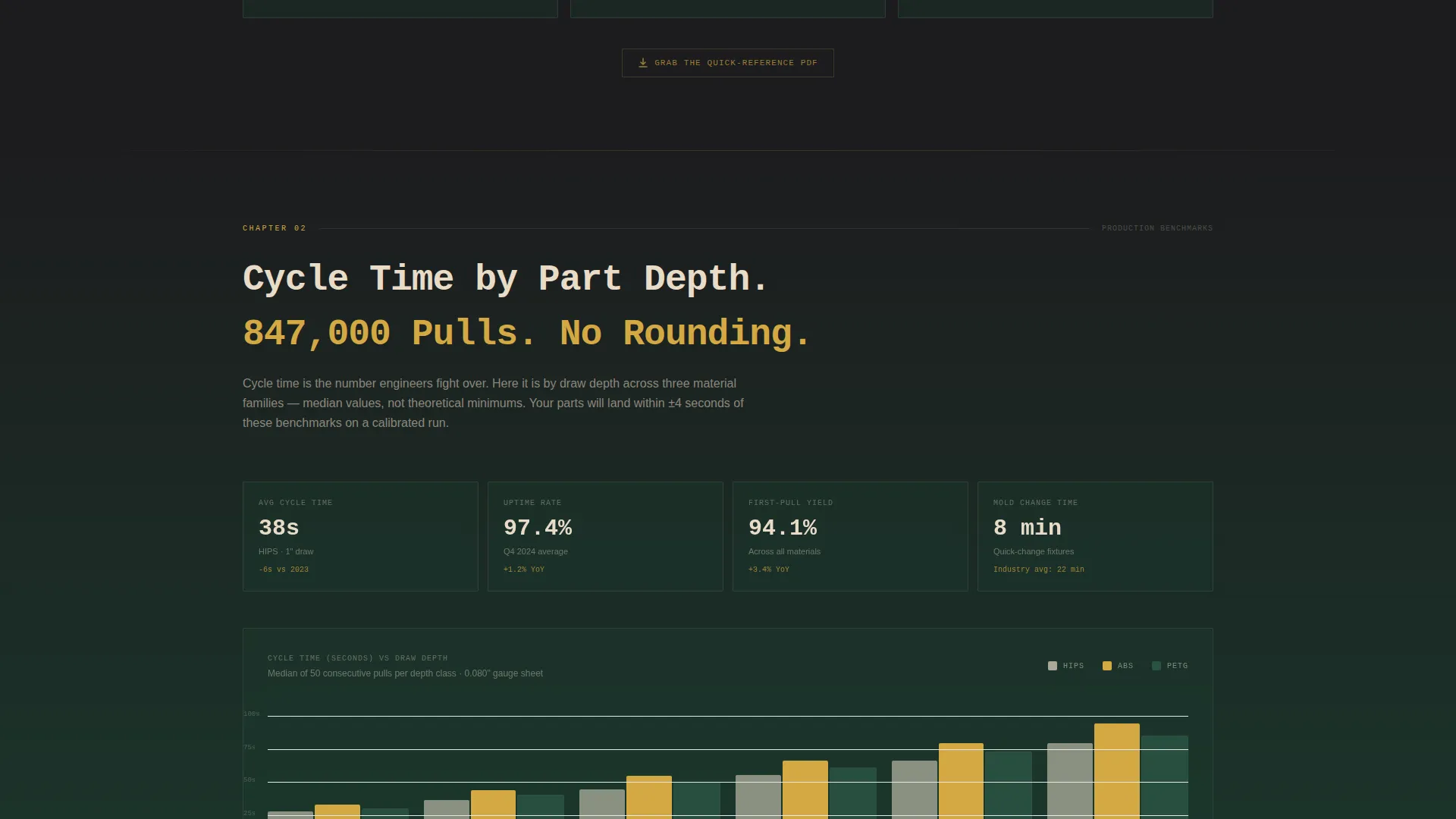
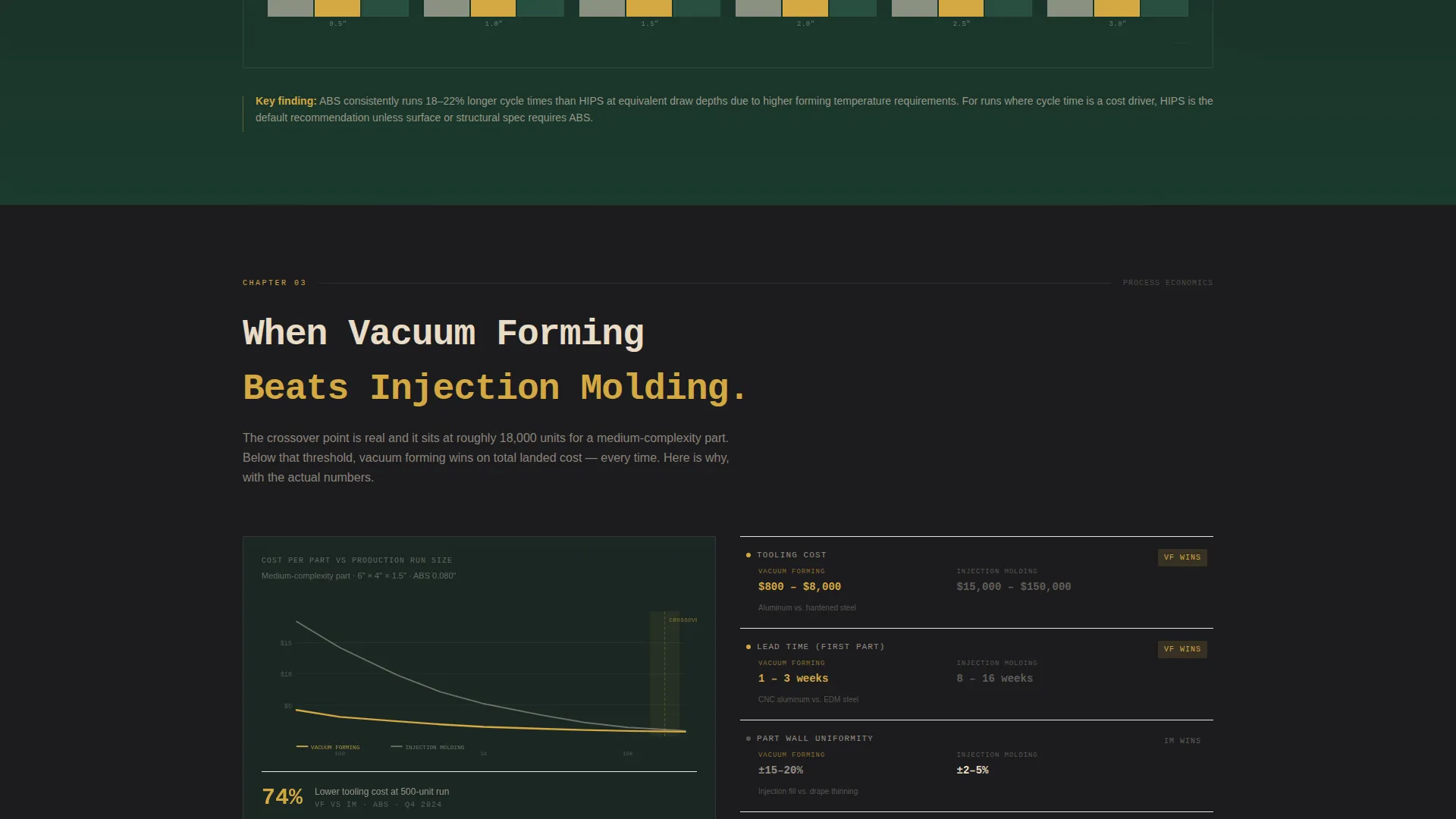
Each scroll section functions as a chapter of a proprietary production report. Material comparison tables contrast HIPS, ABS (Acrylonitrile Butadiene Styrene), and PETG (Polyethylene Terephthalate Glycol) across impact strength and cost-per-unit. Cycle time benchmarks, tolerance achievability charts, and a run-size comparison against injection molding are all built into the page flow.
Dual Conversion Path System
The primary call to action is a gated three-field form collecting work email, company name, and a "What are you forming?" dropdown. The form appears first as a sticky bottom bar after the third scroll section, then again as a full-width module after the final data chapter. A secondary ungated path offers a one-page material selection cheat sheet for visitors not ready to share company details.
Dashboard-Style Data Visualizations
Charts and graphs render in warm birch and status-indicator amber against dark backgrounds. Each visualization is formatted as a dashboard widget, keeping data readable and on-brand without feeling like a generic chart library drop-in.
Sticky Bottom Bar call to action
After the third scroll section, a persistent bottom bar appears with the primary download call to action. This keeps the conversion prompt visible as visitors continue reading through the data chapters, without interrupting the report flow.
Monospace Typography System
The headline and section titles use a clean monospace typeface that signals a technical document rather than a marketing brochure. This typographic choice reinforces the Industry Report creative direction across every section heading.
Page sections overview
| Section | Purpose |
|---|---|
| Exploded View Hero | Introduce the process lifecycle with technical annotation callouts |
| Process Education Chapter | Explain how thermoforming works before presenting data |
| Material Comparison Tables | Compare HIPS, ABS, and PETG on strength and cost |
| Cycle Time Benchmarks | Show production speed data by part depth |
| Tolerance Achievability Charts | Present accuracy data by mold type |
| Vacuum versus. Injection Molding | Prove where vacuum forming wins on run sizes under 5,000 |
| Sticky call to action Bar | Keep the report download visible during scroll |
| Full-Width Report Form | Gate the full report with a three-field lead capture form |
| Quick-Reference PDF Strip | Offer an ungated material cheat sheet for lighter-intent visitors |
Design & branding system
The Forest Trust color system grounds the page in an industrial-but-deliberate aesthetic. Every color choice references the physical environment of a well-run production facility.
- Deep mill green (#1B3A2D) sets the primary dark background, giving the page the weight of a factory floor painted in safety green
- Machine-oil black (#1C1C1E) is used for deep contrast surfaces, while warm birch (#E8DCC8) carries data labels, body text, and table content
- Status-indicator amber (#D4A843) is reserved exclusively for calls to action, data highlights, and hover states, functioning like a shop-floor status light
Mobile & speed optimization
The single-column flow layout makes the template inherently readable on smaller screens. The scroll structure was designed so each chapter section stacks cleanly without requiring horizontal scrolling or resizing.
- Dashboard widget-style charts and tables are sized and formatted to remain legible on mobile viewports
- The sticky bottom bar call to action adapts to sit above the mobile navigation area, keeping the download prompt accessible without covering content
How this template helps you convert
The conversion architecture is built into the page structure itself. Visitors are led from education to evidence to action in a deliberate sequence.
- The industry report format builds credibility first, so by the time the form appears, visitors already trust the data behind the offer and are motivated to download the full report
- The sticky call to action bar after the third section catches visitors at peak engagement, while the full-width form at the end of the data narrative captures those who read the complete report before deciding
Other information about this template
The Formwork template sits at the intersection of the Dashboard Pro theme and the Industry Report creative direction. These two systems work together to make a manufacturing service page feel like a credible technical publication rather than a sales tool.
- The template is categorized under Manufacturing and Industrial, with a subcategory focus on Manufacturing Processes and a niche alignment with vacuum forming service providers
- The Dashboard Pro theme provides the widget-grid visual language that makes data sections feel structured and professional
- The Forest Trust color system was selected specifically to reflect the physical materials and environment of a production facility, not just as an aesthetic choice
- The intersection match score for this template's theme, color system, creative direction, header concept, template style, and landing-page direction is 13, indicating a tightly aligned combination of design and conversion intent
Theme
Dashboard Pro
Creative direction
Industry Report
Color system
Forest Trust
Style
Single Column Flow
Direction
Content/Resource
Page Sections
Exploded View Hero with Annotation Callouts
Chapter-by-chapter Report Scroll
Material Comparison Tables
Dual Conversion Path with Gated Form
Sticky Bottom Bar Call to Action
Dashboard Widget Data Visualizations
Related questions
Who is the primary audience for this template?
What does the gated form collect from visitors?
Can visitors access anything without submitting the form?
What data sections are built into the page?
What makes this template different from a standard manufacturing service page?



