Commercial Office Photography Landing Page Template
Frame is a single-page landing page template built for commercial office photographers. It combines an asymmetric photo grid header, an interactive shoot estimator, and expandable case study tiles to turn a portfolio into a booking engine. Warm Stone tones and brass accents give every section the polished authority of a Class A office lobby.
by Rocket studio
Quick summary
Frame is a gallery and detail landing page template designed for commercial office photography services. It opens with a twelve-tile mosaic header, moves immediately into an interactive shoot estimator, then flows through expandable project case studies. The Corporate Precision visual identity uses warm travertine and brushed brass to signal quiet authority from the first scroll.
Who this template is for
Frame was built for photographers and creative professionals who specialize in commercial interior spaces. It speaks directly to service providers who need a single page that earns trust, proves range, and converts visitors into booked clients.
- Commercial office photographers building a portfolio-first booking page
- Real estate photographers serving brokers, office managers, and coworking space founders
- Photography studios pitching multi-building campus shoots to commercial property clients
What problem this template solves
Most photography portfolio pages ask visitors to browse passively. They show images but never help a potential client understand cost, scope, or process. Frame solves this by putting a practical tool before the gallery, so every visitor gets a personalized context before they see the first case study.
- No clear pricing signal forces prospects to email before they are ready to commit
- Generic gallery layouts fail to show the story behind each shoot, weakening trust
- Weak or absent calls to action leave interested visitors with no clear next step
What you get with this template
Frame delivers a complete single-page flow from first impression to confirmed booking. Every section is purpose-built for a commercial photography service context, with no filler sections or generic placeholder layouts.
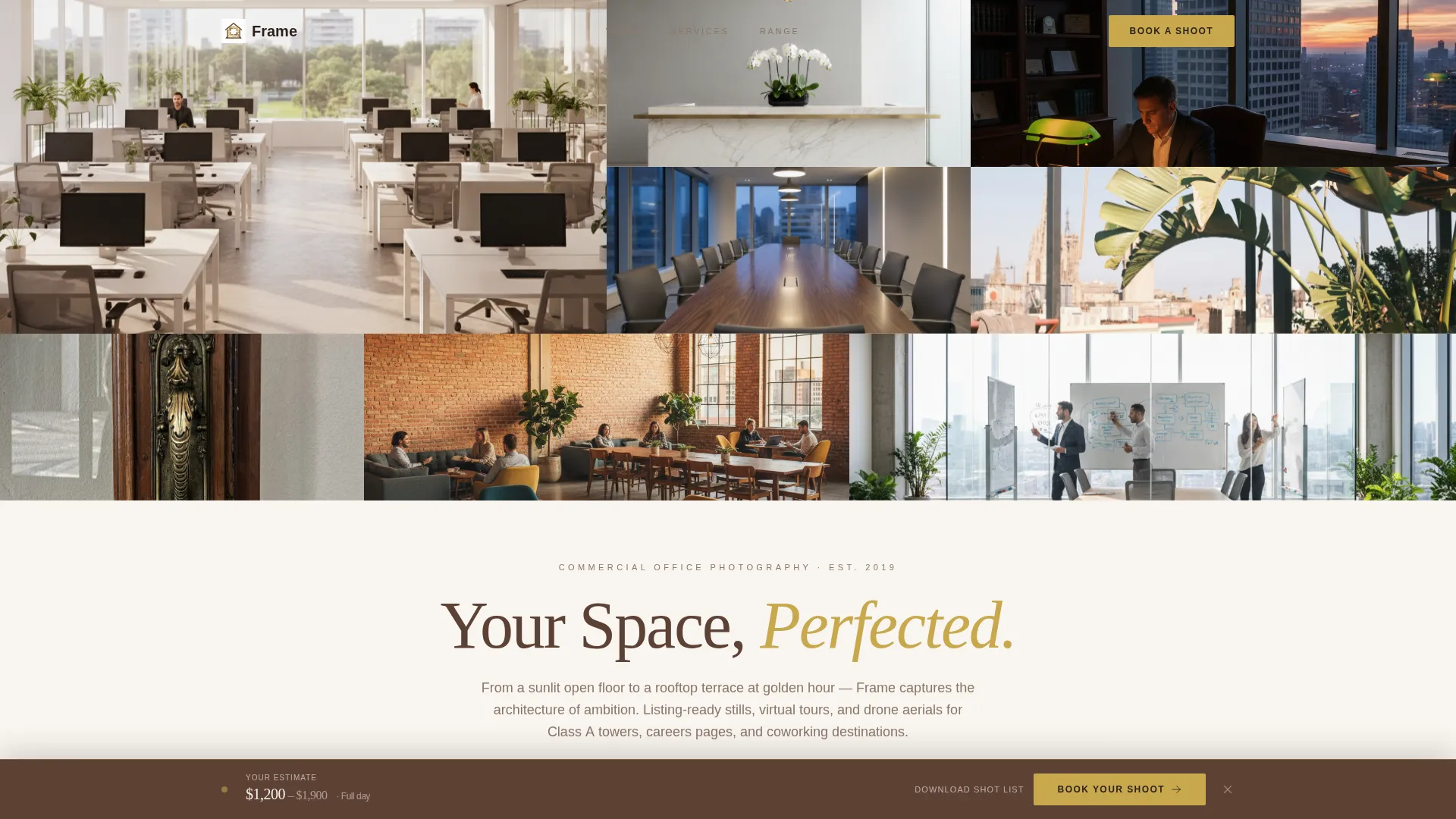
- A twelve-tile asymmetric Photo Grid Mosaic header with scale-shift load animation and a scroll-triggered headline
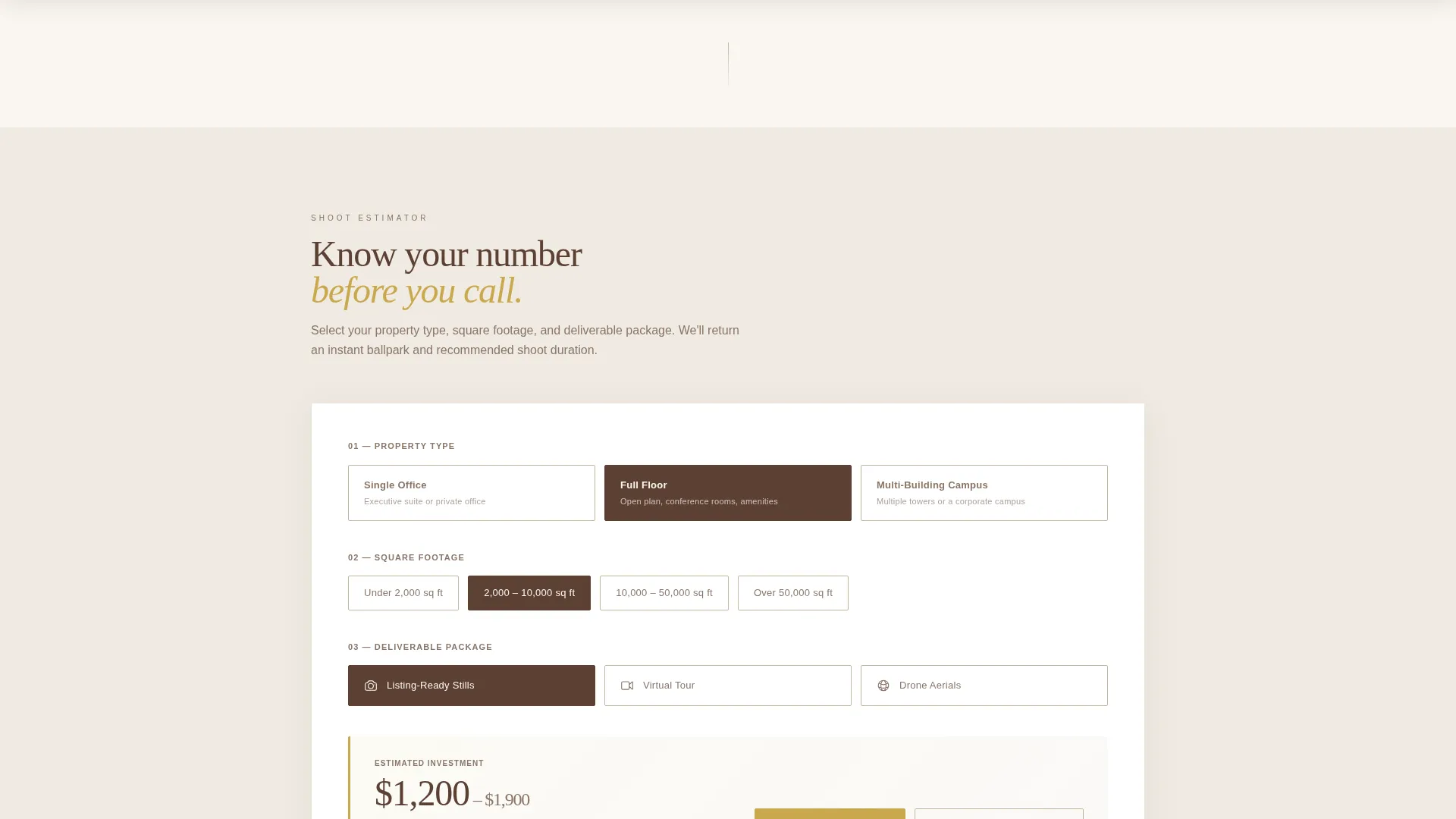
- An interactive shoot estimator with property type, square footage, and deliverable package selectors that return a ballpark quote
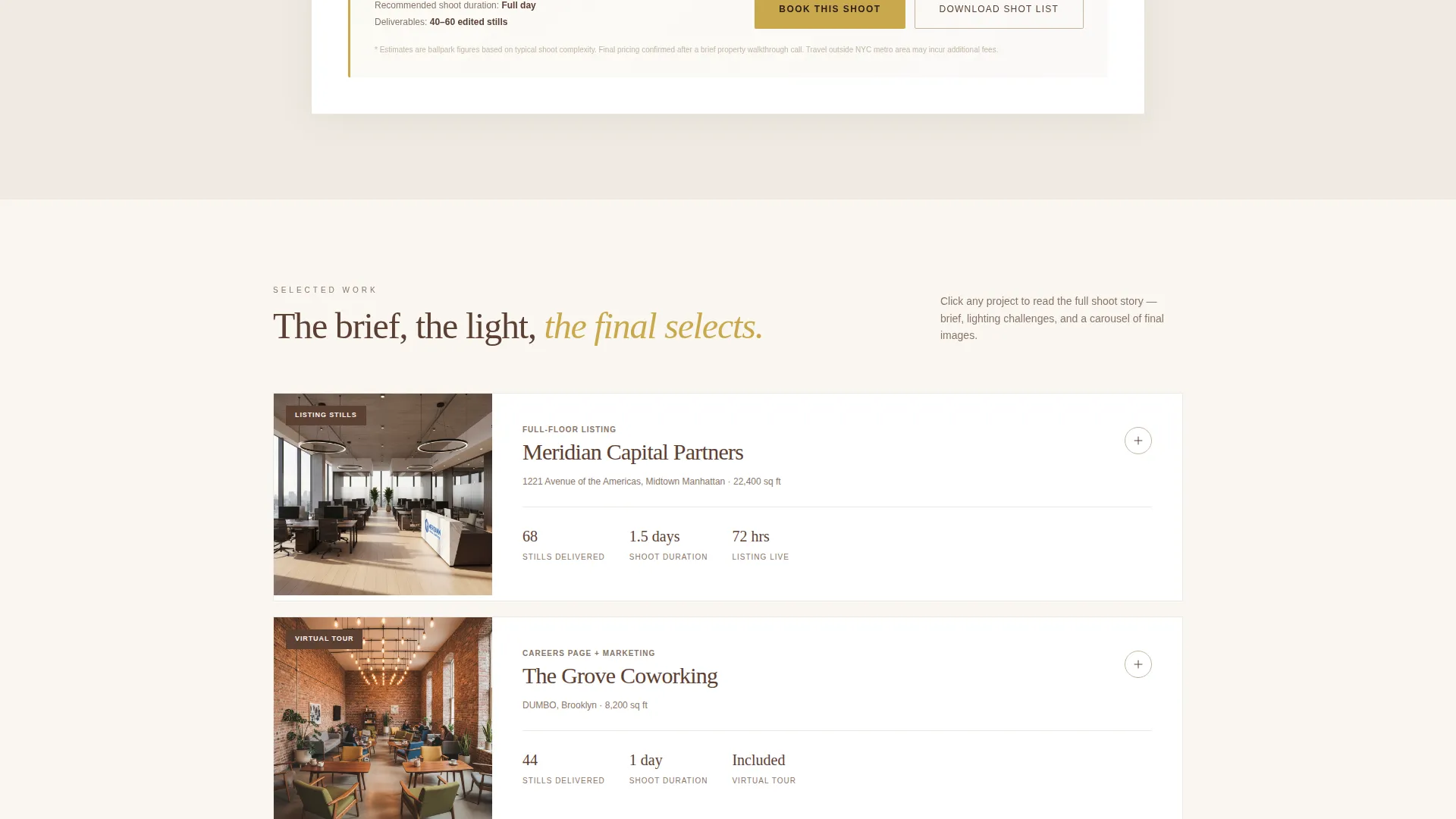
- Expandable case study tiles that reveal shoot briefs, lighting notes, before states, and final image carousels
- A sticky booking bar with a two-step scheduling flow and a secondary email-capture path for unready leads
Feature list
Frame includes purpose-built components that reflect the full scope described in the source brief.
Twelve-Tile Asymmetric Mosaic Header
The header arranges twelve edge-to-edge commercial interior photographs in an asymmetric grid with no gutters. Each tile scales subtly on load, with the largest tile twice the size of the smallest. The headline "Your Space, Perfected" slides up from below the fold on the first scroll pixel, appearing in walnut-dark type.
Interactive Shoot Estimator Tool
Positioned immediately below the mosaic, this tool lets visitors select property type, square footage range, and deliverable package. It returns an instant ballpark quote and a recommended shoot duration. Placing this tool first earns the scroll and qualifies interest before the gallery begins.
Expandable Case Study Tiles
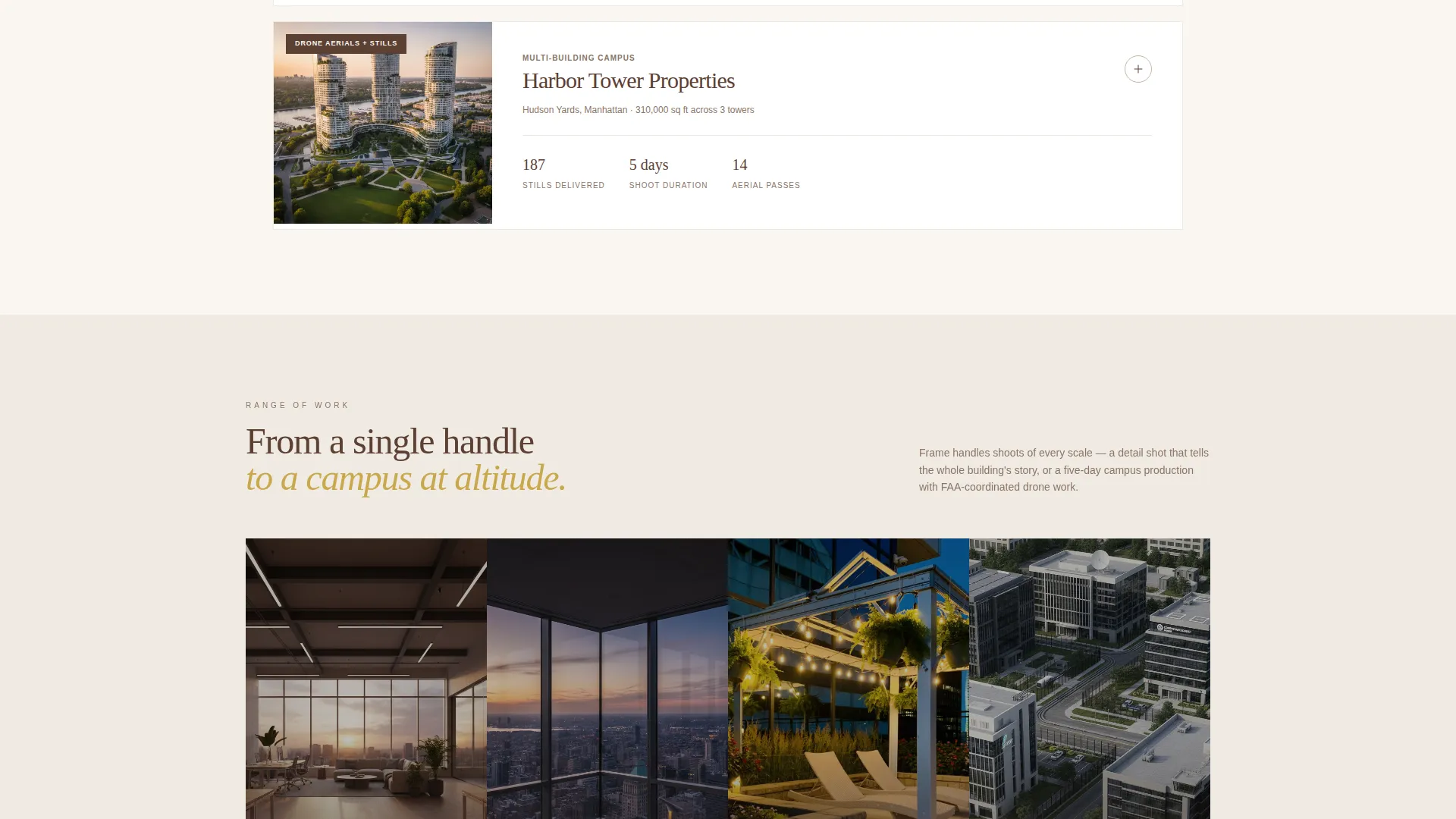
Each gallery row is a case study tile. On click, it expands to reveal the full shoot story: the original brief, lighting challenges faced, the before state, and a carousel of final image selects. Projects are ordered from smallest to largest scope, building confidence with each row.
Sticky Booking Bar
After the estimator interaction, a sticky bottom bar appears and anchors the quoted price. The primary call to action, "Book Your Shoot," opens a two-step flow that collects property address, preferred date, access instructions, and parking details via an embedded calendar.
Email Capture for Unready Leads
A secondary path, "Download Sample Shot List," captures email addresses from visitors who are not yet ready to book. The download positions the photographer as a prepared expert by delivering a practical preparation guide before the shoot ever begins.
Warm Stone Branding System
The color palette uses honed travertine (#C4B5A0), polished walnut (#5C4033), linen white (#FAF6F1), and brushed brass (#C9A84C) reserved for buttons and hover states. No cold corporate grays appear anywhere. The result feels warm, grounded, and quietly authoritative throughout the page.
Page sections overview
| Section | Purpose |
|---|---|
| Photo Grid Mosaic | Open with twelve asymmetric commercial interior tiles and a scroll-triggered headline |
| Shoot Estimator Tool | Let visitors configure property type, footage, and package for an instant quote |
| Case Study Gallery | Expandable project tiles that reveal briefs, challenges, and final image carousels |
| Sticky Booking Bar | Persist the quoted price and surface the primary booking call to action |
| Two-Step Booking Flow | Collect address, preferred date, access instructions, and parking details |
| Email Lead Capture | Offer a sample shot list download to capture emails from undecided visitors |
Design & branding system
The Corporate Precision theme uses the Warm Stone color system to avoid the cold, impersonal feel that most commercial photography pages default to. Every color choice reinforces the sense of a well-appointed, premium interior environment.
- Core palette: honed travertine (#C4B5A0), polished walnut (#5C4033), and linen white (#FAF6F1) form the base
- Accent color: brushed brass (#C9A84C) is reserved exclusively for buttons and hover states, keeping the palette disciplined
- No cold grays appear anywhere; the palette reads warm, grounded, and quietly authoritative throughout
Mobile & speed optimization
Frame is structured so that its most interactive section, the estimator tool, is reachable quickly on any screen size. The layout adapts to narrower viewports without losing the visual impact of the mosaic header or the case study tiles.
- The asymmetric mosaic grid reflows to a readable single-column arrangement on smaller screens
- The estimator tool remains fully functional and easy to use on touch devices
- Sticky bottom bar and booking flow are optimized for thumb-reachable placement on mobile viewports
How this template helps you convert
Frame is built around a deliberate scroll journey that moves a visitor from curiosity to commitment without friction.
- The estimator tool appears before the gallery, so visitors arrive at the case studies already holding a personalized quote, making each project feel relevant to their own budget.
- The sticky booking bar reinforces that quote throughout the rest of the page, reducing the mental distance between interest and action.
- The email capture path ensures that visitors who are not ready to book still enter a follow-up relationship rather than leaving without a trace.
Other information about this template
Frame is categorized under Real Estate and Property, specifically within the Commercial Office Real Estate subcategory. It is designed as a full-width immersive single-page layout, meaning every section runs edge to edge for maximum visual impact.
- Template style: Full-Width Immersive, with no contained-width columns that would reduce the gallery's presence
- Creative direction: the page follows a case study narrative structure, escalating from a single-office shoot to a multi-building campus project
- Ideal property types for the estimator include single offices, full floors, and multi-building campuses
- Deliverable packages supported by the estimator include listing-ready stills, virtual tour assets, and drone aerials
- The template suits photographers building a direct-to-client booking page as well as studios pitching managed services to brokers or property managers
Theme
Executive Suite
Creative direction
Case Study Narrative
Color system
Sunset Mesa
Style
Full-Width Immersive
Direction
Quiz/Assessment
Page Sections
Asymmetric Photo Grid Mosaic Header
Interactive Shoot Estimator Tool
Expandable Case Study Tiles
Sticky Booking Bar with Two-step Flow
Email Lead Capture Via Shot List Download
Related questions
Who is this landing page template designed for?
Can I use this template without a large photo portfolio?
How does the shoot estimator work for visitors?
What does the two-step booking flow collect?
Is the email capture path separate from the booking flow?



