Smart Home Garage Integration Landing Page Template
Garageiq is a split-screen landing page template built for garage smart home integration services. It pairs a live system dashboard with a case study narrative, guides visitors through a five-step garage assessment quiz, and delivers a personalized integration recommendation. The Engineering Blueprint visual theme keeps everything precise, structural, and immediately credible.
by Rocket studio
Quick summary
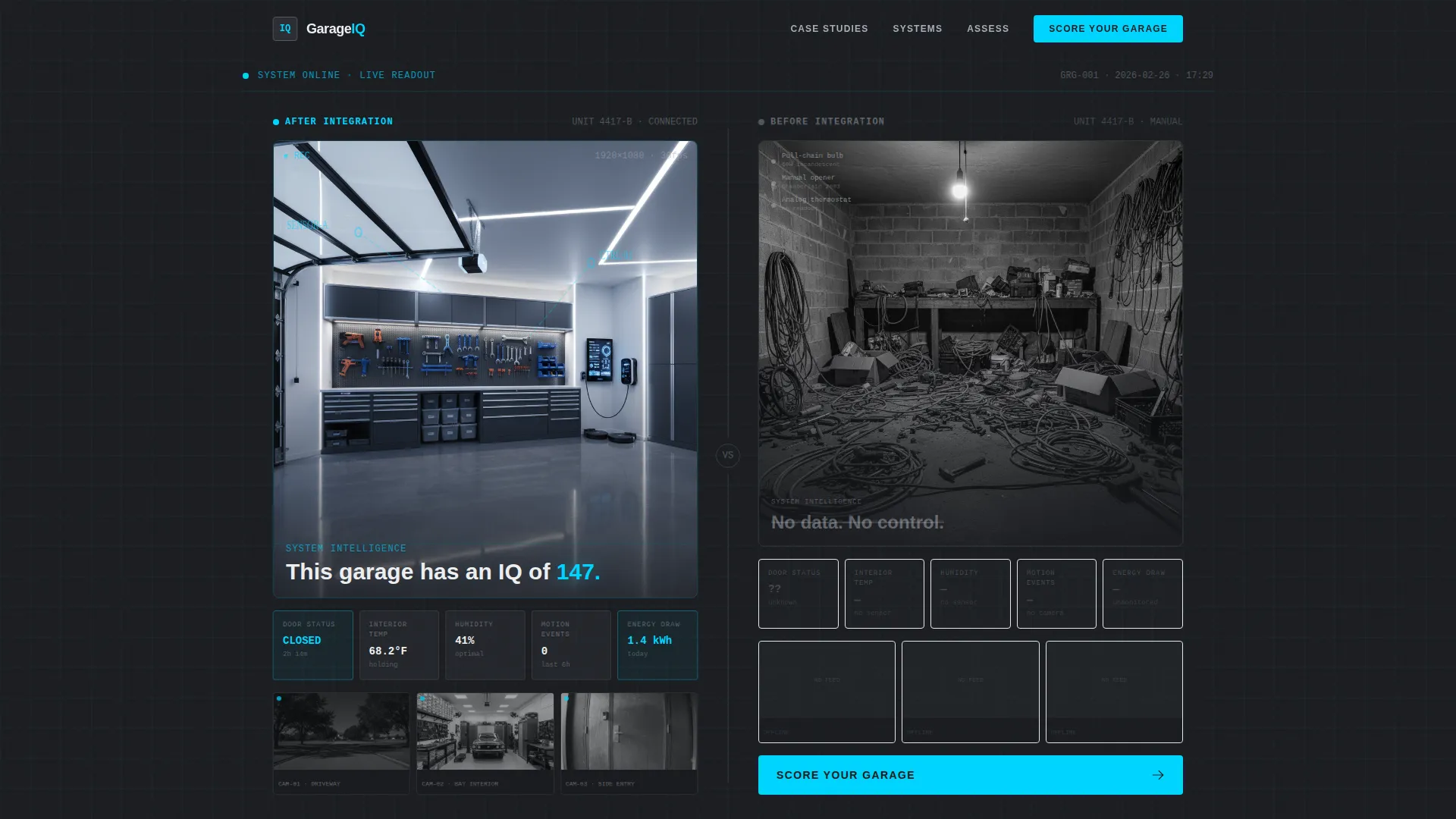
Garageiq is a single-page template designed for garage smart home integration services. The layout splits every section 50/50, placing raw before-state evidence on the left and engineered solutions on the right. A live-data header opens the page, case study sections build trust through visible logic, and a quiz converts visitors into booked consultations.
Who this template is for
This template speaks directly to service providers who turn standard garages into connected, intelligent spaces. It works best when your clients are real people with specific problems and a willingness to invest in a proper system.
- Garage smart home integration consultants and installers serving residential clients
- Contractors running commercial garage or fabrication studio conversion projects
- Smart home service businesses targeting car enthusiasts and workshop owners
What problem this template solves
Most smart home service pages lead with features and end with a generic contact form. Visitors leave without understanding what the work actually involves or whether your team is qualified to handle their specific setup.
- No clear way to show before-and-after project complexity to prospective clients
- Generic calls to action that do not qualify leads or match them to the right service tier
- No mechanism to build engineering credibility before asking for a booking
What you get with this template
You get a structured, single-page layout that guides visitors from curiosity to a confirmed site survey booking. Every section has a defined role and a clear visual logic.
- A live-data stats header that demonstrates real system monitoring before a single headline appears
- Three escalating case study sections that show project complexity and engineering methodology
- A five-step quiz that segments visitors by garage size, use case, and automation level
Feature list
This template ships with six purpose-built sections, each fulfilling a specific role in the conversion sequence.
Live System Dashboard Header
The header opens with a split screen. The left panel displays a real garage's operational readout, including door status, interior temperature, humidity, motion event count, energy draw, and three stacked camera feed thumbnails. The right panel shows the same garage before integration. After three seconds, the tagline fades in over the live data panel.
Escalating Case Study Narrative
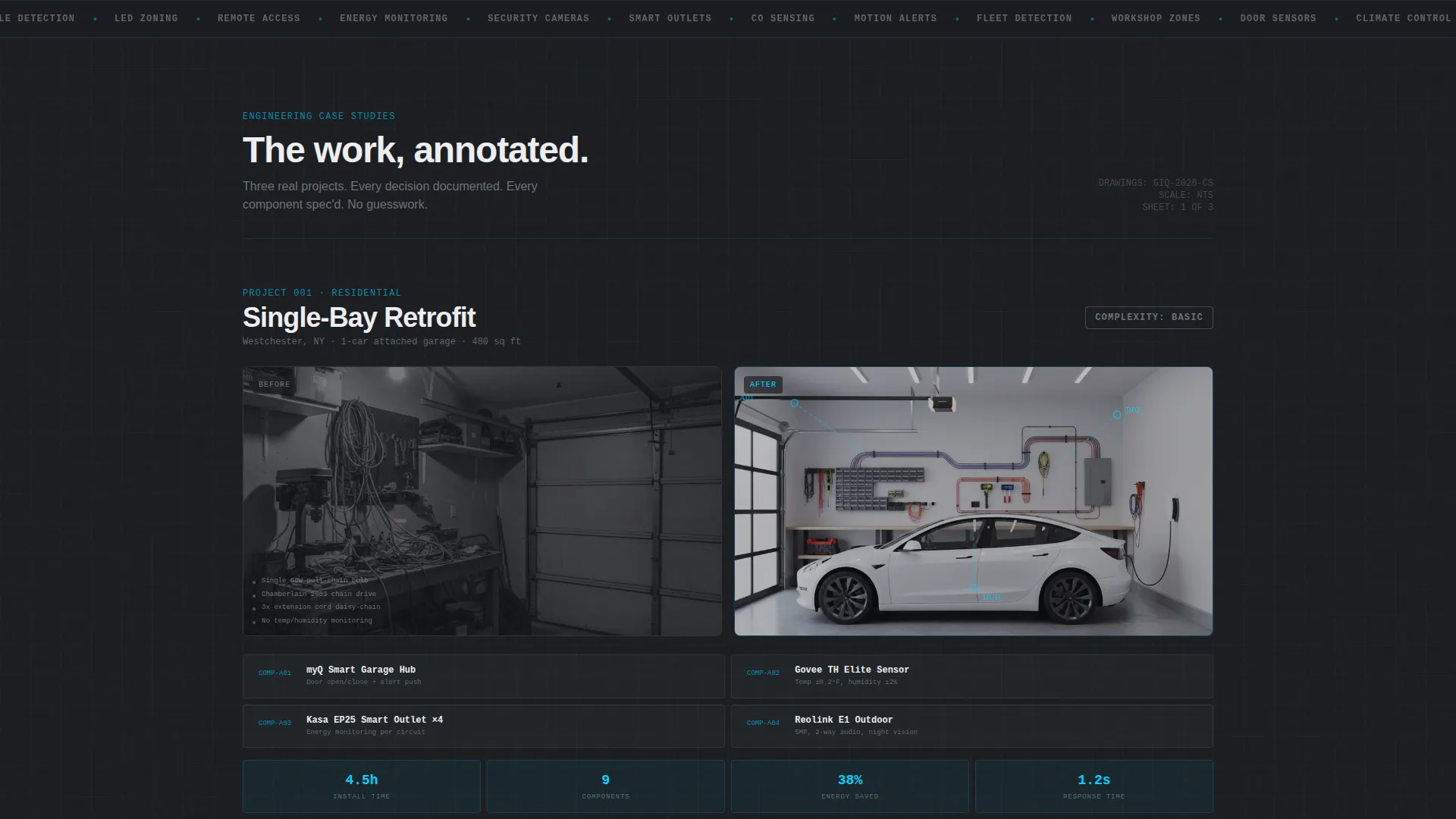
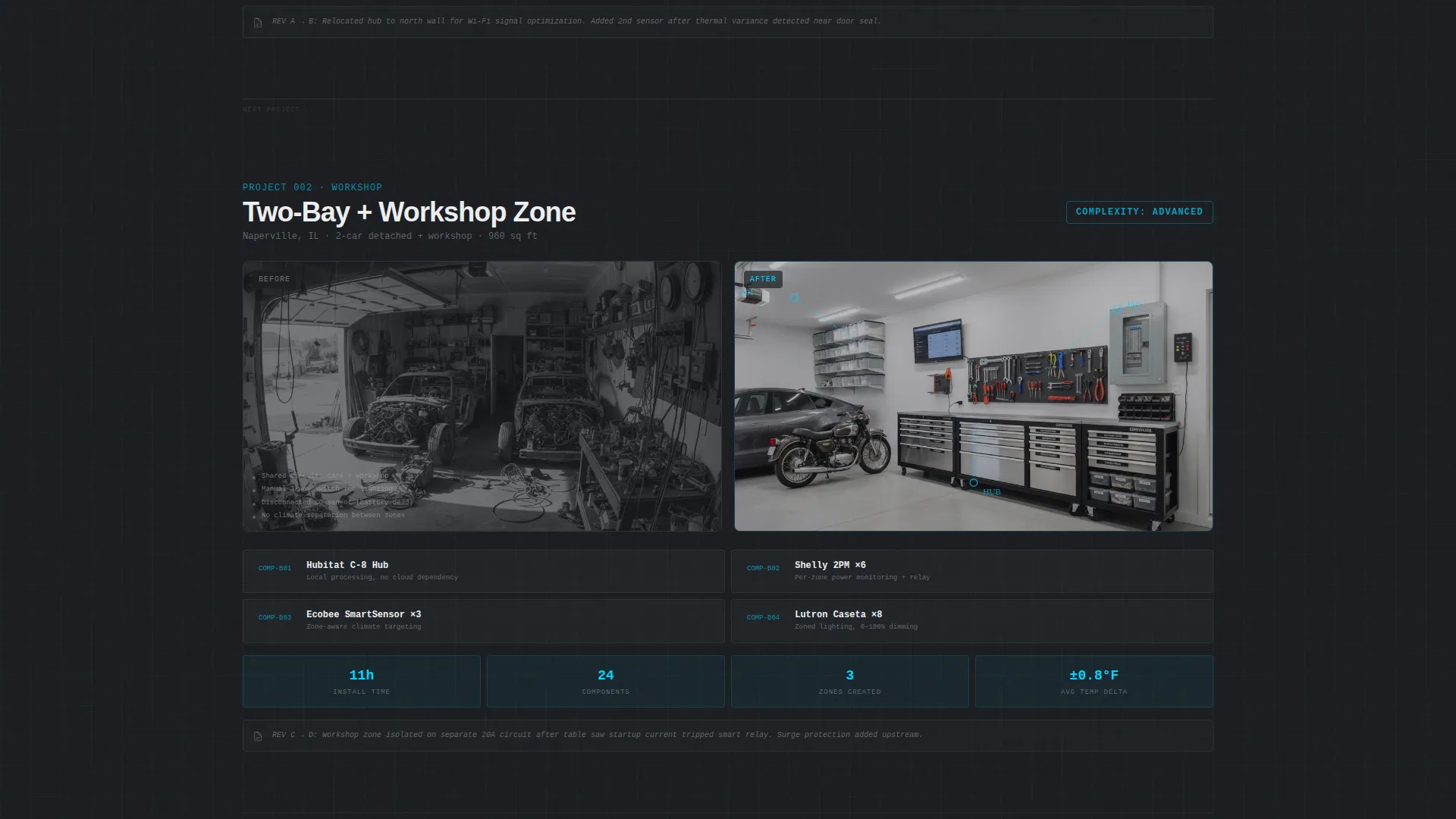
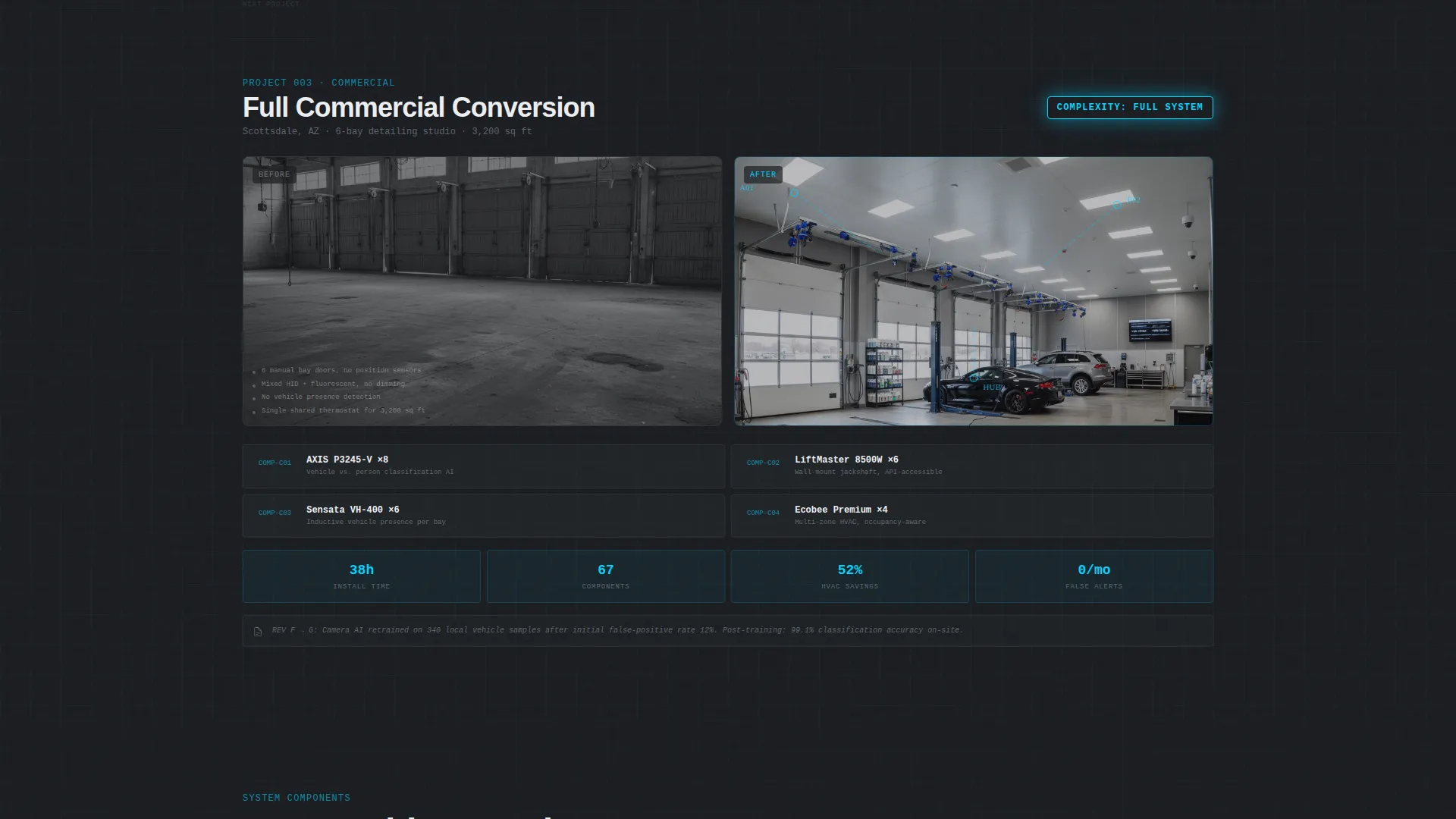
Three case study sections drive the scroll. Each one pairs a before-state photo on the left with an engineered solution on the right. Wiring diagrams overlay the same physical space, component callouts include model numbers, and integration flowcharts annotate every decision like a blueprint revision note.
Five-Step Garage Assessment Quiz
The primary call to action launches a five-question diagnostic flow. It captures garage size and bay count, current automation level, primary use case, connectivity infrastructure, and the visitor's biggest frustration. Results assign a personalized tier and surface a secondary booking prompt.
Personalized Integration Tier Results
Quiz results deliver one of three recommended tiers: Basic, Advanced, or Full System. Each result includes a component count estimate. A secondary call to action then invites the visitor to book a free on-site assessment, converting a quiz result into a qualified consultation lead.
Split-Screen Section Layout
Every section on the page uses a strict 50/50 split. The left side consistently holds the problem state or raw data. The right side holds the solution, the diagram, or the next action. This structural rule creates a visual rhythm that makes the page easy to scan and hard to misread.
Blueprint Visual Theme with Cyan Interaction States
The Engineering Blueprint theme uses a four-color Monochrome Steel palette. Laser-line cyan is reserved exclusively for interactive elements, data highlights, and active wiring path indicators. All other surfaces use structural charcoal, brushed aluminum, and drafting paper white.
Page sections overview
| Section | Purpose |
|---|---|
| Stats Dashboard Header | Opens with live operational data split against a pre-integration view |
| Tagline Reveal | Fades the headline in over live-data panel after a three-second delay |
| Case Study One | Single-bay residential retrofit with before and after comparison |
| Case Study Two | Two-car garage with workshop zone control and annotated diagrams |
| Case Study Three | Commercial conversion with fleet vehicle detection flowcharts |
| Quiz Entry Block | Presents the "Score Your Garage" primary call to action |
| Five-Step Diagnostic | Collects garage profile across five structured question steps |
| Results and Tier Match | Delivers personalized integration tier with component count |
| Site Survey Booking | Secondary call to action that locks in a free on-site assessment |
Design & branding system
The visual identity runs on an Engineering Blueprint theme executed through a Monochrome Steel color system. Every design decision prioritizes functional clarity over decoration.
- Structural charcoal (#2B2D33) and drafting paper white (#EDEEF0) form the primary surface contrast
- Brushed aluminum (#A8ADB5) handles secondary labels, annotations, and inactive interface states
- Laser-line cyan (#00D4FF) activates only on interactive states, data highlights, and live wiring path indicators
Mobile & speed optimization
The template is structured for clean rendering across screen sizes. The 50/50 split stacks vertically on narrower viewports so both sides remain readable without horizontal scrolling.
- Split-screen columns reflow to single-column stacks on mobile devices
- The stats dashboard and quiz diagnostic are laid out to remain functional at smaller viewport widths
- Blueprint line work and annotation overlays are sized to stay legible on standard mobile screens
How this template helps you convert
Every layout decision in this template is designed to move a skeptical visitor toward a concrete next step.
- The stats header earns attention before the first headline appears, letting real operational data establish credibility in the first three seconds of the visit.
- The escalating case studies build confidence progressively, showing that your process scales from a simple residential retrofit to a complex commercial conversion.
- The quiz qualifies each visitor automatically, delivering a personalized tier recommendation that makes the "Book Your Site Survey" prompt feel like a logical, low-friction next step rather than a cold ask.
Other information about this template
This template is a strong fit for service providers operating in the garage renovation and smart home integration space. It is built as a single landing page and does not include a multi-page site structure.
- The Engineering Blueprint theme is distinct from typical smart home marketing aesthetics and positions your service as technically rigorous rather than consumer-grade
- The case study format supports real project documentation, making it easier to populate with genuine client work
- The template is designed in a split-screen style that works equally well for portfolio-style storytelling and direct-response lead generation
- Quiz logic is structured to output three defined tiers, giving your sales process a clear entry point for every lead type
- The template suits niches where trust is earned through visible methodology, such as garage renovation services, residential automation installs, and commercial space conversions
Theme
Engineering Blueprint
Creative direction
Case Study Narrative
Color system
Monochrome Steel
Style
Split Screen (50/50)
Direction
Quiz/Assessment
Page Sections
Live System Dashboard Header
Escalating Case Study Sections
Five-step Garage Assessment Quiz
Personalized Integration Tier Output
Split-screen Section Architecture
Engineering Blueprint Visual System
Related questions
Who is this template built for?
How does the five-step garage quiz work?
Can I replace the case study content with my own project work?
Is this a single landing page or a multi-page site?
Can the Monochrome Steel color palette be customized?



