Fence Installer Marketing Professional Website Template
Gate is a single-column landing page template built for fence installation companies targeting commercial clients, property managers, and general contractors. It leads with animated data proof points, introduces your team through expert panel sections, and drives partnership inquiries through a focused B2B form and a downloadable capabilities sheet. The design feels polished, clinical, and authoritative.
by Rocket studio
Quick summary
Gate is a fence installer landing page template designed for B2B lead generation. It opens with an animated data header showing real local proof points, then builds authority through named expert panels. A partnership inquiry form and downloadable spec sheet work together to capture leads at different stages of readiness.
Who this template is for
This template is built for fence installation businesses that serve commercial and institutional clients. It works best when your company fields work from property managers, general contractors, and commercial developers rather than weekend homeowners.
- Fence installers targeting multi-unit residential and commercial buildout contracts
- Fence companies positioning as preferred subcontractors for general contractors and developers
- Local fence businesses that want to move beyond referrals and into retained vendor relationships
What problem this template solves
Most fence company pages look like a photo album with a phone number. That presentation works for a homeowner searching on a Saturday. It does not work for a property manager evaluating vendors for a 40-unit complex or a GC sourcing a reliable fence sub for a subdivision buildout.
- Commercial buyers need proof of scale, licensed personnel, and professional process before they call
- A generic trades page cannot communicate the difference between a one-truck operation and a credentialed crew
- Rebidding every project wastes time; clients need a reason to put one vendor on retainer
What you get with this template
Gate gives you a complete single-column landing page layout built around B2B trust signals and partnership-oriented conversion. Every section is positioned to answer the questions a commercial buyer asks before they pick up the phone.
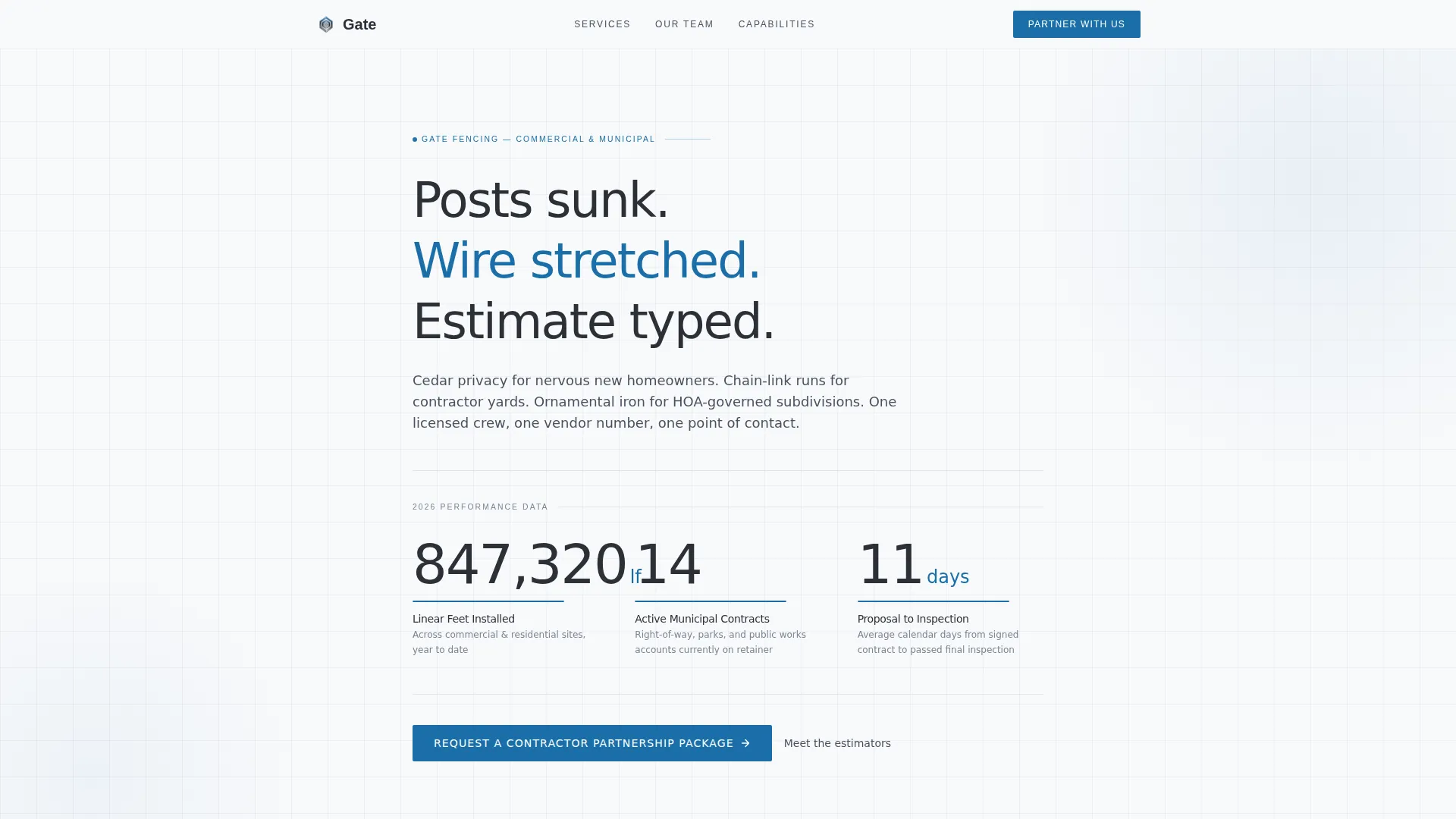
- An animated data header showing linear feet installed, active municipal contracts, and average days from proposal to inspection
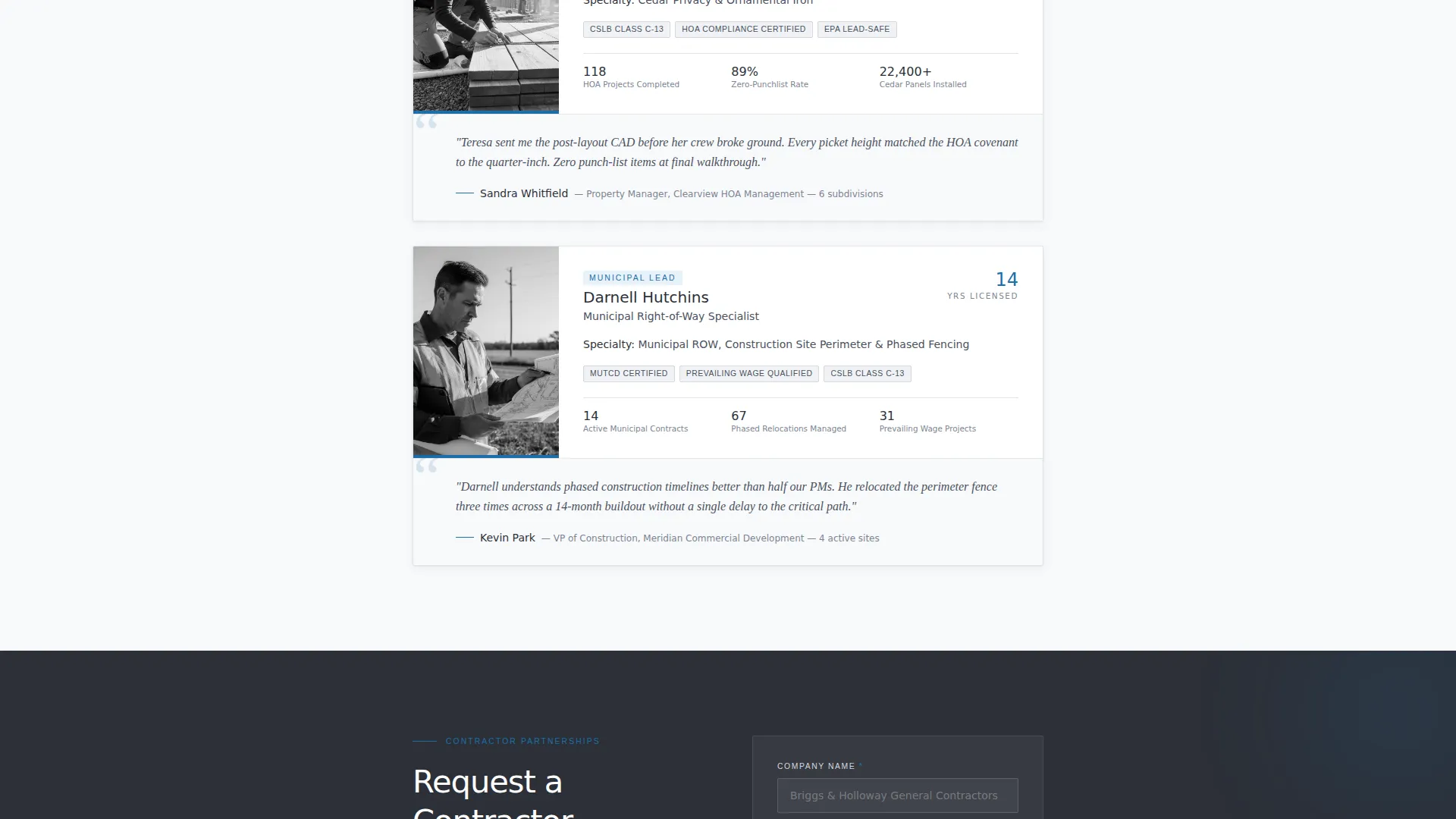
- A repeating expert panel module for named estimators and crew leads with specialty, years licensed, and a client pull quote
- A primary partnership inquiry form and a secondary gated PDF download for leads at different stages
Feature list
This section describes the core built-in layout components and design features included in the Gate template.
Animated Data Counter Header
The header opens with three animated counters rolling upward on page load. Each counter displays a local proof point: linear feet installed this year, active municipal contracts held, and average days from signed proposal to completed inspection. The figures are large, set in charcoal slate against arctic white, with surveyor-blue underlines that draw in as each number lands.
Expert Panel Modules
Each expert panel is a single-column module featuring a named team member alongside their specialty, years licensed, and a brief pull quote from a general contractor or property manager they have worked with. Panels stack vertically to build authority through people rather than project photos, communicating depth of bench to commercial evaluators.
Partnership Inquiry Form
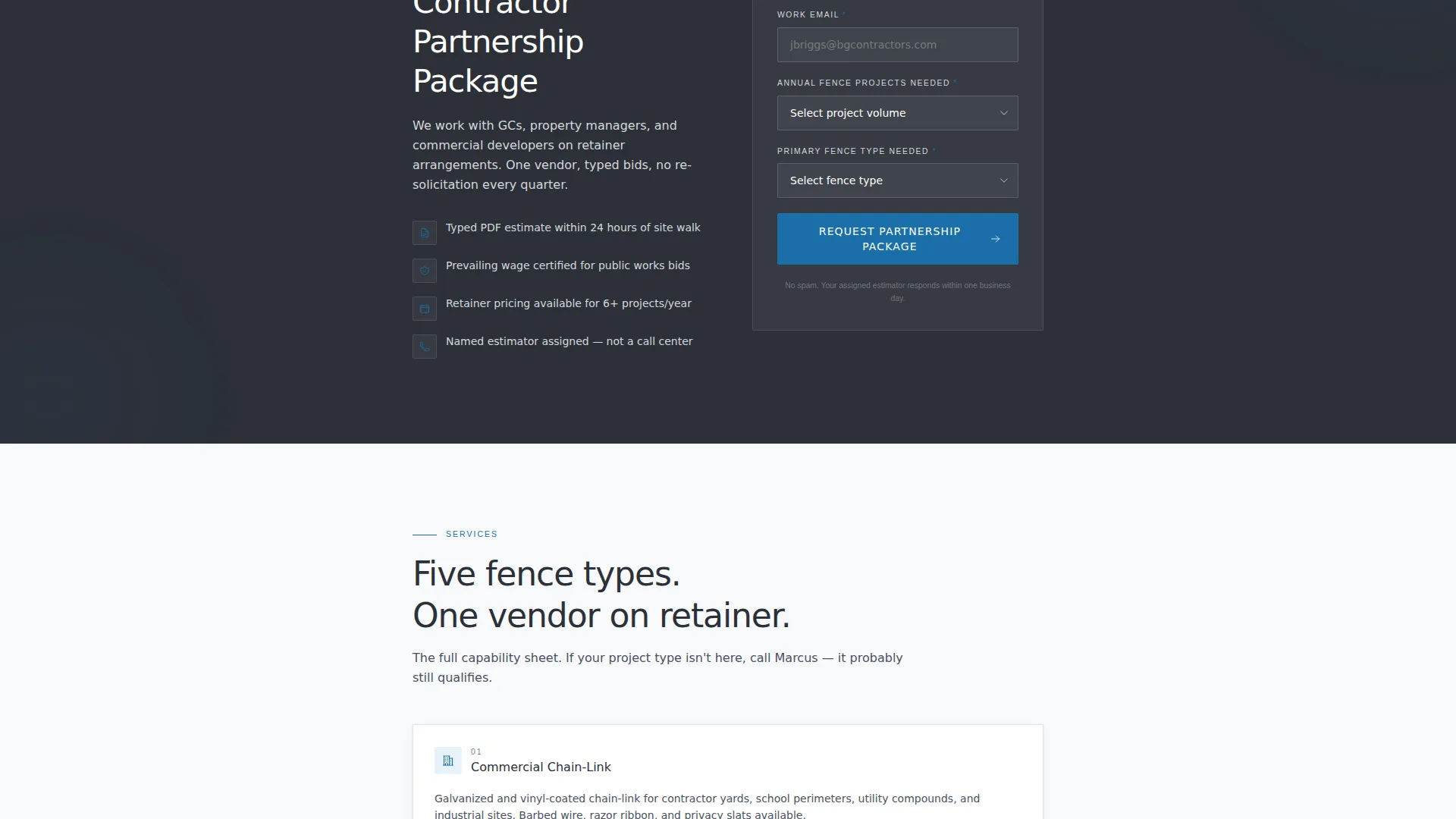
The primary call to action is a structured B2B form capturing company name, project volume estimate via dropdown (1 to 5 projects per year, 6 to 20, or 20 or more), primary fence type needed, and a work email address. The form sits after the third expert panel and repeats in the footer.
Gated Capabilities Sheet Download
A secondary conversion path offers a downloadable commercial capabilities PDF. The download is gated behind an email address only, making it accessible to buyers who are comparing vendors but are not ready to request a full partnership package. This catches early-stage leads without friction.
Executive Suite Visual Layout
The single-column flow uses a clean arctic white base with charcoal slate text and surveyor-blue reserved for buttons, links, and data highlights. The layout reads like a printed spec sheet on a stainless steel clipboard, which matches the expectations of commercial and municipal buyers reviewing vendor materials.
Page sections overview
| Section | Purpose |
|---|---|
| Animated Data Header | Opens with three rolling proof-point counters to establish local scale instantly |
| Expert Panel One | Introduces first named crew lead or estimator with specialty and client quote |
| Expert Panel Two | Adds second team credential, reinforcing bench depth |
| Expert Panel Three | Completes the authority stack before the primary conversion prompt |
| Partnership Inquiry Form | Captures B2B leads with project volume, fence type, and work email |
| Capabilities Sheet Download | Gated PDF offer for comparison-stage buyers requiring only an email |
| Footer call to action Repeat | Repeats the partnership form to recapture visitors who scrolled past |
Design & branding system
Gate uses an Executive Suite visual theme built around the Arctic White color system. The palette is deliberately clinical and easy to read, designed to match the aesthetic expectations of commercial procurement and municipal planning contexts.
- Arctic white (#F8F9FB) as the dominant background, polished aluminum (#D4D7DD) for subtle surface contrast, and charcoal slate (#2C3038) for all headings and body text
- Surveyor-blue (#1B6FA8) used exclusively for links, buttons, and animated data highlights to maintain a single decisive accent
- Typography and spacing follow a spec-sheet aesthetic: generous whitespace, large data numerals, and thin ruled underlines beneath counters
Mobile & speed optimization
The single-column layout is inherently well-suited to mobile viewing. Commercial buyers often review vendor materials on a phone between site visits, so the layout must hold up at smaller sizes without losing its authority feel.
- Single-column flow means no grid collapse issues; every panel stacks cleanly from desktop to phone
- Large counter numerals and clearly labeled form fields remain readable at mobile viewport widths
- Minimal decorative imagery keeps the layout focused and avoids visual noise on smaller screens
How this template helps you convert
Gate is structured around two parallel conversion paths, so you capture leads at both high and low intent within a single page visit.
- The animated data header and expert panel sequence build enough trust that a qualified commercial buyer completes the partnership inquiry form, giving you a warm B2B lead with project context already attached.
- The gated capabilities sheet download catches buyers who are still in the comparison phase, letting you collect a work email from someone who is not ready to talk but is actively researching vendors.
Other information about this template
Gate fits fence installation companies that serve a range of commercial fence applications, from cedar privacy installations for residential communities to chain-link perimeter fencing for contractor staging yards and ornamental iron for HOA-governed subdivisions. The template is part of a single-column flow family built for local service businesses that need to look enterprise-grade without a large design budget.
- Works for companies installing commercial chain-link, cedar privacy, ornamental iron, and municipal right-of-way fence types
- Suited to fence businesses that want to position as a long-term retained vendor rather than a one-off bid competitor
- The PDF download path makes the template practical for trade show follow-up, direct outreach campaigns, or any context where a prospect wants material to review before a call

Theme
Executive Suite
Creative direction
Expert Panel
Color system
Arctic White
Style
Single Column Flow
Direction
Partnership/B2B
Page Sections
Animated Proof-point Counter Header
Named Expert Panel Modules
B2B Partnership Inquiry Form
Gated Capabilities Sheet Download
Executive Suite Single-column Layout
Related questions
Can I update the animated counter numbers in the header?
Is Gate designed for residential or commercial fence companies?
How does the gated PDF download path work?
Can I use Gate if my team has fewer than three named experts?
What types of fence work is this template suited to present?



