Artisan Community Event Invitation Landing Page
Gather is a warm artisan-styled community event landing page built for organizers who want their invitations to feel as considered as the events themselves. The masonry layout showcases seasonal event templates, a progressive three-step RSVP form captures leads without showing pricing, and a deep plum-and-linen color system gives every gathering the weight it deserves.
by Rocket studio
Quick summary
Gather is a single-page community event invitation and lead generation template. It pairs a masonry card grid with a seasonally shifting visual identity to make every neighborhood potluck, church brunch, or school festival feel worth attending. A floating "Start Your Invitation" button and a three-step progressive form turn curious visitors into confirmed leads before pricing ever enters the conversation.
Who this template is for
This template is designed for community organizers who need an invitation that looks as thoughtful as the event it promotes. It suits people who plan recurring seasonal gatherings and need a page that works quickly without sacrificing warmth.
- PTA presidents and school social committees organizing fall festivals, spring fairs, and end-of-year celebrations
- Church and HOA coordinators managing holiday brunches, summer cookouts, and neighborhood block parties
- Independent event hosts planning craft fairs, barn dances, graduation open houses, or New Year's Eve countdowns
What problem this template solves
Most community event pages look like last-minute flyers. They fail to communicate care, and guests arrive unsure whether the event is worth their time. Gather solves the gap between a great event and a page that actually convinces people to show up.
- Generic event pages undercut the organizer's effort and leave guests with low expectations
- Collecting RSVPs through scattered email threads or paper sign-up sheets creates confusion and missed responses
- A plain form with no visual personality gives potential guests no reason to feel excited before they even arrive
What you get with this template
You get a fully designed, single-page layout built around the feeling of receiving a beautiful handwritten invitation. Every visual decision, from torn-edge card textures to the gold-trimmed masonry grid, reinforces the idea that this event matters.
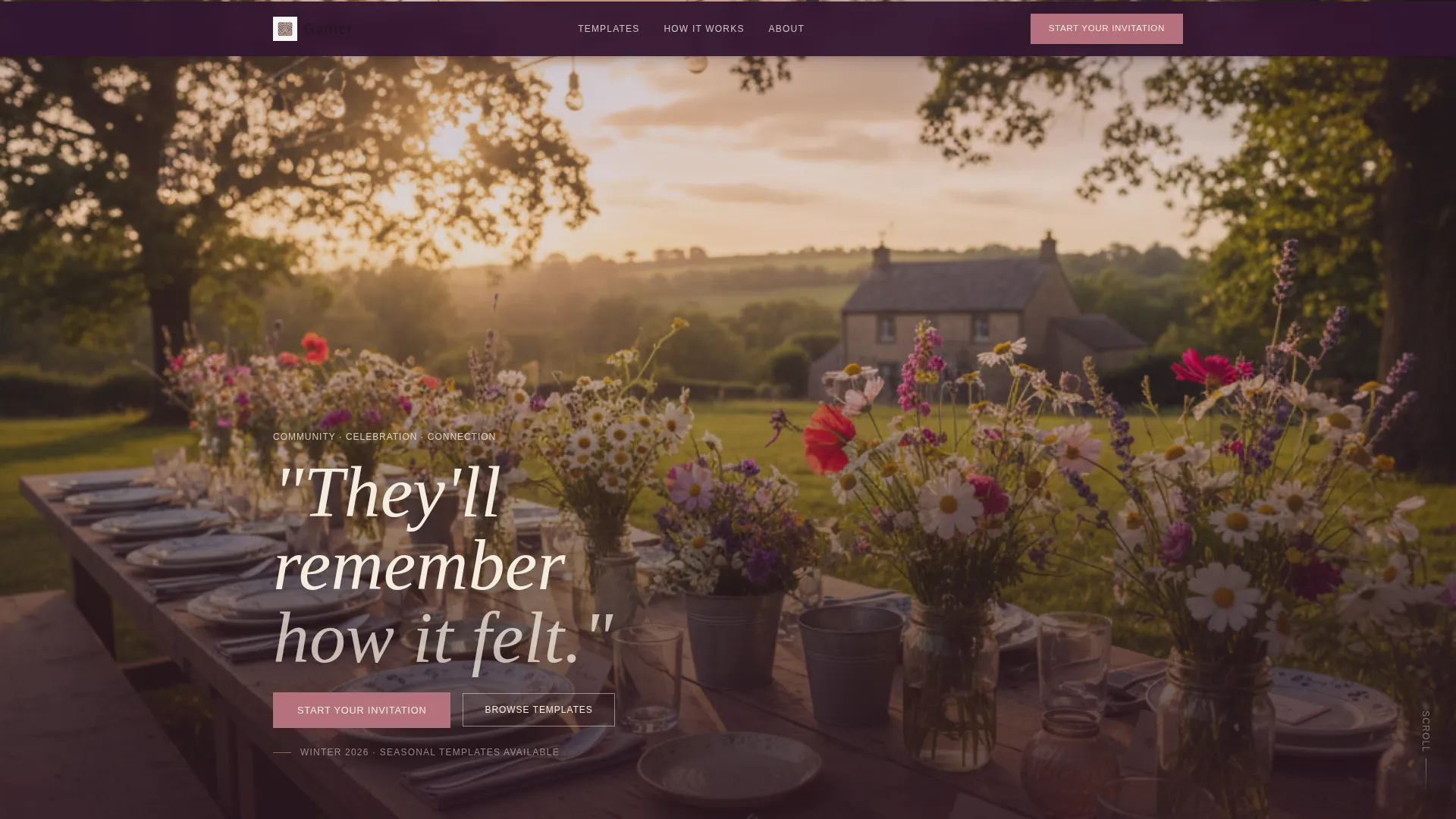
- A living seasonal header image that shifts between a farmhouse table in autumn, a wisteria garden arch in spring, and a cedar-framed doorway in winter
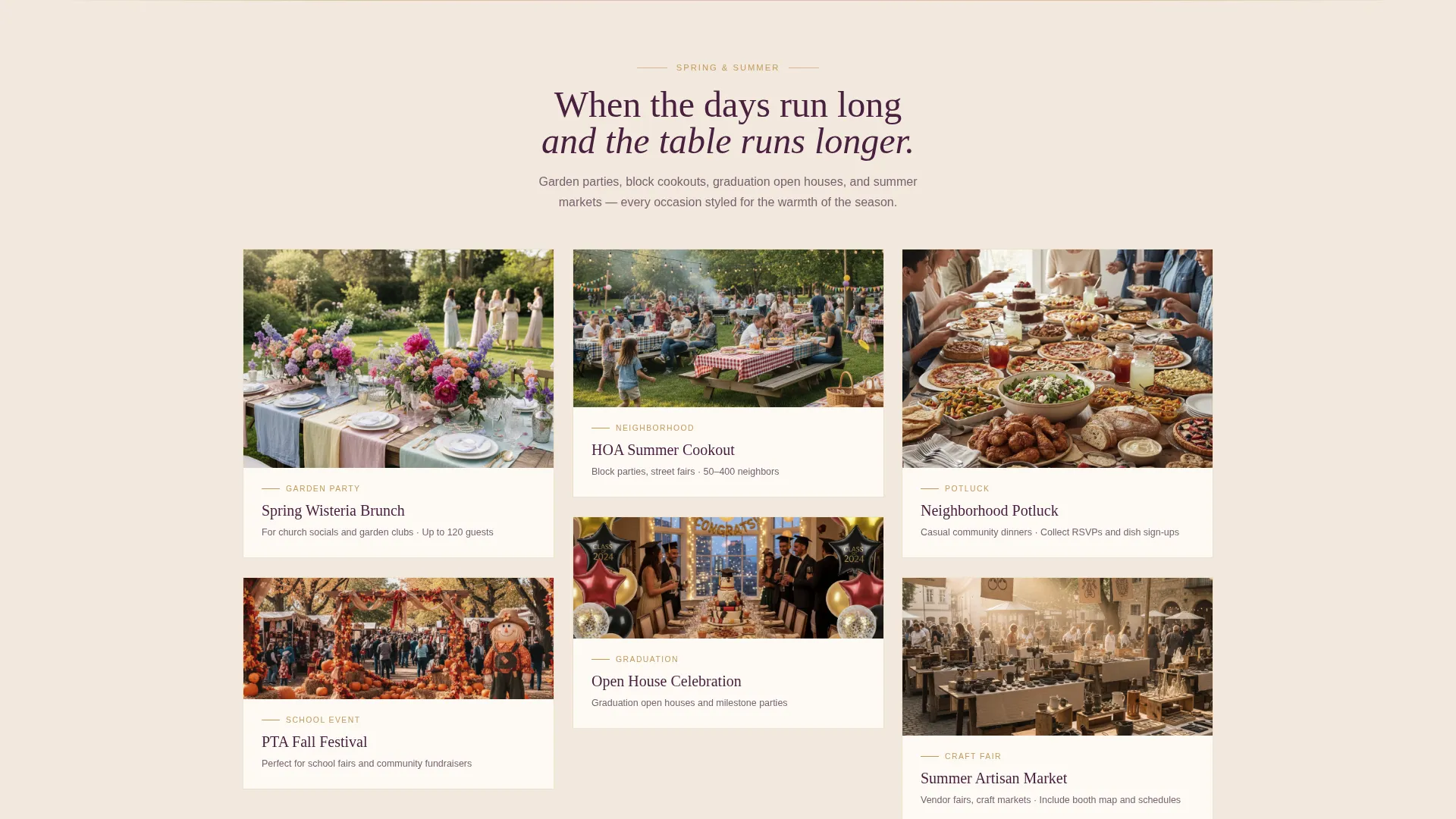
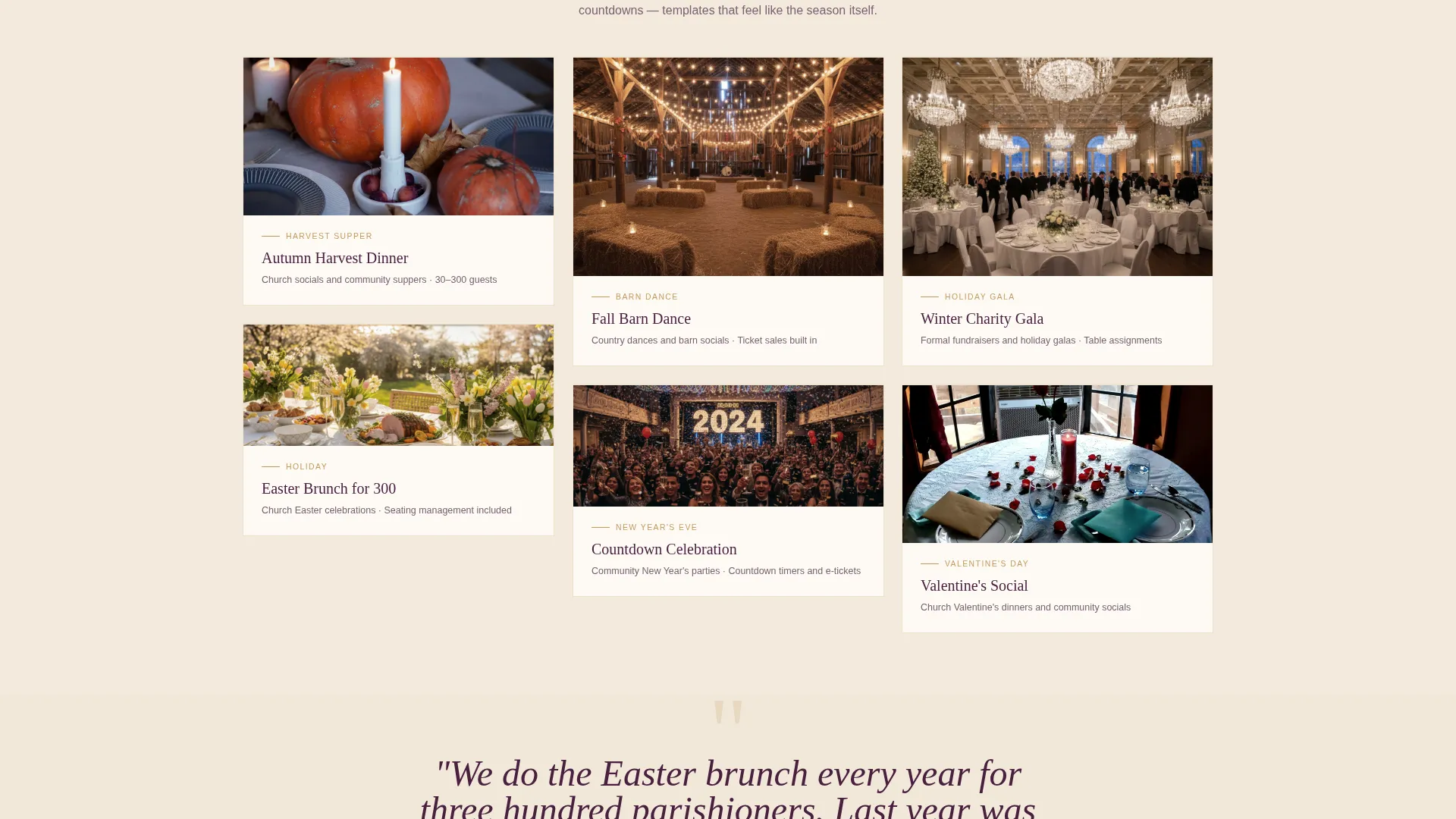
- A scrollable masonry card grid styled for specific event types, including harvest suppers, Valentine's Day socials, and graduation open houses
- A three-step progressive lead capture form that ends with a personalized invitation preview auto-styled to the visitor's selections
Feature list
A brief orientation: every feature listed below is drawn directly from the template brief. Nothing here is speculative.
Seasonal Header Tableau
The header is a full-width hero image that changes with the calendar. Late-afternoon farmhouse light dominates the default state, while spring and winter swaps bring in a wisteria garden arch and a cedar-and-amber doorway respectively. The headline "They'll remember how it felt." fades in over the scene in a serif typeface.
Masonry Event Card Grid
The scrollable grid arranges real event templates as styled cards, each representing a specific seasonal moment. Cards are trimmed in burnished gold and carry hand-set type and torn-edge paper textures. The grid uses a Pinterest-style masonry layout so cards of varying heights sit naturally without awkward gaps.
Scrolling Background Tint Shift
As the visitor scrolls, the page background tint moves gradually from deep plum through dried rose to burnished gold. The effect marks the passage of a year across the card clusters and gives the page a cinematic, memory-book quality without any heavy animation.
Three-Step Progressive RSVP Form
Clicking "Start Your Invitation" opens a guided three-step form. Step one asks the visitor to pick an event type from illustrated icons covering dinner, festival, ceremony, and open house. Step two collects estimated guest count and date. Step three captures name and email, then delivers a personalized invitation preview styled to their choices.
Testimonial Rhythm Blocks
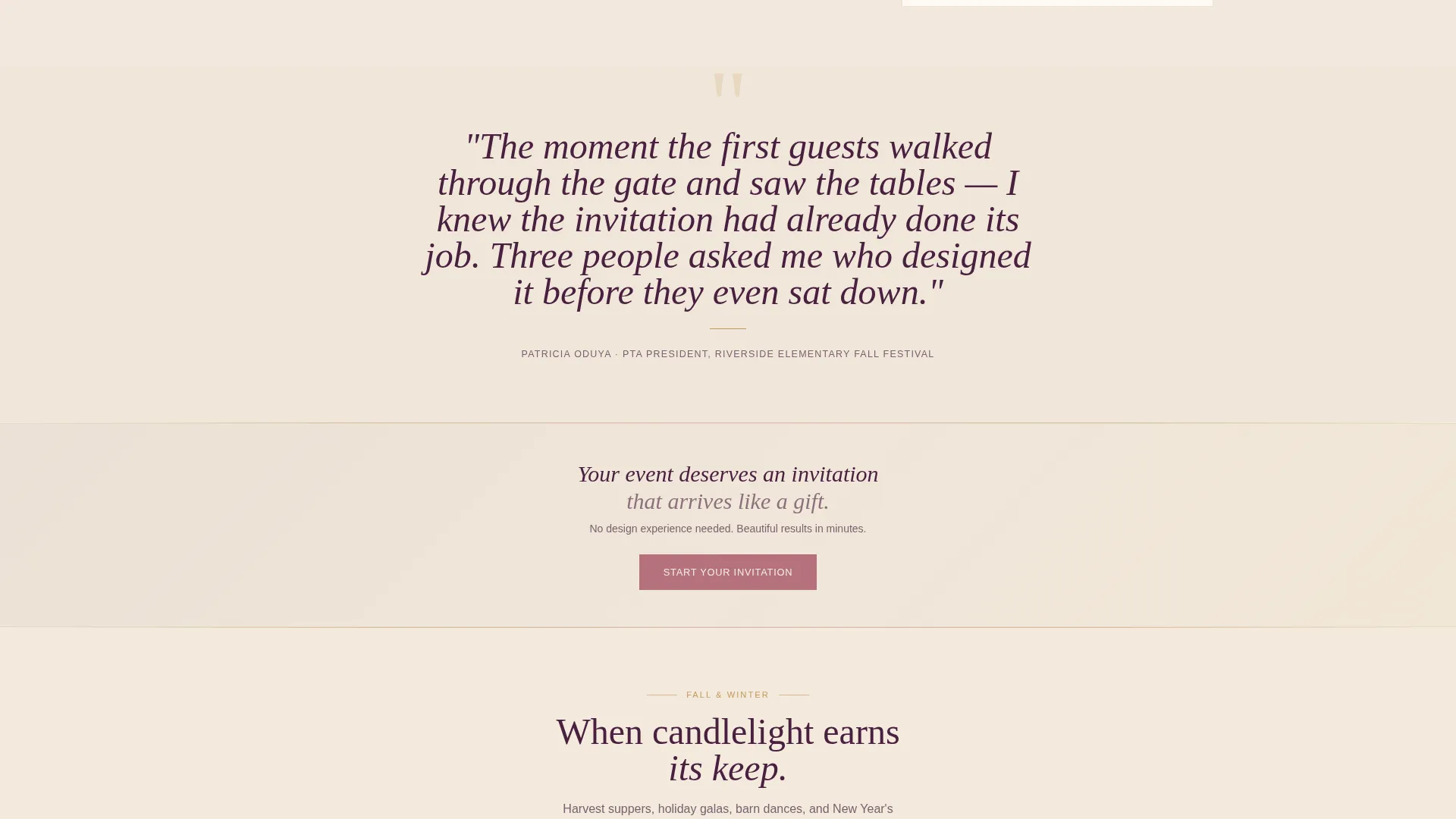
Between every cluster of masonry cards, a single oversized italic testimonial appears. Each quote is attributed to a real organizer describing the moment guests started arriving. The placement follows a deliberate beauty-proof-beauty-proof rhythm that builds trust without interrupting the visual flow.
Floating and Anchored Call to Action
The primary call to action reads "Start Your Invitation" and appears in two positions. It floats as a persistent button over the header so it is always visible on first impression. It also anchors the bottom of every third masonry row so the next action is always within reach as the visitor scrolls deeper.
Page sections overview
| Section | Purpose |
|---|---|
| Seasonal Hero Header | Sets emotional tone and introduces headline |
| Floating call to action Button | Keeps lead capture always accessible |
| Masonry Card Cluster One | Showcases autumn and harvest event templates |
| Testimonial Block One | Provides social proof after first card cluster |
| Masonry Card Cluster Two | Showcases spring and Valentine's Day templates |
| Testimonial Block Two | Reinforces trust between mid-page card groups |
| Masonry Card Cluster Three | Showcases summer and graduation event templates |
| Anchored call to action Row | Drives form entry after third card cluster |
| Three-Step Lead Form | Captures event type, guest count, and contact |
| Invitation Preview Panel | Shows personalized sample before follow-up |
Design & branding system
The Plum Executive color system grounds every visual decision in warmth and intention. The palette reads like a Thanksgiving table set by candlelight, where every element feels chosen rather than defaulted.
- Deep plum (#4A2040) anchors section dividers and typographic flourishes; toasted linen (#F5EDE0) holds the page background like thick cream card stock
- Burnished gold (#C49A5C) edges the masonry cards and signals quality; dried rose (#B5727E) highlights every button and interactive hover state
- Serif typography carries the hand-set letterpress character throughout headings, while torn-edge paper textures on the masonry cards reinforce the artisan, print-inspired visual identity
Mobile & speed optimization
The masonry grid and seasonal imagery are structured to reflow cleanly on smaller screens. The layout prioritizes readability and form usability on mobile devices, where many community event organizers will first encounter the page.
- The masonry card grid collapses to a single-column scroll on narrow viewports so no card is clipped or truncated
- The three-step progressive form is designed for thumb-friendly tap targets, keeping each step focused on one clear input at a time
- The floating "Start Your Invitation" button remains persistently visible on mobile scroll so the primary action is never buried
How this template helps you convert
The page is structured around a single goal: turning a first-time visitor into a named, qualified lead before any sales conversation begins. Every design and layout decision supports that outcome.
- The seasonal hero image and fading headline create an immediate emotional connection, making the visitor picture their own event before they read a single feature description
- The beauty-proof rhythm of cards and testimonials builds credibility progressively, so by the time a visitor reaches the form, trust is already established through visual evidence and real organizer quotes
- The three-step form ends with a personalized invitation preview, making the value of signing up concrete and tangible rather than abstract
Other information about this template
Gather sits within the Wedding and Events category under the Community Event subcategory. It is purpose-built for the Community Event Invitation and RSVP niche, where the organizer's biggest challenge is not logistics but emotional buy-in from potential guests.
- The template style is Masonry/Pinterest, a layout format well-suited to browsable, visually rich content that rewards scrolling
- The creative direction follows a Seasonal/Moment approach, meaning the page feels alive and time-relevant rather than generic year-round
- No pricing information appears anywhere on the page, keeping the lead generation flow focused entirely on value and experience before any commercial conversation
Theme
Warm Artisan
Creative direction
Seasonal/Moment
Color system
Plum Executive
Style
Masonry/Pinterest
Direction
Lead Generation
Page Sections
Seasonal Hero Header with Fade-in Headline
Masonry Card Grid with Artisan Styling
Scrolling Background Tint Transition
Three-step Progressive Lead Capture Form
Beauty-proof Testimonial Rhythm
Dual-position Call to Action Placement
Related questions
What types of events is this template designed for?
Does the page collect RSVPs directly?
Can I update the header image for my specific event?
Is any pricing shown to visitors on the page?
Who is the "Start Your Invitation" button intended for?



