Content Creators Community Landing Page Template
Gather is a nature-inspired, masonry-layout landing page template built for private creator communities. It drives cohort registrations through a polaroid-style Community Mosaic hero, a scroll-linked Origin Story section, and a three-step sign-up form. Designed for YouTubers, newsletter writers, and podcast hosts ready to trade real growth tactics with serious peers.
by Rocket studio
Quick summary
Gather is a single-page, masonry-layout landing page template built to drive cohort registrations for a private content creators community. It pairs a warm, field-notebook visual identity with high-motion scroll storytelling. Real conversation screenshots, member metric tiles, and a time-stamped founder artifact guide visitors from curiosity to sign-up without a hard sell.
Who this template is for
This template is built for community founders and solo creators launching or growing a private, invite-style workspace for serious content creators. It suits people who need social proof to carry the page rather than polished marketing copy.
- Solo YouTubers, newsletter writers, and podcast hosts running membership or cohort communities
- Community builders targeting five-figure-month creators who've outgrown surface-level networking groups
- Founders who want an artifact-driven, story-first registration page rather than a generic sign-up form
What problem this template solves
Most community landing pages feel like brochures. They list features and post stock headshots, but they never prove the community is alive. Serious creators scroll past those pages immediately because nothing on them feels real.
- Visitors have no way to gauge whether the people inside are actually at their level
- Generic sign-up flows ask for commitment before building any trust or curiosity
- Quarterly mastermind-style positioning fails creators who need daily, fast-moving peer signal
What you get with this template
You get a fully structured, single-page registration flow with five purpose-built sections, high-animation scroll behavior, and a nature-inspired design system ready to customize. Every section is designed to earn trust before asking for anything.
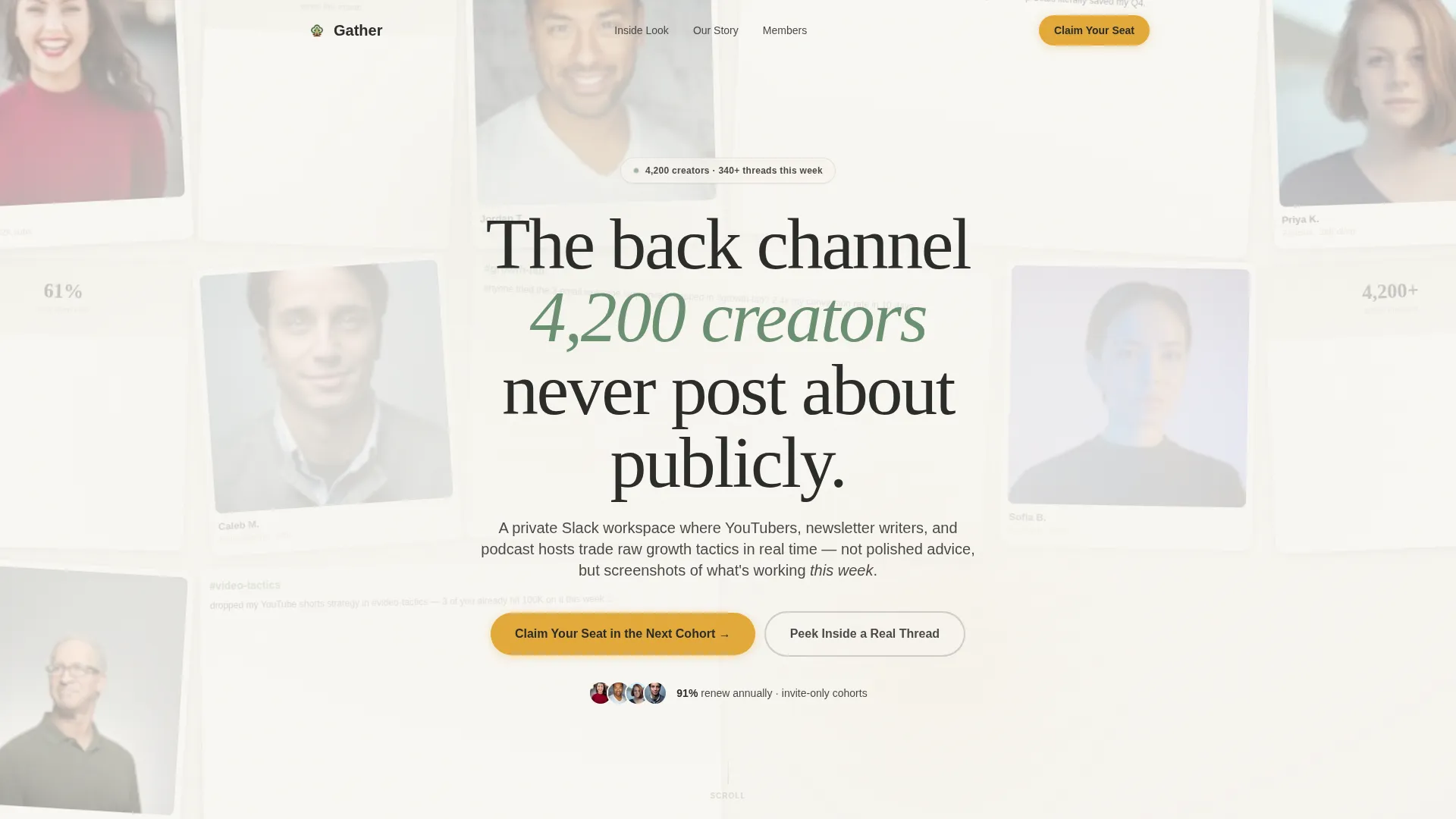
- A parallax Community Mosaic hero with member avatar tiles, metric fragments, and a bold serif headline
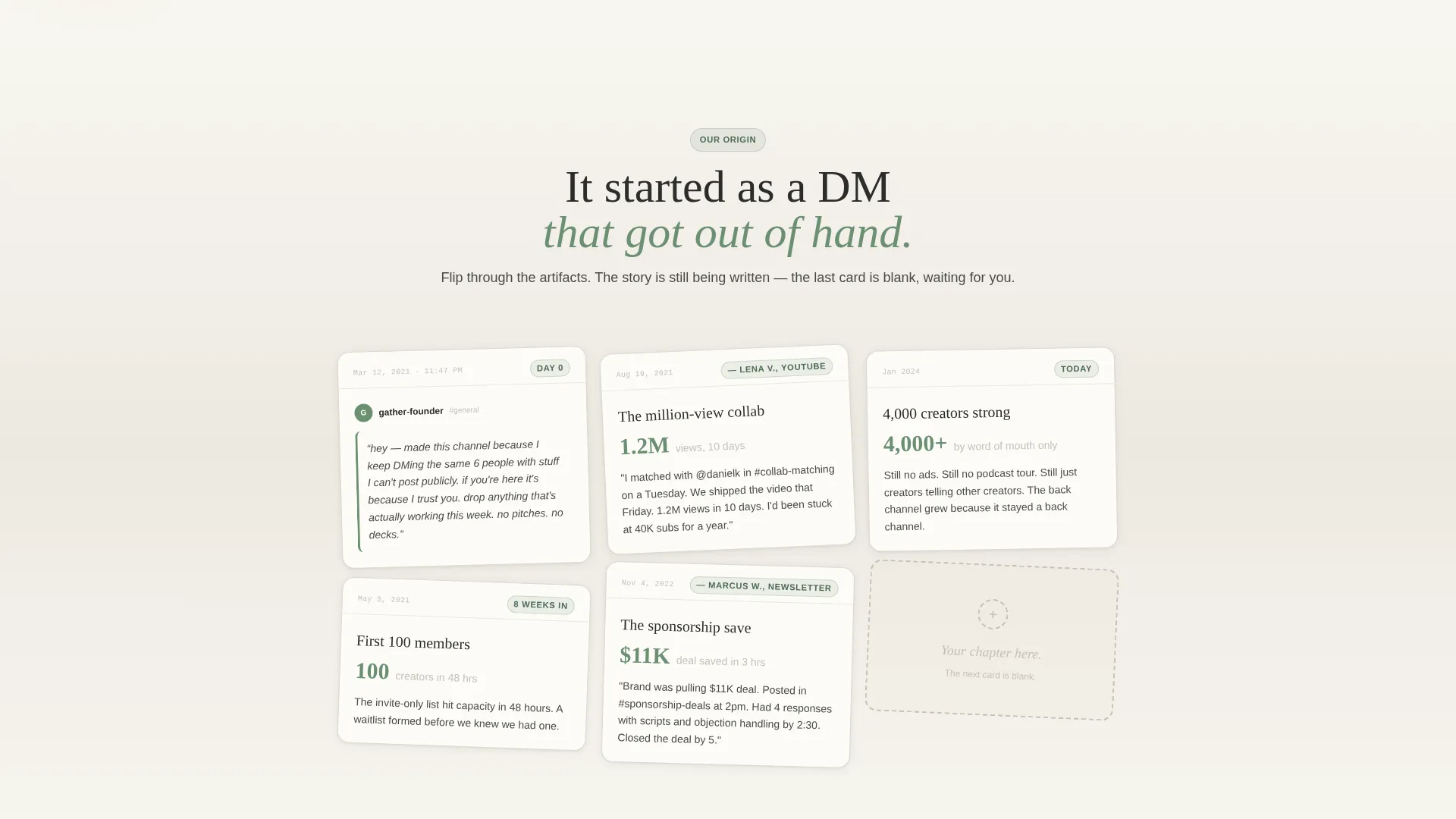
- A masonry Origin Story scroll with artifact cards, milestone moments, and a blank closing card for the visitor
- A three-step cohort registration form with a platform selector, an audience size slider, and an email field
Feature list
A paragraph introduction: Each feature below maps directly to a section or interaction built into this template. Nothing here is speculative.
Parallax Community Mosaic Hero
The hero is an asymmetric, polaroid-style grid of member avatars, Slack screenshot fragments, and creator metric tiles. Tiles are slightly rotated and overlapping. A gentle parallax drift on scroll makes the mosaic feel like a living, growing organism rather than a static banner.
Masonry Origin Story Scroll
The Origin Story section pulls visitors downward through time using staggered masonry cards. Each card is a real artifact: a date-stamped founder message, a milestone quote, a screenshot. The final card is deliberately blank, signaling that the visitor's story is the next one.
Three-Step Cohort Registration Form
The registration section collects information in a purposeful order: creator platform first (YouTube, newsletter, podcast, or multi-platform), then monthly audience size via a simple slider, then email. This sequence reduces friction and frames sign-up as a fit check rather than a data grab.
Proof of Life Section
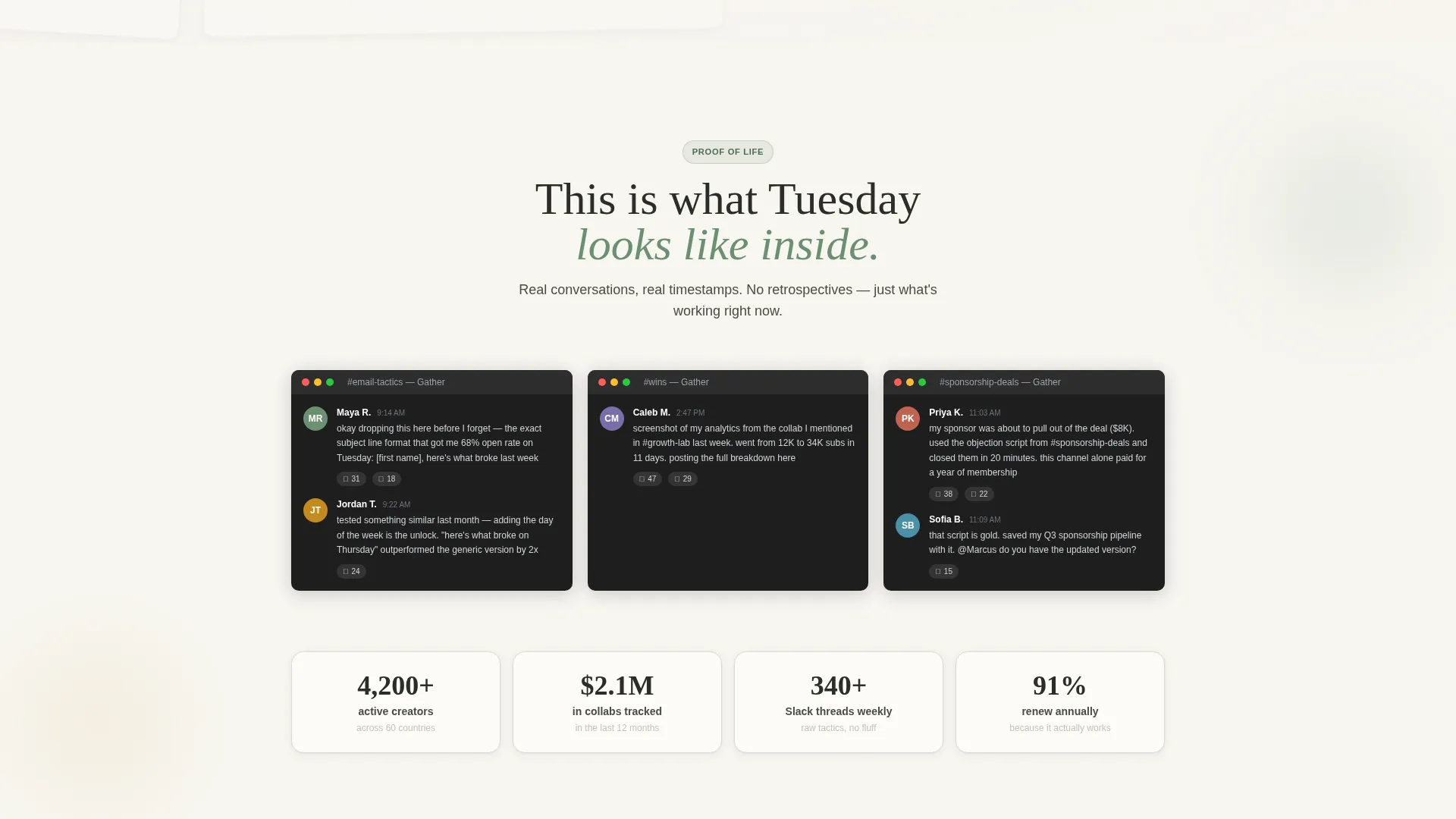
Between the hero and the Origin Story, a dedicated section surfaces real conversation screenshots and member outcome stats. It answers the visitor's first silent question: is this community actually active and worth my time?
Who's Inside Member Tiles
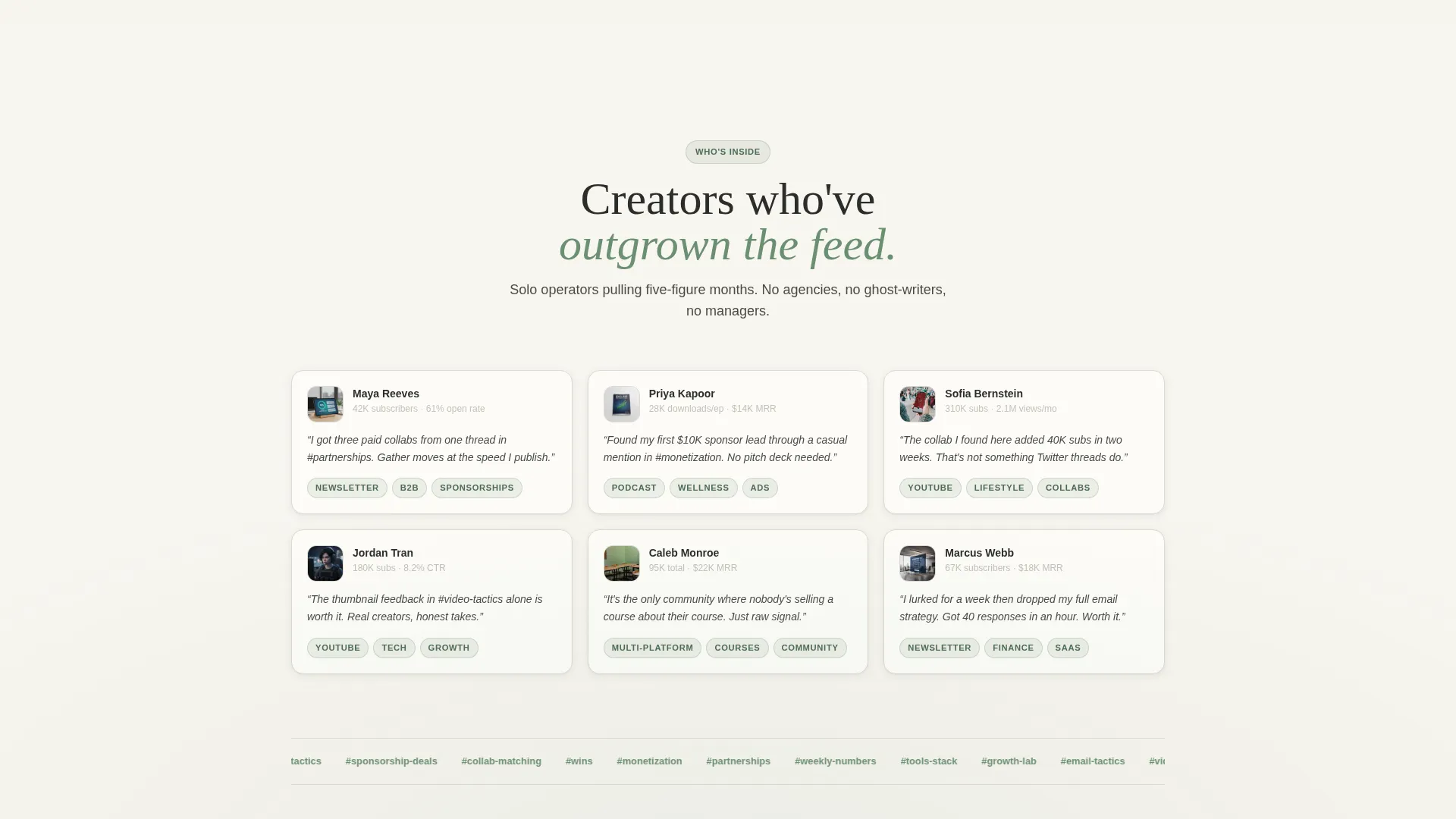
A grid of member profile tiles shows platform badges and audience metric labels. Visitors can immediately judge whether the people inside match their level, which is the fastest trust signal a community page can offer.
Gated Peek Inside Preview
A secondary call to action, "Peek Inside a Real Thread," offers a gated Slack transcript preview delivered by email. This gives hesitant visitors a low-commitment path and keeps them in the funnel without forcing a full registration.
Page sections overview
| Section | Purpose |
|---|---|
| Community Mosaic Hero | Establishes social proof and community scale at first glance |
| Proof of Life | Validates activity with real screenshots and outcome stats |
| Origin Story Scroll | Builds emotional belonging through artifact-based milestones |
| Who's Inside Tiles | Lets visitors self-qualify by seeing real member profiles |
| Cohort Registration Form | Converts qualified visitors with a low-friction three-step form |
Design & branding system
The visual identity follows a Nature-Inspired theme built on the Cloud Canvas color system. The palette evokes a field notebook left open beside a window: warm paper tones grounding bursts of living green, with nothing sterile or corporate in sight.
- Colors: cumulus white (#F7F5F0) and morning fog gray (#C4C1B8) for backgrounds; moss after rain (#6B8F71) on member tags, channel labels, and hover states; goldenrod pollen (#E2A93B) reserved for call-to-action buttons and notification accents; deep loam (#2C2C2A) for all body text
- Typography: Fraunces serif for display headlines, giving the page its hand-set, editorial weight; DM Sans for body copy, keeping paragraphs clean and easy to scan
- Layout: Masonry and Pinterest-style grid arrangement throughout, with slightly rotated tiles, overlapping cards, and staggered reveal animations driven by scroll position
Mobile & speed optimization
The template is built mobile-first because creators most often check community pages on their phones. The mosaic hero is also desktop-optimized for visitors who arrive on a larger screen.
- The primary call to action, "Claim Your Seat in the Next Cohort," pins to the bottom of the screen on mobile for persistent, thumb-friendly access
- Scroll-linked card reveals use IntersectionObserver, a browser-native method that triggers animations only when a section enters the viewport, keeping the page responsive on all devices
- Static-first rendering keeps the initial page load lean, with animations layered on top rather than blocking the first view
How this template helps you convert
This template is built around a single principle: earn the click before asking for it. Every section is sequenced to reduce doubt and build belonging, so by the time a visitor reaches the form, they already feel like they belong inside.
- The Community Mosaic hero leads with collective proof rather than a founder photo, showing visitors a crowd of real people before introducing any pitch
- The Origin Story scroll replaces feature lists with real artifacts and timestamps, creating emotional investment through shared history before the registration ask appears
- The dual call-to-action structure offers two commitment levels, full cohort registration or a low-stakes "Peek Inside" preview, so visitors who are not yet ready still stay engaged
Other information about this template
This template is a strong fit for any creator-economy community that relies on peer credibility rather than course-style authority marketing. A few additional details worth knowing before you customize it.
- The footer follows a horizontal layout pattern, keeping the bottom of the page clean and navigation minimal
- Goldenrod accent color is intentionally restricted to call-to-action elements and notification-style pings, preventing visual noise from diluting its urgency signal
- The blank final card in the Origin Story section is a deliberate design decision, not a placeholder; it is meant to signal to the visitor that their story is next
- Animation intensity is high by design: parallax mosaic drift, staggered card reveals, scroll-linked section transitions, and a magnetic call-to-action button are all part of the built interaction layer
- The template is localized for English, United States date format, and USD-denominated context by default
Theme
Nature-Inspired
Creative direction
Origin Story
Color system
Cloud Canvas
Style
Masonry/Pinterest
Direction
Event Registration
Page Sections
Parallax Community Mosaic Hero
Masonry Origin Story Scroll
Three-step Cohort Registration Form
Proof of Life Section
Who's Inside Member Tiles
Gated Peek Inside Preview
Related questions
Can I use this template for a community other than a Slack workspace?
How do I replace the placeholder member tiles and screenshot cards?
Is the masonry layout responsive on smaller screens?
Can I change the cohort registration form fields?
What does the blank final card in the Origin Story section mean?



