Community Event Portfolio & Case Study Website Template
Gather is a vibrant, overlap-style community event planner landing page built around a Merlot & Smoke color system and a warm Gallery Walk layout. It is designed to generate leads for a solo event planner who turns everyday spaces into memorable celebrations. A full-bleed hero, layered photo cards, staggered testimonials, and a focused inquiry form give visitors an immediate sense of warmth and credibility.
by Rocket studio
Quick summary
Gather is a single-page lead generation template for a community event planner. It uses an overlap and layered visual style, a deep Merlot & Smoke color palette, and a Gallery Walk scroll experience to showcase real events. Every section builds trust before asking for commitment, guiding visitors naturally toward the primary "Plan My Event" call to action.
Who this template is for
This template is built for solo or small-team event planners who serve local communities. It speaks directly to the kind of professional who transforms ordinary venues into celebrations people remember for years.
- A one-person event planning operation handling block parties, quinceañeras, fundraiser galas, and neighborhood festivals
- Nonprofit directors and PTA presidents who need a planner they can trust with limited budgets
- Families planning milestone events like retirement parties that feel polished and intentional
What problem this template solves
Most event planners struggle to communicate warmth, credibility, and range all at once on a single page. Generic portfolio sites feel cold, and basic contact forms do not build enough trust to earn an inquiry. Gather solves this by leading with proof before asking for anything.
- Visitors see real event photography before they read a single line of copy, building immediate emotional confidence
- The layered gallery layout communicates variety and scale, from intimate backyard dinners to full park festivals with stages
- A structured three-step modal form reduces friction by guiding prospects through event type, guest count, and date before asking for contact details
What you get with this template
Gather delivers a fully designed landing page that feels alive from the first scroll. Every section is purpose-built to move a visitor from curious to convinced without pressure.
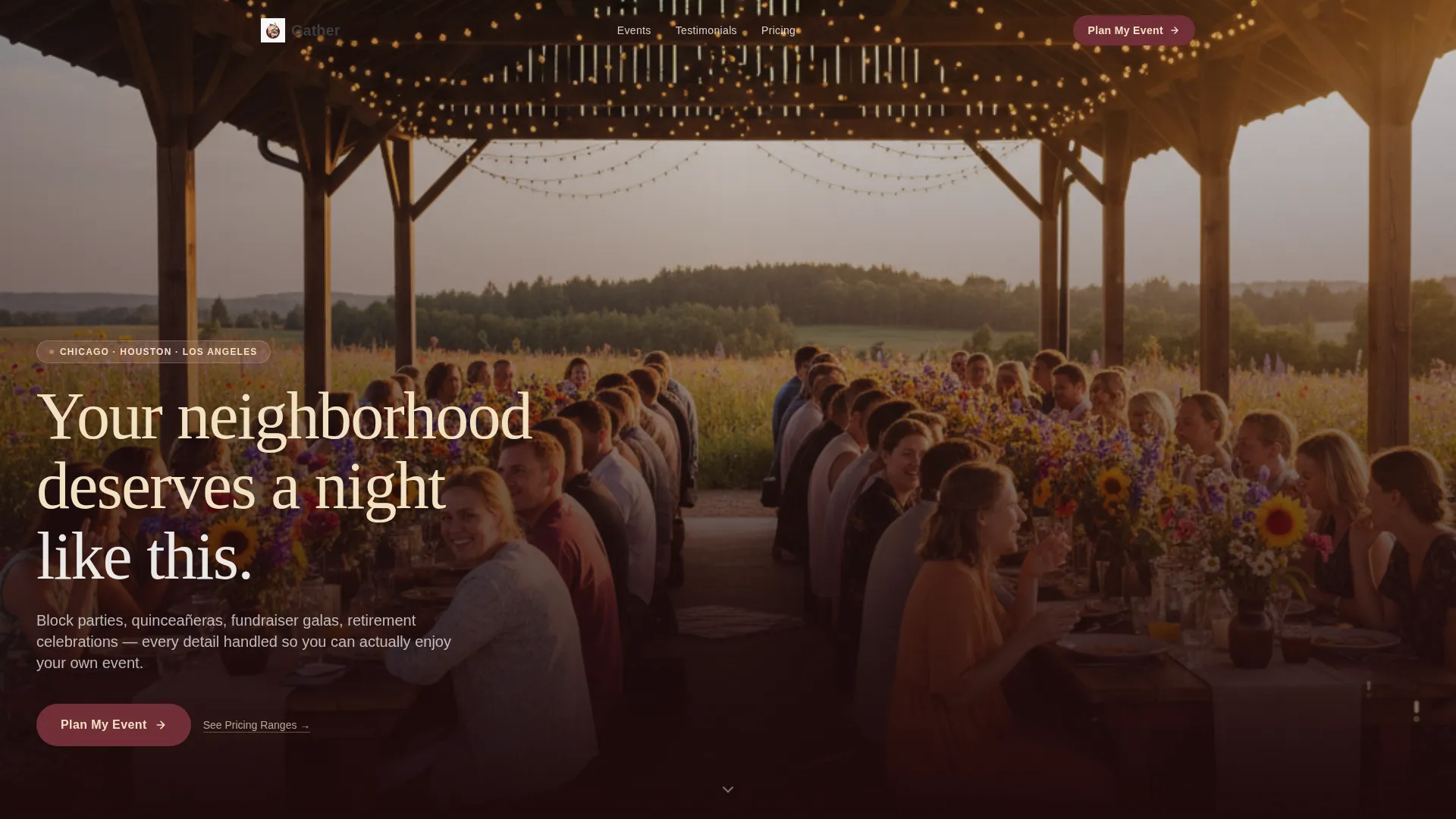
- A full-bleed golden-hour hero with a champagne headline overlay and a primary "Plan My Event" call-to-action button
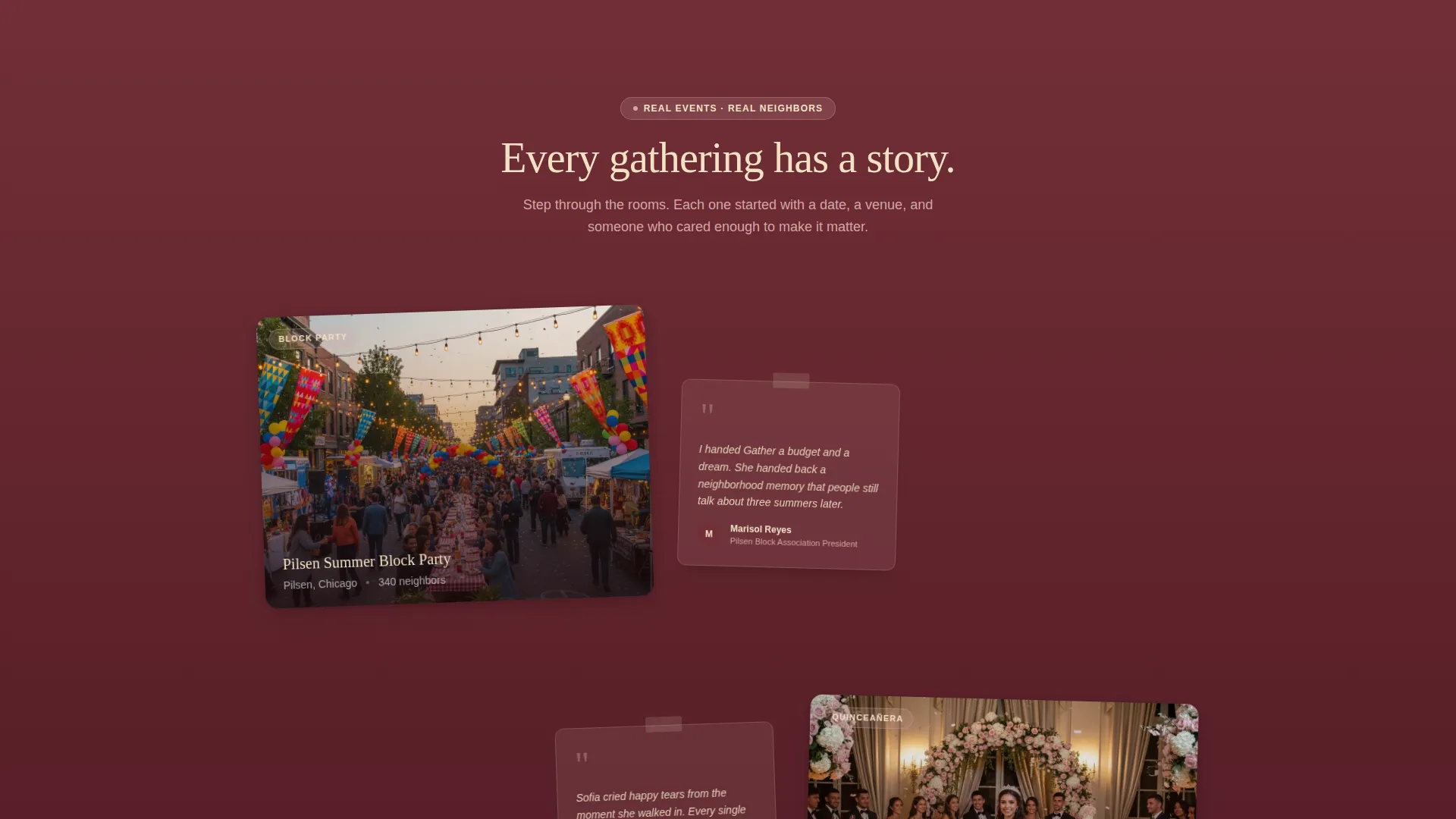
- A staggered Gallery Walk layout with layered photo cards, soft drop shadows, and subtle drift animations showing different event categories
- A sticky call-to-action element, a three-step inquiry modal, and a transparent pricing tier section for visitor self-qualification
Feature list
This template combines editorial design with practical conversion structure. Each feature below reflects a specific, built-in capability from the source brief.
Full-Bleed Hero with Headline Overlay
The header uses a wide-angle golden-hour pavilion photograph cropped to place the viewer at the table. A champagne-colored headline fades up over the smoke-dark lower third of the image. The primary call-to-action button sits directly below in merlot with champagne text.
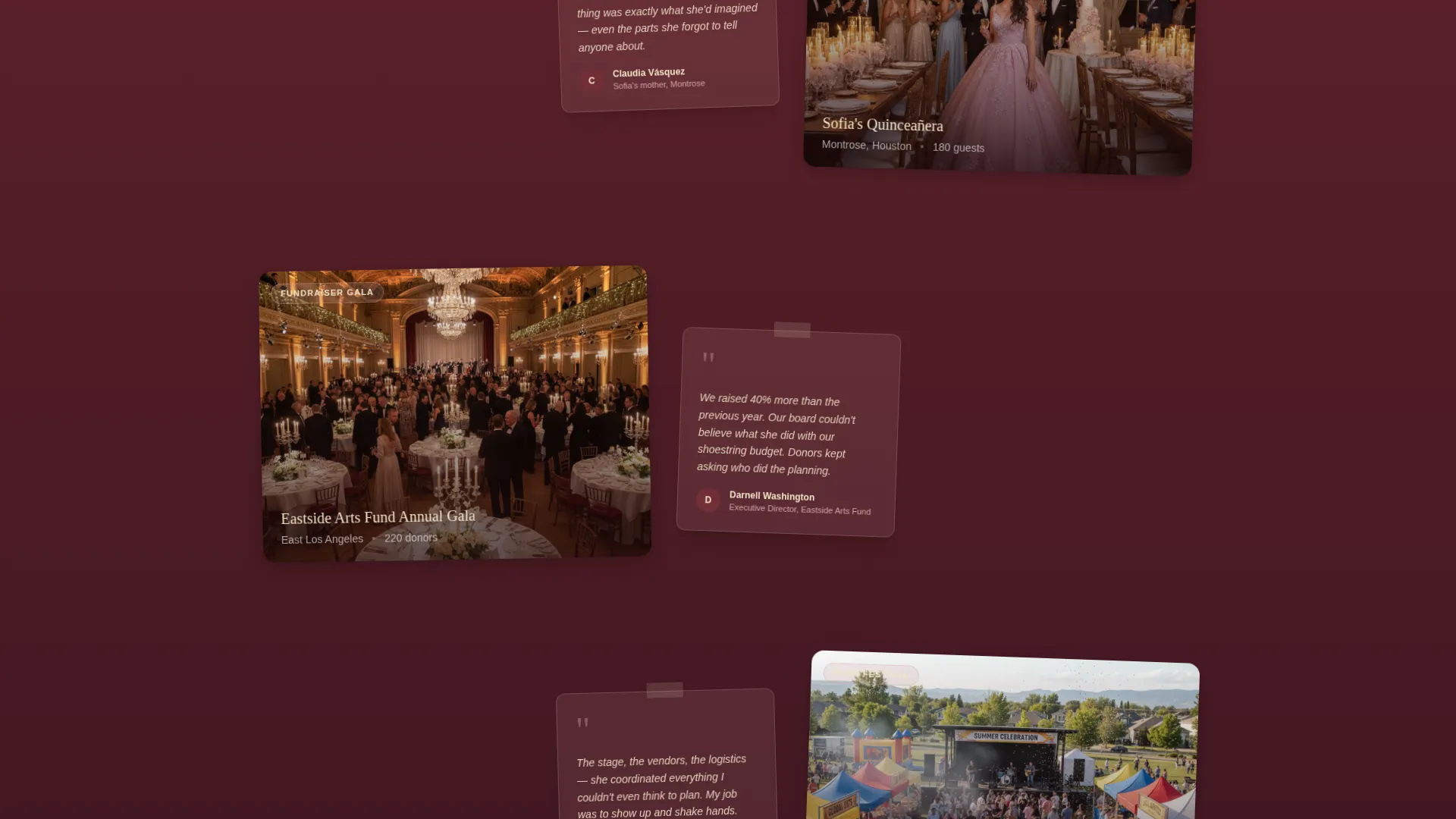
Overlap Gallery Walk Layout
Photo cards are staggered at slight angles with soft drop shadows cast onto merlot section backgrounds. Each cluster groups events by type: festival, gala, family celebration, and fundraiser. As the visitor scrolls, event scale grows from intimate gatherings to large park takeovers, communicating the planner's full range.
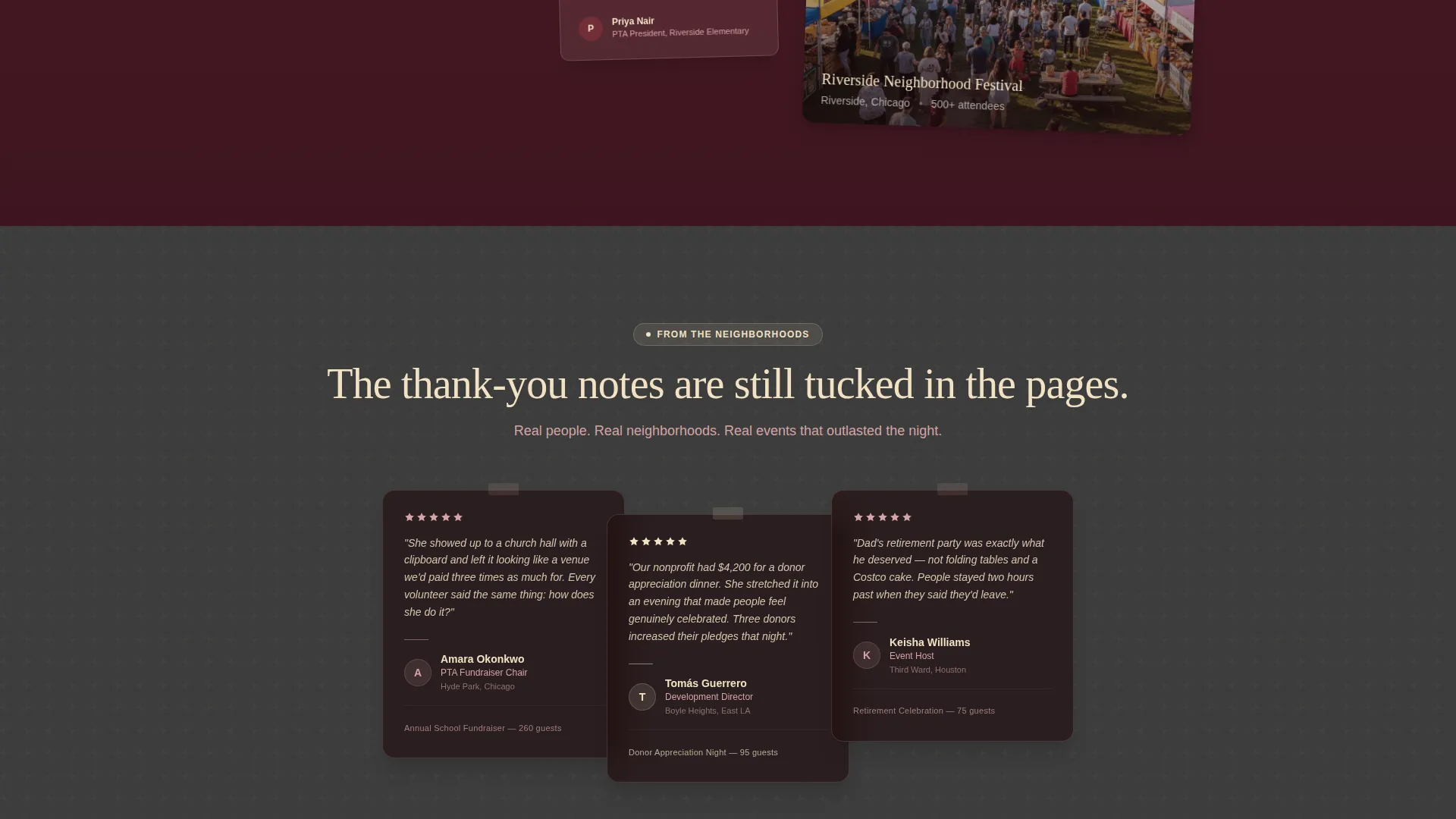
Scrapbook-Style Testimonial Cards
Testimonial cards tuck underneath event photos at a slight visual offset, mimicking the feel of handwritten thank-you notes tucked between scrapbook pages. Each testimonial references a real neighborhood, grounding social proof in specific community context rather than generic praise.
Three-Step Inquiry Modal
Clicking "Plan My Event" opens a layered modal that moves through three focused steps: event type via dropdown, guest count via a slider from 20 to 500, and a date or month picker. A single email field and an optional phone number close the form, keeping the ask minimal and the path clear.
Transparent Pricing Tier Section
A soft "See Pricing Ranges" text link anchors to a tier comparison showing three levels: Intimate, Community, and Festival. This section gives prospective clients just enough budget context to self-qualify before reaching out, reducing mismatched inquiries and saving time for both sides.
Sticky Call-to-Action Element
After the second gallery cluster, a sticky "Plan My Event" button follows the visitor down the page. This ensures the primary conversion action is always reachable without requiring a scroll back to the top, especially useful for visitors who browse the full gallery before deciding.
Page sections overview
| Section | Purpose |
|---|---|
| Full-Bleed Hero | Establishes warmth and invites the first click |
| Primary call to action Block | Anchors the first "Plan My Event" button |
| Gallery Cluster One | Showcases intimate and family-scale events |
| Gallery Cluster Two | Showcases community and fundraiser-scale events |
| Sticky call to action Element | Keeps conversion action visible during scroll |
| Testimonial Layer | Builds neighborhood-level social proof |
| Gallery Cluster Three | Showcases festival and large-scale park events |
| Pricing Tier Anchor | Helps visitors self-qualify by budget range |
| Inquiry Modal | Captures lead details in three focused steps |
| Footer Section | Closes the page with contact and brand presence |
Design & branding system
The Merlot & Smoke color system gives Gather a candlelit, post-celebration warmth that very few event planning pages carry. The palette is specific, intentional, and immediately distinct from generic pastel event templates.
- Deep wine red (#722F37) dominates the hero and footer backgrounds; charcoal smoke (#3C3C3C) grounds mid-section typography and dividers; warm champagne (#F2E2C4) highlights interactive moments and hover states
- Soft blush (#D4A5A5) breathes through card overlaps and pull-quote backgrounds, softening the edges where layered photo cards meet
- Motion is subtle throughout: cards drift into position rather than snap, and parallax shifts background photos a half-beat behind foreground text for a refined scroll experience
Mobile & speed optimization
The overlap and layered card layout is designed to translate naturally across screen sizes. The staggered angles and drop shadows that define the desktop Gallery Walk are preserved at smaller viewports without collapsing into a flat grid.
- The sticky call-to-action button remains accessible on mobile, keeping the inquiry path open throughout the scroll
- The three-step modal is built for sequential interaction, which works smoothly on touch screens where multi-field forms often cause drop-off
How this template helps you convert
Gather earns the click by showing proof long before it asks for anything. The conversion structure follows a deliberate sequence that builds trust at every stage.
- The full-bleed hero and gallery sections establish credibility through real event imagery, so by the time a visitor reaches the call-to-action, they have already pictured their own event inside those frames.
- The three-step modal reduces the perceived effort of reaching out by breaking the inquiry into small, manageable questions rather than presenting a long contact form all at once.
- The transparent pricing tier section filters for the right clients by giving enough budget context to self-qualify, which means the leads that do come through are more likely to convert into bookings.
Other information about this template
Gather fits naturally within the Wedding & Events category and speaks specifically to the Community Event planning niche. A few additional details worth knowing before you start customizing:
- The template style is Overlap/Layered, which means section depth and card stacking are core to the visual experience, not optional decorative choices
- The theme is Celebration & Joy, and the creative direction follows a Gallery Walk structure that rewards visitors who scroll, revealing more ambition and scale with each new cluster
- The header concept is a Full-Bleed Photo, so replacing the placeholder image with a real wide-angle event photograph from your own portfolio will have the greatest single impact on the page's warmth and credibility
- The landing page is built for Lead Generation as its primary direction, meaning every design decision from the sticky button to the modal sequence serves the goal of capturing qualified event inquiries
Theme
Celebration & Joy
Creative direction
Gallery Walk
Color system
Merlot & Smoke
Style
Overlap/Layered
Direction
Lead Generation
Page Sections
Full-bleed Golden-hour Hero
Overlap Gallery Walk Layout
Scrapbook Testimonial Cards
Three-step Inquiry Modal
Transparent Pricing Tier Section
Sticky Call-to-action Button
Related questions
Can I customize the event types in the inquiry modal dropdown?
Does the Gallery Walk layout work if I only have a few event photos?
What are the three pricing tiers in the comparison section?
Is this template suitable for a planner who focuses on one event type?
How does the sticky call-to-action button behave during scrolling?



