Religious & Cultural Architecture Professional Website Template
Gather is a masonry-layout landing page template built for community hall design practices. It blends a warm Playful Geometric visual style with an interactive resource grid that moves visitors from inspiration to practical planning tools. The primary call to action is a gated PDF download, qualified by a short project-stage form. Built for parish councils, village committees, and housing developers.
by Rocket studio
Quick summary
Gather is a single-page template for architecture practices that specialise in community hall design. The masonry resource grid doubles as the content experience, shifting visitors from project inspiration through to practical planning tools. A gated PDF download captures qualified leads via a short form. The design is warm, geometric, and approachable, deliberately unlike a corporate architecture portfolio.
Who this template is for
This template is made for design practices working at the civic and community end of architecture. It suits teams whose clients are not developers with large budgets but committees with grant deadlines and community obligations.
- Parish council clerks and village hall committees looking for a trusted design partner
- Community trust leads navigating grant funding for a new or refurbished hall
- Housing developers with Section 106 community asset obligations who need a clear project brief
What problem this template solves
Community hall design practices struggle to communicate their specialist knowledge online. A generic portfolio page does not reassure a parish clerk who has never commissioned a building before. This template solves that trust gap directly.
- Visitors arrive with questions, not budgets, and the content grid meets them at that stage
- Parish councils and community committees need practical resources before they can commit to an appointment
- The inline conversion nudges turn a browsing session into a qualified lead without feeling pushy
What you get with this template
You get a fully structured landing page that combines an editorial resource library with a focused lead-capture funnel. Every section is designed to speak the language of grant-dependent clients.
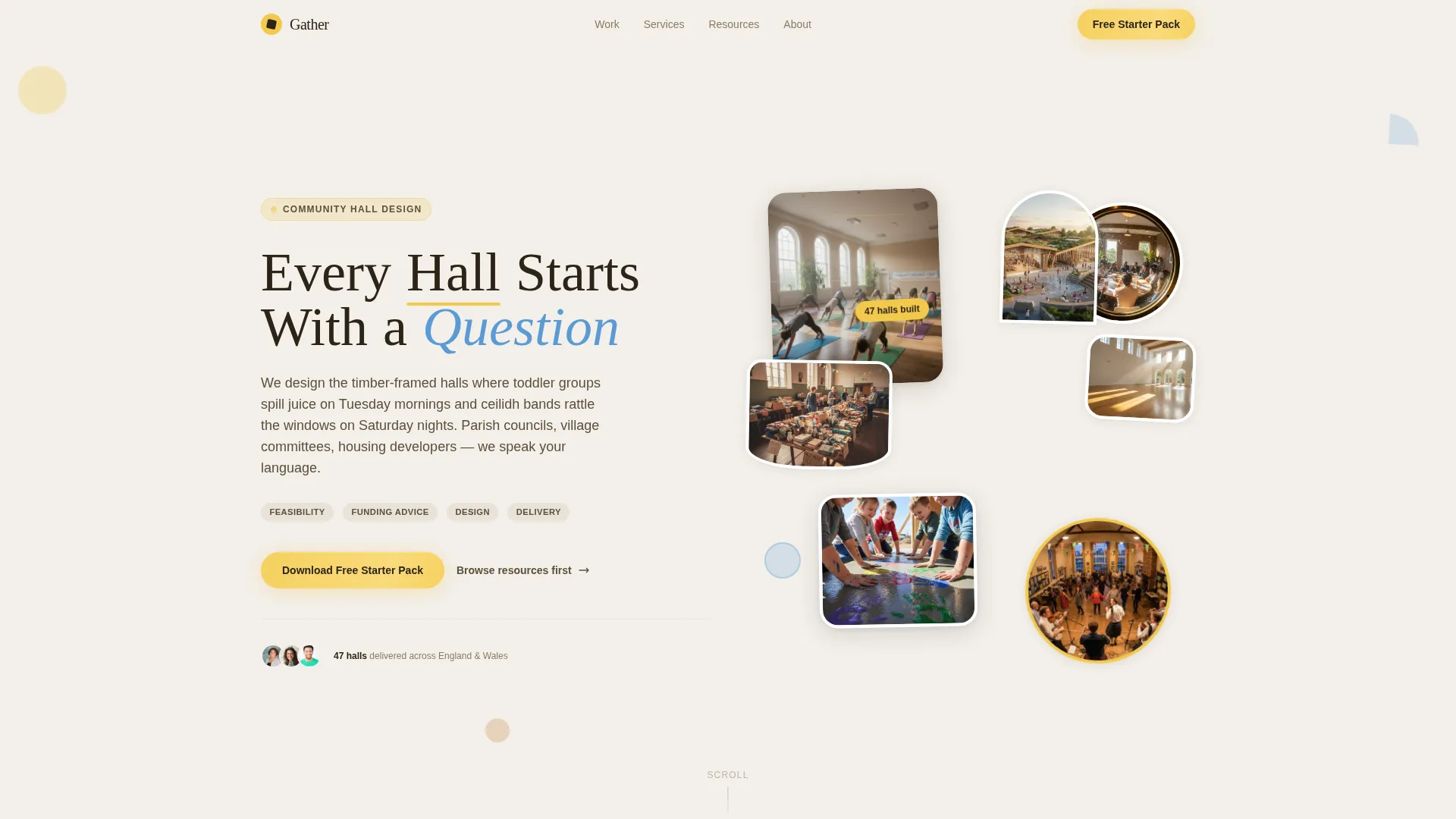
- A Photo Grid Mosaic hero header with geometric image frames and a confident slab-serif headline
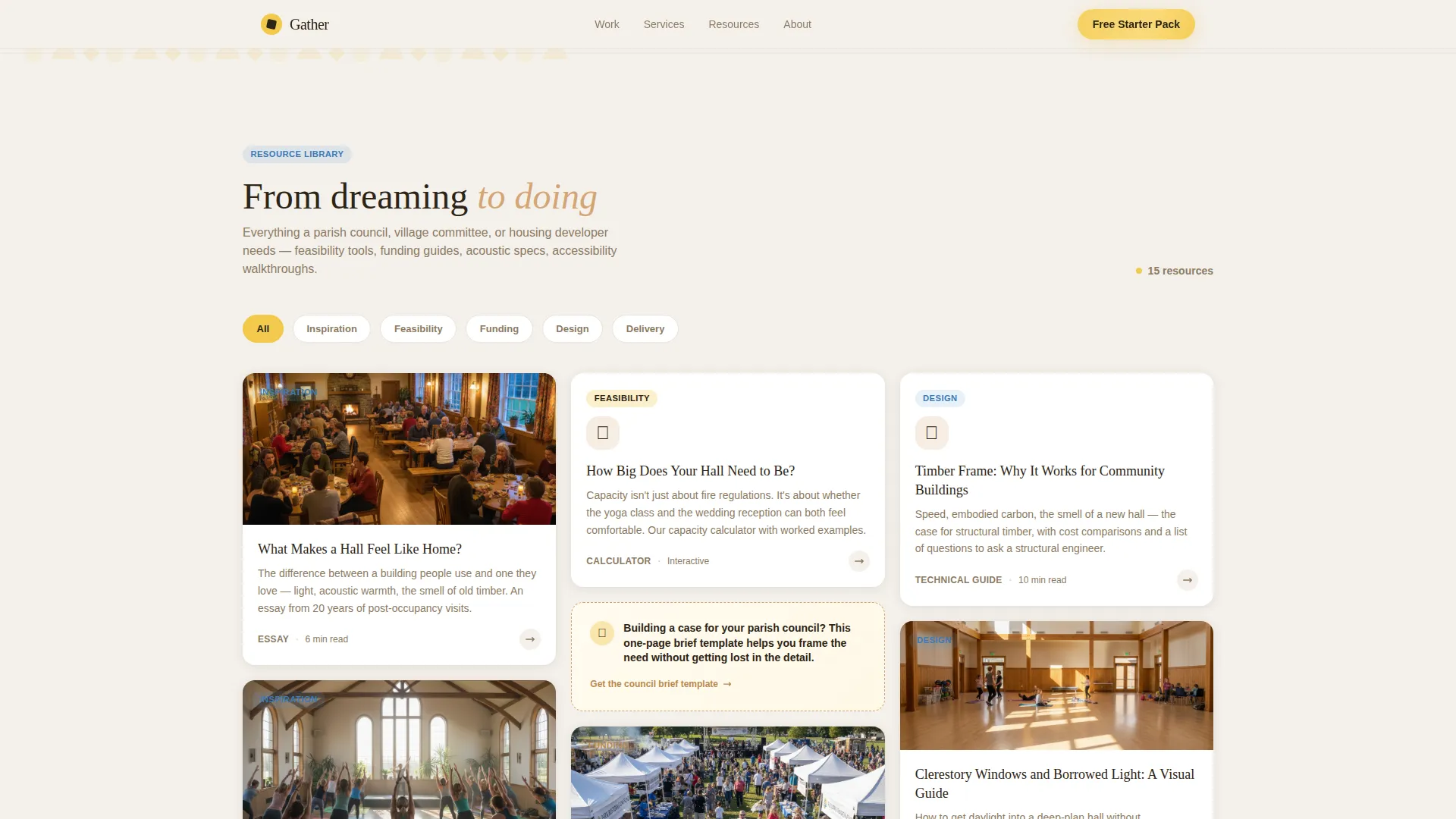
- An interactive masonry resource grid with hover animations and inline conversion prompts every third row
- A gated Starter Pack call-to-action form with a project-stage selector and hall capacity field
Feature list
This template is built around a small number of well-considered components that work together to move visitors from curiosity to contact.
Photo Grid Mosaic Hero Header
The header assembles an asymmetric collage of community halls in active use. Images are cropped into circles, rounded rectangles, and trapezoids, overlapping slightly inside geometric frames. The headline "Every Hall Starts With a Question" sits in DM Serif Display confidently among the photos, setting an approachable tone from the first scroll.
Interactive Masonry Resource Grid
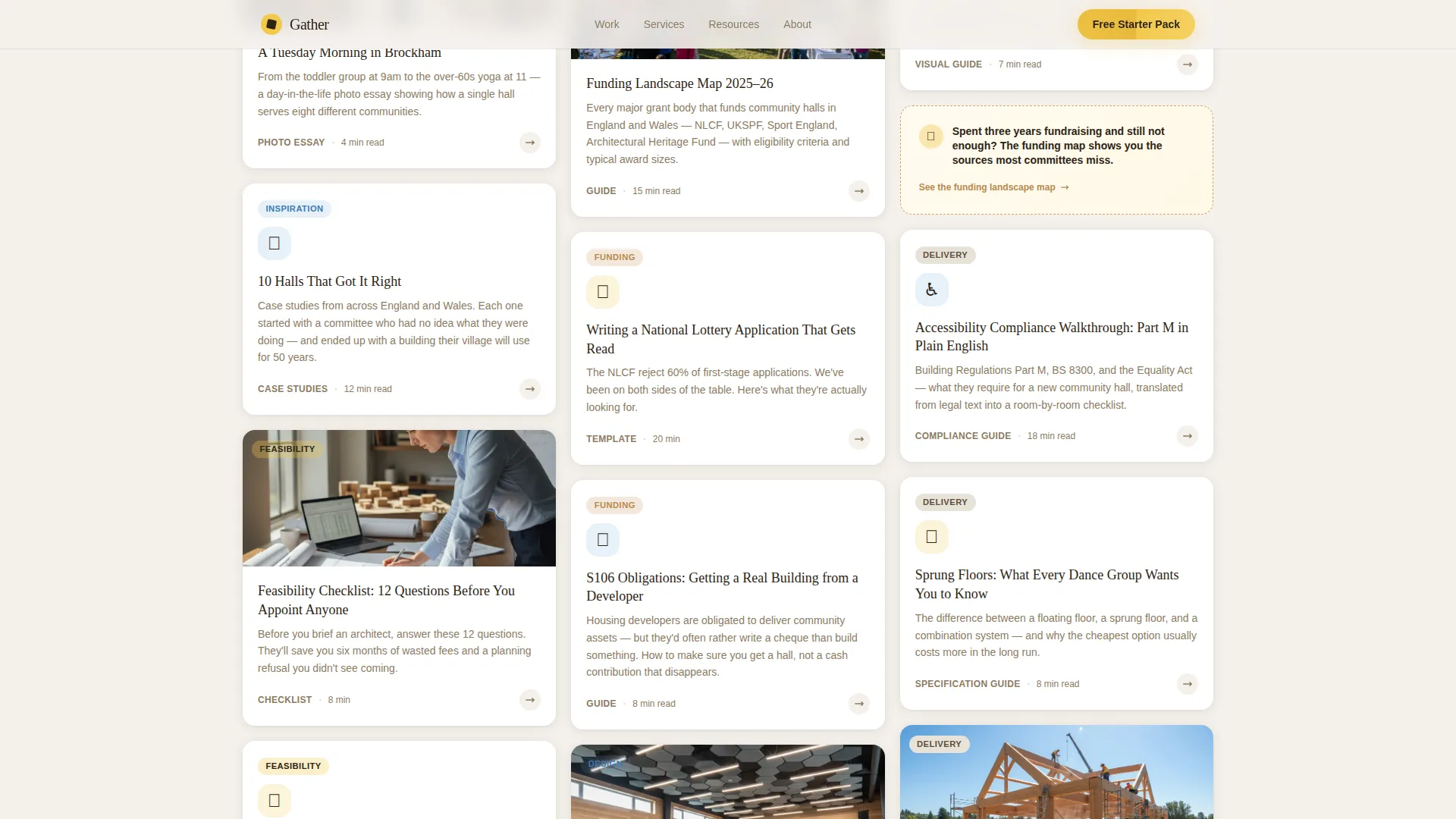
The masonry grid is the core content experience. Each card represents a clickable resource: feasibility checklists, funding guides, case study floor plans, acoustic primers, and accessibility walkthroughs. Hovering a card triggers a geometric animation, a circle expands or a corner folds. As visitors scroll, cards shift from inspirational stories and photographs toward practical templates and planning tools.
Inline Conversion Nudges
Every third row of the masonry grid contains a soft, contextual prompt. These nudges are written in the voice of a helpful adviser, for example, "Building a case for your parish council? This template helps." They feel like a natural part of the content rather than an interruption, and they link directly to the gated download.
Gated Starter Pack Form
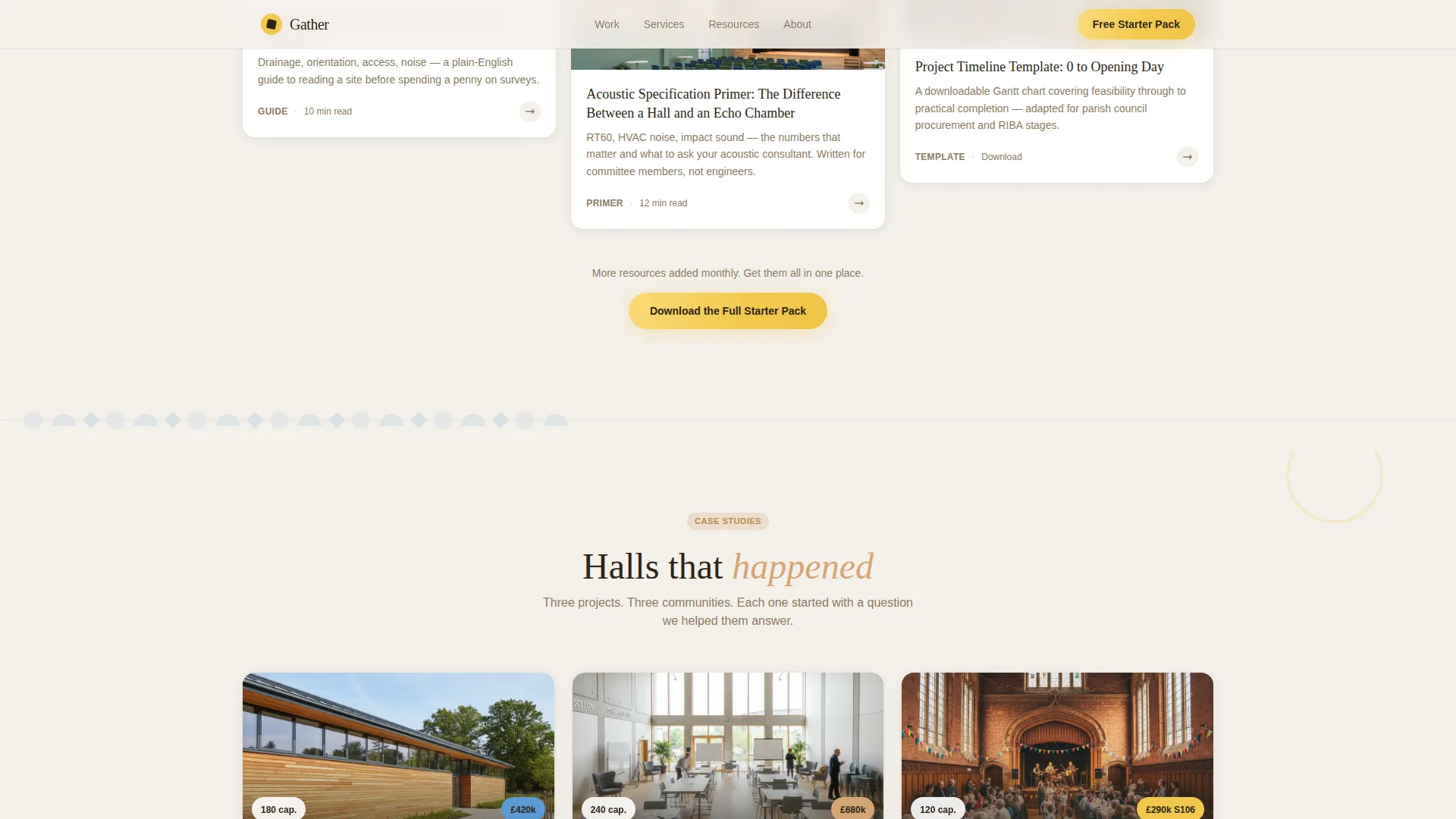
The primary call-to-action section presents the Hall Planning Starter Pack as a free PDF bundle. A short qualification form asks for name, email, project stage (dreaming, fundraising, planning, or tendering), and hall capacity estimate. The project-stage selector means every lead arrives with context, making follow-up conversations more productive.
Case Studies Strip
Three named case studies with real outcomes sit in a dedicated horizontal strip. Each entry shows location, hall capacity, and grant amounts secured, providing the social proof that grant-dependent clients need before they trust a design practice with their community project.
Marquee Partner Logos
A scrolling marquee displays partner and grant-body logos. This adds institutional credibility without cluttering the main content area. It reassures visitors from organisations like parish councils that the practice understands the funding landscape.
Page sections overview
| Section | Purpose |
|---|---|
| Photo Grid Mosaic Hero | Opens the page with community hall photography in geometric frames and the primary headline |
| Masonry Resource Grid | Delivers clickable resources shifting from inspiration to practical planning tools |
| Inline Call-to-Action Rows | Embeds soft conversion prompts every third grid row to guide visitors toward the download |
| Case Studies Strip | Shows three built halls with location, capacity, and grant outcomes for social proof |
| Starter Pack Form | Gates the PDF download behind a short qualification form with project-stage selector |
| Footer | Closes the page with horizontal flow layout and supporting navigation |
Design & branding system
The visual language is Playful Geometric, warm and handcrafted in feel, with geometric shapes used as decorative motifs rather than structural elements. It is built to feel like construction paper pinned to a well-lit corkboard, never like a corporate brochure.
- Cloud Canvas colour palette: plaster white (#F4F0EB) for backgrounds, playground blue (#5B9BD5) for cards and type, warm timber (#D4A574) for accents, and signal yellow (#F2C94C) reserved for buttons, tags, and hover states
- Typography pairing of DM Serif Display for headlines and Manrope for body copy creates a friendly, readable contrast
- Decorative motifs, half-circles, quarter-arcs, and offset rectangles, repeat between content blocks, giving rhythm without noise
Mobile & speed optimization
The template is built desktop-first, reflecting the reality that parish clerks and committee members typically use this content at a desk during office hours. Mobile layout is a solid fallback rather than the primary experience.
- The masonry grid reflows cleanly on smaller screens without losing the card-based structure
- Server Components handle static content sections, while Client Components manage the masonry grid interactions and form stage selector
- Scroll-linked opacity and geometric shape reveal animations are set to medium intensity, keeping the experience smooth without overloading lower-powered devices
How this template helps you convert
Gather is structured to move a cautious, non-technical visitor toward a qualified enquiry without applying pressure. The conversion path is woven into the content rather than bolted onto it.
- The masonry grid builds trust first by offering ungated resources, case studies, checklists, and guides, before asking for any contact details, so visitors arrive at the form already informed
- Inline nudges at every third grid row connect specific resources to the visitor's likely project stage, making the Starter Pack feel like a logical next step rather than a marketing offer
- The project-stage qualification field on the form means the practice receives structured lead data from the very first interaction, enabling more useful and targeted follow-up conversations
Other information about this template
This template sits within the Architecture and Design category, under the Religious and Cultural Architecture subcategory, with a niche focus on community hall design. It is a strong fit for UK-based practices working with grant bodies such as the National Lottery Community Fund and similar civic funding organisations.
- The template uses British English copy throughout, with £ currency references and terminology familiar to UK parish and community governance structures
- The Masonry and Pinterest-style grid layout is particularly well suited to content-rich practices that have accumulated resources, guides, and case studies over multiple projects
- The Interactive Explorer creative direction means the template rewards repeat visitors, who will find new resources as they scroll deeper into the grid
- The template is designed as a single landing page with a focused conversion goal, not as a multi-page site
Theme
Playful Geometric
Creative direction
Interactive Explorer
Color system
Cloud Canvas
Style
Masonry/Pinterest
Direction
Content/Resource
Page Sections
Photo Grid Mosaic Hero Header
Interactive Masonry Resource Grid
Inline Conversion Nudges
Gated Starter Pack Form
Case Studies Strip
Marquee Partner Logos
Related questions
Can I use this template without a large library of resources?
Is the Starter Pack form connected to any mailing platform?
Can I adapt this template for a housing developer audience?
Does the masonry grid require custom code to update?
Is this template suitable for practices outside the United Kingdom?