Freelancers Community Reviews & Social Proof Website Template
Gather is a warm, editorial-style landing page template built for freelancer Slack community builders. It uses a botanical color palette, Polaroid-style member photos, and a neighborhood-coffee-shop scroll to turn isolated solo workers into connected community members. One signup form, gated resource downloads, and generous social proof do the converting without pressure or noise.
by Rocket studio
Quick summary
Gather is an editorial landing page template for freelancer Slack communities. It leads with emotional honesty, real member portraits, and layered social proof instead of corporate polish. Visitors move through a slow, breathing one page layout, bulletin board, weekly schedule, member spotlights, and gated resources, until they are ready to click "Pull Up a Chair" and join.
Who this template is for
This template is built for community founders, organizers, and solo practitioners who want to create a landing page that feels human before it feels transactional. It speaks directly to people who understand the loneliness of remote freelance work and want to offer a genuine alternative.
- Solo freelancers launching or growing a Slack-based peer community for designers, copywriters, or developers
- Community builders who want a landing page that leads with emotional resonance and builds trust through real member stories
- Freelance coaches or organizers who need to collect email addresses, gate resource downloads, and grow a warm list before pitching anything
What problem this template solves
Most community landing pages either feel like a sales funnel or an empty brochure. They overwhelm visitors with buzzwords and vague promises of "networking." They ignore the real reason a freelance writer, designer, or developer would ever consider joining another online group. Gather fixes that by naming the actual problem first.
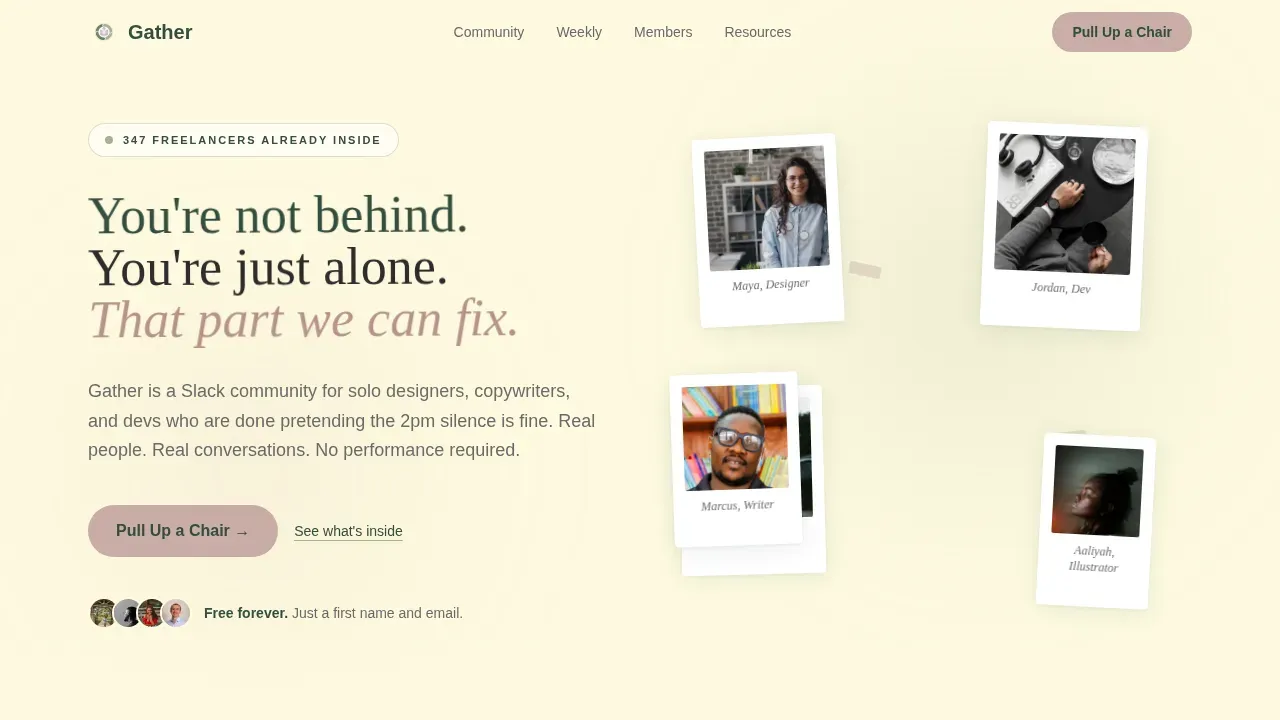
- It avoids overwhelming visitors with hype and instead opens with identity-based copy that says: "You are not behind. You are just alone. That part we can fix."
- It replaces cold conversion tactics with layered social proof, including real member quotes, portrait photos, and weekly schedule previews that show community life instead of describing it
- It gives visitors immediate value through gated resource downloads before asking for any commitment, which makes sign ups feel earned rather than extracted
What you get with this template
This template delivers a fully designed, section-led one page landing experience ready for a freelancer Slack community. Every section is editorial, every interaction is warm, and every call to action is written to encourage rather than pressure. You get a complete layout you can populate with your own member photos and quotes on launch day.
- A hero section with a Polaroid mosaic header, handwritten-style headline, and a primary signup form tied to a free Slack invite
- Five content sections covering a bulletin board of member quotes, a weekly schedule, magazine-style member spotlights, and a gated resource block with three downloadable guides
- A structured footer with logo placement, tagline, and navigation links built for quick orientation
Feature list
This template is designed with specific, prompt-backed components. Each feature below reflects what the brief defines and what the page delivers.
Polaroid Mosaic Hero Section
The hero image is not a stock banner. It is a warm, slightly imperfect mosaic of real member webcam portraits displayed in soft rounded frames, scattered like Polaroids on a desk. The hero section fades in a handwritten-style headline below the portraits. A primary call to action button labeled "Pull Up a Chair" sits directly beneath, linking visitors to the free Slack invite signup form. This approach makes the page feel like a place, not a pitch.
Bulletin Board of Member Quotes
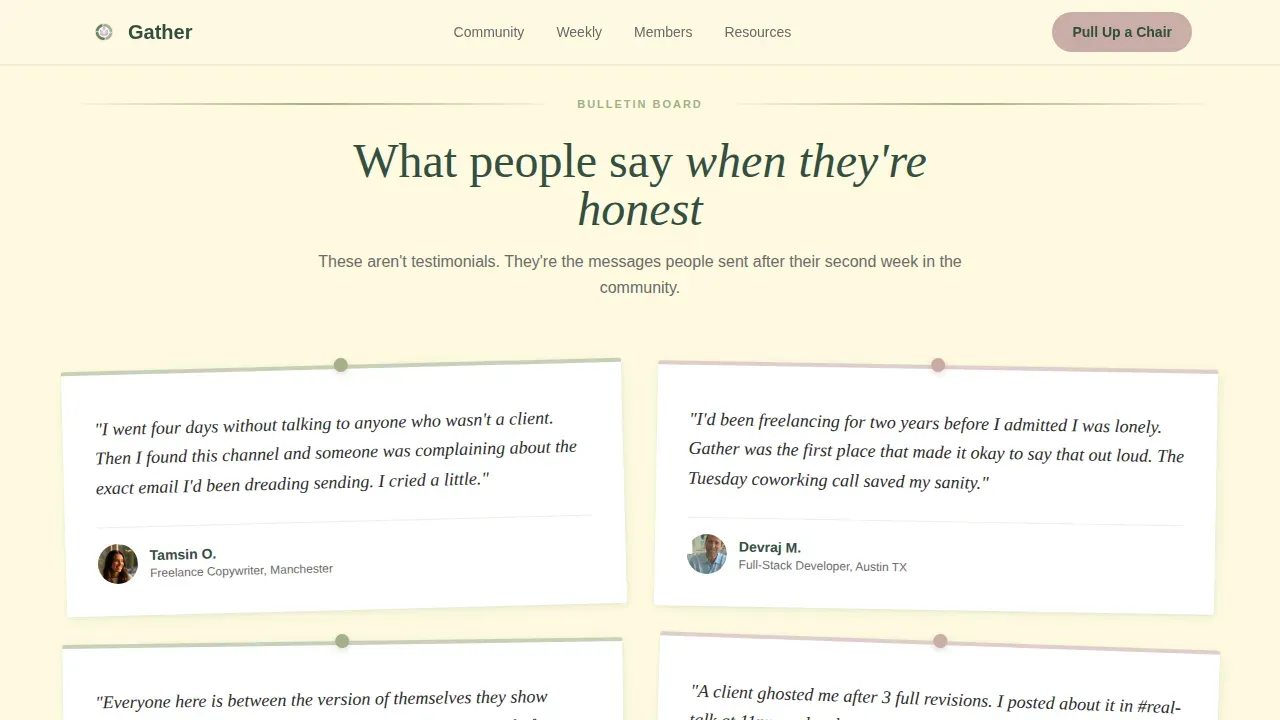
The bulletin board section formats real member testimonials as pinned notes. Each quote speaks to isolation, the relief of finding the group, and the texture of solo freelance life. This is one of the most effective forms of social proof available on a community landing page: transformation stories that visitors recognize in themselves. Adding social proof in this format, using actual words from real customers, helps build trust far faster than a polished endorsement ever could. The design echoes a physical corkboard, keeping the neighborhood creative direction consistent across the entire page.
Neighborhood Newspaper Weekly Schedule
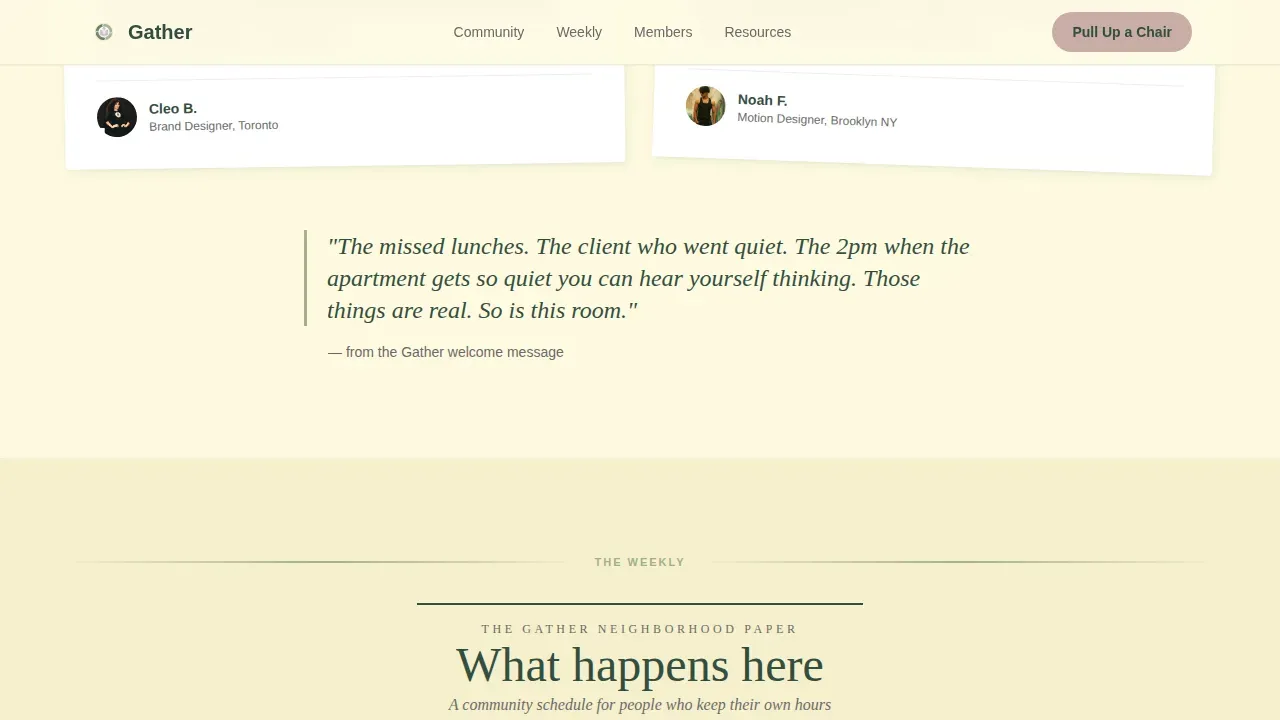
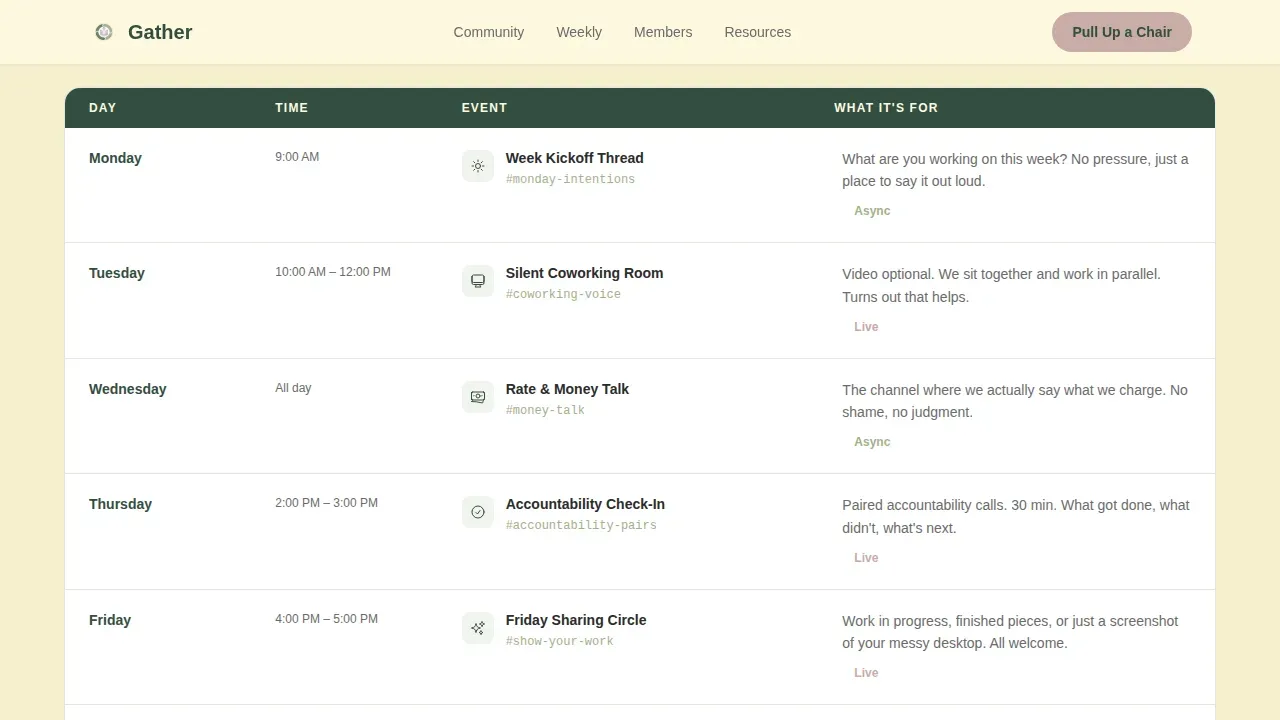
The weekly schedule section is laid out like a local neighborhood paper. It shows coworking hours, accountability threads, and Friday sharing circles in a structured, scannable format. Visitors can see exactly what they are signing up for before they sign anything. This section explaining community rhythms removes ambiguity and helps guide visitors toward confident action. It is one of the clearest examples of a landing page section that sells through transparency rather than persuasion.
Magazine-Style Member Spotlights
Member spotlights are formatted as editorial profile cards. Each card includes soft photography, a pull quote, and a short profile. These are not generic testimonials. They function like mini magazine features, giving potential clients and community members a clear, warm picture of who is already inside. This section is one of the stronger landing page examples of how member stories can replace expert endorsements and still drive sign ups effectively.
Gated Resource Download Block
Three downloadable guides sit inside a dedicated resource section: a freelancer burnout checklist, a rate-setting guide, and a "scripts for difficult clients" PDF. Each download is gated with only an email address. This approach lets the template collect email addresses and grow an email marketing list while delivering immediate value. Visitors receive something useful before they commit to joining, which makes the call to action feel like a natural next step rather than a significant investment ask.
Arc Browser Split Footer
The footer follows a split layout with the logo and community tagline on the left and navigation links on the right. Anchor links connect footer items to the relevant sections above, keeping the one page experience smooth and oriented. This footer design avoids overwhelming visitors who scroll to the bottom looking for key details about the community.
Page sections overview
| Section | Purpose |
|---|---|
| Hero Polaroid Mosaic | Opens with real member portraits and the primary signup form |
| Bulletin Board Quotes | Displays pinned member testimonials about isolation and connection |
| Weekly Schedule | Shows community rhythms like coworking hours and accountability threads |
| Member Spotlights | Features editorial profile cards with pull quotes and soft photos |
| Resource Download Block | Gates three freelancer guides behind an email capture form |
| Split Footer | Provides logo, tagline, and anchor links for page navigation |
Design & branding system
The visual identity follows a Healing Space theme. The botanical color system keeps the background image of the page feeling like a windowsill herb garden at morning light. Nothing is loud. Everything is tended.
- Linen (#FEFAE0) dominates the background across the entire page, giving the layout the feel of blank journal pages; soft sage (#A3B18A) holds section dividers and pull quote frames; deep moss (#344E41) anchors all headlines and navigation elements
- Dried lavender (#C9ADA7) appears only on interactive moments, including buttons, hover states, and signup form accents, rewarding the click without drawing attention before it is earned
- Typography pairs Fraunces, a serif display face with warmth and editorial character, with DM Sans for readable, airy body copy; the combination supports the brand personality of a neighborhood publication rather than a SaaS product
Mobile & speed optimization
The template is designed desktop-first, with a warm, functional mobile experience included. Scroll animations are set to medium intensity: fade-in-up on scroll, staggered Polaroid reveals in the hero section, and a gentle float on pull quote cards. These motion choices guide visitors through the page without rushing them.
- All photos and portrait illustrations are sized for web delivery; the staggered animation system prevents layout shift during the Polaroid reveal sequence
- The signup form and resource download modals are built as client-side components, keeping static sections fast while preserving interactivity where it matters for sign ups and email capture
How this template helps you convert
This template converts through generosity and pacing rather than urgency or pressure. The conversion process is layered so that visitors build trust before they take any specific action.
- The hero section captures early sign ups through the "Pull Up a Chair" call to action, requiring only a first name and email for the free Slack invite, keeping the barrier low and the promise clear
- The resource block collects email addresses from visitors who are not yet ready to join the community, turning browsers into warm email marketing contacts through gated downloads that deliver real value immediately
- Social proof runs throughout: member quotes in the bulletin board, portrait photos with image courtesy credits in spotlights, and visible community schedule details all work together to build trust and push hesitant visitors toward a confident yes
Other information about this template
This section covers additional context about how the Gather template fits into the broader landscape of one page landing page examples and community-building tools.
One page website templates are ideal for product launches, portfolios, and service promotions because they present all necessary information on a single page, making it easier for visitors to navigate and understand the offering. Gather is a clear example of this format applied to community building. Using a one page website template can significantly reduce the time needed to launch a site compared to traditional multi-page approaches, which makes sense for community organizers who want to go live quickly and start capturing sign ups before their community is fully built.
A coming soon page or pre-launch landing page can use this same structure effectively. A coming soon page allows you to collect contact information from warm leads before the community officially opens. Coming soon pages are sometimes called waitlist landing pages and include a brief preview of the expected offering. Including a countdown timer on a coming soon page can create urgency and encourage early sign ups. Using a coming soon page is one of the most effective ways to start building an email list before your site goes live, and Gather's signup form and resource gate work naturally in that pre-launch context.
Custom landing pages are crucial as they bridge the gap between email clicks and sales. Each landing page should perfectly match its email campaign message for a seamless path to conversion, and Gather's warm tone and benefit-driven copy are built to match freelancer-focused email marketing campaigns exactly. Automation tools can integrate with landing pages to manage email lists and follow-up sequences, enhancing engagement with new sign ups over time.
Social proof, such as testimonials and user-generated content, can significantly enhance the credibility of landing pages. Displaying reviews and testimonials on landing pages can help overcome objections and increase conversions. Gather handles this through transformation-style member quotes rather than standard star ratings, which makes the social proof feel more relatable and more real.
The gather warm freelancer community landing page template is fully customizable. You can replace the placeholder member photos, update the community schedule, and edit all copy to reflect your actual community voice and services. The template designed around the Healing Space and Local and Neighborhood creative directions is equally effective whether you are launching a brand new community or relaunching an existing one with a warmer, more honest identity.
Good landing pages avoid overwhelming visitors with too many choices. This template keeps the conversion path clear by using only two primary calls to action across the page: the Slack invite signup form and the resource download gate. That focused structure is what separates good landing pages from cluttered ones. One page templates are particularly effective for showcasing a single service offered, allowing focused messaging and a direct line from headline to action.
For community builders exploring other tools and landing page examples, platforms like Squarespace offer 32 free one page website templates that can be customized for various purposes. Canva provides templates with soft, inviting colors and friendly typography, ideal for community-focused landing pages. Leadpages offers a "Creative Community" template designed specifically for building a community with features like a warm hero section and member benefit highlights. These are all solid examples worth reviewing alongside Gather to understand what different approaches look like in practice.
- This template is a single-page layout and does not include a built-in multi-page site structure or blog
- All photos shown in the demo carry standard image courtesy credits; replace with licensed or original member photos before going live
- The resource download modals are built as client-side interactions and do not include a pre-connected email marketing backend; connect your preferred email service to the signup form fields
- The free landing page invite call to action is designed for a Slack community but the copy and links can be adapted to other community platforms as needed
- Illustrations and decorative elements in the template use the botanical color system and are editable within your design environment
- The template does not include streaming platforms integration or dynamic content feeds; all community schedule content is static and manually updated
- Premium features like animation timing and hover states on lavender interactive elements are configurable without additional plugins
Theme
Healing Space
Creative direction
Local & Neighborhood
Color system
Botanical
Style
Editorial/Magazine
Direction
Content/Resource
Page Sections
Polaroid Mosaic Hero with Signup Form
Bulletin Board Social Proof Section
Neighborhood Newspaper Schedule Layout
Magazine-style Member Spotlights
Gated Resource Download Block
Split Footer with Anchor Navigation
Related questions
Can I use this template before my community is fully launched?
Does the template include the actual resource PDFs?
How do I add my own member photos to the Polaroid mosaic?
Is this template suitable for a freelance writer or designer community specifically?
Can I adapt the weekly schedule section for a different community format?



