Metal Roofing Specialist Website Template with Job Map
Gauge is a gallery-and-detail landing page built for metal roofing specialists. It opens with an interactive map of completed jobs in the visitor's area, walks them through a problem-to-solution visual arc, and closes with a three-step booking form. The Industrial Raw design system and safety-vest orange calls to action give the page instant credibility with rural homeowners, commercial property managers, and general contractors.
by Rocket studio
Quick summary
Gauge is a single-page template for metal roofing contractors who need more than a brochure site. It leads with a geolocation map showing real job pins near the visitor, walks them through damage photography and completed installations, and converts with a sticky three-step quote form. The design feels raw, durable, and built for a trade that doesn't tolerate fluff.
Who this template is for
This template is purpose-built for roofing businesses that install standing-seam metal panels and need a digital presence that matches their field reputation. It works equally well for sole-operator crews and established roofing companies with multiple crews.
- Rural homeowners tired of patching asphalt shingles every spring
- Commercial property managers who think in lifetime cost per square foot
- General contractors who need a reliable roofing sub-contractor that shows up and finishes on schedule
What problem this template solves
Most roofing contractor pages look the same: a phone number, a stock photo of a hammer, and a contact form. Gauge solves the trust gap with density. The map header shows hundreds of completed jobs before a single testimonial loads.
- Visitors arrive skeptical and leave without booking because nothing proves local experience
- Asphalt damage costs go unquantified, so urgency never lands
- Generic contact forms ask for too much too soon, killing conversion before it starts
What you get with this template
Gauge delivers a full gallery-and-detail landing page flow with every major trust and conversion element already structured. You get a visual journey from damage to solution, a credential-heavy map header, and a booking path with three low-friction steps.
- An interactive map header with pulsing job pins and click-to-open roof thumbnails
- A scroll-driven Problem to Solution image arc with captioned damage photography and material spec cards
- A sticky bottom bar with a three-step quote form covering ZIP code, roof type selector, and calendar picker
Feature list
This section covers the core built-in capabilities that make Gauge function as a high-converting metal roofing landing page.
Interactive Job-Pin Map Header
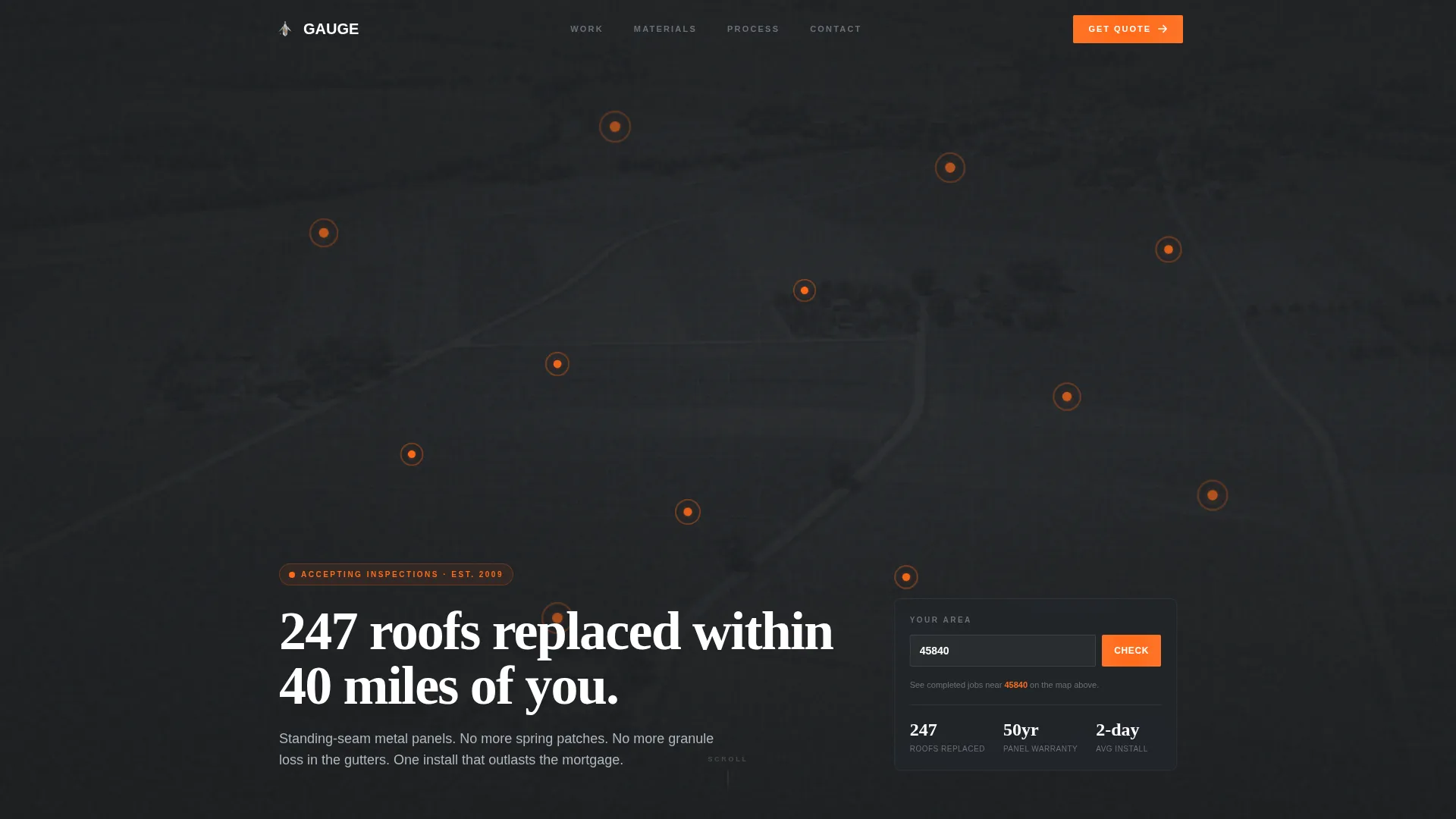
The header renders a dark, desaturated aerial view of the service region. Completed job pins glow in safety-vest orange and pulse subtly to draw the eye. The visitor's ZIP code auto-populates from geolocation, and the headline types out dynamically over the map. Clicking any pin opens a thumbnail of the finished roof, turning geography into proof.
Problem-to-Solution Scroll Arc
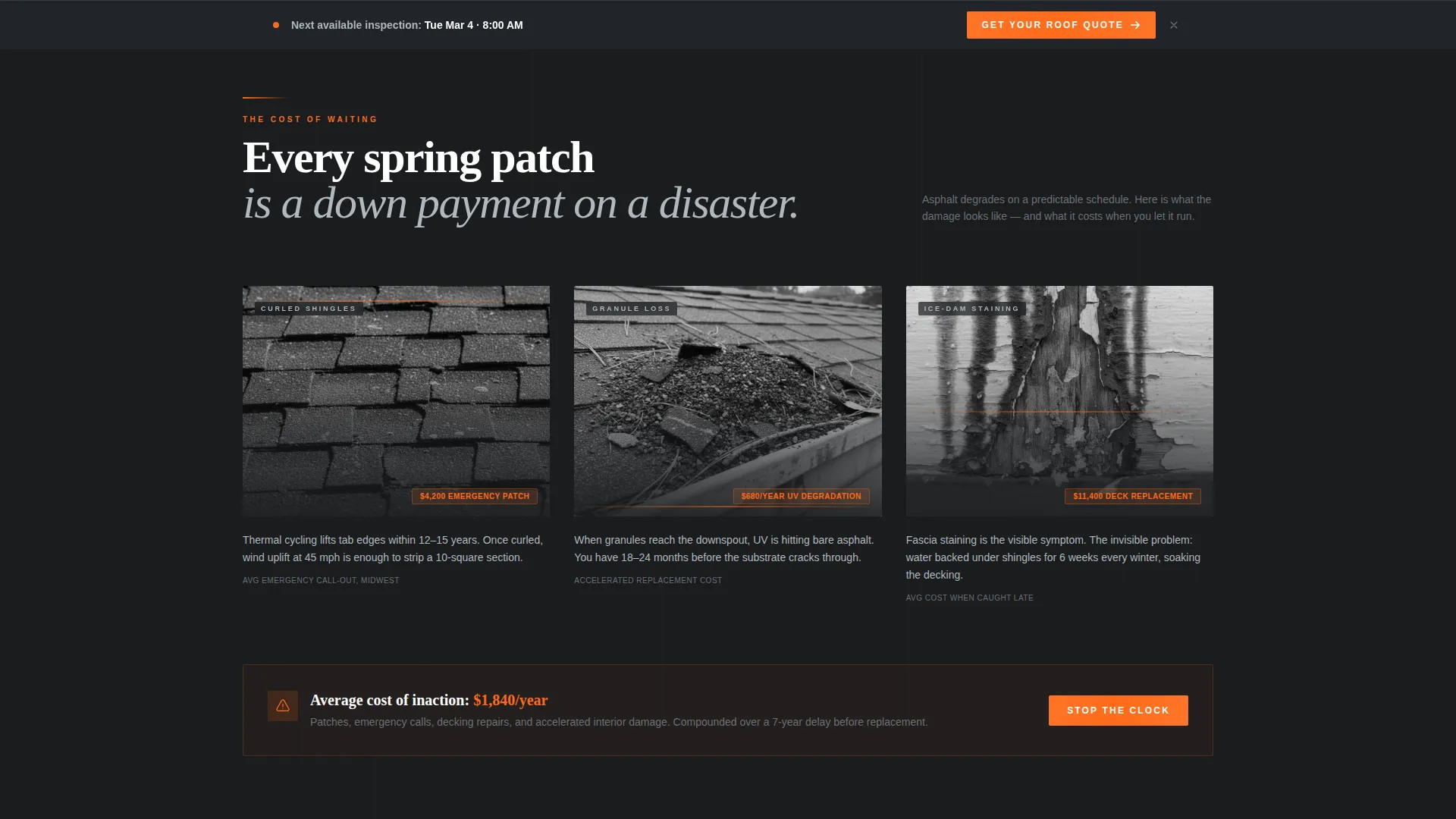
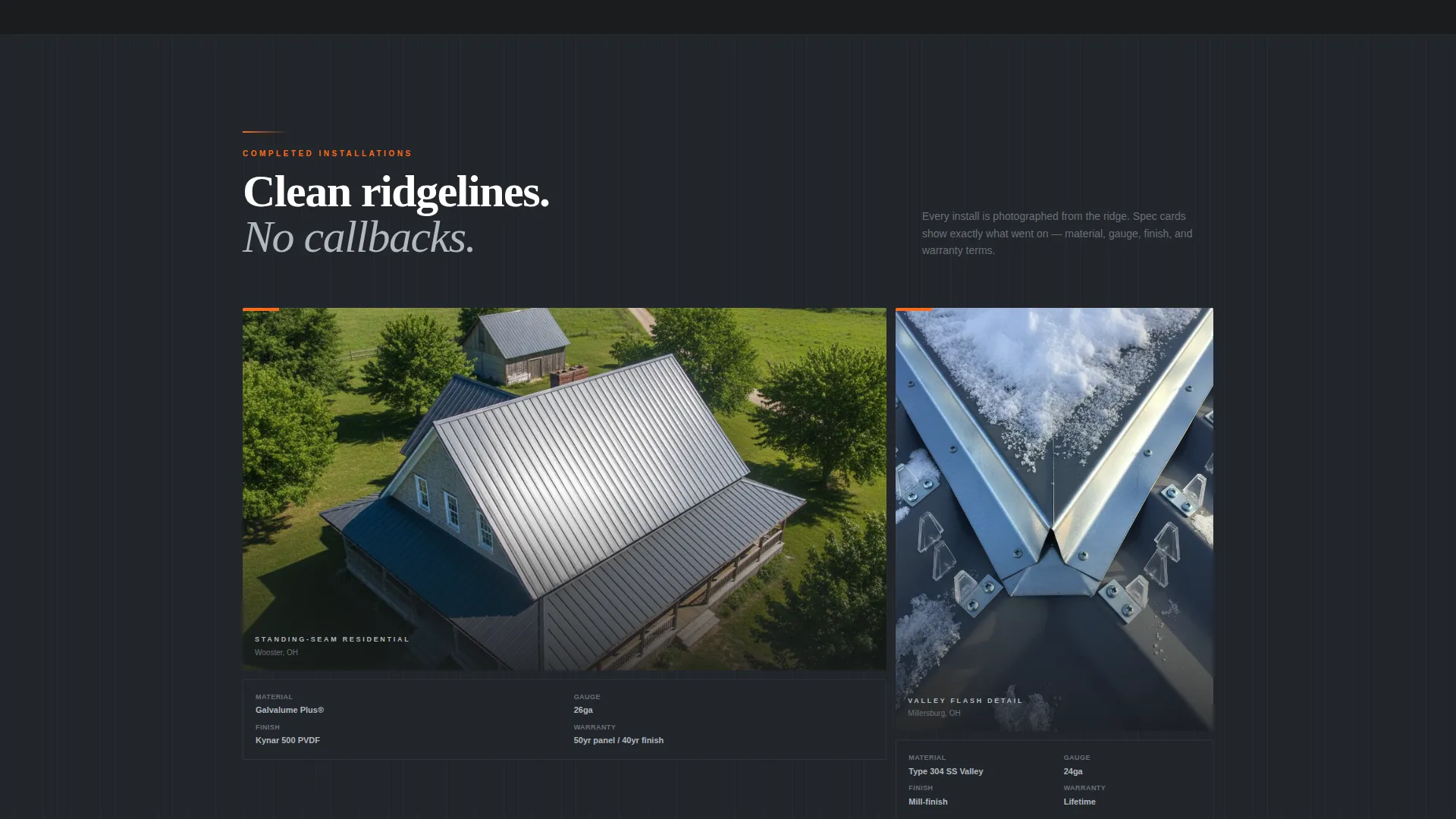
The page opens in damage: close-up photography of curled shingles, granule loss in gutters, and ice-dam staining on fascia. Each image carries a caption that prices out the cost of inaction in dollars per year of delay. Midway through the scroll, the palette lifts almost imperceptibly and the gallery transitions to completed aerial drone shots and detail crops of flashed valleys and snow guards.
Material Specification Cards
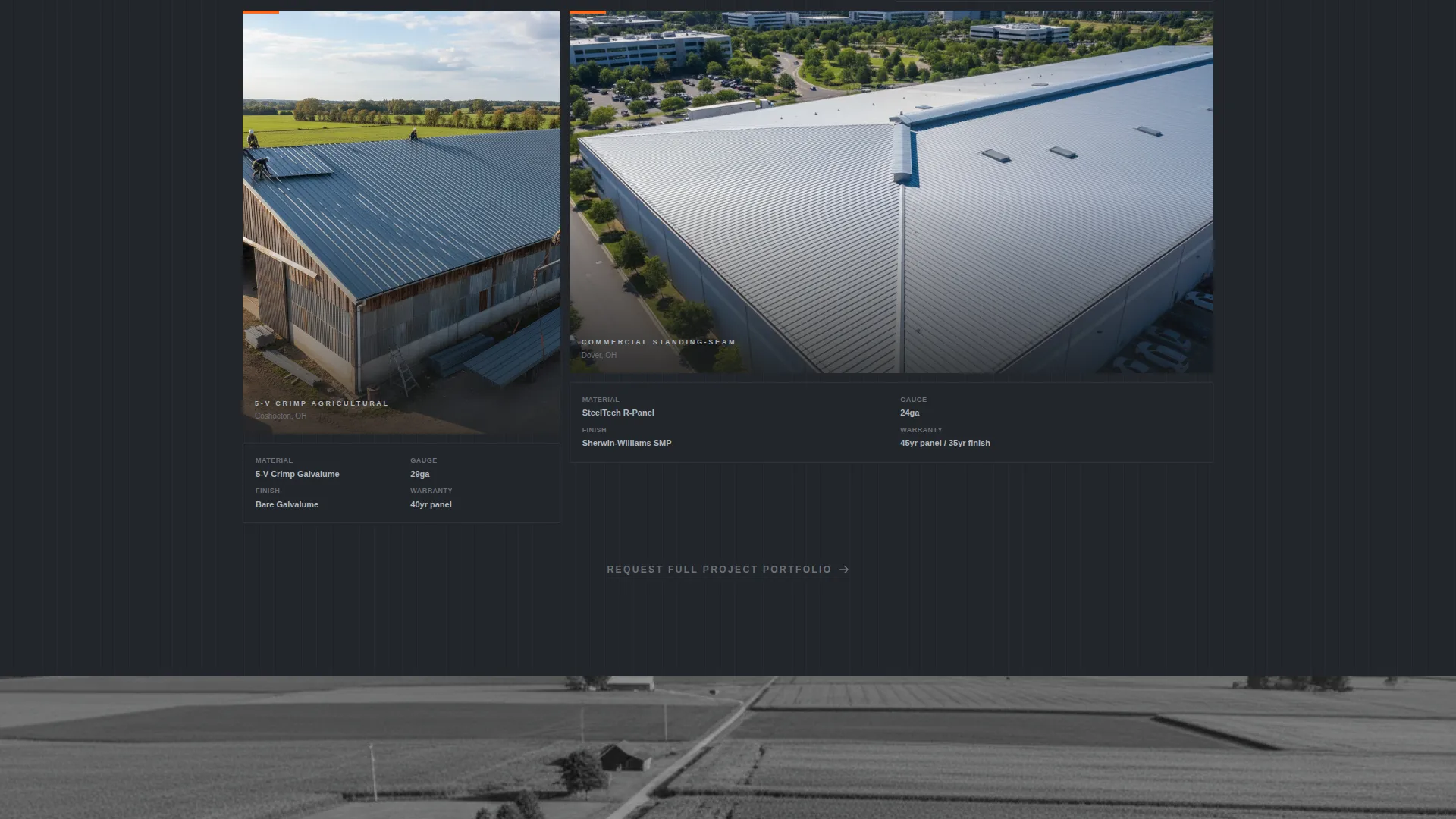
As completed installation images appear, paired spec cards slide in on scroll. Each card documents the material details for that job, giving commercial property managers and detail-oriented homeowners the hard data they need to feel confident in the product.
Three-Step Sticky Quote Form
After the first scroll section, a sticky bottom bar activates with the primary call-to-action: "Get Your Roof Quote." The form runs three steps: ZIP code entry (pre-filled from the map), a roof-type selector with silhouette icons for gable, hip, flat, and barn styles, and a calendar picker that shows the next available inspection slot.
Photo Upload Secondary Path
A secondary conversion path labeled "Send Us a Photo" lets visitors upload a snapshot of their current roof for a preliminary assessment. This lower-commitment option captures leads who are not yet ready to book a calendar slot, widening the top of the funnel.
Crew Credibility Section
The page closes the arc with a single wide-format photograph of the team on a roof peak, tool belts loaded and no staged poses. This image functions as a trust anchor, replacing abstract claims about experience with a direct look at the people doing the work.
Page sections overview
| Section | Purpose |
|---|---|
| Map Job Header | Establishes local proof with pulsing job pins and a dynamic typed headline |
| Damage Problem Gallery | Opens the scroll arc with costed damage photography to build urgency |
| Cost of Inaction | Captions each damage image with dollar-per-year delay pricing |
| Solution Gallery | Transitions to aerial and detail shots of completed metal installations |
| Material Spec Cards | Pairs installation images with scrolling product specification cards |
| Roof Type Selector | Step two of the quote form with silhouette icons for each roof shape |
| Calendar Picker | Step three shows the next available inspection slot for booking |
| Photo Upload Path | Secondary call to action for visitors who prefer a low-commitment first step |
| Crew Wide Shot | Closes the page with an unposed team photograph for human credibility |
| Sticky Quote Bar | Persistent bottom bar holding the primary "Get Your Roof Quote" call to action |
Design & branding system
The visual identity follows an Industrial Raw theme built on a Monochrome Steel color system. Every color decision references the material world of a sheet-metal fabrication shop: fluorescent light bouncing off stacked panels, functional surfaces, and nothing decorative.
- Mill-finish silver (#B0B8BF) and rolled galvalume dark (#2C2F33) form the primary palette, with weathered zinc (#6B7178) used for secondary surfaces and dividers
- Safety-vest orange (#FF6B1A) is reserved exclusively for calls-to-action, active states, and urgent callouts, making every conversion trigger immediately recognizable
- The dark desaturated header and gradual palette lift through the scroll arc are baked into the design system, reinforcing the Problem to Solution narrative without a single word of explanation
Mobile & speed optimization
The template is structured to function cleanly on smaller screens where many roofing customers will land after searching from a job site or truck cab. Every layout decision favors vertical readability and tap-friendly interaction targets.
- The sticky quote bar stays accessible at the bottom of the screen on mobile, keeping the booking path one tap away at all times
- The three-step form breaks the quote process into short, sequenced screens that feel manageable on a phone rather than overwhelming on a single scroll
- Damage photography and spec card layouts reflow to single-column stacks on narrow viewports, preserving the visual arc without horizontal scrolling
How this template helps you convert
Gauge is built around a conversion philosophy: earn the click by showing proof before asking for commitment. Every section is sequenced to reduce resistance and raise confidence.
- The map header answers the first unspoken question before a visitor reads a headline. Seeing orange pins clustered in their own neighborhood converts passive curiosity into active interest faster than any headline claim could.
- The problem arc prices out inaction in real dollars, creating a specific reason to act now rather than bookmark the page and forget it. By the time the sticky call to action bar is visible, the visitor has already been shown what delay costs them.
- The two-path conversion structure means every visitor has an appropriate next step. Ready buyers book an inspection slot. Hesitant visitors send a photo. Neither path requires more information than the visitor is comfortable sharing.
Other information about this template
Gauge is designed as a standalone gallery-and-detail landing page, not a multi-page website. It is part of the Construction and Home category, specifically within the Roofing and Waterproofing subcategory, targeting metal roofing specialist businesses.
- The template style is Gallery and Detail, combining visual portfolio logic with service-page conversion structure
- The header concept is Map-Based, a less common pattern in roofing that gives Gauge a distinct visual identity compared to standard hero-image templates
- Creative direction follows a Problem to Solution Arc, a narrative structure well suited to home-improvement services where urgency and trust both need to be established before a buyer acts
- The booking and scheduling direction makes Gauge particularly useful for contractors who want leads to arrive pre-qualified with a roof type and preferred inspection date already selected
Theme
Industrial Raw
Creative direction
Problem→Solution Arc
Color system
Monochrome Steel
Style
Gallery + Detail
Direction
Booking/Scheduling
Page Sections
Interactive Job-pin Map Header
Problem-to-solution Scroll Arc
Sliding Material Spec Cards
Three-step Sticky Quote Form
Photo Upload Secondary Path
Crew Credibility Closing Section
Related questions
Can I customize the map to show my actual service area?
What roof types does the built-in selector cover?
How does the photo upload path work for leads?
Is this template suitable for commercial roofing projects?
Can I edit the sticky bar call-to-action text?



