Container Home Inspector Landing Page Template
Gauge is a modular card-grid landing page built for licensed container home inspectors. It leads with an interactive Cost Estimator tool, organizes inspection types into scannable card grids, and drives two clear conversion paths: a direct booking form and a free downloadable checklist. The design uses a Corporate Precision style in deep charcoal and inspection-grade amber.
by Rocket studio
Quick summary
Gauge is a single-page template built for a licensed container home inspector. It opens with a full-width interior photograph and an instant-use Cost Estimator tool. Modular card grids cover every inspection category. Two conversion paths capture both ready-to-book visitors and those still in the research phase.
Who this template is for
This template is designed for a licensed inspector who specializes in converted shipping container homes. It speaks directly to three distinct client types who each arrive with a specific, urgent need.
- First-time buyers who found a converted container unit listed online and need a structural assessment before signing.
- Owner-builders mid-conversion who require a certified third-party report for county permitting sign-off.
- Insurance adjusters who will not issue a policy without a formal structural inspection report.
What problem this template solves
Container home buyers and builders struggle to find an inspector who understands the specific risks of corrugated steel construction. A generic home inspector website does not communicate that specialized expertise. This template solves that credibility gap immediately.
- Visitors often leave before booking because they cannot judge scope or cost upfront. The estimator tool removes that barrier instantly.
- Potential clients need visual proof that real deficiencies get caught. The flagged-findings card grid makes that case without a word of sales copy.
What you get with this template
This template delivers a fully structured, single-page layout organized around conversion from the first scroll. Every section is modular, so each card stands alone as a clear unit of information.
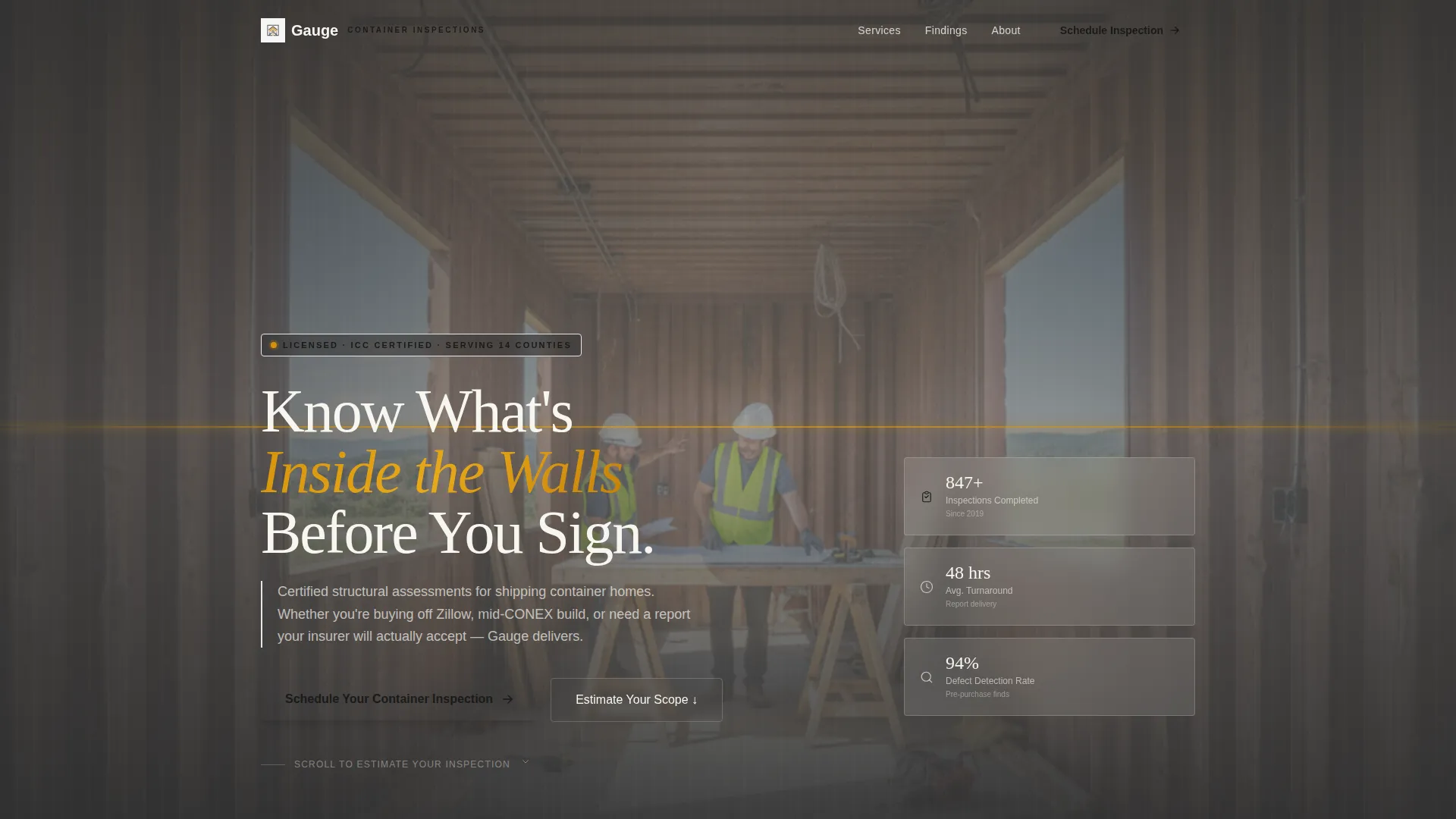
- A panoramic full-viewport header image with a headline and the Cost Estimator tool visible without scrolling.
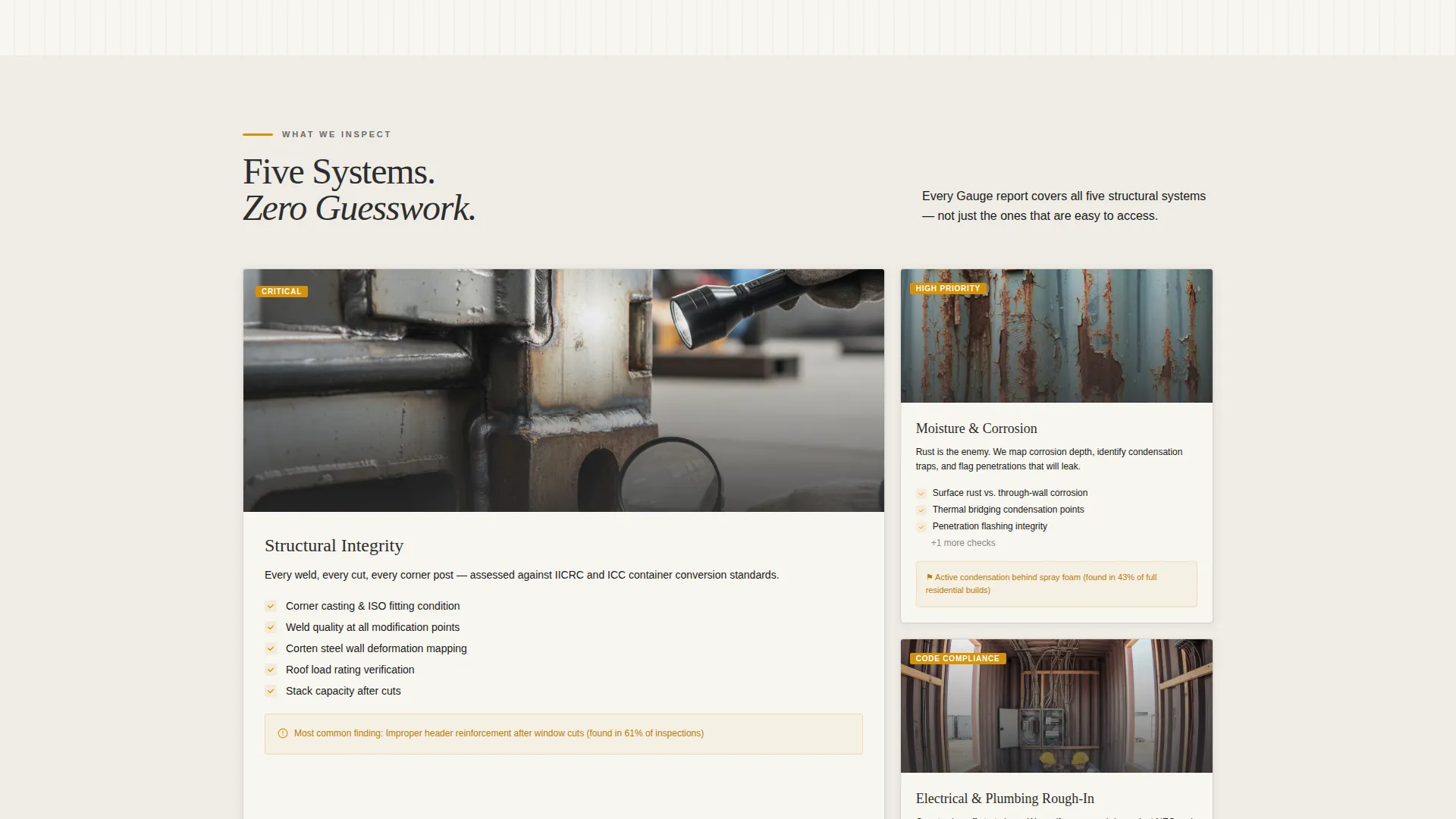
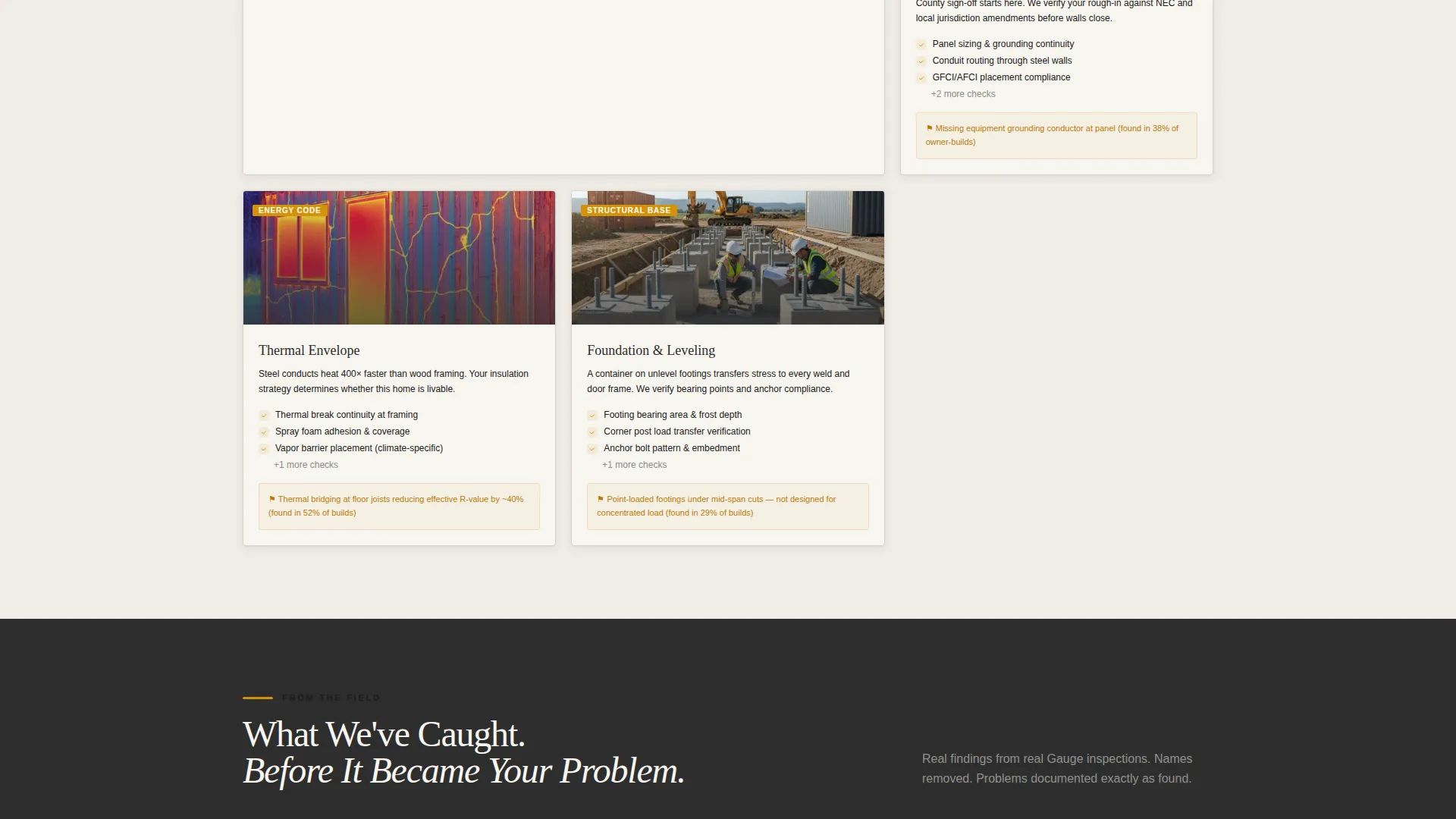
- Five inspection-type card grids covering structural integrity, moisture and corrosion, electrical and plumbing rough-in, thermal envelope, and foundation and leveling.
- Two lead capture paths: a direct booking form and an email-gated PDF checklist download.
Feature list
This template is built around purposeful components that guide a visitor from first impression to committed inquiry. Each feature below is present in the template as described in the source brief.
Interactive Cost Estimator Tool
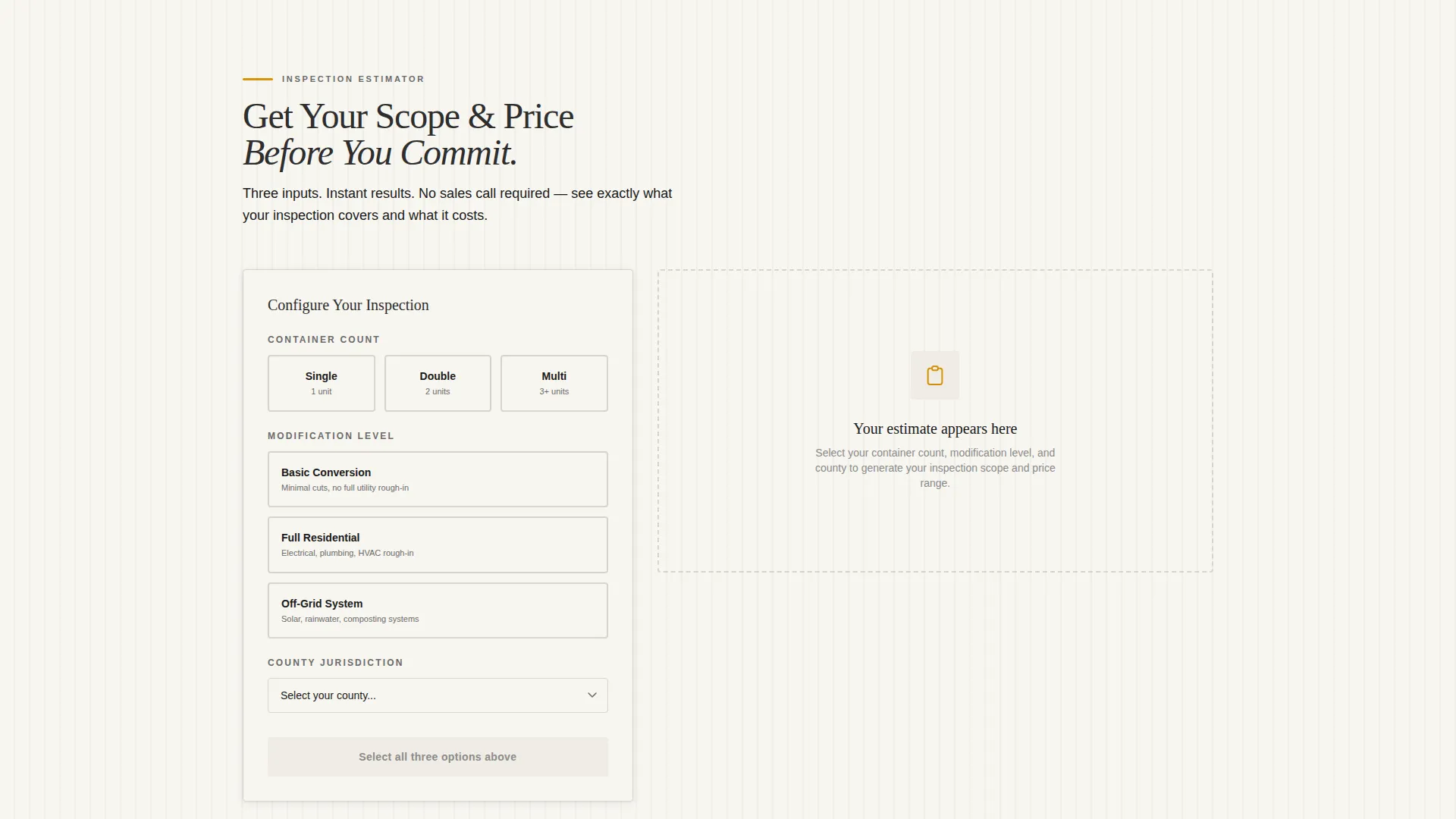
The estimator sits directly beneath the header headline, visible on load. Visitors select container count, modification level, and county jurisdiction. The tool returns an estimated inspection scope, typical turnaround time, and a price range rendered inside modular cards styled as inspection line items.
Flagged Findings Card Grid
Scrolling past the inspection-type cards reveals a grid of real reported deficiencies. Each card carries an amber-highlighted annotation that illustrates exactly what a professional inspection catches. This section converts skeptical visitors more effectively than any claim-based copy.
Dual Lead Capture Paths
The primary conversion path is a booking form that collects property address, container count, project stage, and preferred inspection date. The secondary path offers a free downloadable PDF checklist gated behind email capture, catching visitors who are not yet ready to book.
Sticky Mobile call to action Bar
On mobile, the primary call to action appears as a persistent bottom bar. The button stays visible as the visitor scrolls, so the booking prompt is never out of reach regardless of where they are on the page.
Modular Inspection Category Cards
Each inspection category gets its own card showing what is checked, common deficiencies found, and a sample photo from a real report. The cards are self-contained modules that can be read in any order and still communicate full value.
Full-Viewport Parallax Header
The header uses a wide-angle interior photograph of a container home mid-inspection. A slight parallax drift adds depth without distraction. The overlaid headline and immediate tool access establish authority and utility before the visitor reads a single paragraph.
Page sections overview
| Section | Purpose |
|---|---|
| Panoramic Header Image | Sets authority and surfaces the estimator tool immediately |
| Cost Estimator Tool | Lets visitors calculate inspection scope and price range instantly |
| Inspection Type Cards | Organizes five inspection categories into scannable modular cards |
| Flagged Findings Grid | Shows real deficiencies with amber-annotated evidence cards |
| Booking Form | Captures property details and preferred inspection date |
| PDF Checklist Gate | Collects email addresses from visitors not yet ready to book |
| Sticky Mobile call to action | Keeps the primary booking prompt visible throughout mobile scroll |
Design & branding system
The visual identity follows a Corporate Precision theme. Every color in the palette has a functional role, making the page feel like a printed inspection report mounted on a steel wall.
- Deep container gray (#2D2D2D) and weathered steel charcoal (#4A4A4A) anchor all headers, section dividers, and structural frames.
- Inspection-grade amber (#D4920B) drives calls to action, status indicators, pricing highlights, and card annotations without feeling alarmist.
- Card surfaces use report-white (#F7F5F0) with a subtle drop shadow, so each module reads like a page pulled from a professional assessment.
Mobile & speed optimization
The mobile layout is built around the reality that many buyers and builders first encounter this page on a phone, often mid-search on a property listing platform. The template addresses this directly.
- The Cost Estimator tool is the first interactive element and is fully usable on a small screen without horizontal scrolling.
- The sticky bottom bar keeps the primary call to action visible throughout the entire mobile scroll session.
How this template helps you convert
The page is structured so that each scroll event increases a visitor's confidence and their readiness to act. Conversion is built into the layout sequence, not bolted on at the end.
- The Cost Estimator delivers a personalized scope and price range immediately, making the value of the service tangible before the visitor reads anything else on the page.
- The flagged-findings grid provides visual evidence of what gets missed without professional inspection, turning abstract risk into concrete, amber-annotated examples that motivate action.
Other information about this template
This section covers additional practical context for anyone evaluating the Gauge template for their container home inspection business or similar property inspection service.
- The template is categorized under Real Estate and Property, specifically the Container Home Real Estate subcategory, making it relevant for any inspector working in the alternative and modular housing space.
- The card-grid layout is modular by design, meaning individual sections can be reordered or repurposed to fit slightly different inspection service offerings without breaking the visual system.
- The PDF checklist conversion path serves a dual purpose: it captures leads from undecided visitors and positions the inspector as an educational authority in the container home space.
Theme
Executive Suite
Creative direction
Case Study Narrative
Color system
Midnight Blue
Style
Split Screen (50/50)
Direction
Click-Through
Page Sections
Interactive Cost Estimator Tool
Flagged Findings Card Grid
Dual Lead Capture Paths
Sticky Mobile Call to Action Bar
Modular Inspection Category Cards
Full-viewport Parallax Header
Related questions
Who is the Gauge landing page template designed for?
What does the Cost Estimator tool do?
How does the secondary conversion path work?
What color system does this template use?
Can the modular card layout be adapted for other inspection services?



