Digital Government Booking Website Template
Gazette is a government job application landing page template built for civil service portals. It uses a zigzag alternating layout to walk applicants through each stage of the application process, from eligibility to appointment. The Corporate Precision design, authoritative serif typography, and a live vacancy counter create an institutional tone that builds trust and drives click-throughs to the registration portal.
by Rocket studio
Quick summary
Gazette is a structured, single-page landing page template designed for government job application portals. It guides applicants through a transparent, step-by-step process using an alternating zigzag layout. The design communicates institutional authority through clean typography, a restrained color system, and carefully placed calls to action that direct visitors into a secure registration portal.
Who this template is for
This template is built for organizations and developers launching civil service job portals, public sector recruitment platforms, or digital government services. It suits teams that need to present a formal, trustworthy interface without sacrificing usability.
- Public sector agencies publishing open vacancies across departments such as forestry, municipal planning, or federal audit bureaus
- Developers and designers building government recruitment portals that require a credible, desktop-first layout
- Organizations managing civil service hiring who want to demystify the application process for first-time candidates
What problem this template solves
Government job portals often overwhelm applicants with dense text, unclear processes, and no visible path forward. Gazette removes that friction by making every stage of the application lifecycle visible and easy to follow.
- Applicants lose confidence when they cannot see how the process works, from eligibility to final appointment
- Portals without structured visual flow struggle to convert visiting candidates into registered applicants
- Government platforms often lack the institutional credibility signals that build trust with cautious, first-time users
What you get with this template
You get a fully structured landing page with seven distinct sections, each serving a specific role in the applicant journey. The layout is production-ready and built around a clear conversion goal: move visitors from awareness to portal registration.
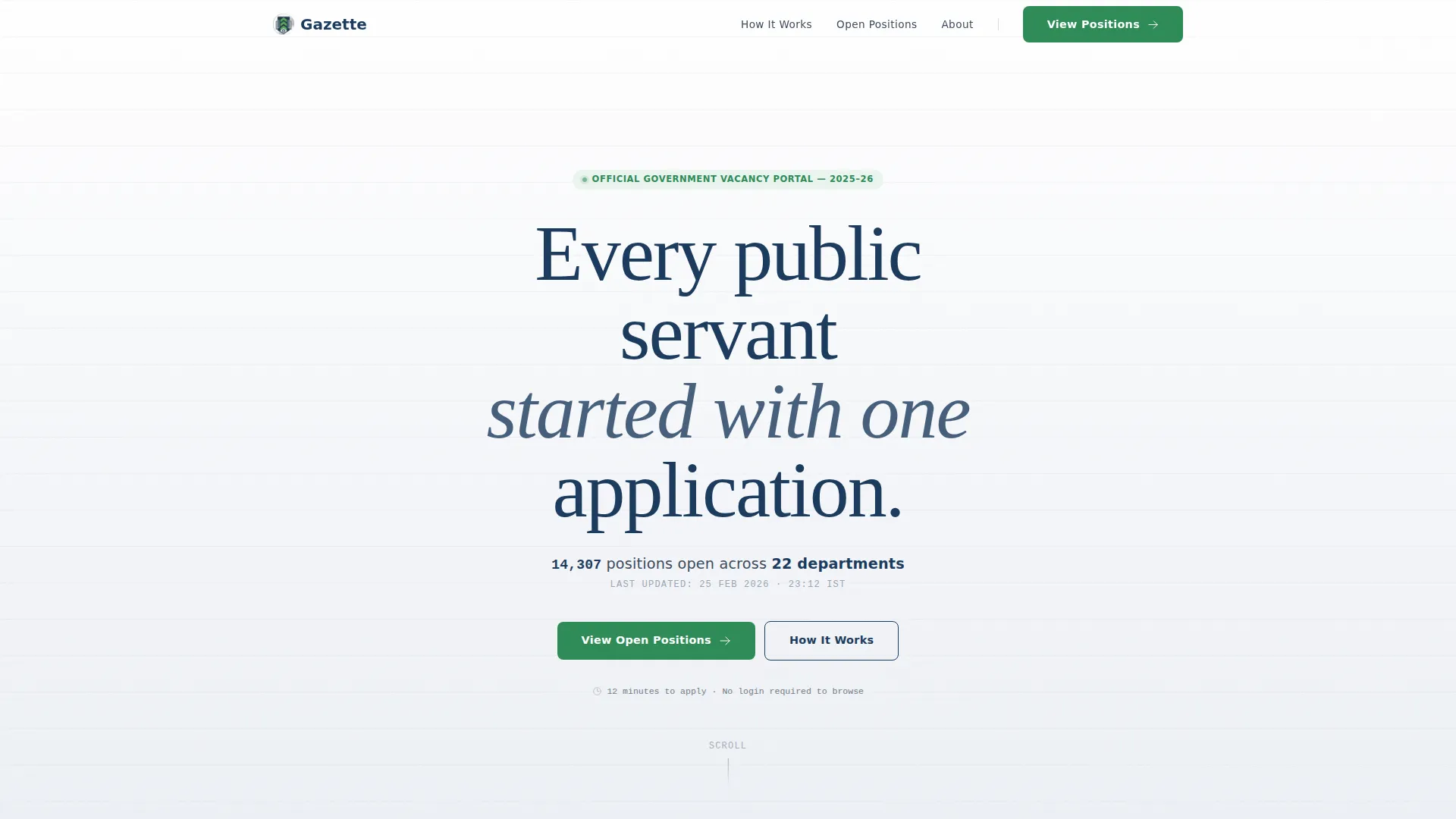
- A manifesto-style hero section with a live vacancy counter and a primary call to action
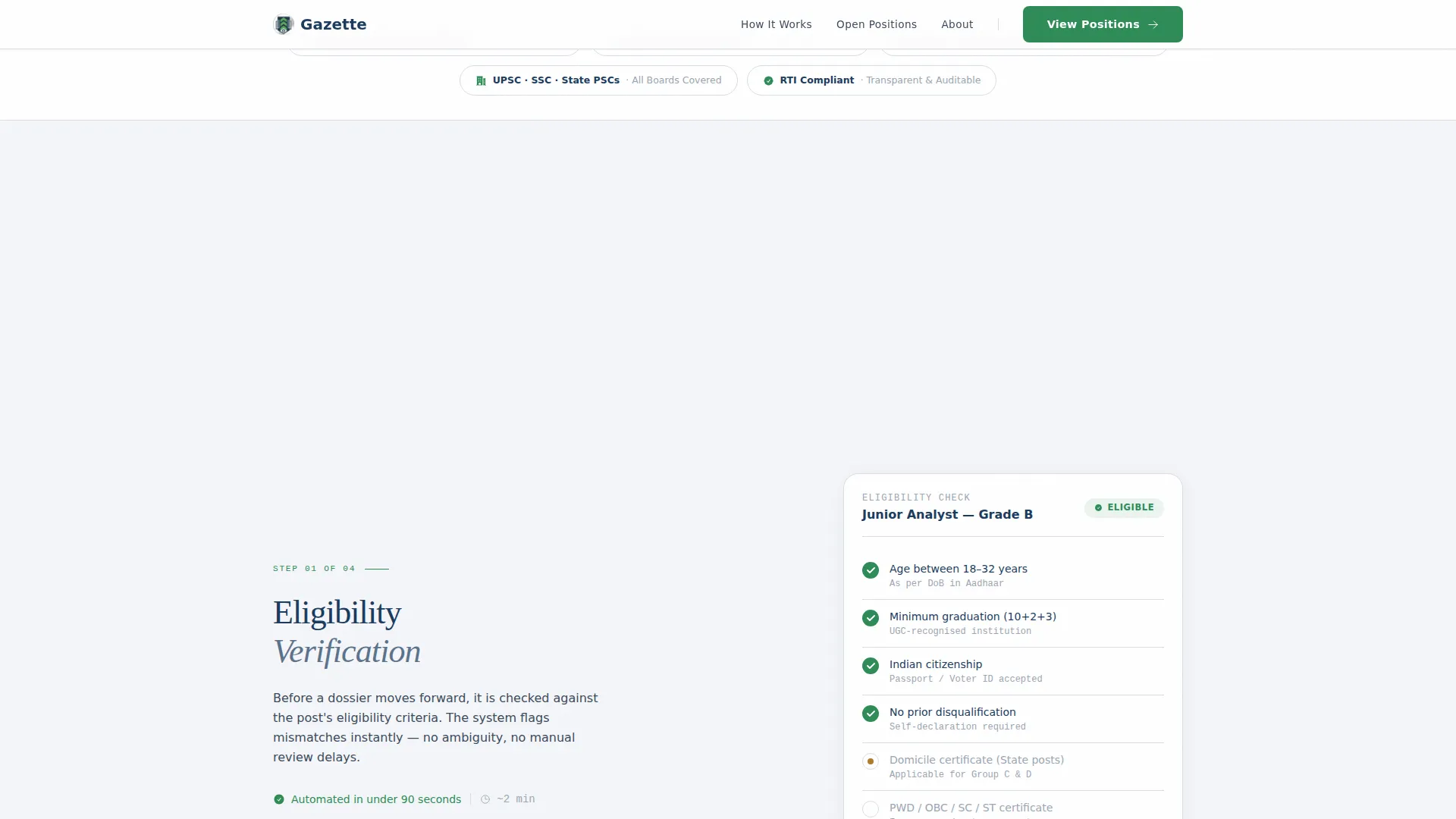
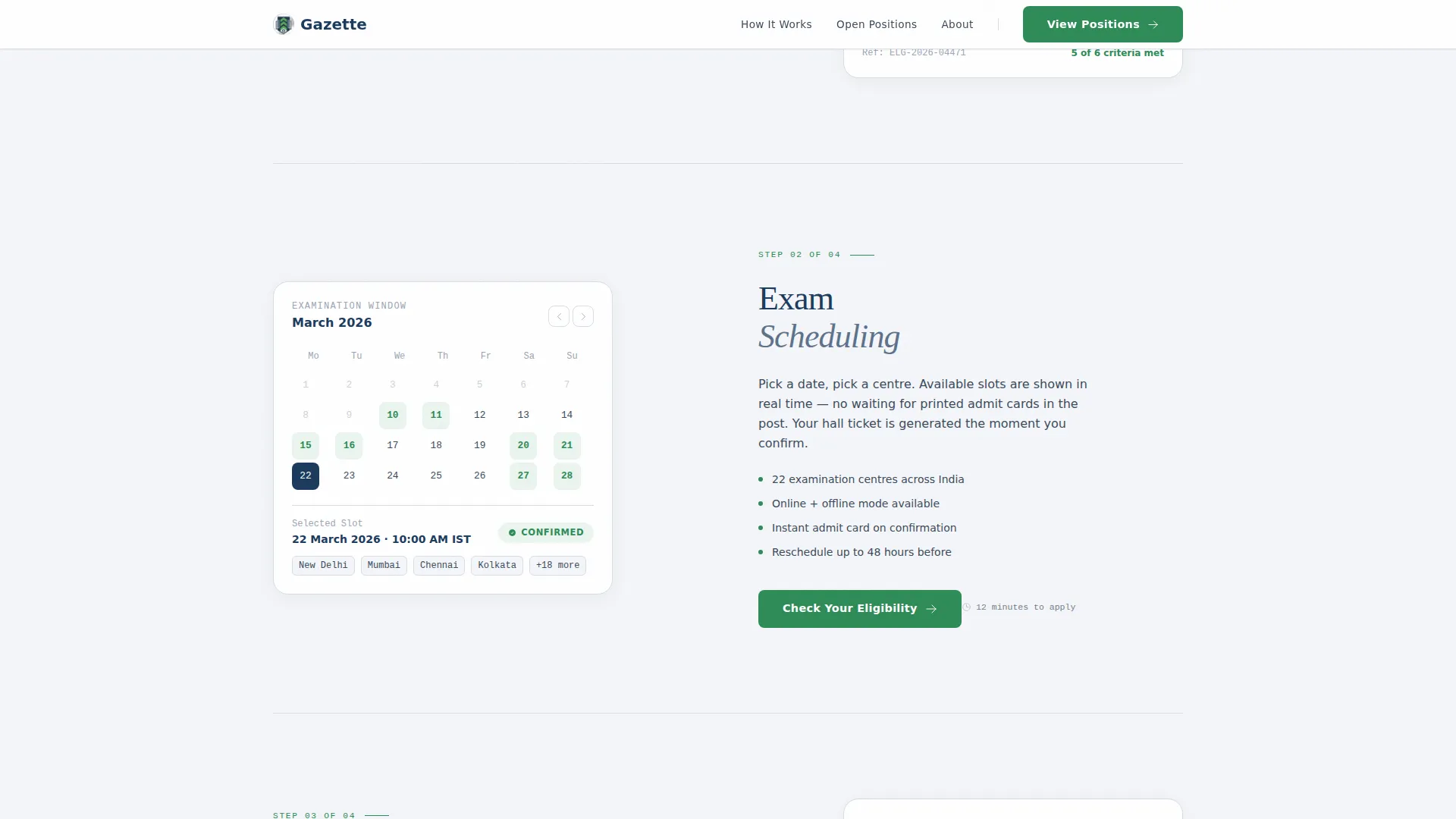
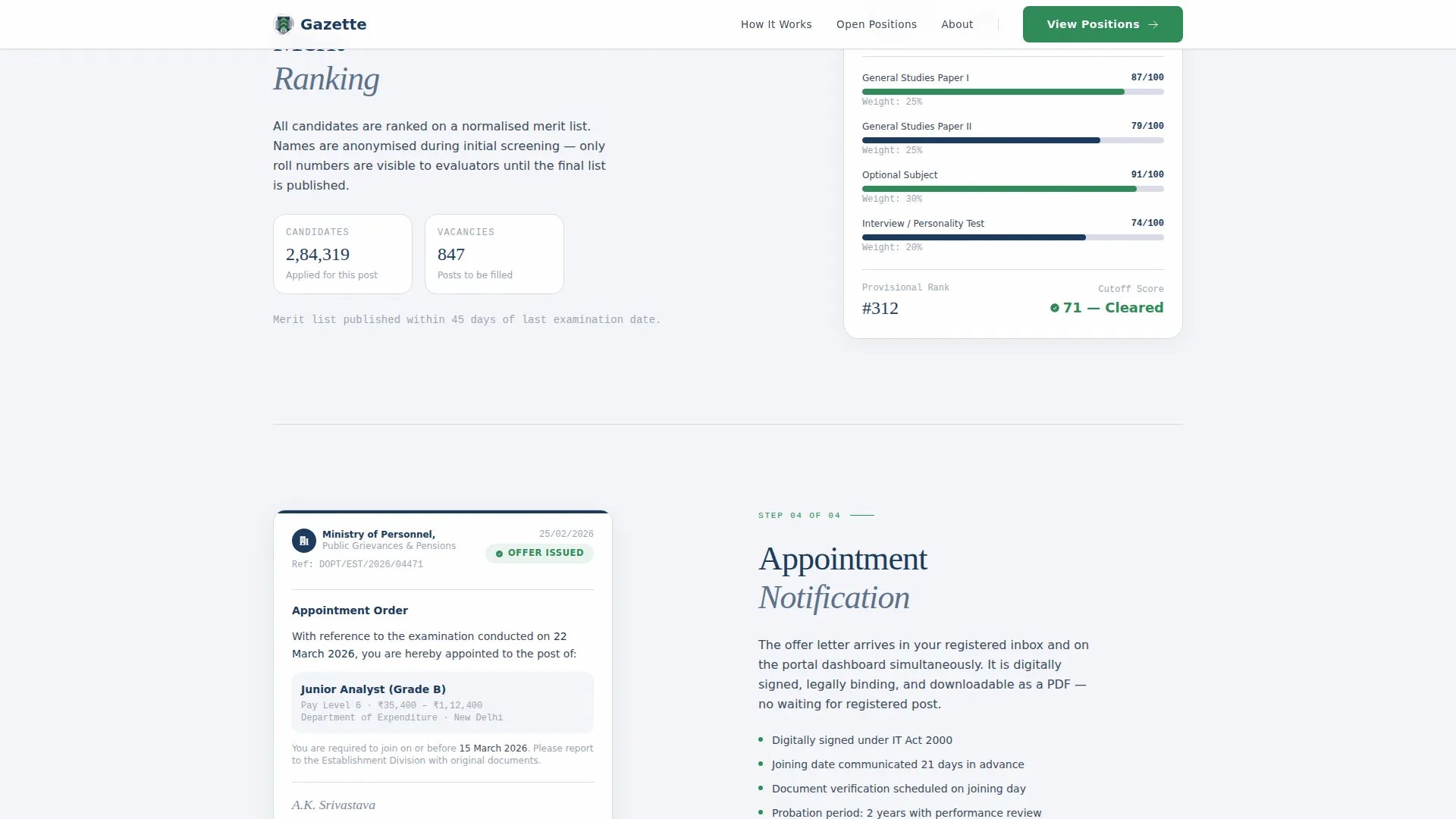
- Four numbered zigzag process steps revealing eligibility, exam scheduling, merit ranking, and appointment notification
- A credentials bar, a named testimonial block, and a closing call to action anchoring the bottom of the page
Feature list
A paragraph describing the feature list follows below.
Every feature in Gazette is drawn directly from the template brief. Each one serves either the visual identity, the applicant journey, or the conversion goal of the landing page.
Zigzag Alternating Process Layout
The core structure of the page alternates content left and right across four application steps. Each section is numbered in a "Step 03 of 05" format, giving scroll momentum the feel of moving through an actual queue.
Live Vacancy Counter
The hero section displays a real-time ticking counter showing the current number of open positions across active departments. The counter animation uses a subtle tick effect to signal that the platform is current and active.
Manifesto Hero with Typographic Authority
The full-width header features a single authoritative serif headline with no imagery. Generous whitespace and a supporting vacancy figure communicate institutional confidence rather than commercial urgency.
Tiered Call to Action System
Three distinct calls to action appear at strategic points: "View Open Positions" in the hero, "Check Your Eligibility" after Step 02, and "Begin Your Application" in the closing section. Each one is paired with an estimated completion time of 12 minutes.
Credentials and Trust Bar
A dedicated credentials row displays ministry seals, an encryption badge, and an accessibility compliance icon. This bar signals legitimacy to cautious applicants before they reach the first process step.
Named Testimonial Block
A single testimonial from a named Grade-B officer who applied through the platform eighteen months prior is placed alongside the appointment step. It provides specific, credible social proof without cluttering the page.
Page sections overview
| Section | Purpose |
|---|---|
| Hero Manifesto | Display the core quote, live vacancy counter, and primary call to action |
| Credentials Trust Bar | Show ministry seals, encryption badge, and compliance icons |
| Step 01: Eligibility | Present a document checklist visual aligned to the left |
| Step 02: Exam Scheduling | Show a calendar interface on the right with a secondary call to action |
| Step 03: Merit Ranking | Display an anonymized score breakdown aligned to the left |
| Step 04: Appointment | Show a sample offer letter and named testimonial on the right |
| Closing Call to Action | Anchor the page with "Begin Your Application" and completion time |
| Footer | Single-row linear footer with supporting links |
Design & branding system
Gazette uses a Corporate Precision visual identity built on the Cloud Canvas color system. The palette draws from the look of a freshly printed government circular: crisp paper, dark ink, and a single green checkmark confirming receipt.
- Colors: soft bureaucratic white (#F4F6F9) for backgrounds, civil slate (#3B4A5C) for body text and dividers, muted ink blue (#1B3A5D) for headlines and navigation, and decisive action green (#2E8B57) reserved for buttons and status indicators
- Typography: DM Serif Display is used for all headlines to project institutional authority; IBM Plex Sans handles body text and interface labels for high legibility
- Visual style: no illustrations or imagery in the hero; typography carries all authority, supported by numbered step headers, document-style checklists, and a calendar interface in the process sections
Mobile & speed optimization
Gazette is designed desktop-first, reflecting the reality that government portal users heavily favor desktop browsers. Full mobile responsiveness is built in so the alternating layout reflows cleanly on smaller screens.
- The zigzag sections stack vertically on mobile without losing the numbered step progression
- Scroll-reveal stagger animations and counter tick effects are handled with performance-conscious component separation, keeping static sections lean
- Hover states on process steps and a magnetic call to action effect are included to enhance desktop interactivity without affecting mobile layout stability
How this template helps you convert
The Transparent Process creative direction turns the application journey itself into the conversion mechanism. Every scroll reveals a new stage, reducing the anxiety that keeps qualified candidates from registering.
- Each call to action is placed at the exact moment a visitor has enough context to act: after the hero, mid-scroll after eligibility, and at the closing anchor, with "12 minutes to apply" displayed beside every button to reduce hesitation.
- The credentials bar and named testimonial handle trust-building passively, so visitors arrive at the registration portal already confident in the platform's legitimacy.
Other information about this template
Gazette is localized for English-language civil service contexts and uses the DD/MM/YYYY date format. The design language and grade-level references align with Indian civil service conventions, though the template can be adapted for other public sector systems.
- The footer uses a Pattern 1 Linear Single-Row layout, keeping the bottom of the page clean and professional
- Animation intensity is set to medium: counter ticks, scroll-reveal stagger on section entry, and subtle hover states provide motion without distracting from content
- The template uses Server Components for static sections and Client Components for the live counter animation, following a split rendering approach described in the project brief
- No form fields are present on the landing page; all data collection happens inside the secure portal that visitors reach after clicking through
Theme
Corporate Precision
Creative direction
Transparent Process
Color system
Cloud Canvas
Style
Zigzag/Alternating
Direction
Click-Through
Page Sections
Zigzag Alternating Process Layout
Live Vacancy Counter with Tick Animation
Manifesto Hero with Typographic Authority
Tiered Call to Action System
Credentials and Trust Bar
Named Testimonial Block
Related questions
Does this template include actual form fields or application logic?
Can I adapt this template for a state-level or municipal government portal?
What typography does this template use?
How does the live vacancy counter work?
Is this template suitable for applicants who are new to the civil service process?



