Industrial Generator & Power Equipment Landing Page
Genset is a dashboard-style industrial landing page template built for generator and power equipment businesses. It combines a spec-dense data grid, an engineering resource library, and an interactive load-planning tool inside a commanding Navy Authority color system. The design speaks directly to facility managers, contractors, and operations directors who need answers fast and trust backed by hard data.
by Rocket studio
Quick summary
Genset is a single-page, dashboard-driven landing page template for generator and power equipment operations. It opens with a panoramic staging-yard photograph, then walks visitors through a monitoring bay, an engineering library, and a load-planning room. Every section is designed to earn trust through specification data before asking for contact details.
Who this template is for
This template is built for businesses that sell, rent, or service generator and power equipment at a commercial or industrial scale. The layout speaks the language of technical buyers who evaluate equipment on hard numbers, not marketing copy.
- Facility managers sourcing standby power solutions for hospitals, data centers, and commercial buildings
- General contractors specifying backup generator units for new construction projects
- Operations directors at manufacturing plants where unplanned downtime carries serious financial consequences
What problem this template solves
Power equipment buyers arrive with specific technical questions. They want kilowatt ranges, fuel types, voltage output, noise ratings, and sizing guidance before they will ever fill out a form. Most generic templates cannot support that level of specification density or structured resource delivery.
- Visitors leave without converting because they cannot find the technical detail they need to justify a decision
- Sales teams waste time on unqualified leads who were never matched to the right generator class
- Credibility gaps appear when a high-value industrial offer is presented on a lightweight, visually thin page
What you get with this template
You get a fully structured, single-page layout organized like a power facility floor plan. Each scroll zone serves a distinct purpose, moving the visitor from awareness to qualification to action without a single dead end.
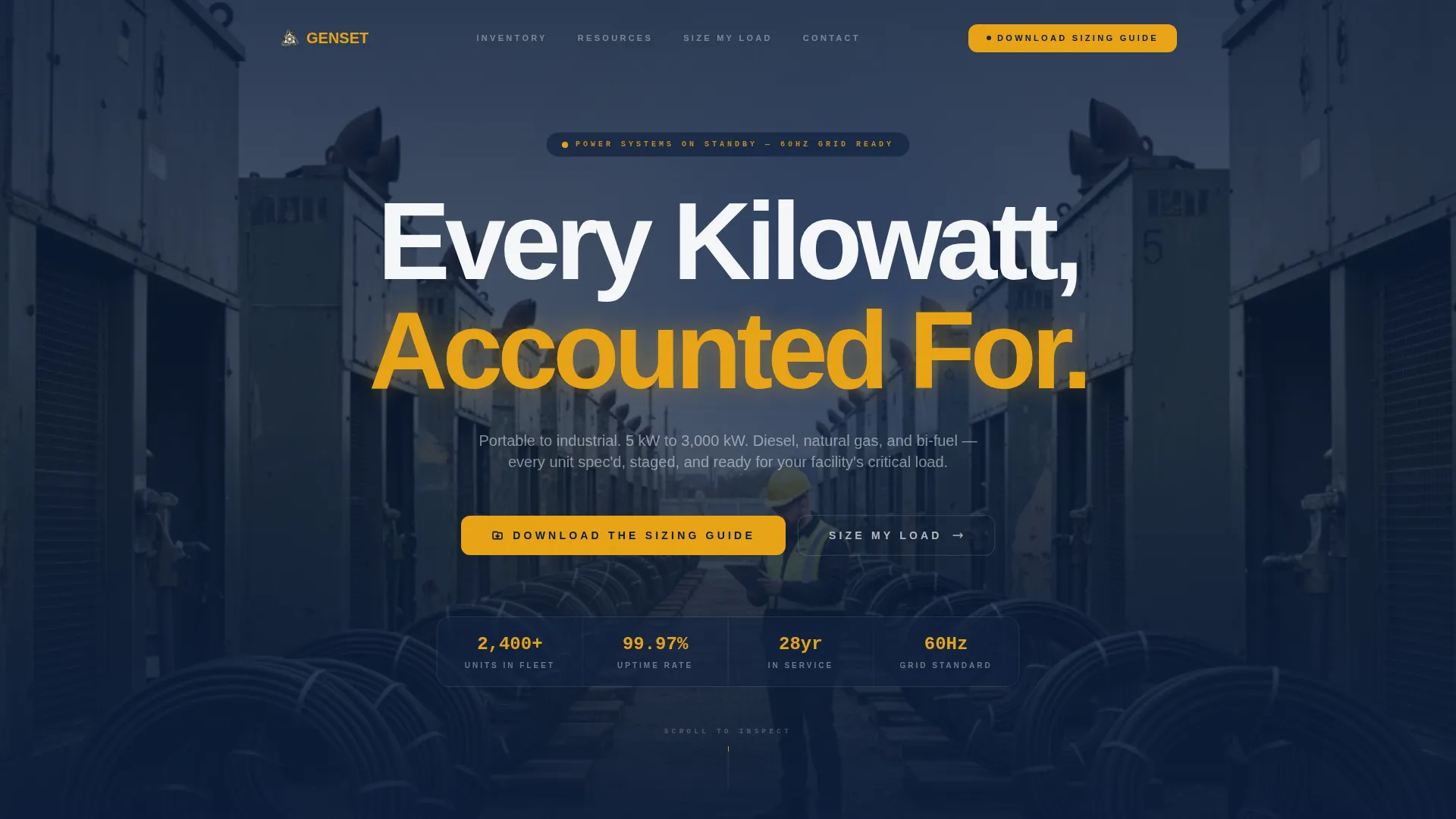
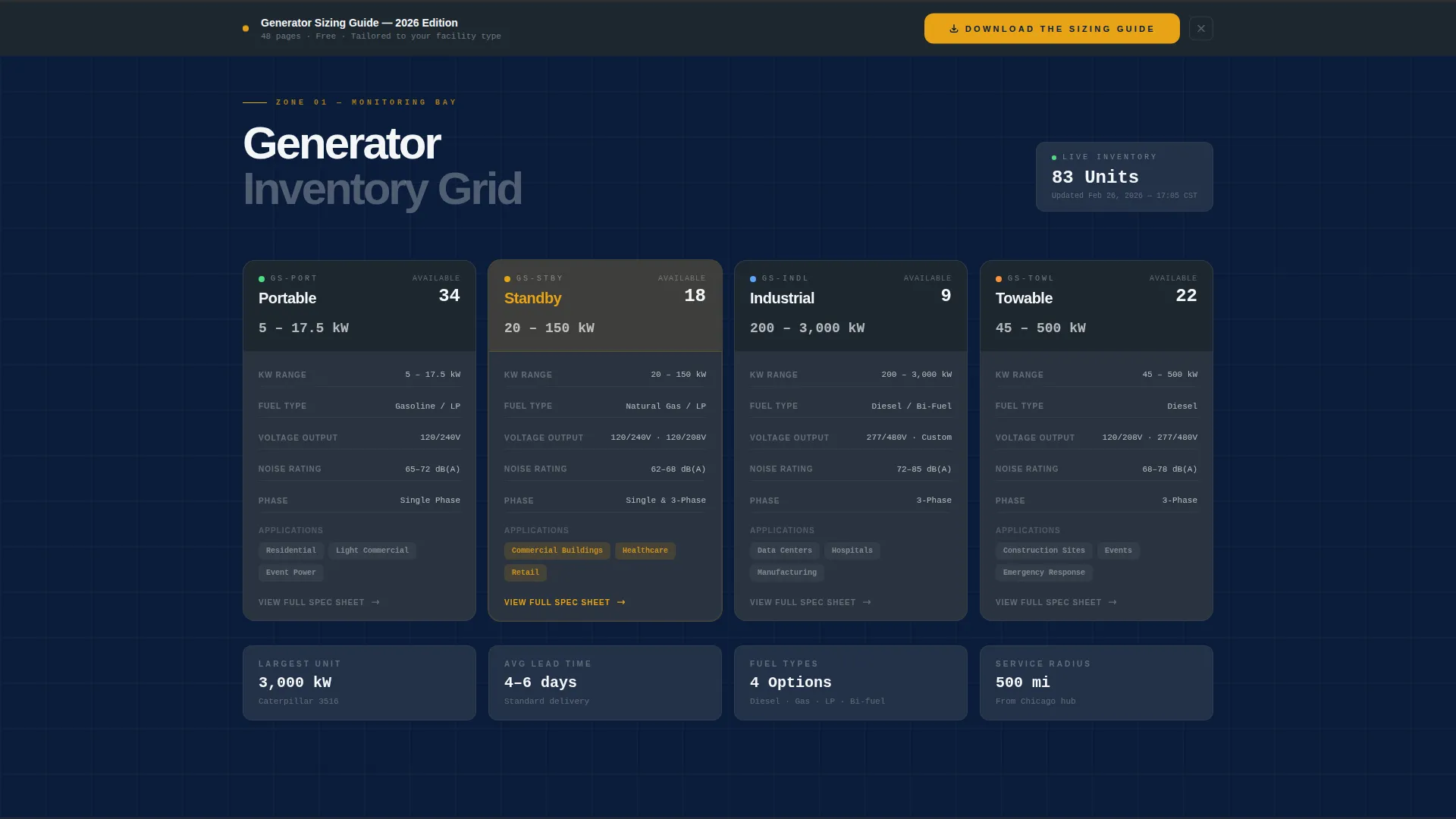
- A panoramic hero section with a translucent navy overlay and a primary headline, followed by a live-style generator category data grid
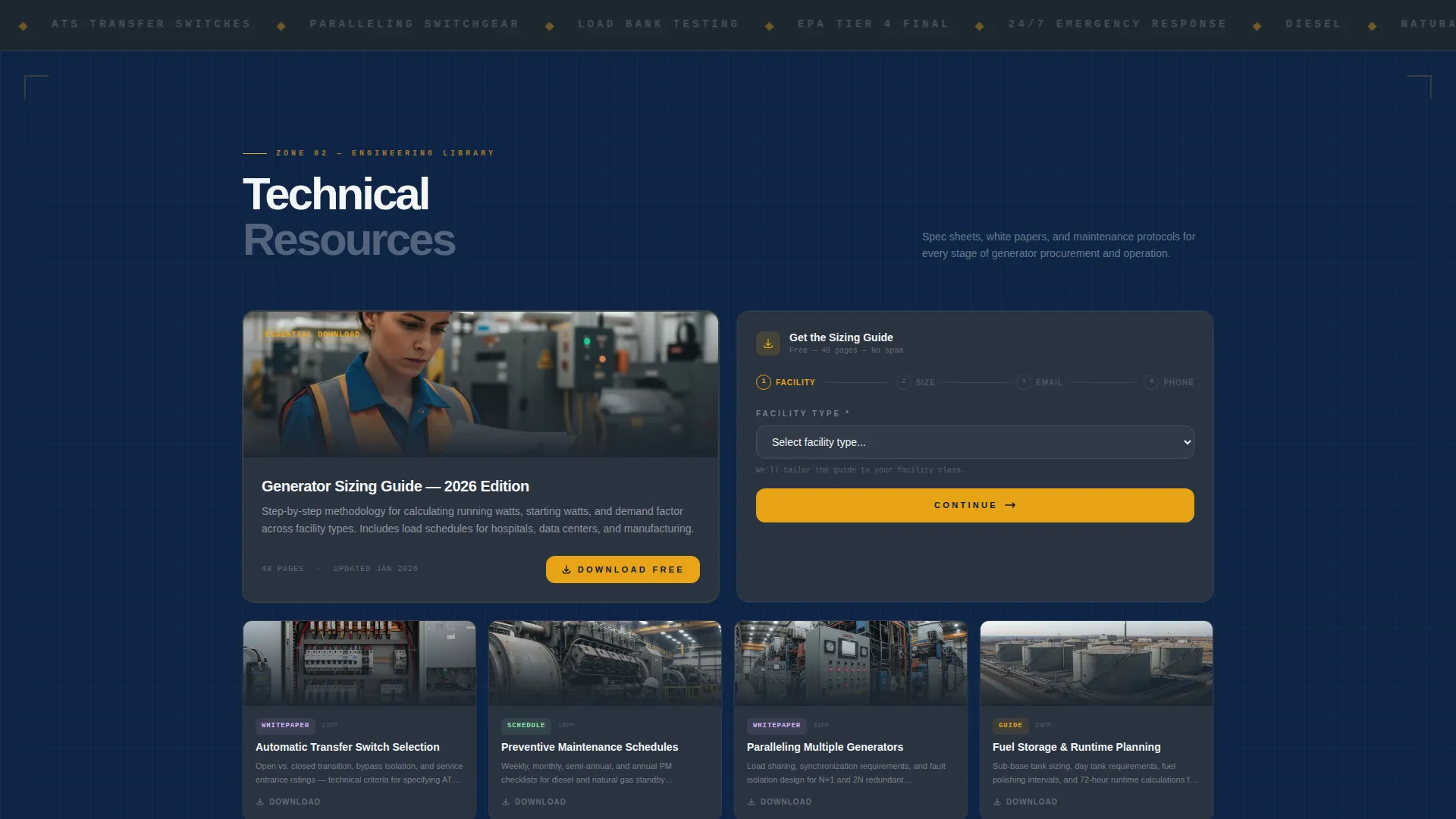
- An engineering library section with a blueprint-style grid layout for technical white papers, sizing calculators, and maintenance schedules
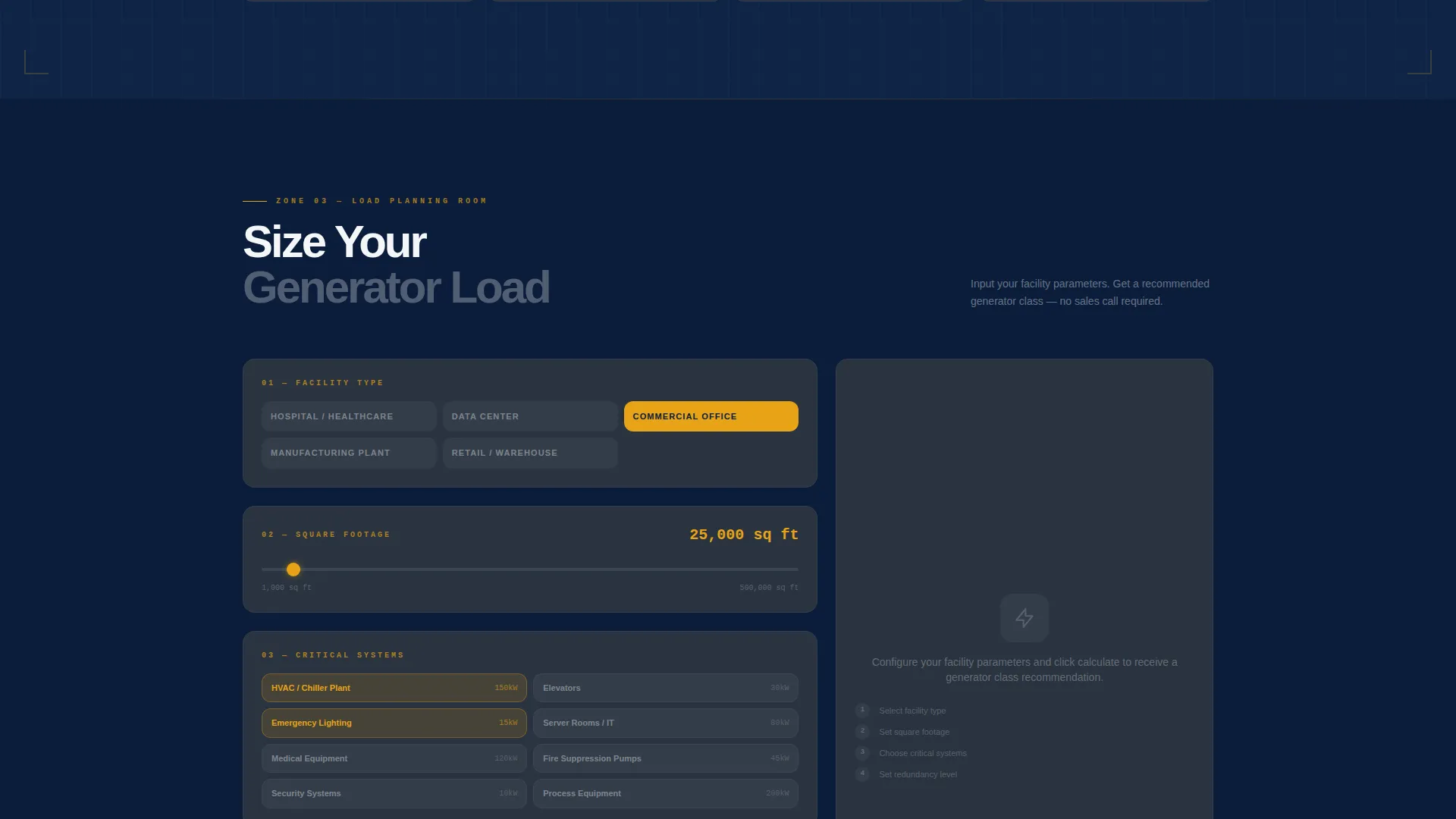
- A load-planning tool section with a progressive-disclosure form and a sticky bottom bar repeating the primary call to action
Feature list
This section covers the core built-in components that make the Genset template function as a high-performance industrial landing page.
Panoramic Hero Section
The header uses a full-width, edge-to-edge photograph taken at knee height across a generator staging yard. A translucent navy overlay anchors the headline "Every Kilowatt, Accounted For," keeping the image atmospheric while the text stays sharp and readable.
Generator Category Data Grid
The monitoring bay section displays generator categories, portable, standby, industrial, and towable, as structured spec cards. Each card shows kilowatt range, fuel type, voltage output, and noise rating in clean columns, giving technical buyers exactly the data they came for.
Engineering Resource Library
The engineering library organizes technical white papers, sizing calculators, and maintenance schedules in a blueprint-style grid. Isometric line illustrations of installation layouts give the section a technical authority that matches the expectations of engineering and procurement audiences.
Interactive Load-Planning Tool
Visitors input their square footage, critical systems, and redundancy requirements to receive a recommended generator class. This tool delivers consulting-grade guidance before any contact information is requested, building genuine trust with the visitor.
Progressive-Disclosure Lead Form
The primary form collects facility type first via a dropdown (hospital, data center, commercial, manufacturing, or residential), then square footage range, then email, then optional phone. This sequence gives value at each step rather than demanding details upfront.
Sticky Bottom Bar with Repeated call to action
After the load-planning section, a sticky bottom bar keeps the "Download the Sizing Guide" call to action visible as visitors continue to scroll. A secondary path, "Request a Site Assessment," provides a lower-friction option for visitors who are further along in their decision process.
Page sections overview
| Section | Purpose |
|---|---|
| Panoramic Hero | Establishes authority and introduces the headline offer |
| Generator Data Grid | Displays category spec cards for quick technical comparison |
| Engineering Resource Library | Delivers white papers, calculators, and maintenance references |
| Load-Planning Tool | Guides visitors to a recommended generator class via inputs |
| Primary call to action Form | Captures facility type, square footage, email, and phone |
| Sticky Bottom Bar | Keeps the sizing guide download visible throughout scrolling |
| Site Assessment Path | Offers a scheduling link for visitors ready to go further |
Design & branding system
The template uses a Navy Authority color system that mirrors the look and feel of an industrial control panel. Every color assignment has a structural purpose, so the palette communicates hierarchy and urgency without any extra decoration.
- Deep command navy (#0B1D3A) dominates headers and section backgrounds, providing a grounded, authoritative foundation
- Gunmetal panel gray (#3B4654) structures the data grid cards, and high-visibility safety white (#F4F6F8) opens breathing room in spec tables and body text
- Alert amber (#E8A317) is reserved for calls to action, status indicators, and key data callouts, directing the eye precisely where decisions happen
Mobile & speed optimization
The Genset template is structured for responsive display across screen sizes. The data grid, spec cards, and form layouts are designed to reflow cleanly on smaller viewports so mobile visitors retain access to the full specification detail.
- Spec card columns stack vertically on narrower screens, keeping kilowatt and fuel-type data legible without horizontal scrolling
- The sticky bottom bar and primary call-to-action button remain accessible on mobile without overlapping critical content
- Section transitions use a subtle horizontal wipe effect, kept visually lightweight so the effect does not interrupt the scroll experience
How this template helps you convert
The conversion strategy is built around earning the click rather than demanding it. Visitors receive genuine value through the data grid and load-planning tool before a single form field appears, which increases the likelihood that the contact details provided belong to a qualified buyer.
- The interactive load-planning tool positions the page as a free consulting resource, making visitors more willing to share their facility details and email address in exchange for a personalized generator class recommendation.
- Progressive disclosure in the lead form lowers perceived friction by starting with a non-personal question (facility type) and only requesting an email after the visitor has already engaged with the tool.
- The repeated "Download the Sizing Guide" call to action in the sticky bottom bar ensures the primary conversion path stays visible for visitors who scroll past the initial placement without acting.
Other information about this template
The Genset template is a strong fit for industrial equipment businesses that publish technical resources as part of their sales process. Its dashboard aesthetic and spec-heavy layout make it well-suited to contexts where the buyer is an engineer, a project manager, or a procurement officer rather than a casual consumer.
- The template style is classified as Dashboard/Data Grid and the creative direction follows a Spatial and Architectural approach, treating each scroll zone as a distinct room in a power facility
- The Service Utility theme and Navy Authority color system work together to communicate the reliability and operational readiness that backup power buyers expect to see
- Section transitions use a horizontal wipe animation that reinforces the spatial metaphor without relying on heavy visual effects
- The template is designed for the Generator and Power Equipment niche within the Manufacturing and Industrial category, making it directly relevant to businesses selling diesel generators, natural gas standby units, portable power equipment, and towable generator sets
Theme
Service Utility
Creative direction
Spatial & Architectural
Color system
Navy Authority
Style
Dashboard/Data Grid
Direction
Content/Resource
Page Sections
Panoramic Hero with Navy Overlay
Generator Category Spec Cards
Blueprint-style Engineering Library
Interactive Load-planning Tool
Progressive-disclosure Lead Form
Sticky Bottom Bar Call to Action
Related questions
Who is the primary audience for this template?
Can I customize the generator categories in the data grid?
What does the load-planning tool section actually do?
How does the progressive-disclosure form reduce drop-off?
Is this template suitable for businesses serving multiple industries?



