Kids Ice Skating Academy Landing Page Template
Glide is a masonry-style landing page template built for kids ice skating academies. It guides nervous parents from first research to confident sign-up through a Hero's Journey scroll experience. With a Lottie animated hero, staggered resource cards, and a warm Soft Mist color palette, it turns casual browsers into engaged leads ready to download the free Starter Kit or browse class schedules.
by Rocket studio
Quick summary
Glide is a single-page, masonry-layout template designed for kids ice skating academies and schools. It follows a Hero's Journey structure, walking parents from beginner resources all the way to celebration and sign-up. The design is warm and community-focused, with a teal call-to-action system that earns trust before it ever asks for an email.
Who this template is for
This template is built for ice skating academies, rinks, and schools that teach children ages 3 to 12. It works especially well for programs that want to attract new families through content before asking them to commit to a class.
- Rink operators and skating directors launching or refreshing a kids program page
- Figure skating clubs seeking to convert curious hockey families or homeschool co-ops
- Skating instructors running independent academies who need a professional first impression
What problem this template solves
Parents searching for kids skating lessons online rarely commit on the first visit. They are comparing options, worrying about costs, and trying to figure out what their child actually needs. This template meets them at that early, uncertain moment and earns their trust card by card.
- There is no clear starting point for first-time skating families researching on a phone between school pickups
- Generic rink websites bury beginner information and make parents do the work of finding answers
- Most academy pages ask for commitment before they have given the parent any real value
What you get with this template
You get a fully structured, scroll-driven landing page that progresses like a story. Every section has a specific job, from welcoming the nervous first-timer to celebrating the confident skater and inviting them to join.
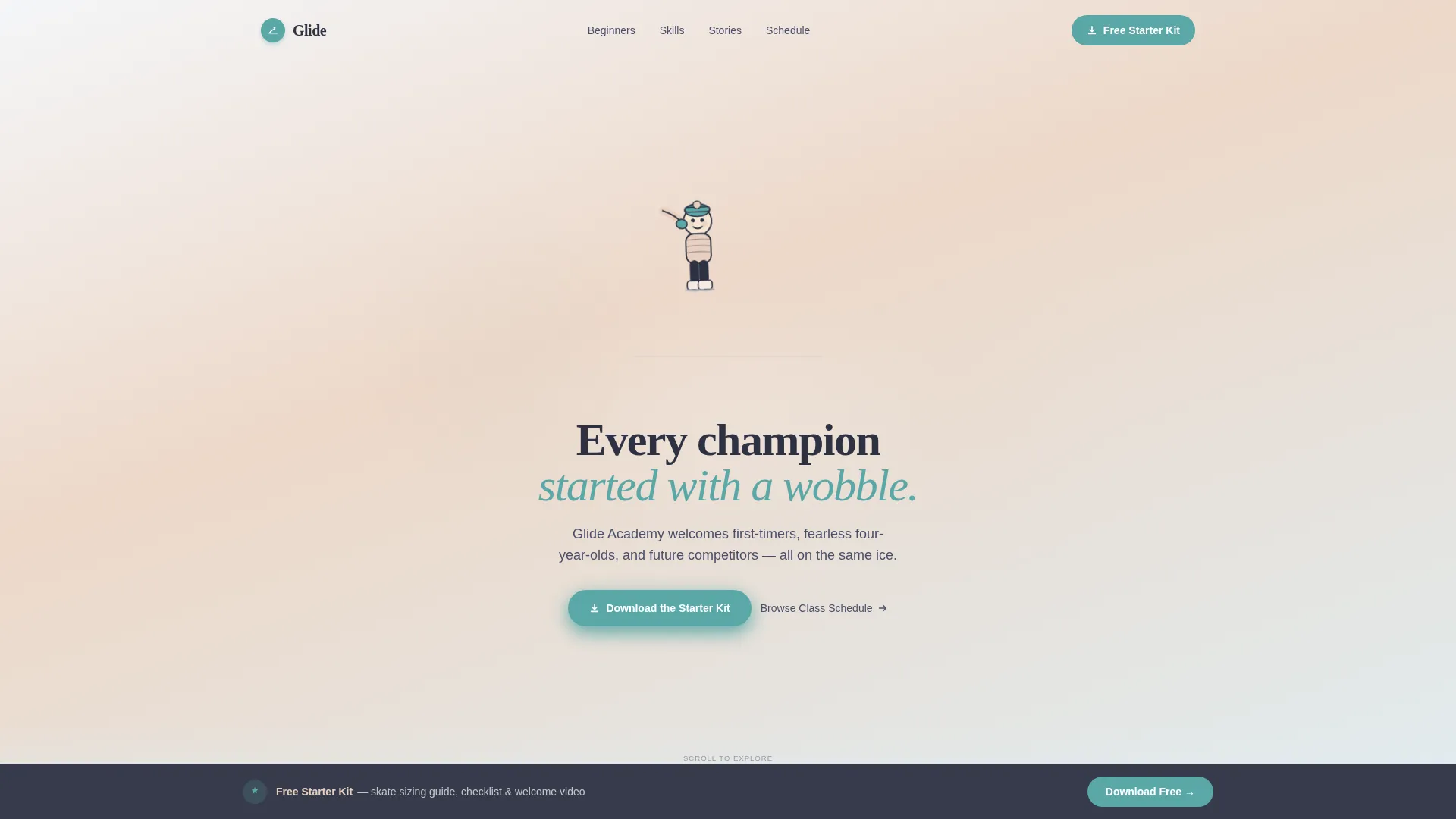
- A Lottie animated hero section with a hand-drawn child skater and the headline "Every champion started with a wobble"
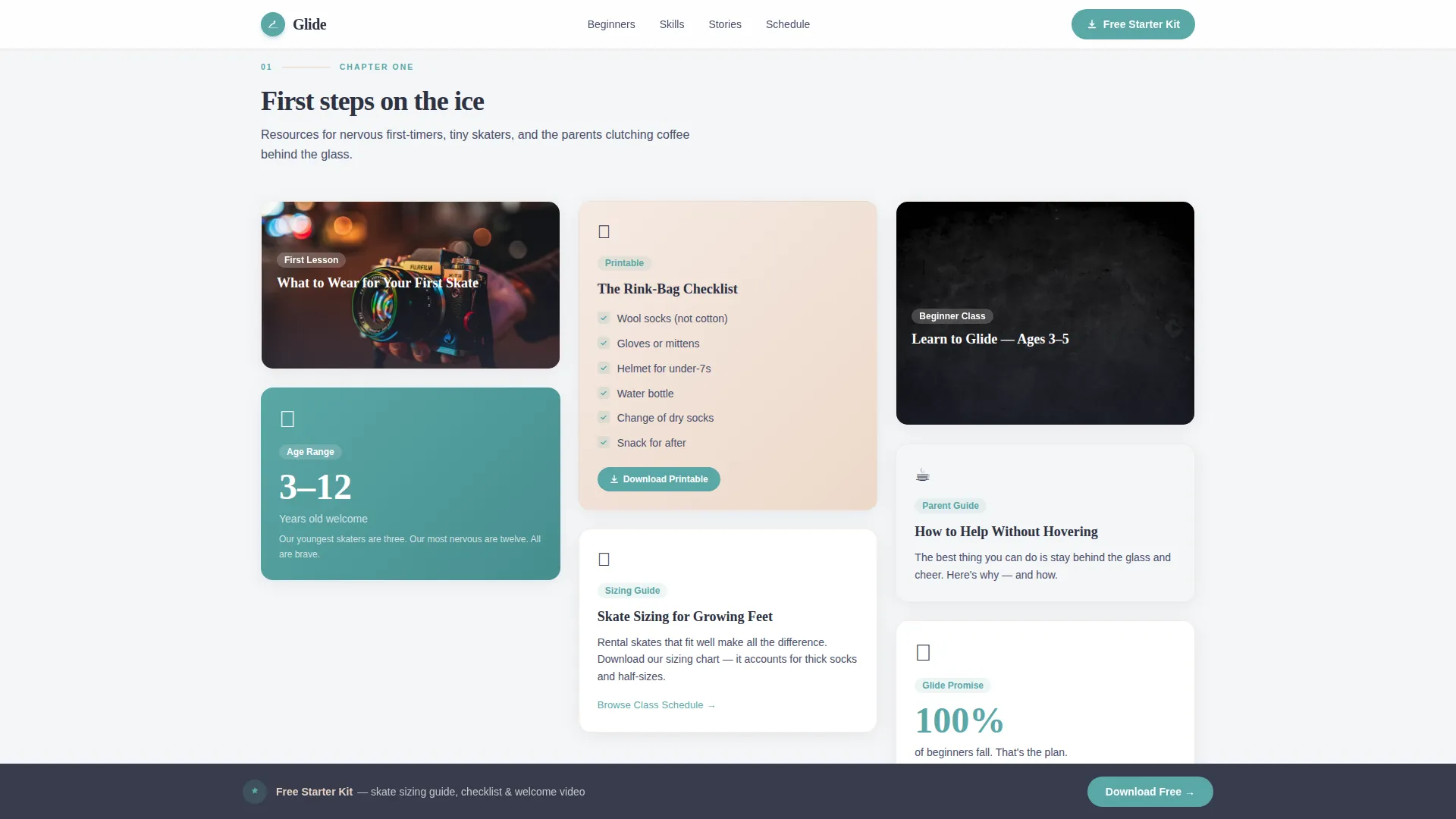
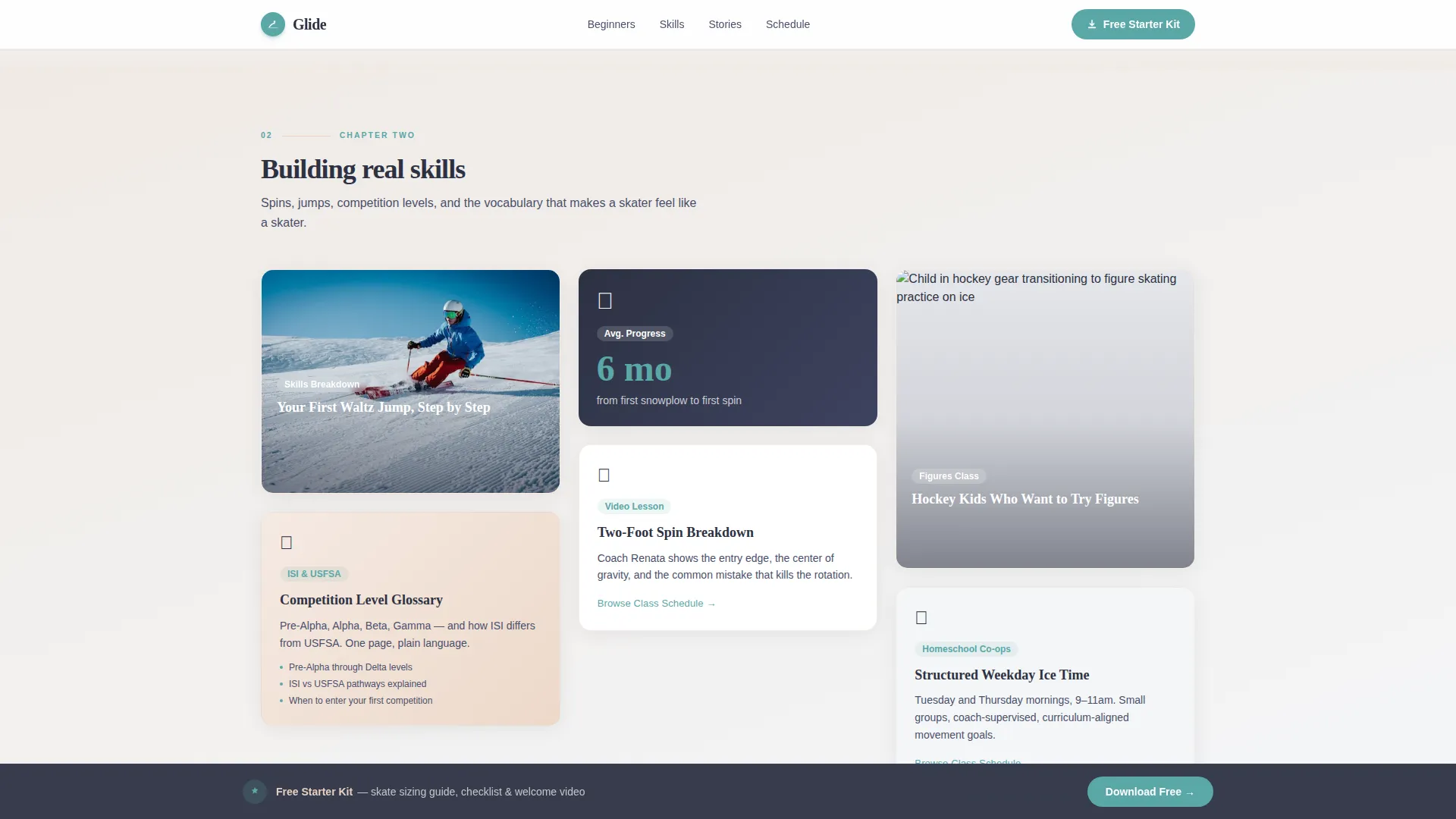
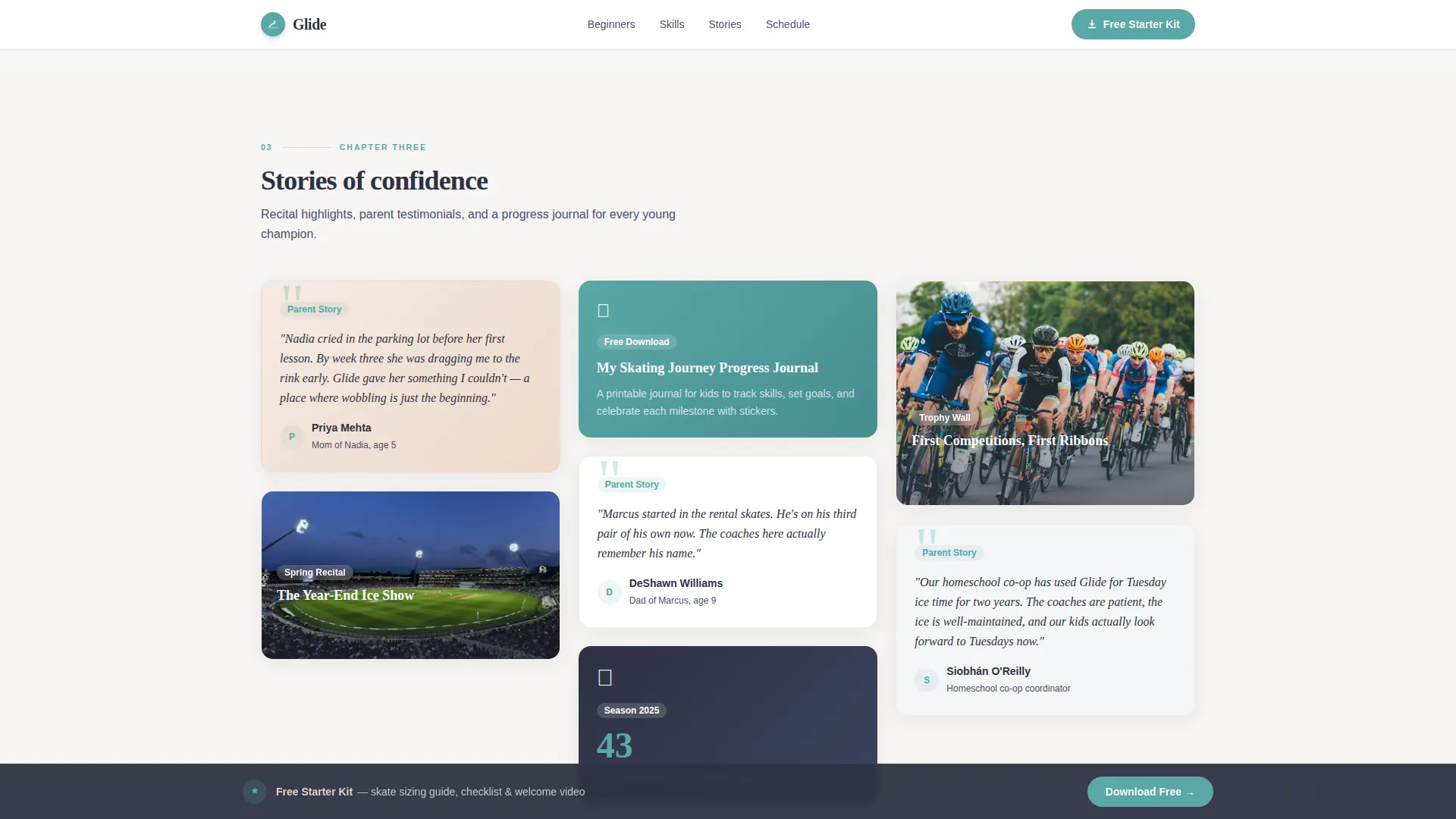
- Three masonry content tiers covering beginner resources, intermediate skill guides, and mastery celebrations
- A sticky download banner, a single-step Starter Kit form, and a secondary class schedule text link path
Feature list
This section covers the core built-in capabilities that make Glide work as a conversion-focused kids ice skating landing page.
Lottie Vector Hero Animation
The header features a full-width Lottie animation of a hand-drawn child in a puffy jacket wobbling, steadying, and gliding across the ice. Snowflake particles drift around the figure as the headline fades in beneath. The line weight is intentionally friendly and imperfect, giving the animation a sketchbook warmth rather than a polished commercial feel.
Hero's Journey Masonry Scroll
The page is organized into three progressive masonry tiers that mirror a child's skating journey. Beginner cards cover gear guides and checklists. Intermediate cards introduce spin breakdowns and competition level guides. Mastery cards celebrate recitals, testimonials, and progress journals. The staggered layout keeps the eye moving and makes each row feel like a new chapter.
Sticky Starter Kit Call-to-Action Banner
After the second scroll depth, a sticky teal banner appears at the top of the viewport inviting parents to download the free Starter Kit. The banner persists throughout the scroll journey and anchors again at the final section, creating two natural moments to convert without interrupting the reading flow.
Single-Step Download Form
The Starter Kit download triggers a simple modal form with three fields: parent's first name, child's age group selected from a dropdown (ages 3 to 5, 6 to 8, or 9 to 12), and email address. The form is intentionally minimal to reduce friction for mobile users who are often searching between other tasks.
Scroll-Triggered Card Reveals
Each masonry card animates into view as the visitor scrolls. The staggered reveal uses CSS animations with an Intersection Observer approach, so cards appear in a natural, flowing sequence rather than all at once. This keeps the page feeling alive without relying on heavy animation libraries.
Secondary Class Schedule Path
Beneath every beginner-tier card, a text link reading "Browse Our Class Schedule" provides an alternative conversion path. Parents who are ready to skip the research phase and book directly are caught at exactly the right moment without disrupting the content journey for those who need more context first.
Page sections overview
| Section | Purpose |
|---|---|
| Animated Hero | Introduce the academy and set an emotional, welcoming tone |
| Beginner Resource Masonry | Deliver gear guides, sizing tips, and a printable checklist |
| Intermediate Skills Masonry | Build credibility with spin guides and competition level content |
| Mastery Celebration Masonry | Inspire with testimonials, recital highlights, and a progress journal |
| Starter Kit Form | Capture parent name, child age, and email in one simple step |
| Footer | Close with a clean, linear single-row footer pattern |
Design & branding system
The visual identity follows a Community Hearth theme built around the Soft Mist color system. Every color choice is grounded in the sensory experience of a rink lobby: cold fog, warm overhead light, and the soft textures of wool mittens and blush-tinted rink boards.
- Backgrounds use rink-fog white (#F4F6F8) and dawn blush (#E8CFC0) to keep the page soft and approachable
- Text sits in deep charcoal (#2D3142) for clear readability against all background tones
- Skate-blade teal (#5AA7A7) appears exclusively on buttons and interactive elements, so every tap target is instantly recognizable
Mobile & speed optimization
The template is built mobile-first, reflecting the reality that most parents search for kids skating lessons on their phones, often while sitting rink-side or waiting for pickup. Every layout decision prioritizes the small-screen experience.
- Masonry cards reflow into a single-column stack on narrow screens, keeping content readable without horizontal scrolling
- CSS animations and an Intersection Observer approach handle scroll-triggered reveals without loading heavy external libraries
- The sticky call-to-action banner and modal form are both sized and spaced for easy thumb interaction on mobile devices
How this template helps you convert
Glide earns the conversion before it asks for it. The page structure is deliberately designed to build parental confidence through useful content, so the download form appears at the moment of maximum trust rather than at the moment of first arrival.
- The Hero's Journey scroll sequence moves parents from anxious researcher to informed believer by delivering real value at every tier, so by the time the Starter Kit form appears, the academy already feels like the right choice.
- Two distinct conversion paths run in parallel throughout the page: the primary teal download banner targets parents who need the full resource journey, while the secondary "Browse Our Class Schedule" text link catches parents who are already ready to book.
Other information about this template
This template was built specifically for the kids ice skating academy and school niche within the broader Kids and Family category. It is a single landing page, not a multi-page site, so it is best used as a focused entry point for paid or organic traffic campaigns targeting parents searching for kids skating lessons nearby.
- Typography uses Fraunces for display headings and DM Sans for body text, pairing editorial warmth with clean legibility
- The footer follows a linear single-row pattern, keeping the close of the page tidy and uncluttered
- The Starter Kit content referenced in the form includes a printable rink-bag checklist, a skate sizing guide, and a welcome video link, all outlined in the template brief
- The template is localized for English-speaking audiences using United States date formats and currency conventions
- The masonry layout style draws from editorial Pinterest-style grids, making it visually distinctive compared to standard sports academy page templates
Theme
Community Hearth
Creative direction
Hero's Journey
Color system
Soft Mist
Style
Masonry/Pinterest
Direction
Content/Resource
Page Sections
Lottie Vector Hero Animation
Hero's Journey Masonry Scroll
Sticky Starter Kit Download Banner
Single-step Lead Capture Form
Scroll-triggered Card Reveals
Dual Conversion Path Design
Related questions
Who is this landing page template designed for?
What is included in the Starter Kit form section?
Can I use this template without the Lottie animation?
How does the masonry layout work on mobile devices?
Does this template support more than one conversion path?



