Bold Brutalist Graphic Designer Landing Page Template
Glyph is a bold brutalist graphic designer landing page built on a bento grid layout. It pairs a photo mosaic header with case study narrative sections, an electric vermillion call-to-action, and a Cloud Canvas color system. Designed to attract creative directors, startup founders, and editorial clients, it turns a portfolio into a high-impact lead generation tool.
by Rocket studio
Quick summary
Glyph is a single-page graphic designer portfolio landing page built around a bento grid structure and a bold brutalist visual identity. It opens with a photo mosaic header, unfolds through case study narrative sections, and closes with two conversion paths. The Cloud Canvas palette keeps everything raw and intentional, while electric vermillion drives every action.
Who this template is for
This landing page is built for independent graphic designers who need their portfolio to work as hard as they do. It speaks directly to the kind of designer whose work is too strong to sit inside a generic template grid.
- Freelance graphic designers pitching to creative directors at agencies
- Brand identity designers targeting startup founders with tight timelines
- Editorial designers whose work needs to stop a scroll, not just fill a screen
What problem this template solves
Most portfolio pages either bury the work inside bloated navigation or present it so quietly that no one pauses long enough to feel it. Glyph removes both problems at once.
- Projects lack context, so visitors leave without understanding the designer's thinking
- Generic portfolio grids make every designer look interchangeable and forgettable
- No clear conversion path means interested clients browse but never actually reach out
What you get with this template
You get a complete, single-page landing page with every section already structured and sequenced. The layout does the creative heavy lifting so you can focus on dropping in your work.
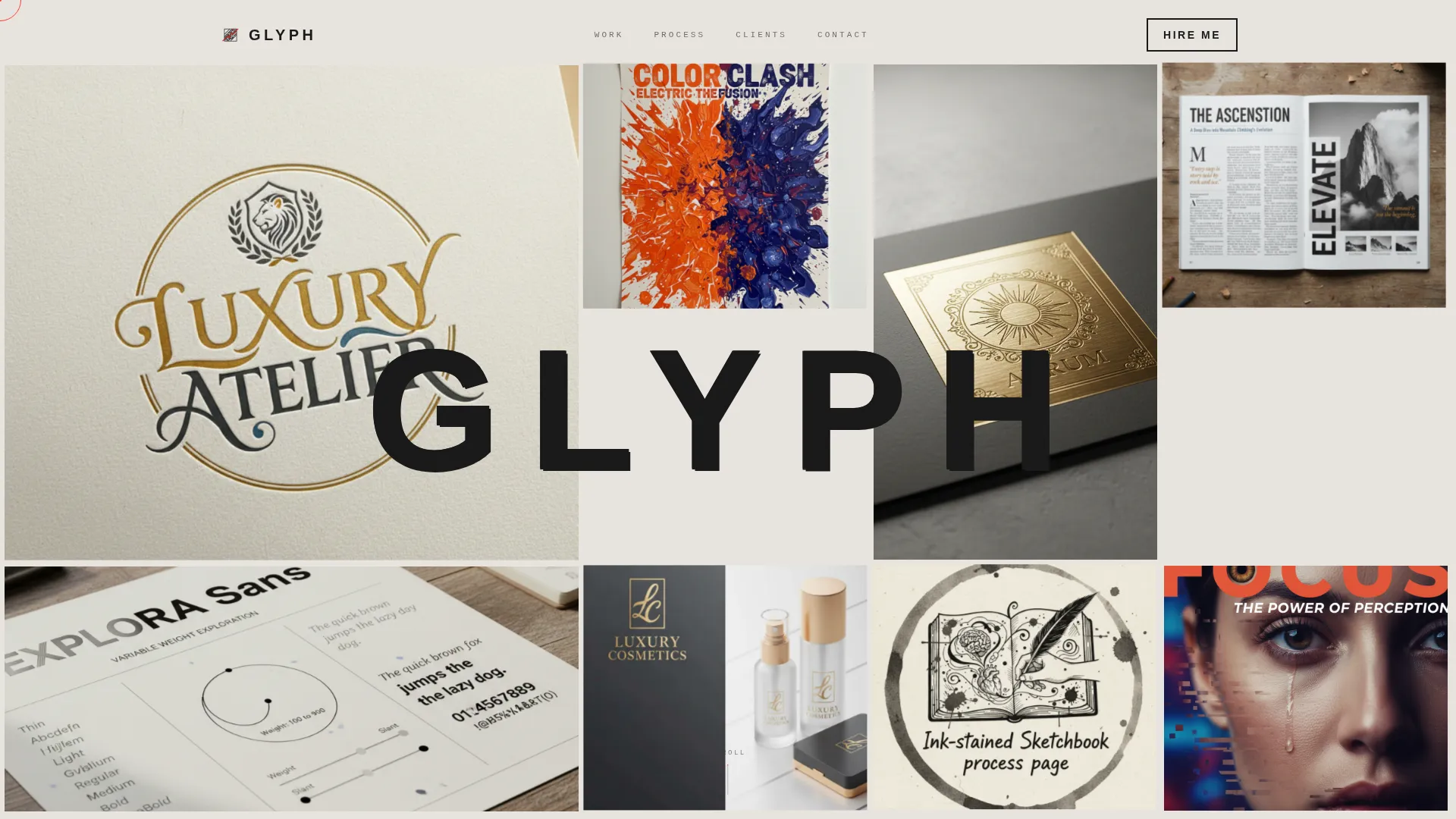
- A photo grid mosaic header with parallax tile movement and a full-bleed name stamp
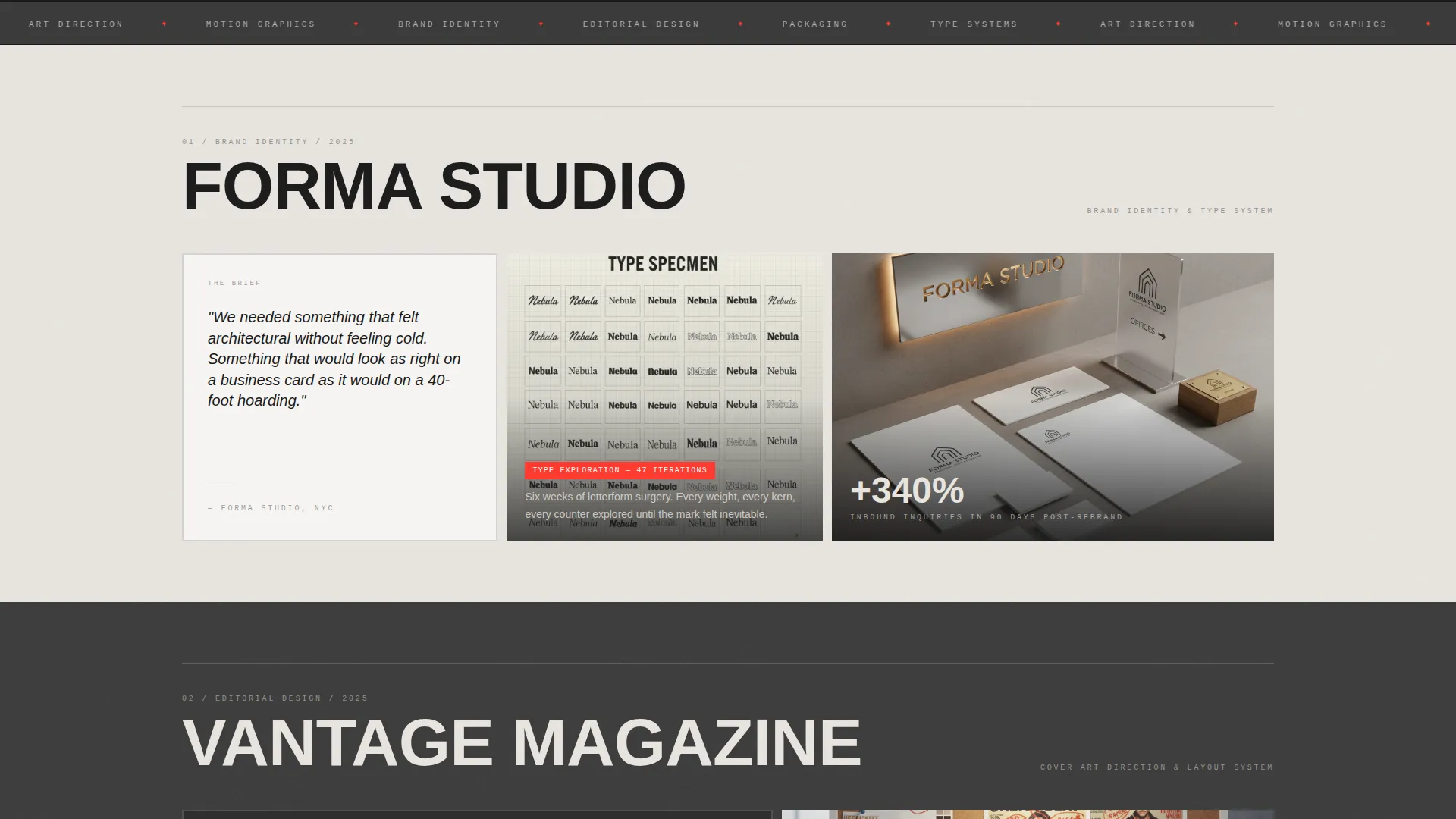
- Bento grid case study sections, each unfolding in three cards: brief, process, and result
- A persistent floating call-to-action button plus a secondary email-capture path at the page base
Feature list
This section breaks down the core built-in features that make Glyph function as both a portfolio and a lead generation landing page.
Photo Grid Mosaic Header
The header arranges six to eight project thumbnails in a bento layout at varying scales. Each tile is cropped tight on the most visually arresting detail. Tiles shift subtly on cursor movement for a parallax depth effect. After a beat, the designer's name stamps itself across the center in oversized, all-caps brutalist type.
Case Study Narrative Sections
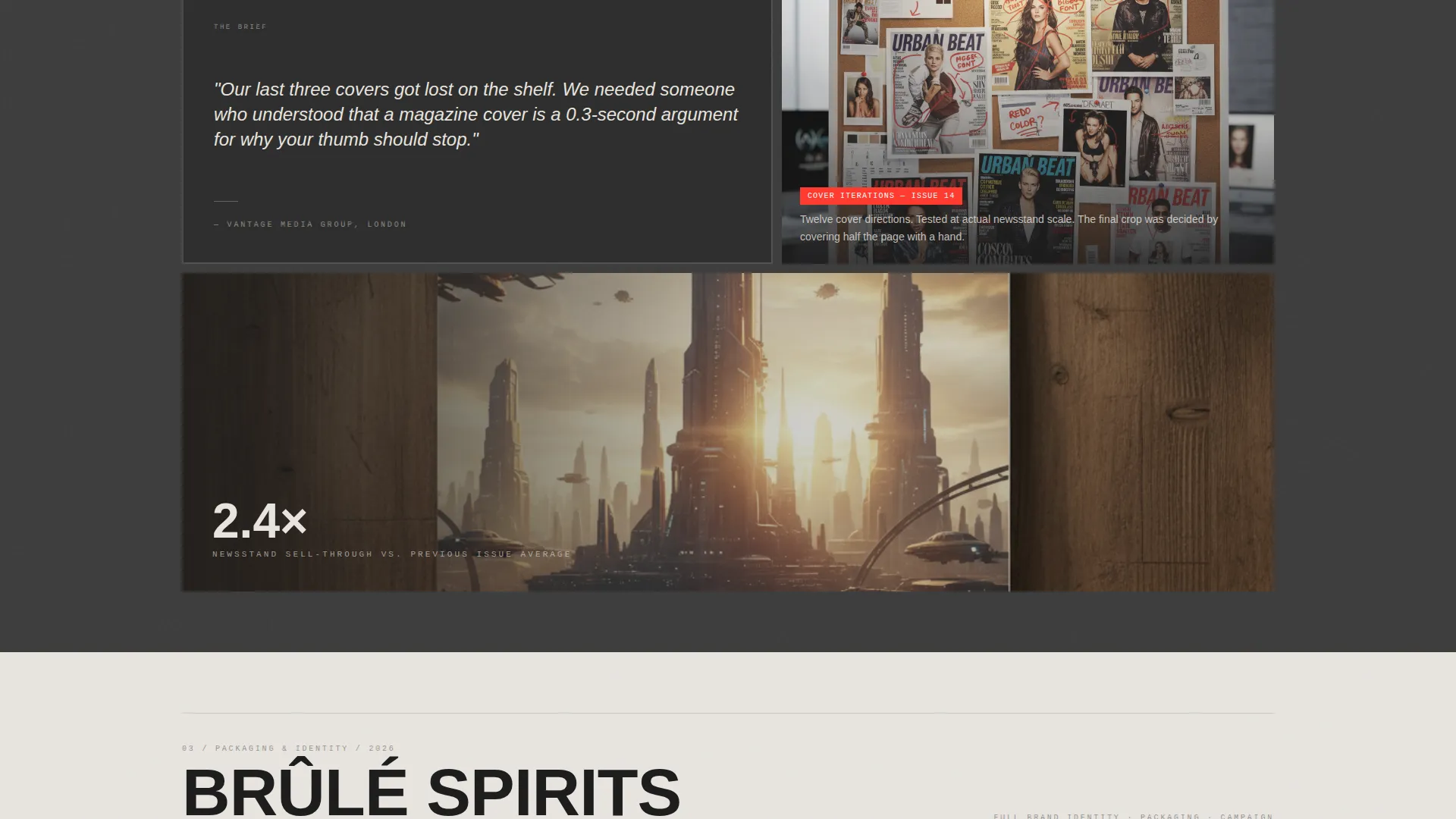
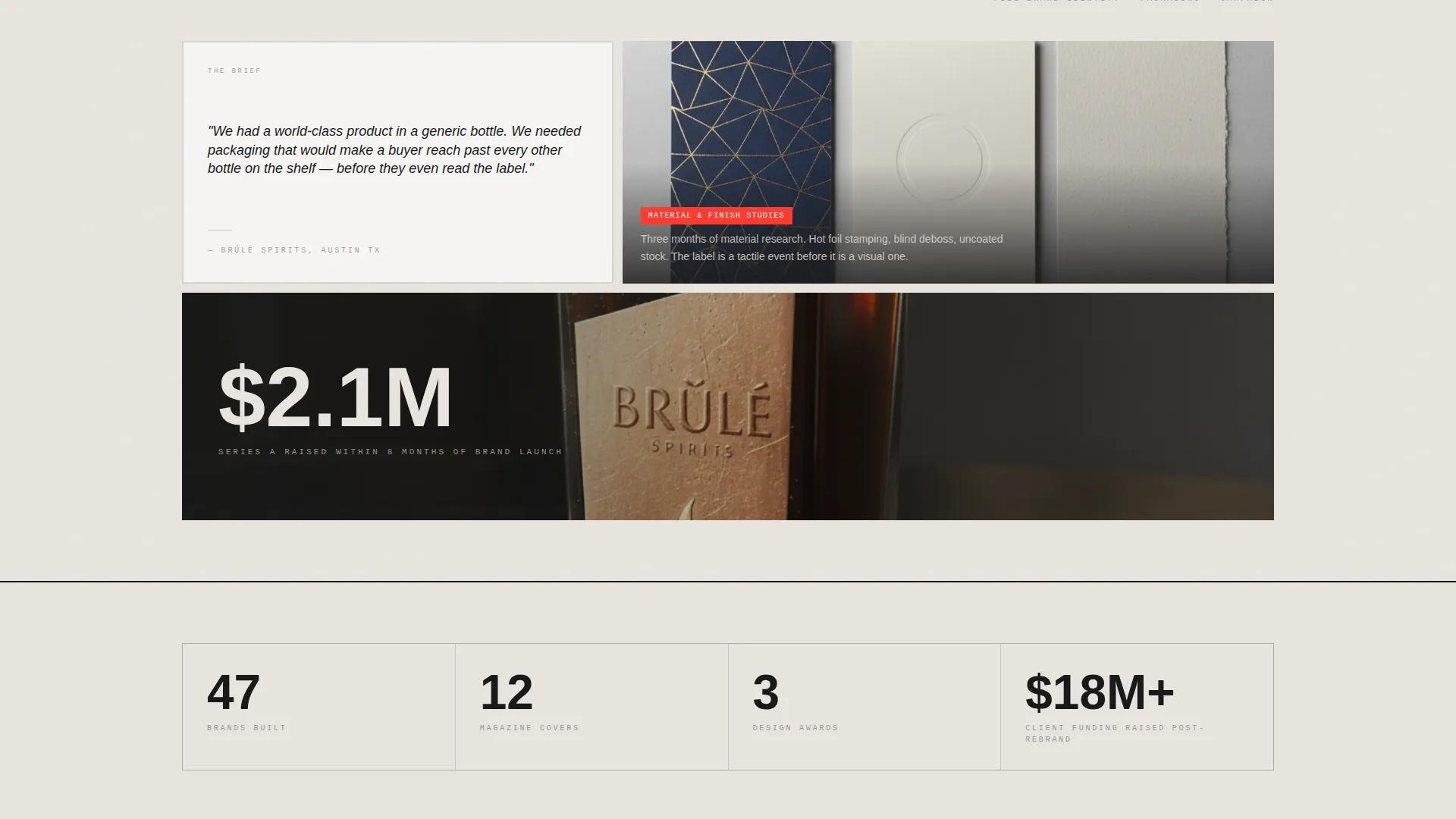
Each project below the header unfolds across three bento cards: a quoted client brief, a process artifact, and a full-bleed final deliverable. The grid reconfigures with every project, shifting between two and three columns and introducing tall cards to keep the scroll rhythm unpredictable. Projects are sequenced to build in scope and ambition toward a crescendo.
Persistent Floating Call-to-Action
A "Let's Make Something" button sits anchored in the bottom-right corner at all times. It uses the electric vermillion accent color so it is always visible without disrupting the layout. Clicking it opens a minimal brutalist contact form with name, company, an open textarea, and an optional budget range toggle.
Secondary Email Capture Path
At the base of the page, a "Download Case Studies as PDF" prompt offers a low-commitment conversion option. It captures an email address from prospects who are interested but not yet ready to contact directly. This gives the designer two distinct entry points for potential clients at different decision stages.
Bento Grid Layout System
The layout uses a dynamic bento grid that reconfigures its column structure across sections. This prevents visual monotony and creates a sense of deliberate, controlled rhythm. Each section feels like a fresh page in a monograph while still flowing as one continuous scroll.
Bold Brutalist Visual Identity
The template is built around exposed concrete white, storm-cloud gray, vapor silver, and a single electric vermillion accent. Backgrounds alternate between light and dark to create tectonic visual shifts between sections. Body text sits in near-black with generous letter-spacing so every character reads as intentional.
Page sections overview
| Section | Purpose |
|---|---|
| Photo Grid Mosaic Header | Opens the page with project thumbnails and a parallax name reveal |
| Case Study Cards | Presents each project across brief, process, and result bento cards |
| Floating call to action Button | Keeps the primary contact action visible throughout the entire scroll |
| Brutalist Contact Form | Captures name, company, project description, and optional budget range |
| Email Capture Footer | Offers a PDF download in exchange for an email address |
Design & branding system
The Cloud Canvas color system gives Glyph its distinctive gallery-wall tension. Every color choice is deliberate, and the accent is used sparingly so it always commands attention.
- Four-color palette: exposed concrete white (#E8E4DF), storm-cloud gray (#3B3B3B), vapor silver (#C4C4C4), and electric vermillion (#FF3B2F) reserved for hover states, active links, and the call-to-action
- Alternating section backgrounds between concrete white and storm gray create strong visual separation without additional dividers
- Near-black body text (#1A1A1A) with generous letter-tracking gives the typography a specimen-like precision throughout
Mobile & speed optimization
The bento grid and parallax interactions are designed to translate cleanly across screen sizes. The layout prioritizes visual clarity at every viewport without losing the brutalist character that defines the template.
- Bento grid tiles restack responsively so the mosaic header remains impactful on smaller screens
- The floating call-to-action button stays anchored and accessible regardless of scroll position or device size
- Parallax cursor effects are scoped to pointer-capable devices so mobile visitors still get a clean, fast-rendering layout
How this template helps you convert
Glyph is structured to move visitors from curiosity to contact without friction. Every design and layout decision supports one goal: turning a browsing creative director or startup founder into an active lead.
- The case study narrative format answers the three questions every client has before reaching out: what you made, how you think, and what the result looked like. It earns trust before asking for anything.
- Two conversion paths serve two types of visitors at once. The floating button captures high-intent prospects immediately. The email-capture footer at the base gives lower-intent visitors a low-stakes reason to stay connected.
Other information about this template
Glyph is built for graphic designers who want a portfolio that functions as an active business tool, not just an online gallery. A few additional details worth knowing before you get started:
- The contact form includes a budget range toggle with three tiers (under $5K, $5K to $15K, and $15K and above) to help filter inquiries before the first conversation
- The case study sequencing is intentional: projects are meant to escalate in complexity so the scroll builds toward your strongest, most ambitious work
- The template is suited for designers in brand identity, editorial, packaging, and poster work where process and outcome both matter to the client
- Glyph is available on Unicorn Platform, where you can customize the layout, swap in your own project assets, and publish without writing code
Theme
Bold Brutalist
Creative direction
Case Study Narrative
Color system
Cloud Canvas
Style
Bento Grid
Direction
Lead Generation
Page Sections
Photo Grid Mosaic Header
Case Study Narrative Sections
Persistent Floating Call to Action Button
Secondary Email Capture Path
Bold Brutalist Color System
Related questions
How many projects can I feature in this template?
Can I customize the contact form fields?
Do I need to know how to code to use Glyph?
What types of design work does this template suit best?
What makes this different from a standard portfolio grid template?



