Research Grant Portfolio Landing Page Template
Grant is a research grant portfolio landing page built on a horizontal scroll layout with a Bold Brutalist visual identity. It maps funded research from agency to investigator, letting program officers, principal investigators, and science journalists explore allocation patterns through interactive data panels, filterable treemaps, and a terminal-style call to action that earns the click before asking for it.
by Rocket studio
Quick summary
Grant is a single-page horizontal scroll landing page designed for showcasing a funded research archive. It uses a Bold Brutalist Electric Indigo visual system to guide visitors through interactive funding data, discipline clusters, and investigator profiles. Three live data panels build trust before the primary call to action appears, making every interaction feel earned rather than forced.
Who this template is for
This template speaks directly to people who live inside the research funding ecosystem. Whether you are presenting data to stakeholders or building your own visibility, this layout gives your work the weight it deserves.
- Program officers who need to benchmark allocation patterns across agencies and fiscal years
- Principal investigators scouting co-funding opportunities and mapping discipline clusters
- Science journalists following the money behind breakthroughs and funded discoveries
What problem this template solves
Research funding data is notoriously scattered. Reports sit in PDFs, award abstracts get buried in agency portals, and no single view connects macro allocation to individual project detail. This template solves the presentation problem so the data can finally do its job.
- Visitors cannot easily explore funding landscapes without a structured, searchable interface
- Generic portfolio layouts fail to communicate scale, depth, or institutional credibility
- Most templates ask for commitment before giving proof of value
What you get with this template
You get a fully designed horizontal scroll landing page ready to present a research grant portfolio with visual authority. The layout moves visitors through funding eras and discipline clusters in a deliberate left-to-right narrative.
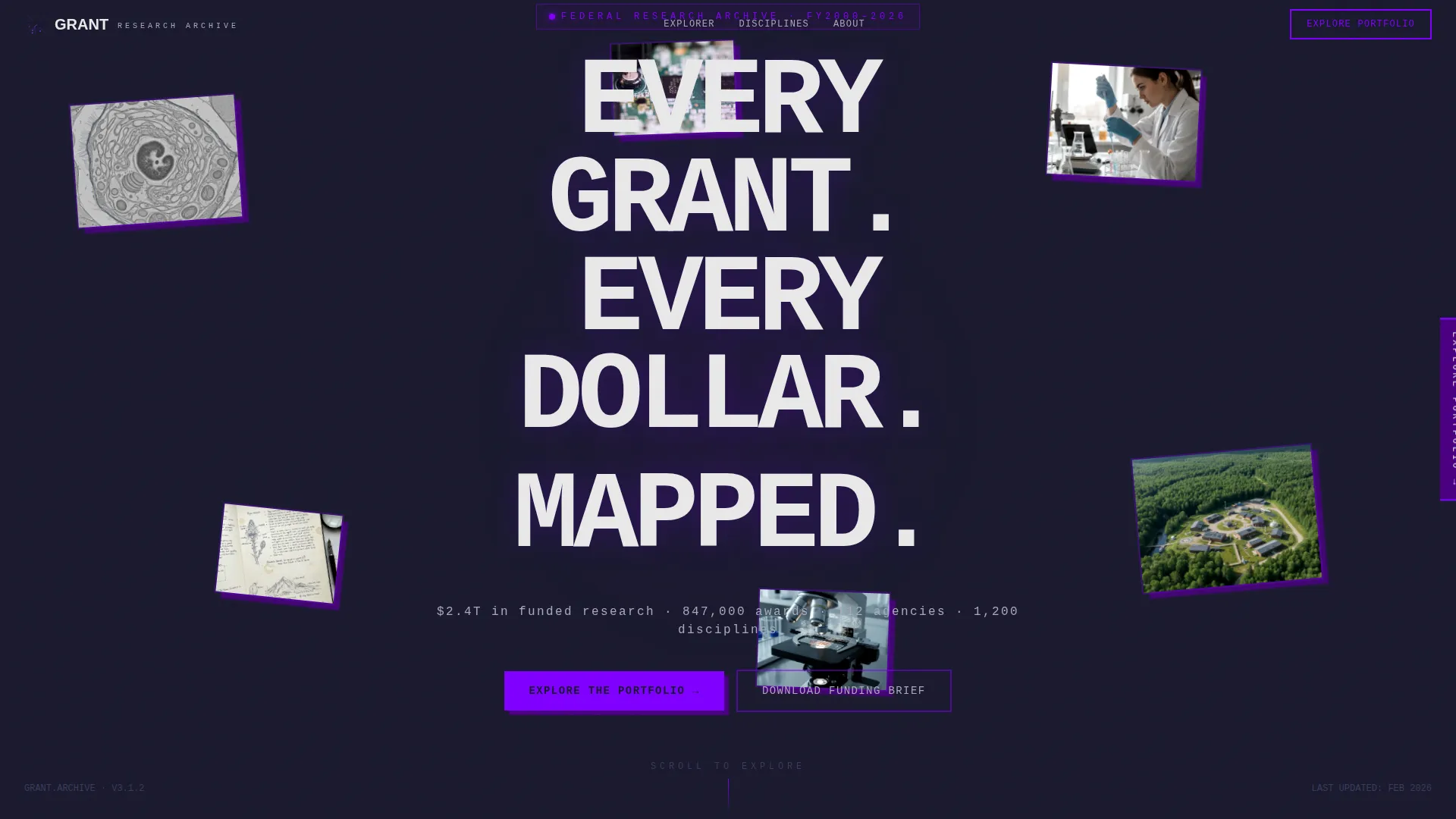
- A parallax floating photo header with cursor-responsive depth and a bold monospaced headline
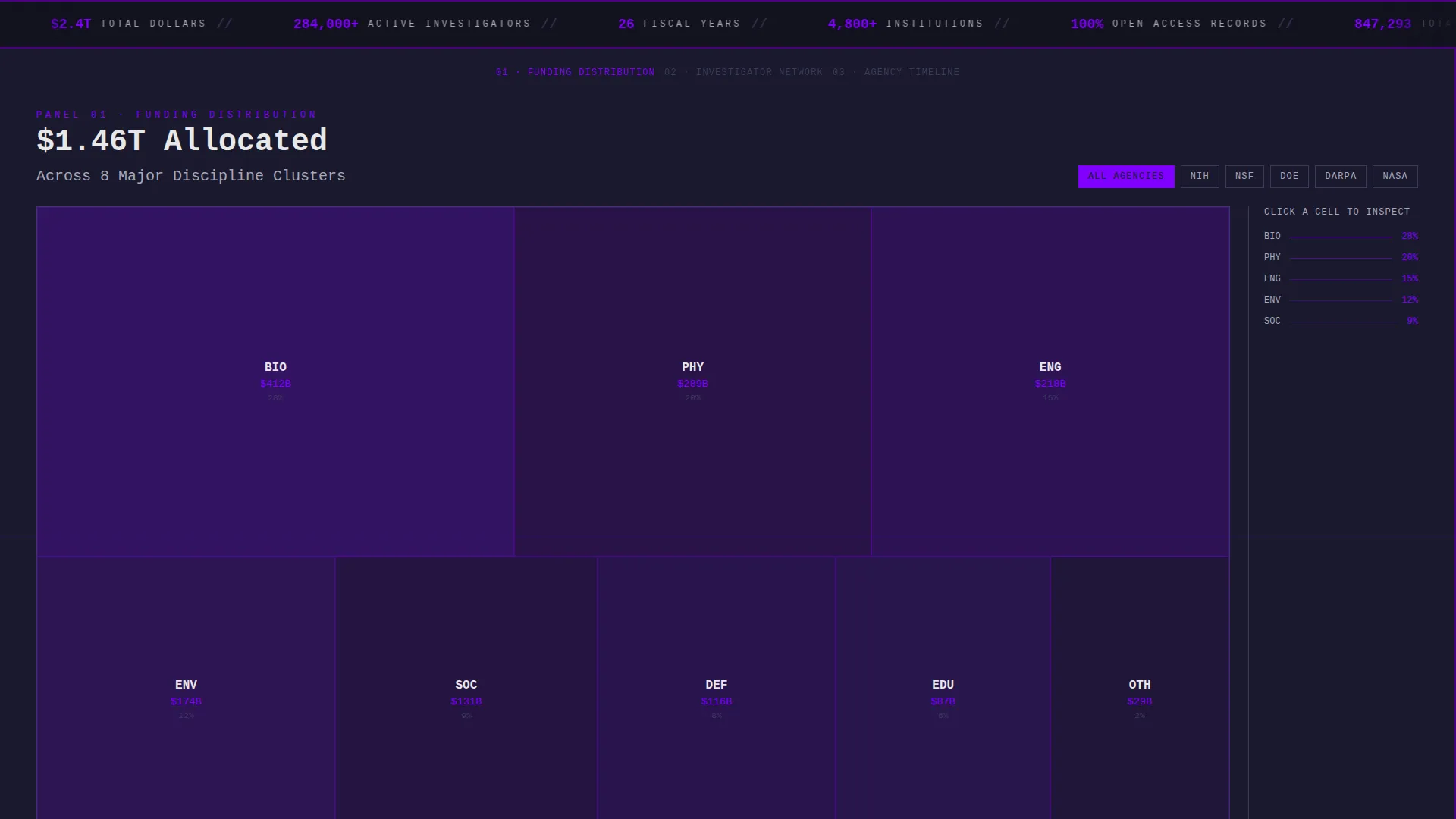
- Three interactive data panel sections featuring filterable treemaps, investigator nodes, and agency timelines
- A dual conversion path with a fixed brutalist tab call to action and a terminal-style prompt on the final slide
Feature list
This template ships with a focused set of purpose-built components. Each one reflects the excavation narrative at the core of the design.
Parallax Floating Photo Header
Research imagery including electron microscopy stills, field station aerials, lab bench close-ups, and handwritten notebook pages drift in parallax layers against a deep charcoal background. Each photo sits slightly rotated with hard drop shadows, responding to cursor movement to shift perceived depth like a living evidence board.
Horizontal Scroll Panel Navigation
Swiping right moves visitors through funding eras and discipline clusters. Each panel is styled as a brutalist concrete block that cracks open on entry to reveal interactive content, creating a physical sense of excavation through layers of institutional data.
Filterable Treemap Data Panel
A visual funding distribution map lets visitors filter by discipline, agency, or fiscal year. The treemap makes allocation patterns immediately readable without requiring visitors to interpret raw numbers or dense tables.
Clickable Investigator Node Panel
Investigator nodes expand on click to surface project summaries and award abstracts. This component rewards curiosity by moving from macro allocation down to the individual award level in a single interaction.
Agency Timeline with Range Selector
A draggable range selector lets visitors scrub through agency funding timelines. This gives program officers and researchers a direct, hands-on way to benchmark patterns across defined fiscal periods.
Dual-Path Conversion System
A fixed brutalist tab labeled "Explore the Portfolio" stays visible on the right edge of the viewport throughout the scroll. On the final slide it expands into a full terminal-style prompt panel. A secondary path offers a downloadable funding brief behind an email gate for offline users.
Page sections overview
| Section | Purpose |
|---|---|
| Floating Photo Header | Establishes scale and credibility with parallax research imagery and a punchy monospaced headline |
| Funding Era Panel | Orients visitors to the historical scope of the archive through the first horizontal scroll block |
| Discipline Cluster Panel | Lets visitors explore funding distribution across research fields using a filterable treemap |
| Investigator Node Panel | Expands individual award abstracts from clickable researcher profiles |
| Agency Timeline Panel | Provides a draggable fiscal year range selector for benchmarking allocation over time |
| Terminal call to action Slide | Closes the scroll with a full-screen prompt to enter the interactive database or download the funding brief |
Design & branding system
The visual identity is Bold Brutalist with an Electric Indigo color system. Every surface is raw, unapologetic, and built to make lit elements demand attention against a monolithic dark background.
- Deep slab charcoal (#1A1A2E) for background panels, high-voltage indigo (#4B0082) for section dividers and active states, phosphor violet (#7F00FF) for hover interactions and data highlights, and exposed concrete white (#E8E8E8) for body text and negative space
- Monospaced typography is used for the primary headline and terminal call to action panel, reinforcing the archival and computational tone throughout
- Drop shadows on floating photos are hard and unblurred, keeping the brutalist aesthetic consistent from header to conversion panel
Mobile & speed optimization
The horizontal scroll interaction is designed for desktop-first presentation, which suits the data-dense nature of a research grant portfolio landing page. The layout respects the complexity of the content.
- Parallax and cursor-tracking effects are scoped to the header section, keeping the rest of the layout stable for varied screen sizes
- Interactive data panels are built as discrete horizontal blocks, making them individually testable and replaceable without affecting the full scroll chain
How this template helps you convert
The conversion strategy in this template is built on proof before commitment. Visitors earn trust through direct interaction before any ask is made.
- Three live, manipulable data panels let visitors filter, click, and drag real content before the primary call to action ever appears, building confidence in the depth of the archive.
- The fixed brutalist tab keeps the "Explore the Portfolio" path visible throughout the entire scroll without interrupting the discovery experience, so motivated visitors can convert at any point.
- The email-gated funding brief download creates a secondary conversion path for visitors who want the data offline, capturing interest from users who are not yet ready to enter the full database.
Other information about this template
This template sits within the Personal and Resume category under the Academic and Research Profile subcategory, making it a strong fit for researchers and institutions that want to present a research grant portfolio with visual depth and interactive credibility.
- The template style is Horizontal Scroll, a deliberate structural choice that mirrors the excavation metaphor built into the content narrative
- The creative direction is Interactive Explorer, meaning the layout prioritizes hands-on data interaction over passive reading
- The header concept is Floating Photos, a constellation layout that deliberately breaks from institutional grid conventions to feel liberated and dynamic
- The landing page direction is Click-Through, with every design decision oriented toward moving visitors into the full interactive database


Theme
Bold Brutalist
Creative direction
Interactive Explorer
Color system
Electric Indigo
Style
Horizontal Scroll
Direction
Click-Through
Page Sections
Parallax Floating Photo Header
Horizontal Scroll Panel Navigation
Filterable Treemap Panel
Clickable Investigator Nodes
Agency Timeline Range Selector
Dual-path Conversion System
Related questions
Who is this landing page template designed for?
Can I customize the color palette?
How does the horizontal scroll layout work?
What are the two conversion paths in this template?
Is this template suitable for a single researcher or only for institutions?



