Greenframe - Precision Sustainablebuilder Landing Page Template
Greenframe is a single-page landing page template built for net-zero construction firms. It opens with animated performance counters, walks visitors through before-and-after project reveals with a drag slider and live data overlays, and closes with a three-step lead qualification form. The Corporate Precision design uses a dark emerald and metric-gold palette to communicate authority and environmental credibility.
by Rocket studio
Quick summary
Greenframe is a precision-crafted landing page template for sustainable construction firms. It leads with animated carbon and energy counters, guides visitors through interactive project reveal sections, and drives qualified leads with a progressive three-step scoping form. The dark emerald color system and engineered typography give the page a boardroom-ready authority that matches the ambition of net-zero building.
Who this template is for
This template is built for construction firms that need to prove their environmental performance before asking for a meeting. It works for businesses that build with cross-laminated timber, reclaimed materials, or closed-loop systems and need to communicate that rigor to demanding clients.
- Net-zero home builders and commercial construction firms targeting institutional clients
- Green building contractors pursuing projects with LEED Platinum, Passive House, or Living Building Challenge requirements
- Sustainable developers pitching municipal planners, corporate facilities managers, and architects
What problem this template solves
Most construction landing pages lead with renders and taglines. Greenframe flips that approach. It leads with verified data so that by the time the call-to-action appears, the visitor has already seen the evidence. This matters when your buyers are comparing embodied carbon figures, not just square footage.
- Clients expect proof, not promises, and a generic builder page provides neither
- A standard template cannot handle the layered complexity of certifications, project data, and progressive lead qualification
- Visitors who are not ready to commit still need a path forward, which the downloadable case study provides
What you get with this template
You get a fully structured single-page layout built around performance data and project storytelling. Every section is designed to raise the stakes as the visitor scrolls deeper into the page.
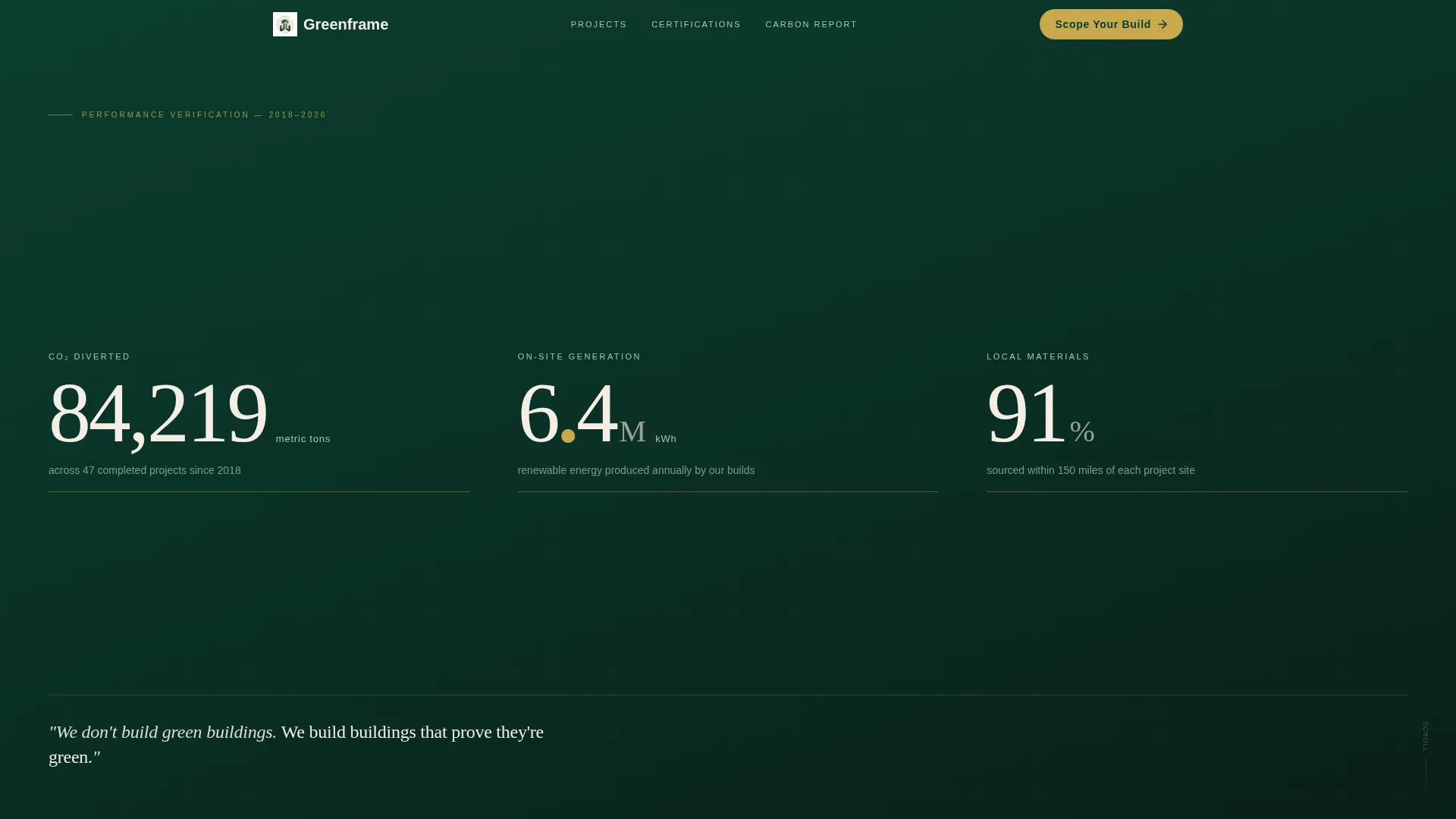
- A full-viewport animated stats wall as the header, displaying three live counters for CO2 diverted, kilowatt-hours generated on-site, and local material sourcing percentage
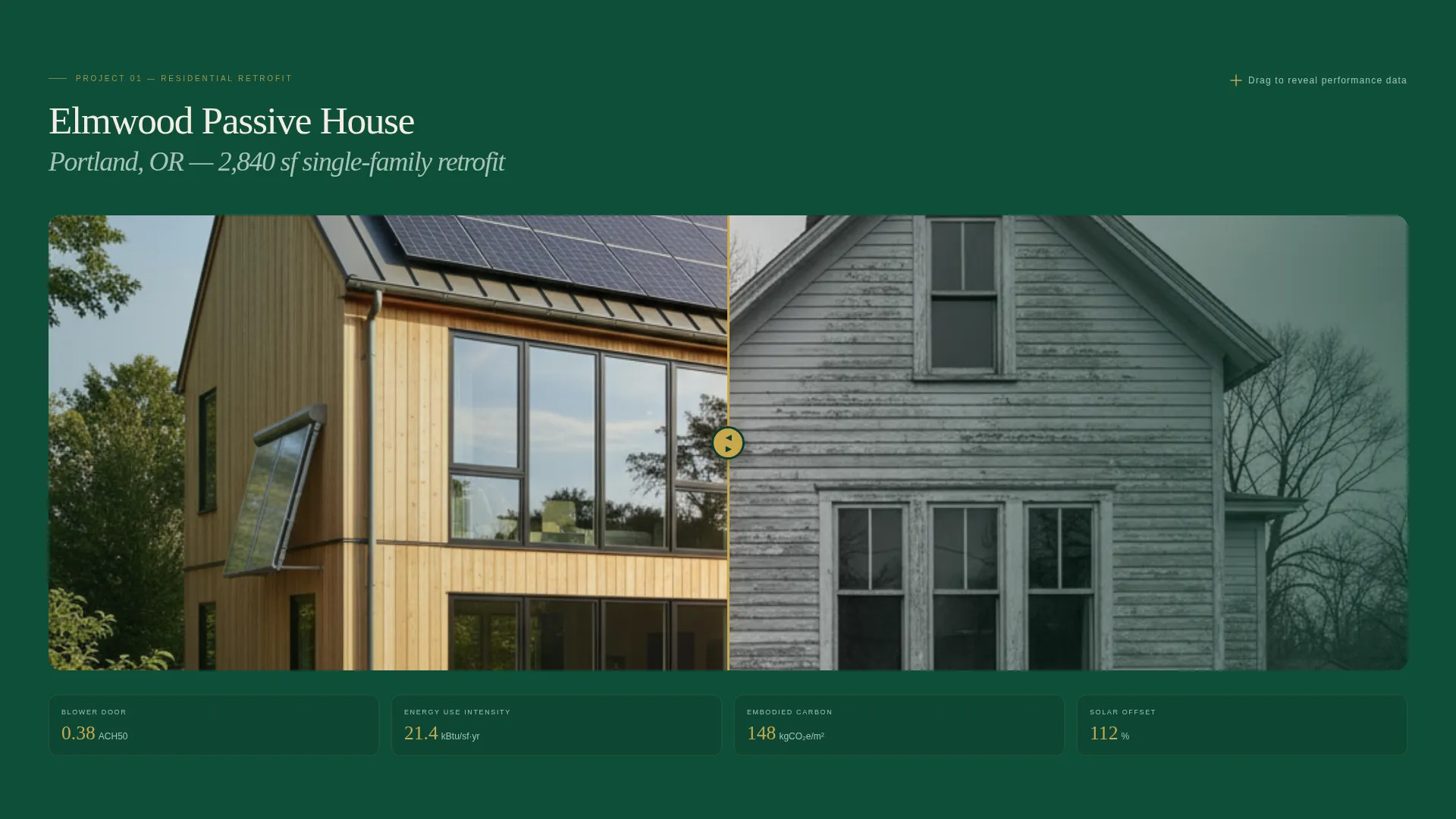
- Interactive before-and-after project sections with a drag slider that reveals finished builds alongside blower-door results, energy-use intensity scores, and embodied carbon figures
- A three-step lead generation form ("Scope Your Build") and a secondary email-gated PDF download ("Get the Carbon Report")
Feature list
This section describes the core interactive and structural features included in the Greenframe landing page template.
Animated Performance Counter Header
Three large counters animate on page load, displaying tons of CO2 diverted, total kilowatt-hours generated across all projects, and the percentage of materials sourced within 150 miles. After five seconds, a single restraint line fades in beneath the data. No hero image, no tagline upfront. The numbers do the opening argument.
Before-and-After Drag Slider
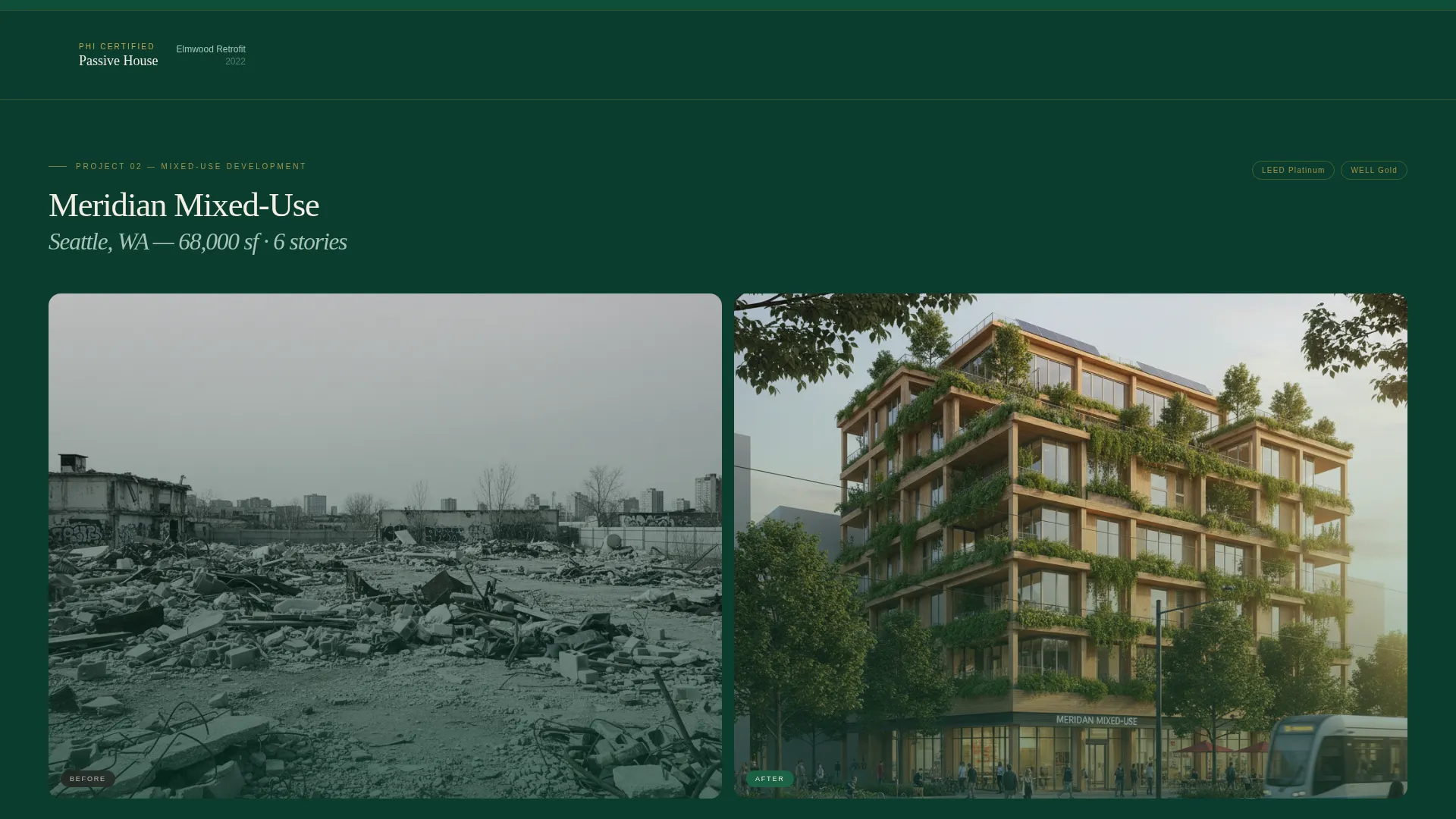
Each project section uses a 50/50 split screen. The left side shows a desaturated documentary photo of the raw site or demolition phase. The right shows the completed build in full natural light. A drag slider lets visitors peel one state into the other, with performance metrics fading in over the finished image as the slider moves right.
In-Slider Data Layer
As the drag slider moves toward the completed build, metric overlays appear on the image. These include blower-door test results, energy-use intensity scores, and embodied carbon per square meter. The data layer turns the reveal into a performance report, not just a visual contrast.
Progressive Three-Step Scoping Form
The "Scope Your Build" call-to-action opens a form in three stages. Step one offers a project type toggle between residential, commercial, and municipal. Step two presents a square-footage range slider and a site zip code field. Step three provides an optional upload field for site plans or requests for proposals. No pricing is surfaced at any step.
Email-Gated Case Study Download
A secondary conversion path labeled "Get the Carbon Report" captures visitors who want proof but are not yet ready to scope a project. The download is gated behind email capture and delivers a PDF case study. This path works in parallel with the primary scoping form.
Certification Timestamp Bands
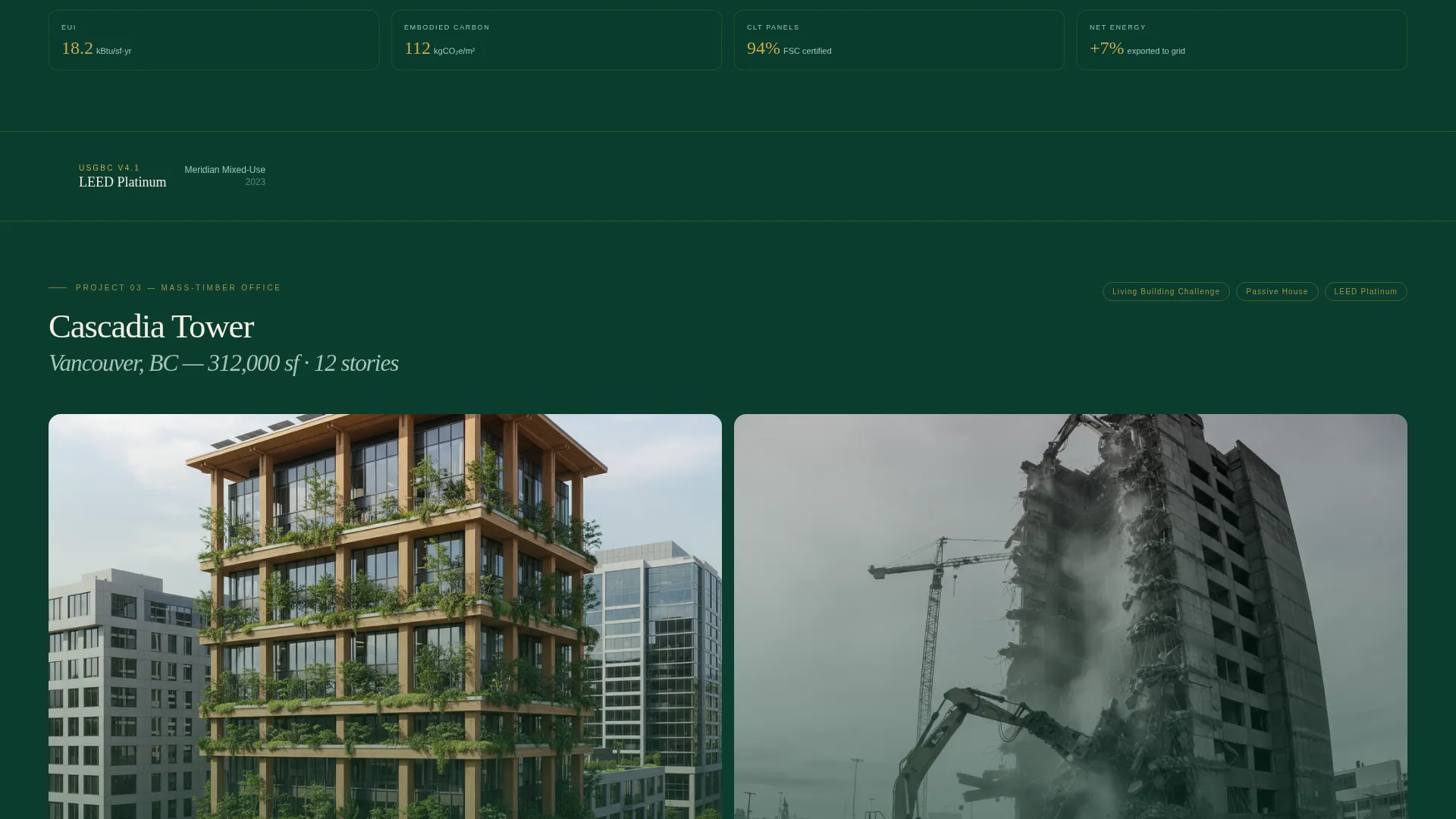
Between project reveals, thin horizontal bands display earned certifications such as Passive House, LEED, and Living Building Challenge. Each certification appears not as a logo but as a timestamped entry with the specific project name attached. This format communicates a track record, not just a credential collection.
Page sections overview
| Section | Purpose |
|---|---|
| Animated Stats Header | Opens with CO2, energy, and sourcing counters |
| Reveal tagline fade | Delivers the brand positioning statement after 5 seconds |
| Project Reveal One | Single-family retrofit with before-and-after slider |
| Certification Band One | Passive House timestamp with project name |
| Project Reveal Two | Mid-scale commercial project with data overlay |
| Certification Band Two | LEED certification timestamp with project name |
| Project Reveal Three | Twelve-story mass-timber office tower reveal |
| Certification Band Three | Living Building Challenge timestamp with project name |
| Scope Your Build call to action | Three-step lead qualification form module |
| Carbon Report Download | Email-gated secondary conversion path |
Design & branding system
The Greenframe template uses a Corporate Precision visual identity built around a four-color dark emerald system. The palette was designed to feel serious and material, like a boardroom surface made from reclaimed wood. Every color has a designated role and is not interchangeable.
- Deep forest black-green (#0B3D2E) dominates all backgrounds and section divides, giving the page weight and depth
- Bleached birch plywood (#F4EDE4) carries body text panels and readable content areas, providing contrast without brightness
- Metric-highlight gold (#C9A84C) appears only on data points, decimal characters, and hover states, so every golden element signals a verified number
Mobile & speed optimization
On mobile, the layout adapts so that performance data remains the first thing a visitor reads. The "Scope Your Build" form becomes a persistent bottom bar so the call-to-action stays reachable without interrupting the scroll.
- The split-screen project sections reflow into a stacked vertical layout on smaller screens, keeping the drag slider functional
- The three-step scoping form collapses into a bottom-anchored bar on mobile, always visible without covering content
- The stats header and data overlays are structured to load counters and text layers cleanly without requiring heavy media assets
How this template helps you convert
Greenframe is built around a principle: earn the click before you ask for it. By the time a visitor sees the call-to-action, they have already processed three rounds of verified performance data. The form then qualifies intent rather than just capturing contact details.
- The animated counters and drag-slider data layers establish credibility in the first scroll, so the visitor arrives at the form already convinced by numbers rather than persuaded by copy
- The three-step progressive form reduces friction by asking only one question category at a time, which means visitors who start the form are more likely to complete it
- The secondary "Get the Carbon Report" download path captures undecided visitors who need more evidence before committing, turning a near-miss into a qualified email lead
Other information about this template
This template is designed for a single-page landing structure, not a multi-page website. All conversion paths live on one continuous scroll. The page is intended for firms that already have project photography and performance data to populate the before-and-after sections.
- The template suits the Real Estate and Property category, specifically the Property Developer and Builder subcategory
- The Corporate Precision theme and Full-Width Immersive style mean the layout relies on strong project visuals and real data to feel complete
- The creative direction follows an interactive explorer pattern, where visitor engagement deepens as they interact with sliders and step through the form
- No pricing is surfaced anywhere in the template, which keeps the lead qualification process focused on project type, scale, and location rather than budget objections
- The PDF case study gating component can be used to deliver any downloadable proof document, not only a carbon report
Theme
Corporate Precision
Creative direction
Interactive Explorer
Color system
Sunset Mesa
Style
Full-Width Immersive
Direction
Booking/Scheduling
Page Sections
Animated Performance Counter Header
Before-and-after Drag Slider
In-slider Data Overlay Layer
Three-step Progressive Scoping Form
Email-gated Case Study Download
Certification Timestamp Bands
Related questions
Do I need real project data to use this template?
Can the scoping form be adjusted for different project types?
What images work best in the before-and-after sections?
Does the secondary download path interfere with the main scoping form?
Is this template suited for firms that only build residential net-zero homes?



