BMX Competition Landing Page Template
Grind is a single-page BMX tournament and competition landing page built for event organizers, crew leaders, and riders ready to lock in their spot. A full-viewport countdown timer opens the experience, a modular card grid drives discovery, and a scheduling drawer handles registration end to end. The design runs on void black, electric magenta, and plasma cyan, built to feel like competition night.
by Rocket studio
Quick summary
Grind is a futuristic, neon-charged BMX competition landing page designed for event organizers running regional qualifiers, national invitationals, and backyard jam sessions. A full-viewport countdown timer anchors the top. A modular card grid below it handles event discovery, rider spotlights, and crew registration in one fast-moving scroll.
Who this template is for
This landing page is built for anyone running or competing in organized BMX events. It handles the full range of participants, from first-timers to sponsored riders chasing circuit points.
- BMX event organizers promoting regional qualifiers, national invitationals, and local competition nights
- Crew leaders registering squads of eight or more for weekend throwdowns
- Parents and junior riders booking a first sanctioned competition slot in the Under-16 bracket
What problem this template solves
Most competition event pages feel static. They list dates and a form link, then leave riders to figure out the rest. That gap costs organizers registrations and leaves competitors without the urgency they need to act fast.
- Open events look identical to closed ones, so riders cannot tell where spots remain
- Crew registration requires a separate workflow that generic pages never accommodate
- No visual system signals live status, heat capacity, or how close an event is to selling out
What you get with this template
You get a ready-to-deploy single-page layout built specifically for BMX competition management. Every component is purpose-built to handle the registration and discovery flow from arrival to confirmed slot.
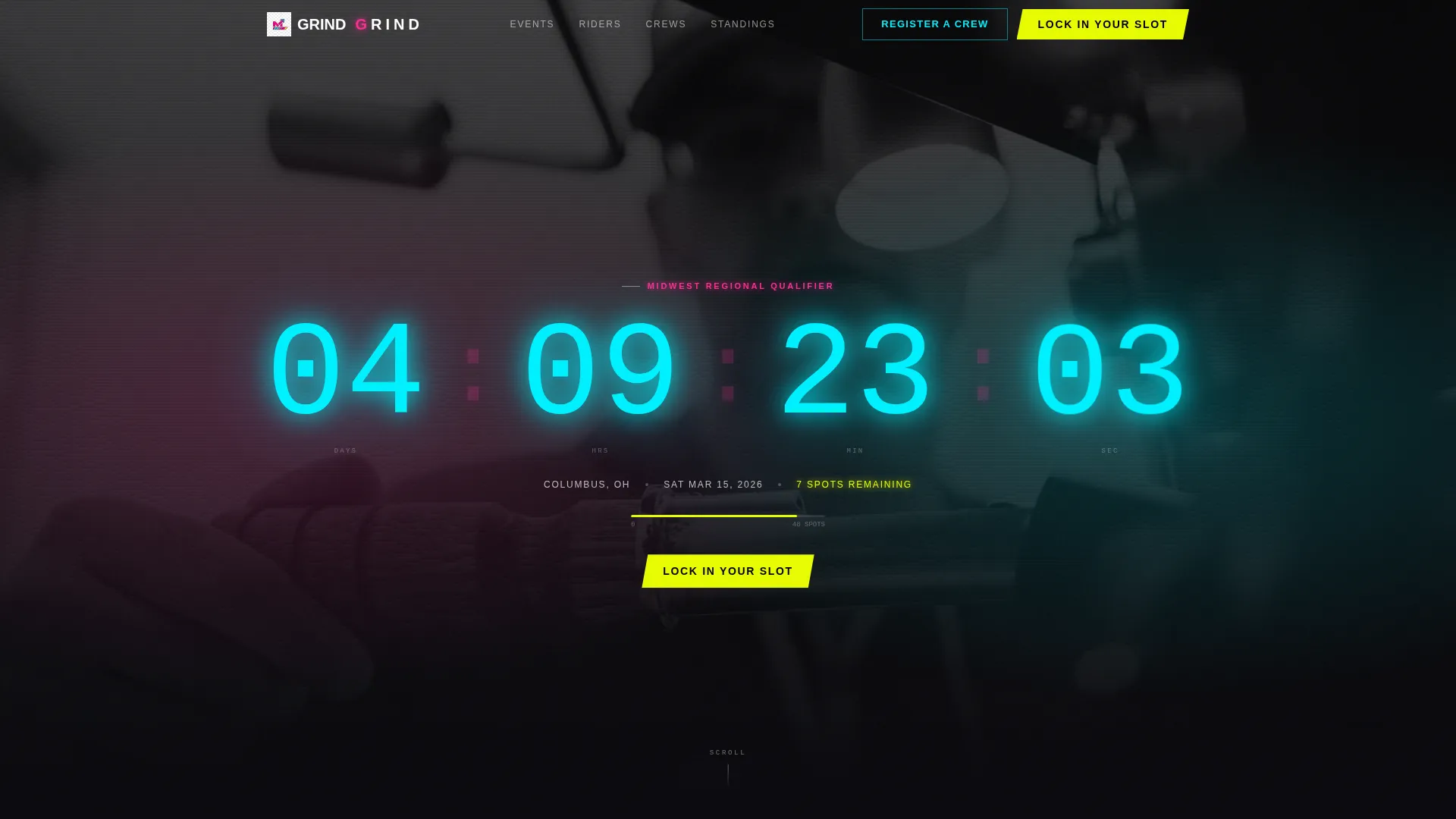
- A full-viewport countdown timer section with event name, venue city, date, and remaining spots
- A modular community gallery grid with event cards, rider spotlight cards, crew registration cards, and photo recap cards
- A scheduling drawer for individual riders and a separate bulk-entry roster builder for crew registrations
Feature list
This landing page delivers a focused set of built-in components. Each one is designed for the pace and pressure of live competition management.
Full-Viewport Countdown Timer Header
The header section fills the entire screen with a segmented neon countdown clock ticking down to the next registered event. The clock numerals pulse on each second tick. Flanking copy shows the event name in condensed uppercase, the venue city, the date, and the spots remaining on a single line below the clock.
Modular Community Card Grid
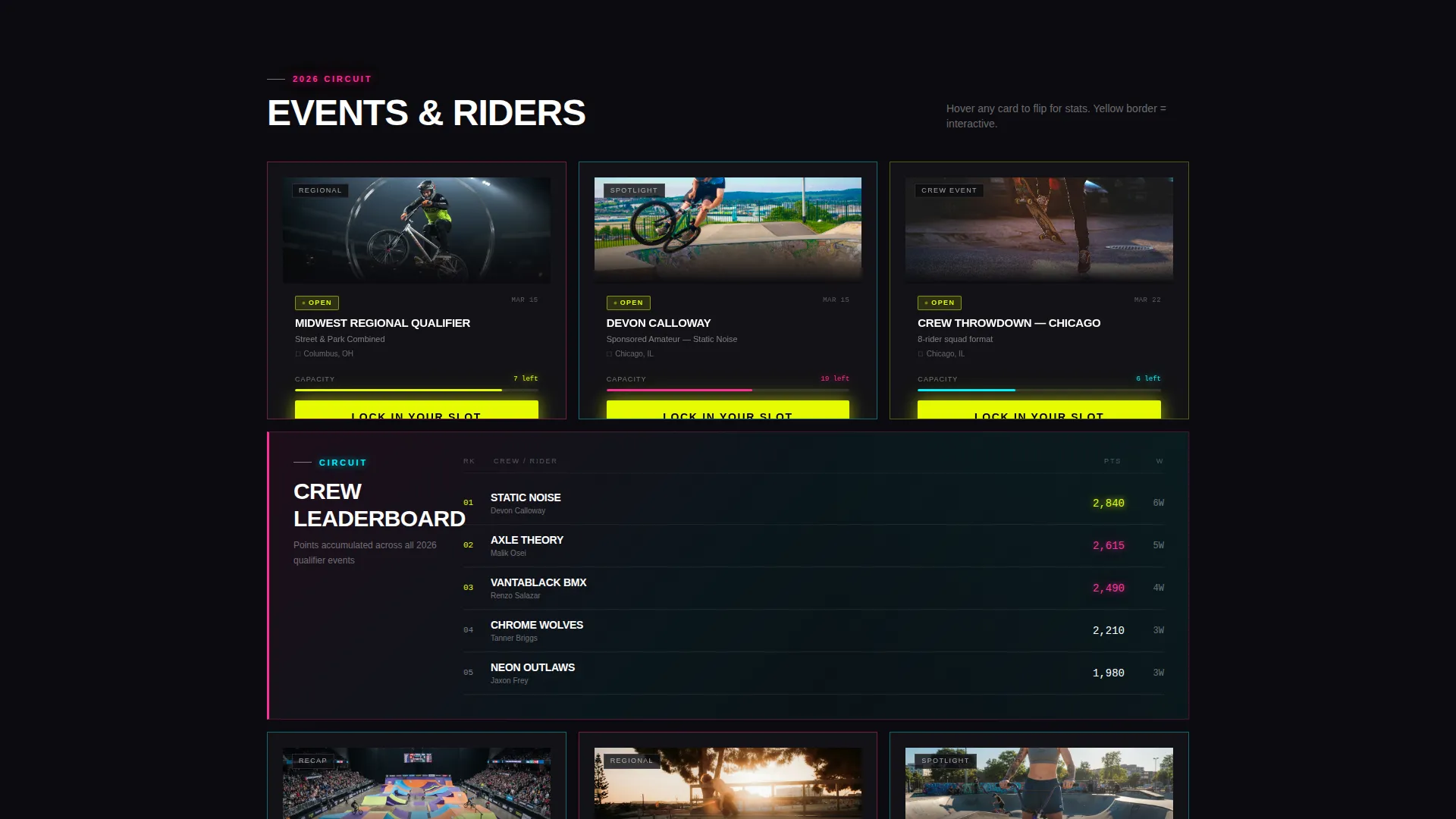
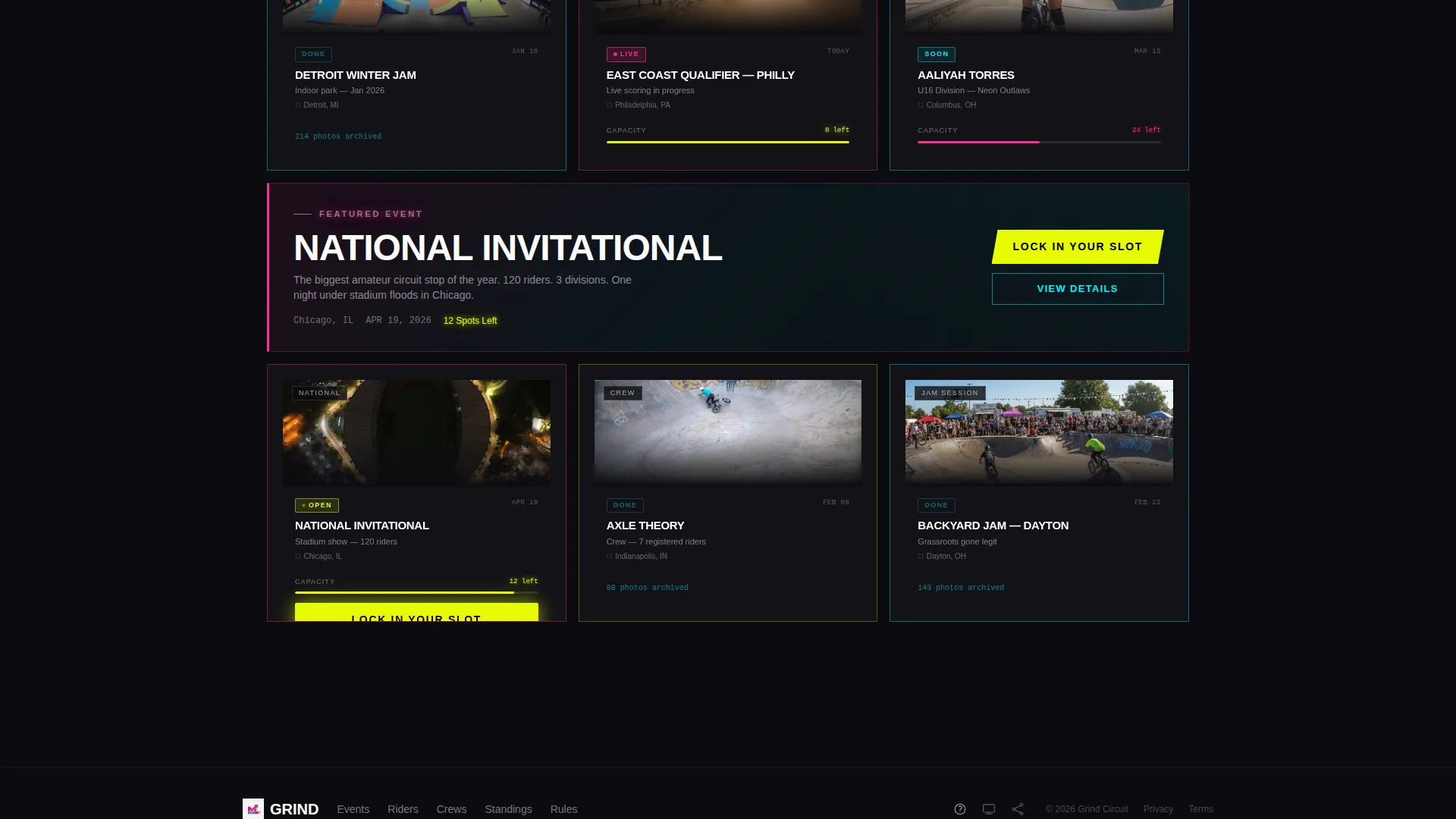
The core of the page is a grid of same-dimension cards wearing different neon border colors by category. Event cards, rider spotlight cards, crew registration cards, and photo recap cards each carry a distinct border so the eye reads type instantly without needing labels. Cards flip or expand on hover to reveal stats, registration status, or mini-galleries.
Live Capacity Bar System
Every open event card displays a capacity bar that shrinks in real time as spots fill. The bar color transitions from plasma cyan to electric magenta to hazard yellow as the event approaches capacity. No copy is needed to communicate urgency; the bar does it visually.
Full-Width Breakout Action Cards
Every three rows of the grid, a full-width action card interrupts the scroll with a featured event or a crew leaderboard. These breakout cards prevent scroll fatigue and escalate the stakes as the user moves down the page toward the next major competition.
Scheduling Drawer with Slot Booking
Tapping or clicking "Lock In Your Slot" opens a slide-in scheduling drawer. The drawer asks for rider name, age bracket (Under-16, Open, or Pro-Am), crew affiliation as an optional field, and preferred heat time, in that exact order. The flow is short, structured, and mobile-friendly.
Crew Roster Builder Form
A secondary registration path labeled "Register a Crew" lives in the navigation. It leads to a bulk-entry form with a roster builder for squad registrations. Crew leaders can enter multiple riders in a single session rather than repeating the individual form.
Page sections overview
| Section | Purpose |
|---|---|
| Countdown Timer Header | Opens with next-event clock, event name, venue, date, and spots remaining |
| Community Gallery Grid | Modular card grid for events, rider spotlights, crew registration, and photo recaps |
| Full-Width Action Cards | Featured event or crew leaderboard breaks appearing every three grid rows |
| Scheduling Drawer | Slide-in individual slot booking form triggered by the primary call to action |
| Crew Registration Form | Bulk-entry roster builder accessed via the navigation link |
| Floating Mobile Button | Pinned "Lock In Your Slot" button persistent on mobile scroll |
Design & branding system
The visual identity runs on a Dopamine Pop color system inside a Futuristic Neon theme. The palette is overstimulated on purpose, built to match the energy of a floodlit arena at competition night.
- Void black (#0B0B0F) dominates all backgrounds, behaving like asphalt under stadium lights
- Electric magenta (#FF2D95) and plasma cyan (#00F0FF) alternate across card borders, typographic accents, and the hologram-graded hero video treatment
- Hazard yellow (#E6FB04) fires exclusively on interactive elements, the primary call-to-action button, countdown digits, live-status badges, and hover states, training the eye to chase action
Mobile & speed optimization
The mobile layout keeps the competition experience intact on smaller screens. No key functionality is hidden or collapsed away from the primary flow.
- The "Lock In Your Slot" call-to-action button pins as a floating element during mobile scroll so the booking entry point is always one tap away
- The scheduling drawer opens as a bottom-sheet overlay on mobile, keeping the form accessible without leaving the page
- The card grid adapts column count for smaller viewports so event cards remain readable and tap targets stay comfortable
How this template helps you convert
The page is designed to close registrations without relying on persuasion copy alone. Visual systems do the heavy lifting at every decision point.
- The countdown timer creates immediate time pressure the moment a visitor lands, before they have read a single line of text
- The live capacity bar transitions from cyan to magenta to yellow as spots fill, manufacturing visible scarcity that drives the click without a single word of urgency copy
- The persistent floating call-to-action button on mobile removes scroll friction entirely, so the path from interest to confirmed slot is always one tap away
Other information about this template
This template sits in the Sports and Recreation category with a specific focus on BMX competition event management. A few additional points are worth knowing before you customize and launch.
- The page direction is Event Registration, meaning every section is sequenced to move a visitor toward a confirmed booking rather than general awareness
- The template style follows a Hero-Dominant layout with the countdown header taking primary visual weight
- The color system and neon theme are built to work for both indoor arena circuits and outdoor jam session events
- Age bracket fields cover Under-16, Open, and Pro-Am divisions, reflecting real sanctioned competition structures
- The ghost video treatment in the header is color-graded into cyan and magenta tones, giving the rider silhouette a holographic appearance consistent with the neon visual identity
Theme
Industrial Raw
Creative direction
Hero's Journey
Color system
Dopamine Pop
Style
Hero-Dominant (90/10)
Direction
Event Registration
Page Sections
Full-viewport Countdown Timer
Modular Neon Card Grid
Live Capacity Bar System
Scheduling Drawer for Slot Booking
Crew Roster Builder Form
Full-width Breakout Action Cards
Related questions
Can this landing page handle both individual rider sign-ups and full crew registrations?
What age brackets does the scheduling drawer support?
How does the page communicate that an event is nearly full?
Can I use this template for multiple event types on the same page?
Where does the primary call-to-action button appear on mobile?