Café Bento Grid Landing Page Template
Grind is a bento grid landing page template built for full-service cafés. It pairs a warm Cloud Canvas color palette with shoppable tile layout, a lifestyle hero image, and dual conversion paths, one for ordering food and drink, one for booking a table with Wi-Fi. Every section is designed to make visitors feel like they just walked through the door.
by Rocket studio
Quick summary
Grind is a single-page café landing page template built around a bento grid layout. It uses a warm, editorial color palette and a shoppable tile structure to turn browsing into ordering. The page serves two types of visitors at once: those ready to add items to a cart and those looking to reserve a seat.
Who this template is for
This template suits café owners and operators who want a landing page that works as hard as their team during the morning rush. It is especially well-suited for full-service cafés that sell both food and an experience.
- Independent café owners who want a polished online presence without custom development
- Operators running a food-and-drink menu alongside a dine-in or work-friendly seating offer
- Small hospitality businesses that need shoppable product tiles and a simple table booking path
What problem this template solves
Most café websites force visitors to read through dense text menus or navigate multiple pages before they can act. Grind removes that friction. It puts the product and the booking option directly in front of the visitor, in a layout that feels as inviting as the café itself.
- Visitors leave before ordering because the menu is buried or hard to browse
- Freelancers and regulars have no quick way to reserve a seat or confirm Wi-Fi availability
- Generic hospitality templates fail to communicate the warmth and character of an independent café
What you get with this template
You get a fully structured bento grid landing page with distinct tiles for every part of the café offering. The layout is built to guide visitors from curiosity to action without ever feeling like a hard sell.
- A shoppable bento grid with "Add to Order" tiles for coffee, pastries, and lunch items
- A sticky cart counter in the top right that updates as visitors browse
- A "Book a Table + Wi-Fi" secondary call to action with a time-slot picker and power-outlet toggle
Feature list
This template includes a set of purposefully built components. Each one reflects a specific moment in the café visit, from first impression to final order.
Lifestyle Hero Header
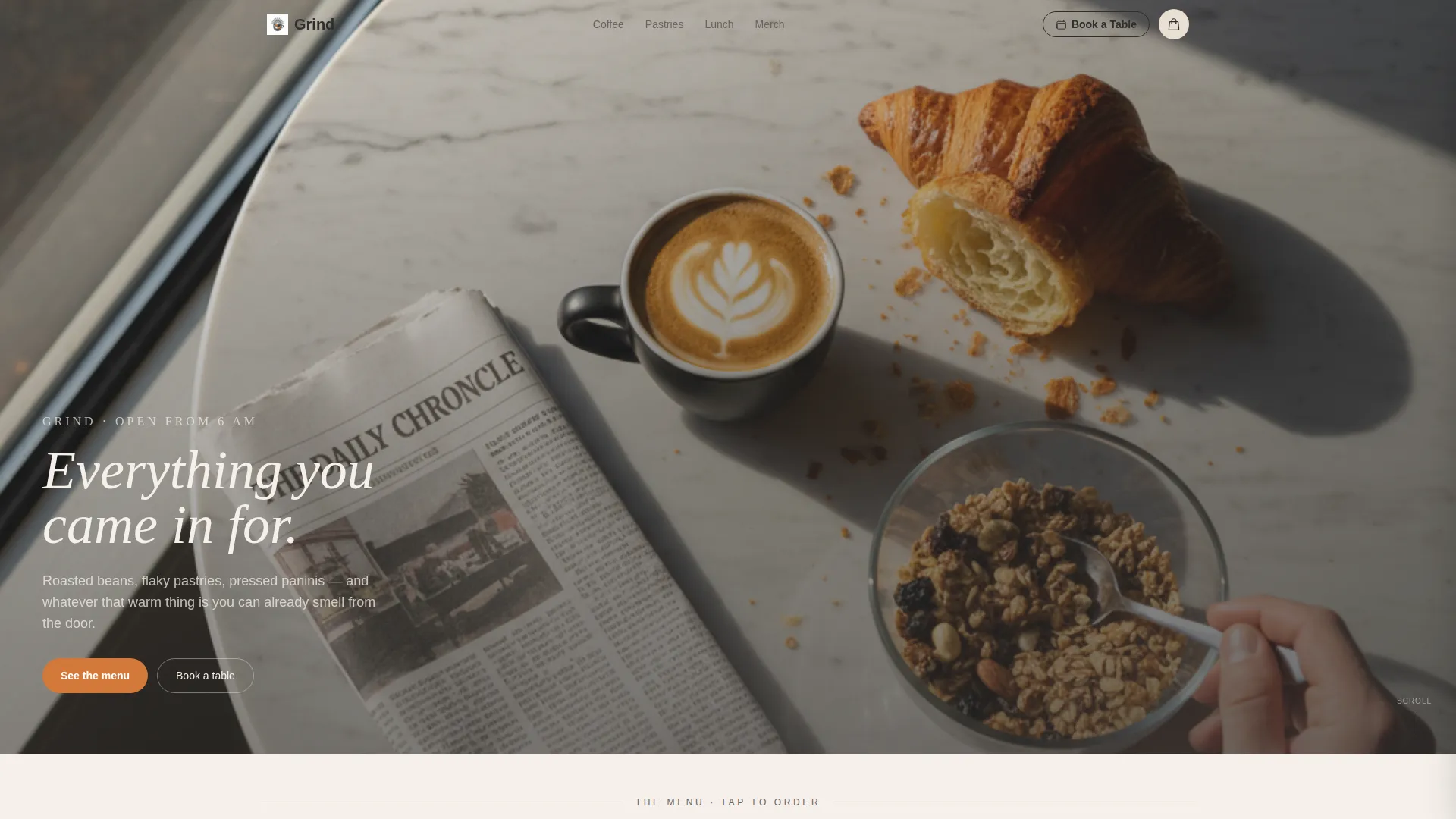
The header uses an overhead lifestyle photograph: a marble table, a half-drunk cortado, a torn croissant, and a hand reaching for granola. Natural window light rakes from the left. A serif headline fades in over the image reading "Everything you came in for."
Shoppable Bento Grid Layout
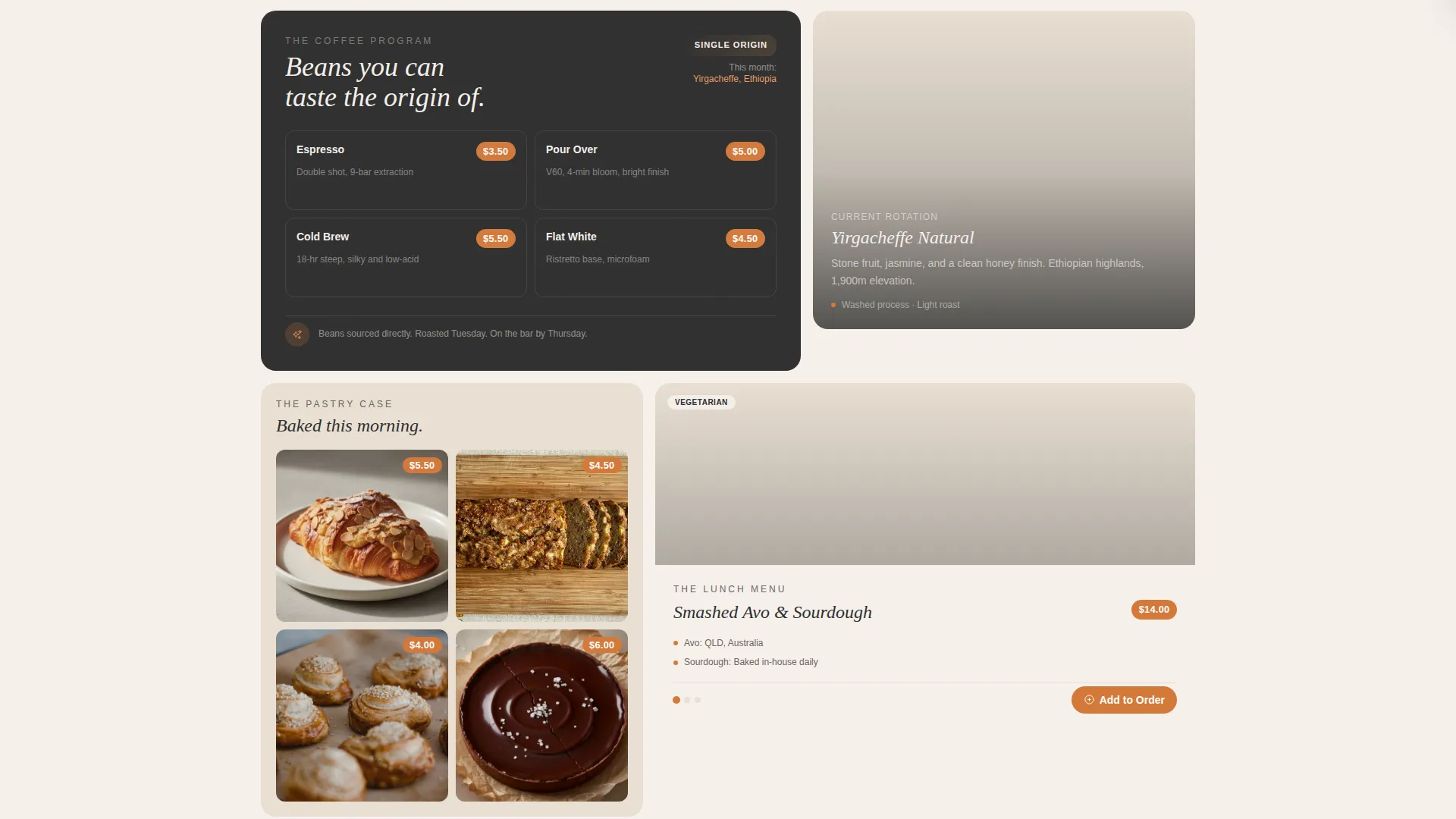
Every tile in the grid is a shoppable unit. Food and drink tiles carry an "Add to Order" button. The layout arranges tiles by category, coffee program, pastry case, lunch menu, and branded merchandise, so visitors discover the offering the way they would explore a physical café.
Sticky Cart Counter
A persistent cart counter sits in the top right corner of the page. It fills incrementally as visitors add items, keeping the order visible without interrupting the browsing experience.
Table and Wi-Fi Booking Path
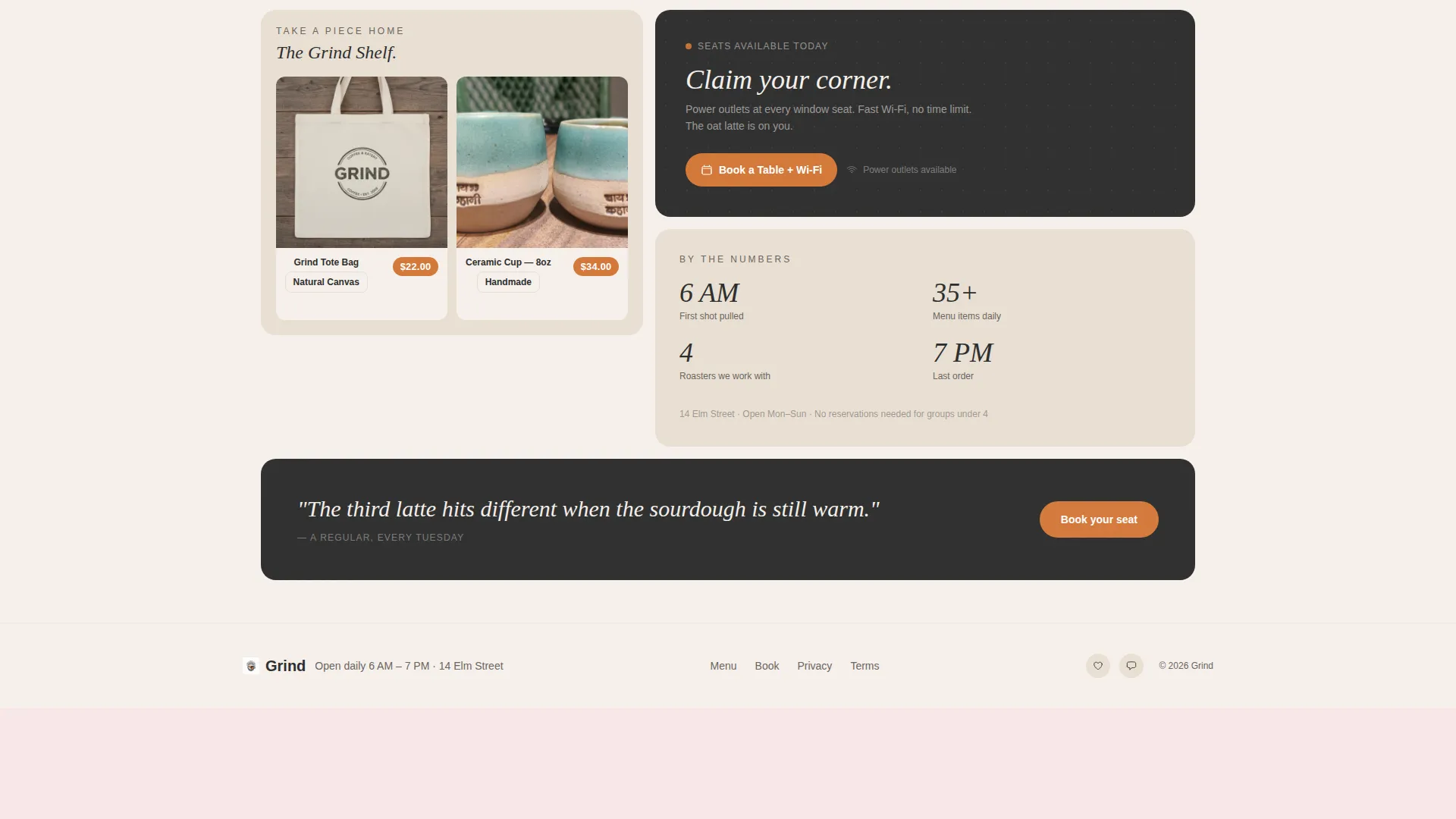
A secondary conversion path targets the freelancer and regular crowd. The "Book a Table + Wi-Fi" call to action opens a time-slot picker. Visitors can toggle for power-outlet seating, making the booking feel practical and personal.
Cloud Canvas Color System
The palette uses warm linen white, steamed milk cream, chalkboard charcoal, and a single marmalade orange accent. The accent color appears on buttons, price tags, and hover states. The result feels like a café counter wiped clean, tactile, warm, and specific.
Scroll Reveal Tile Progression
Tiles reveal progressively as the visitor scrolls. Each bento compartment opens like a new room in the café, with the coffee program first, followed by the pastry grid, the lunch tile, and finally the merchandise square.
Page sections overview
| Section | Purpose |
|---|---|
| Hero Header | Introduces the café with an overhead lifestyle shot and serif headline |
| Coffee Program Tile | Showcases beans, brew methods, and rotating single-origin offerings |
| Pastry Case Grid | Displays individual pastry items photographed on parchment in a grid-within-a-grid |
| Lunch Menu Tile | Highlights the lunch offering with ingredient provenance detail |
| Merchandise Square | Features branded tote bags and ceramic cups as shoppable items |
| Sticky Cart Counter | Keeps the running order visible at the top right throughout the page |
| Table Booking Panel | Opens a time-slot picker with a power-outlet seating toggle |
Design & branding system
The visual identity is built on the Cloud Canvas color system. Every color choice ties back to a physical sensation inside the café, flour dust on warm wood, black menu boards, and a jar of preserves catching morning light.
- Warm linen white (#F5F0EB) and steamed milk cream (#E8DFD3) form the page background and tile surfaces
- Chalkboard charcoal (#2E2E2E) handles all type and dark tile backgrounds
- Marmalade orange (#D4793A) is used exclusively for buttons, price tags, and hover states to draw the eye without overwhelming the palette
Mobile & speed optimization
The bento grid layout is built to restack cleanly on smaller screens. Tiles that sit side by side on desktop shift into a single-column scroll on mobile, preserving the discovery feel of the experience.
- Bento tiles reorder to maintain the coffee-first, pastry-second, lunch-third content hierarchy on mobile
- The sticky cart counter and booking call to action remain accessible at all scroll depths on any screen size
How this template helps you convert
The page is structured around two buyer intents and moves visitors toward action without pressure. The layout does the selling through visual proximity and tactile product presentation.
- The "Add to Order" tile system makes every item shoppable immediately. Visitors do not need to navigate away or search for a menu. The sticky cart counter reinforces momentum by showing the order building in real time.
- The "Book a Table + Wi-Fi" path gives a second type of visitor a direct route to commitment. The time-slot picker with an outlet-seating toggle answers the freelancer's specific need, making the booking feel tailored rather than generic.
Other information about this template
This template is categorized under Retail and E-Commerce, in the Full-Service Business subcategory. It is built specifically for the full-service café and hospitality niche, where visual presentation and speed-to-order are both critical.
- The template theme is Marketplace Grid, designed to support multi-item browsing and shoppable tile layouts
- The creative direction follows an Unboxing Experience approach, where each tile reveals a different layer of the café's offer
- The template style uses a Scroll Reveal progression, so the page builds as the visitor moves through it
- The header concept is a Lifestyle Shot, editorial, immersive, and tactile in feel
- The landing page direction targets Marketplace and Multi conversion, supporting both direct ordering and table reservations on a single page

Theme
Marketplace Grid
Creative direction
Curated Collection
Color system
Citrus Burst
Style
Scroll Reveal (Progressive)
Direction
Upsell/Upgrade
Page Sections
Lifestyle Hero Header with Serif Headline
Shoppable Bento Grid with Add to Order
Sticky Cart Counter
Table and Wi-fi Booking Panel
Scroll Reveal Tile Progression
Cloud Canvas Color System
Related questions
Can I customize the menu items and prices shown in the bento tiles?
Does this template support both ordering and table reservations on the same page?
Can I add or remove tiles from the bento grid?
Is this template suited to a café that also sells branded merchandise?



