Fitness Studio Complete Booking Website Template
Grind is a bento grid fitness coach landing page template built for coach-led studios that sell trust before they sell time slots. It presents each personal trainer as a data-rich product tile on a glassmorphic dark dashboard. Live class counts, certifications, specialty tags, and real-time schedule strips give visitors everything they need to commit. A single-goal app download flow drives every conversion.
by Rocket studio
Quick summary
Grind is a single-page fitness coach landing page template designed around one idea: the coach is the product. Built on a bento grid layout with a glassmorphic Dashboard Pro theme, it turns a studio roster into a browsable database of verified trainers. Every tile surfaces coaching credentials, workout specialties, ratings, and live schedules so visitors can feel confident before they ever book.
Who this template is for
This landing page template speaks directly to studio owners and fitness coaching brands that lead with their team. It is built for operators who know their trainers are the unique selling proposition, not the equipment.
- Pre-workout professionals who research a personal trainer before choosing a time slot
- Postpartum clients comparing instructor certifications and pre/post-natal specialties
- Boutique gym owners who want a professional landing page that highlights coach credibility with data, not just headshots
What problem this template solves
Most gym landing page designs bury trainers in a single row of headshots. Visitors land, see faces with names, and leave without enough information to commit. A high bounce rate follows because the page never builds trust fast enough.
This fitness landing page template solves that by replacing thin bios with metric-dense coach tiles. Each tile provides detailed information at a glance.
- Visitors scroll through live class counts, average ratings, and certification icons instead of relying solely on a paragraph bio
- The sticky app download sheet surfaces after engagement depth is reached, reducing drop-off before conversion
- Limited spots urgency is embedded in real-time schedule strips, so users act before a class fills
What you get with this template
This landing page template delivers a complete, ready-to-launch coach roster page. Every section is pre-structured around the single goal of driving app downloads through coaching credibility.
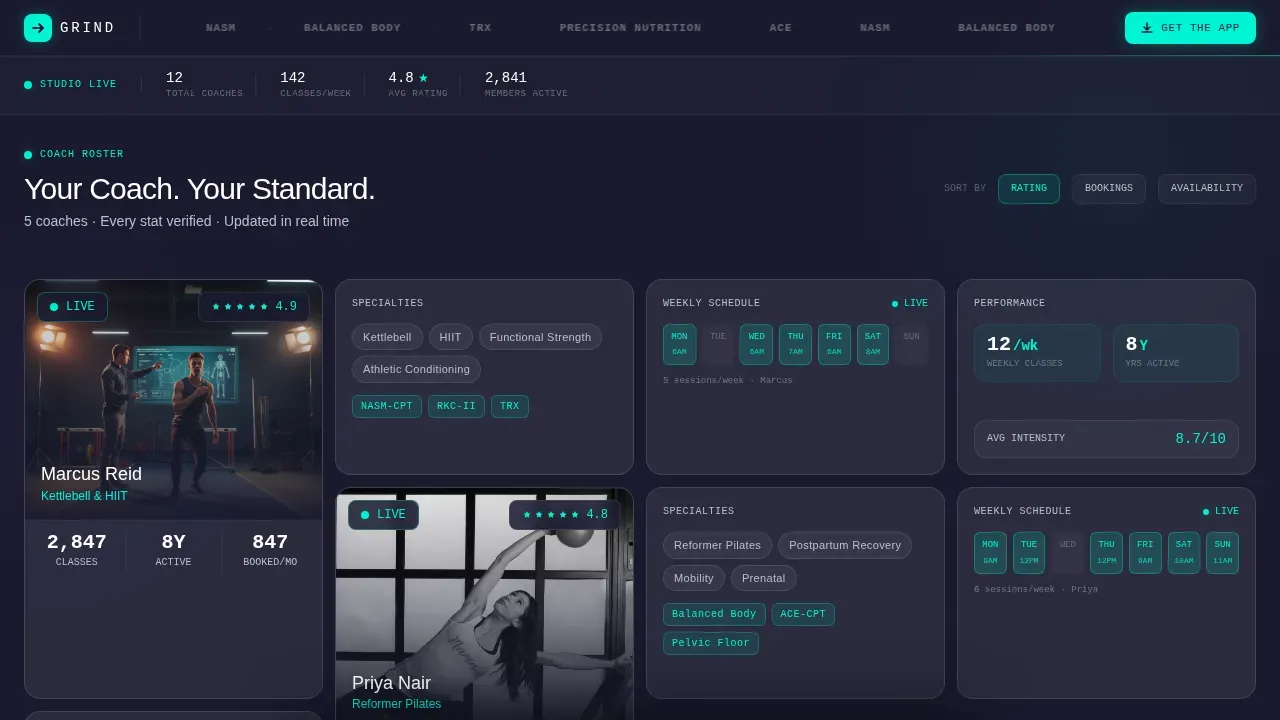
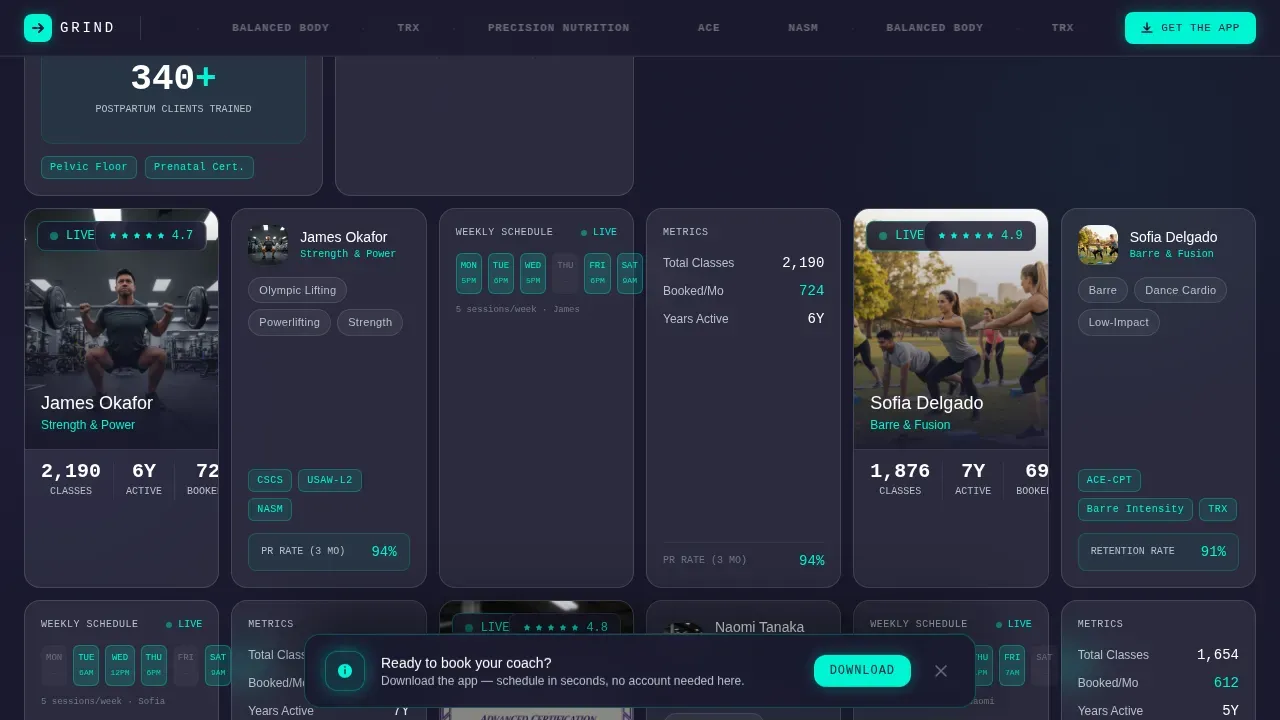
- A full bento grid of coach tiles, each formatted as a fitness coach landing page product data sheet with portrait, live stats, specialty tags, and a weekly schedule strip
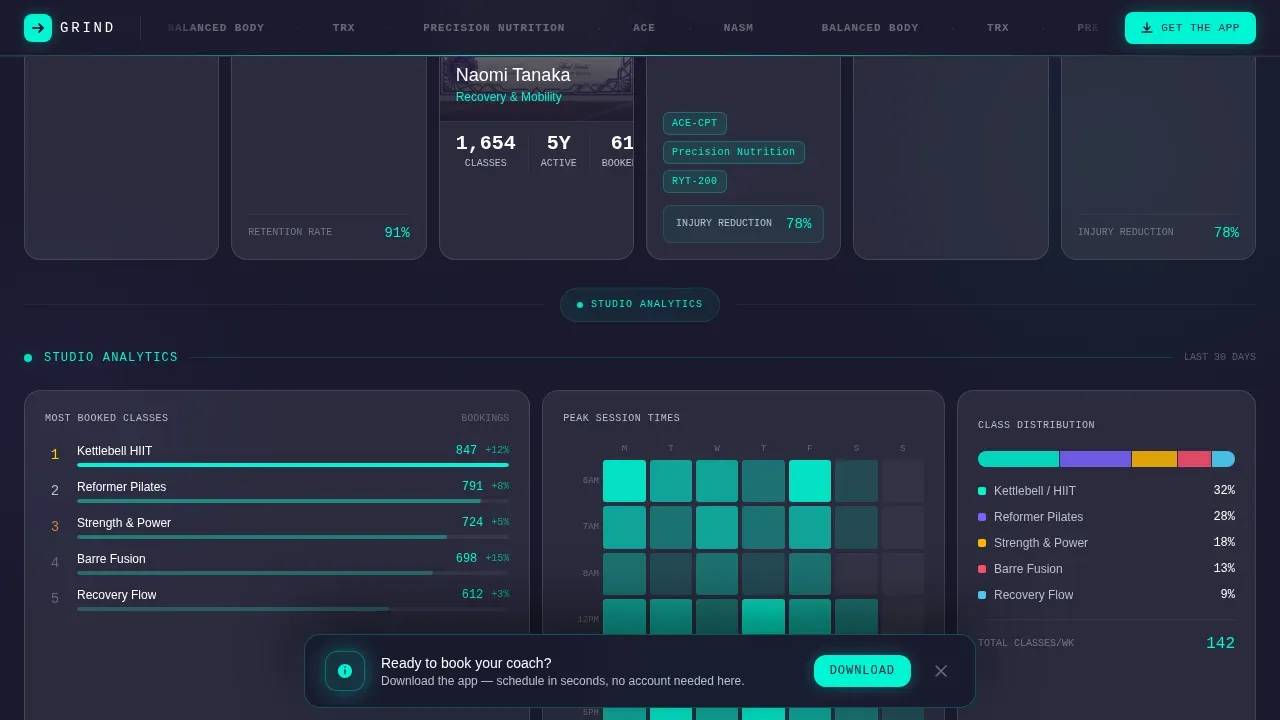
- An analytics section with a most-booked class leaderboard, a session-time heatmap, and a class-type distribution chart to provide social proof at a studio level
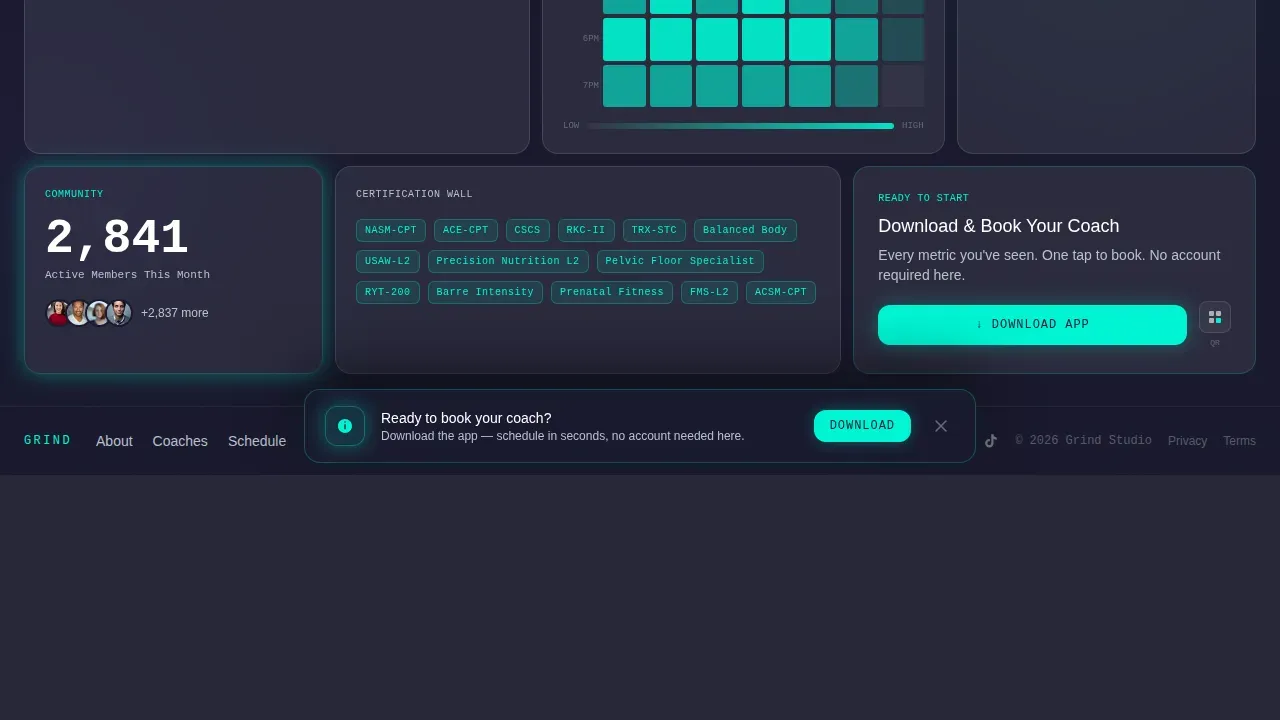
- A scroll-triggered sticky bottom sheet with iOS and Android store badges, a QR code, and an SMS link field for frictionless app access
Feature list
This template includes a focused set of components. Each one is grounded in the brief and designed to support a high converting fitness landing page experience.
Bento Grid Coach Roster Tiles
Each coach occupies a frosted glass bento tile that reads like a spec sheet. The largest tile per row holds a square portrait with a live class count and average rating overlaid. Flanking tiles display specialty tags, years active, certifications as icon rows, and a real-time weekly schedule strip. This layout lets visitors scan and compare trainers the way they browse a product catalog, which is a proven way to build trust fast.
Glassmorphic Dashboard Pro Visual System
The visual theme uses a deep charcoal substrate at hex color #1A1A2E, frosted translucent card surfaces with backdrop blur, electric mint accent at hex color #00F5D4, and cool slate text. Cards float on the dark ground with soft luminous borders. Mint pulses on hover states and live-data elements. Depth comes from layered translucency, not heavy shadows, giving the coaching page a clinical precision feel without coldness.
Scroll-Triggered Sticky App Download Sheet
After a visitor scrolls past three coach tiles, a sticky bottom sheet rises. It contains iOS and Android store badges, a QR code, and a phone-number field for an SMS download link. There is no account creation on-page. The app handles onboarding. This keeps the landing page focused on a single goal while the call to action stays visible without interrupting the browsing experience.
Live Analytics and Social Proof Section
Below individual coach tiles, the page shifts to studio-level data. A leaderboard of most-booked classes, a heatmap of peak session times, and a stacked bar chart of class-type distribution let visitors see the studio's operational proof. This social proof section transforms the landing page from a marketing page into a performance dashboard, which helps potential customers trust the fitness coaching program before they download.
Pinned Logo Bar Header with Certification Row
The header is a slim, pinned navigation strip. The studio wordmark sits left-aligned. A horizontal scroll of partner and certification logos covers ACE, NASM, Balanced Body, TRX, and Precision Nutrition in monochrome white. A mint-green "Get the App" call to action button anchors the right side. There is no hero image below the header. The bento grid begins immediately, making the coaches the first visual impact for new visitors.
Scroll-Triggered Animations and Mint Pulse States
The template uses high-intensity animation throughout. Beam borders light up on scroll. Mint pulses fire on hover and on live-data elements. Coach tiles reveal via Intersection Observer-powered scroll triggers. The schedule strips animate in as users reach each coach. These micro-interactions give the fitness landing page the feel of a live dashboard rather than a static website page.
Page sections overview
| Section | Purpose |
|---|---|
| Pinned Logo Bar | Studio wordmark, certification partner logos, mint call to action button |
| Hero Bento Grid | Coach tiles as data-sheet product cards with portraits and live stats |
| Coach Detail Tiles | Specialty tags, certification icons, years active, weekly schedule strips |
| Analytics Leaderboard | Most-booked classes ranked to show coaching demand |
| Session Time Heatmap | Peak hour visualization to highlight studio activity and set expectations |
| Class Distribution Chart | Stacked bar showing workout type spread across the full program |
| Sticky Download Sheet | Scroll-triggered app download modal with QR code and SMS link |
| Footer Row | Linear single-row footer with studio links and sign-off |
Design & branding system
The design language is Dashboard Pro with a glassmorphic color system. It feels like a heart-rate monitor glowing through fog: dark and calm until the mint accent fires. Typography uses DM Sans for interface labels and JetBrains Mono for stats and numbers, keeping coaching data crisp and readable at any size.
- Color palette: deep charcoal #1A1A2E substrate, frosted rgba(255,255,255,0.08) card surfaces with backdrop blur, electric mint #00F5D4 accent, cool slate #B8C1CC text, and bright white #FFFFFF for names and numbers
- Animation and interactivity: beam border reveals, mint pulse on hover and live elements, scroll-triggered tile appearances, and a scroll-depth-triggered sticky sheet create a high-interactivity coaching landing page experience
- Branding flexibility: the monochrome certification logo strip, color variables, and modular bento tiles mean studios can customize the palette and swap coach content without restructuring the layout
Mobile & speed optimization
A large share of fitness traffic arrives from mobile users. This landing page is designed mobile-first, with the bento grid reflowing to single-column coach tiles on smaller screens. The brief specifies a smartwatch-and-phone booking context, so every coaching stat is legible at thumb-scroll speed.
- Intersection Observer powers scroll-triggered reveals, keeping the page responsive without blocking the render of visible content
- CSS GPU animations drive the beam borders, mint pulses, and sticky sheet transitions, keeping motion fluid on mobile devices
- The sticky bottom sheet surfaces at engagement depth on mobile, ensuring the app download call to action reaches users without requiring a scroll back to the top of the page
How this template helps you convert
This fitness coach landing page is engineered around a single conversion goal: app downloads. Every design and content decision feeds that outcome without adding competing elements or visual clutter.
- Data density builds trust before the call to action appears. By the time visitors see the sticky download sheet, they have already reviewed live class counts, verified certifications, specialty tags, ratings, and a real-time schedule strip for multiple trainers. A well-defined unique selling proposition backed by measurable data can elevate conversion rates significantly, and this template makes that data impossible to miss.
- The sticky call to action sheet is triggered by engagement depth, not a timer. It appears after three coach tiles are scrolled past, so it reaches users who are already invested. The modal contains call to action buttons for both iOS and Android, a QR code, and an SMS link field, giving every visitor a frictionless path to download regardless of their device.
- Limited spots signals within real-time schedule strips create urgency. Users who see a class with few open slots are more likely to act immediately rather than return later. Urgency paired with trust signals is a reliable pattern in high converting fitness landing page design.
Other information about this template
This template is a standalone web page, not a multi-page website builder output. It is built for studios that want a professional landing page focused entirely on coaching credibility and app acquisition. The design draws from patterns common in the fitness world, where studios like those inspired by Orangetheory Fitness use vibrant visuals and structured content to drive engagement.
- Fitness landing page templates like Grind work best when studios treat the coach roster as valuable content rather than a list. Each trainer profile functions as its own coach landing page within the grid, giving potential clients detailed information per trainer before they commit.
- The template can support video testimonials in coach tiles if the studio wants to add short introductions per trainer. This is consistent with best practices showing that pairing video testimonials with coach profiles builds trust faster than text alone.
- Fitness content in the analytics section can be updated by swapping the leaderboard, heatmap, and chart data to reflect real studio numbers. The layout is designed to accommodate live or static data equally.
- The page is a great example of how a gym landing page can shift from generic marketing to a data-rich coaching experience. Studios that have struggled with high bounce rates on plain trainer pages will find the spec-sheet approach meaningfully different.
- Users who want to attract a lunchbreak crowd or early-morning regulars can highlight specific coaches and limited spots in those time blocks, making the fitness coach landing page speak directly to each audience segment's schedule.
- The template does not require account creation on-page. The fitness coaching app handles onboarding after download, keeping the standalone web page free of form friction.
- Start building on this template by replacing the placeholder coach portraits, swapping certification icons to match your studio's actual credentials, and updating the schedule strips with real class times. The bento layout makes it straightforward to add or remove coach tiles as your team grows.
Theme
Dashboard Pro
Creative direction
Spec Sheet
Color system
Glassmorphic
Style
Bento Grid
Direction
App Download
Page Sections
Bento Grid Coach Roster Tiles
Glassmorphic Dashboard Pro Theme
Scroll-triggered Sticky Download Sheet
Studio-level Analytics Section
Pinned Logo Bar with Certification Strip
High-intensity Scroll Animations
Related questions
Does this template include a built-in booking system?
Can I use this template for a solo personal trainer rather than a full roster?
How does the sticky app download sheet get triggered?
Can I customize the colors and certification logos in this template?
Is this a single-page landing page or a multi-page website?