Kids Skateboarding League Landing Page Template
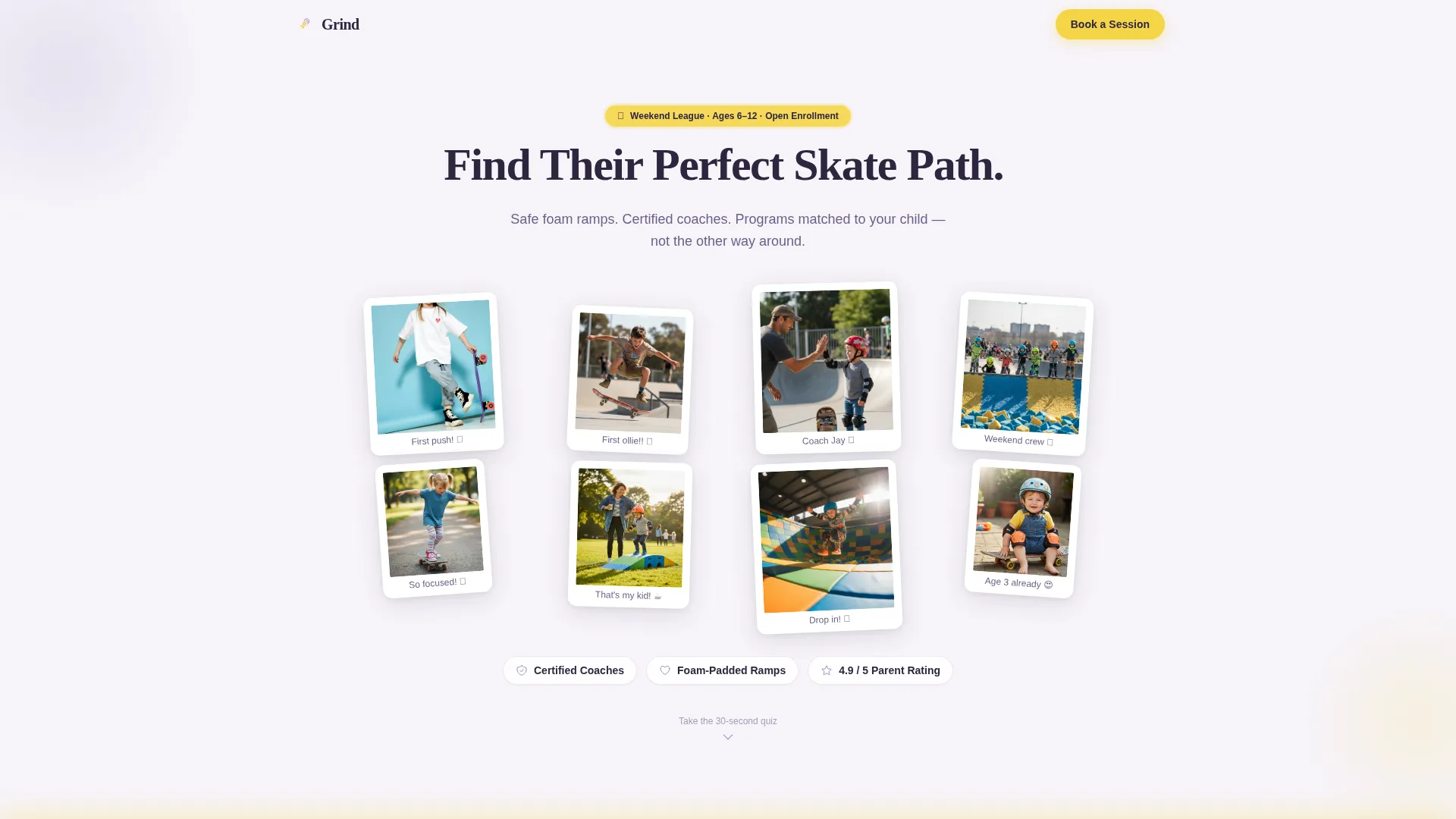
Grind is a scroll reveal landing page template built for kids skateboarding leagues and weekend programs. It guides parents through a three-question personalization quiz, then reveals the right program for their child. The Lavender Dream color system, UGC photo wall header, and sticky booking bar work together to turn a late-night search into a booked first session.
by Rocket studio
Quick summary
Grind is a single-page template designed for kids skateboarding leagues that need to convert curious parents into paying participants. A typewriter headline, a mosaic photo wall, and a smart quiz engine make the page feel personal from the first scroll. The sticky booking bar keeps the call to action visible at every step.
Who this template is for
This template is built for organizers running weekend kids skateboarding leagues, youth skate programs, and beginner skateboarding classes for children. It is ideal for coaches and small business owners who serve parents, not kids, as the primary decision-maker.
- Local skate programs enrolling kids between six and twelve years old
- Weekend leagues with certified coaches, foam-padded ramps, and structured skill levels
- Youth sports organizers who need a booking-ready page without a custom build
What problem this template solves
Parents searching for safe kids activities at night face a wall of generic sports pages that show the same information to every visitor. They cannot quickly tell whether a program fits their child's age, experience, or goal. That uncertainty costs sign-ups.
- No clear fit between the child's skill level and the program on offer
- Too many clicks before a parent can see safety details, coach credentials, and available dates
- No soft conversion path for parents who are interested but not yet ready to book
What you get with this template
Grind gives you a complete, scroll-reveal landing page with layered interactivity. Every section is designed to meet a parent at a different stage of readiness, from first impression to confirmed booking.
- A UGC photo wall header with staggered Polaroid-style tiles and a typewriter headline
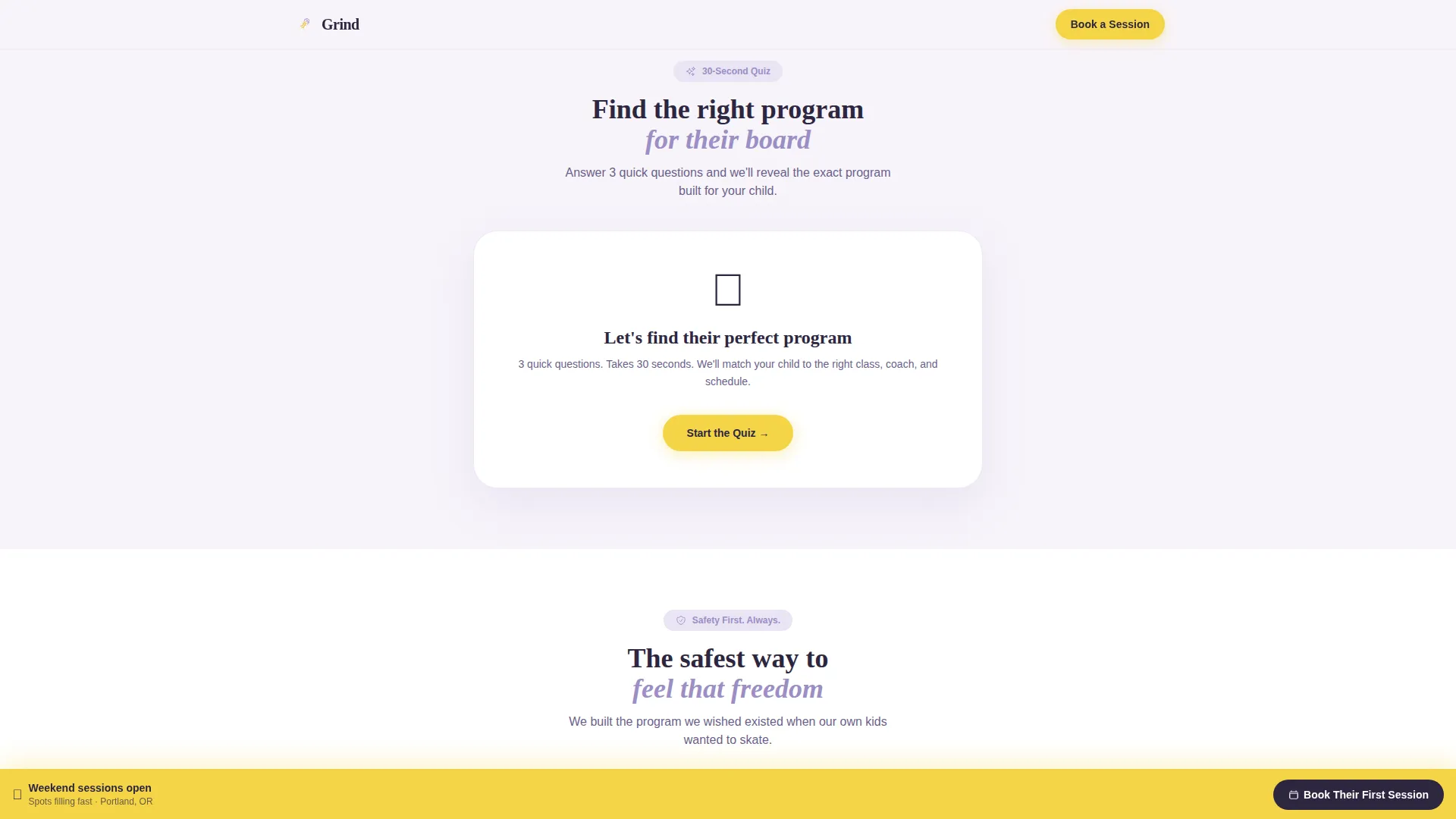
- A three-step quiz engine that reveals a personalized program based on age, experience, and goal
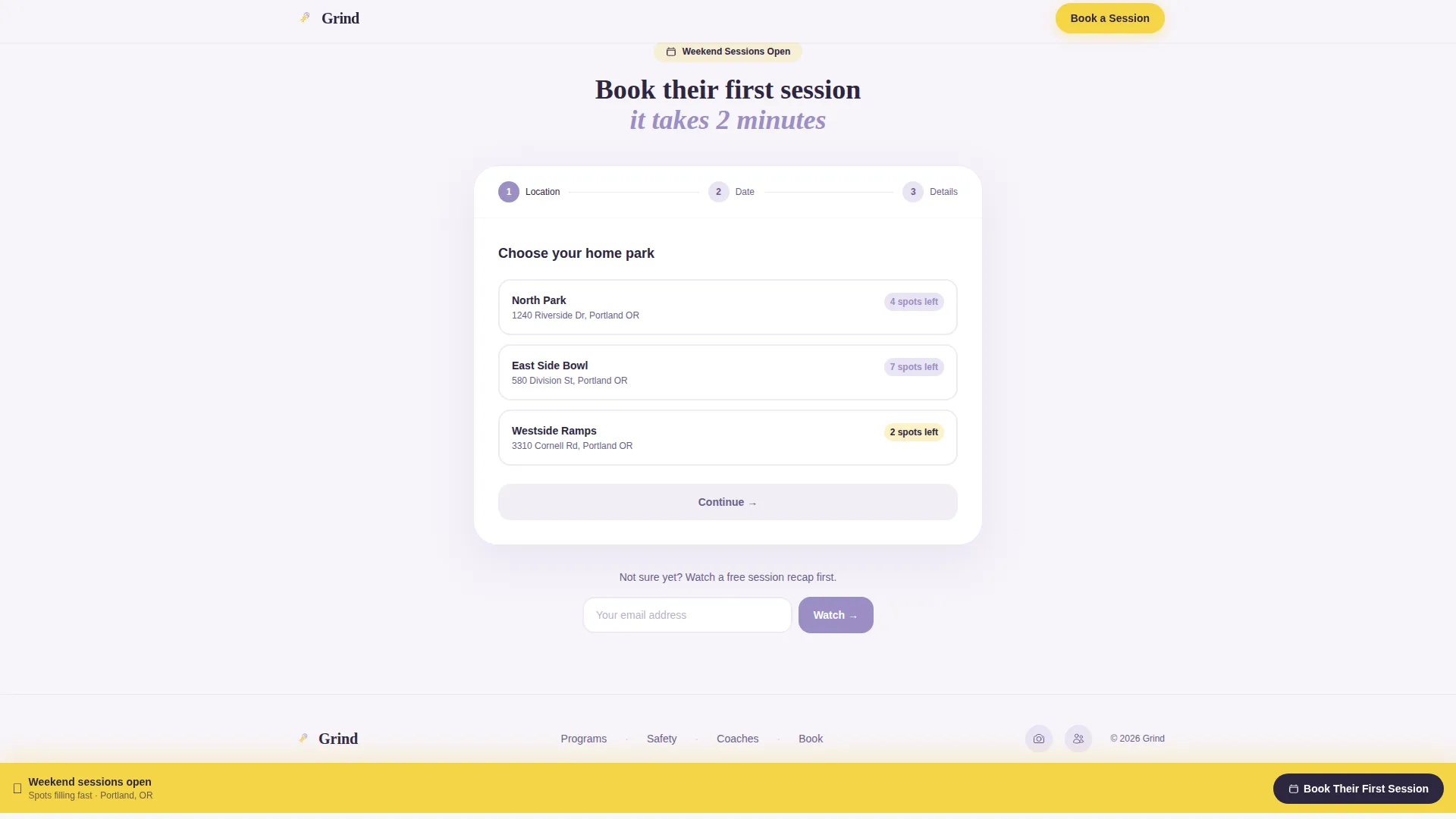
- A sticky bottom booking bar with a three-step scheduling flow and a soft email capture alternative
Feature list
This template combines high-animation visual design with practical conversion mechanics. Below is a breakdown of its built-in components.
UGC Polaroid Photo Wall Header
The header loads parent-submitted photos and short clips as staggered, slightly rotated tiles, styled like Polaroids on a corkboard. A typewriter effect spells out the headline letter by letter as the page opens, creating an immediate sense of energy and warmth.
Three-Step Personalization Quiz
The quiz asks three questions: the child's age, their current experience level, and their goal. Each answer triggers a scroll reveal of the matching program, showing session photos, coach bios, skill progression charts, and safety certifications tailored to that specific child profile.
Dynamic Program Reveal Sections
Program cards do not appear until the quiz is complete. They unfold progressively, like chapters in a guidebook, so every parent sees only the content relevant to their child. This keeps the page focused and prevents information overload.
Sticky Booking Call to Action Bar
A bottom bar pinned in skatepark yellow stays visible throughout the entire scroll. It carries the primary call to action "Book Their First Session" and opens a three-step flow: location picker, visual calendar with open spots, and a short contact form.
Safety and Coaches Section
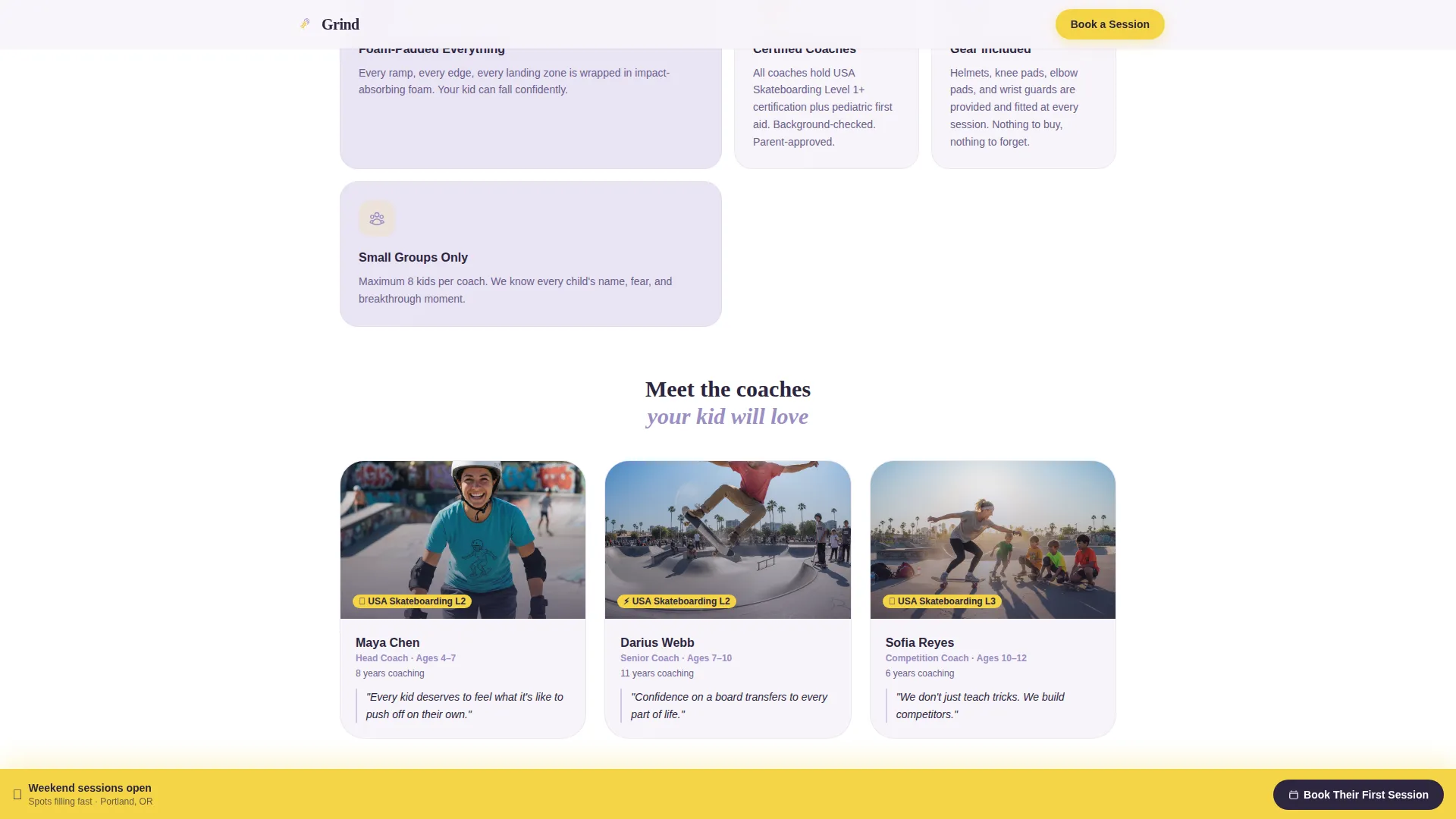
This section presents foam-padded ramp details, coach certifications, and individual coach bios. It is structured to answer the safety questions parents carry before they trust a program with their child.
Soft Email Capture Path
A secondary conversion path lets hesitant parents enter their email to watch a free session recap video. This single-field form nurtures families who need one more nudge before committing to a booking.
Page sections overview
| Section | Purpose |
|---|---|
| Hero Photo Wall | Opens with UGC Polaroid mosaic and animated typewriter headline |
| Trust Badge Row | Displays safety certifications and coach credentials at a glance |
| Quiz Engine | Collects age, experience level, and goal in three steps |
| Program Reveal Cards | Shows personalized program based on quiz answers |
| Safety and Coaches | Details foam ramps, certifications, and coach bios |
| Booking Flow | Three-step location, calendar, and contact form |
| Email Capture Path | Single-field form for parents not ready to book |
| Footer | Minimal dot-pattern footer with key links |
Design & branding system
The visual identity follows an Educational Guide theme built on the Lavender Dream color system. The palette is soft enough to feel trustworthy to parents and bright enough to catch a child's eye across the room.
- Core colors: soft violet (#9B8EC4), chalky lilac (#D5C8E6), warm cloud white (#F7F4FA), and skatepark yellow (#F5D547) reserved for buttons, badges, and call-to-action elements
- Typography pairing: Fraunces display serif for headlines and DM Sans for body text, balancing playful energy with easy readability
- Visual style: Polaroid notebook aesthetic with staggered tile animations, quiz transition effects, and smooth CSS scroll-reveal behavior throughout
Mobile & speed optimization
This template is built mobile-first, which matches the core audience: parents searching for safe kids activities on their phones late at night. Every interactive element is sized and sequenced for thumb-friendly use.
- Staggered tile reveals and quiz transitions are designed to run smoothly on mobile screens without layout disruption
- The sticky booking bar and single-field email capture are optimized for one-handed interaction on smaller devices
- Smooth CSS scroll behavior and progressive section reveals reduce visual clutter and keep the mobile experience focused
How this template helps you convert
Grind is structured around a clear conversion funnel that moves parents from curiosity to commitment. Each section removes a specific barrier to booking.
- The quiz creates a personalized experience that makes parents feel the page was built for their child, increasing trust and time on page before any ask is made.
- The sticky booking bar keeps the primary call to action visible at all times, so a parent who is ready to book never has to scroll back up to find it.
- The soft email capture path offers a low-commitment alternative for hesitant parents, extending the relationship beyond the first visit without losing the lead.
Other information about this template
This template uses a Scroll Reveal (Progressive) style, meaning sections load as the parent scrolls rather than all at once. This pacing is intentional, it rewards engagement and keeps the experience feeling guided rather than overwhelming.
- Template style: Scroll Reveal (Progressive) with high animation and high interactivity settings
- Category fit: Kids and Family, specifically the Kids Skateboarding Competition and League niche
- Footer pattern: Vercel-minimal dot design for a clean, uncluttered page close
- Localization: Built for USA audiences, USD pricing contexts, and English-language copy
- Social proof elements include parent photo submissions, coach certification displays, and session count indicators
Theme
Educational Guide
Creative direction
Quiz & Personalize
Color system
Lavender Dream
Style
Scroll Reveal (Progressive)
Direction
Booking/Scheduling
Page Sections
UGC Polaroid Photo Wall Header
Three-step Personalization Quiz
Dynamic Program Reveal Sections
Sticky Booking Call to Action Bar
Safety and Coaches Section
Soft Email Capture Path
Related questions
Can I use this template without running a quiz?
Does the template include the booking calendar and contact form?
Is this template suitable for a single coach running small sessions?
Can I change the colors to match my league's branding?
What happens if a parent skips the quiz?



