Senior & Disability Professional Website Template
Navigate is a single-column landing page template built for county aging and disability offices. It guides families, seniors, and caregivers from confusion to action through an interactive county map, a self-assessment checklist, and a straightforward event registration form. The design feels like a trusted government office: calm, clear, and ready to help.
by Rocket studio
Quick summary
Navigate is a single-column landing page template purpose-built for county aging and disability services offices. It combines an interactive county map, a self-guided intake checklist, and an event registration flow into one clean scroll. The design communicates civic authority without intimidating the people who need help most.
Who this template is for
This template was designed for county government offices that connect older adults and people with disabilities to local programs. The intended operators are public administrators, social service teams, and outreach coordinators who need a page that works just as well on a phone in a hospital parking lot as it does on a desktop at home.
- Adult children searching for help for an aging parent after a sudden health event
- Veterans' spouses sorting through benefit letters and unsure where to start
- Parish volunteers and community advocates trying to refer a neighbor to the right program
What problem this template solves
Families in crisis rarely know what services exist, let alone how to apply. A county office webpage that lists programs alphabetically does not help someone who is frightened and overwhelmed. This template removes that barrier by guiding visitors through a structured self-assessment before asking them for anything.
- Visitors do not know which programs they qualify for and need help narrowing their options quickly
- Non-technical, high-stress users need a page that communicates trust immediately and requires minimal reading effort
- County offices need a path from awareness to confirmed enrollment without adding burden to caseworkers
What you get with this template
You get a fully structured, single-column landing page with five content sections and a footer. Every section has a specific job, and together they walk a visitor from "I'm not sure what I need" to a reserved seat at a program event or a direct phone call with a caseworker.
- An interactive SVG county map with animated location pins and a hover tooltip showing the nearest event
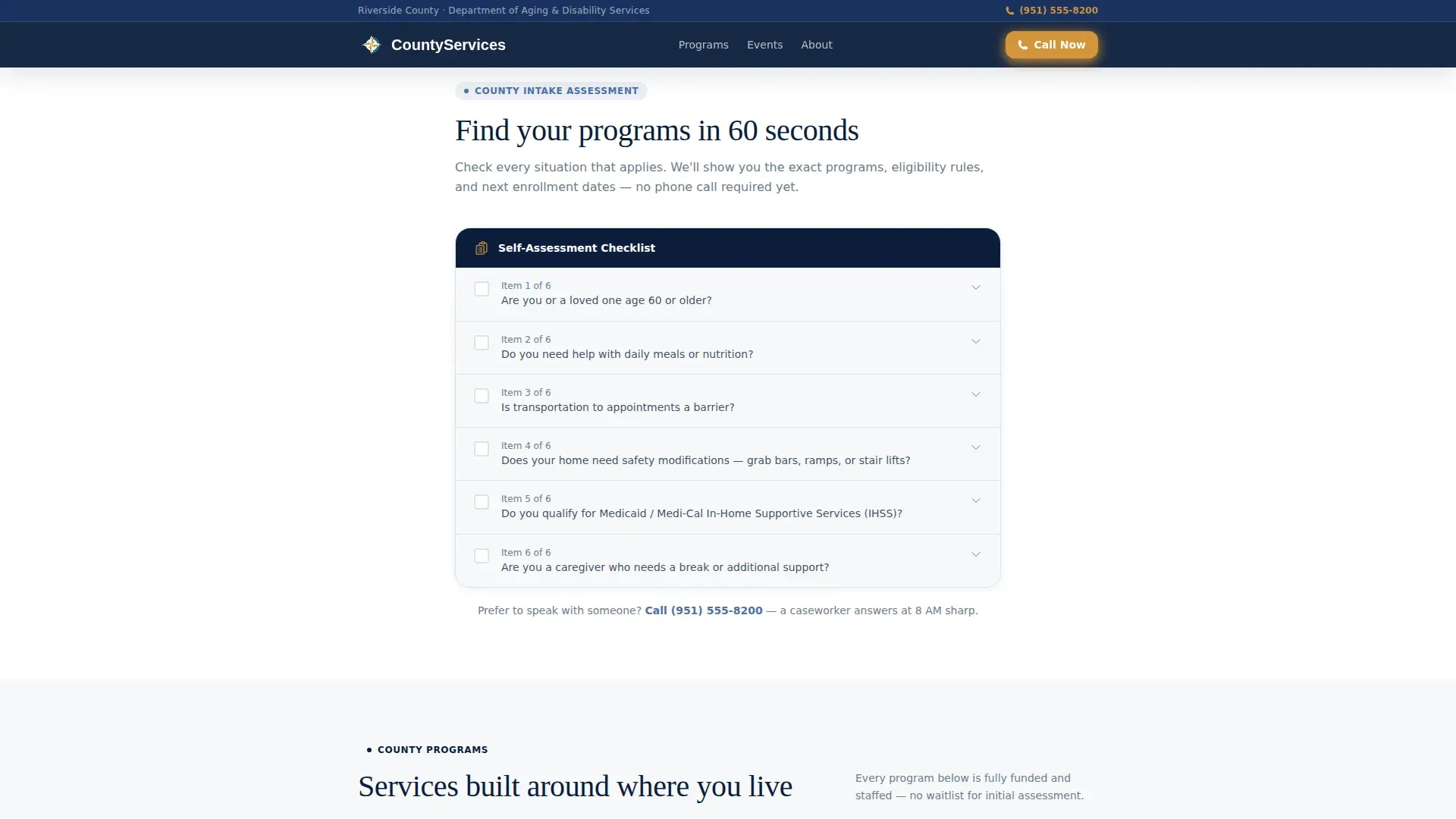
- A self-assessment checklist styled as an intake form that reveals matching programs as the visitor works through it
- A registration form with event selection, accessibility needs field, and a secondary call-us-directly button
Feature list
A paragraph introduces the core features before each item.
The features below represent the functional building blocks of the Navigate landing page template. Each one was designed to match how real visitors interact with county services under stress.
Interactive County Map with Animated Pins
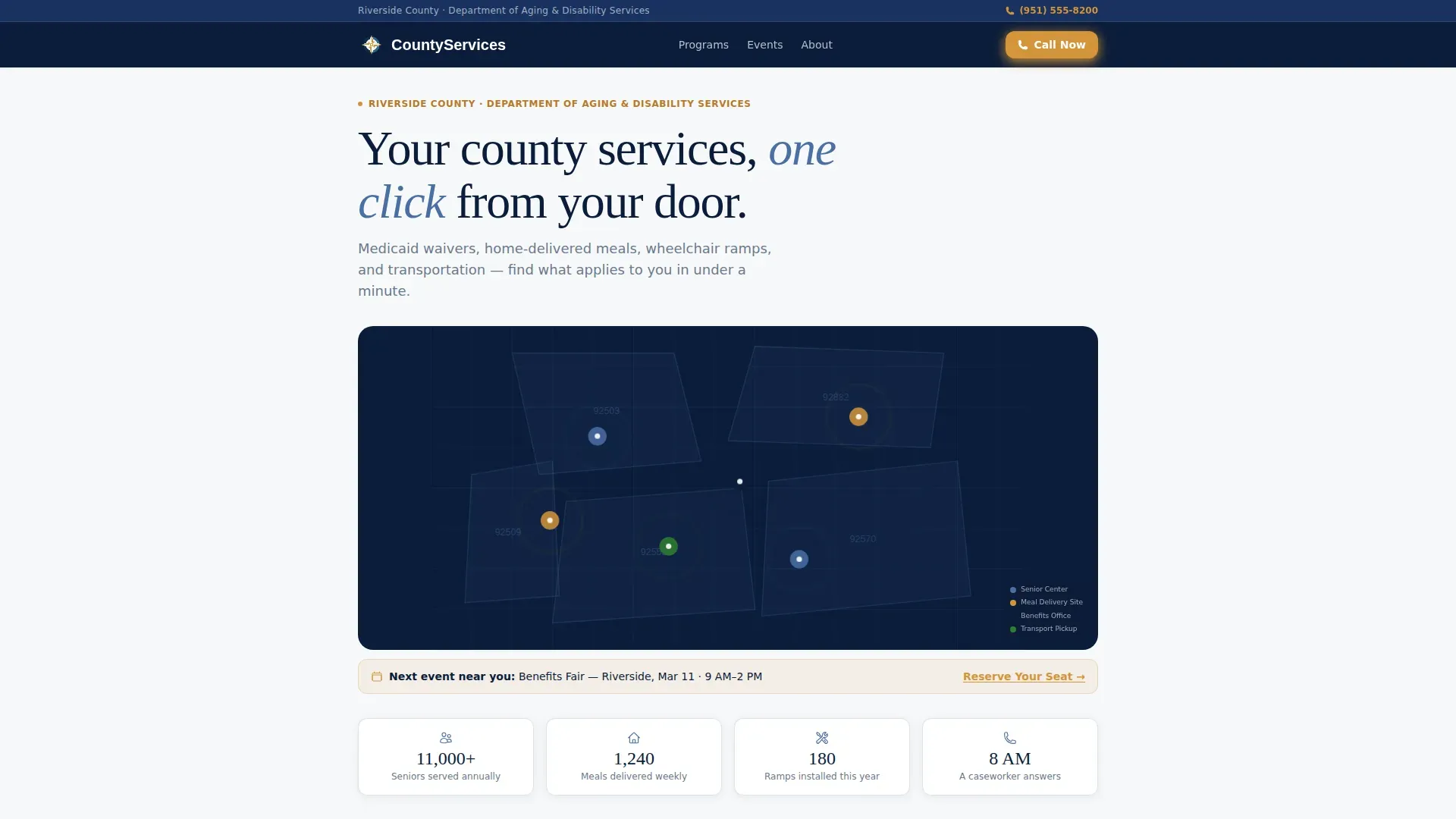
The hero section opens with an SVG county map rendered in deep navy and steel blue. ZIP code boundaries are softly outlined, and colored pins mark senior centers, meal delivery sites, benefits offices, and transportation pickup zones. Hovering or tapping a pin surfaces a tooltip with the nearest resource and upcoming event. A pulsing animation on each pin draws the eye without distracting from the headline above.
Self-Assessment Intake Checklist
Scrolling past the map, visitors encounter a checklist styled like an official county intake form. Questions cover age, daily living needs, caregiver status, and mobility requirements. Each checked item gently reveals the matching program with eligibility details, contact hours, and the next scheduled enrollment event. The reveal logic makes the scroll feel guided and personal rather than generic.
Asymmetric Bento Grid of Service Categories
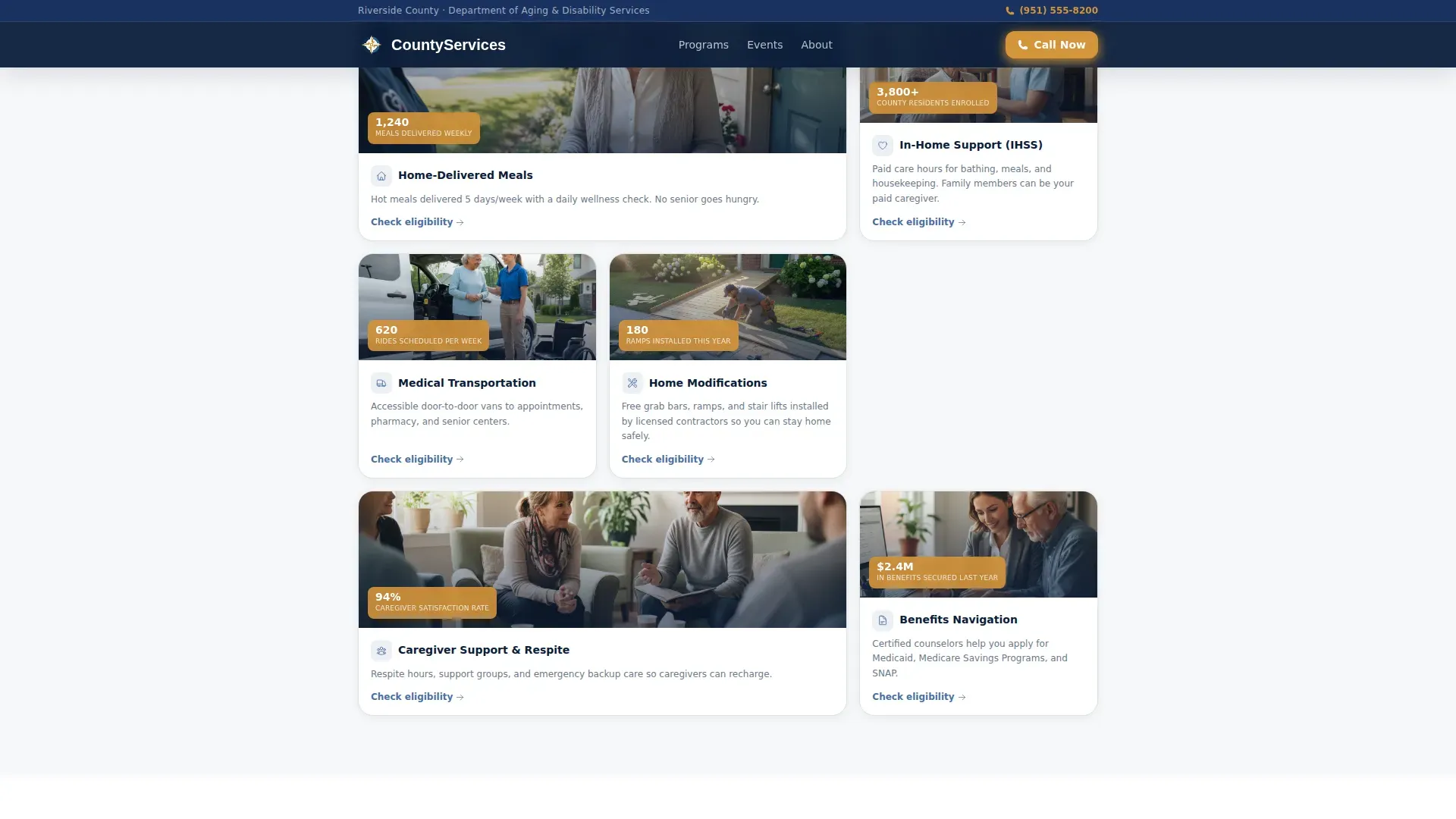
The Programs section presents six service categories in an asymmetric bento grid layout. Categories include home-delivered meals, transportation, home modifications, Medicaid waivers, caregiver respite support, and benefits navigation. Each card carries a short description and a clear next step so visitors can see what applies to them at a glance.
Event Registration Form with Accessibility Options
The registration form collects first name, ZIP code, and event selection from a dropdown. An optional field for accessibility needs covers wheelchair access, interpreter services, and transportation assistance. A secondary "Call Us Directly" click-to-call button sits alongside the form for visitors who prefer a human voice over filling out fields.
Social Proof Statistics Block
The page includes a statistics block displaying program impact numbers: seniors served, meals delivered, and home modifications completed. Real caseworker office hours appear alongside the stats, grounding the page in operational credibility rather than vague promises.
Page sections overview
| Section | Purpose |
|---|---|
| Hero Map | Display county resources visually and surface the nearest upcoming event via an animated pin tooltip |
| Intake Checklist | Guide visitors through a self-assessment that reveals matching programs and eligibility details |
| Programs Grid | Present six service categories in a scannable bento layout with clear next steps |
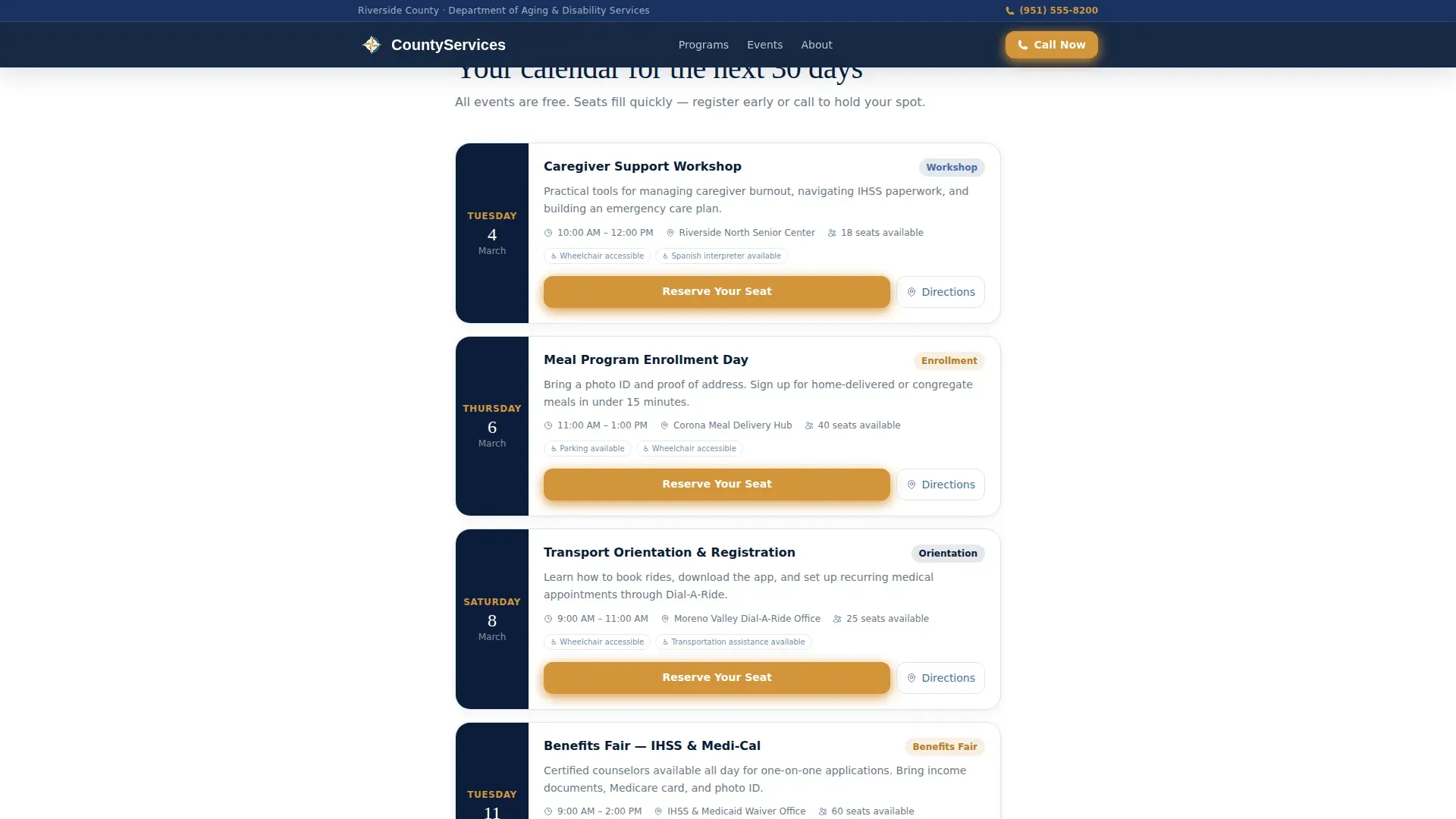
| Events Listings | Show upcoming workshops and benefits fairs with a prominent Reserve Your Seat call to action |
| Registration Form | Capture event sign-ups with accessibility options and offer a direct call path as an alternative |
| Footer | Provide essential contact information and office details in a clean single-row layout |
Design & branding system
The visual identity follows a Civic Service theme. The palette draws from authoritative government design traditions: deep, trustworthy colors paired with a warm background that keeps text easy to read. The typographic pairing of a serif headline font and a clean body font reinforces the feeling of a well-maintained public office.
- Deep federal navy (#0B1D3A) anchors the header, top bar, and primary headings to signal official authority
- Calm steel blue (#4A6FA5) handles section dividers and secondary text, adding warmth without breaking the civic tone
- Warm accessible white (#F7F8FA) covers all content backgrounds to reduce visual fatigue during longer scroll sessions
- Action gold (#D4943A) is reserved exclusively for buttons and urgent callouts, creating a clear and consistent signal for every call to action
Mobile & speed optimization
The template was built mobile-first. The primary users described in the brief are people on phones in stressful environments: hospital parking lots, kitchen tables, a neighbor's living room. Every layout decision prioritizes thumb-friendly tap targets, readable text at small sizes, and fast visual orientation.
- The interactive map responds to tap as well as hover, so the tooltip experience works without a mouse
- Server Components handle all static content sections while Client Components are scoped to the interactive map and checklist reveal logic
- Scroll-linked section fades are kept lightweight to maintain fast perceived load without sacrificing the guided feel
How this template helps you convert
The Navigate template earns the registration before it asks for it. The flow is designed to demonstrate value at each scroll step, so the visitor feels helped rather than pressured when the form finally appears.
- The interactive map immediately shows the visitor that county resources exist near them, building geographic relevance and trust before a single word is read
- The intake checklist personalizes the experience by surfacing only the programs that match the visitor's situation, reducing overwhelm and increasing the likelihood they will take the next step
- The registration form appears after the visitor has already seen their matched programs and an upcoming event, making the ask feel like a natural next step rather than a cold request
Other information about this template
This section covers additional practical details about the Navigate template that support real deployment decisions.
- The footer uses a Pattern 1 Linear Single-Row layout, keeping contact details accessible without adding visual weight at the bottom of a long scroll
- Typography uses Fraunces for serif headlines and DM Sans for body text, a pairing that balances civic authority with readable warmth
- Animation intensity is set to medium: map pin pulse, checklist reveal, and scroll-linked section fades are all present but never overwhelming
- The page is localized for United States audiences, using English copy, 12-hour time formats, and United States dollar currency references where applicable
- The template is structured as a single-column flow, meaning all sections stack vertically in a deliberate narrative order that guides the visitor from awareness to action
Theme
Civic Service
Creative direction
Checklist & Audit
Color system
Navy Authority
Style
Single Column Flow
Direction
Event Registration
Page Sections
Interactive County Map with Animated Pins
Self-assessment Intake Checklist
Six-category Programs Grid
Event Registration with Accessibility Fields
Program Statistics and Caseworker Hours
Related questions
Who is the Navigate template designed for?
What sections are included in this landing page?
Does the registration form include accessibility options?
Can the page handle visitors who are not comfortable with technology?
How does the checklist reveal logic work?



