Hair Salon Pre-Launch & Coming Soon Website Template
Shear is a bold brutalist hair salon coming soon landing page built as a live dashboard. It combines a countdown grid, services spec sheet, stylist roster, and app download call to action into one aggressive single-page flow. The monochrome steel palette and clipper-oil gold accents make every scroll feel urgent and intentional, built to convert style-obsessed visitors before the doors even open.
by Rocket studio
Quick summary
Shear is a coming soon landing page for a hair salon, designed in a bold brutalist style. It runs like a live data dashboard, countdown tiles, a services spec sheet, stylist profile cards, and a pinned app download bar all stack into one relentless scroll. The goal is simple: get visitors to download the booking app and claim a priority slot before launch day.
Who this template is for
This template is built for hair salon owners and brand teams who want to build anticipation before opening day. It works especially well when you have an existing booking app and want early sign-ups locked in.
- Salon founders launching a new location who want to capture early clients before the doors open
- Brand-led stylists with a strong visual identity who need a page that matches their attitude
- Marketing teams running a pre-launch campaign tied to an app download or SMS notification flow
What problem this template solves
Most coming soon pages feel like placeholders. They sit still and say nothing. A hair salon with real energy and a real opening date needs something that feels alive from the first scroll.
- Visitors land and have no urgency to act, so they leave without signing up or downloading the app
- The salon's personality and services are invisible until opening day, losing the warm-up window entirely
- There is no clear, low-friction path for turning a curious walk-by visitor into a confirmed first-day client
What you get with this template
You get a fully designed single-page layout that functions like a live dashboard. Every section is pre-built and styled to the bold brutalist visual system described in the brief.
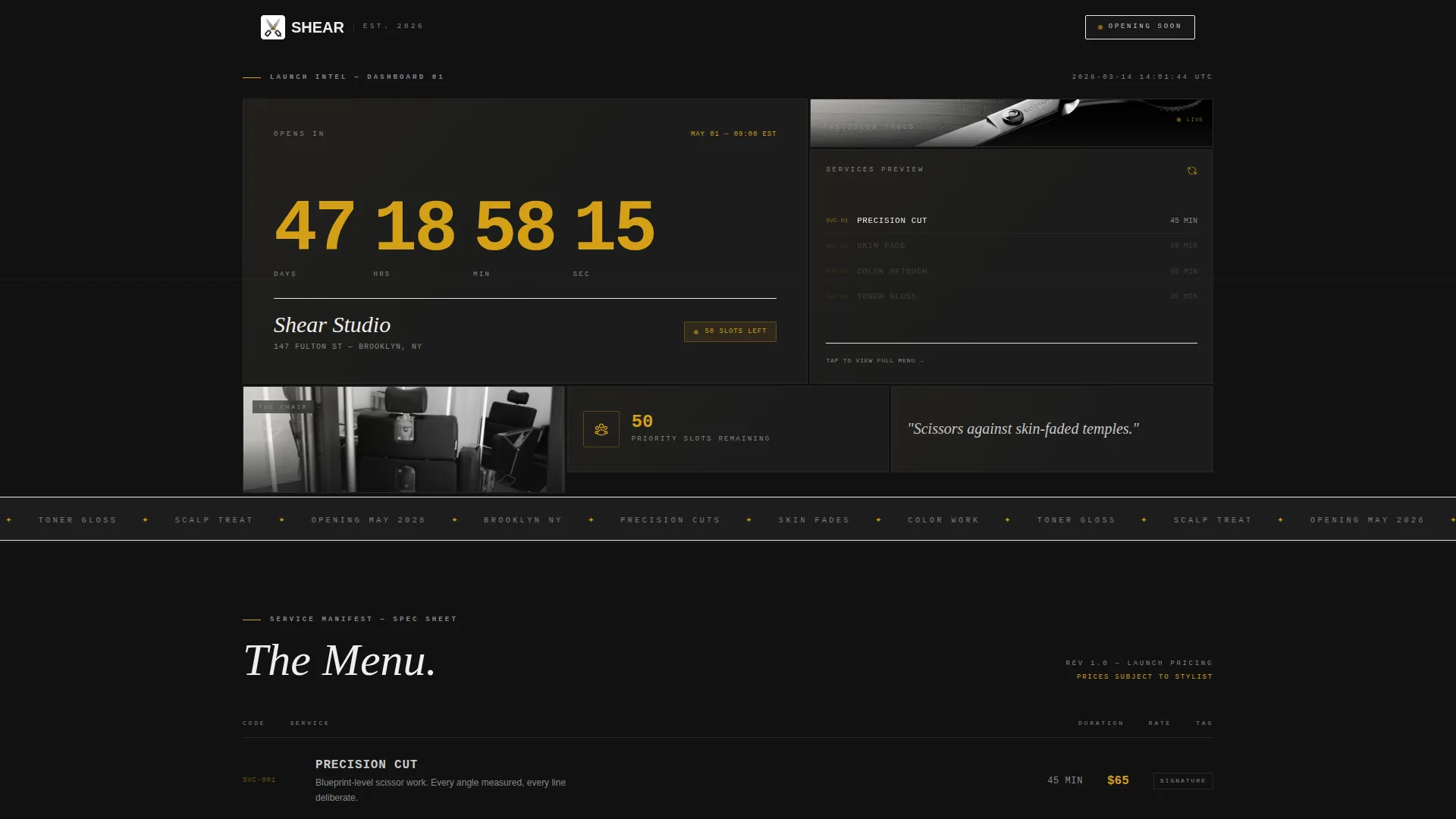
- An interactive countdown grid header with four brutalist data tiles that each reveal a different fragment of the salon
- A services spec sheet section, a stylist roster with profile cards, a neighborhood map tile, and a pinned app download bottom bar
- A secondary SMS opt-in path with a single phone number field and a gold send arrow for zero-friction lead capture
Feature list
This template packages its functionality into focused, purposeful sections. Each feature is designed to build momentum as the visitor scrolls.
Live Countdown Grid Header
The header is built as a grid of four brutalist data tiles. One tile plays a looping close-up of shears, one displays the opening date ticking down to the second in mono-spaced type, one shows a rotating chair render, and one lets visitors tap to preview signature services. The tiles crowd the viewport and shift on scroll like a refreshing dashboard.
Services Spec Sheet Section
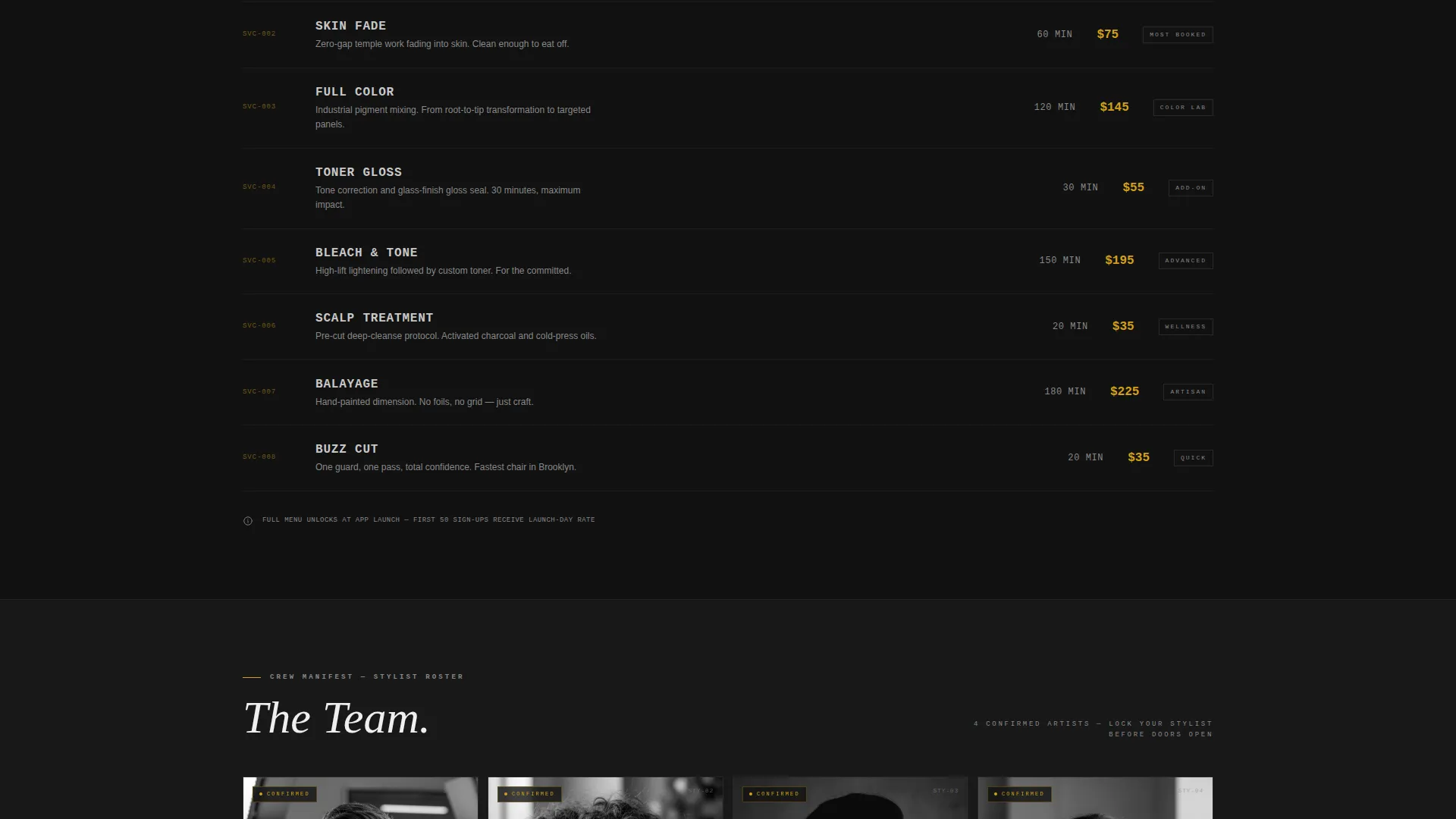
The services section is formatted like a raw data table, not a soft menu. Cut names, durations, and details are displayed in data-style formatting that matches the industrial visual tone. This gives style-conscious visitors the intel they need without soft-selling them.
Stylist Roster with Profile Cards
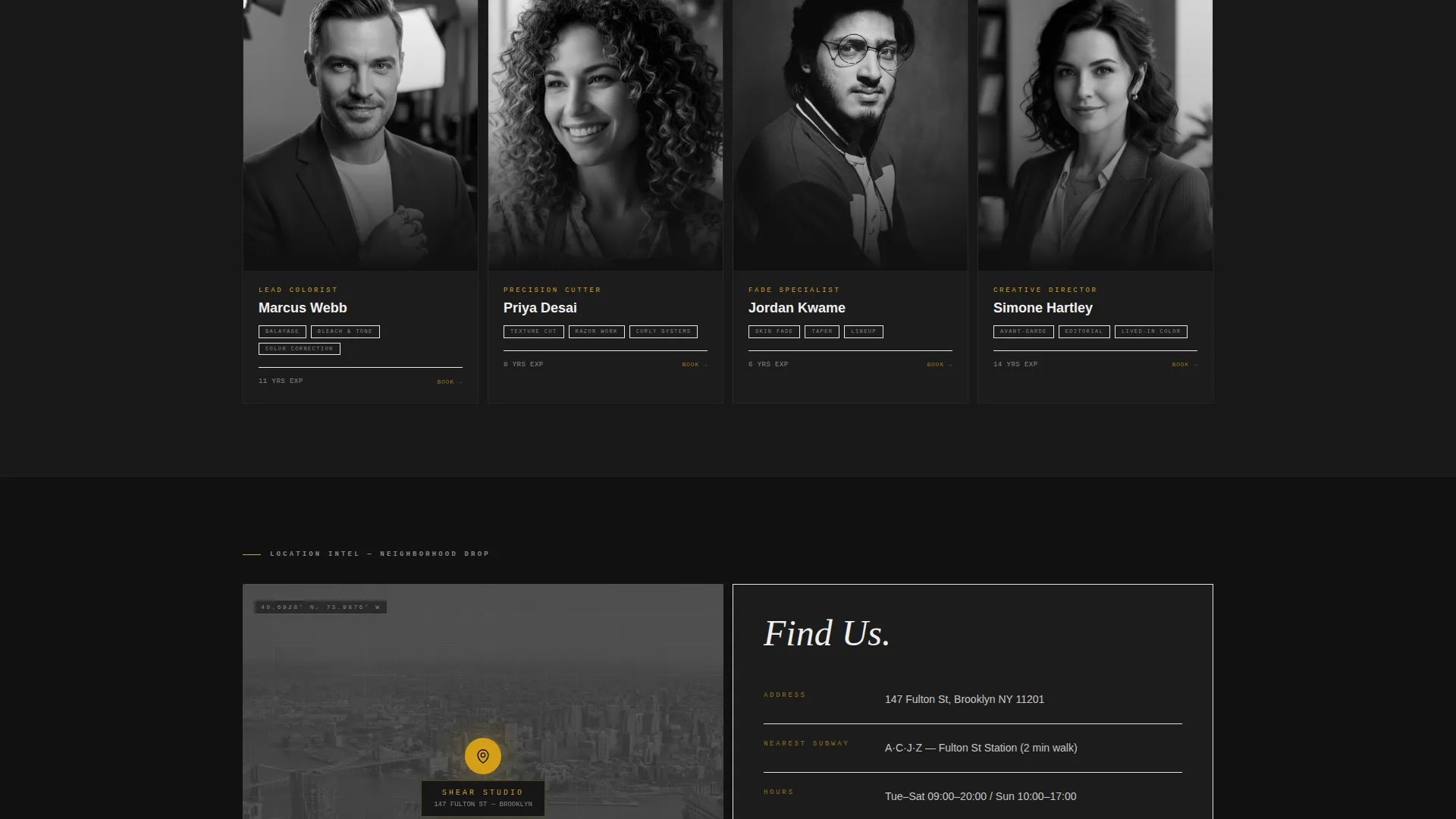
Each stylist appears as a stark black-and-white portrait card with specialization tags. The cards are direct and editorial, presenting the team like classified personnel profiles rather than a standard about section.
Pinned App Download Bottom Bar
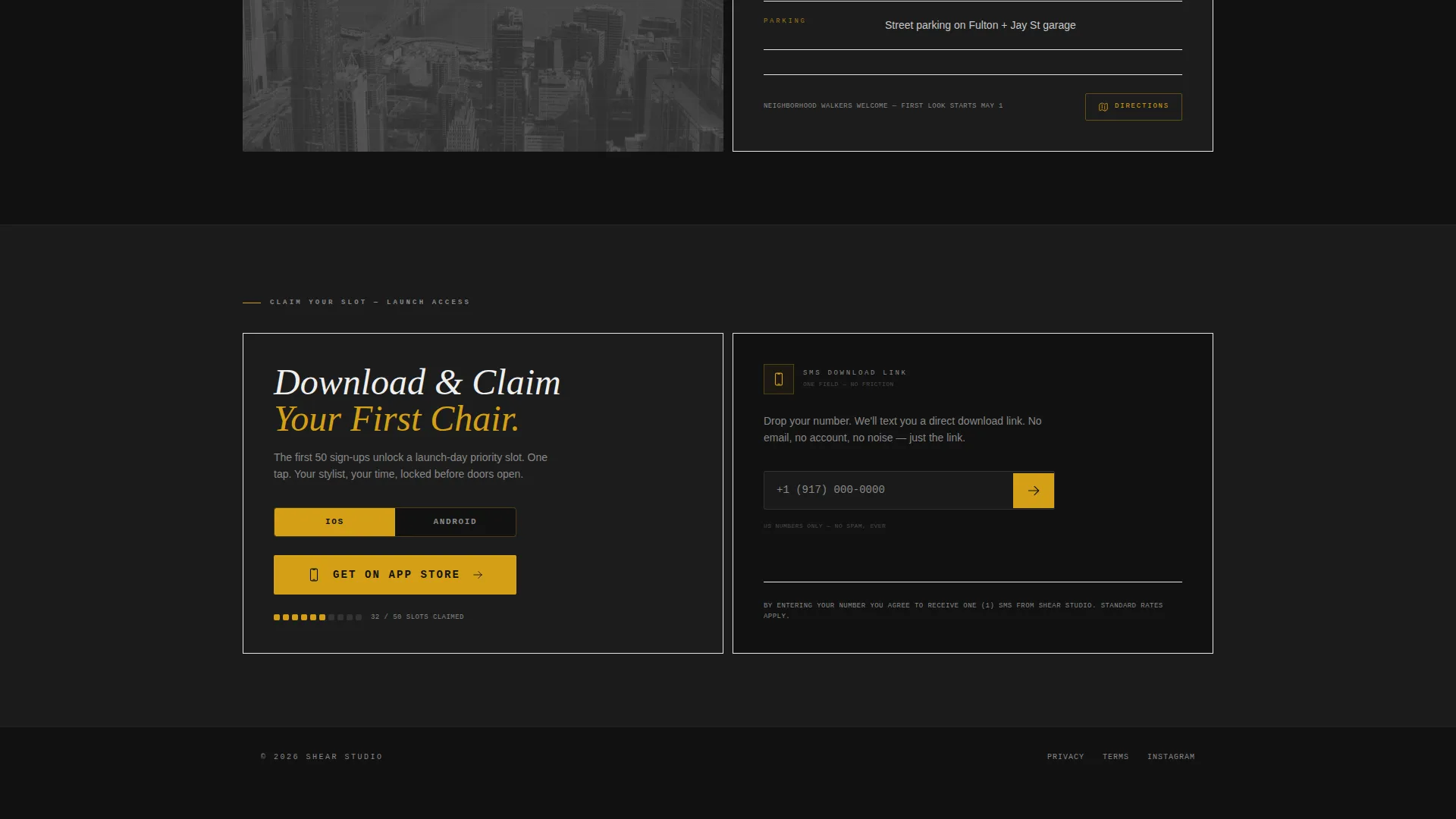
A persistent bottom bar stays fixed as visitors scroll. It reads "Download and Claim Your First Chair" in clipper-oil gold on forge black. Tapping opens a platform toggle for iOS and Android that deep-links to the booking app, where the first fifty sign-ups unlock a launch-day priority slot.
SMS Opt-In Secondary Path
Visitors who prefer not to download immediately can enter only their phone number to receive an SMS download link. There is one field and a gold send arrow. No extra steps, no form friction.
Neighborhood Map Tile
A dedicated map tile shows the salon's pin drop within the page's data grid layout. It grounds the digital experience in a real location and speaks directly to neighborhood walk-by visitors.
Page sections overview
| Section | Purpose |
|---|---|
| Countdown Grid Header | Reveals salon fragments through four live brutalist data tiles |
| Services Spec Sheet | Displays cut names and durations in raw data formatting |
| Stylist Roster Cards | Shows team portraits and specialization tags |
| Neighborhood Map Tile | Anchors the salon to its physical location |
| Pinned Download Bar | Drives app download and priority slot sign-up |
| SMS Opt-In Field | Captures phone numbers for a frictionless download link |
Design & branding system
The visual identity is built on a monochrome steel color system. Every surface references the feeling of a barbershop tool tray under fluorescent light: chrome, functional, and precise.
- Core palette: forge black (#111111) for backgrounds, brushed aluminum (#C8C8C8) for body text, cold concrete (#3A3A3A) for alternating section backgrounds, and clipper-oil gold (#D4A017) reserved exclusively for countdowns and interactive tap targets
- Typography uses mono-spaced type for data and countdown displays, reinforcing the raw dashboard aesthetic throughout the page
- Gold only appears where a finger should land, training the visitor's eye toward action before they consciously decide to tap
Mobile & speed optimization
The layout is designed for thumb-first use. The pinned bottom bar, single-field SMS input, and tile-based grid all respond naturally to mobile screen sizes and touch interactions.
- The persistent download bar remains accessible at the bottom of the screen throughout the entire scroll journey on mobile devices
- The SMS opt-in path reduces sign-up friction to a single field, which is especially effective for mobile visitors arriving from Instagram or a neighborhood walk-by
- Tile-based grid sections are sized to fill the viewport intentionally, keeping each scroll step focused and immersive on smaller screens
How this template helps you convert
The page is engineered around scarcity and momentum. Every design decision pulls the visitor closer to tapping that gold button.
- The countdown header creates immediate time pressure. Visitors see seconds ticking down before they read a single word of copy, anchoring the opening date as a real and approaching event.
- The limited-slot language tied to the first fifty app sign-ups adds a scarcity layer that makes the download feel like a competitive advantage, not just an app install.
- The gold accent color appears more frequently as the visitor scrolls deeper, progressively training the eye toward the pinned download bar and the SMS opt-in field at the bottom.
Other information about this template
This template sits within the hair salon website templates subcategory and is specifically designed for the hair salon coming soon page niche. It is built for the technology category context, where app download flows and mobile-first interactions are the primary conversion mechanism.
- The template style is a dashboard and data grid layout, which is uncommon in the salon space and creates strong visual differentiation for a new location launch
- The bold brutalist theme and monochrome steel color system are intentional choices that appeal to style-obsessed millennial clients who respond to editorial and industrial aesthetics
- The intersection match between the coming soon use case and the app download landing-page direction makes this template suitable for salons running a pre-launch campaign tied to a booking application
Theme
Bold Brutalist
Creative direction
Launch Energy
Color system
Monochrome Steel
Style
Dashboard/Data Grid
Direction
App Download
Page Sections
Live Brutalist Countdown Grid
Services Spec Sheet Layout
Stylist Roster Profile Cards
Pinned App Download Bar
Single-field SMS Opt-in
Neighborhood Map Tile
Related questions
Does this template require a booking app to work?
Can I update the countdown date and service details?
Is this template designed only for new salon openings?
How does the SMS opt-in field work?
Can I change the color palette to match my brand?