Precision MRO Aircraft Maintenance Landing Page Template
The Hangar template is a hero-dominant landing page built for aircraft maintenance, repair, and overhaul (MRO) businesses. It pairs an immersive scroll-driven engine assembly animation with a precision Ruby and Chrome color system. Fleet managers, directors of maintenance, and charter operators get a technically credible, booking-ready experience designed to convert at both scheduled and emergency response moments.
by Rocket studio
Quick summary
Hangar is a single-page MRO landing page template built around an exploded turbofan hero, scroll-linked engine assembly motion, and two conversion paths: a slide-over scheduling form and a stripped-down AOG emergency form. The design uses runway black, chrome silver, hydraulic ruby, and inspection-lamp white to make every section feel like the hangar floor at dawn.
Who this template is for
This template is built for aviation MRO businesses that need to present complex technical services in a clear, credible, and bookable format. It speaks directly to the people who manage aircraft on tight compliance calendars and tighter turnaround windows.
- Directors of maintenance and fleet managers handling compliance, scheduling, and AOG coordination
- Charter operators and Part 135 operators who need a single aircraft type back on the ramp fast
- MRO facility owners and operators looking to generate qualified inbound booking requests
What problem this template solves
Most MRO websites bury their strongest capabilities behind generic service pages and weak calls-to-action. They fail to communicate urgency, technical depth, or the ability to manage both scheduled checks and aircraft-on-ground emergencies. This template solves that directly.
- Fleet managers need to assess a hangar's capabilities at a glance, especially at 2 a.m. during an AOG event
- Compliance-focused buyers want visible safety credentials, certifications, and a clear review of service categories before committing
- Charter operators demand a fast path to emergency contact without wading through irrelevant content
What you get with this template
This template delivers a complete, production-ready landing page with every section designed to earn its viewport. The design and interactivity are purpose-built for the MRO category, with no filler sections and no generic layouts.
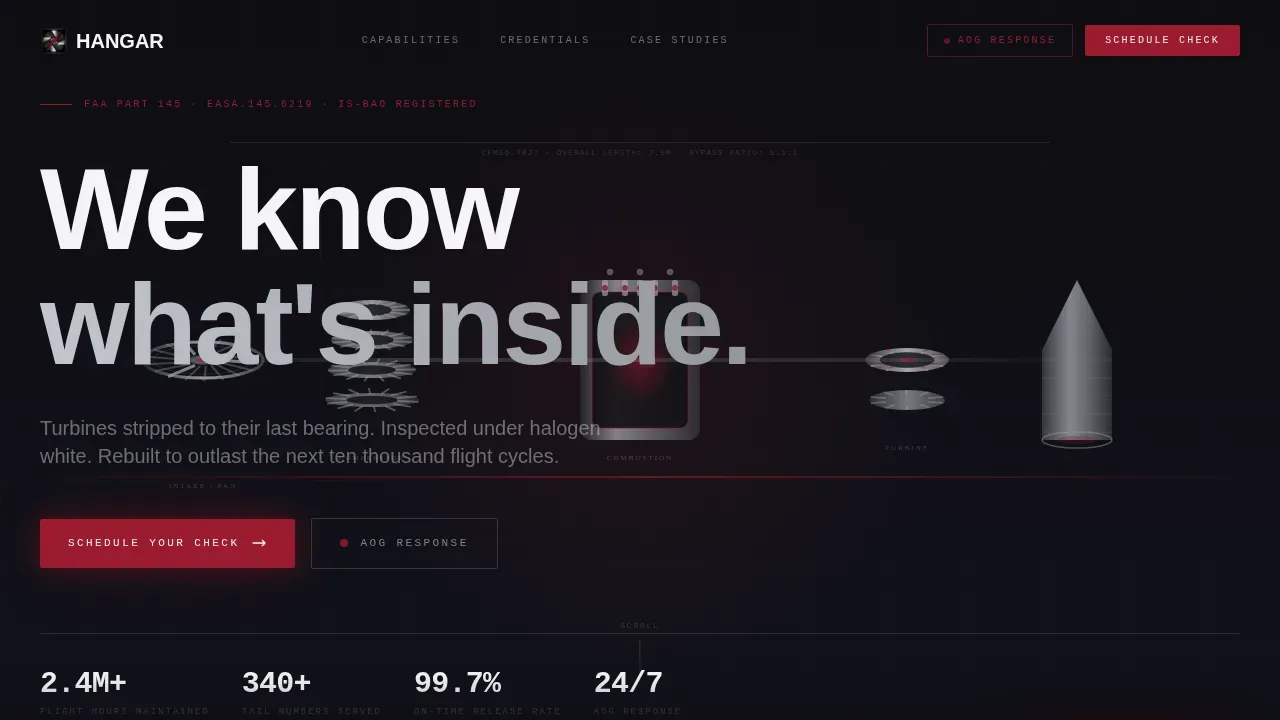
- An exploded turbofan hero section with cursor parallax and a scroll-driven engine assembly narrative across four service stages
- A persistent bottom bar with a "Schedule Your Check" call-to-action and a secondary ruby-accented "Request AOG Response" emergency path
- Horizontal-scrolling case studies, an animated fleet hours counter, and a certifications trust grid
Feature list
This template includes six purpose-built features. Each one is grounded in what aviation MRO businesses actually need to convert qualified visitors into scheduled clients.
Exploded Turbofan Hero with Cursor Parallax
The hero section uses a technically accurate, CSS and SVG exploded turbofan diagram set against runway black. Every compressor disc, combustion liner, and turbine blade floats in precise alignment. Chrome edges catch light as the cursor moves, and a single knockout white headline anchors the visual: "We know what's inside." This opening creates immediate technical credibility without relying on stock photos.
Scroll-Driven Engine Assembly Narrative
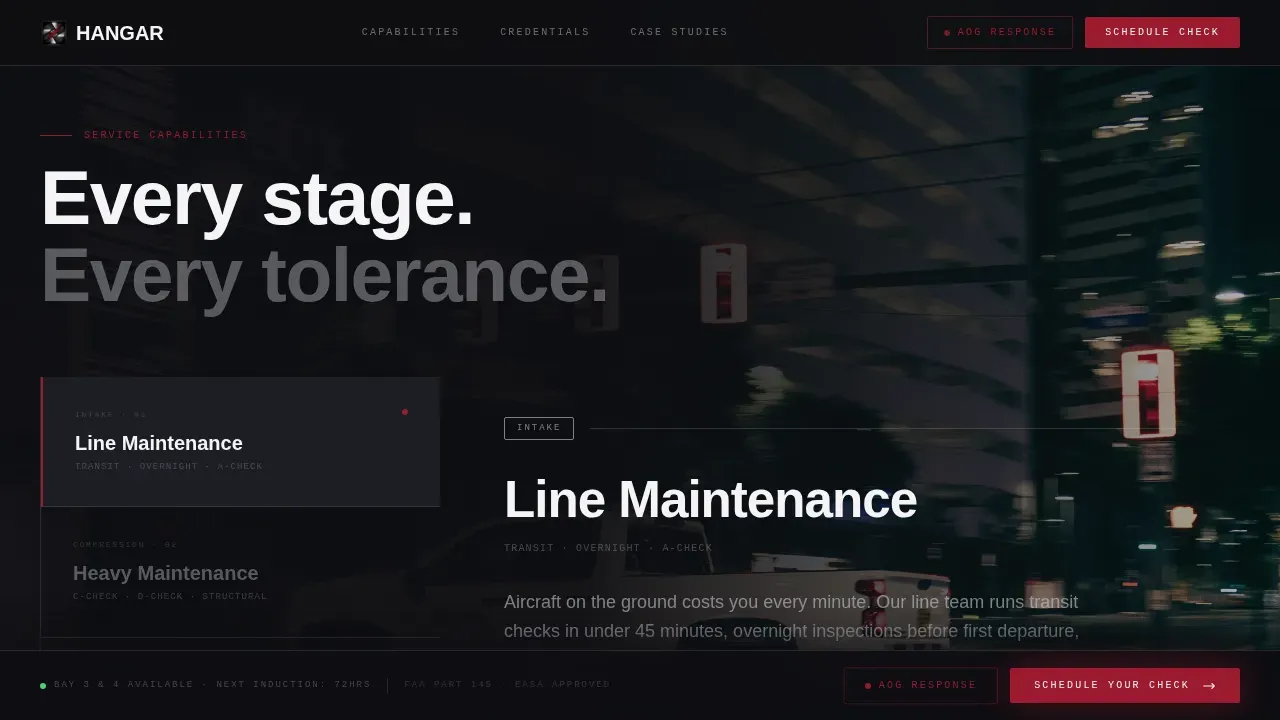
As the user scrolls, the engine components glide back into position stage by stage. Each assembly stage maps to a core service: intake to line maintenance, compression to heavy checks, combustion to engine overhaul, and exhaust to component repair. This motion-led structure makes the capabilities section feel like a natural continuation of the hero rather than a separate content block.
Dual Conversion Forms
The primary conversion tools are a slide-over booking form and a streamlined AOG emergency form. The booking form includes an aircraft type selector covering narrow-body, wide-body, turboprop, and business jet options, a check level selector spanning A through D checks and engine, a date picker for the preferred induction window, and a tail-number field. The AOG form is designed to be completed in under fifteen seconds with just tail number, location, and phone.
Persistent Bottom Bar Call-to-Action
After the first scroll, a bottom bar activates and stays visible throughout the session. It anchors "Schedule Your Check" as the primary action and "Request AOG Response" as the secondary ruby-highlighted path. This persistent control means conversion is always one step away, regardless of where the visitor is in the page.
Animated Credentials and Trust Section
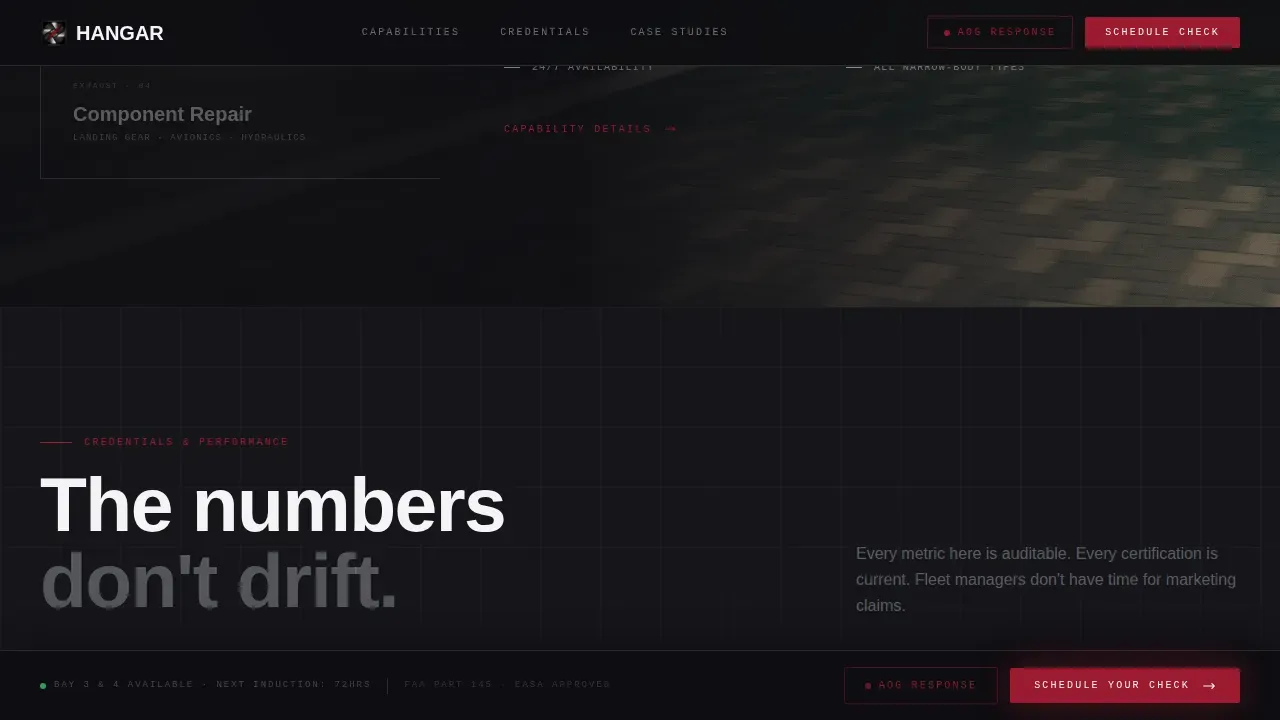
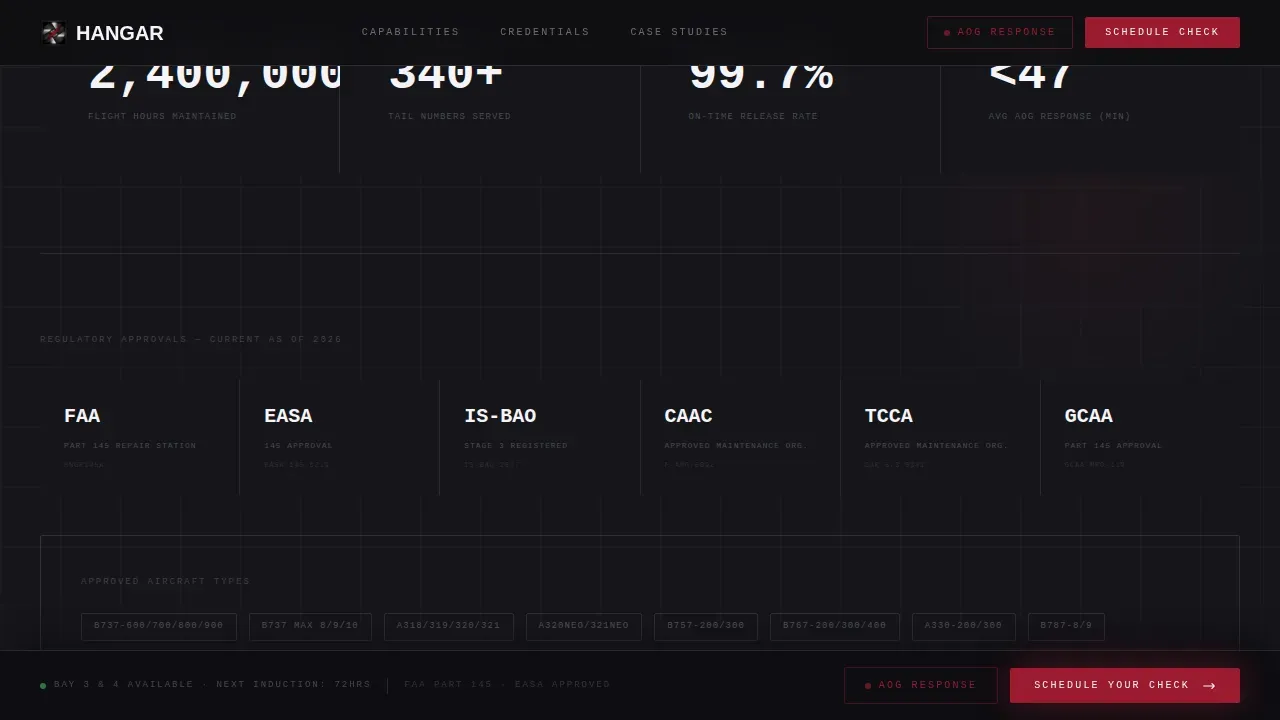
The credentials section uses animated data counters to show fleet hours maintained and tail numbers served. A certifications grid displays regulatory badges prominently. This section applies established trust signals so visitors can review compliance standing before they book.
Horizontal-Scrolling Case Studies
Operator case studies move horizontally across the viewport like aircraft taxiing across a threshold. Each case study is a full-bleed moment that highlights a specific aircraft model, the check completed, and the outcome. This format keeps the page narrative immersive while delivering the social proof that MRO buyers require.
Page sections overview
| Section | Purpose |
|---|---|
| Exploded Turbofan Hero | Opens with cursor parallax engine diagram and headline |
| Capabilities Narrative | Maps engine stages to four core MRO service types |
| Credentials and Trust | Displays animated counters, certifications, and safety data |
| Case Studies Rail | Horizontal-scroll operator outcomes by aircraft model |
| Schedule Call-to-Action | Persistent booking bar and slide-over scheduling form |
| AOG Emergency Form | Fast emergency contact path for AOG response |
| Footer | Minimal developer-style footer with essential links |
Design & branding system
The design system is built around an industrial precision aesthetic with cold metal textures, deliberate ruby accents, and clinical white used to open up data-heavy sections. The palette and type choices reflect the actual tools and materials found on a hangar shop floor.
- Colors: runway black (#0E0E12) grounds full-bleed photos; chrome silver (#C9CCD1) textures panel borders and section dividers; hydraulic ruby (#9B1B30) drives call-to-action buttons and status indicators; inspection-lamp white (#F4F4F7) opens capability sections
- Typography: DM Sans for massive display headings; JetBrains Mono for data readouts, specifications, and form labels, reinforcing the technical process feel
Mobile & speed optimization
The template is designed desktop-first, reflecting the reality that fleet managers and directors of maintenance typically review and book MRO services from workstations. The layout is built to remain fully functional and readable on tablet screens as well.
- Desktop-first layout with responsive adaptation to tablet viewports for on-ramp and hangar-floor access
- Server Components handle static content sections, keeping the page fast; Client Components manage the animated hero, scroll triggers, and interactive forms
How this template helps you convert
The template is structured so that every scroll moment builds confidence and every key interaction reduces friction. The conversion architecture is intentional, not incidental.
- The hero earns attention immediately with technically accurate imagery and a single powerful claim, so the visitor knows within seconds they are in the right place
- The scroll narrative walks through capabilities and credentials in sequence, building the case before the booking moment arrives, and the persistent bottom bar keeps the call-to-action in control at all times
- The dual-form system handles both planned maintenance and urgent AOG needs, so no visitor leaves without a clear next step regardless of why they landed on the page
Other information about this template
This template is a strong starting point for MRO businesses exploring how to apply modern web design to a traditionally conservative industry. Designers working with this model can adapt the color system, swap in authentic facility photos, and update service categories without rebuilding the core layout.
- Aircraft hangar construction context matters for businesses building or presenting a new facility. The primary objective of hangar construction is to deliver a safe, efficient, and durable facility capable of accommodating various aircraft types while meeting environmental and regulatory demands. Environmental conditions such as wind loads, seismic activity, and temperature variations affect structural and operational design choices.
- An aircraft maintenance checklist supports hangar operations by providing structured task assessments using approved data and verification of competence permits and skills. Updating the checklist ensures compliance for all applicable aircraft when new Airworthiness Directives or Service Bulletins are released.
- Using an aircraft maintenance template can save time, increase data accuracy, and ensure compliance across an entire fleet. The applicability capability allows operators to manage variances between multiple aircraft of the same type or series. Changes to a template can cascade down to all applicable aircraft within the series.
- For MRO operations, visibility of asset location and movement is crucial for effective planning and execution. Using a single platform for managing tasks, people, tooling, and materials can drive improved efficiency. Digital twins can provide insights into MRO processes, helping to identify deviations from planned operations and support faster decision-making.
- The hangar precision mro aircraft maintenance landing page template is suited for MRO companies of any scale, from regional bases to large multi-bay facilities. Businesses operating a dedicated mro hangar will find the layout and service categorization model directly applicable to their booking and inquiry workflow.
- Efficient layout planning is crucial to optimize the flow of aircraft, equipment, and personnel. Aircraft hangar doors are complex components that affect structural loads, frame design, energy usage, and overall functionality. Cost is a major decision factor, influenced by span width, door type, and project location.
- Steel structures are a dominant choice for hangar construction due to their high strength-to-weight ratio and ability to achieve long clear spans. Modern hangar construction requires precise engineering, thoughtful design, and efficient execution to meet rising aviation demand worldwide.
Theme
Dynamic Motion
Creative direction
Immersive Visual
Color system
Ruby & Chrome
Style
Hero-Dominant (90/10)
Direction
Booking/Scheduling
Page Sections
Exploded Turbofan Hero with Parallax
Scroll-driven Engine Assembly
Dual Booking and AOG Forms
Persistent Bottom Bar Call to Action
Animated Credentials Section
Horizontal Case Studies Rail
Related questions
Can I customize the service categories and aircraft types shown in this template?
Does this template support both scheduled maintenance and AOG emergency bookings?
How does the scroll animation work in the capabilities section?
Is this template suitable for a facility that handles multiple aircraft types?
What credentials and trust signals does this template support?



