Dental Condition Library Landing Page Template
A condition and treatment library landing page built for holistic dental practices. It pairs real patient questions with side-by-side comparison tables contrasting conventional and biological dental protocols. Four core topics, amalgam fillings, implants, root canals, and cavitations, are covered in depth, with an inline guide download and a persistent Discovery Call booking path.
by Rocket studio
Quick summary
This landing page gives health-conscious dental patients a structured, reference-style resource. Each section opens with a plain-language patient question, then answers it with a two-column comparison table. Visitors can filter by condition, expand table rows for deeper detail, and download a printable protocol guide, all without hitting a paywall or a jargon wall.
Who this template is for
This template suits holistic and biological dental practices that want to educate patients before the first appointment. It works especially well for practitioners who use biocompatible materials and whole-body diagnostic thinking.
- Biological and holistic dentists building a patient education hub
- Practices offering amalgam removal, ceramic implants, or cavitation treatment
- Dental teams who want their website to answer patient questions thoroughly before a call
What problem this template solves
Most dental websites either overwhelm visitors with clinical language or offer too little information to earn trust. Patients researching amalgam concerns, root canal risks, or mercury detox arrive mid-spiral and leave without answers. This template meets them exactly where they are.
- Removes the barrier between a worried patient and a clear, honest explanation
- Replaces vague "book a consultation" prompts with substantive, condition-specific content
- Bridges the gap between a patient's online research and a practice's actual protocols
What you get with this template
The template is a single-page, scroll-driven resource hub organized around four biological dentistry topics. Every section follows the same readable rhythm: question, table, optional deeper dive.
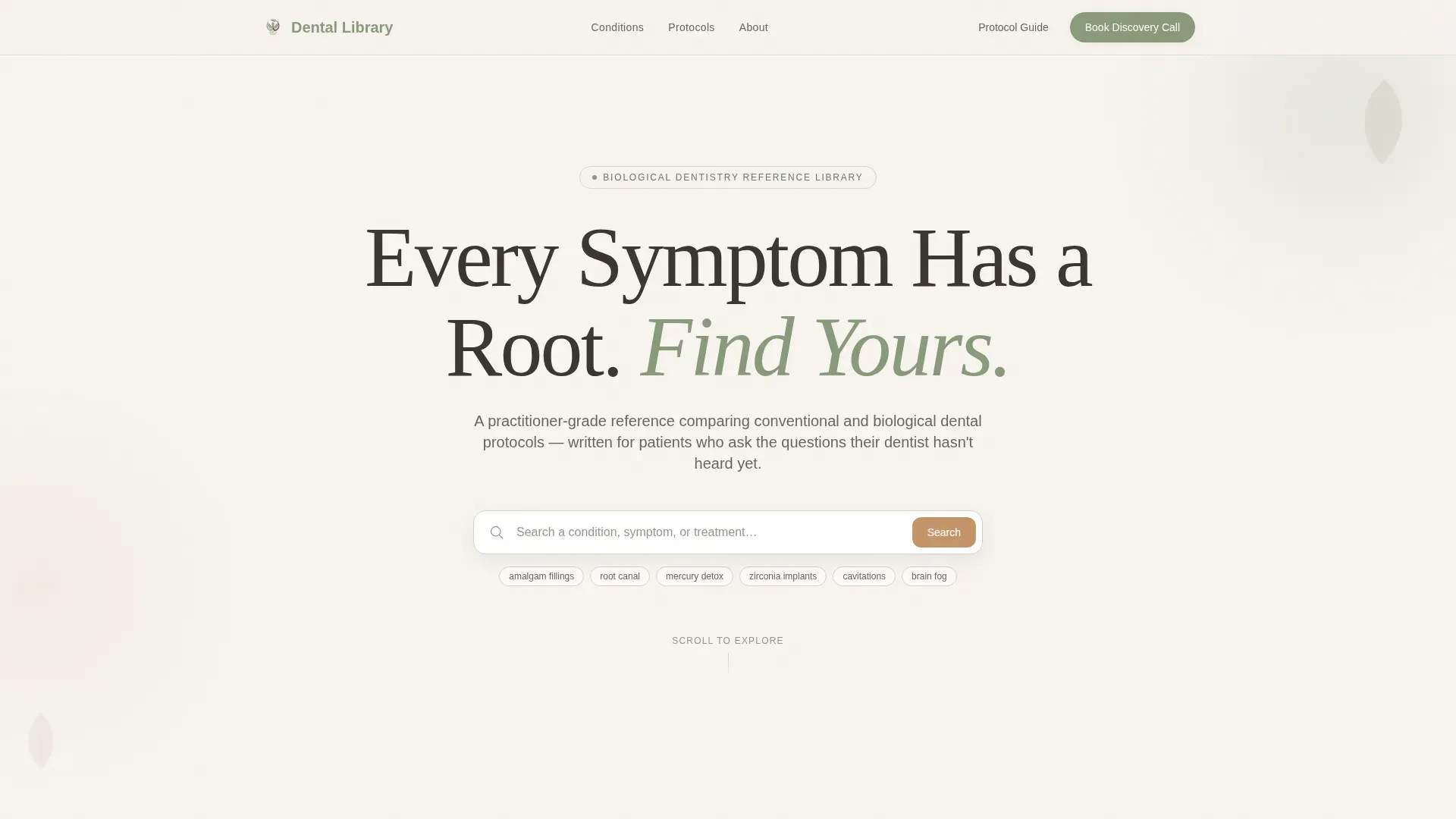
- A hero section with a large centered serif headline and an immediate condition search bar
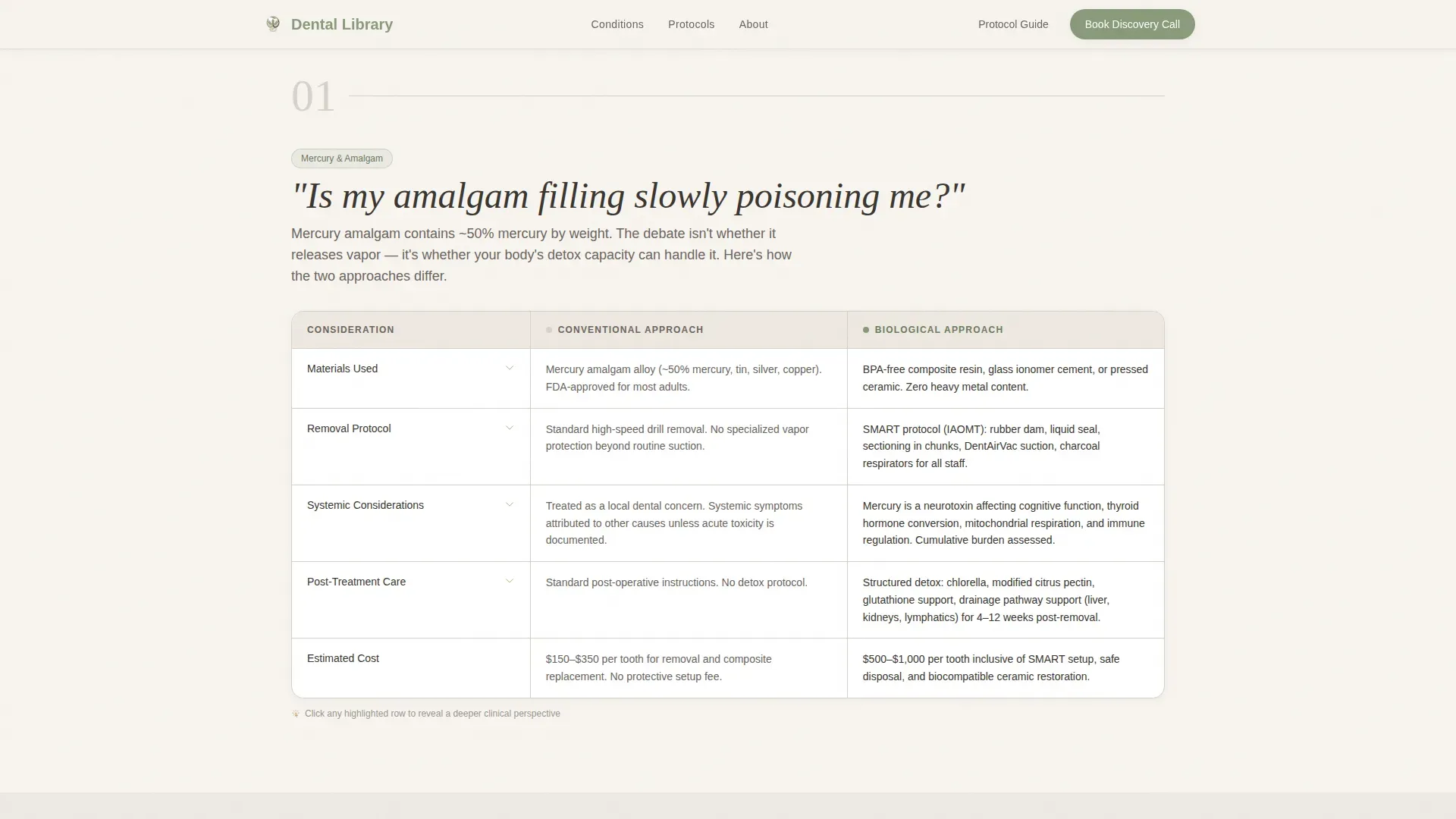
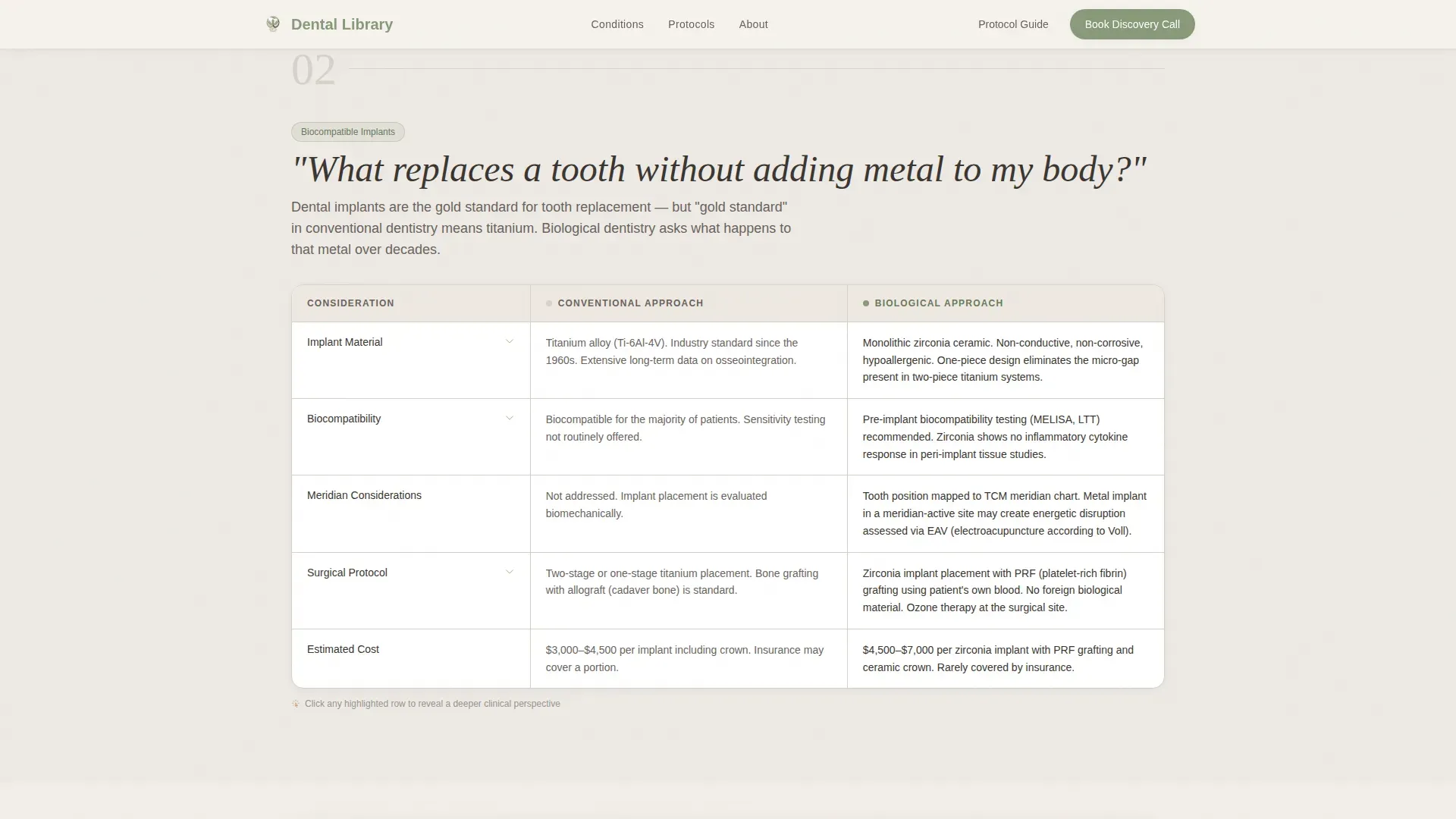
- Four FAQ-led comparison table sections covering amalgam fillings, implants, root canals, and cavitations
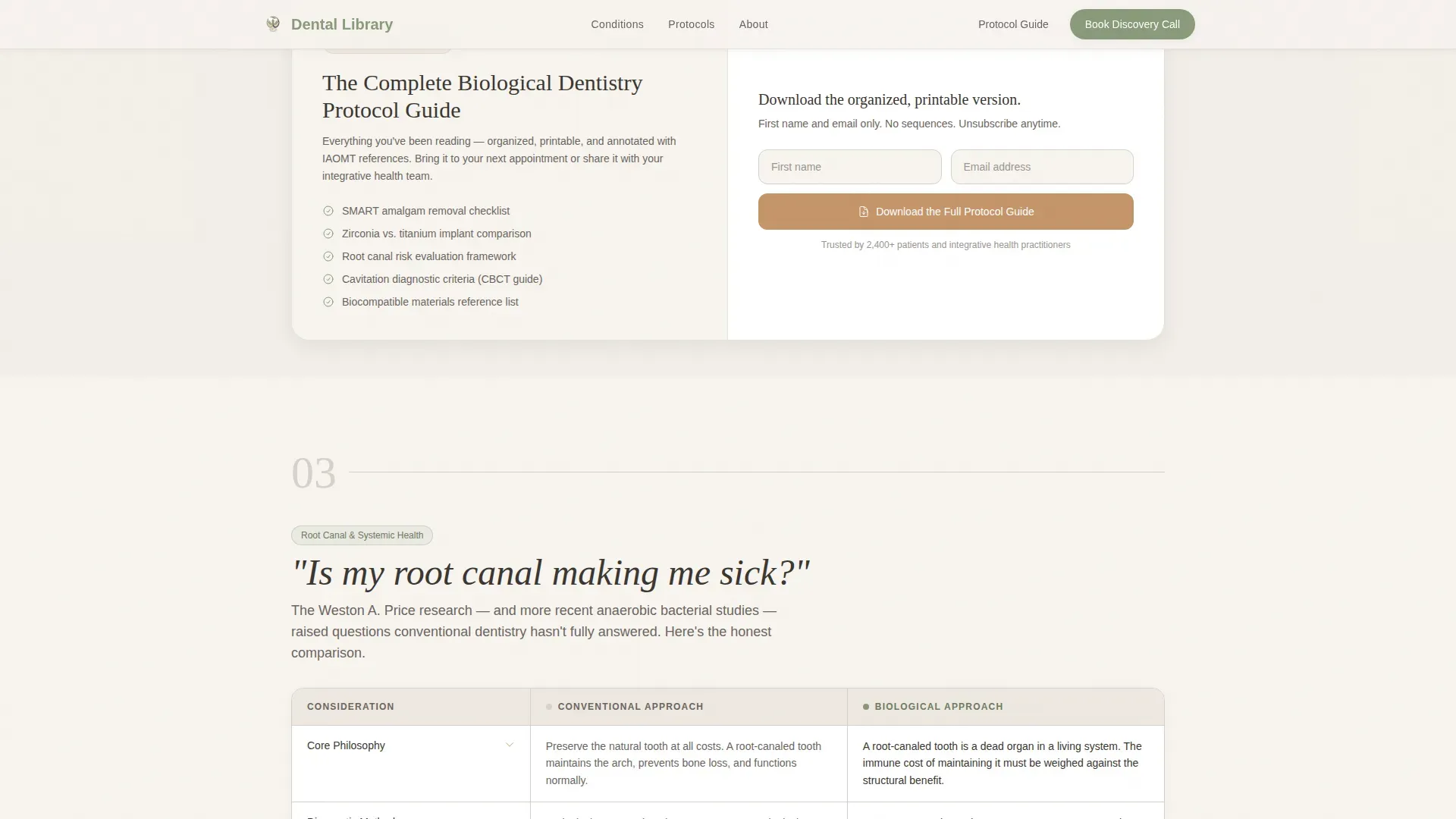
- An inline email capture form after the third condition block, three patient testimonial blocks, and a final Discovery Call call-to-action section
Feature list
This section covers the core built-in capabilities included in the template.
FAQ-Led Comparison Tables
Each of the four condition sections opens with a real patient question in large conversational type. Directly below, a two-column table contrasts the conventional dental approach with the biological and holistic approach. Rows cover materials used, diagnostic method, systemic considerations, and recovery protocol.
Expandable Deep-Dive Table Rows
Every comparison table includes expandable rows triggered by a warm clay accent highlight on hover. Visitors who want more context can open a row to read extended detail without leaving the table or navigating to a new page.
Condition Search Filter
A search bar sits directly below the hero headline with ghost text reading "Search a condition, symptom, or treatment." Visitors can self-direct to the exact topic they need rather than scrolling through all four condition blocks in sequence.
Inline Protocol Guide Download
After the third condition comparison, an inline email capture row asks for a first name and email address. The exchange is framed as receiving an organized, printable version of what the visitor has already been reading, making the action feel natural rather than transactional.
Sticky Navigation with Discovery Call Button
A persistent navigation bar stays visible throughout the full page scroll. It carries a muted sage-colored "Book a Discovery Call" button for visitors who are already convinced and ready to act, without interrupting the reading experience for those still researching.
Patient Testimonial Section
Three patient story blocks with specific outcome details provide social proof grounded in real-world results. This section sits between the protocol guide download and the final call-to-action, reinforcing trust at a decisive moment in the visitor journey.
Page sections overview
| Section | Purpose |
|---|---|
| Hero headline | Draws visitors in with a large serif headline and an immediate condition search bar |
| Amalgam comparison table | Answers questions about mercury fillings with a side-by-side protocol table |
| Implants comparison table | Compares conventional and biocompatible implant approaches row by row |
| Root canals comparison table | Addresses root canal concerns with biological versus conventional protocols |
| Protocol guide download | Captures first name and email in exchange for a printable reference guide |
| Cavitations comparison table | Covers cavitation diagnosis and treatment using both approaches |
| Patient testimonials | Shares three specific patient outcome stories to build credibility |
| Final call to action | Invites visitors to book a Discovery Call directly |
| Footer | Horizontal flow footer with practice navigation and contact links |
Design & branding system
The visual identity follows an Organic Flow theme. The palette draws from natural, unprocessed materials, think unbleached cotton, dried eucalyptus, and limestone surfaces. Nothing feels clinical or sterile.
- Color system: soft parchment white (#F7F4EF) and morning fog gray (#D6D1CA) alternate as section backgrounds, living sage (#8A9A7B) anchors headers and iconography, warm clay (#C4956A) is reserved for interactive highlights and active table rows, and all body text uses grounded charcoal (#3B3631)
- Typography: Fraunces serif for headlines creates an editorial, reference-book quality; DM Sans handles body text for clean, comfortable reading at any size
- Whitespace is used as a design element throughout; no decorative imagery competes with the headline or table content
Mobile & speed optimization
The template is designed desktop-first to support the reference-reading behavior typical of patients doing extended research. Full mobile support is included so the experience holds at any screen size.
- Scroll animations use a fade-in-up pattern on section entry, keeping motion subtle and purposeful rather than distracting
- Interactive components, the search filter, expandable table rows, and inline form, are handled client-side, while static content uses server component rendering for faster initial page load
- The sticky navigation remains usable and unobtrusive on both desktop and mobile viewports
How this template helps you convert
The conversion model is built on a principle of answering first and asking second. Visitors are never asked to give anything before they receive real, useful information.
- The condition library earns attention by delivering thorough, honest comparisons before any call-to-action appears, building the trust that makes a patient willing to share their email or book a call.
- The protocol guide download is positioned after the visitor has already read three full condition comparisons, making the email exchange feel like receiving a bookmark rather than entering a funnel.
- The persistent Discovery Call button in the sticky nav captures visitors who are ready to act at any point in their reading, without forcing everyone through the same linear path.
Other information about this template
This template is built for the holistic dentist niche within the broader Health and Medical category. It is specifically designed around the Holistic Dentist Condition and Treatment Library use case, making it a focused tool rather than a general dental website theme.
- The template style is Comparison Table, organized around the FAQ-Driven creative direction, which means content rhythm is question-first throughout
- The header concept is Giant Headline Centered, using Fraunces serif at a scale that fills the viewport the way a chapter title fills a page
- The landing-page direction is Content and Resource hub, with a dual conversion path: protocol guide download and Discovery Call booking
- The Cloud Canvas color system and Organic Flow theme are consistent across all sections, giving the page a warm, editorial identity distinct from conventional dental websites
- Social proof references patient outcomes with specificity, and the protocol comparison tables can reference established biological dentistry frameworks such as IAOMT and SMART protocols where the practice uses them
Theme
Organic Flow
Creative direction
FAQ-Driven
Color system
Cloud Canvas
Style
Comparison Table
Direction
Content/Resource
Page Sections
Faq-led Comparison Tables
Expandable Deep-dive Table Rows
Condition Search Filter
Inline Protocol Guide Download
Sticky Discovery Call Navigation
Patient Testimonial Section
Related questions
What dental conditions does this template cover?
Can visitors find specific information without reading everything?
How does the email capture work?
Is the Discovery Call booking option always visible?
What makes this template different from a standard dental website?



