Holistic Dentist Booking Website Template
A hub and spoke landing page built for holistic dental practices. It opens with an interactive Toxicity Exposure Calculator, then guides visitors through a five-step clinical pathway covering biocompatibility testing, safe amalgam removal, replacement material options, detox support, and long-term monitoring. Every section closes with a consult booking call to action, earning the click through education before asking for commitment.
by Rocket studio
Quick summary
This landing page template gives holistic dental practices a structured, education-first patient hub. A Toxicity Exposure Calculator personalizes the experience from the first scroll. An anchor navigation then locks into view, guiding visitors through five sequential clinical steps. Lead capture appears at every logical decision point, making the path from curious visitor to booked consultation feel natural and earned.
Who this template is for
This template is built for biological and holistic dental practices that want to educate patients before asking for an appointment. It suits practices whose patients arrive with research already done and expect clinical detail in return.
- Holistic dentists offering safe amalgam removal, zirconia implants, or fluoride-free pediatric care
- Practices serving autoimmune patients, post-cancer patients, or health-conscious parents
- Clinics that want to demonstrate clinical credibility before presenting a booking form
What problem this template solves
Most dental practice pages present a booking form before earning the visitor's trust. Patients researching biological dentistry are often skeptical, medically informed, and unwilling to book without first understanding the exact protocol. This template solves that gap.
- Visitors leave standard dental pages without acting because no page has addressed their specific concern
- Health-conscious patients need personalized context, not generic service lists
- Practices lose leads who are in research mode but not yet ready to call
What you get with this template
You get a complete single-page hub with five interconnected content spokes, all anchored by a sticky navigation bar. The layout is designed for desktop-first research sessions while remaining fully responsive.
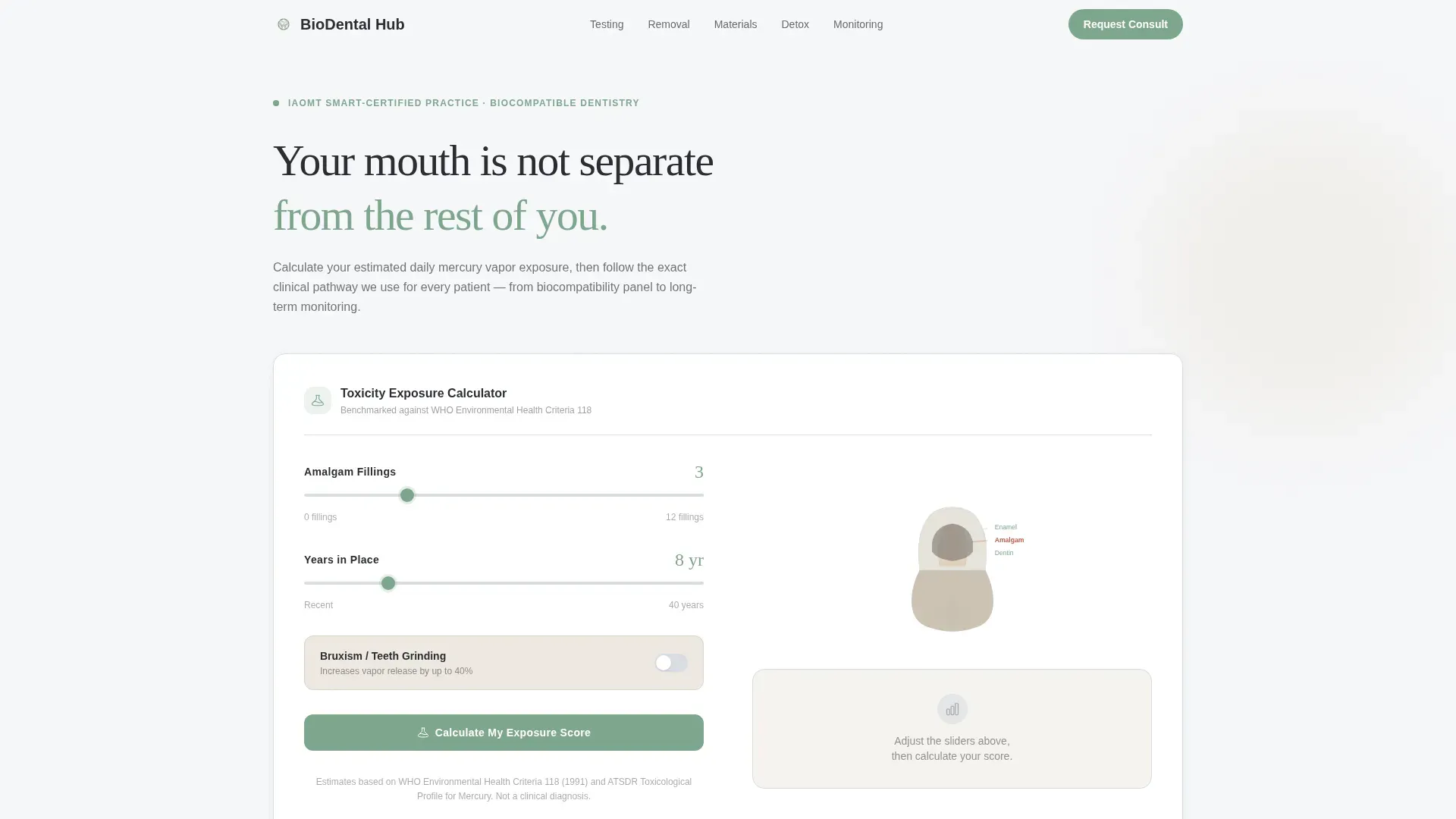
- A header-mounted Toxicity Exposure Calculator with slider inputs and a live risk summary output card
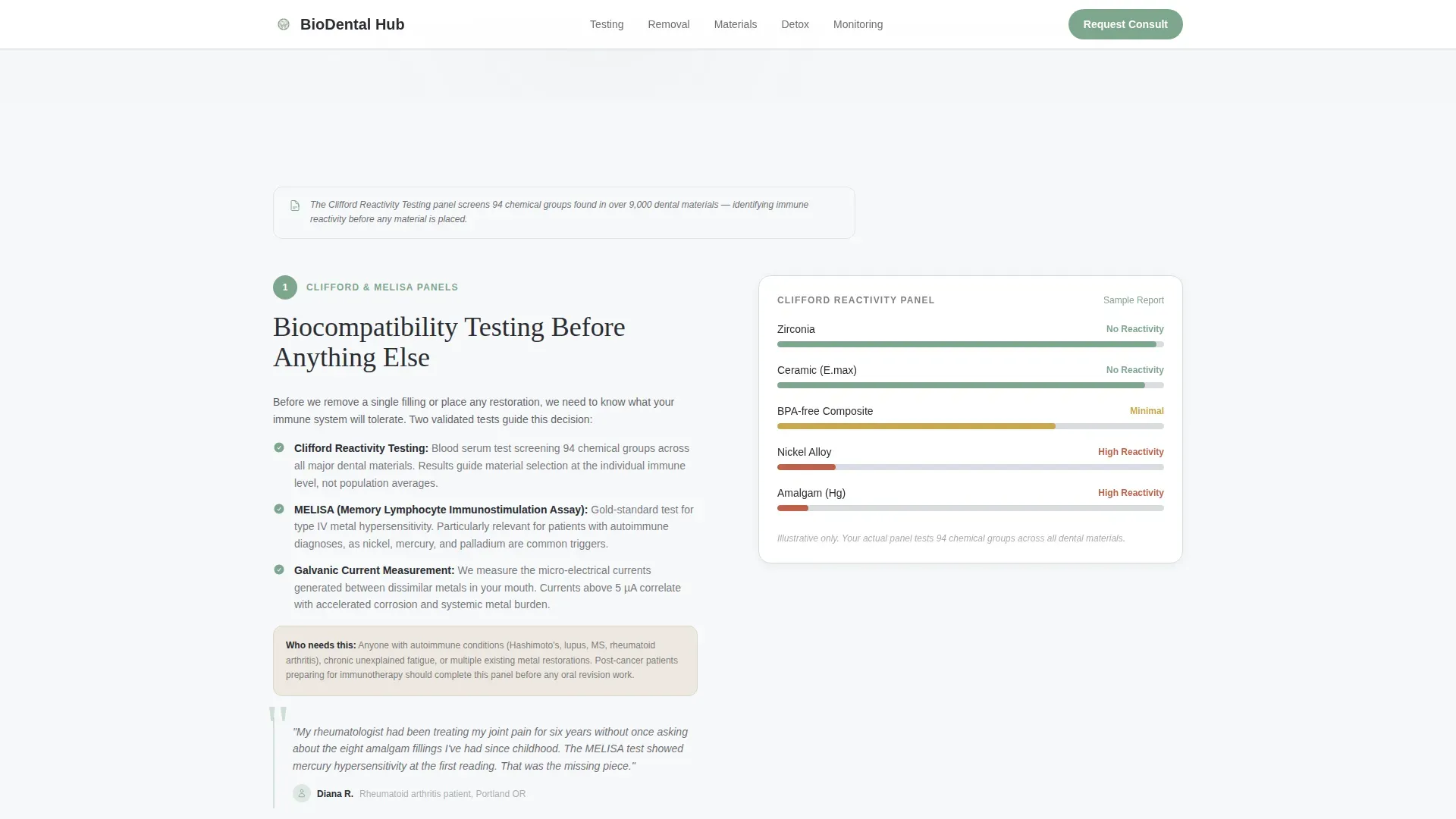
- Five numbered clinical pathway sections, each covering a distinct stage of the biocompatibility journey
- Two conversion paths: a primary consultation form and a secondary email-gated PDF download
Feature list
This template is built around the intersection of clinical education, interactive tools, and structured lead generation. Each feature is deliberate and sourced directly from the project brief.
Toxicity Exposure Calculator
Visitors input the number of amalgam fillings, years in place, and whether they grind their teeth. The tool outputs an estimated daily mercury vapor exposure score benchmarked against World Health Organization thresholds. A color-coded gauge and a personalized risk summary card present the result without alarmism.
Animated Molar Cross-Section Diagram
Slider inputs drive a translucent SVG diagram of a molar that visually darkens as the calculated exposure score rises. The animation uses scroll-linked reveals and GSAP ScrollTrigger, turning an abstract number into something viscerally clear.
Five-Step Clinical Pathway
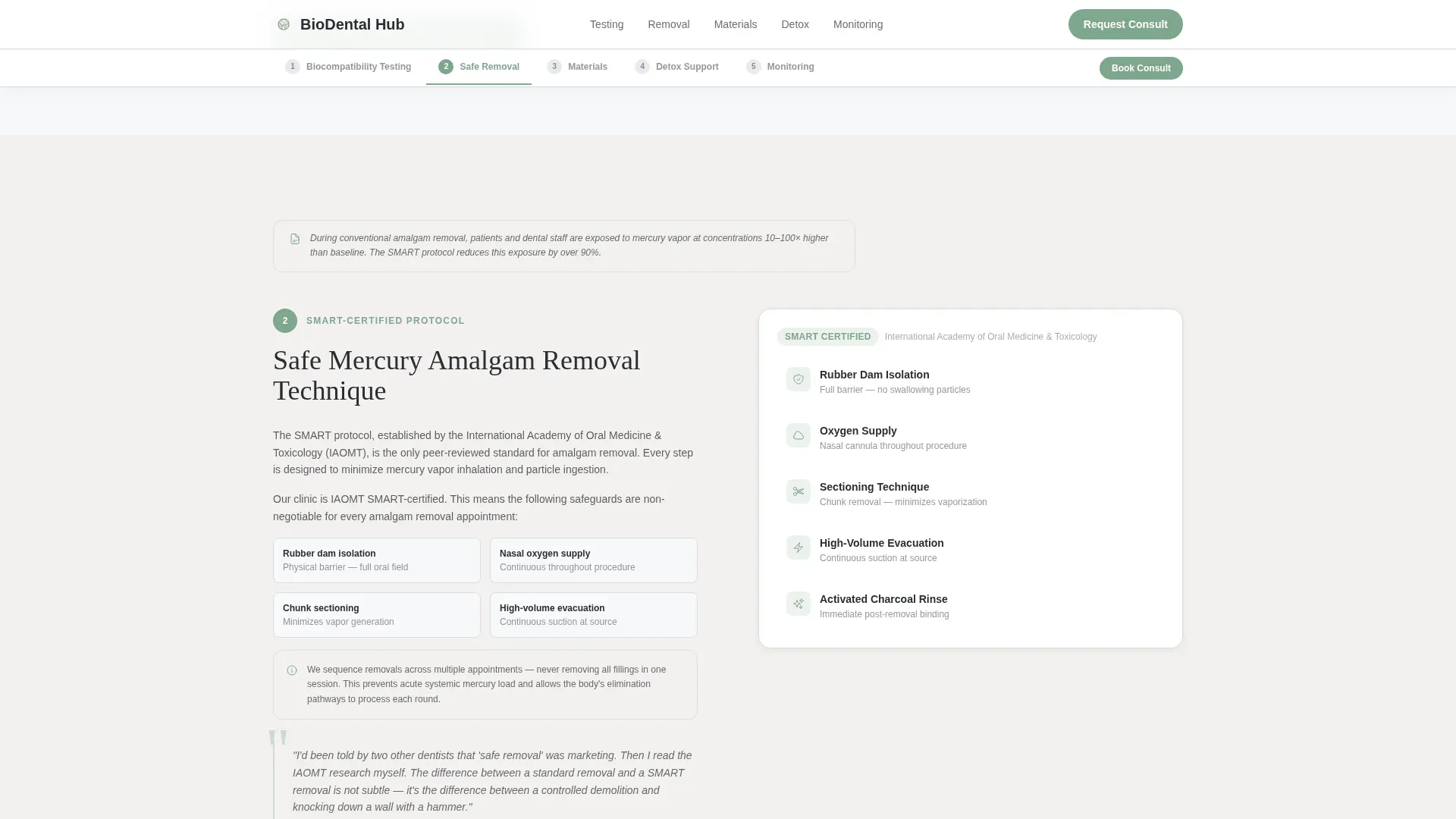
An anchor navigation bar locks into view after the calculator result appears. It guides visitors through Step 1 (biocompatibility testing panels), Step 2 (safe amalgam removal protocol), Step 3 (replacement material comparison), Step 4 (detox support and timeline), and Step 5 (long-term monitoring). Each step opens with a clinical fact and closes with a patient testimonial quote.
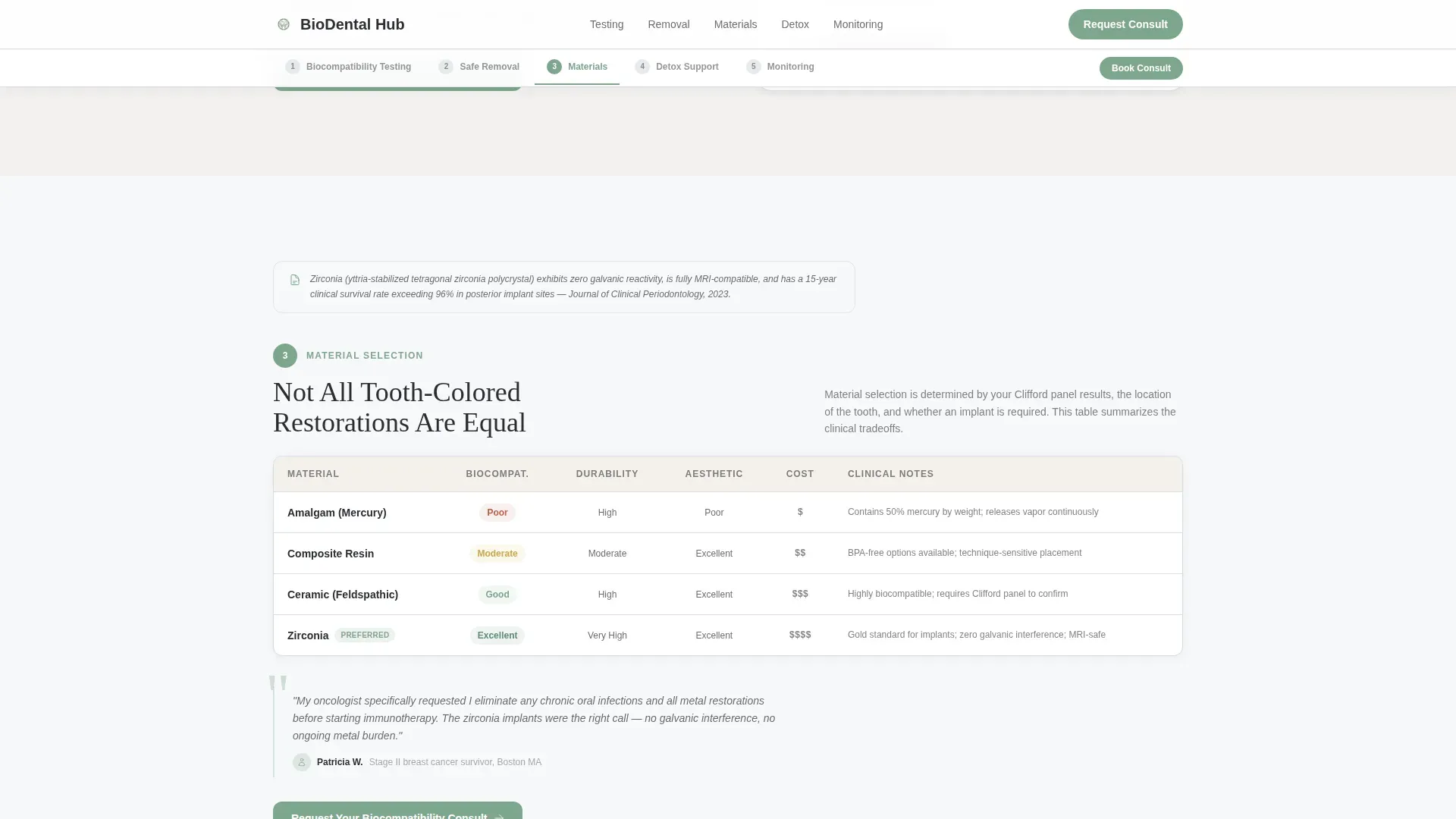
Replacement Materials Comparison Table
Step 3 includes a structured comparison of composite, ceramic, and zirconia restoration options. The table format helps patients understand trade-offs clearly, reducing the need to ask basic questions during a consultation.
Dual Lead Capture System
The primary call to action, "Request Your Biocompatibility Consult," appears below the calculator result and repeats at the close of each spoke section. A secondary path offers a downloadable Safe Removal Checklist gated behind email only, serving visitors still in research mode.
Per-Step Patient Testimonial Quotes
Each of the five clinical steps closes with a patient testimonial. Social proof is placed exactly where a visitor is most likely to hesitate, reinforcing the decision to move to the next step or book a consult.
Page sections overview
| Section | Purpose |
|---|---|
| Hero Calculator | Personalize mercury exposure risk with interactive slider inputs |
| Sticky Anchor Nav | Keep step navigation visible throughout the full scroll |
| Step 1: Biocompatibility Testing | Explain Clifford and MELISA panel options in plain language |
| Step 2: Amalgam Removal | Walk through the safe removal protocol step by step |
| Step 3: Replacement Materials | Compare composite, ceramic, and zirconia restoration options |
| Step 4: Detox Support | Cover binders, drainage pathways, and a recovery timeline |
| Step 5: Long-Term Monitoring | Outline follow-up protocols after treatment is complete |
| Lead Gen Form | Capture consultation requests with a detailed intake form |
| PDF Download Gate | Offer the Safe Removal Checklist behind an email gate |
| Footer | Present practice information in a single linear row |
Design & branding system
The visual identity follows a Corporate Precision theme with a Scandinavian clinical sensibility. Nothing reads as cold or sterile. Soft whites and warm neutrals do the work that chrome and plastic usually mishandle.
- Color palette: soft clinical white (#F7F8FA) for backgrounds, sterile mist gray (#D9DDE3) for borders, deep charcoal (#2B2D33) for body text, calm sage (#7FA68E) for interactive elements, and warm pearl (#EDE8E0) for alternating section backgrounds
- Typography pairing: DM Sans for body text keeps reading comfortable at length, while Fraunces serif display headings give each clinical step the weight it deserves
Mobile & speed optimization
The template is built desktop-first to match how research-mode patients actually use it, then scales cleanly to smaller viewports. Static sections use server-rendered components while the calculator and lead forms load as client components.
- The sticky anchor navigation reflows to a compact format on smaller screens without losing step context
- Slider inputs and the animated molar diagram remain interactive and legible on tablet and mobile viewports
How this template helps you convert
The conversion strategy is sequenced deliberately. Trust is built before any form is shown, so the booking request feels like a logical conclusion rather than a cold ask.
- The calculator delivers a personalized mercury exposure score early in the session, making the visit feel immediately relevant and the practice feel technically credible
- The five-step guide answers every objection a cautious patient might have before the consultation form appears, so the primary call to action arrives after education, not before
Other information about this template
This template is built for a specific and underserved niche at the intersection of health-conscious consumer research and clinical dental practice. A few additional details are worth noting for anyone evaluating it.
- The page is localized for United States audiences with English copy, USD references, and MM/DD/YYYY date formatting
- Interactivity level is high, with live calculator output, anchor navigation, a PDF gate modal, and a multi-field consult form all present in a single page
- Animation intensity is set to medium, balancing clinical seriousness with enough visual feedback to keep research-mode users engaged
- The consultation form captures name, email, primary concern via dropdown, number of existing metal restorations, and whether the patient has a referring physician
- The downloadable Safe Removal Checklist serves as a softer conversion point for visitors who are not yet ready to book
Theme
Corporate Precision
Creative direction
Step-by-Step Guide
Color system
Cloud Canvas
Style
Hub & Spoke (Anchor Nav)
Direction
Lead Generation
Page Sections
Toxicity Exposure Calculator with Live Output
Animated Molar SVG Diagram
Five-step Clinical Pathway Navigation
Replacement Materials Comparison Table
Dual Conversion Path Design
Per-step Social Proof Quotes
Related questions
What type of dental practice is this template designed for?
Can I customize the five clinical pathway steps?
How does the PDF download gate work?
Does the calculator output actually change based on visitor inputs?
Is this template suitable for practices with pediatric patients?



