Franchise Business Booking Website Template
Haul is a modular card-grid landing page built for junk removal franchises. It opens with a full-viewport Before/After Slider, guides visitors through photographic job-type transformations, and drives every click toward a booking calendar. The Cloud Canvas color system and action-green call-to-action buttons keep the experience clean, light, and conversion-focused from the first scroll.
by Rocket studio
Quick summary
Haul is a single-page, click-through landing page template designed for junk removal franchises. A full-viewport Before/After Slider anchors the header, while a modular card grid walks visitors through real job transformations. Transparent pricing, specific project stats, and a sticky booking bar remove hesitation and push visitors straight to the scheduling calendar.
Who this template is for
This template is built for junk removal operators who want a polished, conversion-ready presence without starting from scratch. It serves franchise owners who need to reach multiple customer types through a single, confident page.
- Realtors and property managers who book fast turnovers on tight deadlines
- Homeowners facing large cleanouts like basements, garages, or attics
- Junk removal franchise owners ready to replace generic pages with photographic proof
What problem this template solves
Most junk removal pages fail because they list services without showing results. Visitors land, feel uncertain about pricing and process, and leave without booking. Haul solves that trust gap before the visitor ever reaches the call-to-action button.
- No proof of real work: the Before/After Slider and card grid fill every section with photographic transformations
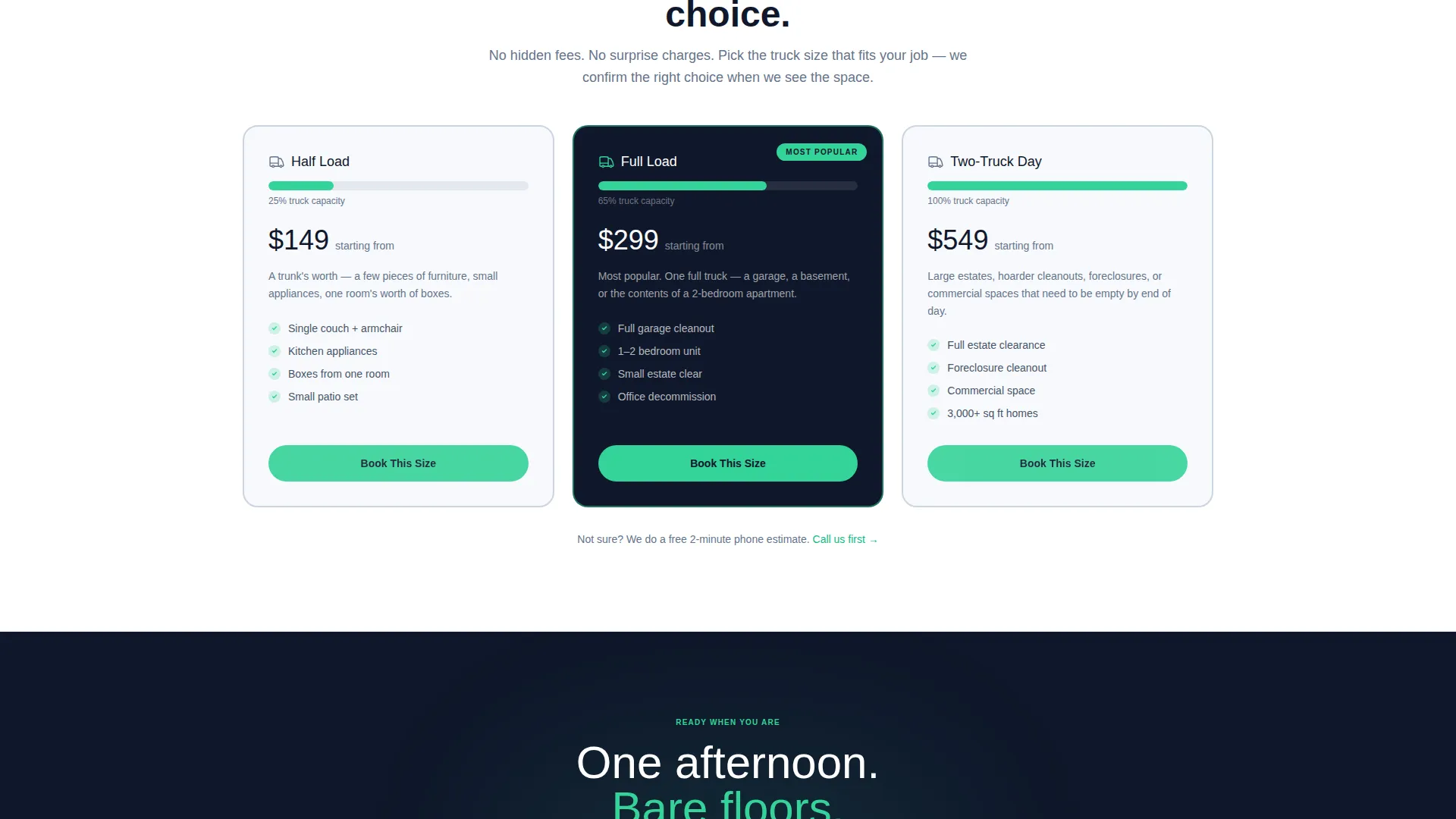
- Pricing anxiety: a dedicated "How Pricing Works" card with a transparent three-tier truck-size graphic removes the biggest hesitation upfront
- Unclear next step: a sticky "Book Your Cleanout" bar stays visible after the first scroll, so the path to booking is never lost
What you get with this template
You get a complete, ready-to-customize landing page with a clear visual flow from the header down to the booking call-to-action. Every section is pre-structured so you replace content, not layout.
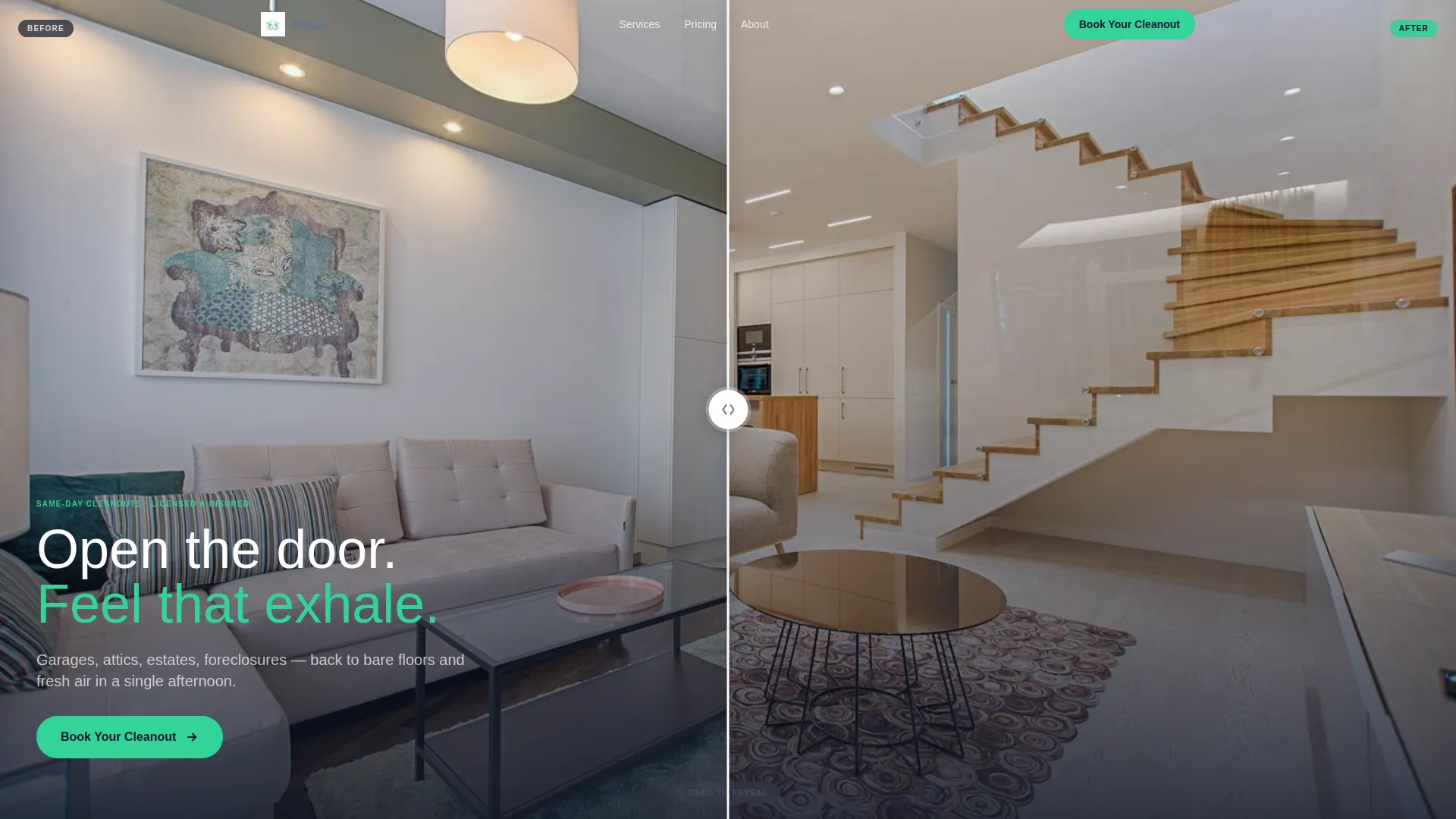
- A full-viewport interactive Before/After Slider in the header
- A modular card grid with flip or slide transformation reveals for each job type
- A sticky bottom booking bar and a transparent pricing card built directly into the page flow
Feature list
This template is built around one goal: turning a first-time visitor into a booked appointment. Each feature below contributes directly to that outcome.
Full-Viewport Before/After Slider
The header fills the entire screen with a draggable slider. Left side shows a packed garage; right side reveals the same space cleared bare. Visitors perform the transformation themselves, feeling the result before reading a single word.
Modular Job-Type Card Grid
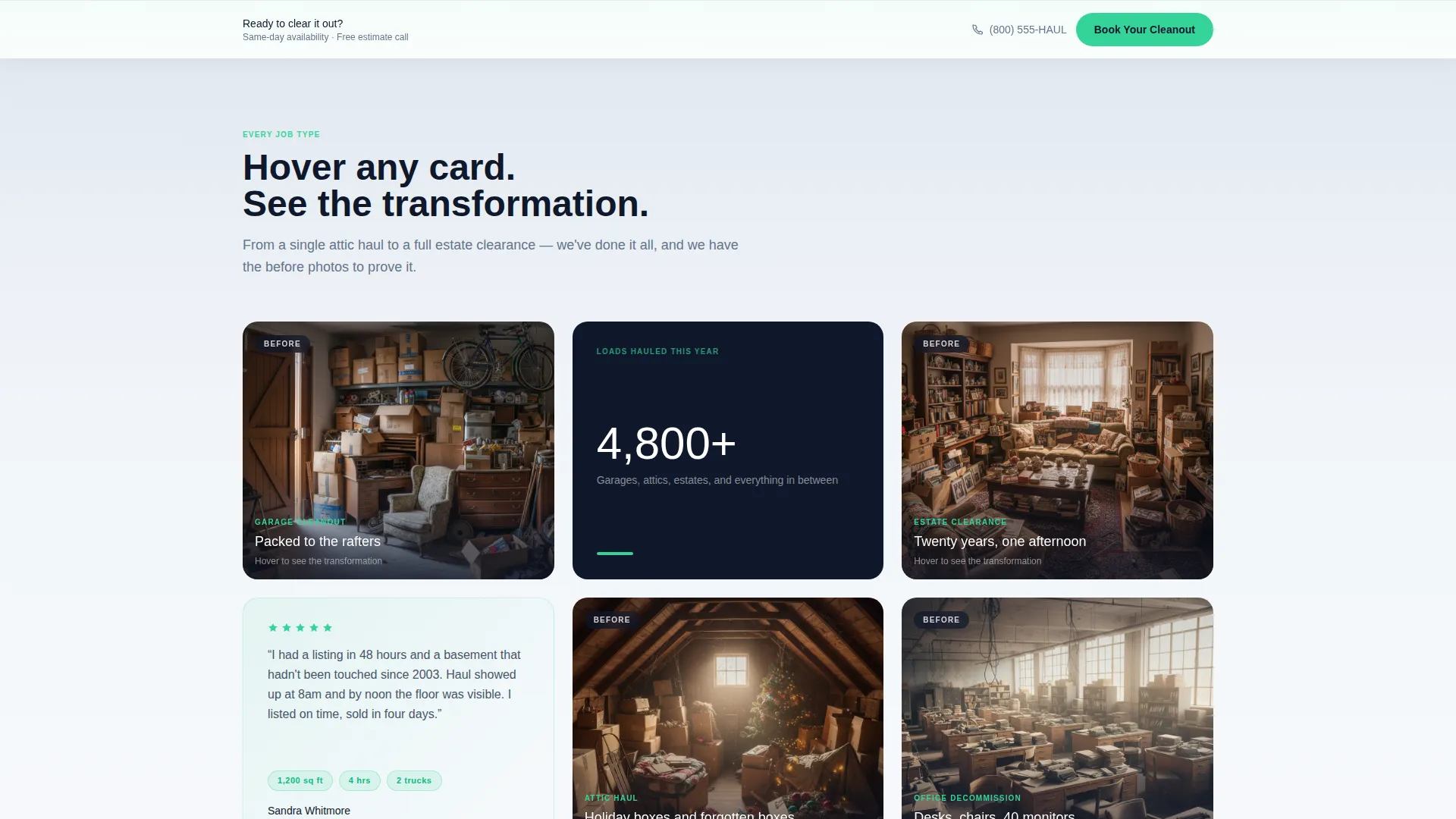
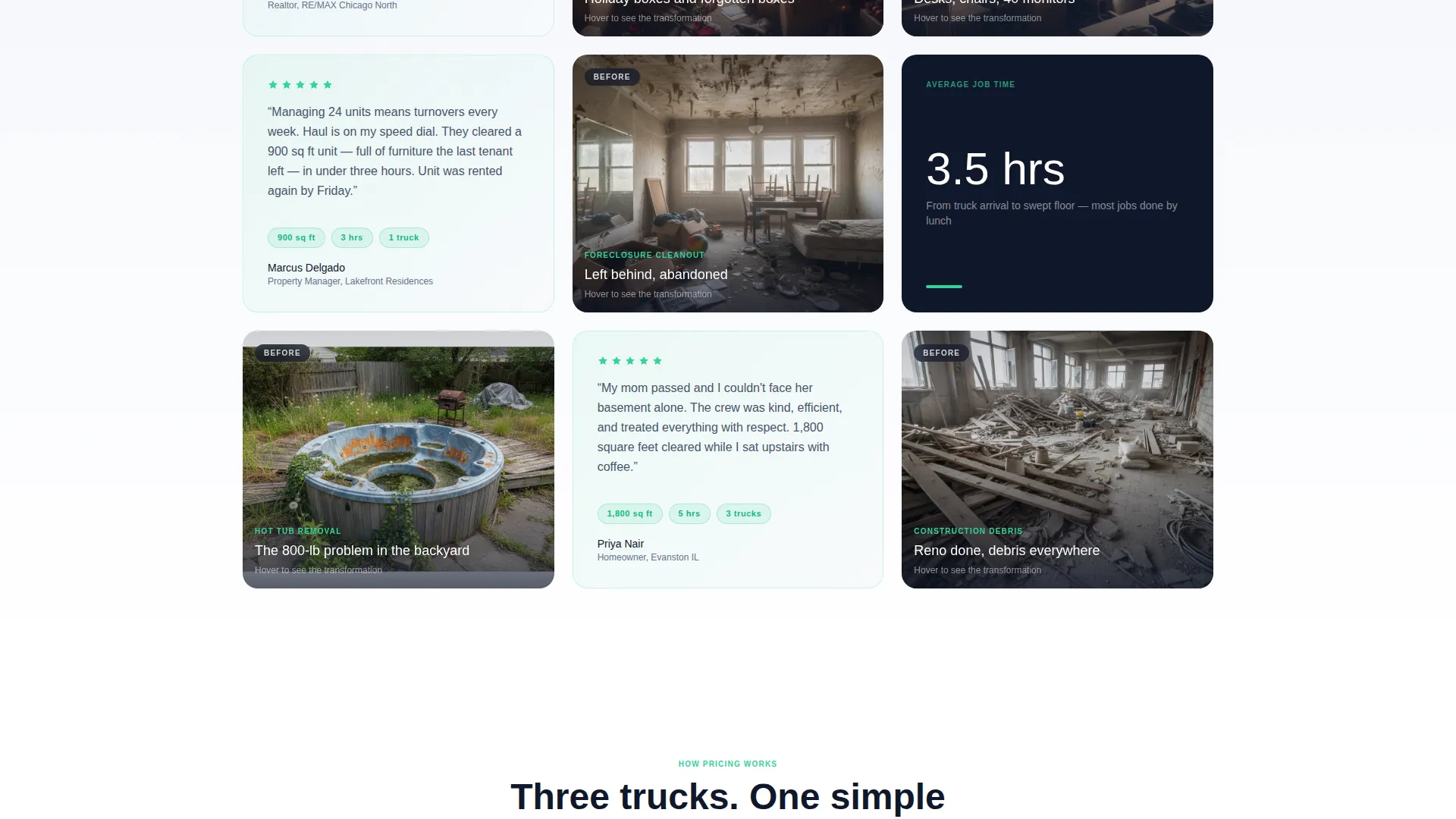
Each card in the grid represents a specific job type, such as garage cleanout, estate clearance, office decommission, or hot tub removal. Cards flip or slide to reveal the after state, and the grid staggers into view on scroll, growing visually lighter and more spacious toward the bottom of the page.
Stat-Paired Testimonial Cards
Testimonial cards are embedded between project cards. Each quote is paired with specific job data, for example "1,200 sq ft basement, 3 hours, two trucks." Concrete numbers build trust faster than generic praise.
Transparent Pricing Card
A dedicated card explains how pricing works using a clear three-tier truck-size graphic. It addresses the most common hesitation before the visitor reaches any call-to-action button.
Sticky Booking Bar
After the first scroll, a persistent bottom bar displays the primary "Book Your Cleanout" call-to-action in action green. It stays visible as the visitor browses, keeping the conversion path open at all times.
Soft Gradient Cloud Canvas Design
The page uses an open-sky white and soft mist gray palette that eases from pale gray at the top to pure white at the bottom. This visual lightening mirrors the emotional feel of a space being cleared, reinforcing the brand message through design alone.
Page sections overview
| Section | Purpose |
|---|---|
| Before/After Header | Engages visitors instantly with a draggable transformation slider |
| Job Type Cards | Showcases specific cleanout services with visual before-and-after reveals |
| Testimonial Cards | Builds trust with stat-paired real customer quotes |
| How Pricing Works | Removes pricing hesitation with a transparent truck-size tier graphic |
| Sticky Booking Bar | Keeps the primary call-to-action visible throughout the entire scroll |
Design & branding system
The visual identity uses a Soft Gradient theme built on the Cloud Canvas color system. Every color choice reinforces the idea of a space lifting and clearing as the visitor scrolls down.
- Core palette: open-sky white (#F7F9FC), soft mist gray (#E2E8F0), calming slate (#64748B) for body text, and confident action green (#34D399) for buttons and progress indicators
- Page backgrounds ease from pale gray at the top section to pure white at the bottom, creating the visual sensation of the page itself being decluttered
- Action green appears on the primary "Book Your Cleanout" button and the sticky bottom bar, making the next step clear and visually distinct at every scroll position
Mobile & speed optimization
The modular card grid and sticky booking bar are structured to work across screen sizes. The layout adapts so the Before/After Slider and card interactions remain usable on smaller devices.
- Cards in the grid are designed to reflow cleanly on narrow screens without losing the visual transformation effect
- The sticky booking bar remains anchored to the bottom of the viewport on both desktop and mobile, keeping the call-to-action consistently reachable
- Scroll-stagger animations on the card grid are designed to feel lightweight, so the page reads smoothly without heavy load delays
How this template helps you convert
Every design and content decision in this template is pointed toward one outcome: a visitor clicking "Book Your Cleanout" and landing on the scheduling calendar.
- The Before/After Slider creates an immediate emotional connection. Visitors feel the result before they read about pricing or process, which lowers their guard and raises engagement from the very first second.
- The modular card grid with stat-paired testimonials builds progressive trust as the visitor scrolls. By the time they reach the pricing card, they already believe the work is real and the team is capable.
- The sticky booking bar ensures the call-to-action is never more than one tap away. No form friction, no multi-step hesitation. The click goes directly to the scheduling page where visitors choose their date, property type, and estimated load size.
Other information about this template
This template is categorized under Franchise Business within the broader Retail and E-Commerce space, making it a practical fit for multi-location junk removal operators who need a consistent, brandable page layout.
- The click-through structure means no contact form lives on this page. All lead capture happens on the external scheduling page, keeping the landing page lean and focused
- The card grid is modular, so job-type cards can be added, removed, or reordered to match the specific services a franchise location offers
- This template is designed as a single landing page, not a multi-page website, so all messaging must be handled within the page's vertical scroll flow
- The Before/After creative direction is carried consistently from the header slider through every job-type card, creating a unified narrative rather than a collection of disconnected sections
Theme
Neo-Retro
Creative direction
Comparison Journey
Color system
Ink & Paper
Style
Overlap/Layered
Direction
Click-Through
Page Sections
Full-viewport Before/after Slider
Modular Job-type Card Grid
Stat-paired Testimonial Cards
Transparent Three-tier Pricing Card
Sticky Bottom Booking Bar
Cloud Canvas Soft Gradient Theme
Related questions
Does this template include a booking form?
Can I change which job types appear in the card grid?
What happens after a visitor clicks the booking button?
Is this template designed for a single franchise location?
Can I update the pricing card to reflect my actual rates?



