Forklift Operator Booking Website Template
Haul is a single-page landing page template built for one-operator forklift businesses. It leads with a credential bar, walks visitors through a job-type comparison table, and closes with a three-step booking form. The design uses a construction-site color palette and FAQ-driven scroll sections to remove doubt and move visitors toward scheduling.
by Rocket studio
Quick summary
Haul is a focused forklift operator landing page template designed to convert skeptical contractors and warehouse managers into booked jobs. Credential badges open the page, a comparison table answers "what can you move," and a three-step booking form closes the visit. Every scroll section answers one real buyer question before the next doubt can form.
Who this template is for
This template is built for independent forklift operators who need a professional online presence without a web development budget. It suits anyone running a one-operator business that handles heavy, awkward, or high-value loads on short notice.
- Certified forklift operators taking on general contractor callouts, warehouse coverage gaps, and residential specialty deliveries
- Solo trade operators who need a page that builds trust fast and routes same-day inquiries to a booking form or phone call
- Forklift service providers handling varied job types such as construction site moves, event setup, and palletized stone delivery
What problem this template solves
Most forklift operators lose jobs before a conversation starts. Potential clients land on a plain contact page, see no credentials, and call someone else. This template solves the credibility gap by putting proof front and center and making it effortless to book.
- Visitors cannot immediately see that the operator is licensed, insured, and experienced, so they leave before asking a price
- Clients with urgent needs like same-day warehouse cover or a residential hot tub delivery have no quick path to scheduling
- Without a clear breakdown of job types and what is included, buyers hesitate at the pricing stage
What you get with this template
The template delivers a complete, ready-to-customize single-page layout structured around proof, clarity, and conversion. Every section has a defined job to do before handing the visitor to the next one.
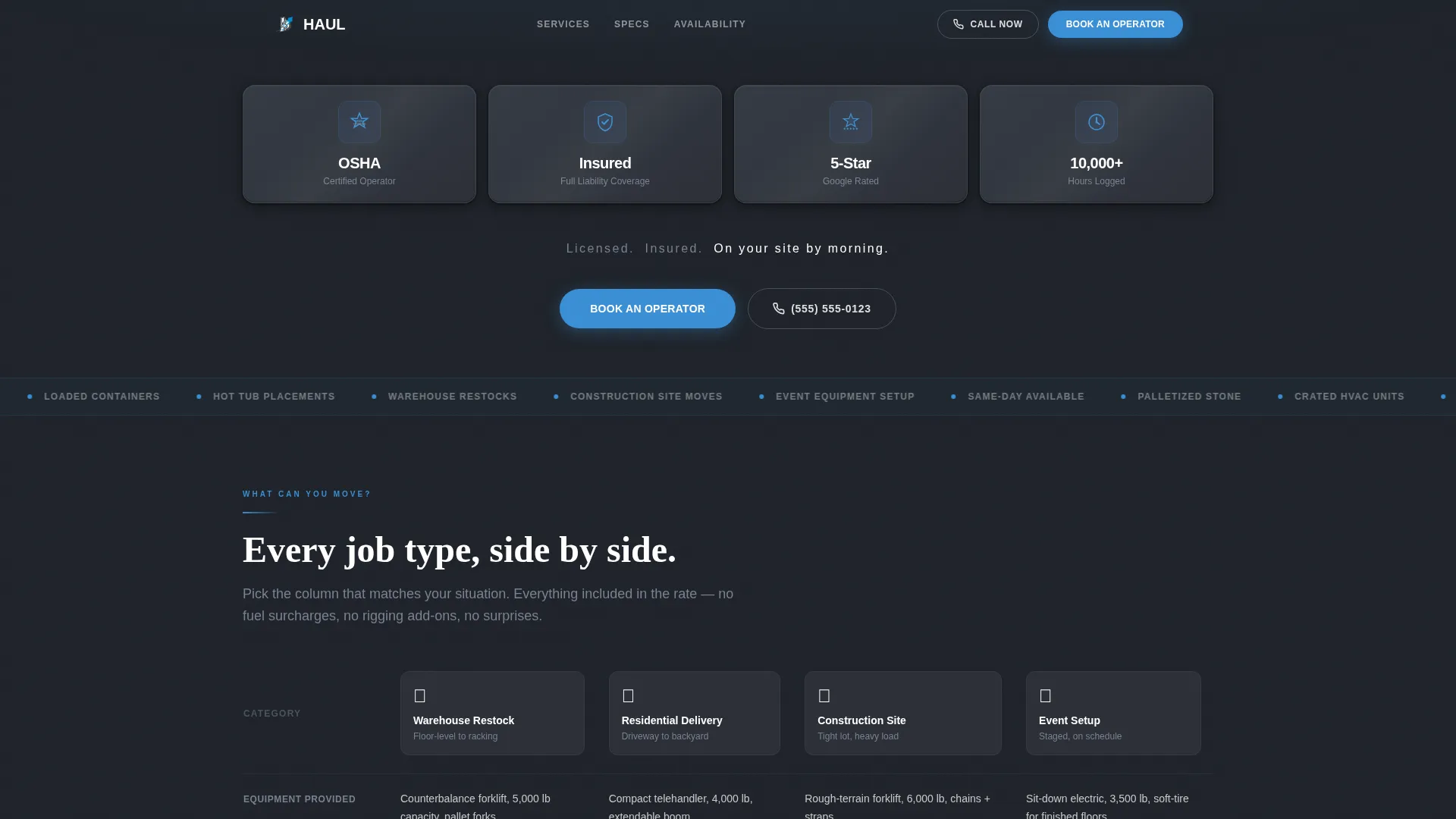
- An award badge header bar showing Occupational Safety and Health Administration certification, full liability insurance, five-star Google rating, and a logged-hours counter
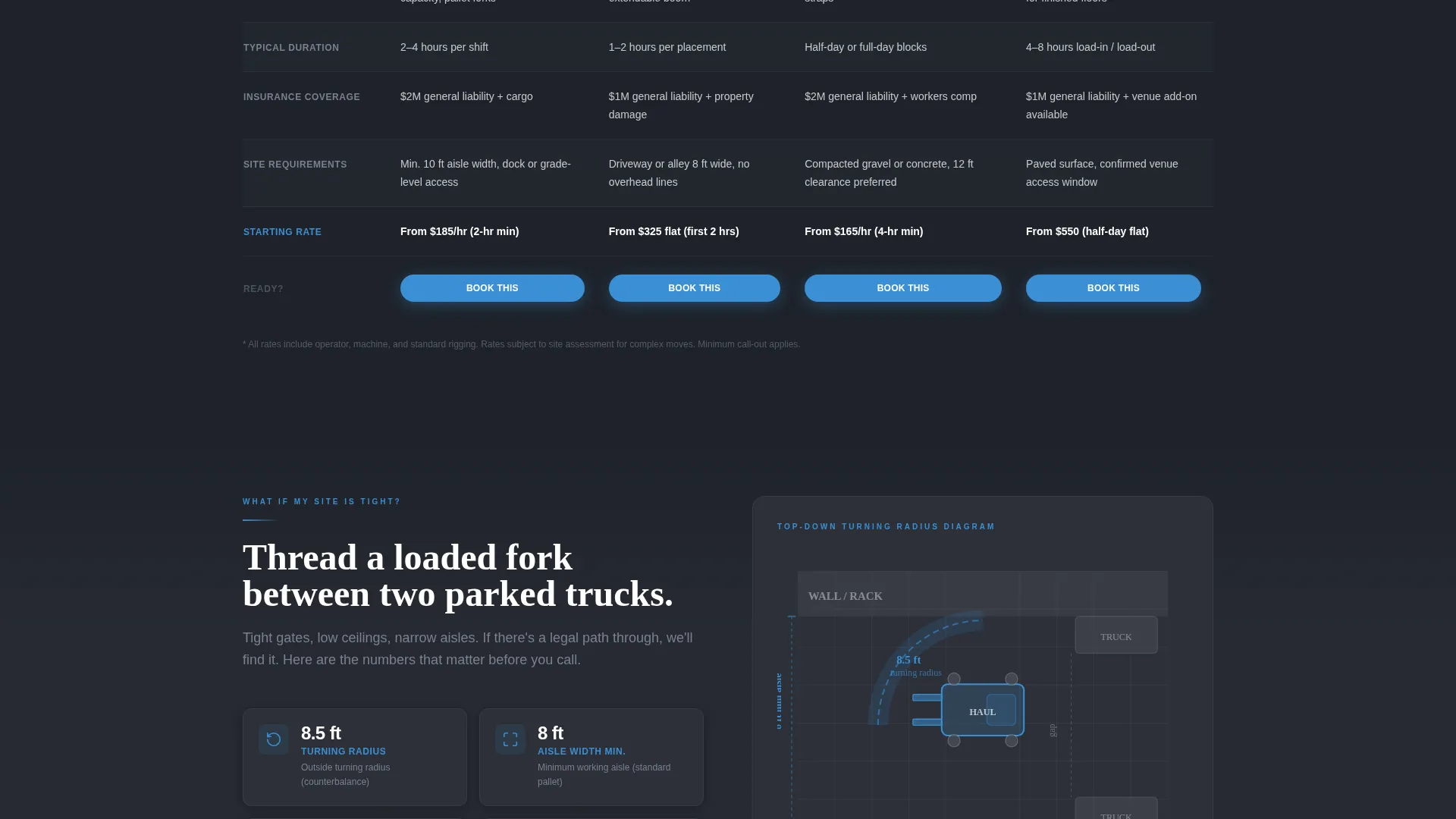
- A job-type comparison table covering warehouse restock, residential delivery, construction site, and event setup with rows for equipment, duration, insurance, and starting rate
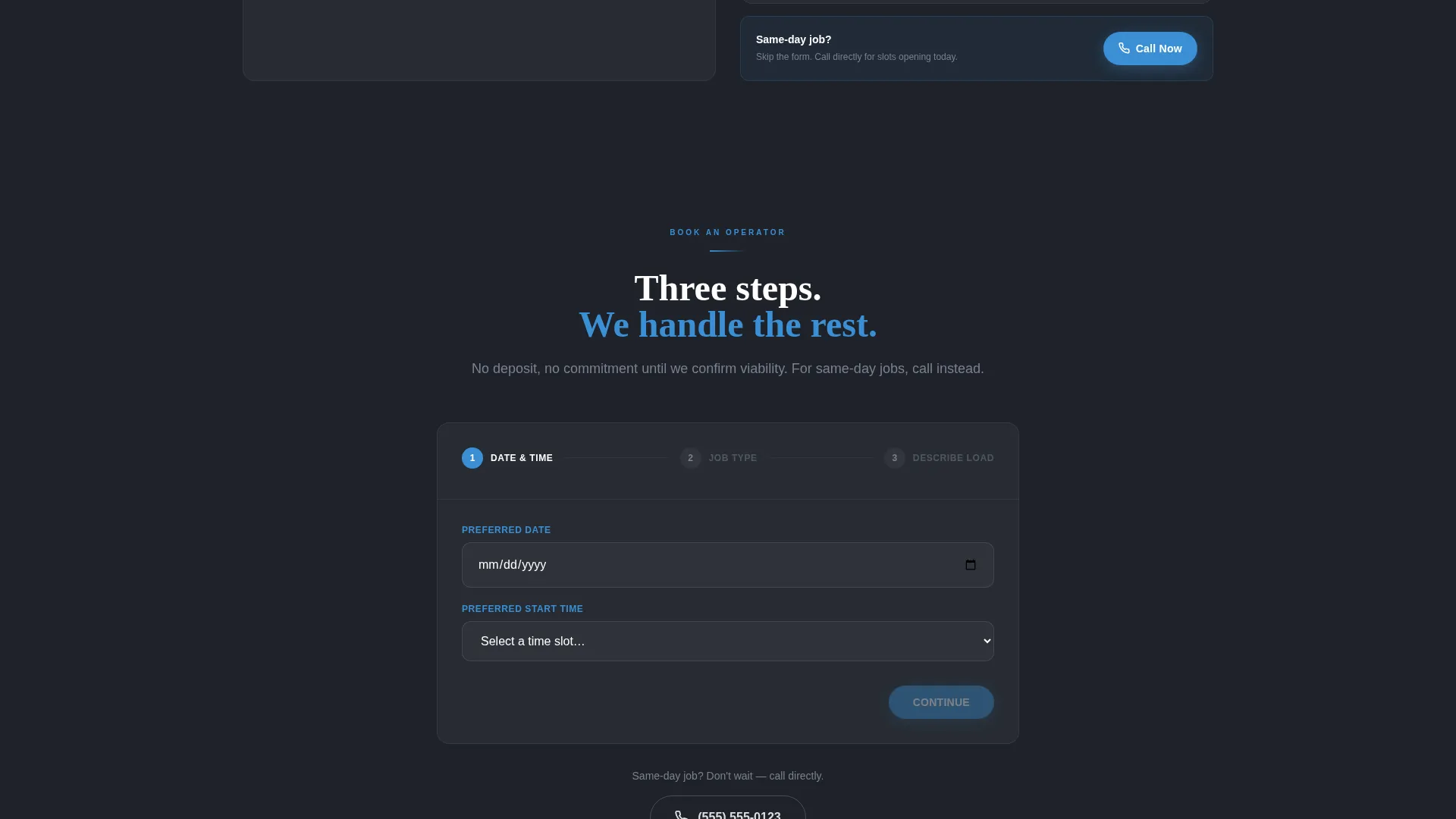
- A three-step booking form with a date and time picker, a job type dropdown, and a free-text load description field, plus a secondary click-to-dial call option
Feature list
This template is built around a small set of high-impact components. Each one serves a specific conversion purpose.
Award Badge Credential Header
Four embossed metallic credential icons sit in a tight horizontal bar against a deep charcoal background. They cover certification, insurance, rating, and experience hours. A single line fades in below them reading "Licensed. Insured. On your site by morning." There is no hero image, no tagline above the fold. The credentials speak first.
FAQ-Driven Scroll Sections
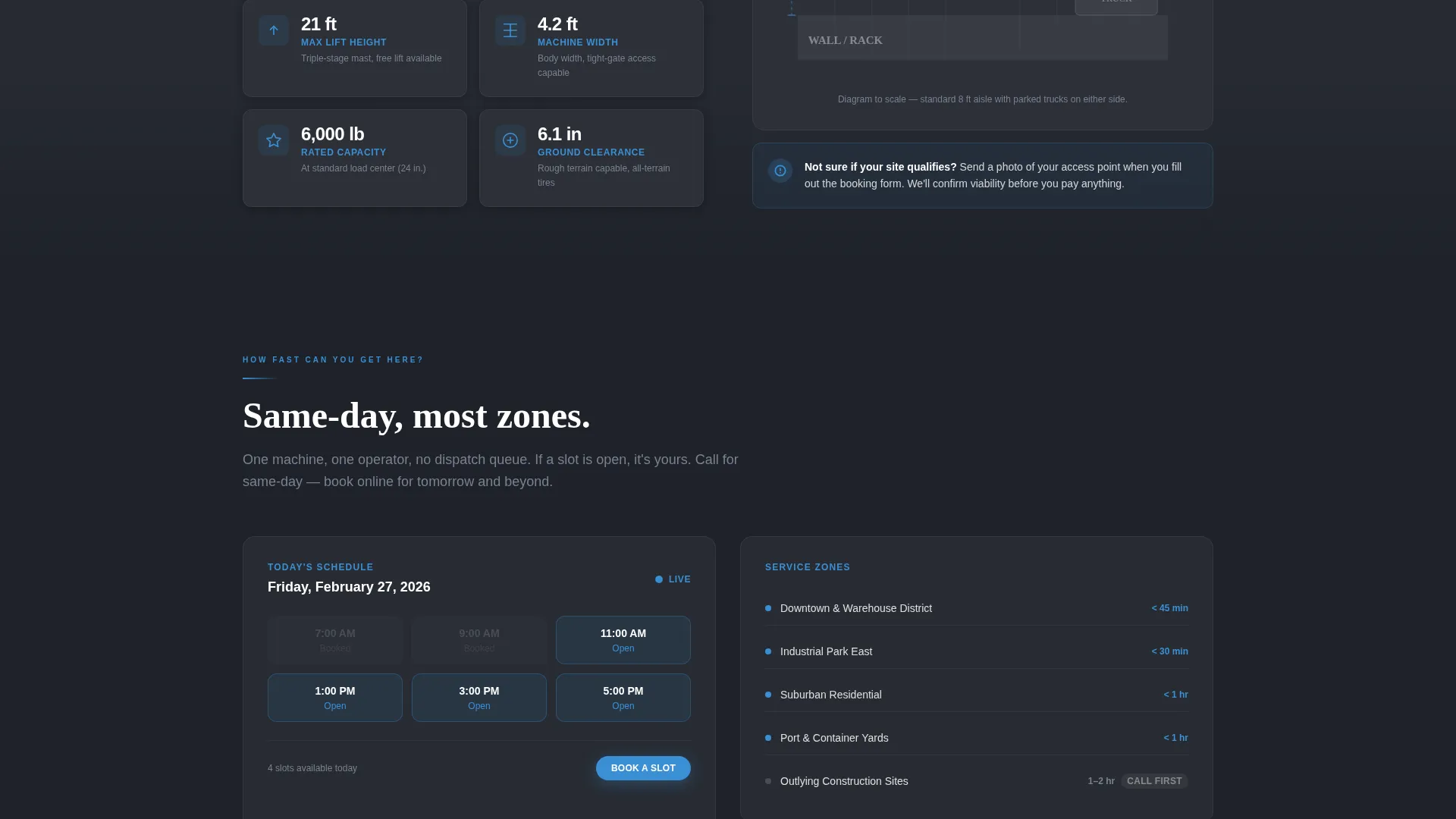
Each scroll section is built around the question a visitor is already asking. "What can you move?" opens the comparison table. "What if my site is tight?" shows turning-radius specs beside a top-down diagram. "How fast can you get here?" reveals a same-day availability calendar. This format removes one objection at a time.
Job-Type Comparison Table
The comparison table organizes four job types across columns: warehouse restock, residential delivery, construction site, and event setup. Rows cover equipment provided, typical job duration, insurance coverage, and starting rate. The alternating row color in chalked concrete keeps the table easy to scan without visual noise.
Three-Step Booking Form
The booking form uses three clearly labeled fields: a date and time picker, a job type dropdown that matches the comparison table columns exactly, and a free-text field labeled "Describe the load and site access." The primary call to action reads "Book an Operator." A secondary "Call Now" option with a click-to-dial number handles same-day urgency.
Same-Day Availability Calendar
A visual availability calendar inside the "How fast can you get here?" section gives visitors a real-time sense of scheduling options. It reduces the friction of reaching out by showing open slots before a visitor even fills in the form.
Turning Radius Diagram Section
A top-down diagram paired with turning-radius specifications answers the tight-site objection directly. This section reassures contractors and warehouse managers that the operator can work in constrained spaces without needing extra site prep.
Page sections overview
| Section | Purpose |
|---|---|
| Credential Badge Header | Establish trust immediately with certification, insurance, rating, and hours |
| Credential Fade-In Line | Reinforce authority with a single reassuring headline below the badges |
| Job Comparison Table | Show job types side by side with equipment, duration, coverage, and rate |
| Tight Site Section | Address site-access concerns with turning-radius specs and a top-down diagram |
| Availability Calendar | Show open scheduling slots to reduce booking hesitation |
| Booking Form | Capture date, job type, and load details in three steps |
| Call Now Option | Provide a click-to-dial secondary path for same-day urgent requests |
Design & branding system
The visual identity follows a Service Utility theme that feels like a clear morning on a working construction site. Every color choice is functional and deliberate, with nothing decorative added.
- Color palette: weathered asphalt gray (#4A4E57) for primary backgrounds, hi-vis safety blue (#3B8FD4) for all interactive elements and calls to action, chalked concrete (#E8EAED) for alternating table rows, and deep crane-boom charcoal (#1E2229) for headings
- Badge treatment: credential icons are rendered as embossed metallic toolbox-decal style marks that catch light subtly against the dark header bar
- Typography and layout follow a clean, utilitarian structure with no decorative elements, keeping the focus on the information and the booking path
Mobile & speed optimization
The single-page layout is structured to remain fully usable on smaller screens. The most important conversion elements stay visible and accessible without horizontal scrolling or layout collapse.
- The credential badge bar, comparison table, and booking form are each designed to stack or reflow cleanly at mobile viewport widths
- The click-to-dial "Call Now" option becomes especially useful on mobile, where tapping a number is faster than filling out a form
- The three-step booking form is kept short by design, reducing friction for users completing it on a phone between site visits
How this template helps you convert
The page is structured so that each section removes one reason not to book. By the time a visitor reaches the form, the decision is already made.
- The credential header resolves the trust question immediately, before any copy is read, so visitors stay instead of bouncing to a competitor.
- The comparison table resolves the "what do I get" question by showing job types, inclusions, and rates side by side, so pricing feels transparent rather than suspicious.
- The FAQ-driven scroll flow stacks certainty section by section, so the booking form at the end feels like a natural next step rather than a commitment the visitor was not ready to make.
Other information about this template
This template sits at the intersection of Professional Services and Forklift Operator Online Presence. It is a purpose-built single-page layout for operators who work in high-demand, time-sensitive niches.
- The template style is Comparison Table, making it well suited to any operator who competes on clarity and wants buyers to see exactly what is included before asking a price
- The FAQ-driven creative direction aligns with how buyers in this niche actually search: they arrive with specific operational questions, not general interest
- The Booking and Scheduling conversion path is paired with a secondary phone option, covering both planners who book ahead and contractors who need someone on site by morning
- The Slate and Sky color system was chosen for its immediate industry legibility: it reads as professional and site-ready without requiring a single photo above the fold
- The template is fully customizable, so operators can replace the sample job types, rates, credential details, and contact information to match their actual service area and pricing
Theme
Service Utility
Creative direction
FAQ-Driven
Color system
Slate & Sky
Style
Comparison Table
Direction
Booking/Scheduling
Page Sections
Award Badge Credential Header
Job-type Comparison Table
Faq-driven Scroll Sections
Three-step Booking Form
Turning Radius Diagram
Same-day Availability Calendar
Related questions
Can I change the job types in the comparison table?
Does the template include the booking form functionality?
Can I update the credential badges with my own certifications?
Is the Call Now button ready to use?
Does this template work for operators who cover multiple job types?



