Daycare & Childcare Specialist Professional Website Template
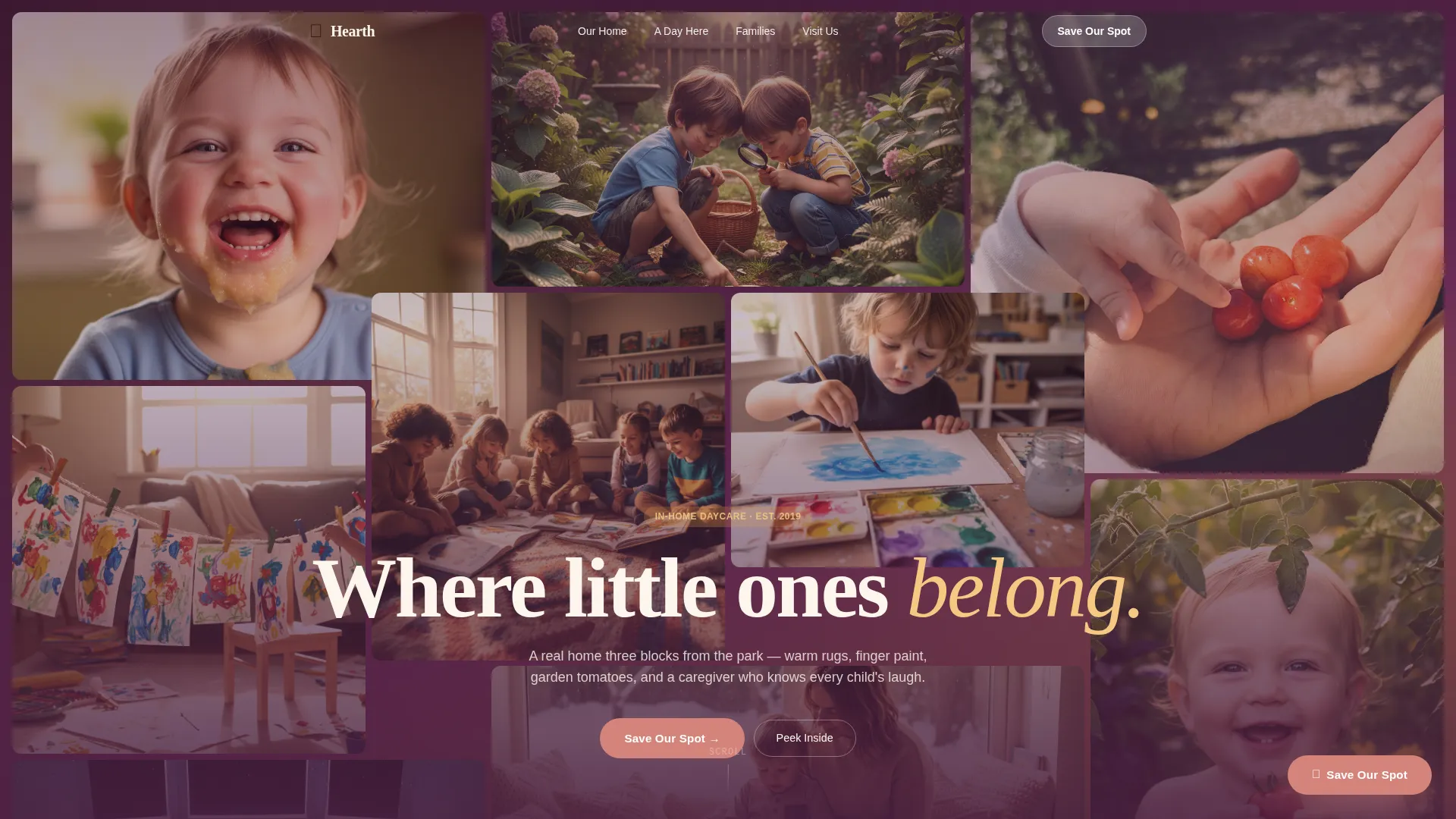
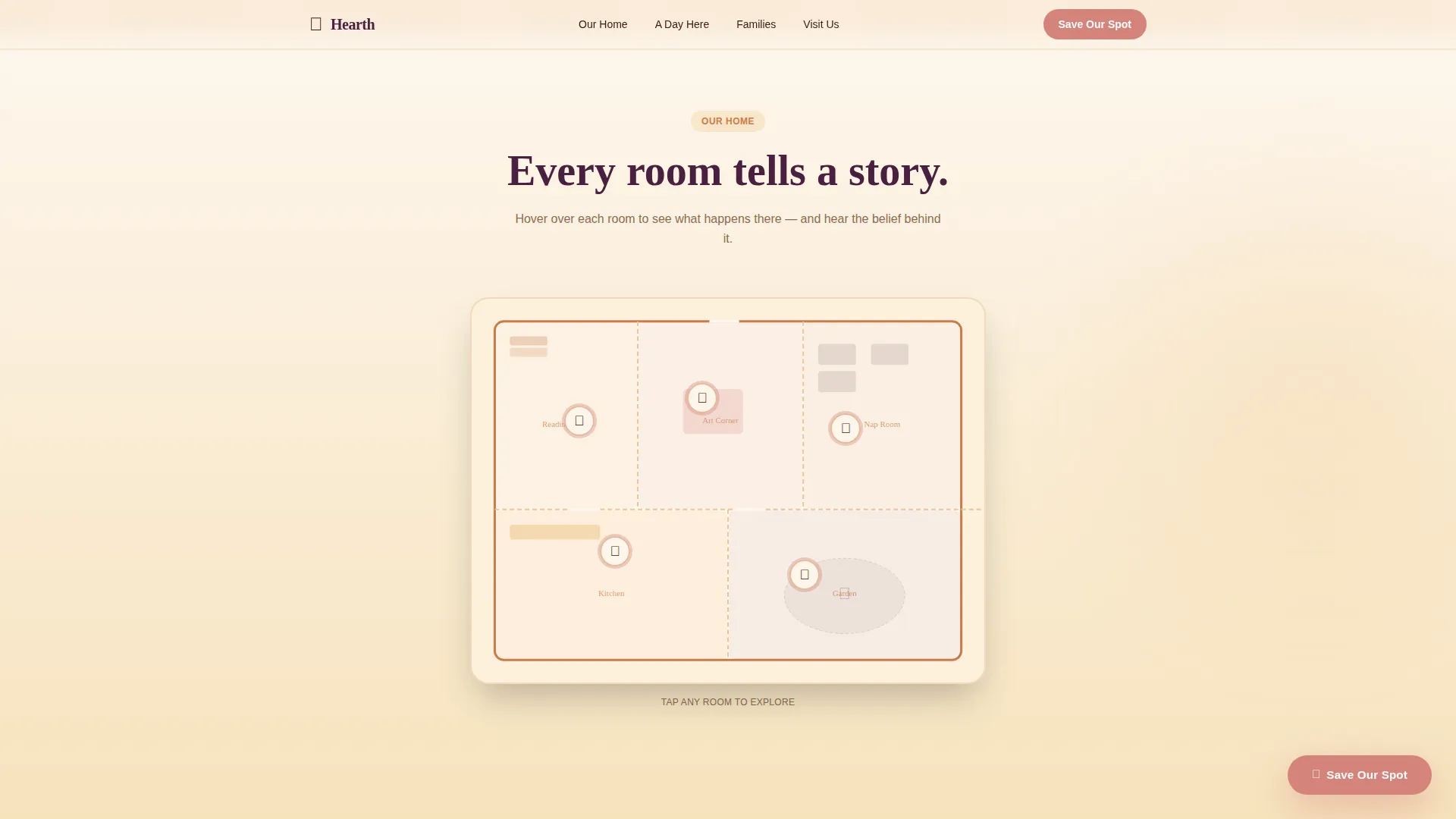
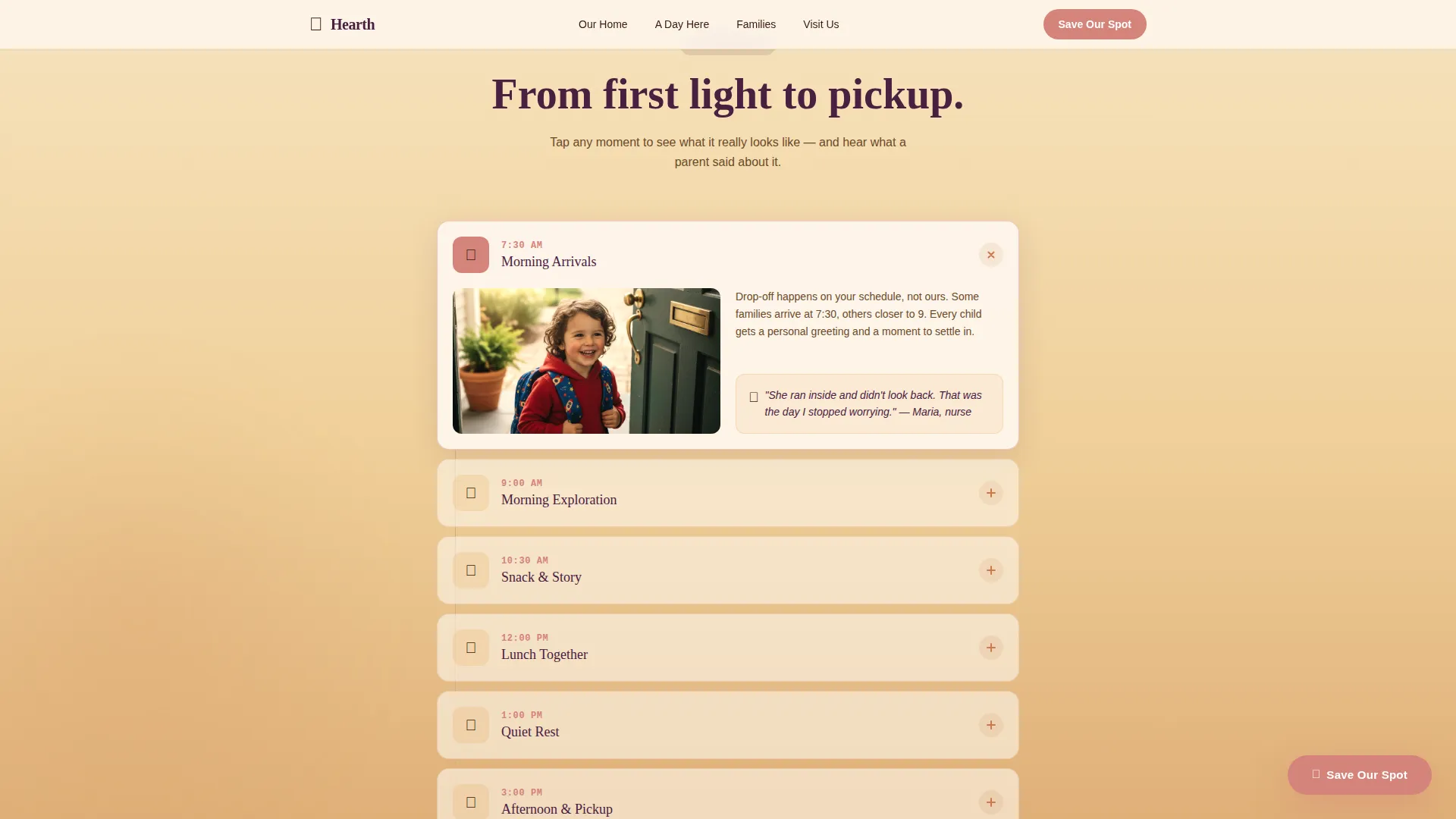
Hearth is a warm, scroll-reveal landing page template built for in-home daycare providers. It pairs a candid nine-photo mosaic hero with an interactive illustrated floor plan, an expandable daily timeline, and a trust-first registration flow. The design uses a Sunset Gradient palette and serif typography to make every visitor feel like they have already stepped inside the home.
by Rocket studio
Quick summary
Hearth is a single-page daycare landing page template designed to turn cautious first-time parents into open house registrants. It opens with a parallax photo mosaic, leads visitors through an illustrated floor plan and a real-day timeline, and closes with a warm registration form. Every scroll step builds trust before asking for a commitment.
Who this template is for
This template is built for in-home daycare providers who want their page to feel like a home, not a brochure. It suits small, community-rooted childcare businesses that rely on neighborhood trust and word-of-mouth referrals.
- In-home daycare owners hosting open house events and needing a dedicated registration page
- Early childhood care providers serving first-time parents, flexible-schedule families, and night-shift workers
- Childcare professionals who want candid, story-driven content to replace generic facility copy
What problem this template solves
Parents choosing in-home daycare carry real anxiety. They cannot visit every option in person before deciding, and a flat, text-heavy page does nothing to ease that worry. Hearth solves the trust gap by letting the page do the visiting for them.
- First-time parents need to feel the warmth of a space before they are willing to fill out a form
- Flexible-schedule families need to see that the provider understands their hours and routines
- Providers need a clear registration path that captures interest before the open house fills up
What you get with this template
Hearth delivers a fully structured, scroll-reveal landing page with every section already planned and designed. You get a complete visual story from the first image to the final form, with no sections left for you to guess.
- A nine-image parallax photo mosaic hero, an illustrated interactive floor plan, and an expandable hour-by-hour daily timeline
- A dual-path registration section with a primary "Save Our Spot" form and a secondary "Just Peek Inside" email opt-in
- A warm Sunset Gradient color system, Fraunces serif headings, and DM Sans body text already paired and ready to use
Feature list
This template is built around interactive storytelling, not static content blocks. Each feature below is grounded in what the template actually delivers.
Parallax Photo Grid Mosaic Hero
Nine unevenly arranged candid snapshot tiles fill the hero section like photos pinned to a refrigerator door. The tiles lift gently on a parallax scroll, giving the header a living, breathing quality from the first moment.
Interactive Illustrated Floor Plan
A softly illustrated home map lets visitors hover over individual rooms to trigger photo pop-ups. Each room also reveals a short philosophy snippet, turning a floor plan into a quiet conversation about how the home runs.
Expandable Daily Timeline Ribbon
An hour-by-hour ribbon unfolds as the visitor scrolls. Each time block is expandable, shows a real photo, and carries a single sentence from a parent text message, grounding the schedule in genuine daily life.
Dual-Path Registration Section
The primary call to action, "Save Our Spot," is a rose-colored floating button that appears after the floor plan once trust is established. A secondary path, "Just Peek Inside," offers hesitant visitors a photo-diary email series instead of immediately asking for a date.
Scroll-Triggered Gradient Transitions
Background gradients shift from linen white through warm honey to dusky rose as the visitor scrolls deeper. The visual warmth increases with depth, mirroring the feeling of afternoon light moving across a home through the day.
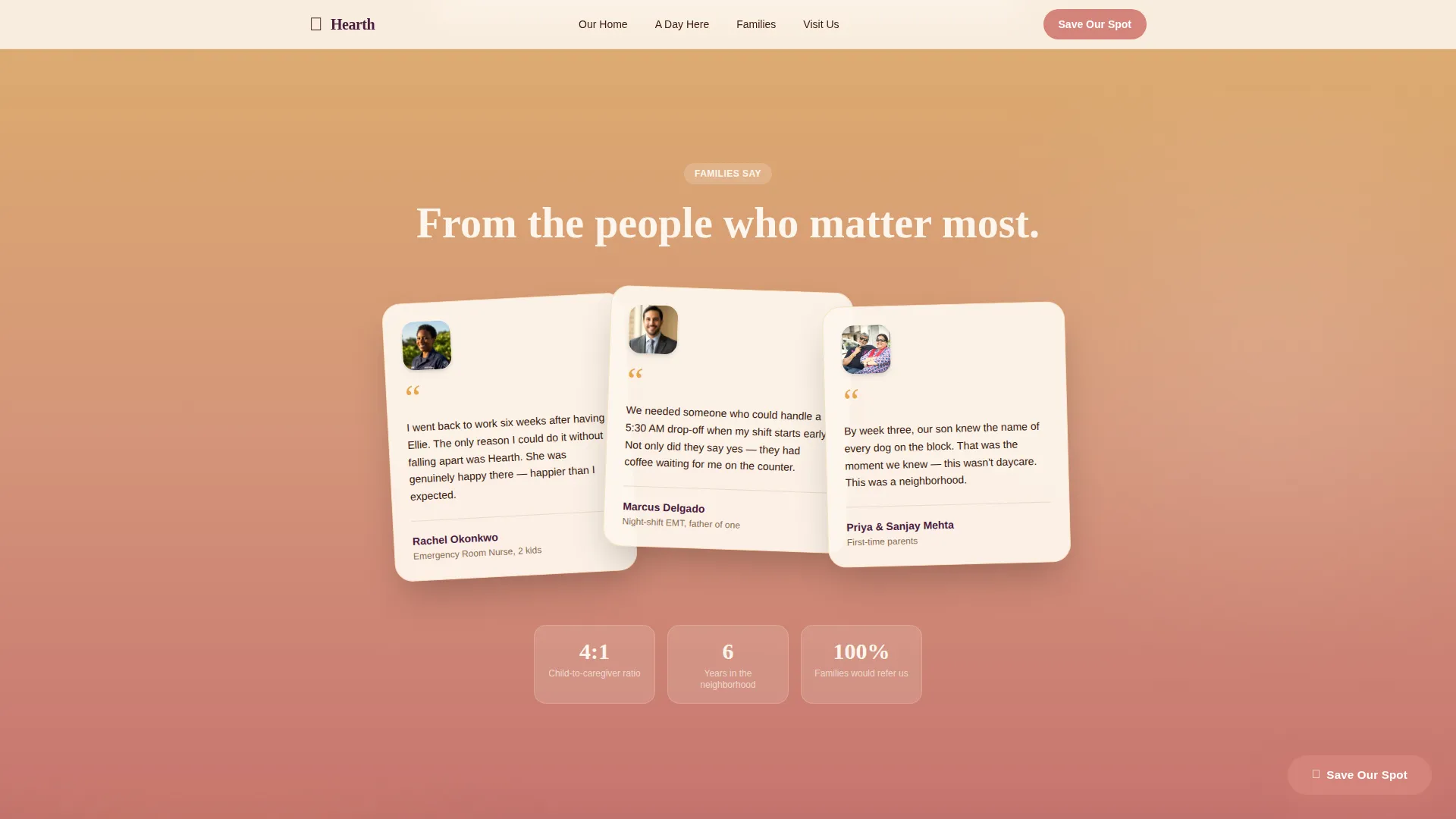
Parent Testimonials with Portrait Treatment
A dedicated testimonials section presents parent voices with an overlapping portrait layout. Real quotes sit alongside faces, giving social proof a human weight that a star-rating block cannot match.
Page sections overview
| Section | Purpose |
|---|---|
| Hero Mosaic Grid | Opens with nine warm candid photos and parallax lift to create immediate emotional connection |
| Floor Plan Explorer | Interactive illustrated home map with room hover pop-ups and philosophy snippets |
| Daily Timeline Ribbon | Expandable hour-by-hour day view with real photos and parent text quotes |
| Parent Voices | Testimonials with overlapping portrait treatment and real parent quotes |
| Registration Form | "Save Our Spot" open house form with three Saturday date slots and child age field |
| Secondary call to action | "Just Peek Inside" path offering a photo-diary email series for hesitant visitors |
| Footer | Arc Browser Split layout with logo and tagline on the left, navigation links on the right |
Design & branding system
The template uses a Community Hearth theme built around a Sunset Gradient color system. Every color decision references the feeling of late-afternoon light in a lived-in home, not a clinical childcare center.
- Colors: warm honey (#E8A44A), soft terracotta (#C97B4B), dusky rose (#D4837A), deep plum (#4A2040), and creamy linen white (#FDF6EC)
- Typography: Fraunces serif for headings to carry warmth and editorial weight, DM Sans for body text to keep reading easy and modern
- Visual style: warm-shifted candid photography, organic hand-drawn illustrations for the floor plan, and gentle gradient bands at section transitions
Mobile & speed optimization
The template is built mobile-first, designed for parents browsing quickly on a phone during a lunch break. Every interactive element is sized and spaced for touch, and the scroll-reveal animations are tuned for small screens.
- Mobile-first layout with touch-friendly tap targets on the floor plan pop-ups, timeline blocks, and registration form
- Server components handle static sections to keep initial load light, while client components power the interactive floor plan and expandable timeline
- Scroll-triggered animations and gradient shifts are designed to work cleanly on portrait mobile screens without layout breaking
How this template helps you convert
Hearth is structured so that trust comes before the ask. The registration form appears only after visitors have moved through the mosaic, the floor plan, the daily timeline, and the testimonials. By that point, most visitors are not deciding whether to visit; they are picking a date.
- The photo mosaic, interactive floor plan, and expandable timeline build familiarity before any form is shown, reducing drop-off from anxious or undecided visitors
- The floating "Save Our Spot" button appears at the right scroll depth, and the "Just Peek Inside" secondary path captures leads who are not yet ready to commit to a visit date
Other information about this template
This section covers additional context that helps you understand the full scope of what Hearth includes and how it fits within the broader childcare template space.
- The template is localized for a US audience with English copy, USD formatting, and US date formats for the three Saturday open house slots
- Credential badge placements are included in the design to support provider trust signals alongside the testimonials section
- The footer follows an Arc Browser Split pattern with the provider logo and tagline anchored on the left and navigation links on the right, set in deep plum for typographic gravity
Theme
Community Hearth
Creative direction
Interactive Explorer
Color system
Sunset Gradient
Style
Scroll Reveal (Progressive)
Direction
Event Registration
Page Sections
Parallax Photo Grid Mosaic Hero
Interactive Illustrated Floor Plan
Expandable Daily Timeline Ribbon
Dual-path Registration Section
Scroll-triggered Gradient Transitions
Parent Testimonials with Portrait Treatment
Related questions
Can I change the open house dates in the registration form?
Do I need to supply my own photos for the mosaic hero?
Is the illustrated floor plan customizable?
What does the "Just Peek Inside" option do?
Is this template suited to a single in-home daycare location?



