Dog Trainer Facebook Ads Landing Page Template
Heel is a single-page landing page template built for independent dog trainers ready to run Facebook ads that actually fill calendars. It pairs a commanding headline, a social proof logo wall, and a side-by-side comparison table to show visitors exactly what separates boosted posts from real ad campaigns, then converts them with a focused lead-capture form.
by Rocket studio
Quick summary
Heel is a focused landing page template for dog trainers who want to turn Facebook ad traffic into booked group classes and private sessions. It leads with a bold headline, backs it with peer social proof, and walks visitors through a sharp comparison table before presenting a no-friction resource download form. The design feels authoritative, clean, and built for a serious training business.
Who this template is for
This template is built for working dog trainers who are ready to move beyond posting and boosting. It fits independent operators and small training businesses who understand their craft but want a smarter way to attract clients through paid traffic.
- Reactive dog specialists and puppy program owners who need consistent lead flow
- Board-and-train operators looking to fill facility spots, not just grow social followers
- Independent trainers earning roughly $5,000 to $15,000 per month who are ready to run real ad campaigns
What problem this template solves
Most dog trainers waste ad spend because their landing page was never built to convert paid traffic. They send clicks to an Instagram profile or a generic website, lose the visitor in three seconds, and have no way to know if the ad worked. This template solves that directly.
- No dedicated booking or capture page to send ad traffic to
- No clear proof of credibility before asking a visitor to take action
- No structured argument for why real campaigns outperform boosted posts
What you get with this template
You get a complete, single-page layout purpose-built for a dog trainer Facebook ads resource download. Every section is arranged to build trust fast and move the visitor toward one clear action.
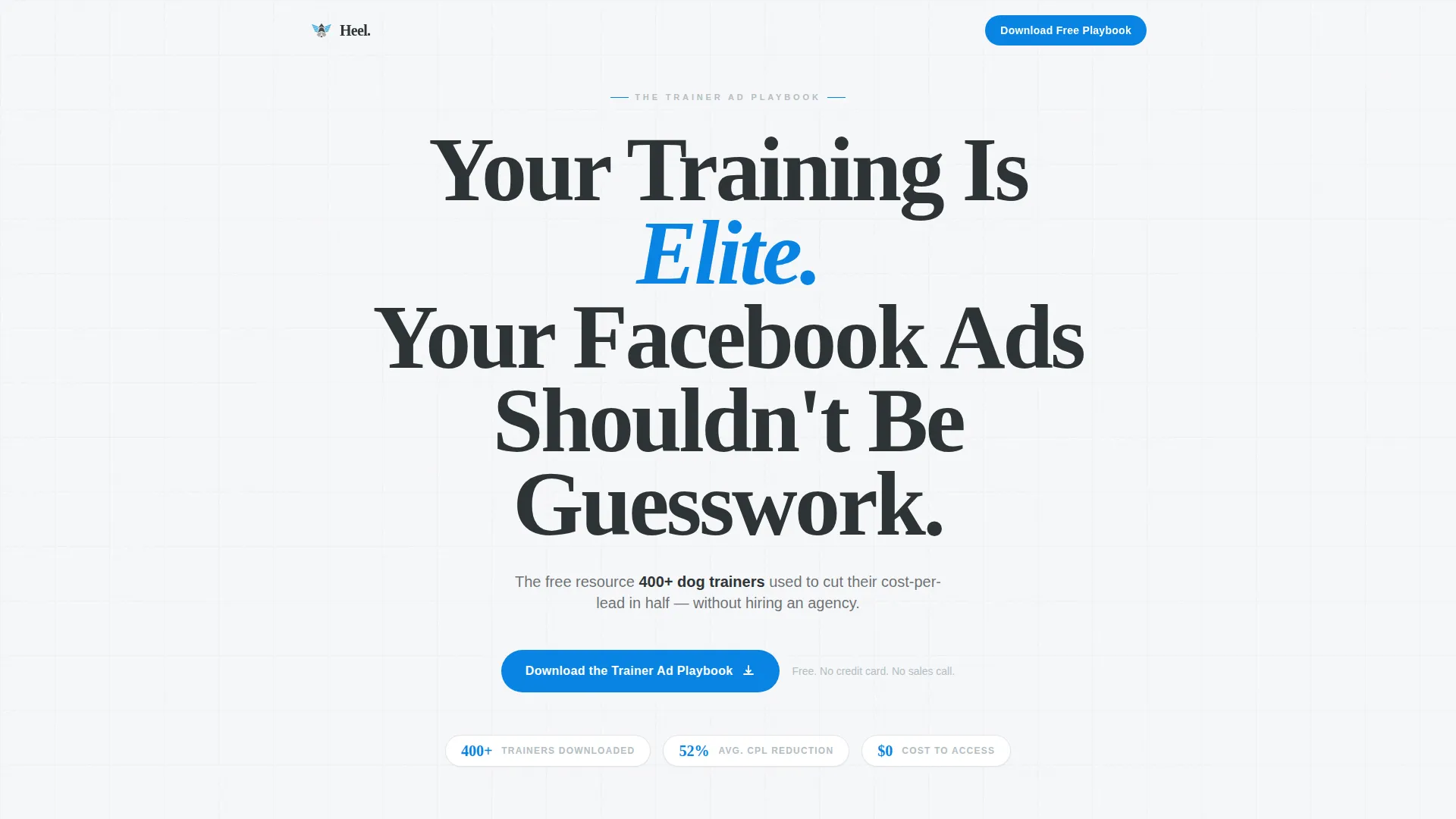
- A viewport-filling headline section with a bold typographic statement and a credibility subline
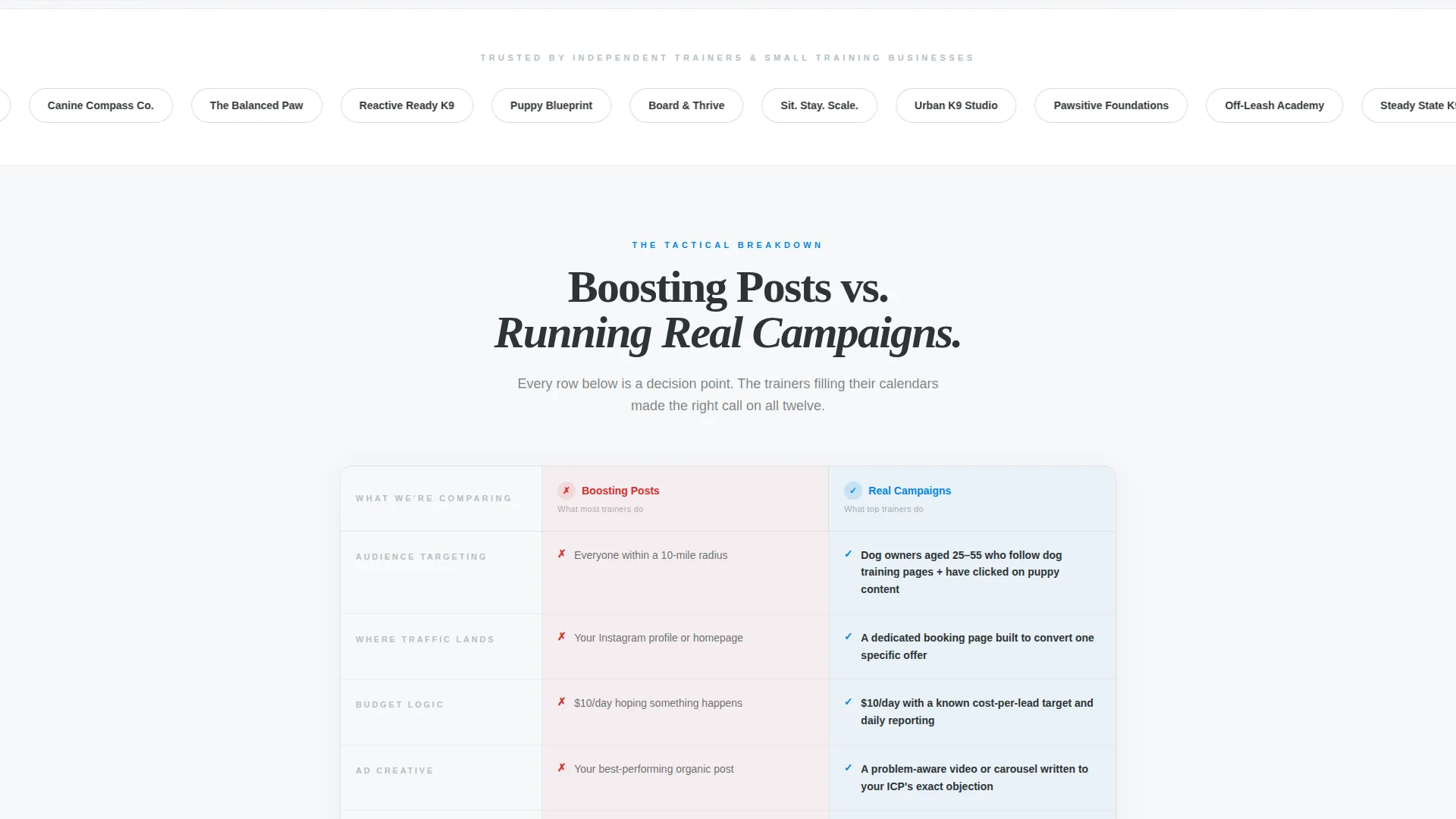
- A horizontal logo wall showing peer training businesses for immediate social proof
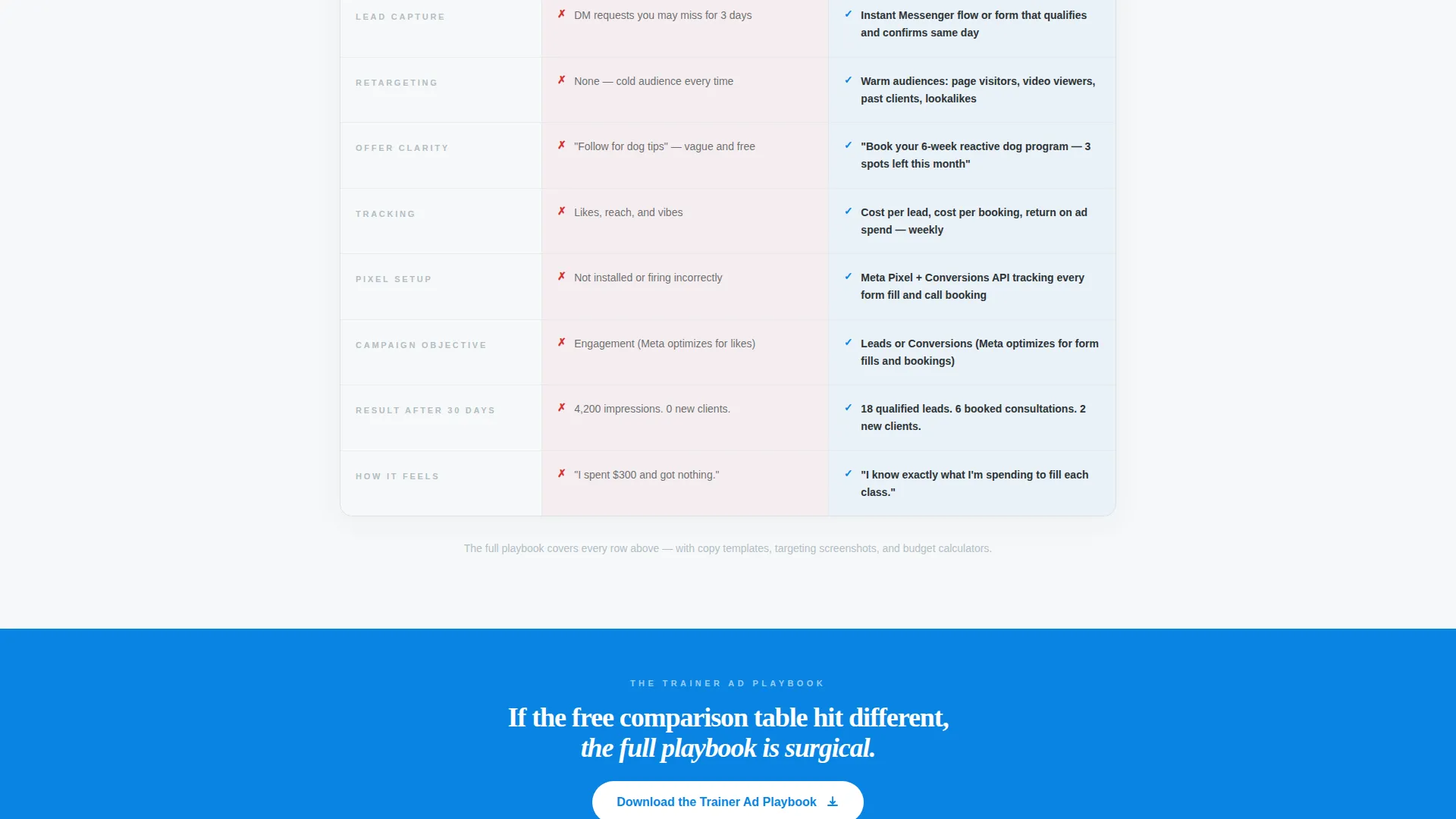
- A detailed comparison table contrasting boosted posts against real Facebook campaigns
- A lead-capture form asking for first name, email, and a qualifying dropdown question
- A sticky mobile bottom bar that keeps the primary call to action visible on scroll
Feature list
This section covers the core built-in components that make Heel work as a high-converting dog trainer landing page.
Giant Centered Headline Block
The header section uses massive, tight serif typography that fills the viewport on load. The word "Elite" is styled in the deep sky accent color (#0984E3) to draw the eye and signal confidence. There is no image or illustration, only the weight of the statement itself.
Horizontal Logo Wall
Directly beneath the headline, a horizontal band displays styled training business names such as "Pawsitive Foundations," "Off-Leash Academy," and "Steady State K9." This social proof band appears before any marketing claim, so trust is established at first scroll.
Side-by-Side Comparison Table
The core of the page is a structured table contrasting "Boosting Posts" against "Running Real Campaigns." Each row targets a decision trainers recognize, such as radius targeting versus behavior-based targeting and Instagram traffic versus a dedicated booking page. The table builds authority through specificity.
Triple-Placement Call to Action
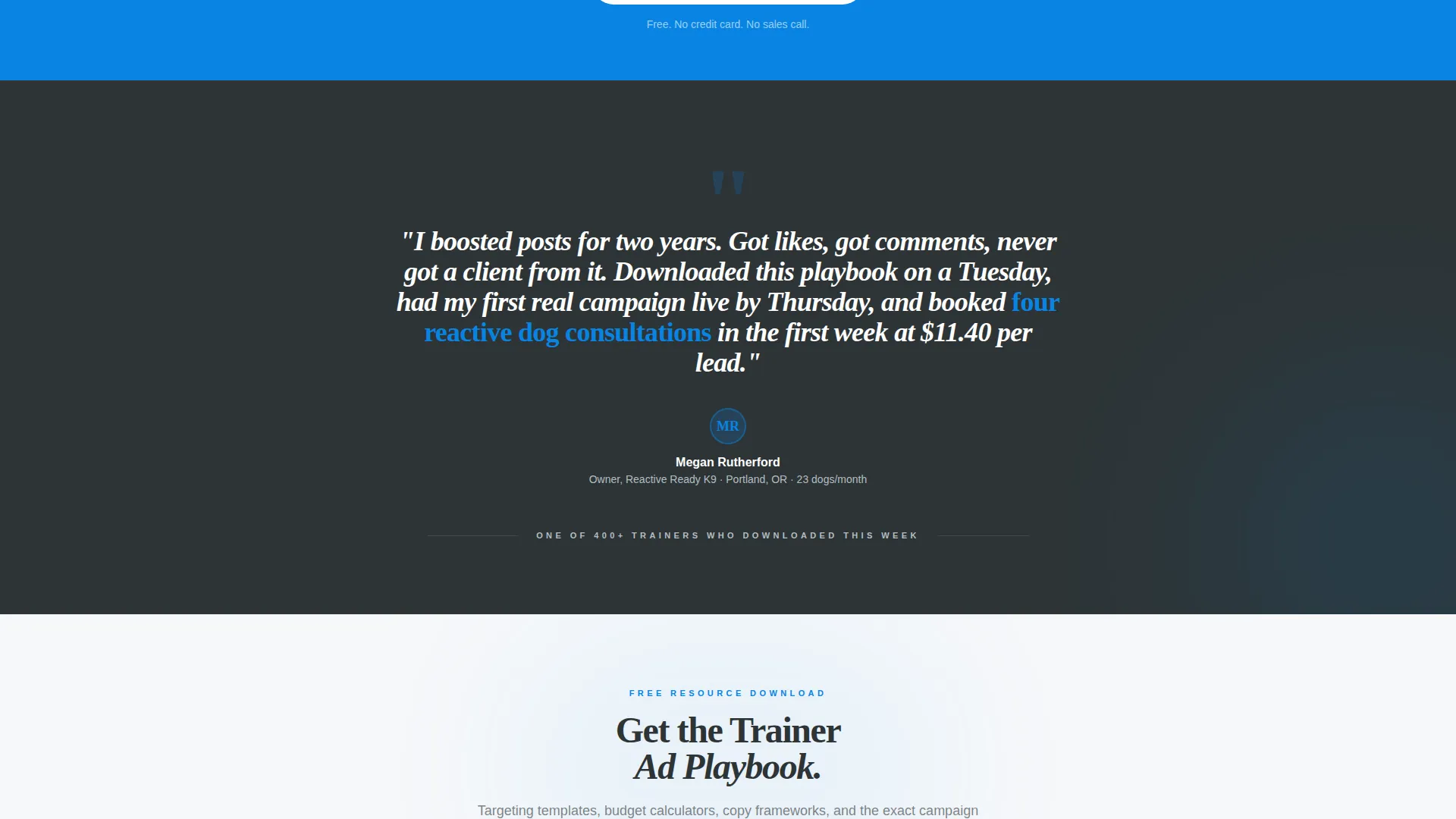
The primary call to action, "Download the Trainer Ad Playbook," appears in three locations: after the logo wall, after the comparison table, and in a sticky bottom bar on mobile. Repetition is intentional and tied to the scroll journey.
Qualifying Lead Capture Form
The form collects first name and email alongside one qualifying dropdown question: "How many dogs do you train per month?" The options are 1 to 10, 11 to 30, and 31 or more. There is no credit card field and no call-booking step, keeping friction minimal.
Executive Suite Visual Theme
The Cloud Canvas color system uses soft cumulus white (#F7F8FA) as the primary background with charcoal authority (#2D3436) for body text and warm stone gray (#B2BEC3) for supporting elements. Deep sky (#0984E3) is reserved strictly for calls to action and data highlights, giving the page a polished, strategy-deck feel.
Page sections overview
| Section | Purpose |
|---|---|
| Giant Headline Header | Opens with the core statement and credibility subline |
| Logo Wall Band | Establishes peer social proof before any claims |
| Comparison Table Core | Contrasts boosted posts against real ad campaigns |
| Post-Table call to action Block | Recaptures intent after the comparison argument |
| Lead Capture Form | Collects name, email, and qualifying dropdown answer |
| Sticky Mobile Bar | Keeps the download call to action visible on mobile scroll |
Design & branding system
The visual identity follows an Executive Suite theme that feels like a printed strategy deck, clean enough to breathe and serious enough to be trusted with an ad budget. Every design decision reinforces credibility over decoration.
- Color palette uses soft cumulus white (#F7F8FA), charcoal authority (#2D3436), warm stone gray (#B2BEC3), and deep sky (#0984E3) reserved for calls to action and highlights
- Typography centers on a tight, modern serif at a viewport-filling scale for the headline, paired with a restrained charcoal subline
- No background images or illustrations appear in the header; confidence comes from typographic weight alone
Mobile & speed optimization
The template is built with mobile visitors in mind, particularly trainers who may click a Facebook ad on a phone and land here seconds later. The layout adapts cleanly for smaller screens.
- A sticky bottom bar keeps the "Download the Trainer Ad Playbook" call to action anchored at the bottom of the screen on mobile devices
- The comparison table is structured to remain readable at mobile widths without losing the row-by-row contrast that drives the argument
- The single-page, section-led layout avoids unnecessary page loads or navigation complexity
How this template helps you convert
Heel is engineered around a single conversion path: give away enough tactical value in the free comparison view that the visitor feels compelled to download the full playbook. Every section reinforces that path.
- The headline filters for the right visitor immediately, speaking directly to trainers who have already wasted money on boosted posts and felt nothing happen
- The logo wall removes the "is this legitimate?" hesitation before the visitor reaches the first call to action, so trust is already in place when the download button appears
- The comparison table delivers so much specific, recognizable detail that the visitor experiences the value of the resource before they have even entered their email
Other information about this template
Heel is a Comparison Table template built under the Content and Resource download direction. It is designed to support paid social traffic from Facebook and Instagram campaigns aimed at dog trainer audiences.
- The template fits trainers running niche programs such as reactive dog rehabilitation, puppy foundation courses, and board-and-train boarding programs
- The qualifying dropdown on the form helps segment leads by training volume without adding extra form fields or friction
- The three-placement call to action structure is intentional: it mirrors proven direct-response page architecture where the offer is restated at each moment of peak conviction
- This template can support any dog trainer Facebook ads resource, guide, or playbook that converts cold paid traffic into warm, identified leads
Theme
Executive Suite
Creative direction
Logo Wall Authority
Color system
Cloud Canvas
Style
Comparison Table
Direction
Content/Resource
Page Sections
Giant Centered Headline Block
Horizontal Logo Wall
Side-by-side Comparison Table
Triple-placement Call to Action
Qualifying Lead Capture Form
Executive Suite Visual Theme
Related questions
Can I use this template without running Facebook ads right now?
Does the form connect to an email platform automatically?
Can I replace the logo wall placeholders with real business names?
Is this template suitable for a brand-new training business?
Can the comparison table rows be edited?



