Garage Door Repair Marketing FAQ Website Template
Hoist is a single-page, lead generation landing page built for garage door repair services. It uses FAQ-driven scroll sections paired with comparison tables to help stressed homeowners, property managers, and real estate agents diagnose their situation fast and request a free estimate with minimal friction.
by Rocket studio
Quick summary
Hoist is a comparison table landing page designed for garage door repair free estimate services. It converts urgent visitors into leads through a typographic hero, FAQ-driven scroll sections, side-by-side comparison tables, and a low-friction lead form. Every layout decision is built around one goal: make requesting a free estimate feel like the obvious, rational next step.
Who this template is for
This template is built for home service businesses that need to capture leads fast. The layout speaks directly to high-stress, time-sensitive repair situations where trust is earned in seconds, not paragraphs.
- Garage door repair companies offering same-day or emergency service
- Property managers handling tenant complaints about stuck or damaged doors
- Real estate agents who need a reliable repair completed before a listing goes live
What problem this template solves
Most home service landing pages ask visitors to trust before they understand. Hoist flips that sequence. It answers the exact questions homeowners are already searching, then presents the decision to book as the logical conclusion of what they just read.
- Visitors arrive stressed and skeptical; the page meets them with clear answers, not sales language
- DIY temptation is addressed head-on with honest comparison tables showing real risk and cost differences
- The lead form appears only after the comparison tables have already done the convincing
What you get with this template
Hoist delivers a fully structured, single-page layout ready to customize for any garage door repair business. Every section is intentional and ordered to move hesitant visitors toward a free estimate request.
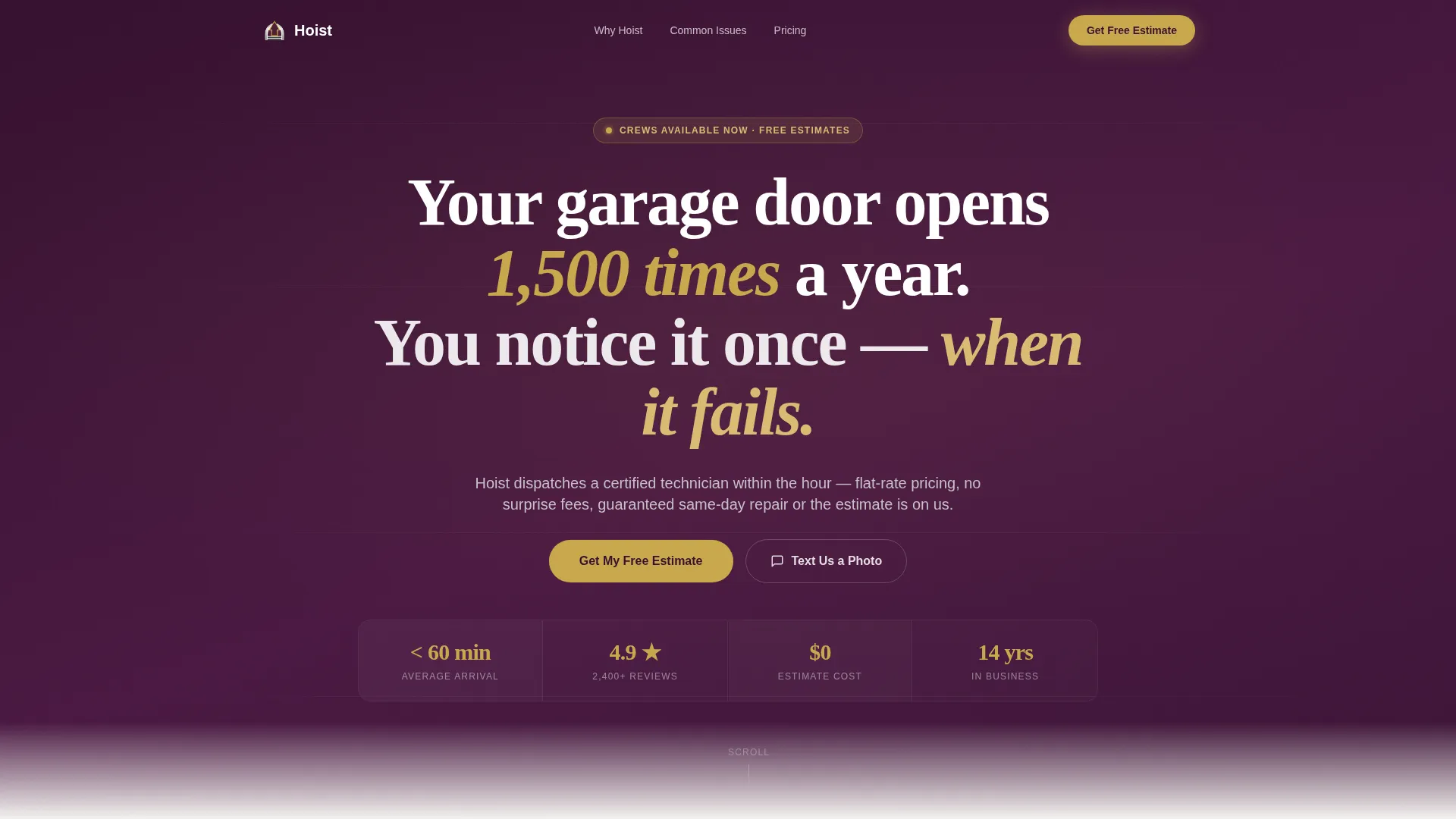
- A typographic hero section built on a deep plum field with a bold serif manifesto and a gold call-to-action button
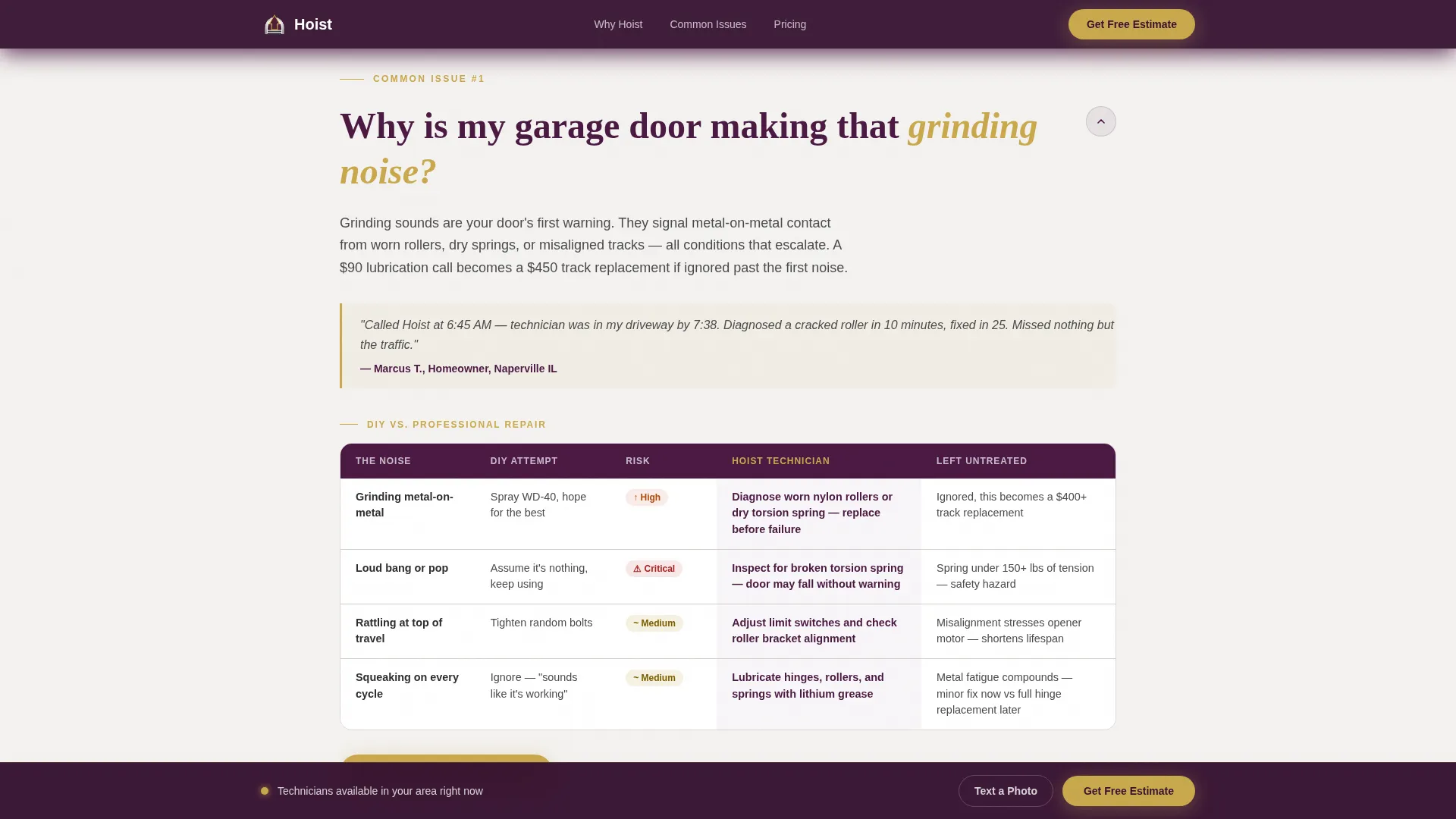
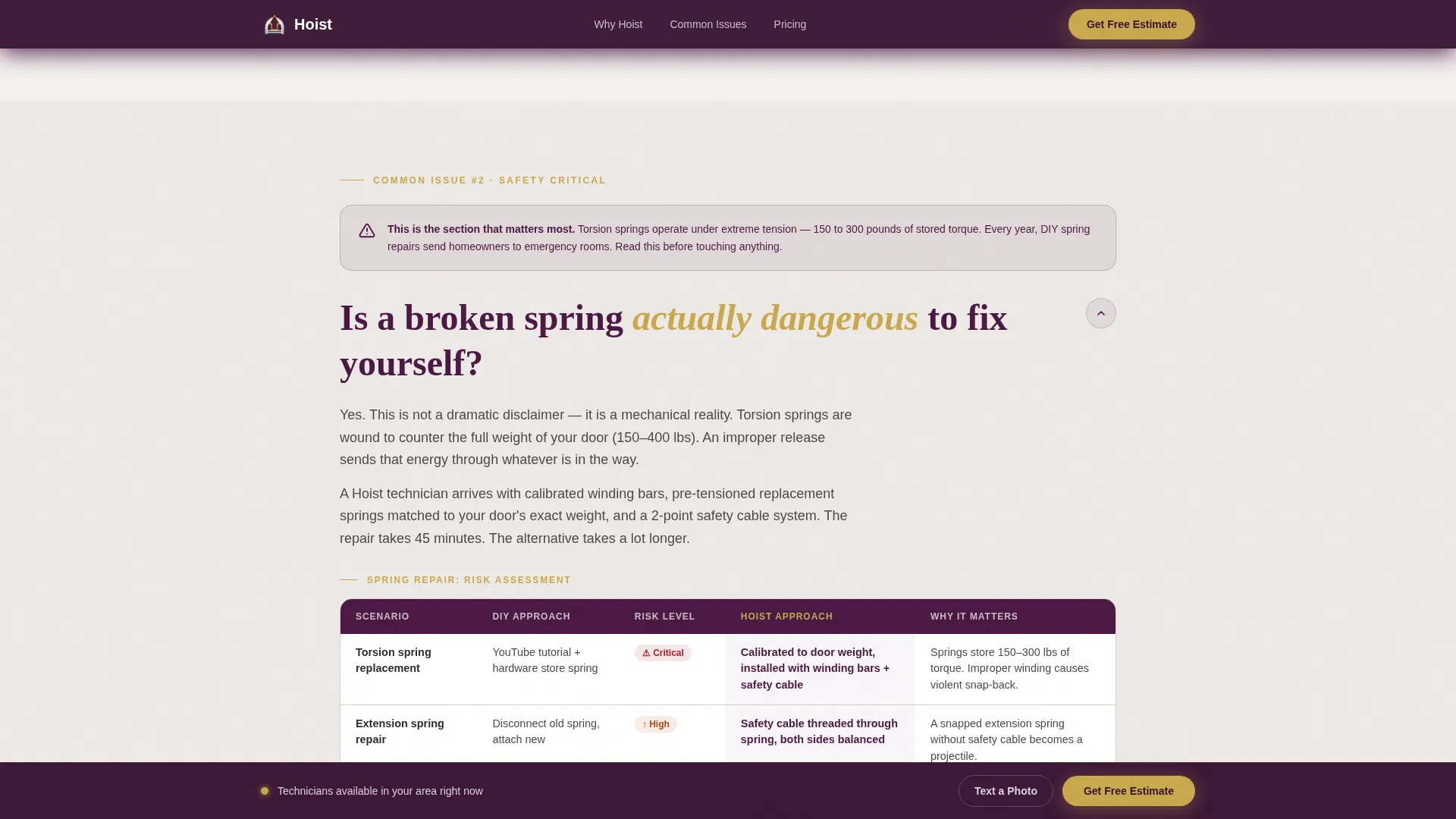
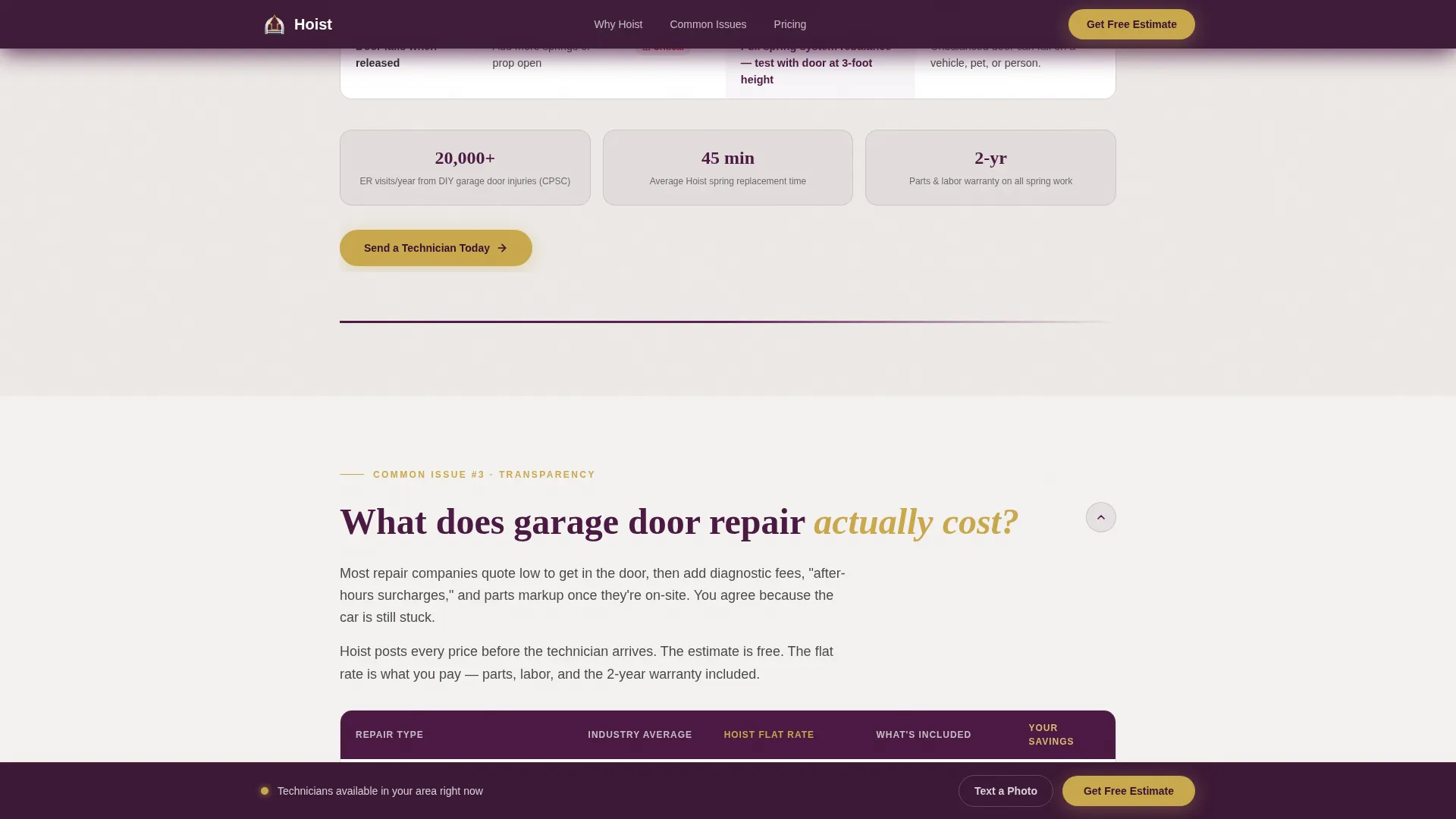
- Three FAQ accordion sections, each paired with a comparison table covering noise diagnosis, spring safety, and pricing transparency
- A lead capture form with a zip code field, a visual symptom picker, an appointment window selector, and a mobile SMS fallback option
Feature list
This template ships with a focused set of interactive and visual components. Each one is tied directly to the lead generation purpose of the page.
Typographic Manifesto Hero
The hero opens with a bold white Fraunces serif quote set against a deep plum background. A platinum sub-line carries the free estimate promise and response-time guarantee. No images compete with the message, making the opening statement land with immediate authority.
FAQ Accordion with Comparison Tables
Each of the three FAQ sections uses an accordion format to reveal a concise answer paired with a side-by-side comparison table. The tables cover DIY versus professional repair risk, broken spring patch versus full rebalance, and competitor average pricing versus transparent flat-rate costs.
Visual Symptom Picker
The lead form includes a visual picker that lets visitors select their door symptom from illustrated options: off-track, noisy, won't close, or damaged panel. This reduces form friction and pre-qualifies the lead before submission.
Floating Call-to-Action Bar
After the first scroll, a gold-on-plum "Get My Free Estimate" bar pins to the screen. It stays visible as visitors move through FAQ sections, keeping the conversion path accessible at all times without interrupting the reading flow.
SMS Photo Option
Mobile visitors can tap a direct SMS link to send a photo of their door instead of filling out the form. This secondary conversion path removes the typing barrier for users who are literally standing in their driveway.
Trust and Social Proof Row
A stat row beneath the hero displays the one-hour arrival guarantee, a five-star rating count, and total jobs completed. Inline testimonial quotes appear within the FAQ sections to reinforce credibility exactly where doubt is highest.
Page sections overview
| Section | Purpose |
|---|---|
| Typographic Hero | Opens with manifesto quote, free estimate promise, and gold call to action |
| Trust Stats Row | Displays arrival guarantee, star rating, and jobs completed |
| FAQ Section One | Answers grinding noise question with DIY versus pro comparison table |
| FAQ Section Two | Addresses broken spring danger with safety comparison table |
| FAQ Section Three | Explains repair costs with flat-rate versus competitor pricing table |
| Lead Capture Form | Collects zip, symptom, and appointment window with SMS fallback |
| Page Footer | Single-row linear footer with essential business links |
Design & branding system
The visual identity follows a Corporate Precision theme. Every color and type choice signals authority without coldness, and precision without over-decoration.
- Color palette: deep boardroom plum (#4A1942) anchors the header and section dividers; polished charcoal (#2D2D2D) carries body text; brushed platinum (#E8E4E1) washes the background; decisive gold (#C9A84C) is reserved exclusively for calls to action and active states
- Typography: Fraunces serif is used for the hero manifesto and section headlines; DM Sans handles body copy, form labels, and user interface elements throughout the page
Mobile & speed optimization
This template is built mobile-first. The target visitor is often on a smartphone in a driveway, not at a desk, so every interaction is designed for thumb navigation and small screens.
- Animations use a slideInBlur entry for the hero and scroll-fade reveals for FAQ sections, implemented with CSS-driven transitions to keep JavaScript minimal
- The SMS photo link provides a native mobile action that removes typing friction entirely for on-site visitors
How this template helps you convert
The page is structured as a pre-selling sequence. By the time a visitor reaches the form, the comparison tables have already answered the objections.
- The manifesto hero creates immediate emotional resonance and states the free estimate promise before the visitor has to scroll, establishing trust in the first three seconds
- The three FAQ sections with comparison tables escalate from cosmetic issues to safety hazards, making inaction feel progressively riskier and professional repair feel progressively more reasonable
- The floating call-to-action bar and low-friction form flow (zip code first, then symptom picker, then appointment window) reduce the number of decisions a stressed visitor has to make at the moment of conversion
Other information about this template
Hoist is suited for garage door repair businesses operating in suburban USA markets. The layout, language defaults, and pricing context are all calibrated for a domestic home services audience using USD pricing.
- The footer follows a linear single-row pattern, keeping the page exit clean and uncluttered
- The template style is classified as a Comparison Table landing page, making it well-suited for any service category where side-by-side decision tools accelerate buyer confidence
- The page is designed to serve urgent, high-intent visitors who are already mid-problem, not browsing casually
Theme
Corporate Precision
Creative direction
FAQ-Driven
Color system
Plum Executive
Style
Comparison Table
Direction
Lead Generation
Page Sections
Typographic Manifesto Hero
FAQ Accordion with Comparison Tables
Visual Symptom Picker
Floating Call-to-action Bar
SMS Photo Fallback
Trust Stats and Social Proof
Related questions
Can I use this template for a garage door repair business in my local area?
How do the comparison tables help generate more leads?
What information does the lead form collect?
Who is this landing page template designed for?
Does the floating call-to-action bar stay visible the whole time?



