Book Artist Landing Page Template
The Storybook Atelier Studio children's book illustrator landing page template is built for illustrators who want their portfolio to feel like a published book. A horizontal-scroll manifesto structure, Electric Indigo color system, and cadmium yellow call-to-action panels turn first views into serious partnership inquiries from editorial directors, indie authors, and creative agencies.
by Rocket studio
Quick summary
This is a single-page horizontal-scroll landing page designed for a children's book illustrator running a one-person atelier studio. It pairs full-bleed illustrations with belief-statement panels to create a portfolio that reads like a story book. Every section earns the final call to action, turning a passive view into an active book partnership inquiry.
Who this template is for
This template speaks to illustrators whose work lives at the intersection of craft and commerce. It is built for creatives who want their landing page to do serious business without looking like a business.
- Children's book illustrators pitching editorial directors at mid-size publishing houses
- Indie authors or self-publishing creators who need to attract a distinctive artistic voice for their kids book project
- Creative agencies or art directors sourcing illustrators for packaging, greeting cards, or brand campaigns
What problem this template solves
Most illustration portfolios feel like filing cabinets. They show the work but never make a case for the creative voice behind it. An art director visiting a generic portfolio site gets a gallery of images with no story connecting them.
- Publishers need to feel the illustrator's world before they commission a childrens book, not just browse a grid
- Indie authors self-publishing a kids book struggle to find a collaborator whose voice clearly matches their story
- A flat, template-looking design signals "available," not "sought after," which undercuts the illustrator's perceived value and potential income
What you get with this template
You get a fully structured horizontal-scroll landing page that functions as a visual manifesto. Each panel builds on the last, moving visitors from awe to inquiry with deliberate pacing. The book design is opinionated, atmospheric, and built for desktop-first delivery with a vertical fallback for mobile.
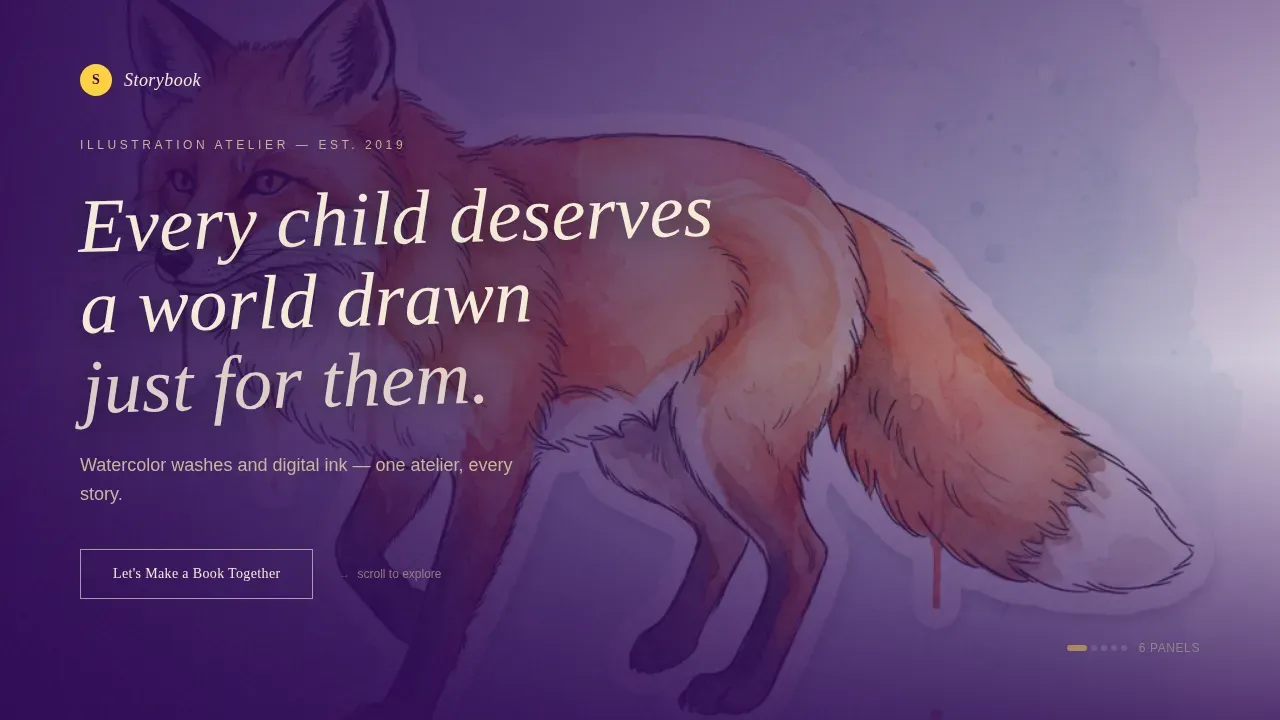
- A hero section with a full-bleed illustration and a hand-lettered typographic manifesto stamped across it
- Horizontal manifesto panels pairing belief statements with supporting illustrations, process sequences, and animated book spreads
- A contact panel with a cadmium yellow call-to-action button, an inquiry form, and a gated lookbook download for art directors
Feature list
This template includes a carefully considered set of sections and interaction patterns. Each one is grounded in what children's book illustration clients actually need to see before they sign on.
Horizontal Scroll Manifesto Structure
The scroll IS the story. Each lateral panel presents a belief statement alongside a full illustration that proves it. Panels begin spacious and contemplative, then stack faster as the visitor moves through, mimicking the rhythm of flipping through a picture book. This pacing keeps views engaged across the full page.
Hero with Hand-Lettered Type Overlay
The header is a cinematic, full-bleed illustration with a vellum-white manifesto statement brushed across it at a slight tilt. The type feels painted, not placed. A ghost call-to-action button sits quietly in the header. Navigation stays hidden until the visitor begins scrolling, keeping the first impression pure and book-like.
Process Panel and Work Grid
A dedicated process panel shows the sketch-to-color sequence, turning technical publishing competencies into a visual argument. Including a storyboard or sketch section builds professional trust fast. The work grid layers printed book mockups, raw sketches, and animated character GIFs to show depth and versatility across the illustrator's body of work.
Dual Call-to-Action System
The primary call to action, "Let's Make a Book Together," appears first as a ghost button in the hero, then solidifies in cadmium yellow on the final panel. A short inquiry form captures name, company or imprint, project type (picture book, editorial, or brand and licensing), and a loose brief. A secondary path offers a gated studio lookbook download for art directors who need to share work internally before committing.
Scroll-Snap and Staggered Animations
CSS scroll-snap drives the horizontal panel progression. Staggered panel reveals, floating vellum cards, tilt effects, and magnetic call-to-action button behavior create an interactive experience. Intersection Observer powers animations so each panel enters with intention, not all at once.
Contact-Ready Inquiry Form
The inquiry form is placed prominently on the final panel, ensuring clear contact information is never more than one scroll away. Fields are purposeful: name, company or imprint, project type, and a loose brief textarea labeled "Tell me about the story." This mirrors best practices for landing pages where a visible contact prompt is essential.
Page sections overview
| Section | Purpose |
|---|---|
| Hero illustration panel | Opens with a full-bleed illustration and manifesto statement to establish creative voice instantly |
| Manifesto scroll panels | Pairs belief statements with supporting illustrations across horizontal panels |
| Process sequence panel | Shows sketch-to-final-color workflow to demonstrate craft depth and publishing competencies |
| Portfolio work grid | Displays printed book mockups, sketches, and animated character elements |
| Contact and call-to-action panel | Hosts the inquiry form, primary yellow call-to-action button, and lookbook download |
| Footer | Minimal pattern with social icons and copyright only |
Design & branding system
The design language feels like a jar of ink tipped onto parchment at golden hour. It is electric where pigment pools and warm and papery where it has not reached yet. Typography uses Fraunces for serif display headings and DM Sans for body text.
- Color system: deep studio indigo (#2E0854) as the persistent background, charged violet (#7B2FBE) on section transitions and hover states, warm vellum (#F5EDDA) for text panels and negative space
- Cadmium yellow (#FFD23F) is reserved exclusively for calls to action and pull-quotes; vellum cards float above the art like pages torn from a sketchbook
Mobile & speed optimization
This landing page is designed desktop-first to deliver the full horizontal-scroll manifesto experience on larger screens. A vertical fallback layout ensures the story remains readable on any device without losing its visual character.
- CSS scroll-snap handles horizontal panel transitions cleanly without layout errors on supported browsers
- Intersection Observer triggers staggered animations per panel, so performance stays controlled as each illustration and text block enters the viewport
How this template helps you convert
The manifesto structure earns trust before it asks for anything. By the time a visitor reaches the inquiry form, they are not hiring a freelancer; they are choosing a creative voice for their childrens book project.
- The horizontal scroll moves visitors through a curated argument for the illustrator's style, with each panel reinforcing the story before the next call to action appears, reducing hesitation at the form stage.
- The dual call-to-action system gives art directors a low-commitment path (the lookbook download) alongside the high-commitment inquiry form, so visitors at different decision stages both have a next step that fits where they are.
Other information about this template
This template sits within a broader ecosystem of kids book templates and illustration portfolio references. It draws on established best practices for children's book website design while remaining distinctly non-generic.
- A strong landing page for a children's book illustrator should feature 10 to 12 of the best pieces to avoid needing explanations; this template is structured to present a curated number of illustrations across its panels
- Including 2 to 3 images from the same story helps show character consistency; the manifesto panels can accommodate this naturally
- Environmental landscape spreads, character expression views, and coloring book style process pages all translate well into the template's panel system
- Children's book templates simplify the process of creating storybooks; kids book templates like this one offer various layouts illustrators can adapt to their own visual language
- Diverse character representation across races, ages, and body types is important for the modern publishing market and can be reflected in the portfolio images chosen for each panel
- For illustrators exploring AI tools to supplement their workflow, platforms such as BookBildr allow users to write and illustrate stories online with AI-generated images; BookBildr also offers professional printing and delivery services for children's books, making it a useful reference for indie authors who may reach out through this landing page
- Descriptive image file naming helps art directors and search engines find illustration work more easily; this is a practical step to take alongside launching this landing page on any site
- Aspiring authors, parents, and educators can also use kids book graphic templates to create coloring book pages or picture book layouts; this template can save time for illustrators who need to turn a brief into a professional portfolio presentation fast, whether the timeline is 1 year into a career or just 1 month after starting to sell work independently



Theme
Atelier Studio
Creative direction
Manifesto
Color system
Electric Indigo
Direction
Partnership/B2B
Page Sections
Horizontal Scroll Manifesto Layout
Hero with Type-over-image Header
Process and Portfolio Panel Set
Dual Call-to-action System
Scroll-snap and Staggered Animation
Contact-ready Inquiry Form
Related questions
Can I use this template for a coloring book or editorial illustration portfolio?
Does the template include the inquiry form and lookbook download sections?
How does the horizontal scroll experience work on mobile?
Is this template suitable for illustrators working across different kids book formats?
Can an indie author use this template to attract a children's book illustrator?



