Public Health Department FAQ Website Template
Immunize is a split-screen landing page template built for vaccination and immunization offices. It guides three distinct visitor types, parents, HR managers, and corporate travel coordinators, through FAQ-driven sections that answer their specific questions before asking anything in return. The layout pairs an infographic hero with downloadable resources, a patient portal link, and a gated checklist download.
by Rocket studio
Quick summary
Immunize is a single-page, FAQ-driven landing page template designed for clinical immunization offices. It splits every section 50/50, pairing a real visitor question on one side with a visual answer on the other. From school-entry records to OSHA compliance rosters, it handles three distinct audiences without losing its clinical focus.
Who this template is for
This template is built for immunization offices that serve more than one kind of client at a time. It works equally well for public health departments, private vaccination clinics, and occupational health providers.
- Parents who need school-entry vaccine records sorted before registration deadlines
- HR managers tracking OSHA immunization compliance for large employee groups
- Corporate travel coordinators arranging pre-departure vaccination certificates for international trips
What problem this template solves
Most vaccination office pages make visitors dig for answers. Immunize flips that by leading with the questions real visitors arrive with, then answering them in order of urgency.
- Visitors leave without converting because they cannot find the right information for their specific situation
- Offices lose trust when a page feels generic rather than clinically precise
- Parents, employers, and travel teams each need different information, and a single undifferentiated page fails all three
What you get with this template
You get a fully structured, single-page layout that moves visitors from question to answer to action. Every section is ready to customize with your clinic's actual data, schedules, and contact details.
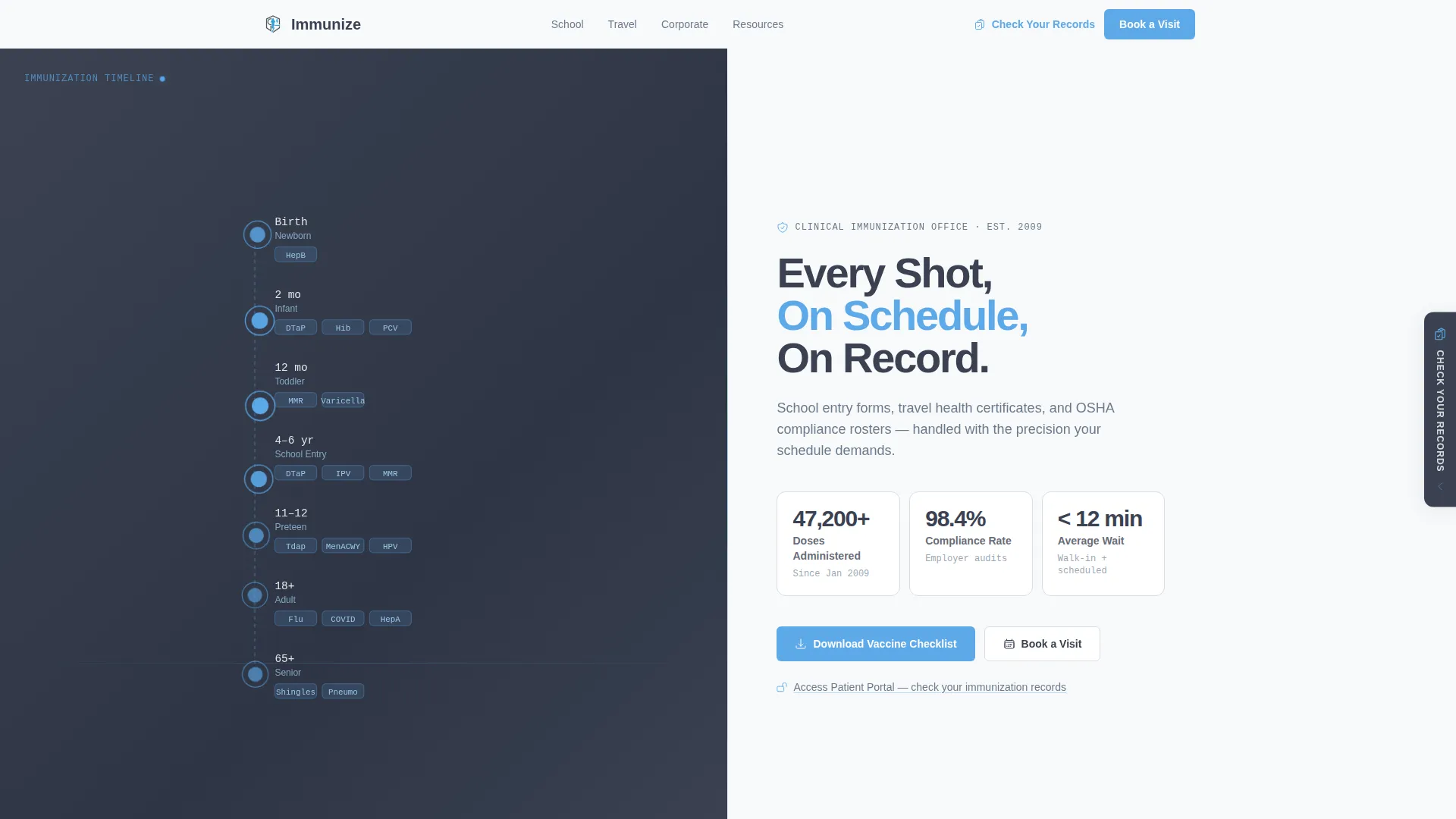
- A hero section with an animated immunization timeline graphic and three live stat callout cards
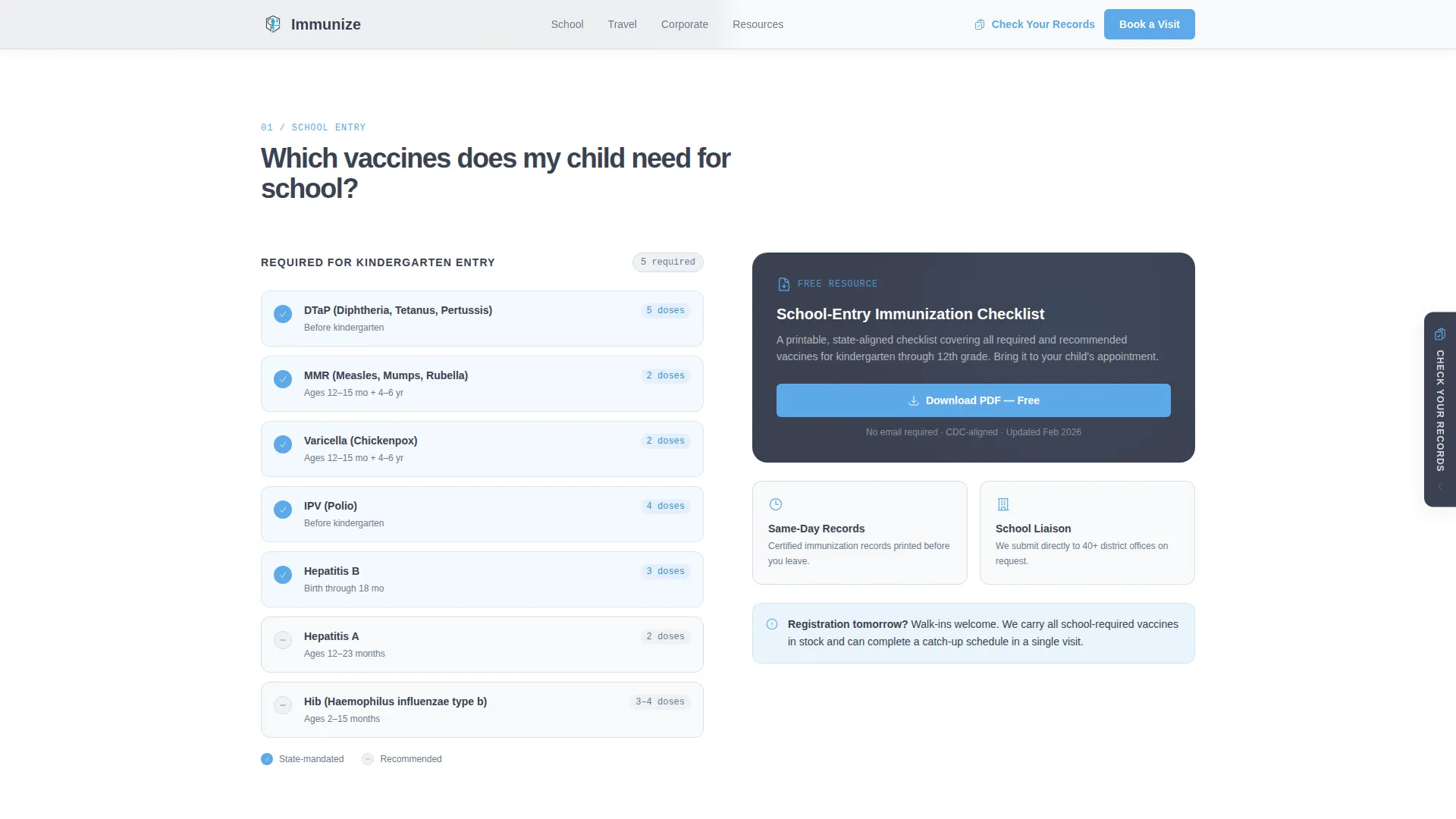
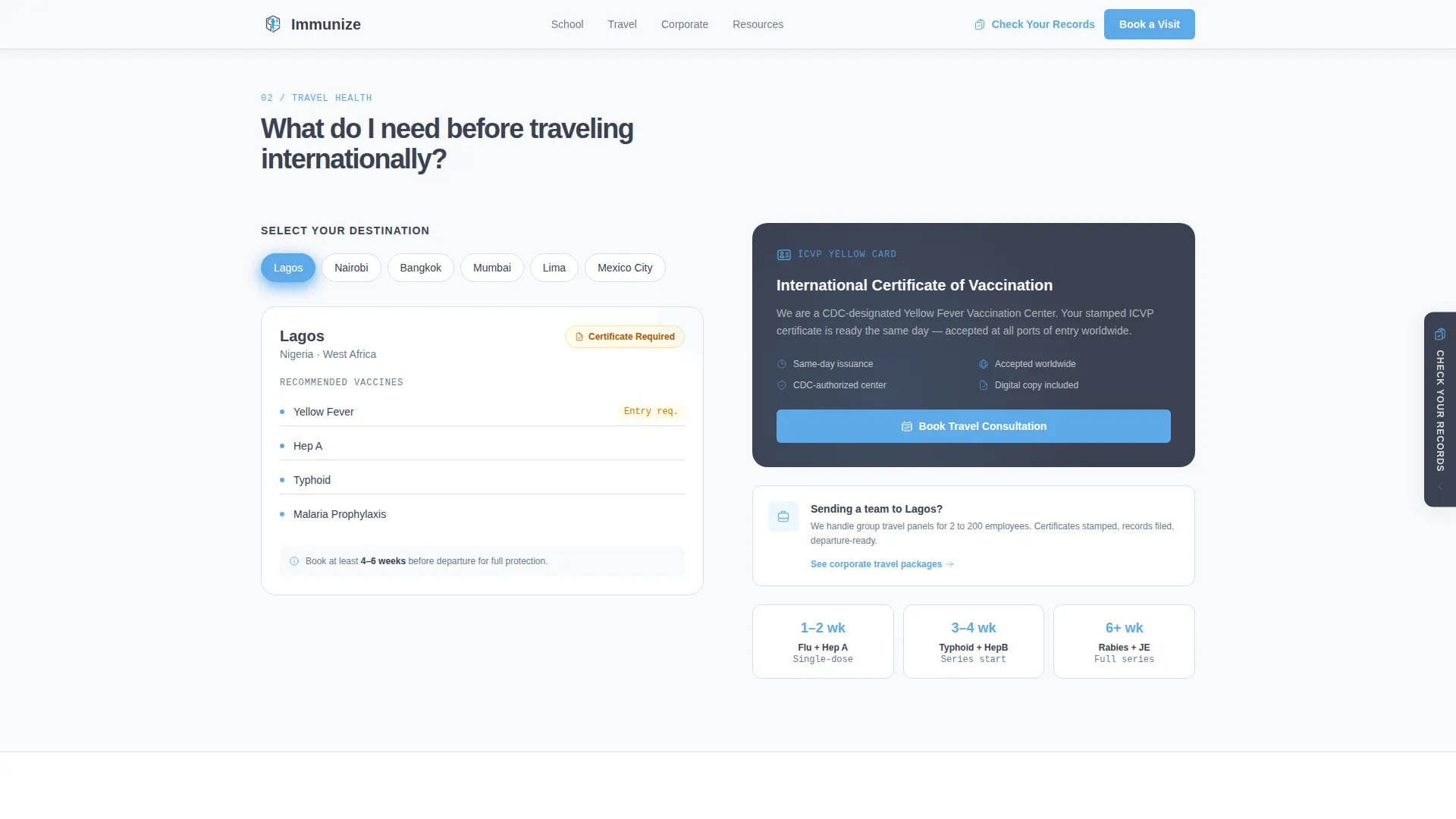
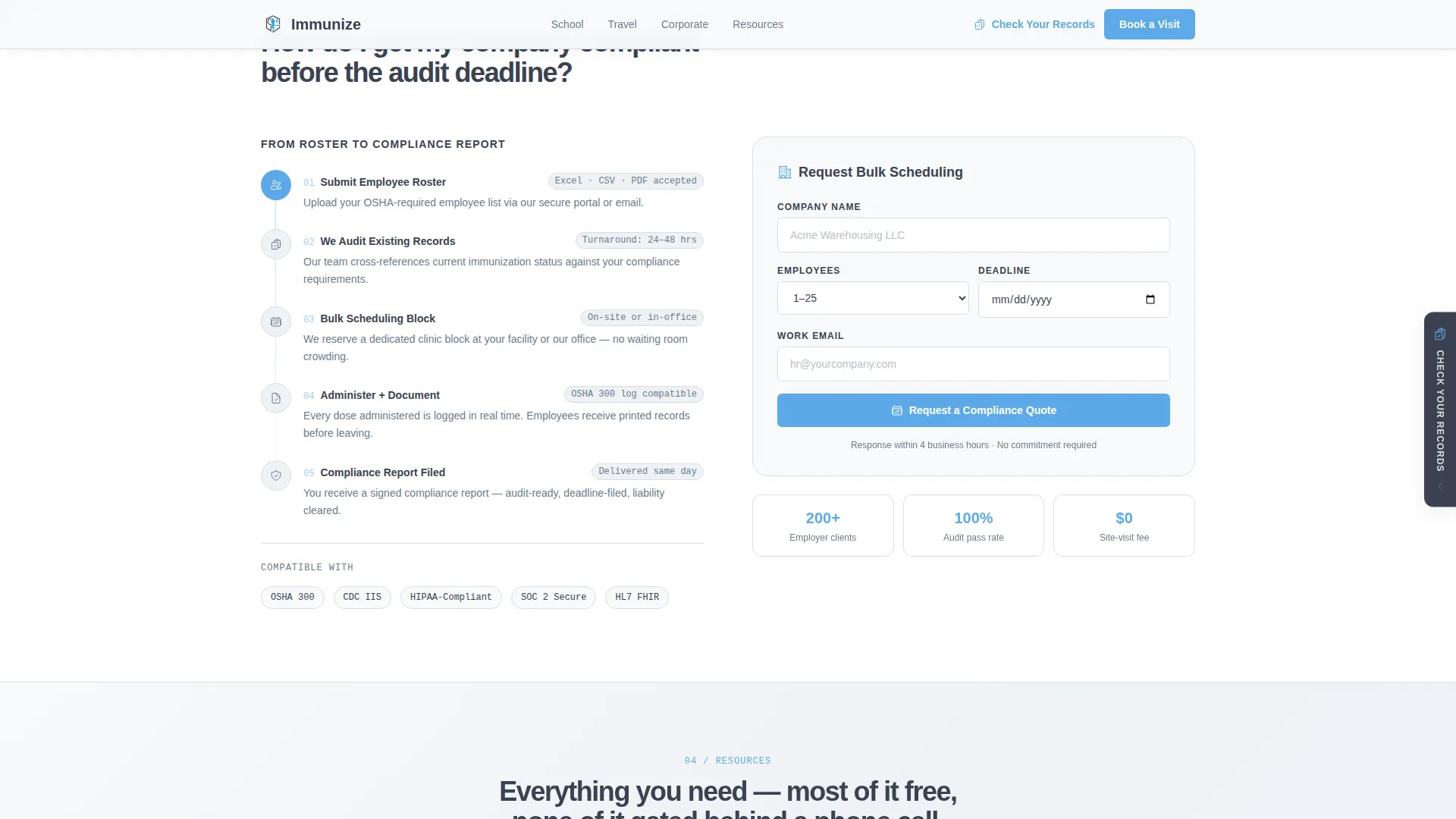
- Four FAQ-style content sections covering school vaccines, travel vaccines, corporate compliance, and a checklist download
- A persistent sidebar call-to-action linking to your patient portal, plus an email-gated checklist download and an ungated printable schedule
Feature list
A paragraph introduces each feature below, grounded in what the template actually delivers.
FAQ-Driven Section Architecture
Each scrollable section is structured around a question a real visitor arrived with. The question sits on one side, and the visual answer sits on the other. This format keeps visitors reading because the next section always anticipates what they were about to ask.
Split-Screen 50/50 Layout
Every section divides the viewport equally between content and visual. The hero pairs an animated SVG immunization timeline with a bold headline and three stat cards. Subsequent sections pair checklists, flowcharts, and search visuals with downloadable resources or contact forms.
Animated Infographic Hero
The left panel displays a color-coded immunization timeline running from birth through adulthood. Each milestone node pulses subtly in sky blue. The right panel carries the headline, three slate-bordered stat callout cards, and no stock photography, the data provides the reassurance.
Email-Gated Checklist Download
The primary call-to-action offers a vaccine checklist download behind a single email field. A secondary, ungated path lets any visitor download a printable schedule without signing up. The page earns the submission by answering questions first.
Persistent Sidebar Portal Link
A sidebar call-to-action remains visible as visitors scroll. It links to your patient portal under the label "Check Your Records." This gives returning patients a direct path without interrupting new visitors who are still reading.
Audience-Specific Content Sections
Three distinct FAQ blocks address school vaccine requirements, international travel certificates, and bulk corporate scheduling. Each block escalates from personal to organizational, pulling visitors deeper into the page naturally.
Page sections overview
| Section | Purpose |
|---|---|
| Hero Split Screen | Display animated timeline and stat callouts |
| School Vaccines FAQ | Answer school-entry vaccine questions with visual checklist |
| Travel Vaccines FAQ | Cover international certificate needs with destination visual |
| Corporate Compliance FAQ | Guide bulk scheduling with flowchart and contact form |
| Checklist Download | Capture email for gated checklist; offer ungated CDC schedule |
| Footer | Single-row linear navigation and clinic contact details |
Design & branding system
The template follows a Corporate Precision theme with a Slate and Sky color system. Every color choice is deliberate: the palette reads like a freshly cleaned exam room, orderly, calm, and impossible to second-guess.
- Clinical charcoal (#3B4252) for primary text and navigation, institutional slate (#6B7B8D) for secondary surfaces, open-sky blue (#5DA9E9) for buttons and interactive highlights, and sterile white (#F8F9FB) for backgrounds and card faces
- Plus Jakarta Sans handles all headings and body text for a clean, professional read; JetBrains Mono is used for stat labels and reference codes to reinforce clinical precision
- Animations are set at medium intensity: pulsing timeline nodes, staggered section reveals, a scan-line effect, and character-reveal text on key headlines
Mobile & speed optimization
The template is built desktop-first to match the primary audience of HR managers and corporate coordinators working at their desks. A mobile fallback ensures the page remains readable and functional on smaller screens.
- Static content sections use Server Components to keep initial load light; animated and interactive elements use Client Components to isolate interactivity
- The split-screen layout collapses gracefully on mobile, stacking each pair of panels vertically so no content is lost or hidden
How this template helps you convert
The conversion strategy is built on answering before asking. By the time a visitor reaches the download form, the page has already resolved most of their core questions for free.
- The hero stat cards, doses administered, compliance rate, and average wait time, establish immediate credibility before visitors scroll past the first section.
- Each FAQ section delivers a complete, useful answer (visual checklist, destination tool, scheduling flowchart) before presenting any call-to-action, so the eventual ask feels earned rather than interrupting.
- The persistent portal link gives returning patients a frictionless path back to their records, reducing incoming calls and keeping the office efficient.
Other information about this template
This template is designed for English-language markets in the United States. All date formats follow the US convention, and content references align with Centers for Disease Control and Prevention (CDC) schedule standards. The footer uses a Pattern 1 linear single-row layout for a clean, uncluttered close to the page.
- The template is categorized under Government and Public, Public Health Department, with a niche focus on vaccination and immunization office use cases
- Compliance logos are included as a social proof element alongside the stat callouts in the hero section
- The creative direction is intentionally FAQ-driven, meaning visitors are never confronted with a hard sell before their immediate question has been addressed
Theme
Corporate Precision
Creative direction
FAQ-Driven
Color system
Slate & Sky
Style
Split Screen (50/50)
Direction
Content/Resource
Page Sections
Faq-driven Section Architecture
Split-screen 50/50 Layout
Animated Infographic Hero
Email-gated Checklist Download
Persistent Sidebar Portal Link
Audience-specific Content Blocks
Related questions
Can this template handle three different visitor types at once?
What does the email-gated download section include?
Is the animated timeline easy to update with my clinic's real data?
Does the persistent sidebar call-to-action appear across all sections?
Can this template be used for a public health department instead of a private clinic?



