Certified Implant Dentist Appointment Booking Website Template
A hub-and-spoke landing page built for implant dental practices that need to turn insurance anxiety into booked consultations. The template leads with a live cost estimator, then walks visitors through coverage rates, common denials, billing code strategy, and financing, using hard numbers at every turn to replace confusion with a plan patients can act on.
by Rocket studio
Quick summary
This is a single-page, anchor-nav landing page for an implant dental practice focused on insurance education and patient acquisition. It opens with an interactive cost estimator, then guides visitors through five data-driven spoke sections. Every section leads with an oversized statistic before the explanation, so patients feel informed before they ever share contact details.
Who this template is for
This template is built for implant dental practices that want to convert research-mode patients into booked consultations. It is especially useful when your audience arrives knowing they need implants but not knowing what their plan will actually pay.
- Implant dentists and oral surgeons who handle their own insurance billing education
- Practices that routinely deal with pre-authorization requests, claim denials, and patient sticker shock
- Dental marketing teams who want a data-dense, credibility-first alternative to a generic services page
What problem this template solves
Most dental websites bury insurance information in an FAQ or a single paragraph. Patients who have just been told they need implants open a second browser tab to research coverage, and they rarely find a clear answer. This template meets that patient exactly where they are.
- Patients arrive not knowing what CDT codes, missing tooth clauses, or plan downgrades mean for their wallet
- Vague "call us for pricing" pages lose trust before the first contact attempt
- Without a structured billing education flow, practices spend consultation time on insurance basics instead of treatment planning
What you get with this template
You get a fully structured, interactive landing page that replaces phone-tag with a self-service insurance research experience. The layout is built around five anchor-linked spoke sections, each opening with a bold statistic and closing with a clear call to action.
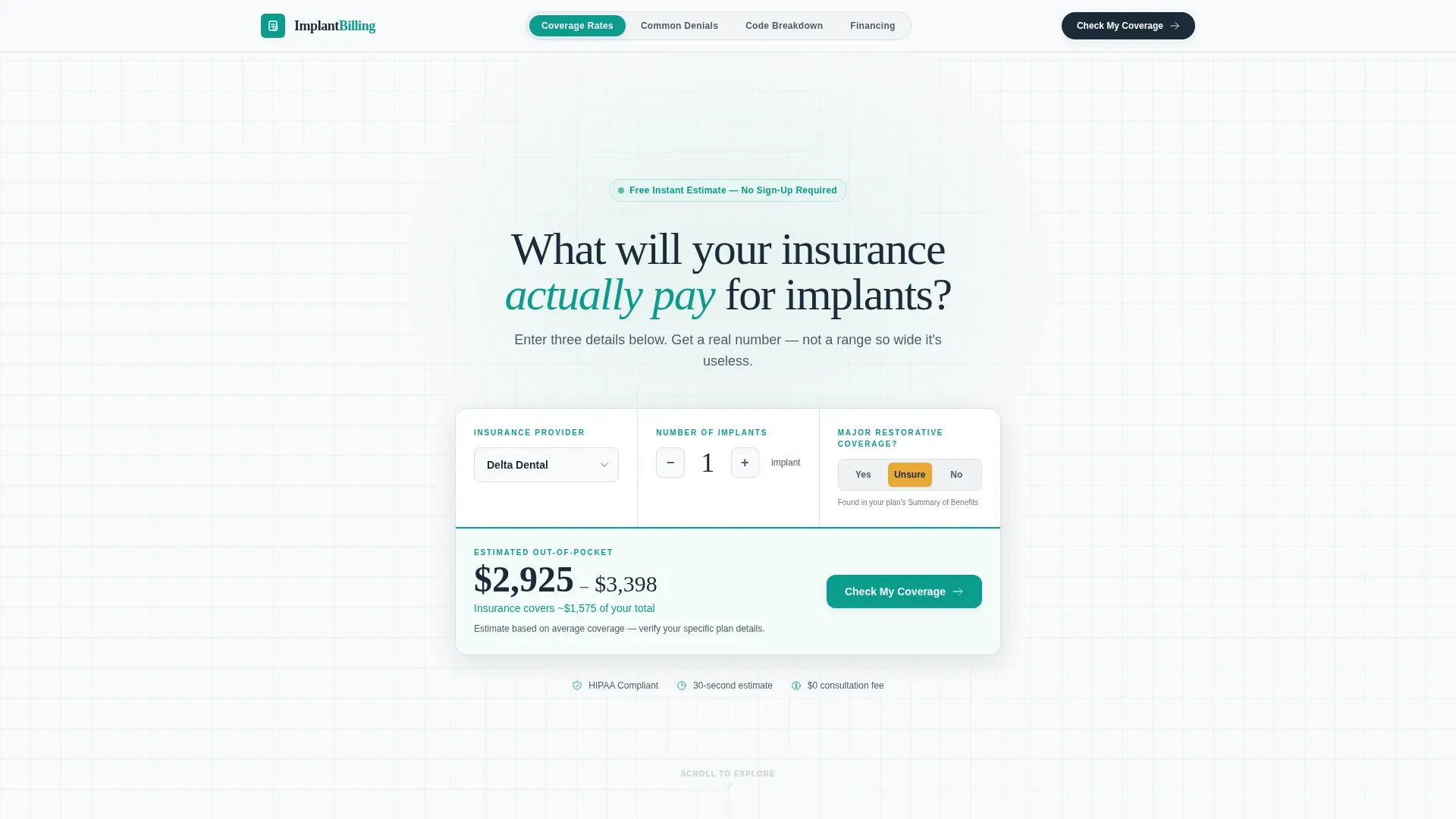
- A header cost estimator with three inputs, a dynamic results box, and a teal-bordered output display
- Five content spokes covering coverage rates, common denials, billing code breakdowns, and financing options
- A five-step guided coverage assessment quiz that delivers a preliminary coverage score before asking for personal information
Feature list
This template is built around high-interactivity components and a data-first visual hierarchy. Each feature listed below is directly present in the template design as described in the source brief.
Live Insurance Cost Estimator
The header contains a compact estimator tool with three inputs: insurance provider (dropdown with carrier logos), number of implants (a stepper from 1 to 6), and major restorative coverage status (yes, no, or unsure toggle). Below the inputs, a teal-bordered results box displays an estimated out-of-pocket range in large tabular figures. No photography is used, the tool proves competence before asking for anything.
Five-Step Coverage Assessment Quiz
Clicking "Check My Coverage" launches a guided five-step modal. Step 1 captures carrier and plan type. Step 2 asks about prior dental history. Step 3 identifies procedure codes if the patient knows them. Step 4 collects name and email. Step 5 delivers an instant preliminary coverage score on a teal gradient gauge ranging from "Likely Covered" to "Pre-Auth Required" to "Expect Denial, We Can Help." Micro-insights appear between steps so patients feel informed at every point.
Anchor Navigation with Spoke Sections
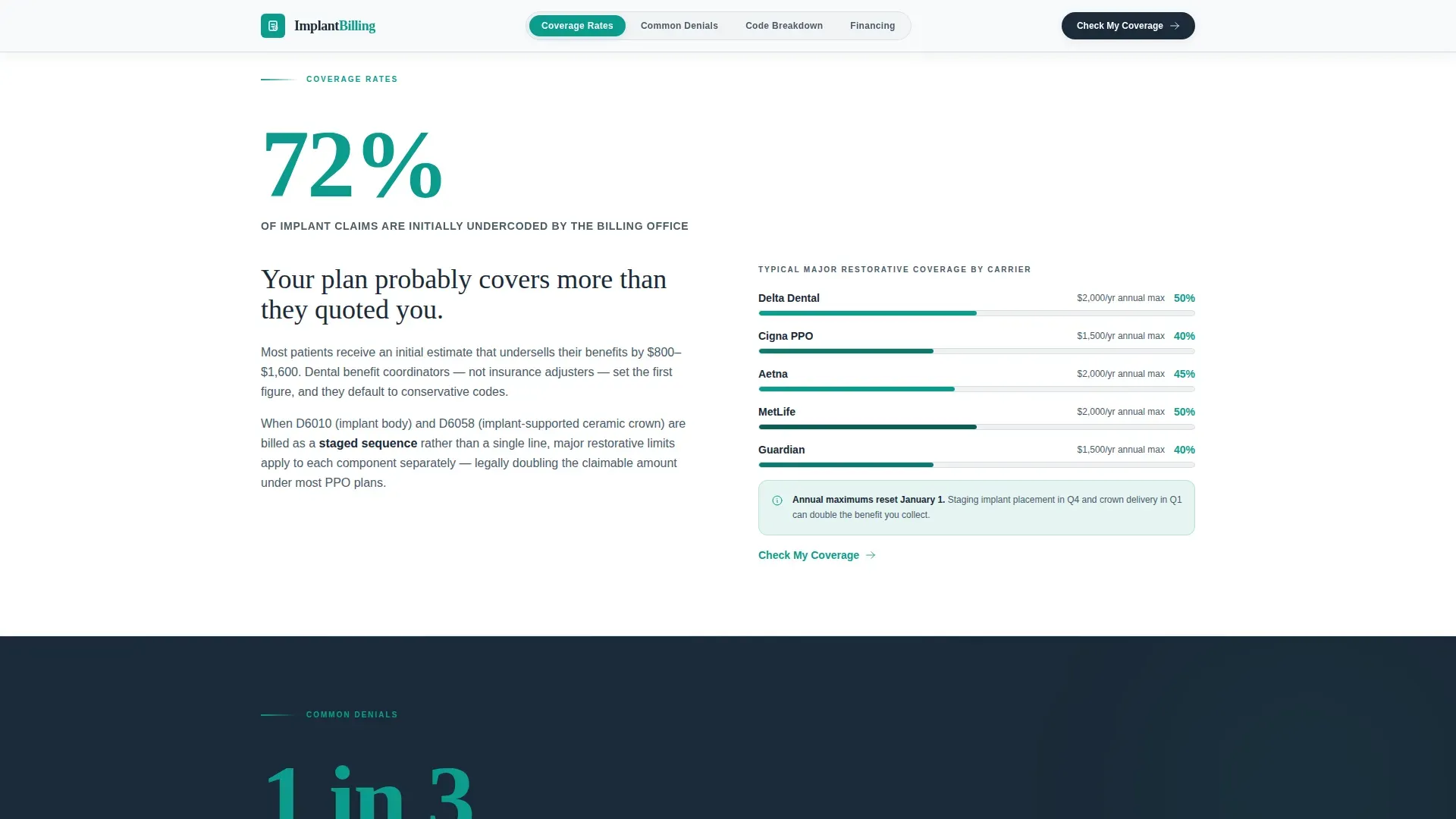
A sticky anchor nav pins to the top of the page with labeled spokes: Coverage Rates, Common Denials, Code Breakdown, and Financing. Each spoke section opens with a single oversized statistic rendered in clinical teal against deep charcoal. The scroll rhythm is designed so the number lands first, the paragraph earns trust second, and the nav reminds the visitor that more detail is one click away.
Stats-First Content Architecture
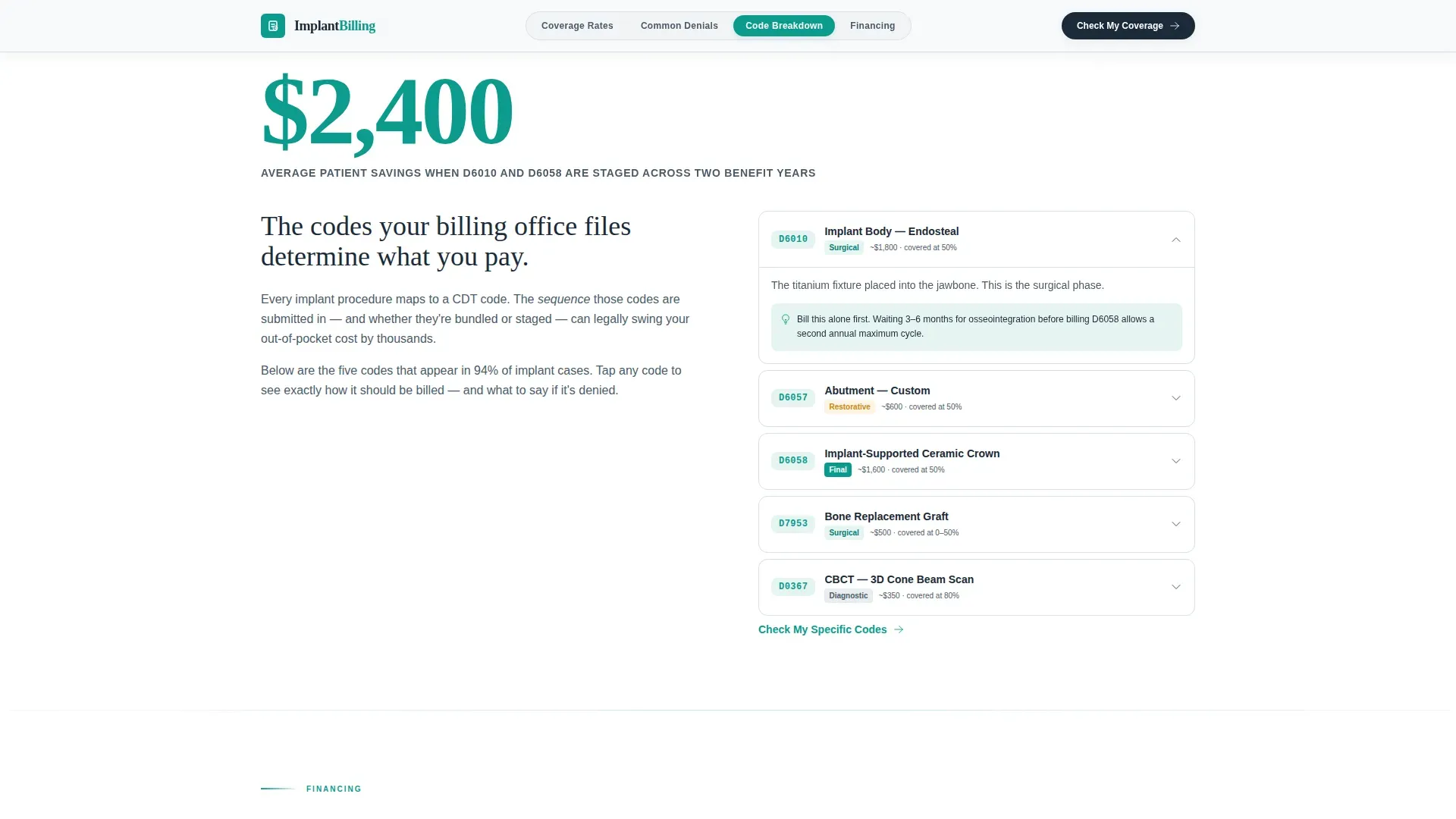
Every major section leads with a hard number before any explanation. Examples built into the template include a 72% undercoding statistic, a $2,400 average patient savings figure tied to correct CDT code staging, and a $0 consultation call to action. This approach escalates from general coverage literacy to specific billing strategy as the visitor scrolls.
Implant Insurance Checklist Download
A secondary conversion path sits alongside the primary quiz call to action. Visitors who are not ready to complete the full assessment can download an implant insurance checklist by submitting their email address only. This path captures leads at an earlier stage of the decision process without requiring full quiz completion.
Animated Number Counters and Quiz Progress Bar
The template includes medium-level animation: number counters activate as statistics scroll into view, quiz step transitions animate between the five steps, and a catalyst amber progress bar tracks quiz completion. The amber color is reserved exclusively for interactive states and the quiz progress bar, keeping it visually distinct from all other user interface elements.
Page sections overview
| Section | Purpose |
|---|---|
| Hero Estimator | Opens with the live cost calculator and primary "Check My Coverage" call to action |
| Coverage Rates Spoke | Leads with the 72% undercoding statistic and explains coverage literacy basics |
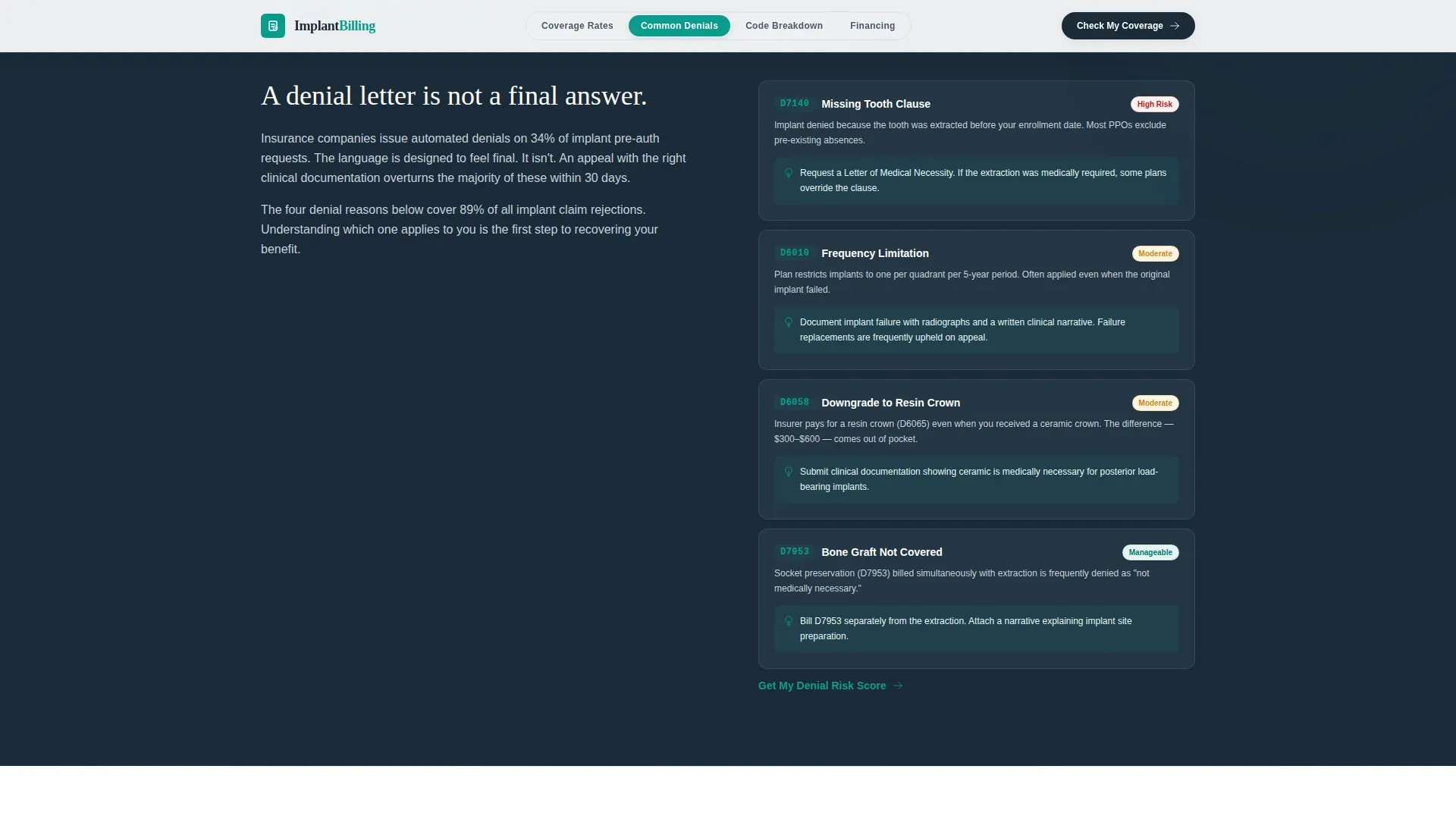
| Common Denials Spoke | Explains missing tooth clause, plan downgrades, and denial patterns with a stat lead |
| Code Breakdown Spoke | Highlights $2,400 savings tied to correct D6010 and D6058 staging logic |
| Financing Spoke | Presents the $0 consultation offer and secondary checklist download path |
| Minimal Footer | Closes with a Pattern 3 Vercel-style minimal footer layout |
Design & branding system
The visual identity follows a Corporate Precision theme. The palette is deliberately clinical and data-dense, it feels like a freshly printed explanation of benefits statement, authoritative and structured, with one highlighted line that tells you the number that matters.
- Clinical teal (#0D9B8C) is used for primary actions, data highlights, teal-bordered result boxes, and the coverage gauge gradient
- Deep charcoal (#1B2A38) anchors body text, navigation labels, and section backgrounds to keep the layout grounded and readable
- Sterile white (#F7F9FA) covers section backgrounds throughout, reinforcing a clean clinical environment
- Catalyst amber (#E8A838) appears exclusively on interactive states, toggle switches, and the quiz progress bar to signal action without competing with the primary palette
- Typography pairs DM Sans for body precision and data labels with Fraunces for oversized serif statistics that command attention on scroll
Mobile & speed optimization
The template is designed desktop-first, reflecting that insurance research behavior typically happens on larger screens where spreadsheet-style data is easier to process. Full mobile support is included so the experience holds up across all devices.
- Static spoke sections are built for server-side rendering, keeping content fast to load even before any interactive component activates
- The calculator and quiz are built as client components, isolating interactivity from the static content base to avoid blocking the initial page render
- The estimator inputs, stepper controls, and quiz modal are all touch-accessible and resize cleanly for smaller viewports
How this template helps you convert
This template is structured to earn trust through information before it ever asks for a commitment. The conversion architecture is layered deliberately.
- The header estimator delivers a personalized out-of-pocket estimate immediately, giving the visitor a reason to stay and a reason to trust the practice before any contact is requested
- Each spoke section closes with a repeated "Check My Coverage" call to action, so every scroll position has a natural next step without feeling pushy
- The five-step quiz delivers a preliminary coverage score at the end, giving genuine value in exchange for contact information, and the secondary checklist download captures visitors who are not yet ready for the full assessment
Other information about this template
This template is purpose-built for the United States dental market. All carrier references, billing codes, and plan terminology are specific to the US insurance landscape.
- CDT codes referenced in the template include D6010 (implant fixture placement) and D6058 (porcelain crown on implant), with staging logic explained in the Code Breakdown spoke
- Carrier logos and dropdown options include Aetna, MetLife, Cigna, Delta Dental, Guardian, and an "Other/None" fallback
- The template uses DM Sans at body weight for precision readability and Fraunces at display weight for the oversized statistics that drive the stats-first scroll experience
- Animation intensity is set to medium: number counters, quiz step transitions, and the gauge animation are included without heavy motion that could distract from the data
Theme
Corporate Precision
Creative direction
Stats-First Impact
Color system
Teal Catalyst
Style
Hub & Spoke (Anchor Nav)
Direction
Quiz/Assessment
Page Sections
Live Insurance Cost Estimator
Five-step Coverage Assessment Quiz
Anchor Nav Spoke Structure
Stats-first Content Hierarchy
Implant Insurance Checklist Download
Animated Counters and Progress Indicators
Related questions
What kind of dental practice is this landing page template built for?
Does the cost estimator connect to live insurance data?
What is the difference between the quiz path and the checklist download?
Can I customize the insurance carrier options in the estimator dropdown?
Is this a single landing page or a multi-page website?



