Accessibility Recruitment Landing Page Template
Comply is a recruitment-focused landing page template built for accessibility audit firms. It combines a scroll-linked sidebar, a three-card Persona Selector, and a Testimonial Mosaic grid to attract practitioners who think in WCAG, not just list it. Candidates apply by submitting a real accessibility audit teardown, filtering for specialists who can identify and fix accessibility issues from day one.
by Rocket studio
Quick summary
Comply is a sidebar companion landing page template designed for accessibility audit services that recruit top-tier WCAG specialists. It opens with a Persona Selector, layers in educational content and team testimonials, and closes with two distinct calls to action. The page is built to feel like a well-lit classroom where web accessibility expertise is both taught and proven.
Who this template is for
This template is built for two connected audiences. The primary audience is accessibility practitioners searching for a specialist team to join. The secondary audience is organizations that need rigorous audit services. Both groups find what they need on the same page.
- Accessibility practitioners: front-end developers, designers, and consultants who work with screen readers, keyboard navigation, and color-contrast analyzers daily.
- Hiring teams at accessibility audit firms that want applicants to demonstrate real skill before an interview.
- SaaS product leads, government contractors, and e-commerce directors facing compliance requirements and needing credible audit services.
What problem this template solves
Most recruitment pages for specialist roles look identical to generic job boards. They describe responsibilities without proving expertise, and they attract candidates who list WCAG compliance on a resume without understanding what success criteria actually mean in code. Comply flips that dynamic entirely.
- It filters applicants by asking them to submit a real accessibility audit teardown alongside a resume, so only practitioners who can navigate and evaluate live websites apply.
- It educates visitors on what auditors actually do, building trust with potential clients who want to understand the scope and depth of the service.
- It removes the usual barriers between a curious candidate and a meaningful first step, offering a "Shadow an Audit" path for those not yet ready to apply.
What you get with this template
Comply delivers a fully structured, section-led layout designed for desktop-first use with a mobile responsive fallback. Every section serves a dual purpose: recruiting qualified specialists and demonstrating audit expertise to potential clients.
- A sticky scroll-linked sidebar that tracks chapter progress and keeps a persistent "We're Hiring" indicator with a live open role count visible as visitors scroll.
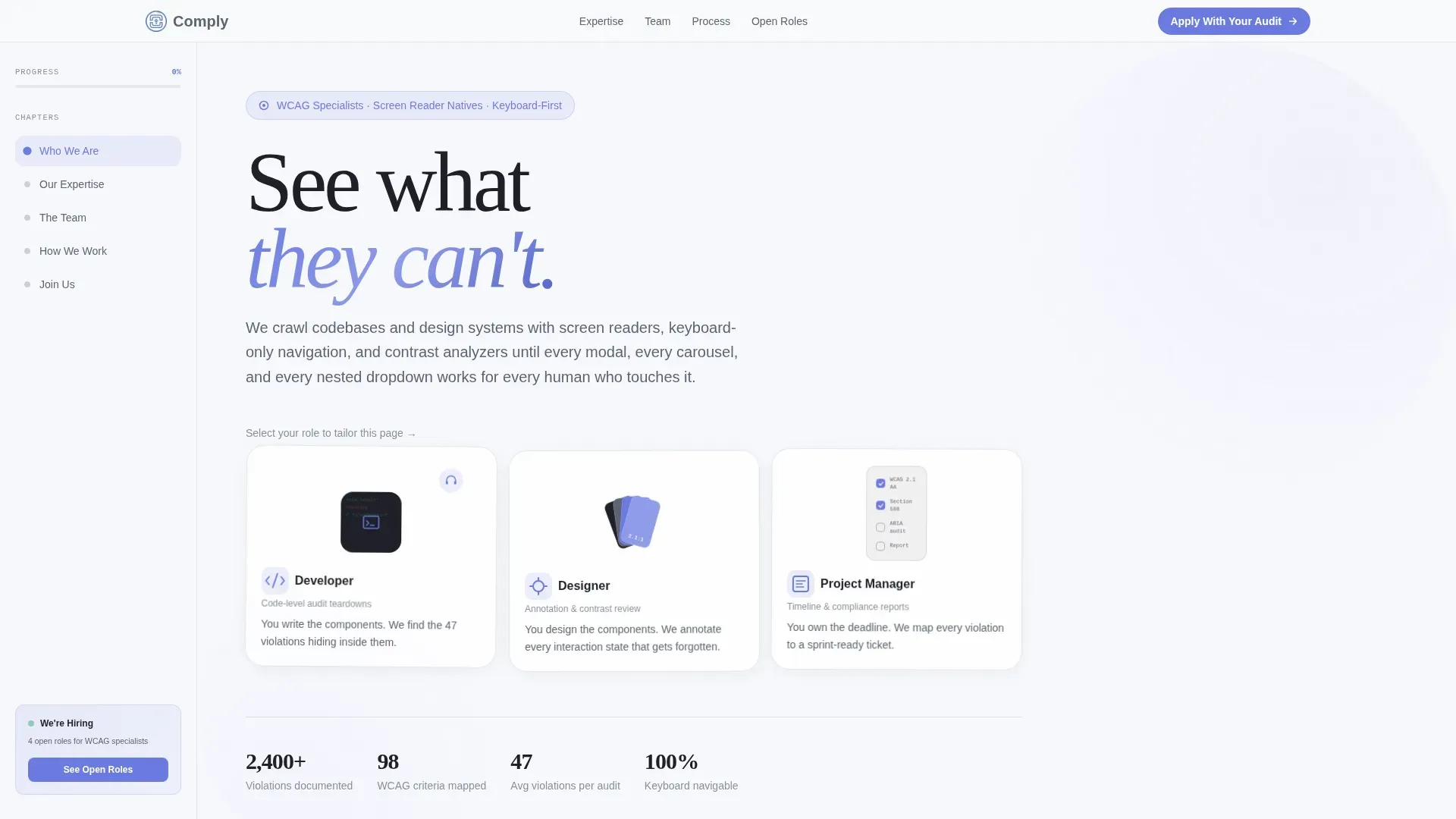
- A three-card Persona Selector in the hero section that reflows page language, case studies, and job description details based on whether the visitor identifies as a developer, designer, or project manager.
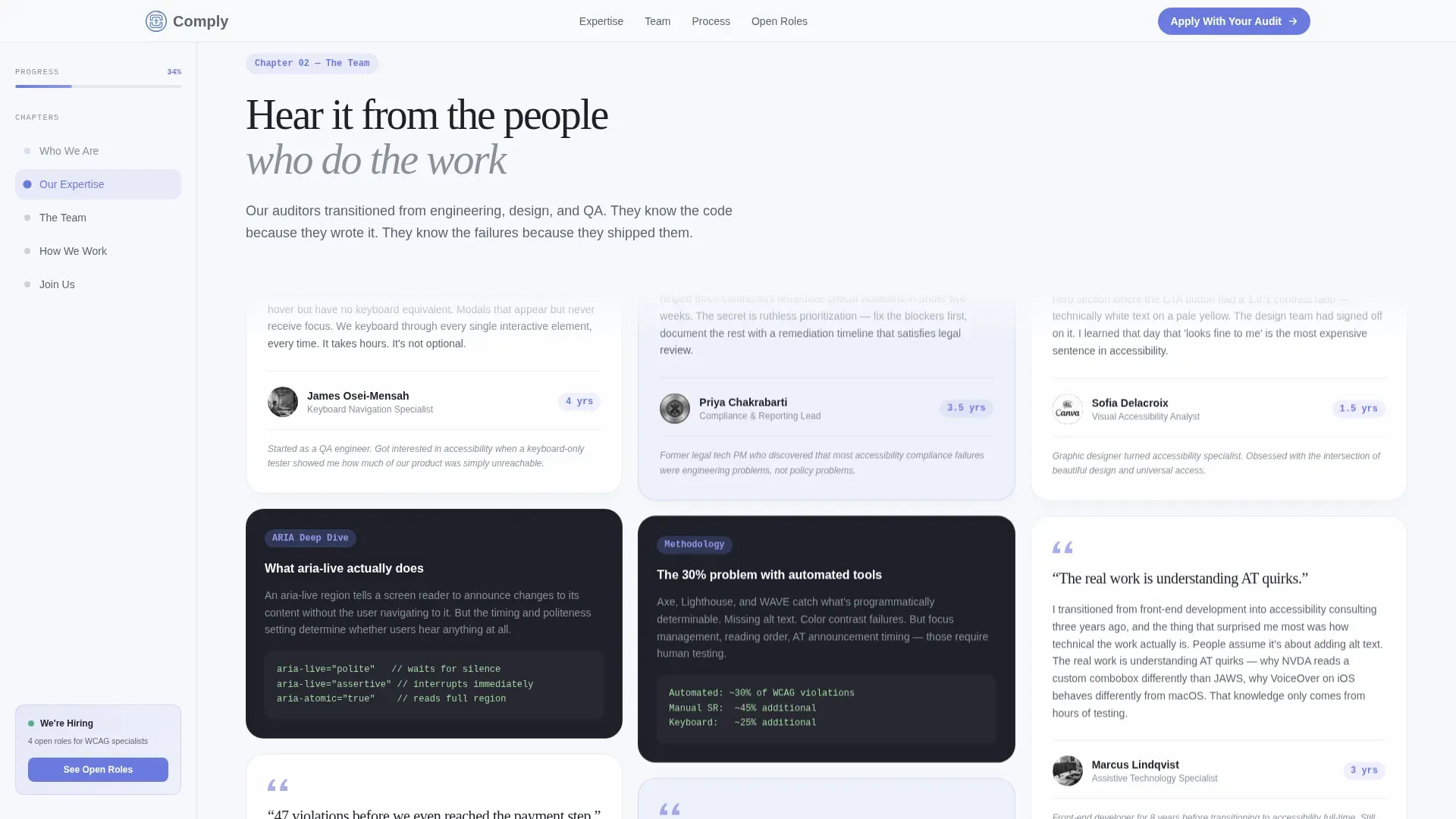
- A Testimonial Mosaic grid with staggered pull quotes, role titles, and tenure badges, woven between educational content about what an accessibility audit actually involves.
Feature list
This template is built around six core capabilities, each grounded in the prompt brief.
Role-Based Persona Selector
Three illustrated floating cards sit side by side in the hero section. Each card depicts a specific user type: a developer, a designer, and a project manager. Clicking or keyboard-activating a card reflows the page content so engineers see code-level audit teardowns, designers see annotation examples, and project managers see timeline and report structures. The selector is fully keyboard-navigable, making it an immediate demonstration of accessibility competence.
Scroll-Linked Sidebar with Progress Tracker
The sticky sidebar tracks visitor progress through the page chapters. It keeps a persistent "We're Hiring" indicator that updates the open role count as visitors scroll past relevant team testimonials. This turns a passive reading experience into a guided journey, reducing the learning curve between arriving on the page and clicking "Apply With Your Audit."
Testimonial Mosaic Grid
Team testimonials are staggered in a mosaic grid with pull quotes, role titles, and tenure badges. Each tile builds a portrait of the team. One auditor describes finding 47 violations in a Fortune 500 checkout flow. Another explains transitioning from front-end development into accessibility consulting. This format functions simultaneously as a recruiting pitch and a proof of expertise.
Educational Deep-Dive Sections
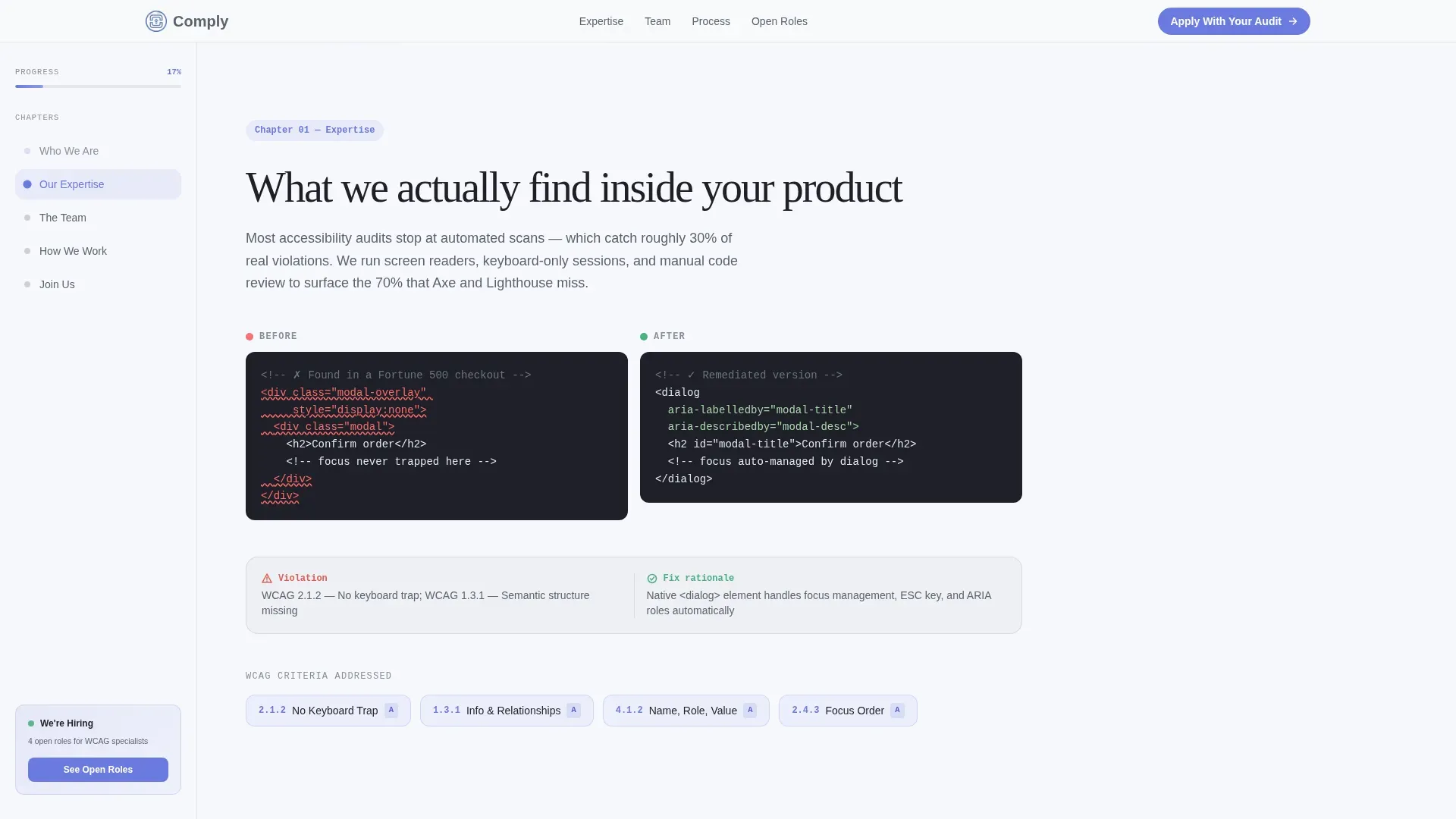
Between testimonial tiles, the page teaches visitors what WCAG auditors actually do. Sections cover topics such as what aria-live regions do, how screen readers interpret form label associations, and how auditors document accessibility issues across a web page. This educational content builds credibility with both prospective hires and potential clients evaluating the team's depth of knowledge.
Dual Call-to-Action Architecture
The primary call to action, "Apply With Your Audit," invites candidates to submit a short accessibility teardown of any live website alongside their resume. The secondary path, "Shadow an Audit," lets curious applicants book a one-hour observation session. Both paths are clearly accessible and use descriptive link text rather than vague phrases, keeping every action meaningful.
Horizontal Team Profile Gallery
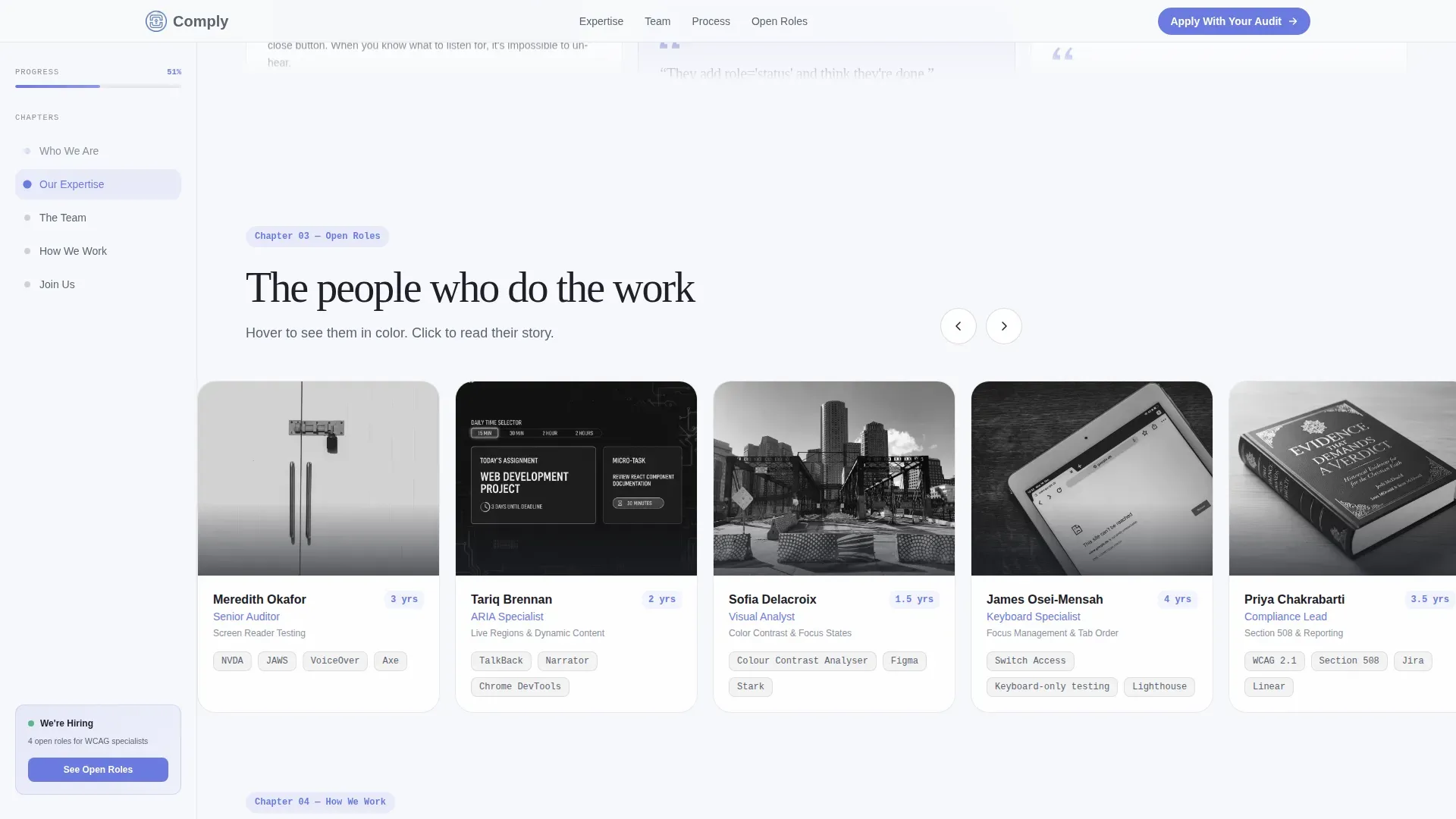
A horizontal scroll gallery presents team profiles in a grayscale-to-color hover treatment. Each profile functions as both a recruitment pitch and a character study of the organization. Visitors understand the team's background, their approach to accessibility testing, and why experienced practitioners choose to work here.
Page sections overview
| Section | Purpose |
|---|---|
| Hero, Persona Selector | Identify visitor role; reflow page content accordingly |
| Expertise Mosaic Grid | Display team testimonials with pull quotes and tenure badges |
| Educational Deep-Dive | Teach audit methodology; build credibility with visitors |
| Team Profile Gallery | Showcase individual auditors with hover-activated color reveal |
| Dual Call to Action | Route visitors to apply or book a shadow session |
| Footer | Vercel Horizontal Flow pattern; site-level navigation links |
Design & branding system
The visual identity follows an Educational Guide theme using the Cloud Canvas color system. The palette feels like a well-lit classroom with clean whiteboards and blue dry-erase marker accents. Nothing competes for attention, and every element earns its space on the page.
- Colors: soft cumulus white (#F7F8FC) background, accessible mid-gray (#5C6370) for body text, calm periwinkle (#6C7AE0) for interactive focus rings and active states, and deep graphite (#1E2028) for headings.
- Typography: DM Sans for large display headings that anchor each section, and IBM Plex Mono for code snippets and audit teardown examples throughout the educational sections.
- All text and interactive elements are designed to meet WCAG 2.1 Level AA standards for contrast ratios, with 4.5:1 for normal text and 3:1 for large text, so the template itself models the accessibility standards it promotes.
Mobile & speed optimization
The template is desktop-first by design, reflecting the sidebar companion layout. The sticky sidebar and mosaic grid are primary desktop experiences. A mobile responsive fallback is included to ensure the page remains usable across screen sizes.
- The sidebar collapses gracefully on smaller screens, preserving the progress-tracking function without blocking content.
- Animations including floating cards, staggered mosaic reveals, and the grayscale-to-color team gallery are implemented with scroll-linked triggers designed to degrade cleanly on lower-powered devices.
- Server Components handle static content sections, while Client Components manage the Persona Selector reflow and scroll-tracking sidebar, keeping interactive overhead focused where it is needed.
How this template helps you convert
Comply is built to move visitors toward two clear actions without confusion. Every section is ordered to build trust before asking for commitment.
- The Persona Selector immediately personalizes the experience for each visitor type, making the page feel relevant from the first scroll rather than generic. Visitors who feel seen are far more likely to read through the full educational content and engage with a call to action.
- The "Shadow an Audit" secondary path reduces friction for candidates who are interested but not yet ready to apply. It creates a lower-commitment entry point that still captures qualified leads and keeps the pipeline active without pressuring visitors prematurely.
Other information about this template
This template covers a niche where web accessibility, recruitment, and service credibility must coexist on a single page. Several practical details are worth knowing before you build with it.
- The sidebar uses semantic HTML structure, including the
<aside>tag, to define the sidebar content as complementary to the main content. This helps assistive technology users and screen readers understand the page layout correctly. - Every interactive element, including the Persona Selector cards and sidebar navigation links, is reachable using only a keyboard. The Tab key navigates forward, Enter activates links, and Esc closes open states. Focused elements are clearly highlighted using the periwinkle (#6C7AE0) focus ring.
- The template includes a "Skip to Content" link at the top of the page. This allows users to bypass the sidebar if it is repetitive for their session, a standard best practice for keyboard-only users.
- Alt text is provided for all illustrated images in the Persona Selector and team profile gallery. Meaningful alternative text descriptions ensure screen reader users receive the same context as sighted visitors.
- The left menu sidebar navigation uses a proper heading hierarchy to maintain logical structure. This supports assistive technology users navigating by heading landmarks.
- An accessibility statement section can be added to the footer using the template's existing layout. The W3C recommends publishing an accessibility statement as a step in legal risk management, and the footer's Vercel Horizontal Flow pattern provides a natural location for that link.
- Accessibility audit reports generated by the teams using this template can be structured to include a cover page with essential information, an executive summary of key findings, an audit findings table with page URL references, severity ratings, and recommended fixes. There is no universally recognized standard for documenting accessibility failures, so the template's educational sections help explain the organization's chosen approach.
- The compliance dashboard concept referenced in the educational deep-dive section can reflect data such as the percentage of the site meeting a chosen accessibility level, helping clients visualize scope and priority.
- Accessibility testing tools referenced in the educational content, including automated WCAG checkers that cover WCAG 2.0, 2.1, and 2.2 guidelines, are presented as part of the auditor's methodology explanation. Combining automated accessibility testing with manual auditing provides full coverage for accessibility compliance.
- The Comply accessibility audit recruitment sidebar companion landing page template is specifically designed for firms that want their recruitment page to function as a live proof of their craft, modeling the same accessibility standards they audit for in client products.
- Organizations should regularly update their accessibility statements to reflect ongoing accessibility efforts and improvements. The template's footer link placement makes this straightforward to maintain.
- Accessibility statements should include contact information so users can report accessibility issues directly. This builds user confidence and demonstrates the organization's responsibility to its audience.
Theme
Educational Guide
Creative direction
Testimonial Mosaic
Color system
Cloud Canvas
Style
Sidebar Companion
Direction
Recruitment/Hiring
Page Sections
Role-based Persona Selector
Scroll-linked Sidebar Progress Tracker
Testimonial Mosaic Grid
Educational Deep-dive Content
Dual Call-to-action Architecture
Grayscale-to-color Team Gallery
Related questions
Who is this template designed for?
Can visitors navigate the Persona Selector without a mouse?
What does the Apply With Your Audit call to action involve?
Does the template include an accessibility statement?
Is the sticky sidebar navigable without a mouse?



