Immersive Tattoo Artist Portfolio Landing Page
Ink is an immersive tattoo artist landing page built for portfolio storytelling and lead generation. Each case study unfolds as a layered visual sequence, from reference image to healed result. The design uses a Cloud Canvas palette and condensed serif typography to keep the focus on the work. A three-field inquiry form earns the click after the art proves the process.
by Rocket studio
Quick summary
Ink is a single-page tattoo artist portfolio template built around case study storytelling. It uses an overlap and layered layout to walk visitors through each project in five visual stages. The design steps back so the tattoo work speaks first. A lead generation form and flash drop sign-up close the page once the artist has proven their process.
Who this template is for
This template is built for tattoo artists who want their portfolio to do real selling work. It suits artists whose clients arrive with saved reference folders and a clear sense of what they want.
- Tattoo artists building a case study portfolio that shows process, not just finished work
- Artists who book by inquiry and want a focused, form-based lead generation path
- Independent tattoo professionals who want a visually immersive landing page without a full website build
What problem this template solves
Most tattoo portfolio pages show a gallery of finished pieces with no context. That leaves prospective clients guessing about the artist's process, communication style, and booking path.
- Visitors scroll past beautiful work with no story and no clear next step
- Artists lose qualified leads because there is no low-friction way to send an idea
- Flash drops and waitlists go unannounced because there is no secondary conversion path built into the page
What you get with this template
You get a fully structured, single-page tattoo portfolio layout built around five-stage case study sequences and two conversion paths.
- An immersive overlap and layered page layout with parallax depth and case study stacks
- A three-field lead generation form with image upload, placement description, and availability selection
- A secondary flash drop mailing list sign-up requiring only an email address
Feature list
This template packages every visual and functional element described in the brief into a single cohesive layout. Each feature serves a specific purpose in the client journey.
Five-Stage Case Study Sequences
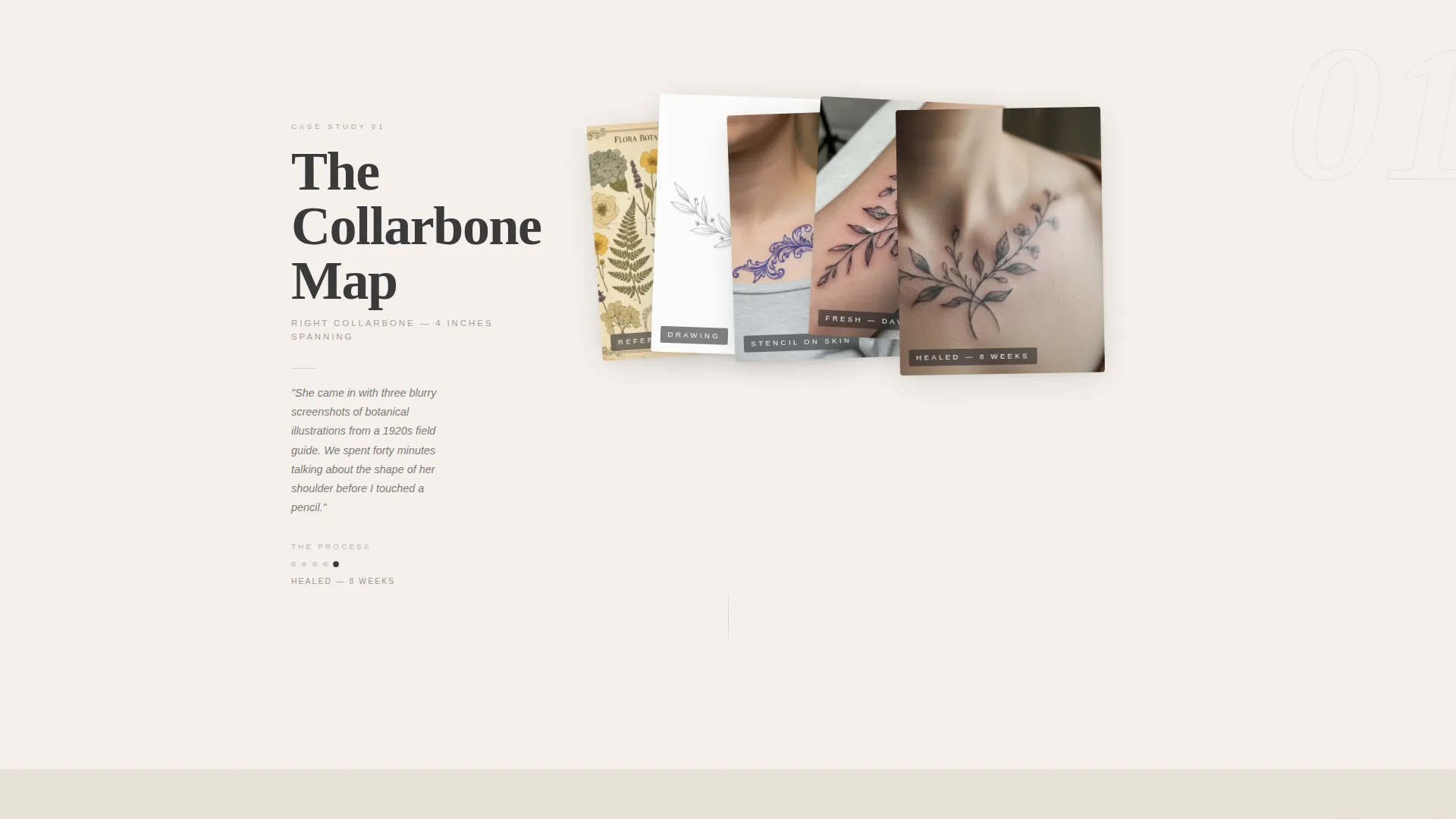
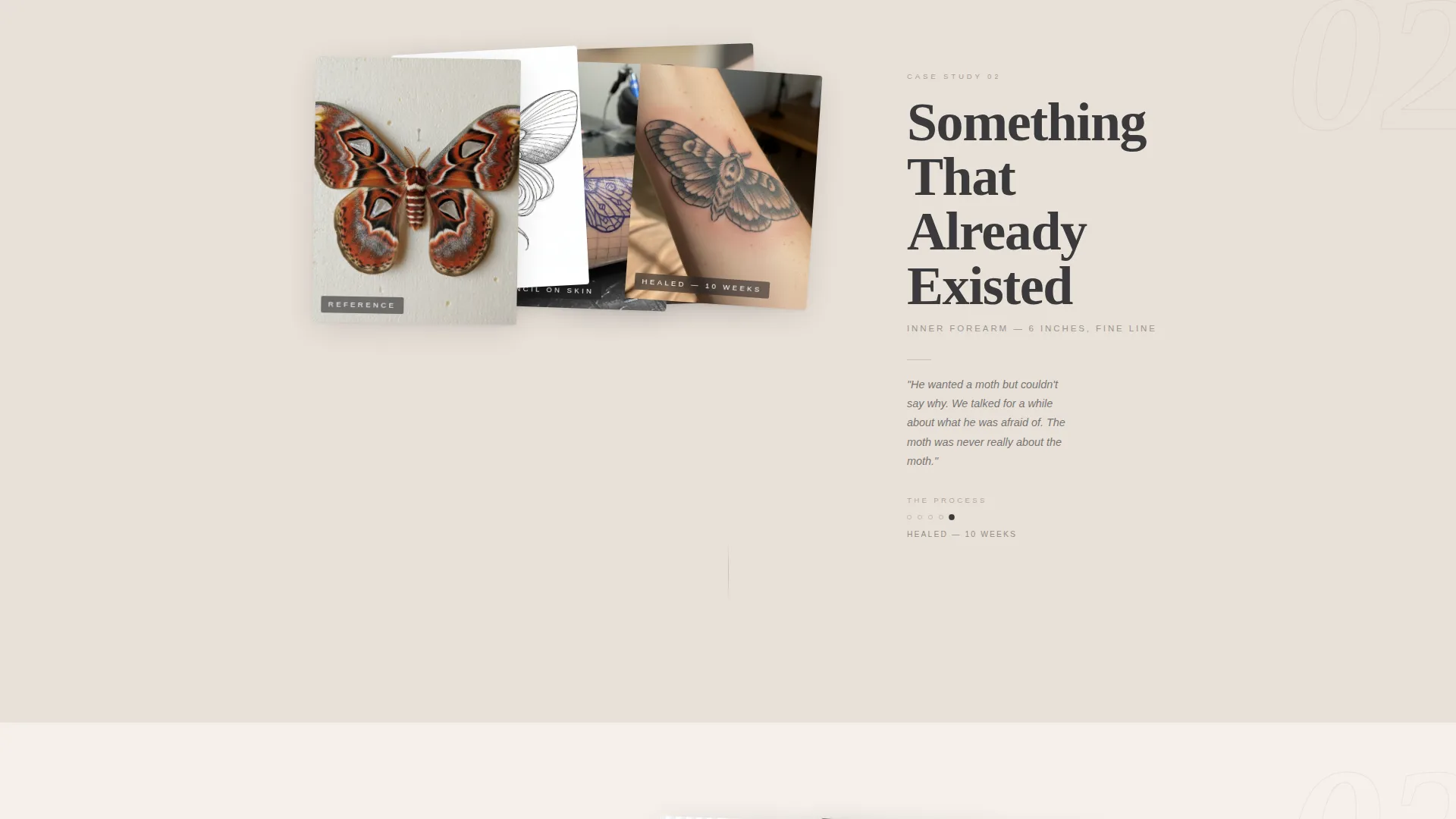
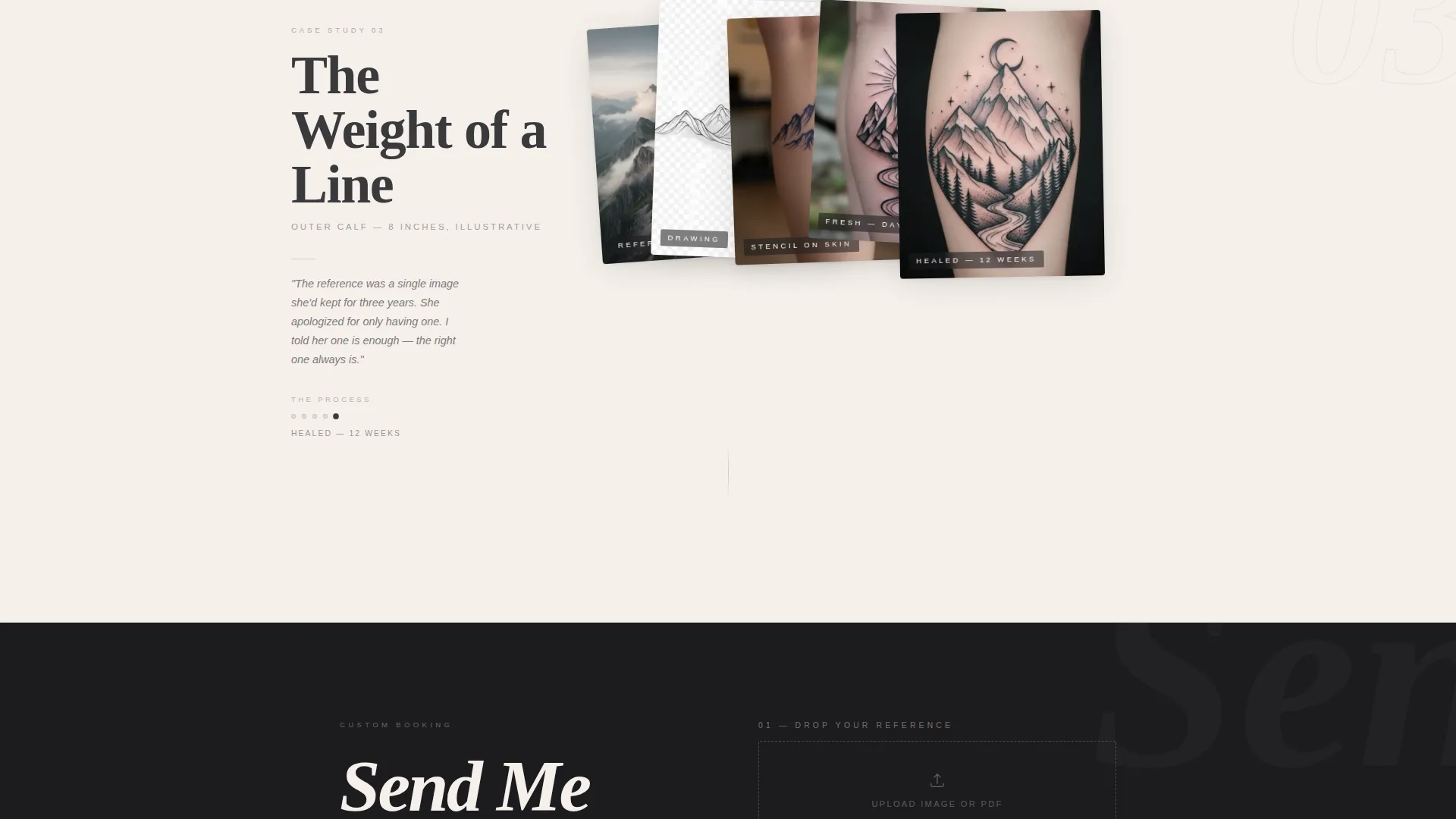
Each case study displays the reference image, custom drawing, stencil on skin, fresh tattoo, and healed result in a layered stack. Photos overlap and shift with parallax depth, creating the feel of a physical portfolio spread across a table.
Immersive Giant Headline Header
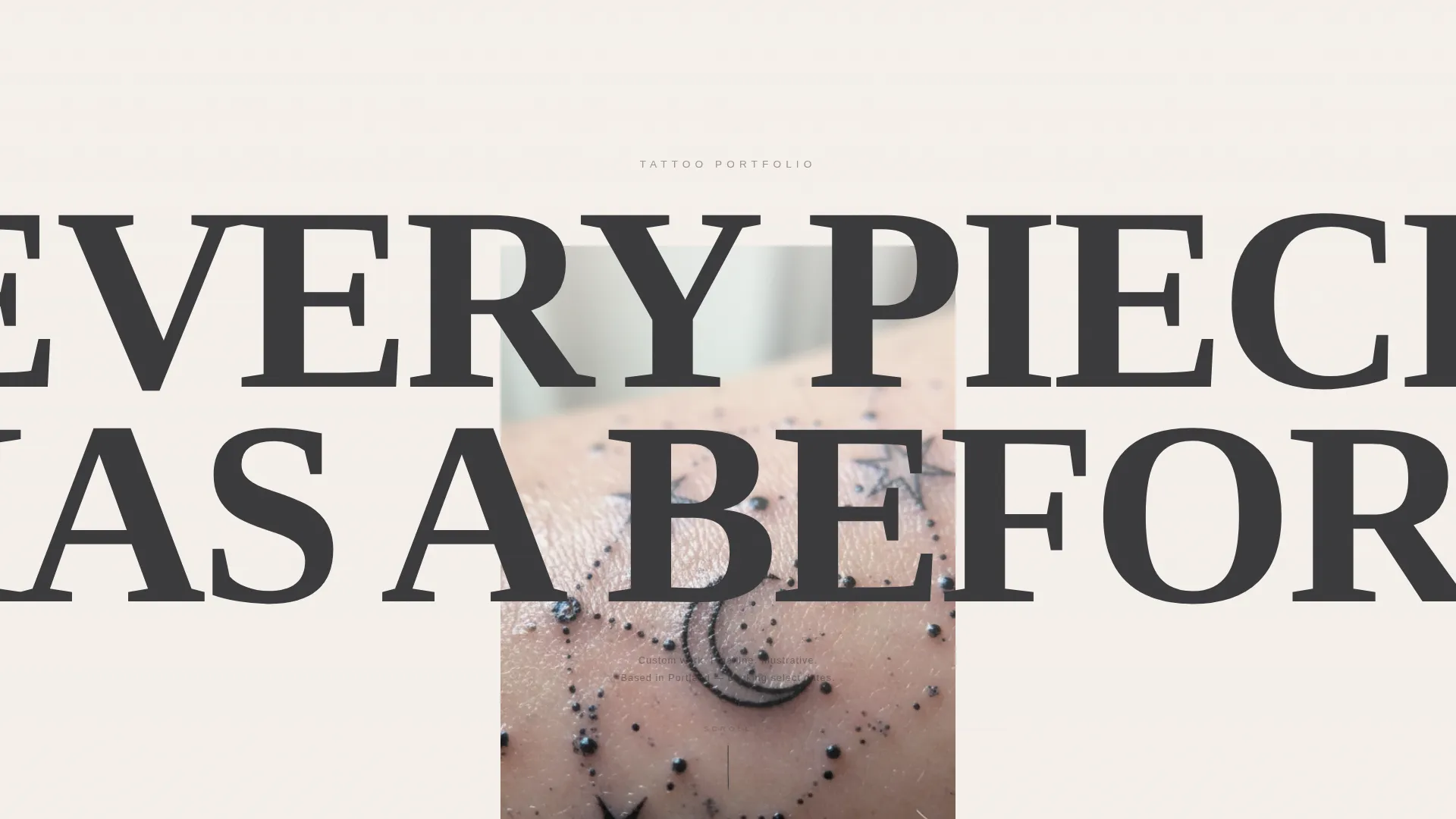
The header opens with a single massive condensed serif headline centered on cloud white. The letters crop at the viewport edges and a high-resolution tattoo detail photograph bleeds up from behind the text, creating immediate visual tension that drives the scroll.
Artist Voice Annotations
A short italic annotation sits beside each case study. It does not explain the art. It names the conversation that started the project, giving visitors a sense of the artist's perspective and communication style without a formal bio section.
Three-Field Inquiry Form
The lead generation form appears after the third case study. It asks for a reference image upload, a free-text field for placement and size, and a dropdown to select availability preference across weekday, weekend, or flexible options.
Flash Drop Email Sign-Up
A secondary conversion path lets visitors join a flash drop mailing list with just an email address. This path captures people who are not ready to book but want to stay connected to the artist's upcoming work.
Overlap and Layered Page Structure
Backgrounds layer in overlapping cards of soft warm white and faded linen. Images break out of their containers in a way that mirrors how tattoos interact with the natural contours of a body, reinforcing the visual identity of the work itself.
Page sections overview
| Section | Purpose |
|---|---|
| Giant headline header | Opens with cropped type and a bleeding tattoo detail photograph to create immediate scroll tension |
| Case study one | Displays the first five-stage project sequence with layered photos and an artist annotation |
| Case study two | Continues the portfolio narrative with the second project stack and voice note |
| Case study three | Completes the proof-of-process sequence before the primary call to action appears |
| Lead generation form | Presents the three-field inquiry form after the work has earned the ask |
| Flash drop sign-up | Offers a low-commitment email capture for visitors not yet ready to book |
Design & branding system
The Cloud Canvas color system keeps the palette quiet so the tattoo photography commands every frame. Typography uses a condensed serif for headlines and a restrained body style that never competes with the images.
- Color palette: soft warm white (#F5F0EB), misted graphite (#3A3A3C), faded linen (#E8E0D8), and healed-ink blue (#4A5568) reserved for hover states and active links only
- Layout approach: overlapping card backgrounds in white and linen, with images deliberately breaking their containers to mirror the organic placement of tattoos on skin
- Typography: large condensed serif headlines set at viewport-cropping scale, with artist annotations in small italics to contrast the editorial weight of the header
Mobile & speed optimization
The overlap and layered structure is designed to translate the immersive desktop experience into a vertically scrolling mobile format. The visual hierarchy stays clear at smaller breakpoints.
- Case study stacks reflow into single-column sequences on mobile without losing the layered narrative logic
- The three-field inquiry form is sized and spaced for comfortable thumb interaction on small screens
- Image bleed effects and parallax depth are structured to remain readable on mobile without requiring desktop viewport dimensions
How this template helps you convert
The page is designed so that every scroll builds trust before any ask is made. Conversion is earned by the time the form appears.
- The five-stage case study sequences show the artist's thinking process across multiple projects, so visitors arrive at the form already confident in the work they are about to inquire about.
- The three-field inquiry form is placed deliberately after the third case study, creating a natural moment where a qualified visitor is ready to act and the path to contact is immediately visible.
- The flash drop sign-up gives hesitant visitors a low-commitment way to stay connected, keeping them in the artist's audience without forcing a booking decision before they are ready.
Other information about this template
This template is part of the Lens and Frame theme collection, which pairs immersive visual creative direction with clean structural layouts suited to portfolio and agency use cases.
- Template style: Overlap and Layered, using the Cloud Canvas color system
- Theme: Lens and Frame with Immersive Visual creative direction
- Header concept: Giant Headline Centered with a photograph bleeding behind cropped typography
- Category: Portfolio and Agency, specifically built for the Tattoo Artist Case Study Portfolio niche
- The no-navigation header is an intentional design choice. Removing the navigation keeps the visitor focused on the work from the first scroll rather than jumping to a contact page prematurely
- This template is suited to artists who book custom work by inquiry and want each page visit to feel like a studio consultation rather than a product catalogue browse
Theme
Lens & Frame
Creative direction
Immersive Visual
Color system
Cloud Canvas
Style
Overlap/Layered
Direction
Lead Generation
Page Sections
Five-stage Case Study Sequences
Immersive Giant Headline Header
Artist Voice Annotations
Three-field Inquiry Form
Flash Drop Email Sign-up
Overlap and Layered Page Structure
Related questions
Can I add more case studies beyond the three included?
Does the inquiry form support image uploads?
Can I use the flash drop sign-up without the inquiry form?
Is there a navigation menu in this template?
What makes this different from a standard tattoo portfolio gallery?



