Mixed-Use Building Inspector Landing Page Template
Inspect is a modular card-grid landing page built for mixed-use building inspectors. It pairs a cinematic address-search header with a scrollable Before/After card grid that walks visitors through structural, electrical, plumbing, fire safety, envelope, and compliance findings. Every design choice builds authority before asking for a commitment, guiding visitors naturally toward scheduling a walkthrough.
by Rocket studio
Quick summary
Inspect is a single-page, click-through landing page template for mixed-use building inspection professionals. The layout opens with a full-bleed aerial header and a centered address field, then unfolds into a modular card grid where Before/After reveals show real deficiency findings, annotated callouts, and report previews. The page ends with a full-width call-to-action that sends visitors to a dedicated scheduling page.
Who this template is for
This template is built for inspection professionals who serve commercial and residential mixed-use properties. It speaks directly to the clients those professionals work with every day.
- Property managers handling tenant complaints and capital planning budgets
- Real estate attorneys and buyers ordering due-diligence inspections before acquisition
- HOA boards and building owners who need credible, evidence-based inspection reports
What problem this template solves
Many inspection businesses rely on generic service pages that tell visitors what they do without showing them. That gap creates doubt, especially when the stakes involve six-figure repair liabilities or pre-acquisition due diligence.
- Visitors leave without trusting the inspector's depth of knowledge or reporting quality
- No report preview means no tangible evidence before a commitment is requested
- A weak first impression costs the inspection firm high-value clients at the exact moment those clients are researching options
What you get with this template
You get a fully structured, single-page layout built around evidence and authority. Every section works together to move a skeptical visitor from curiosity to a scheduled walkthrough.
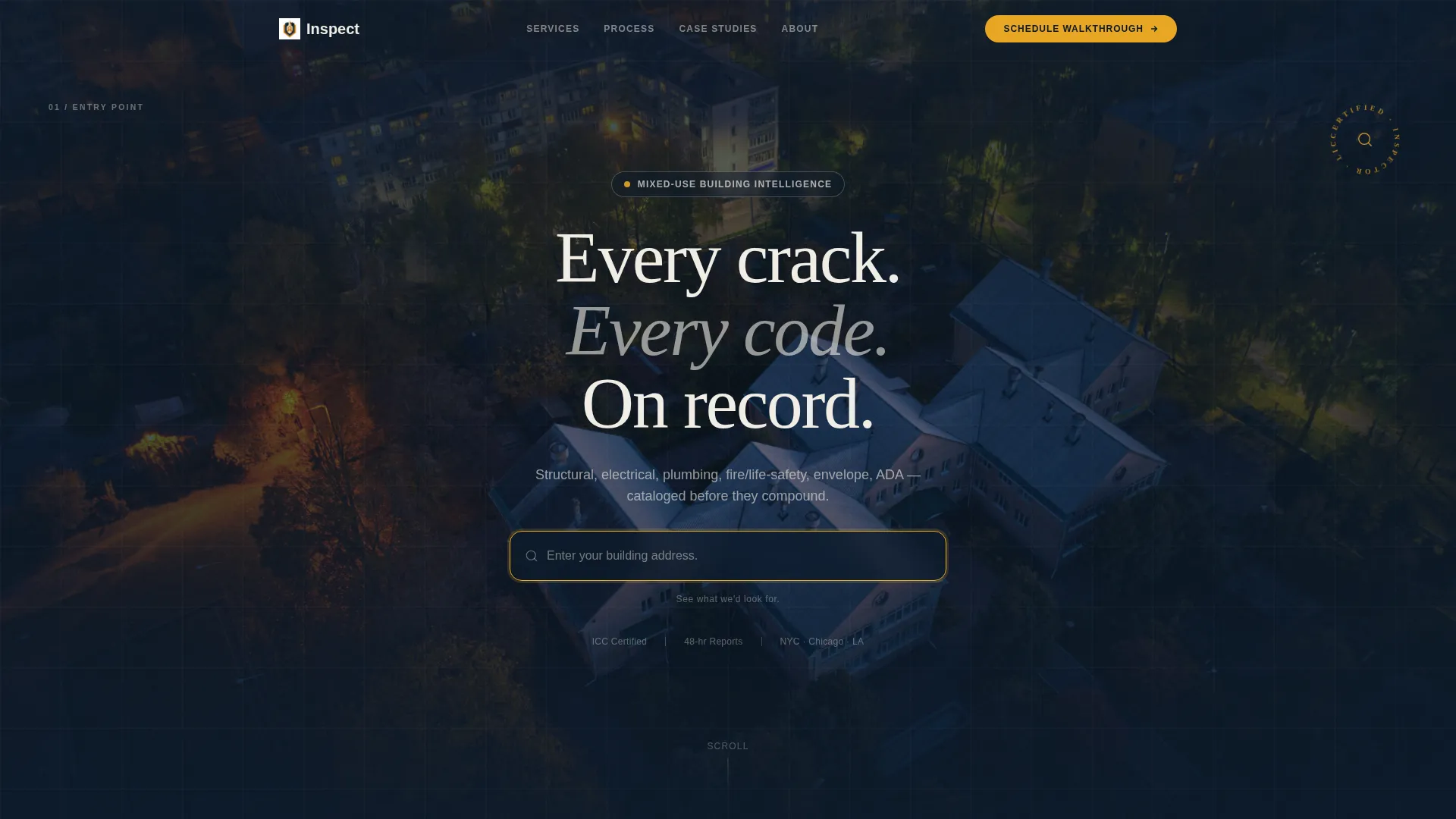
- A location-input header with a centered address field over a full-bleed aerial dusk photograph
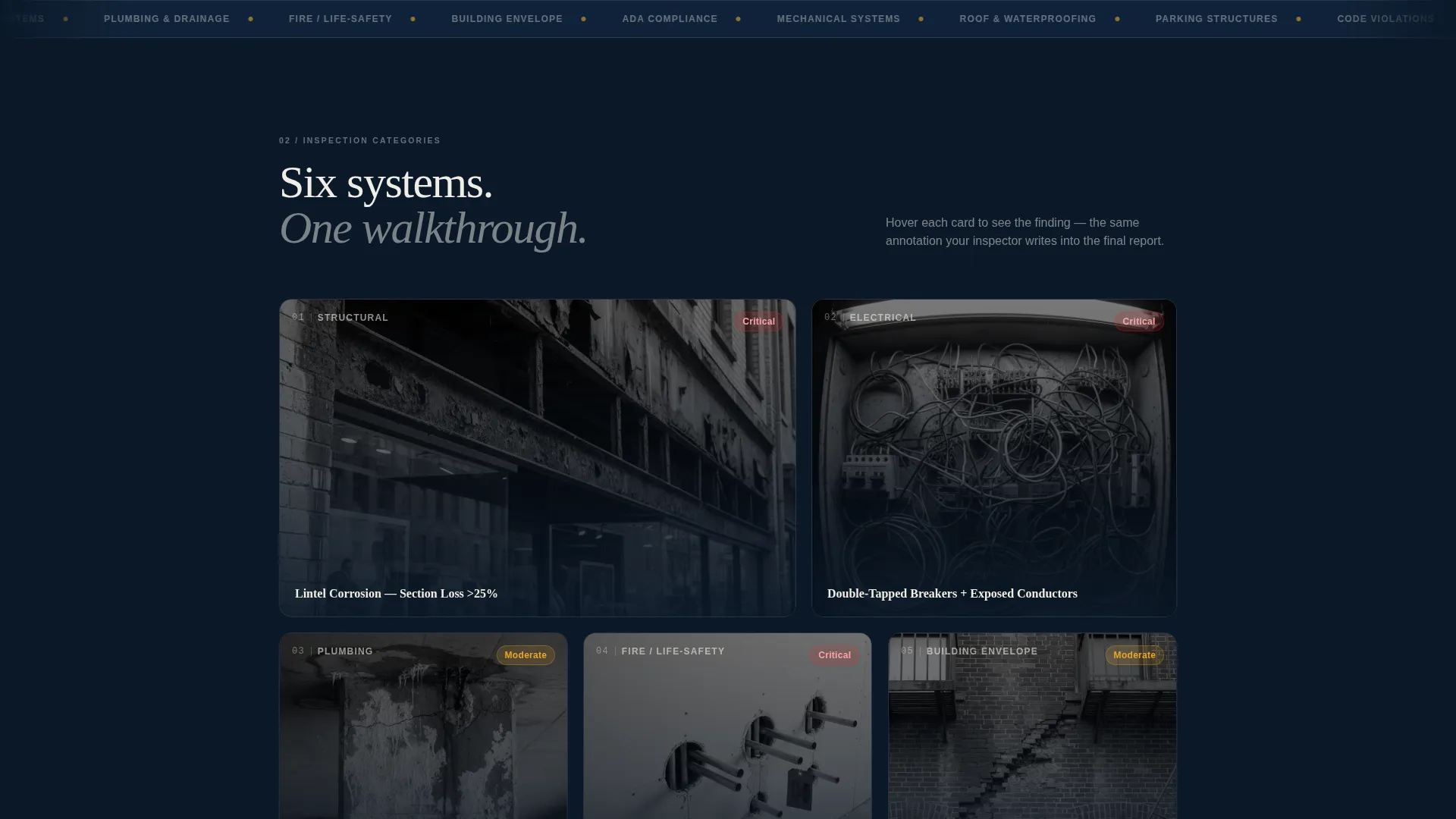
- A modular Before/After card grid covering six inspection categories, each with a flip or slide reveal showing annotated findings
- A sticky amber call-to-action button, a lightbox PDF report preview trigger, and a full-width closing call-to-action card
Feature list
This section covers the core functional and design features delivered by the Inspect template.
Location Input Header Scene
The header centers a single elegant search field over a dimly lit aerial photograph of a dense mixed-use block at dusk. Placeholder text reads "Enter your building address." A micro-line below reads "See what we'd look for." The amber cursor blink is the only animated element on screen, reinforcing a detective-desk focus.
Before/After Modular Card Grid
Each card in the grid represents one inspection category: structural, electrical, plumbing, fire and life safety, building envelope, and compliance. The front face shows a real deficiency photograph. On hover or tap, the card flips or slides to reveal the same element annotated with inspection callouts, code references, and severity ratings.
Scrolling Report Progression
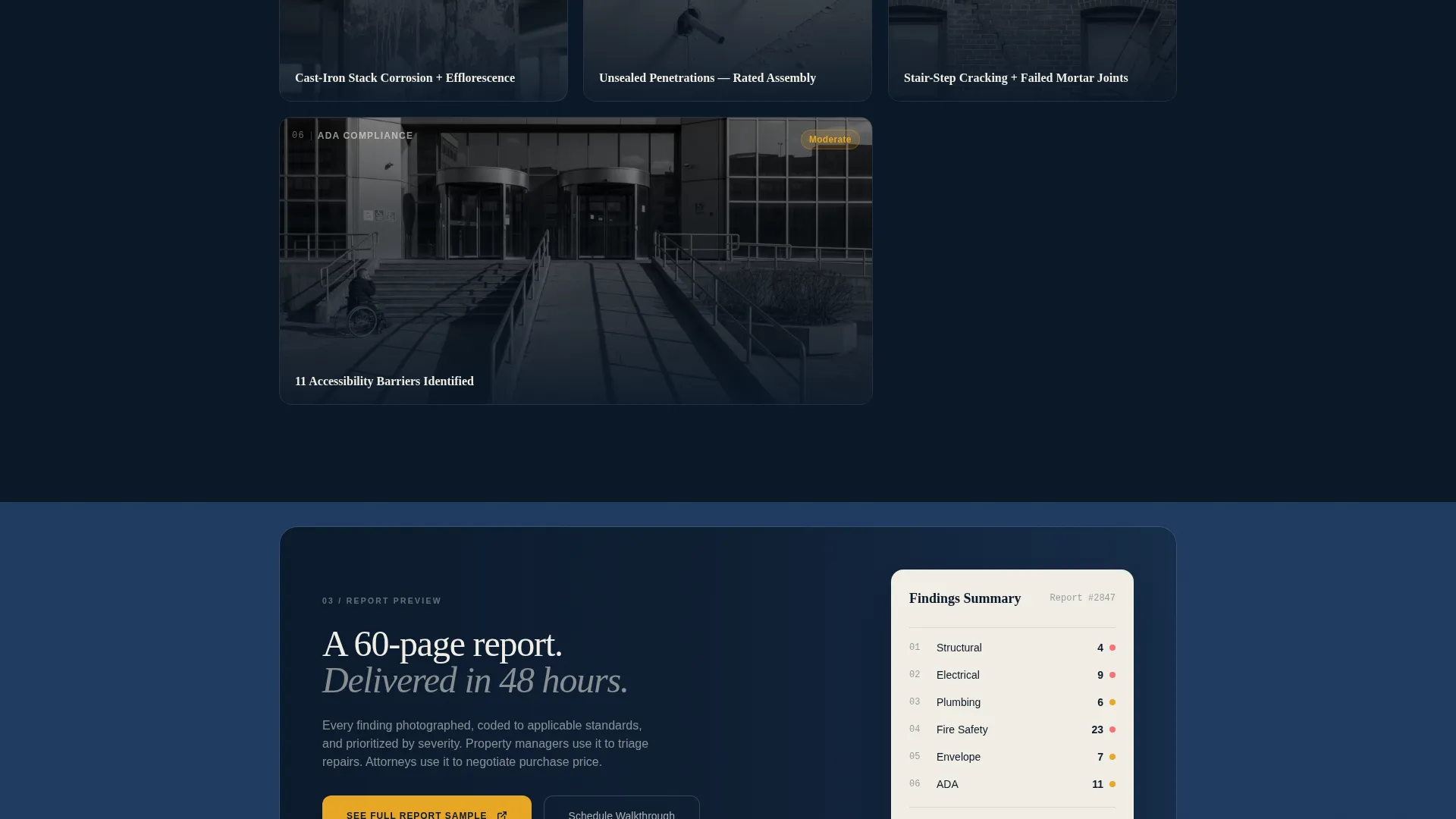
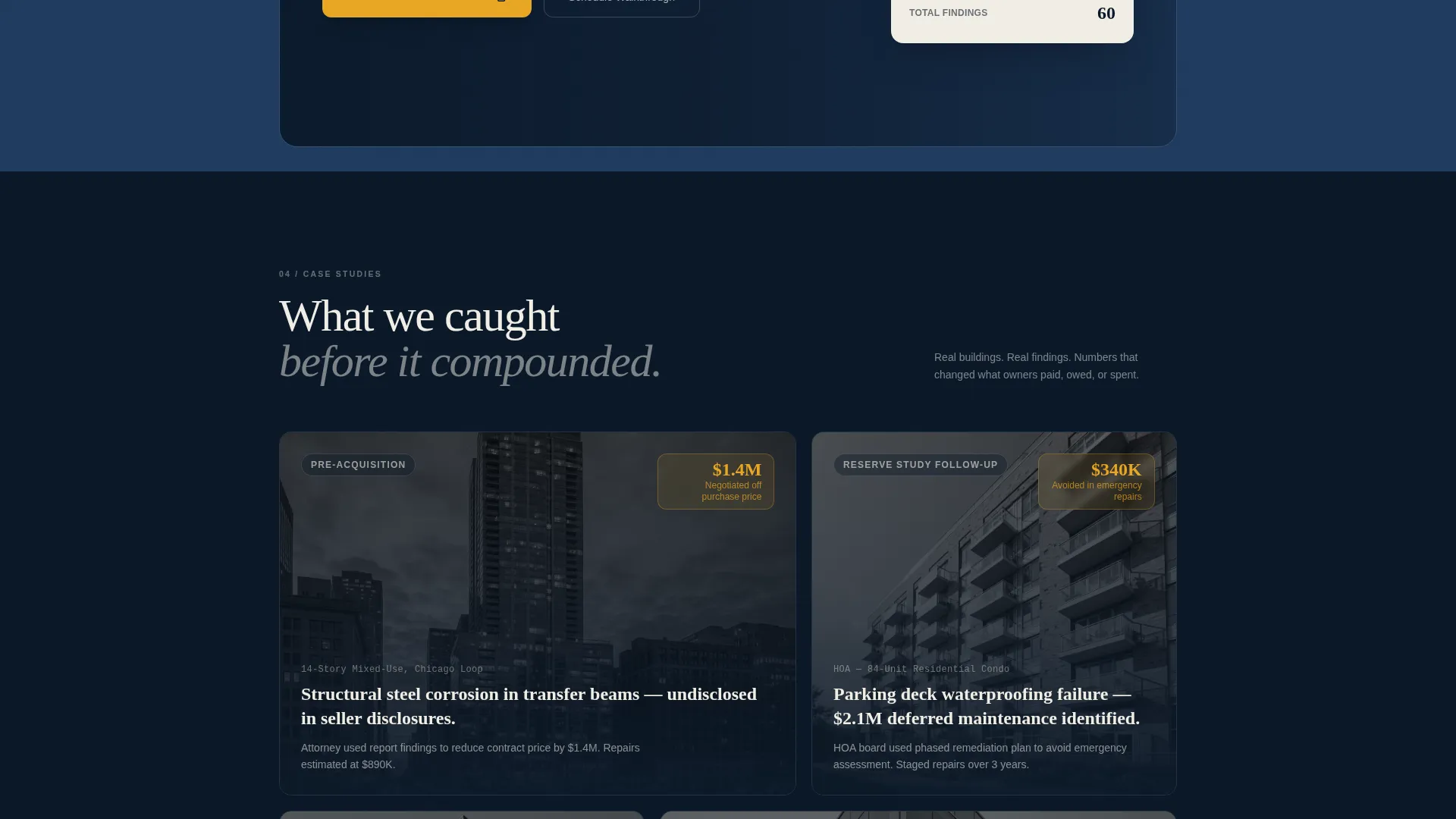
As the visitor scrolls deeper, cards shift from individual findings to full inspection report previews and then to case study summaries. These case studies show how early inspections helped owners avoid significant repair costs. The grid rhythm changes from two columns to three and back to a single cinematic card, sustaining visual interest throughout.
Lightbox PDF Report Preview
Every card flip state includes a secondary micro call-to-action labeled "See Full Report Sample." This triggers a lightbox overlay showing a PDF report preview. Visitors can review the inspector's output format and detail level before any scheduling commitment is required.
Sticky Amber Call-to-Action Button
The primary call-to-action, "Schedule Your Walkthrough," appears first in the header after an address is entered. It then reappears as a sticky amber button throughout the scroll experience. A final full-width card at the bottom of the grid repeats the call-to-action, ensuring the prompt is always visible without being intrusive.
Midnight Blue Atelier Branding System
The template uses a four-color palette built around deep midnight, drafting-table slate, vellum white, and inspection-flag amber. Backgrounds alternate between midnight and slate. Cards float on vellum with hairline borders. Amber appears only on calls-to-action, alert badges, and hover states, giving every flash of it the weight of a circled finding.
Page sections overview
| Section | Purpose |
|---|---|
| Address Search Header | Anchors visitor attention with a single bold question and an aerial dusk photograph |
| Structural Findings Card | Shows rusted lintel deficiency on front; annotated callout with code reference on reveal |
| Electrical Findings Card | Displays electrical deficiency photograph; flips to severity rating and inspection note |
| Plumbing Findings Card | Opens with plumbing defect image; reveals annotated findings and code citation |
| Fire Safety Card | Presents missing firestop photograph; uncovers life-safety callout and severity badge |
| Building Envelope Card | Leads with efflorescence photograph; reveals envelope annotation and rating |
| Compliance Findings Card | Shows compliance deficiency; flips to code reference and corrective action note |
| Report Preview Cards | Transitions from single findings to full inspection report layout previews |
| Case Study Cards | Highlights real-cost savings achieved through early deficiency identification |
| Closing call to action Card | Full-width card repeating the "Schedule Your Walkthrough" prompt to end the page |
Design & branding system
The Inspect template uses an Atelier Studio visual identity built on a Midnight Blue color system. The palette is intentionally restrained so that every use of amber carries the weight of an important finding.
- Four core colors: deep midnight (#0B1929), drafting-table slate (#1E3A5F), vellum white (#F0EDE5), and inspection-flag amber (#E8A624)
- Backgrounds alternate between midnight and slate; card surfaces use vellum white with hairline borders; amber is reserved for calls-to-action, alert badges, and hover states
- Typography and layout follow a leather-bound field notebook aesthetic: meticulous, high-contrast, and illuminated only where attention is needed
Mobile & speed optimization
The card grid is modular, meaning each section reflows cleanly across screen sizes without breaking the Before/After reveal mechanic. The layout adapts from a desktop multi-column grid to a single-column stack on smaller screens.
- Column count adjusts dynamically: two-column and three-column grid layouts compress to single-column on mobile devices
- The sticky call-to-action button remains visible on smaller screens, keeping the scheduling prompt accessible throughout the scroll
- The lightbox PDF preview scales to viewport size so the report sample reads clearly on any device
How this template helps you convert
The page earns trust before it asks for a click. By the time a visitor reaches the bottom, they have already seen the inspector's methodology, output quality, and real-world results.
- The Before/After card reveals make the inspector's analytical depth visible and tangible, replacing generic claims with actual evidence of the work
- The lightbox report preview lets visitors evaluate the inspector's documentation standard privately, removing hesitation before the scheduling step
- Every call-to-action directs visitors to a dedicated scheduling and scoping page rather than a generic contact form, making the next step feel purposeful and low-pressure
Other information about this template
Inspect is a click-through landing page, meaning its singular goal is to move a qualified visitor to a separate scheduling page. There are no embedded forms, no contact inputs, and no multi-step flows on this page.
- The template is designed for mixed-use building inspection services but its card-grid architecture and Before/After reveal pattern can support adjacent property inspection niches
- The modular layout makes it straightforward to add, remove, or reorder inspection category cards to match the inspector's actual service scope
- The page structure follows a booking and scheduling direction, meaning all calls-to-action point outward to a scoping or appointment page rather than collecting data on this page
Theme
Pastoral Calm
Creative direction
Before/After Reveal
Color system
Cloud Canvas
Style
Split Screen (50/50)
Direction
Booking/Scheduling
Page Sections
Location Input Header Scene
Before/after Modular Card Grid
Scrolling Report Progression
Lightbox PDF Report Preview
Sticky Amber Call-to-action
Midnight Blue Atelier Color System
Related questions
Does this template include a contact form or booking form?
Can I add or remove inspection category cards?
What does the lightbox report preview show?
Who is this landing page built to impress?
Can this template work for property types other than mixed-use buildings?



