Health Inspector Appointment Booking Website Template
Inspect is a health inspector booking landing page built for food service operators who need certified inspections before deadlines hit. It features a three-tier comparison table, a gated pre-inspection checklist, and a zip-code availability lookup. The design pairs hard compliance data with client testimonials, helping kitchen managers and franchise operators book with confidence.
by Rocket studio
Quick summary
Inspect is a precision-built landing page for a certified health inspection booking service. It targets restaurant owners, hotel managers, and food processing supervisors who need to schedule professional inspectors before a county visit. The page pairs a structured comparison table with layered social proof, giving operators the clarity and confidence to act before a deadline does.
Who this template is for
This template is designed for food service professionals who carry compliance responsibility daily. It speaks directly to the people who lose sleep over renewal dates and walk-through scores.
- Kitchen managers and venue owners facing upcoming health inspection deadlines
- Franchise operators running multi-site audits across more than one state
- New venue owners preparing for their first official county inspection walk-through
What problem this template solves
Most operators search for inspection help only after a failed visit. This page positions the booking service as the proactive choice, replacing anxiety with a scheduled appointment and a clear action plan.
- Visitors arrive unsure which inspection tier matches their situation
- There is no easy way to know inspector availability by location without calling around
- Operators lack a practical checklist to self-audit before a certified inspector arrives
What you get with this template
This template delivers a fully structured single-page layout organized around one core conversion goal: booking a certified health inspector. Every section earns its place by reducing hesitation and moving the visitor forward.
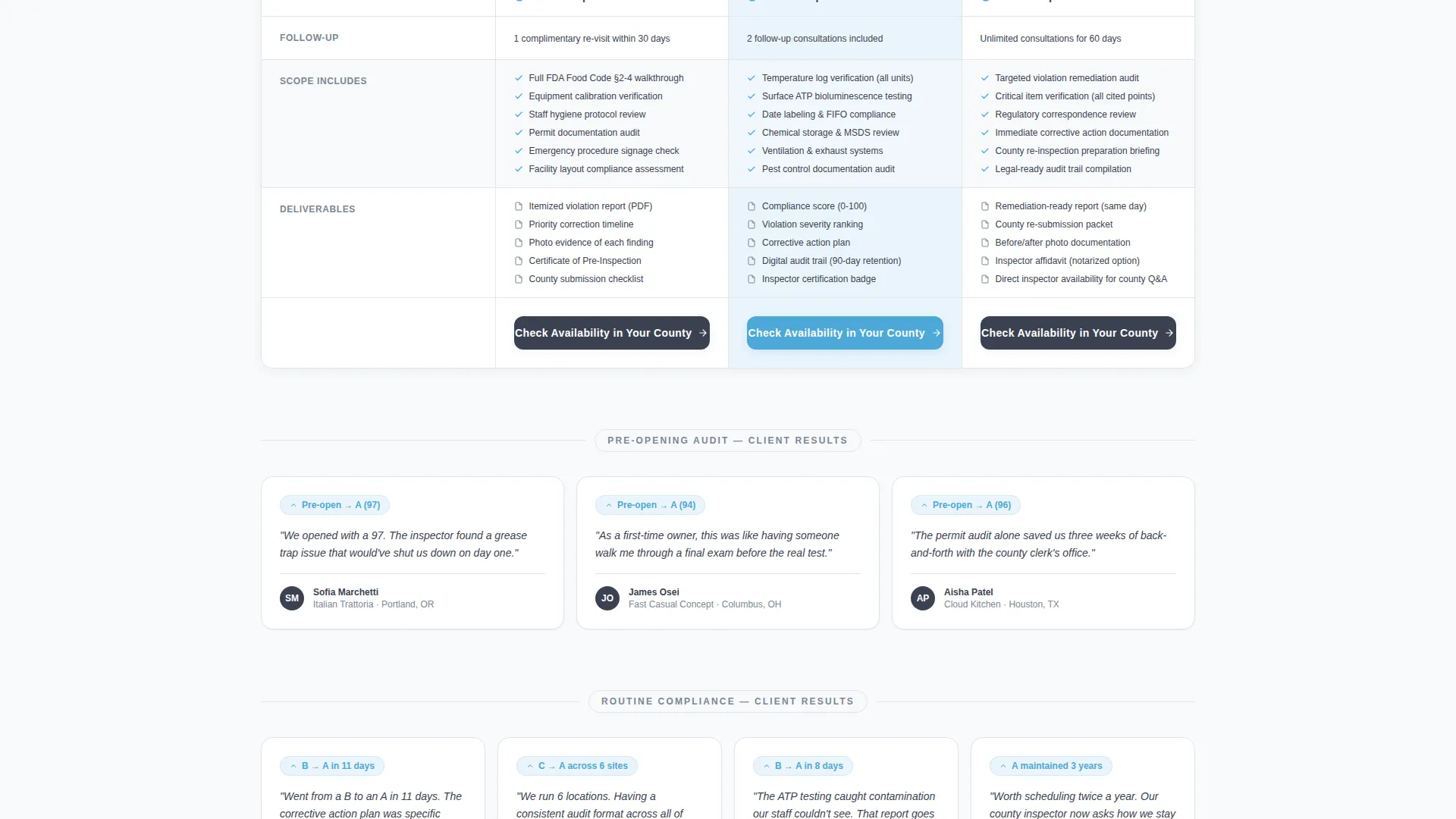
- A three-tier comparison table covering Pre-Opening Audit, Routine Compliance, and Emergency Re-Inspection
- A gated downloadable pre-inspection checklist requiring only an email and venue type to unlock
- A zip-code availability lookup embedded in each tier to surface the next three open inspection dates
Feature list
This landing page packs purposeful components that serve both first-time visitors and returning operators comparing tier options.
Three-Tier Comparison Table
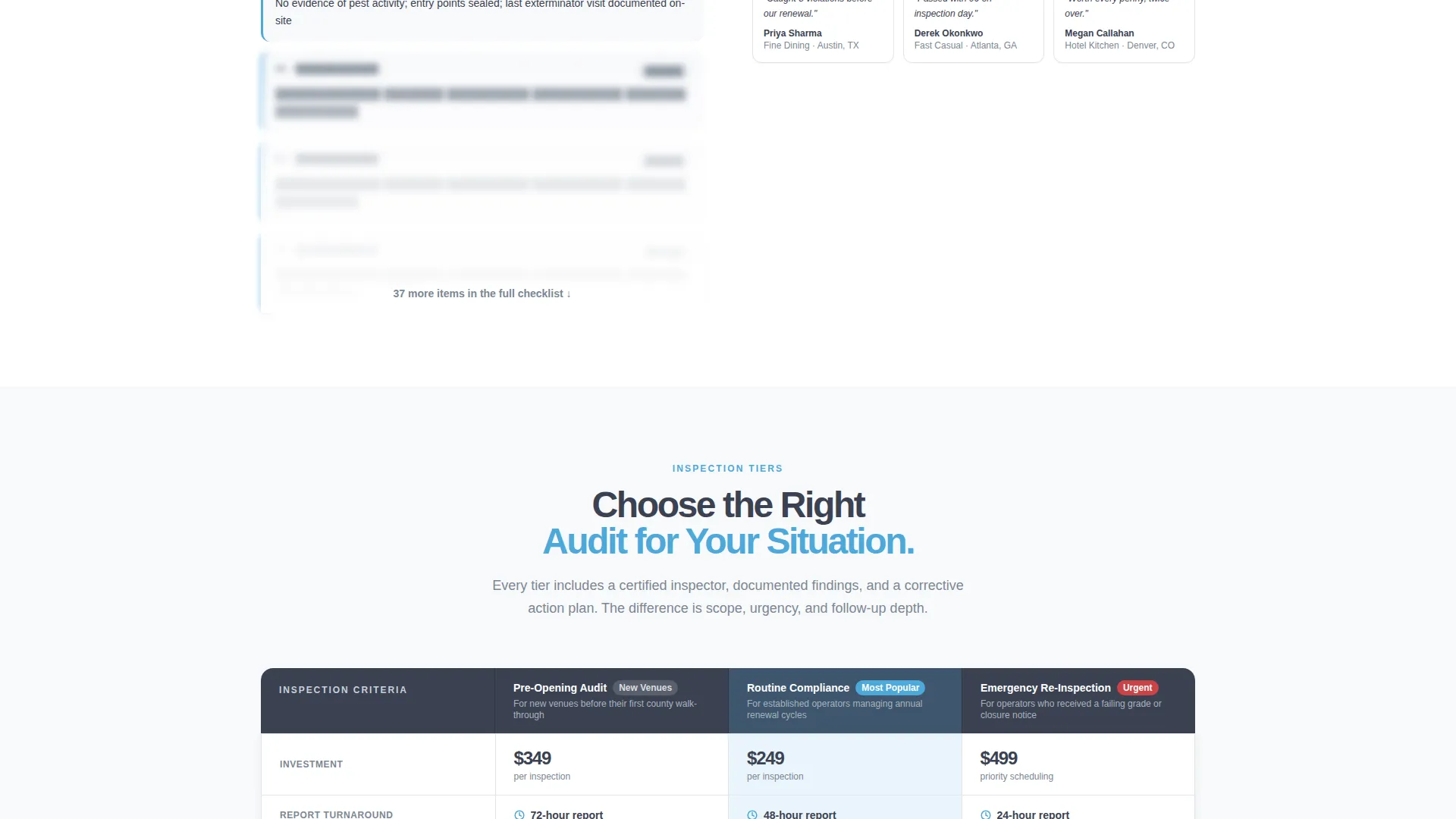
Each tier row in the comparison table displays scope, turnaround time, deliverables, and follow-up visit details side by side. Visitors can scan across all three tiers in one view without leaving the page.
Testimonial Mosaic Layout
Below each inspection tier, a cluster of three to four client testimonials appears as tiled cards. Each card is tagged with venue type, city, and a score improvement result such as "B to A in 11 days," building social proof that feels earned rather than placed.
Gated Pre-Inspection Checklist
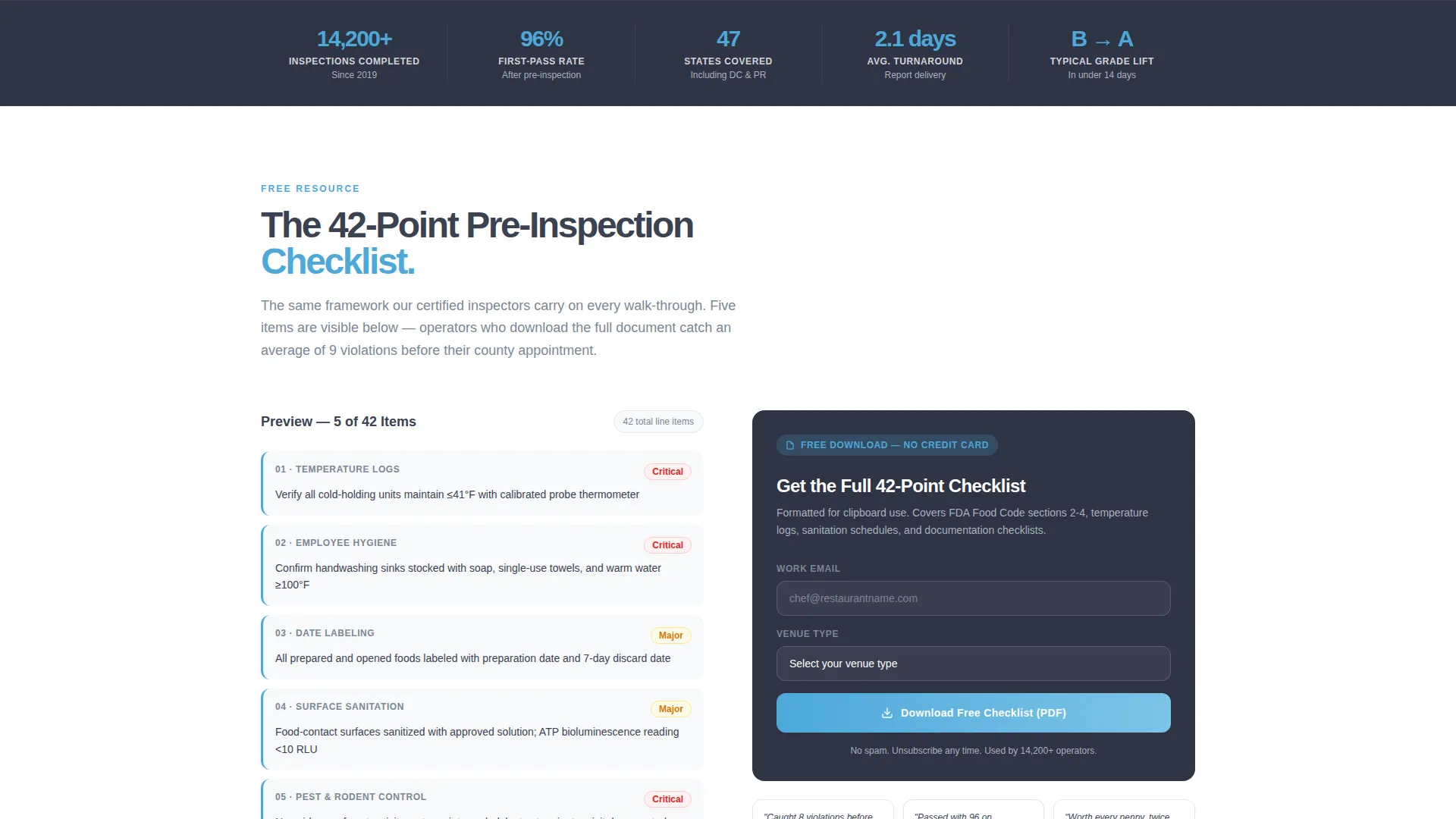
The primary conversion path offers a forty-two-line-item checklist gated behind an email address and venue-type field. Five checklist items are previewed directly on the page so visitors understand the value before submitting.
Zip-Code Availability Lookup
A secondary conversion path sits inside each comparison tier row. Visitors enter a zip code and the lookup returns the next three available inspection dates in their county, removing the biggest barrier to booking.
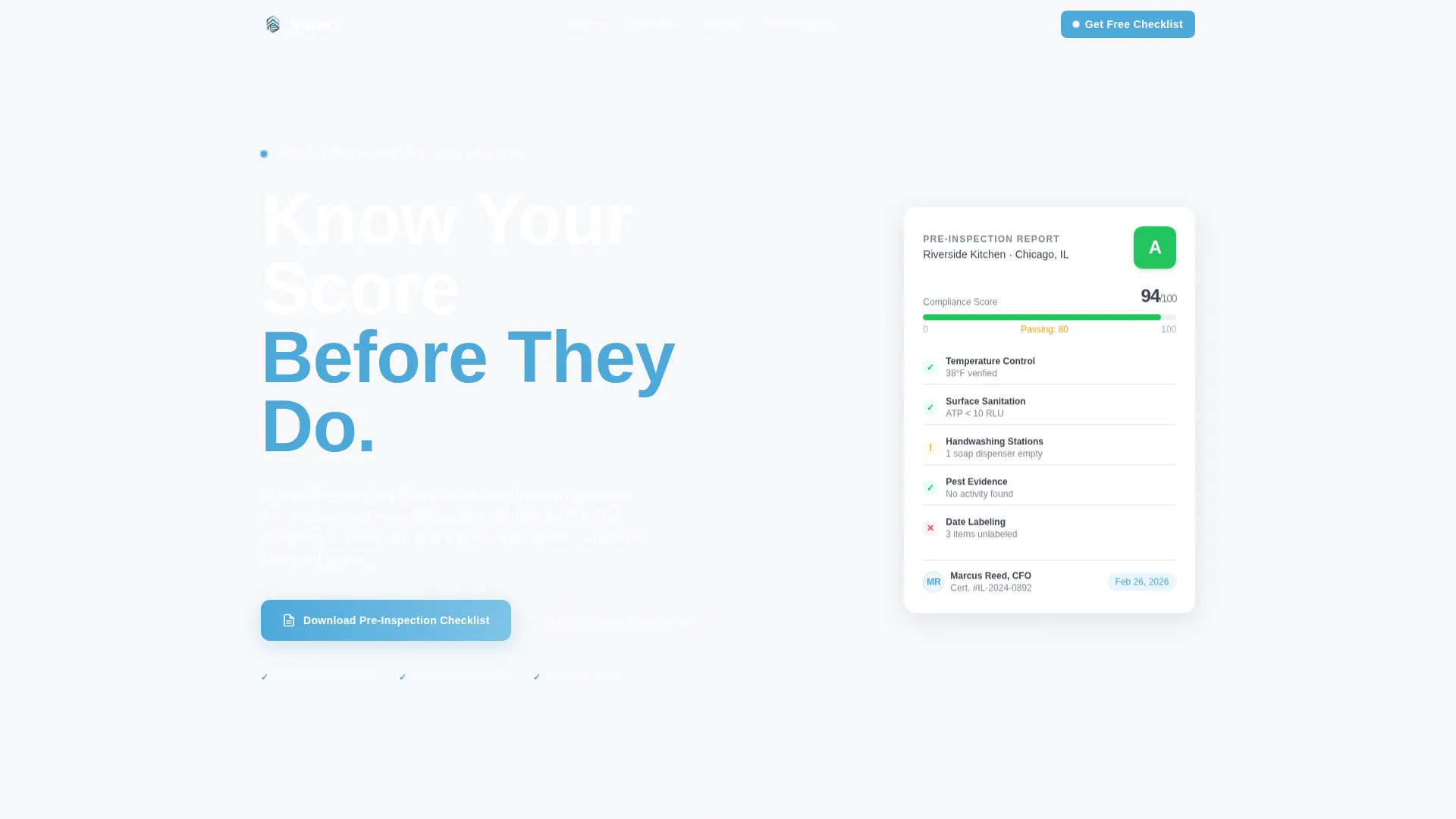
Giant Headline Header Section
The header uses a large, left-aligned headline with "Know Your Score Before They Do" set in a heavy squared-off sans-serif. The right half holds a sharp product-focused photograph of a gloved hand using a digital thermometer, reinforcing professionalism without stock-photo clichés.
Checklist Line-Item Preview
Five of the forty-two checklist items are surfaced directly on the page before the gate. This preview tactic shows operators exactly how detailed the full document is, making the email submission feel like a fair trade.
Page sections overview
| Section | Purpose |
|---|---|
| Header Hero | Establish credibility and present the core headline |
| Comparison Table | Compare three inspection tiers side by side |
| Tier Testimonials | Display client proof cards beneath each tier |
| Checklist Preview | Preview five checklist items before the gate |
| Checklist Download Gate | Capture email and venue type for lead generation |
| Availability Lookup | Return open inspection dates by zip code |
Design & branding system
The visual identity follows a Corporate Precision theme built on the Slate and Sky color system. Every color choice reinforces the feeling of a clean, audited environment where nothing is hidden or out of place.
- Institutional charcoal (#3B4252) for primary text and table headers; regulation gray (#7B8794) for secondary copy and divider lines
- Compliance sky (#4DA8DA) for active states, selected tier highlights, and the key headline phrase
- Clean-room white (#F8F9FB) across open backgrounds, paired with a heavy squared-off sans-serif typeface for all headline text
Mobile & speed optimization
The layout is structured with a mobile-first content hierarchy. Comparison tables, testimonial cards, and lookup inputs are each designed to reflow cleanly on smaller screens without losing their functional purpose.
- The comparison table collapses to a vertically stacked card format on narrow viewports
- Testimonial mosaic tiles resize and restack so score improvement tags remain readable on mobile
How this template helps you convert
Every design and copy decision on this page is aimed at turning a compliance-anxious visitor into a confirmed booking or a qualified lead.
- The checklist gate captures leads before the visitor is ready to book, giving the service a second chance to convert through follow-up with a practical, high-value resource.
- The zip-code lookup reduces the single biggest friction point in service booking: not knowing if an inspector is actually available nearby on a useful date.
- The testimonial mosaic places real operator outcomes directly alongside the comparison data, so the emotional case for booking is always visible next to the rational one.
Other information about this template
This template is categorized under Professional Services with a focus on health inspector online presence. It is built as a single-page content and resource destination rather than a multi-step funnel, making it well suited for direct traffic from search, referral, or local advertising campaigns.
- The template style is a Comparison Table layout, making it easy to adapt for other inspection or compliance service tiers
- The Testimonial Mosaic creative direction can be updated with real client data as the service grows its verified review base
- The header concept follows a Giant Headline Left structure, which can be adapted with any short, action-oriented compliance headline
Theme
Corporate Precision
Creative direction
Testimonial Mosaic
Color system
Slate & Sky
Style
Comparison Table
Direction
Content/Resource
Page Sections
Three-tier Comparison Table
Testimonial Mosaic with Score Proof
Gated Pre-inspection Checklist
Zip-code Availability Lookup
Compliance-focused Header Layout
Related questions
Who is the Inspect landing page template built for?
What are the three inspection tiers shown in the comparison table?
How does the pre-inspection checklist download work?
What does the zip-code availability lookup return?
Can this template work for a franchise operator managing multiple locations?



