Building Inspector Landing Page Template
Inspect is an editorial-style landing page template built for independent building inspectors. It pairs a bold quote-driven header with a scrolling testimonial mosaic, room-by-room educational content, and a gated checklist download. The design feels like an open field notebook, honest, unvarnished, and built to earn trust before a single signature dries.
by Rocket studio
Quick summary
Inspect is a single-page template designed for a solo building inspector who wants to attract first-time homebuyers, real estate agents, and legal professionals. The layout opens with a manifesto-style header, moves through real client stories, and funnels visitors toward a downloadable inspection checklist. Every section earns attention before asking for it.
Who this template is for
This template is built for independent home inspection professionals who operate alone and rely on trust, not volume, to grow their client base. It speaks directly to the kinds of clients who carry the most anxiety into a transaction.
- First-time homebuyers worried about hidden structural or safety issues before closing
- Real estate agents who need a credible inspector they can refer without liability concerns
- Divorce attorneys and legal professionals requiring an impartial structural assessment
What problem this template solves
Most inspection business pages look like contractor directories. They list credentials, show a stock photo of a clipboard, and tell visitors nothing useful. That approach fails buyers who arrive scared and leave unconvinced.
- Buyers need proof that an inspection uncovers real problems, not reassurance that everything looks fine
- Agents and legal clients need to see professional credibility, not just a phone number and a service list
- Without educational content, visitors leave before they understand why hiring an inspector matters
What you get with this template
This template delivers a complete editorial landing page layout organized around storytelling and education. Every section is structured to build confidence before asking for contact details.
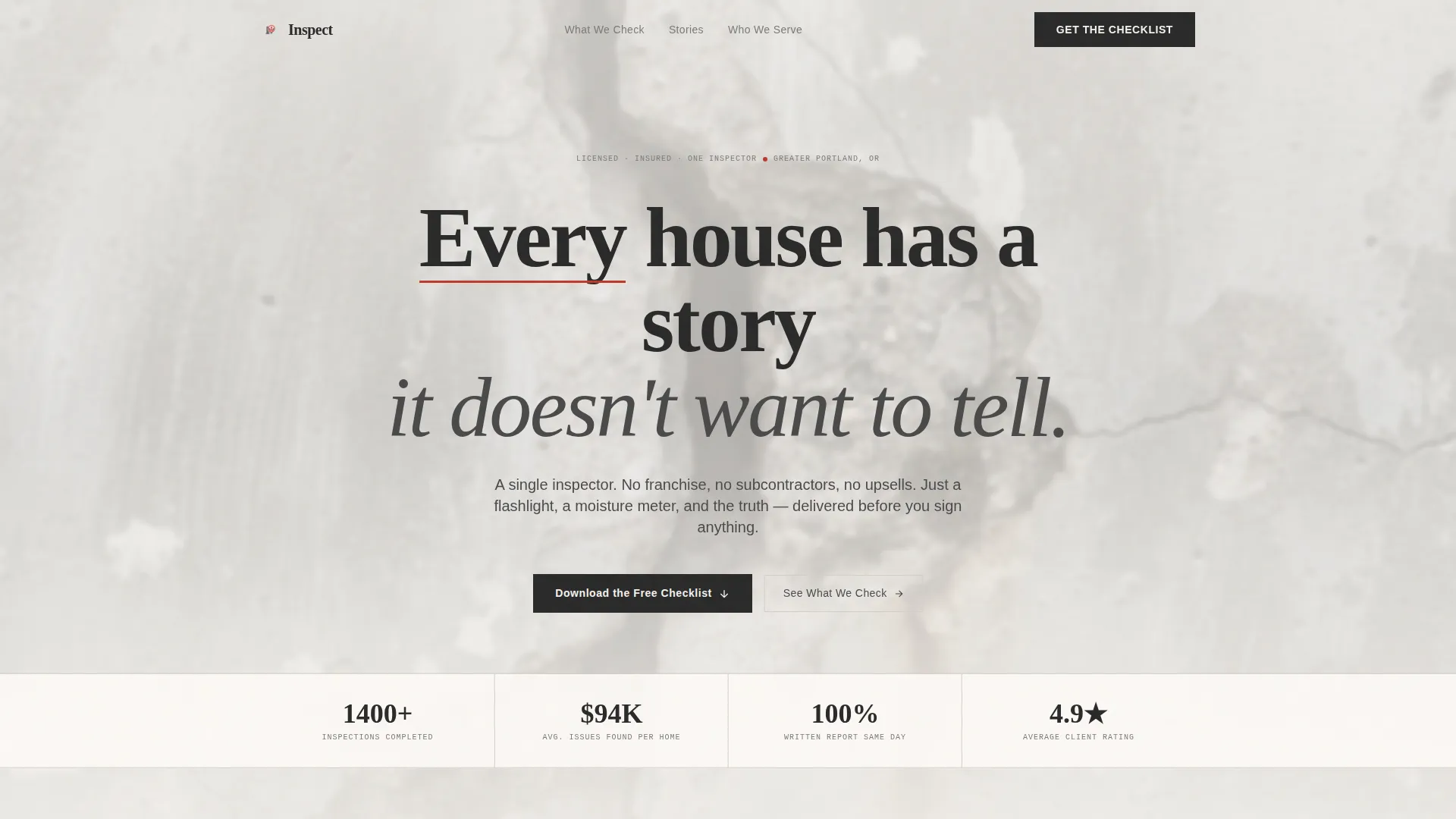
- A quote-driven manifesto header set against a foundation-crack background photograph
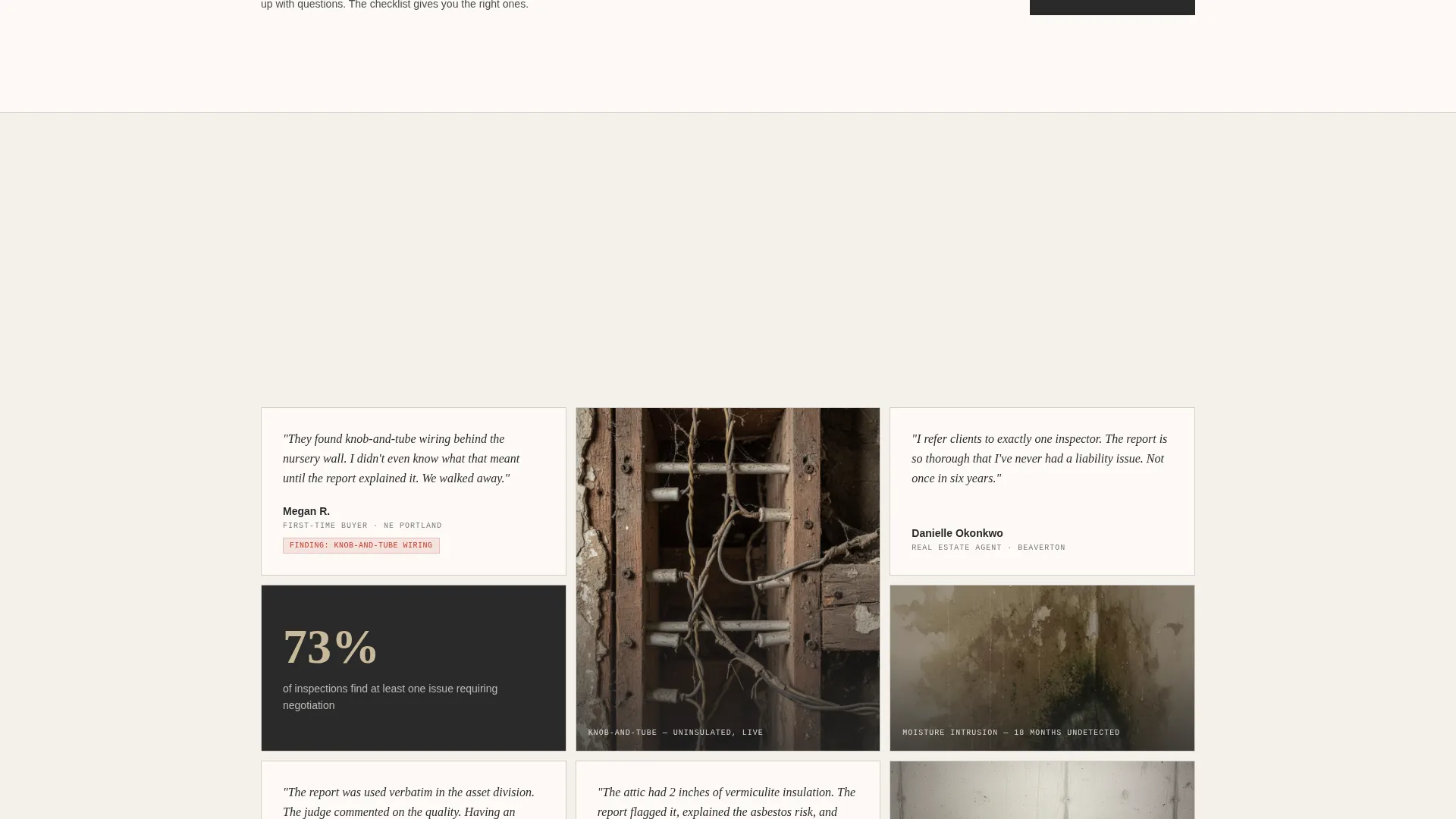
- A scrolling testimonial mosaic pairing real buyer quotes with specific findings and dollar amounts
- A gated checklist download form and an ungated room-by-room visual breakdown as a secondary path
Feature list
This template includes purpose-built sections that work together as a single persuasive flow. Each feature below reflects what the brief describes as part of the delivered layout.
Quote and Manifesto Header
The page opens with a bold serif headline set against a close-up foundation-crack photograph, slightly out of focus. The quote reads as texture, not alarm. A single red underline beneath one word carries the full visual weight of the section.
Testimonial Mosaic Grid
A scrolling grid pairs real homebuyer quotes with the specific inspection findings behind them. Each tile includes a close-up photo of the actual issue. The mosaic grows denser as visitors scroll, building an evidence-based case for why inspection matters.
Gated Checklist Download
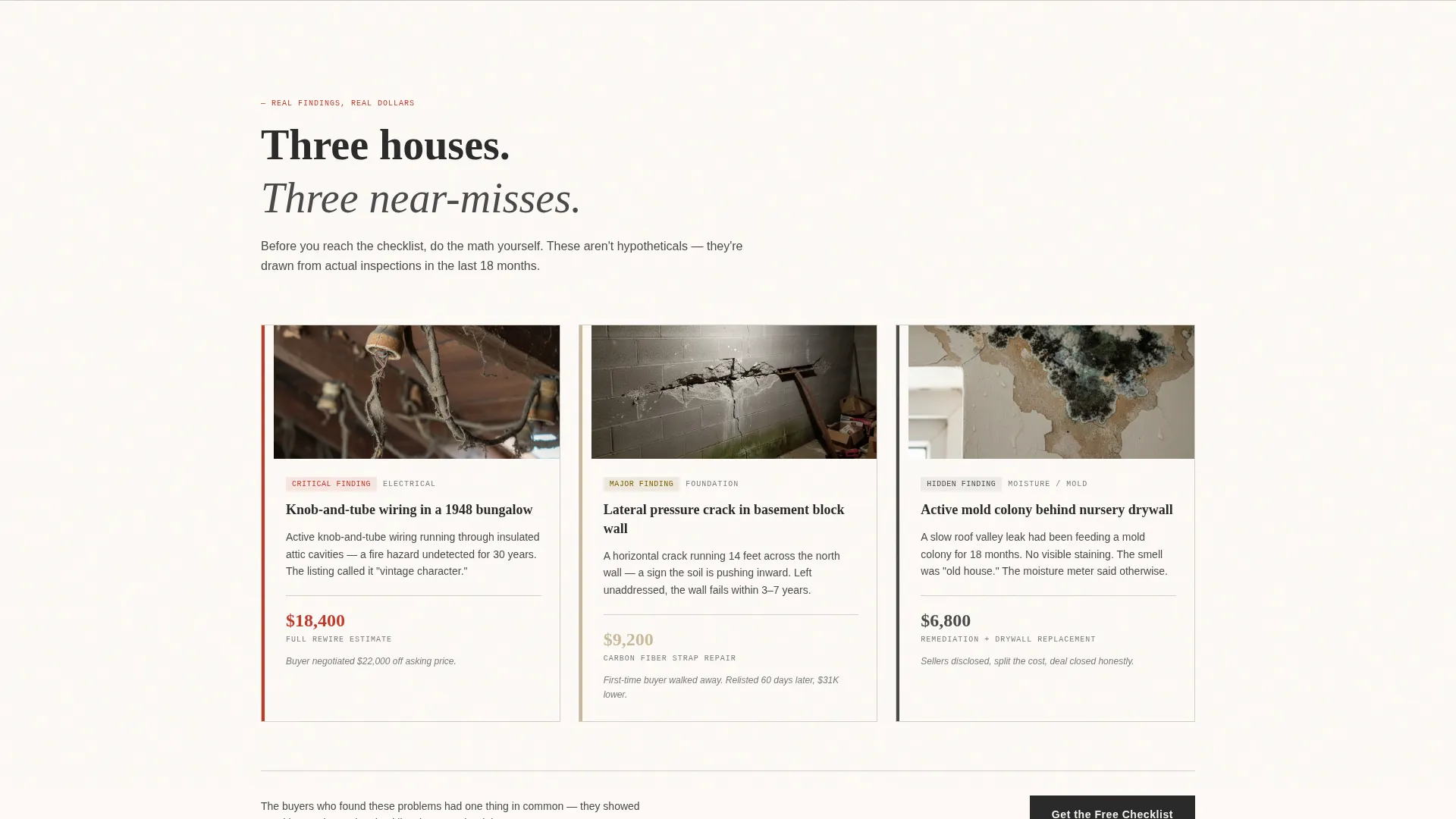
The primary call to action is a downloadable First-Time Buyer Inspection Checklist. Visitors enter their email address and zip code to receive it. Before reaching the form, they see three real findings with dollar amounts attached, so the value of the checklist is obvious before they commit.
Room-by-Room Visual Breakdown
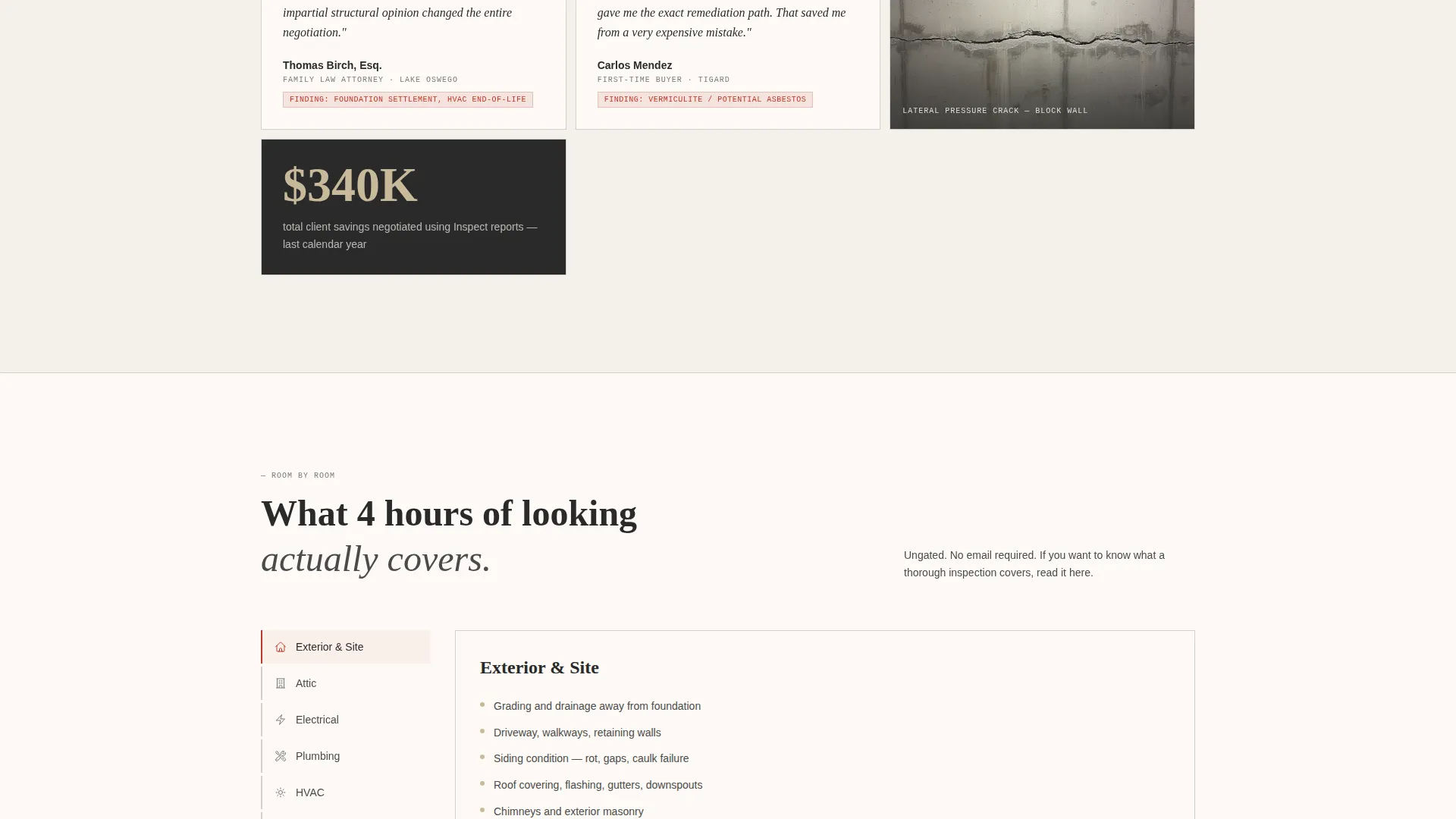
A secondary, ungated content path shows visitors exactly what the inspector checks in each area of a home. This section functions as free educational content and keeps non-converting visitors engaged without requiring a form submission.
Dollar-Anchored Finding Previews
Three real inspection findings with repair cost estimates are displayed before the checklist form. Visitors calculate the value of an inspection themselves before seeing the call to action. The math does the persuasion.
Cloud Canvas Color System
The palette uses soft overcast white, pencil-graphite gray, clipboard tan, and notation red. Red appears only on callouts and critical findings. Every other element stays quiet so that red marks carry genuine urgency when they appear.
Page sections overview
| Section | Purpose |
|---|---|
| Manifesto Header | Opens with a bold quote and foundation-crack background to set a tone of honesty |
| Testimonial Mosaic Grid | Pairs buyer stories with specific findings to prove inspection value through real evidence |
| Dollar Finding Previews | Shows three real findings with cost estimates before the checklist form appears |
| Checklist Download Form | Gates the First-Time Buyer Inspection Checklist behind email and zip code entry |
| Room-by-Room Breakdown | Provides ungated educational content showing what each home area inspection covers |
Design & branding system
The visual identity follows an Educational Guide theme built on the Cloud Canvas color system. The result feels like a well-worn field notebook left open on a dashboard, matte, unvarnished, and trustworthy in its plainness.
- Colors: soft overcast white (#F4F1EC), pencil-graphite gray (#4A4A4A), clipboard tan (#C9B99A), and notation red (#C0392B) reserved for callouts only
- Typography: bold serif fonts carry the manifesto header; body text stays legible and editorial in tone
- Photography direction: close-up, slightly out-of-focus structural detail images replace stock inspector portraits throughout
Mobile & speed optimization
The editorial layout is designed to read well at any screen width. Scrolling sections and mosaic grids adapt to smaller viewports without losing their narrative flow.
- The testimonial mosaic reflows from a multi-column grid to a single-column scroll on mobile devices
- Form fields for the checklist download are sized and spaced for easy touch input on phones and tablets
How this template helps you convert
The page is built around a Content and Resource model, where visitors receive something useful before they are asked for anything in return. That sequencing is deliberate.
- Dollar-anchored findings appear before the form, so visitors arrive at the call to action already convinced they need the checklist
- The ungated room-by-room breakdown keeps lower-intent visitors on the page, building familiarity with the inspector's expertise without requiring commitment
Other information about this template
This template is categorized under Professional Services with a specific focus on building inspector online presence. The editorial and magazine layout style makes it well suited for any solo inspection professional who wants their page to read more like a trusted guide than a service advertisement.
- Template style: Editorial and Magazine, with a Content and Resource landing page direction
- Header concept: Quote and Manifesto, using a Testimonial Mosaic creative direction for the body
- Theme: Educational Guide, reinforced through the room-by-room breakdown and checklist offer
- Best suited for one-person inspection operations, though the layout can support small inspection firms with similar positioning
Theme
Educational Guide
Creative direction
Testimonial Mosaic
Color system
Cloud Canvas
Style
Editorial/Magazine
Direction
Content/Resource
Page Sections
Quote and Manifesto Header
Scrolling Testimonial Mosaic
Dollar-anchored Finding Previews
Gated Checklist Download Form
Room-by-room Visual Breakdown
Cloud Canvas Color System
Related questions
Is this template designed for a solo inspector or a larger firm?
What makes this template different from a standard service page?
Can I use this template without the checklist download feature?
Who are the target visitors this template is designed to reach?
Does the template include the actual inspection checklist content?



