Appliance Repair & Booking Website Template
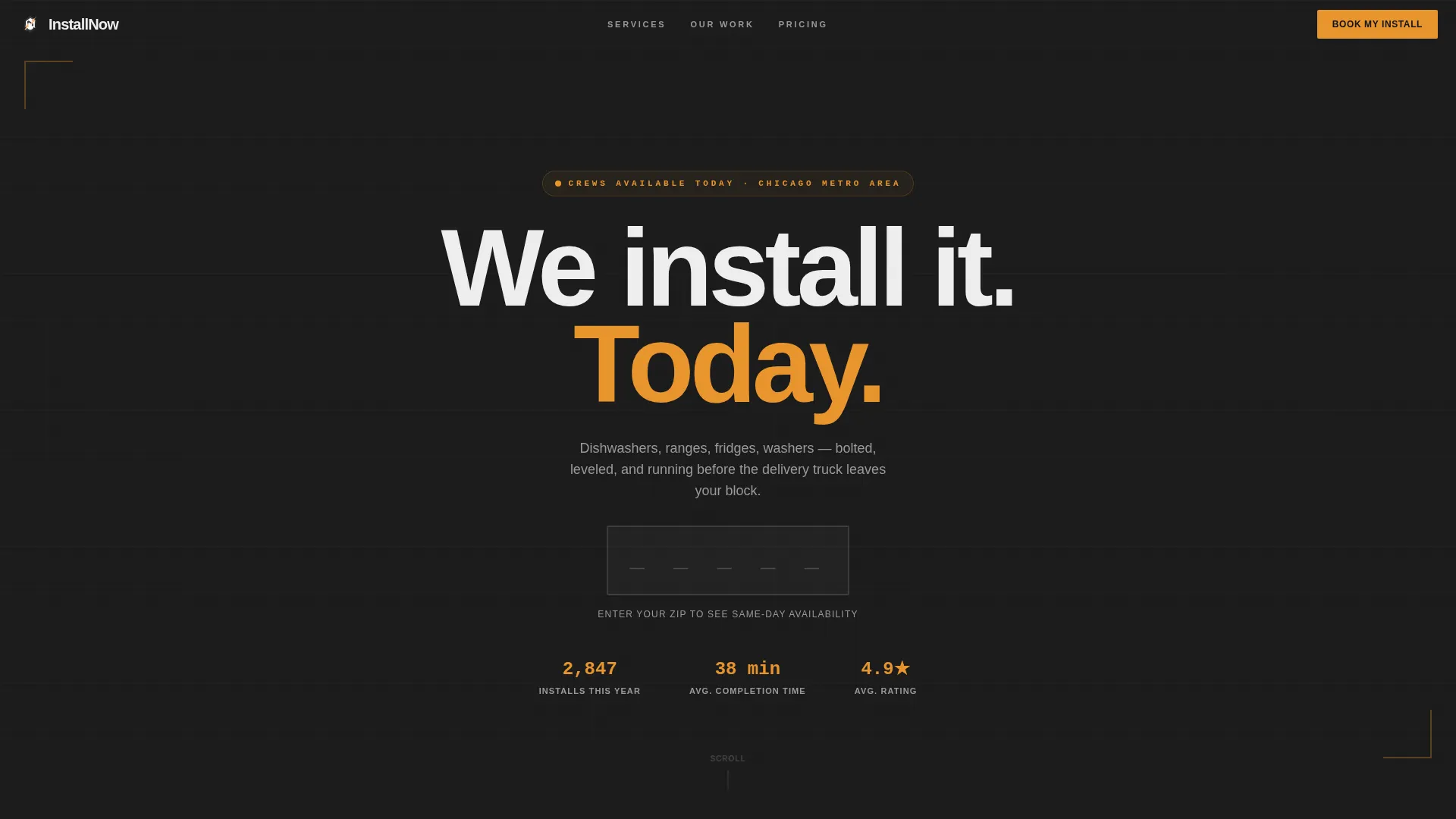
Installnow is a modular card-grid landing page built for appliance installation services. It opens with a live zip-code availability field, walks visitors through a Problem-to-Solution service card grid, and closes the deal with a three-step inline booking form. The Industrial Raw design keeps every clickable element in utility amber so the next action is always obvious.
by Rocket studio
Quick summary
Installnow is a single-page booking template for local appliance installation crews. It leads with a zip-code field that reveals same-day time slots, moves through a flipping service card grid that turns appliance pain points into solved states, and ends with a fast three-step form. The result is a focused, mobile-first page built to turn a stressed homeowner into a confirmed booking.
Who this template is for
This template is built for small appliance installation businesses that need to convert visitors quickly. It fits any team that handles residential installs on tight timelines and wants a page that works as hard as they do.
- Homeowners who need a dishwasher, washer, dryer, range, or refrigerator installed today
- Landlords managing unit turnovers on 48-hour deadlines
- Property managers coordinating multiple appliance swaps across a portfolio
What problem this template solves
Most local service businesses rely on generic contact forms that lose customers before the first message is even sent. Visitors with an urgent need do not want to wait for a callback. They want to know if you are available right now and how fast they can lock in a time slot.
- No clear availability signal means visitors bounce before booking
- Long or confusing forms create friction exactly when urgency is highest
- Generic service pages fail to show proof that the job gets done fast and clean
What you get with this template
You get a complete single-page layout structured around one goal: converting a visitor into a scheduled appliance installation appointment. Every section earns the next scroll with evidence before asking for commitment.
- A hero section with a live zip-code field that cascades same-day time slots on entry
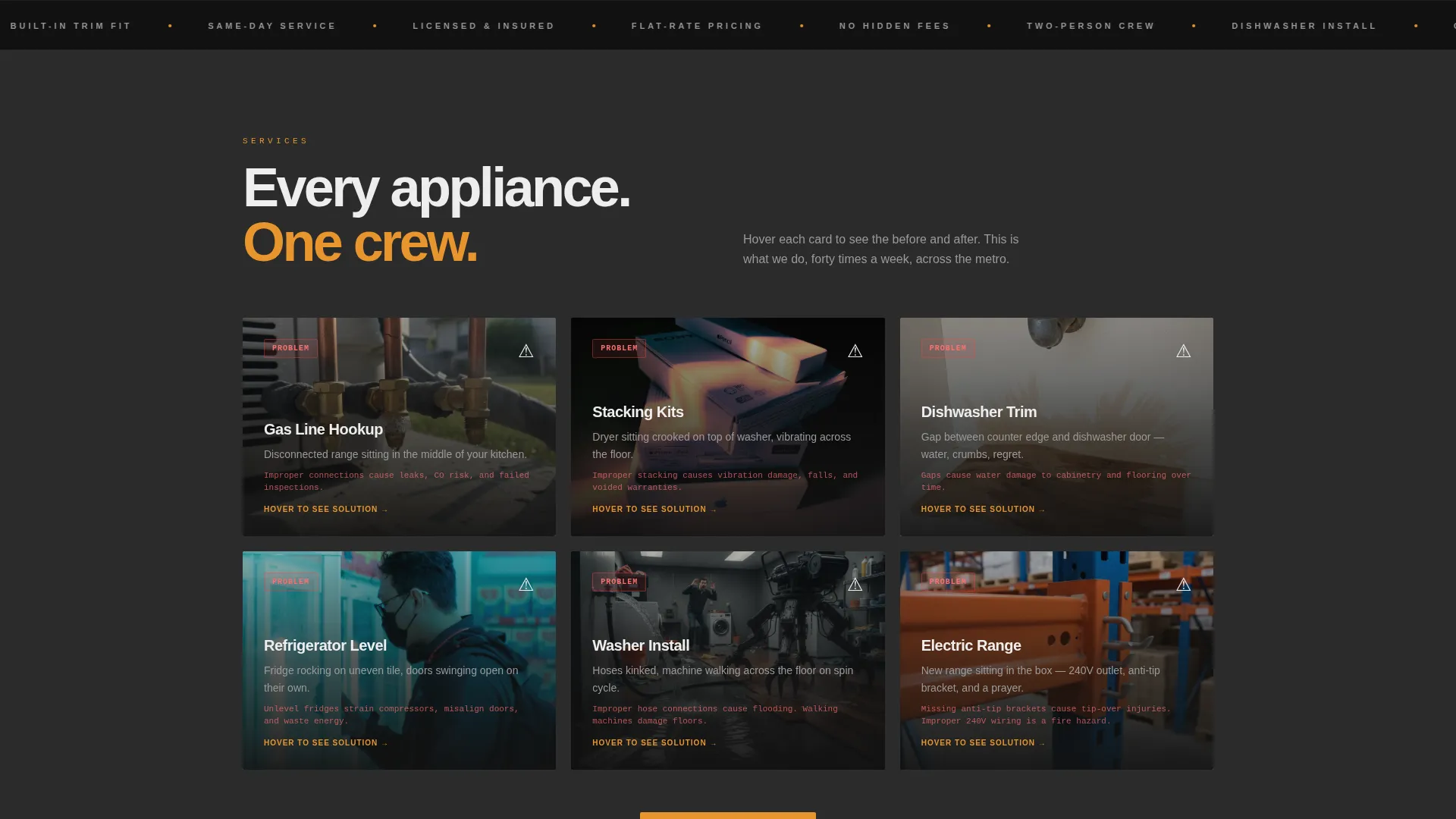
- A six-card Problem-to-Solution service grid with CSS flip animations on hover
- A three-step inline booking form with an icon-based appliance selector
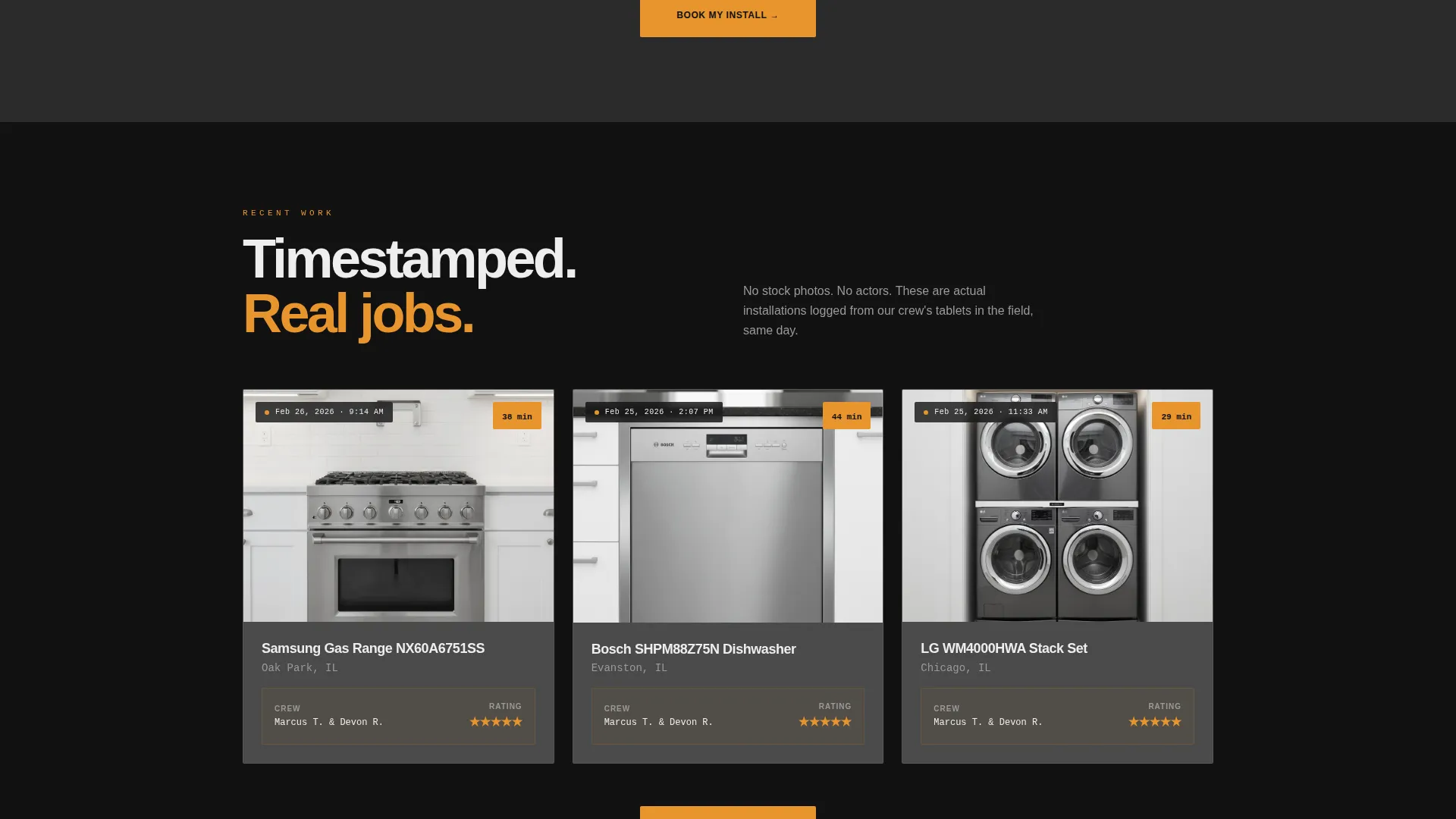
- A timestamped proof row showing real install records with completion times
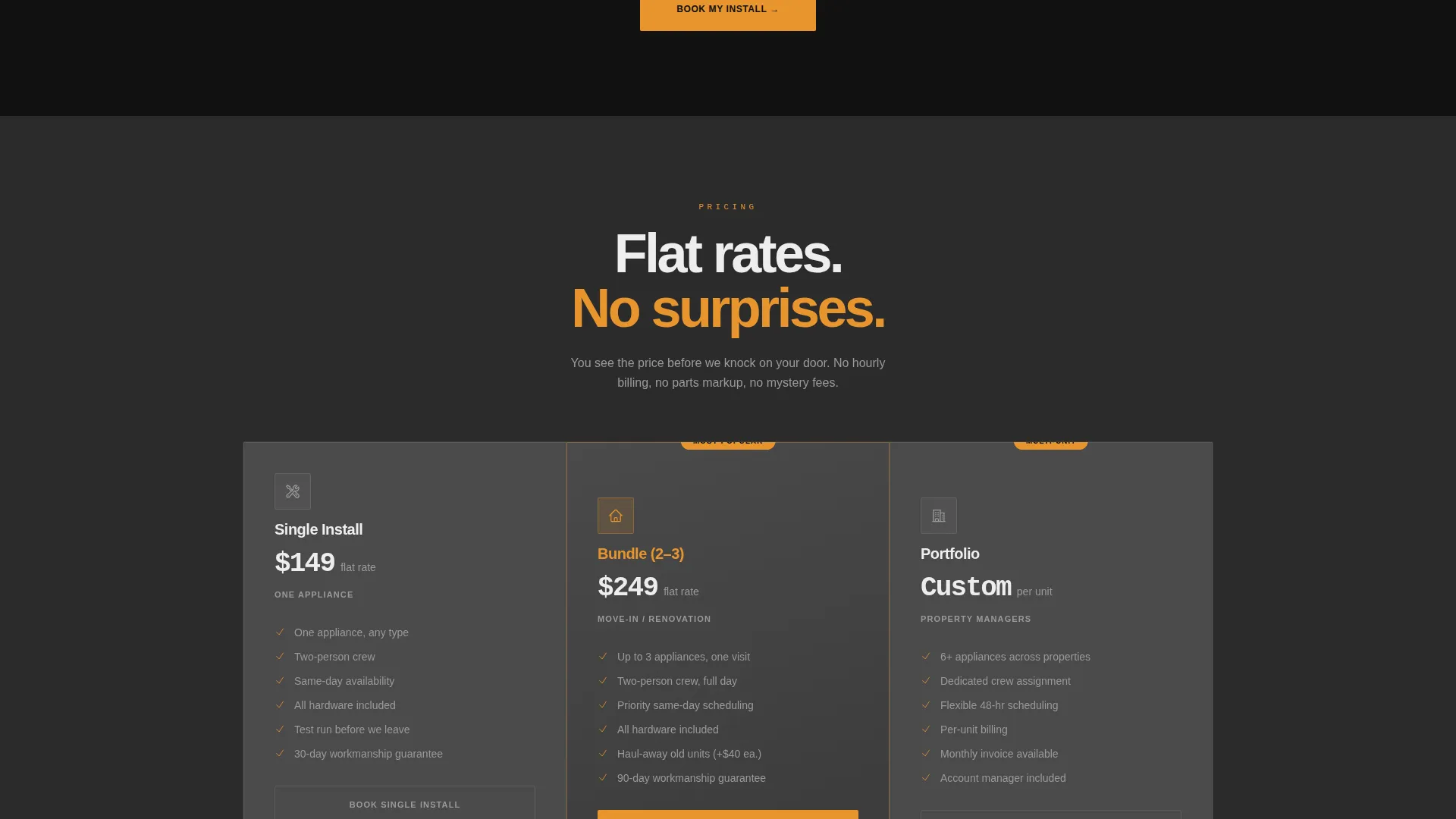
- A three-column pricing grid covering Starter, Pro, and Portfolio tiers
- A text-message chat widget triggered by a secondary "Not sure what you need?" path
Feature list
This template is built around interactivity and proof. Every component earns its place by moving a hesitant visitor closer to booking.
Live Zip-Code Availability Field
The hero opens with a single oversized zip-code input on a dark textured background. When a visitor enters five digits and submits, available same-day time slots cascade into view. The static header becomes a live scheduling interface without a page reload.
Problem-to-Solution Flip Card Grid
Six service cards cover the most common appliance install scenarios: gas line hookups, stacking kits, built-in trim fitting, and more. Each card shows the unsolved problem state on the front. On hover, the card flips to reveal the resolved, flush, and finished result.
Three-Step Inline Booking Form
The primary call to action opens a short inline form. Step one uses an icon selector to identify the appliance type. Step two offers a date picker with morning or afternoon window choices. Step three collects name, address, and phone number. The whole flow is designed to take under 30 seconds.
Timestamped Install Proof Row
A dedicated row below the service grid shows real installation photos paired with completion timestamps and location details. Floating stat cards reinforce speed and volume. This section converts skepticism into confidence before the pricing section appears.
Pinned Mobile Booking Button
On mobile devices, the "Book My Install" button in utility amber stays pinned to the bottom of the viewport at all times. Visitors never have to scroll back up to take action, which is critical when they are standing in their kitchen holding a phone.
Three-Column Pricing Grid
A clear pricing section presents three tiers side by side: Starter for single-appliance homeowners, Pro for landlords with one unit, and Portfolio for property managers handling multiple swaps. Each tier uses amber callouts to highlight the price and the primary action.
Page sections overview
| Section | Purpose |
|---|---|
| Hero zip field | Reveal same-day availability by zip code |
| Service card grid | Show Problem-to-Solution flip cards for six appliance types |
| Timestamped proof row | Display real install records with completion times |
| Three-column pricing | Present Starter, Pro, and Portfolio tier options |
| Inline booking form | Collect appliance type, schedule, and contact details in three steps |
| Footer row | Provide a single linear row with contact and navigation links |
Design & branding system
The visual identity follows an Industrial Raw direction built around a Charcoal and Amber color system. The palette is disciplined: charcoal and graphite hold everything still, and amber appears only where action is required.
- Workshop charcoal (#2B2B2B) as the primary page background and brushed graphite (#4A4A4A) on card surfaces
- Utility amber (#E8952E) reserved exclusively for buttons, price callouts, and interactive elements
- Concrete white (#EDEDED) for all body text, with Manrope for bold headings and JetBrains Mono for timestamps and data values
Mobile & speed optimization
This template is built mobile-first because its primary user is a homeowner standing in their kitchen with a phone. Every layout decision prioritizes thumb-friendly interaction and fast task completion.
- The zip-code field, card grid, and booking form all reflow cleanly to single-column mobile layouts
- The amber "Book My Install" button pins to the bottom of the viewport on mobile so the call to action is always one tap away
- GSAP ScrollTrigger animations and CSS card flips are scoped to interactive client components while static sections use server-rendered markup for leaner initial loads
How this template helps you convert
Conversion is built into the page structure, not bolted on as an afterthought. The entire layout follows a deliberate arc from urgency to proof to commitment.
- The zip-code field creates an immediate availability signal that hooks visitors before they consider leaving, replacing vague promises with a live scheduling moment.
- The Problem-to-Solution card grid and timestamped proof row build trust progressively, showing the exact pain point and its resolved state before asking for any personal information.
- The three-step booking form keeps commitment friction as low as possible, with an icon selector replacing typed input in step one and a total completion time under 30 seconds.
Other information about this template
This template is part of the Construction and Home category under the Appliance Repair and Service subcategory. It is designed specifically for the appliance installation service niche and reflects USA-market conventions including USD pricing, MM/DD/YYYY date formatting, and imperial measurements throughout.
- The page uses high-level animation: GSAP ScrollTrigger for scroll reveals, CSS flip transitions on service cards, and a zip-code cascade effect in the hero
- A secondary conversion path labeled "Not sure what you need?" opens a text-message chat widget for visitors who are uncertain about their appliance type or scope
- The footer follows a linear single-row pattern keeping the page exit clean and focused
- The template style is Card Grid (Modular), which makes individual service cards easy to update, reorder, or expand as a crew adds new appliance types to their offering
Theme
Industrial Raw
Creative direction
Problem→Solution Arc
Color system
Charcoal & Amber
Style
Card Grid (Modular)
Direction
Booking/Scheduling
Page Sections
Live Zip-code Scheduling Field
Problem-to-solution Flip Cards
Three-step Inline Booking Form
Timestamped Install Proof Row
Pinned Mobile Call-to-action
Three-tier Pricing Grid
Related questions
What appliance types does this template cover?
Can I update the pricing tiers to match my own rates?
How does the zip-code availability feature work in the template?
Is this template suitable for a property manager handling multiple units?
What if a visitor is unsure which service they need?



