Insurance Agency Multi-Department Agent Finder Website Template
Insure is a hub-and-spoke insurance agency landing page built around a live premium estimator, department-level anchor navigation, and an app download call to action. Visitors find the right agent in under thirty seconds. Deep teal, midnight navy, and warm amber form a palette that feels clinical enough to trust and decisive enough to act on.
by Rocket studio
Quick summary
Insure is a single-page insurance agency contact template that turns policy confusion into fast, confident action. An interactive premium estimator greets visitors at the top. A sticky anchor nav guides them to the right department. Stats build trust on every scroll, and a floating app download bar closes the loop on mobile.
Who this template is for
This template is built for insurance agencies that need more than a generic contact page. It works especially well when your team covers multiple policy lines and your visitors arrive with very different needs.
- Independent and mid-size insurance agencies managing auto, home, life, and commercial lines
- Agencies wanting to route first-time buyers, small-business owners, and families to the right agent quickly
- Teams ready to drive mobile app adoption alongside traditional phone and web inquiries
What problem this template solves
Most insurance agency pages dump every policy type, phone number, and agent name into one long scrollable wall. Visitors leave without calling because they cannot figure out who handles their specific situation.
- Visitors cannot identify the right agent or department without reading everything on the page
- First-time buyers and small-business owners feel overwhelmed before they even start a quote
- Agencies lose mobile visitors who want a faster path than a full web form
What you get with this template
You get a fully structured landing page that organizes every department, agent, and contact path into one guided experience. The layout does the sorting so your visitor does not have to.
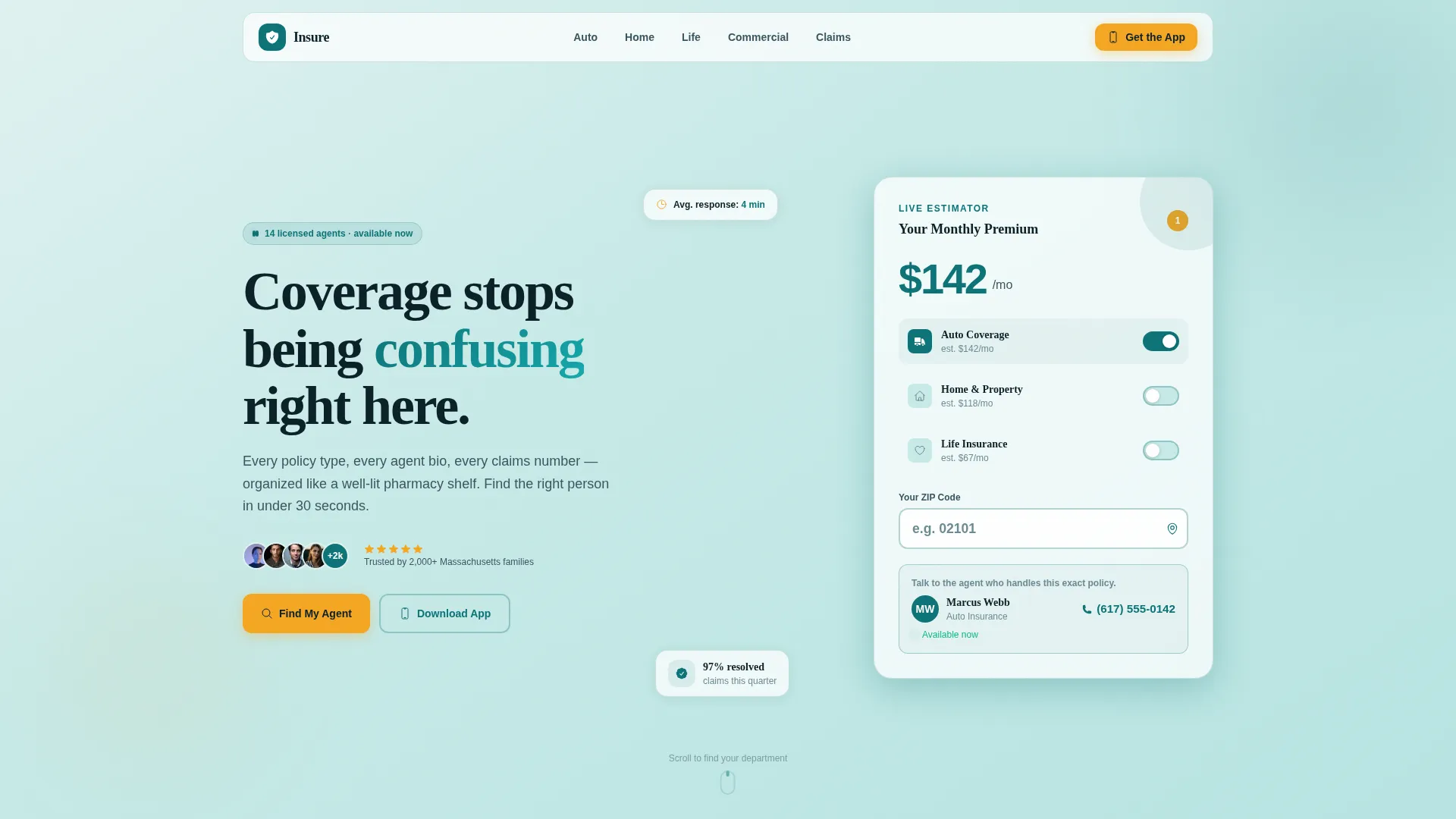
- An interactive header estimator with three policy toggles (Auto, Home, Life), a zip-code input, and a live recalculating premium figure
- A sticky left-rail anchor nav linking to department spoke sections for Auto, Home, Life, Commercial, and Claims
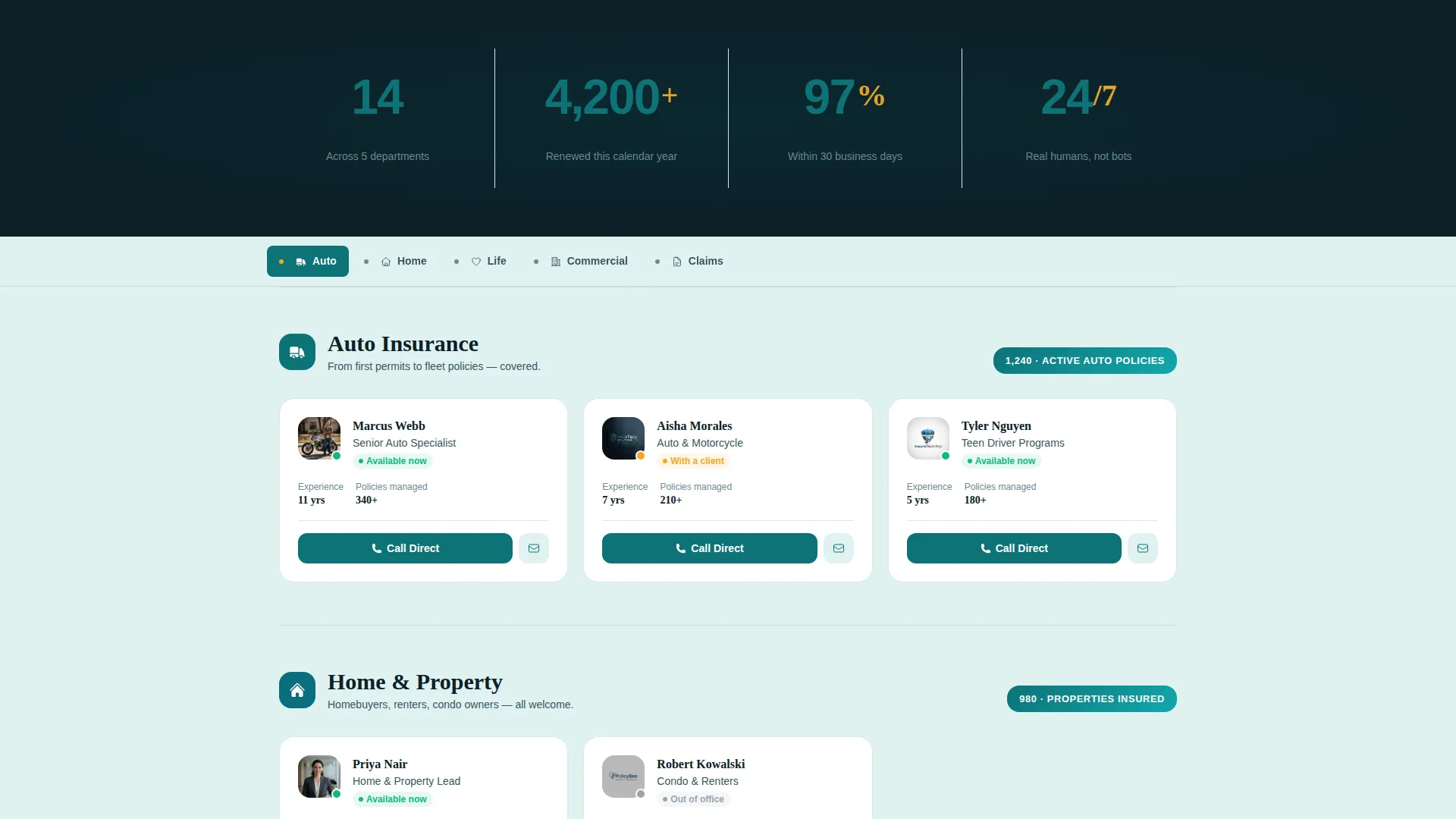
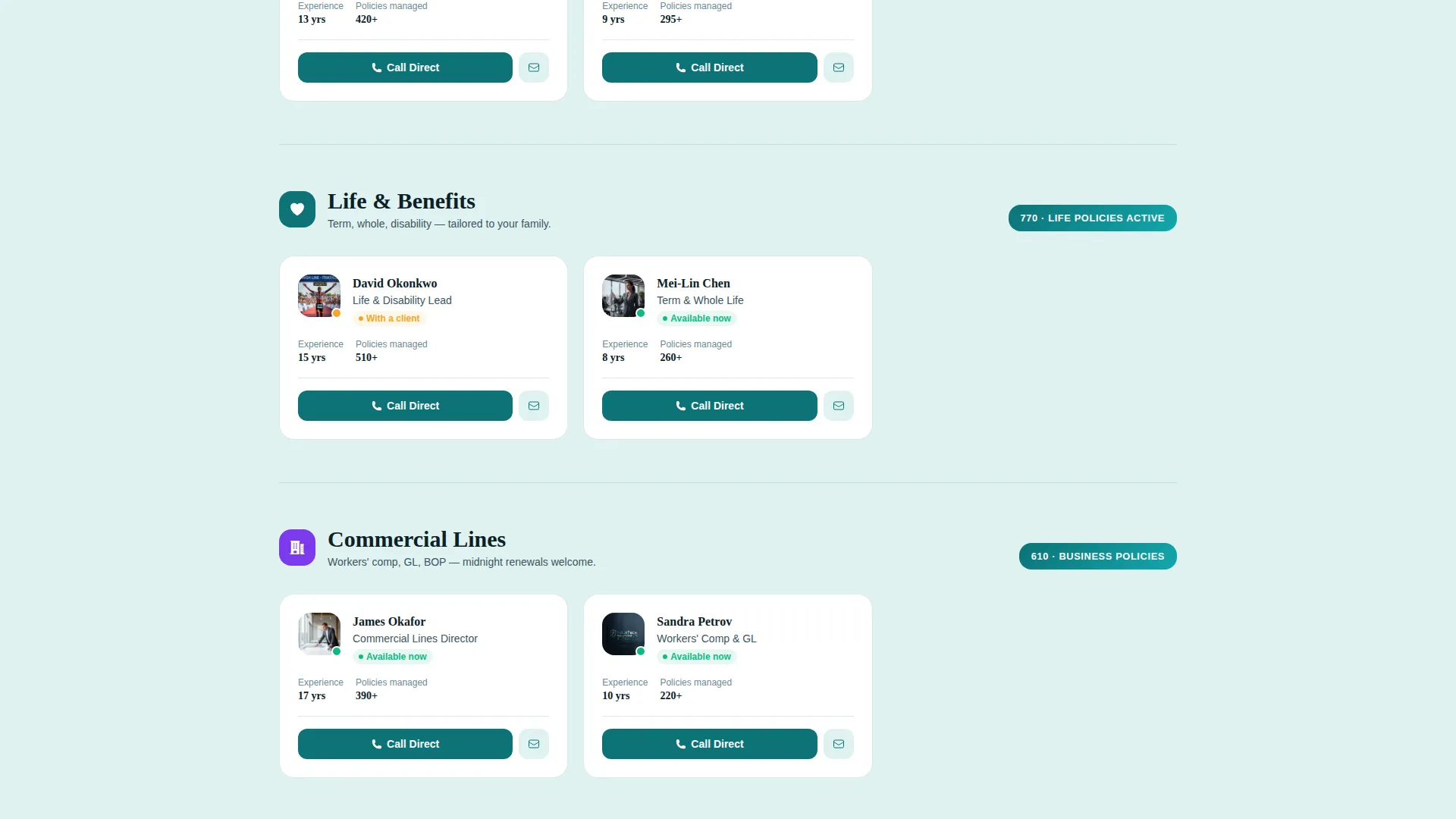
- Agent cards with direct phone numbers and availability badges inside each department section
- A stats impact row featuring oversized counting numerals ("14 licensed agents," "4,200 active policies," "97% claims-resolution rate")
- A floating mobile bottom bar with a primary "Download Our App" call to action and a secondary "Text Me the Link" field
Feature list
This template combines discovery tools, social proof, and conversion paths into one cohesive flow. Each feature below comes directly from the page layout described in the brief.
Interactive Premium Estimator
A compact calculator floats over a soft mint header panel. Three toggle switches let visitors select Auto, Home, or Life coverage. A zip-code input field and a live dollar figure recalculate in real time as toggles change, making the estimate feel personal before any agent speaks.
Hub-and-Spoke Anchor Navigation
A sticky left-rail navigation lists five departments: Auto, Home, Life, Commercial, and Claims. Clicking any item scrolls the right panel to that spoke section. The layout narrows the visitor's search from broad agency overview down to a specific team without a page reload.
Department-Level Stats and Agent Cards
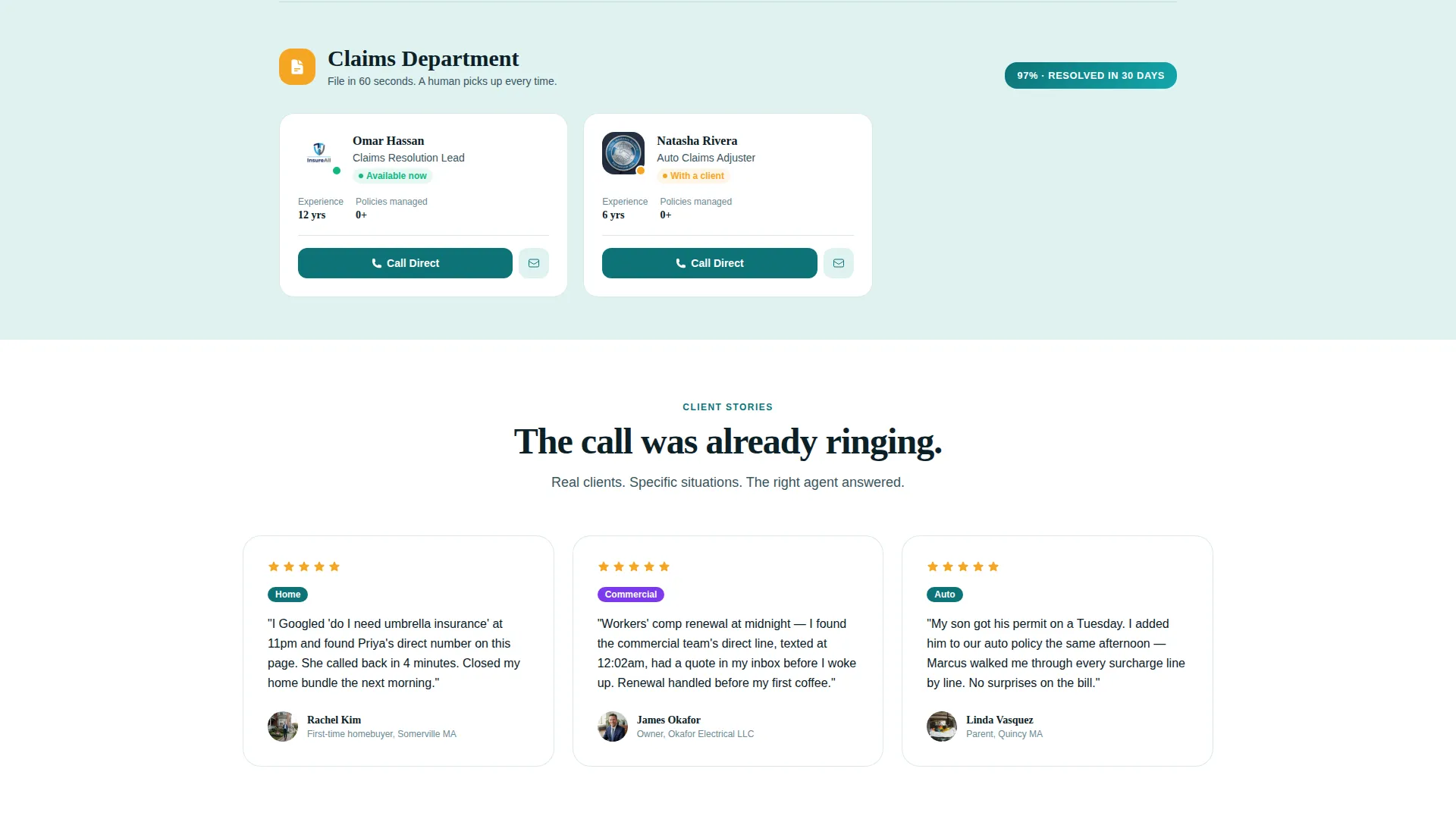
Each spoke section opens with one department-specific stat before revealing agent cards. Every card shows a direct phone number and an availability badge, so visitors know who is reachable right now rather than guessing from a generic directory.
Stats-First Impact Row
A full-width data row sits directly below the estimator. Three key figures count up as they enter the viewport. The animation draws attention and builds credibility before the visitor reads a single agent bio.
Floating App Download Bar
On mobile, a persistent bottom bar pins the primary call to action in warm amber. It appears after the estimator interaction. A secondary "Text Me the Link" field with a single phone-number input gives an alternative path for visitors who prefer not to tap through to an app store.
Estimator-to-App Continuity
The visitor's estimator selections carry forward into the app onboarding flow. The coverage type and zip code chosen on the landing page are not lost when the visitor taps through to download. This single continuity detail removes a meaningful friction point in the conversion path.
Page sections overview
| Section | Purpose |
|---|---|
| Premium Estimator Header | Opens the page with an interactive quote tool and a direct agent prompt |
| Stats Impact Row | Displays agency-wide proof figures that count up on scroll |
| Anchor Nav Rail | Provides sticky department links for fast in-page navigation |
| Auto Department Spoke | Shows Auto stat, agent cards, and direct contact details |
| Home Department Spoke | Shows Home stat, agent cards, and direct contact details |
| Life Department Spoke | Shows Life stat, agent cards, and direct contact details |
| Commercial Department Spoke | Shows Commercial stat, agent cards, and direct contact details |
| Claims Department Spoke | Shows Claims stat, agent cards, and direct contact details |
| App Download Bar | Pins the primary mobile call to action and secondary text-link option |
Design & branding system
The Teal Catalyst color system was chosen to feel like the calm authority of a medical waiting room crossed with the decisive clarity of a green traffic light. Every color has a specific job in the layout.
- Deep policy teal (#0D7377) anchors primary headings, stat numerals, and the left-rail nav
- Midnight claim navy (#0B2027) handles body text, section dividers, and agent card borders for sharp readability
- Soft underwriter mint (#E0F2F1) washes background panels to create breathing room between dense data sections
- Warm amber (#F5A623) is reserved exclusively for buttons, badge counts, and the active navigation dot so every actionable element stands out immediately
Mobile & speed optimization
The layout was designed with mobile insurance visitors in mind. The floating app download bar and the estimator interaction are both built for one-thumb use.
- The floating bottom bar on mobile pins the primary call to action after the estimator proves value, keeping it visible without blocking content
- The "Text Me the Link" field requires only a phone number, reducing form friction for visitors on small screens
- Each department spoke section keeps agent cards compact and scannable, so a visitor on a mobile device can read a name, see a badge, and tap a number in one short stop
How this template helps you convert
Every section in this template is sequenced to move a visitor from confusion to confident contact. The layout does not ask for commitment before it delivers value.
- The premium estimator delivers a personal figure before any form asks for personal data, building trust through utility rather than promises
- The stats row and department spoke sections layer in specific credibility at every scroll point, so confidence grows as the visitor moves down the page
- The floating app download bar and "Text Me the Link" option give mobile visitors two low-friction exit ramps that convert without requiring a full quote submission
Other information about this template
This template fits naturally into a broader insurance agency digital presence and can serve as the primary contact and discovery hub for agencies at different growth stages.
- The template style is Hub and Spoke with Anchor Nav, making it straightforward to extend with additional department spokes if your agency adds new policy lines
- The Directory and Discovery theme means the design prioritizes findability over storytelling, which suits agencies where the visitor already knows they need coverage and just needs the right contact
- The Stats-First Impact creative direction is particularly effective for agencies that have concrete numbers to share, because the counting animation draws attention before any marketing copy competes for it
Theme
Directory & Discovery
Creative direction
Stats-First Impact
Color system
Teal Catalyst
Style
Hub & Spoke (Anchor Nav)
Direction
App Download
Page Sections
Interactive Premium Estimator
Hub-and-spoke Anchor Navigation
Department Stats and Agent Cards
Stats-first Impact Row
Floating App Download Bar
Estimator-to-app Continuity
Related questions
Can I update the agent cards and phone numbers myself?
Does the premium estimator connect to a live quoting system?
How does the floating app download bar behave on desktop?
Can I add more departments to the anchor navigation?
Is this template suitable for a single-agent agency?



