College Savings Planning Landing Page Template
Shield is a sidebar companion landing page template built for millennial education savings services centered on the 529 plan. It pairs a Plum Executive color system with a Problem→Solution Arc narrative, animated data storytelling in the hero, a live savings calculator, and a freemium "Build My 529 Blueprint" PDF flow, giving financial planning services a confident, authoritative presence that moves anxious parents toward action.
by Rocket studio
Quick summary
Shield is a single-page sidebar companion template designed for 529 college savings planning services. It opens with an animated tuition counter, walks visitors through a clear account type comparison, and resolves in a personalized savings roadmap. The Plum Executive palette and Legal Shield theme project calm authority. The freemium conversion model lets visitors generate a downloadable plan before committing an email address.
Who this template is for
This template is built for financial planning services and independent advisors who help families save for higher education through tax-advantaged accounts. It speaks directly to the people sitting across the desk, or staring at a browser tab at midnight, trying to figure out where to start.
- Dual-income millennials with toddlers researching a 529 plan for the first time, looking for clarity without condescension
- First-generation wealth builders who need plain-language guidance before they consult a financial professional or tax advisor
- Divorced parents who need clean, auditable contribution records and a clear plan description they can share with co-parents or an attorney
What problem this template solves
Most education savings landing pages either overwhelm visitors with compliance language or undersell the urgency of starting now. Neither approach converts. Tuition inflation compounds silently while families delay decisions because the choices feel too complex. This template solves the conversion gap by making the stakes visible and the path forward obvious.
- Visitors arrive confused about whether a 529 plan, a Uniform Transfers to Minors Act account, or a Coverdell Education Savings Account is right for their situation, and leave with a side-by-side comparison in plain language
- New parents often underestimate how quickly education costs accelerate; the animated hero counter makes the real numbers impossible to ignore
- Many families delay investing because they fear making the wrong choice; the freemium PDF roadmap lowers the barrier so visitors can save progress and request a full projection without pressure
What you get with this template
Shield delivers a fully structured single-page layout with a persistent sidebar that evolves as the visitor scrolls. Every section is purpose-built for the education savings niche, from the opening data visualization through the account type comparison to the interactive savings calculator.
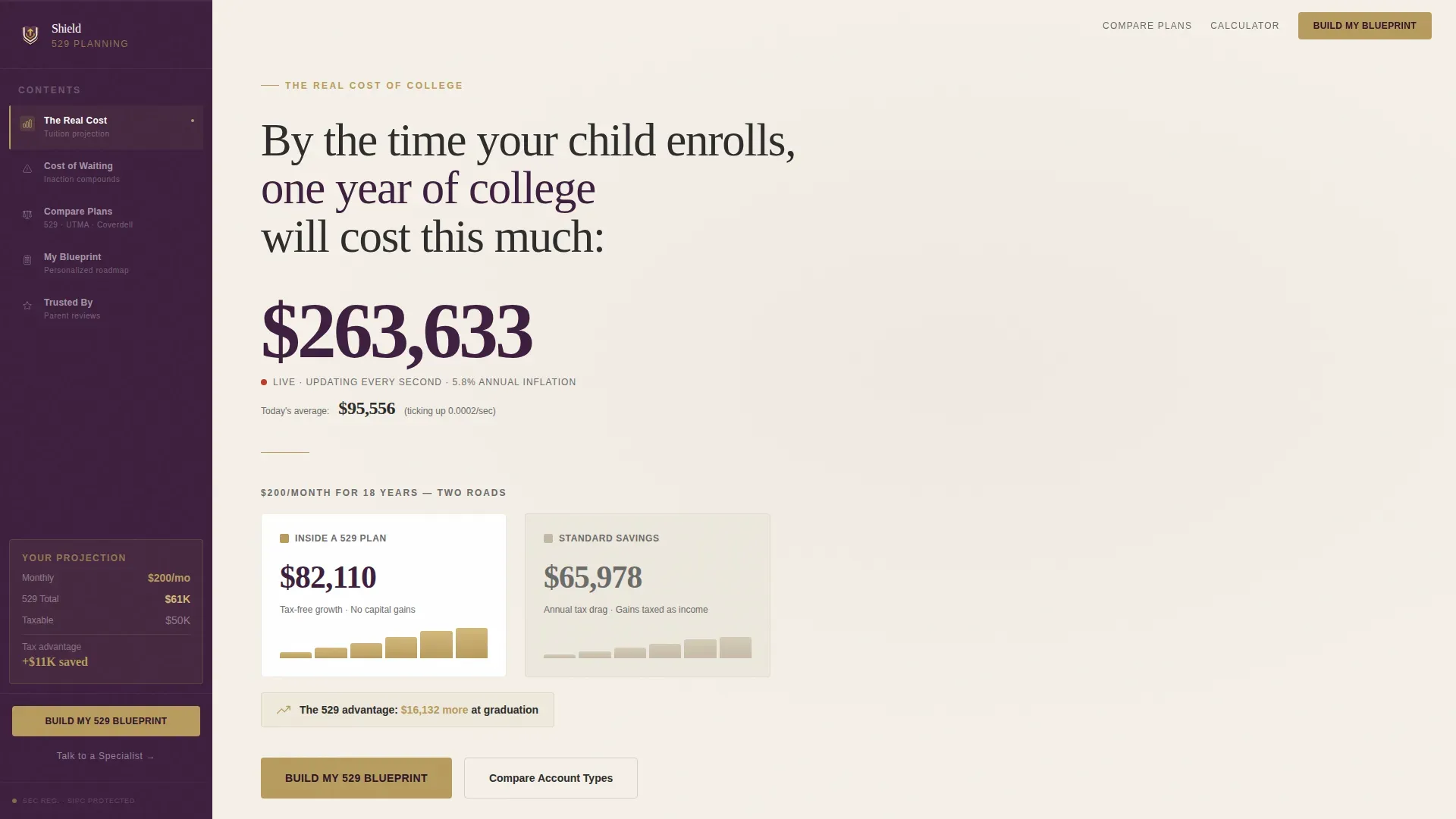
- A hero section with an animated tuition counter and diverging 529 plan versus standard savings account projection lines, showing the tax free growth gap in real time
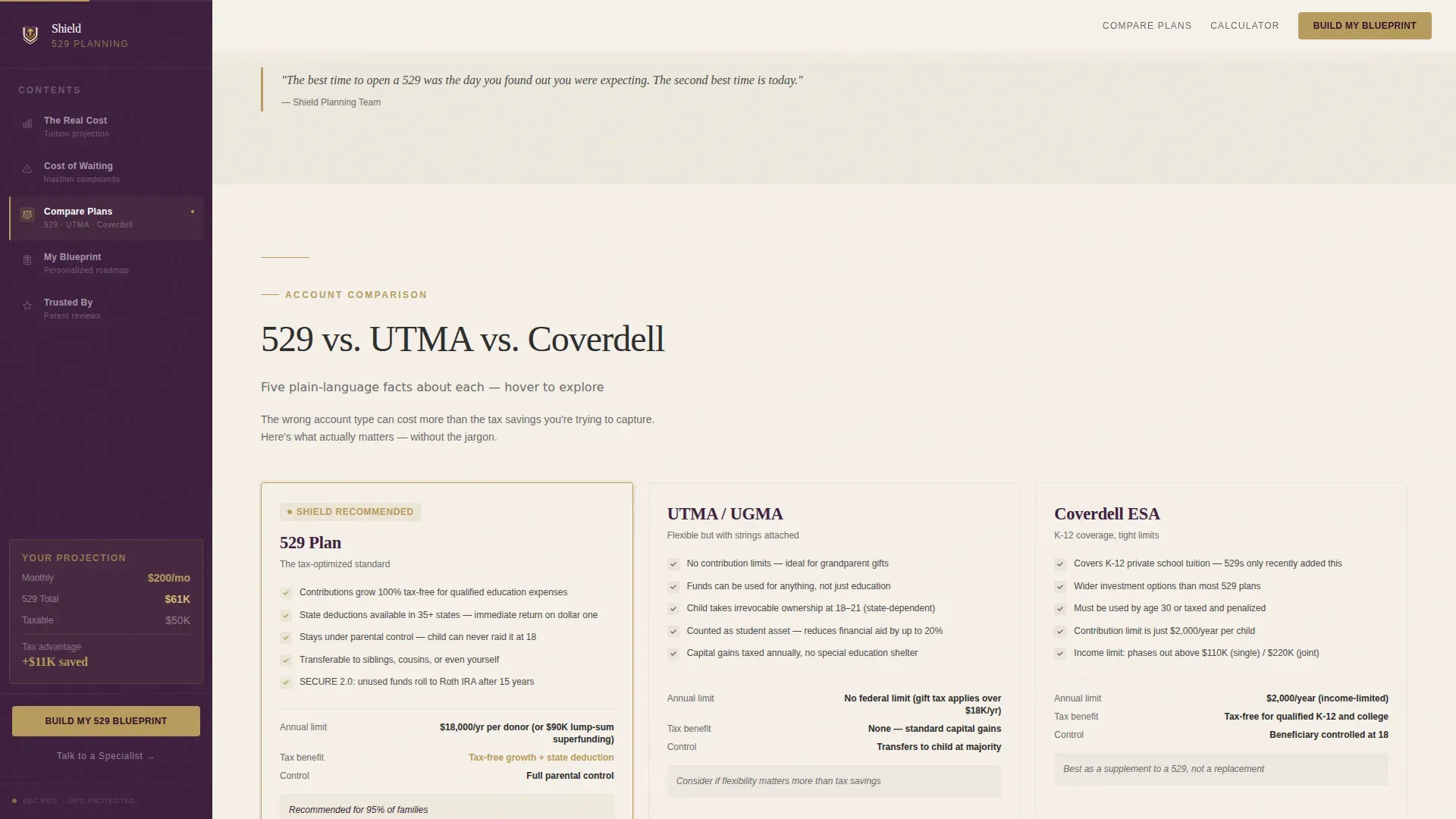
- A three-way account comparison section covering the 529 plan, the Uniform Transfers to Minors Act account, and the Coverdell Education Savings Account, each reduced to five plain-language bullets
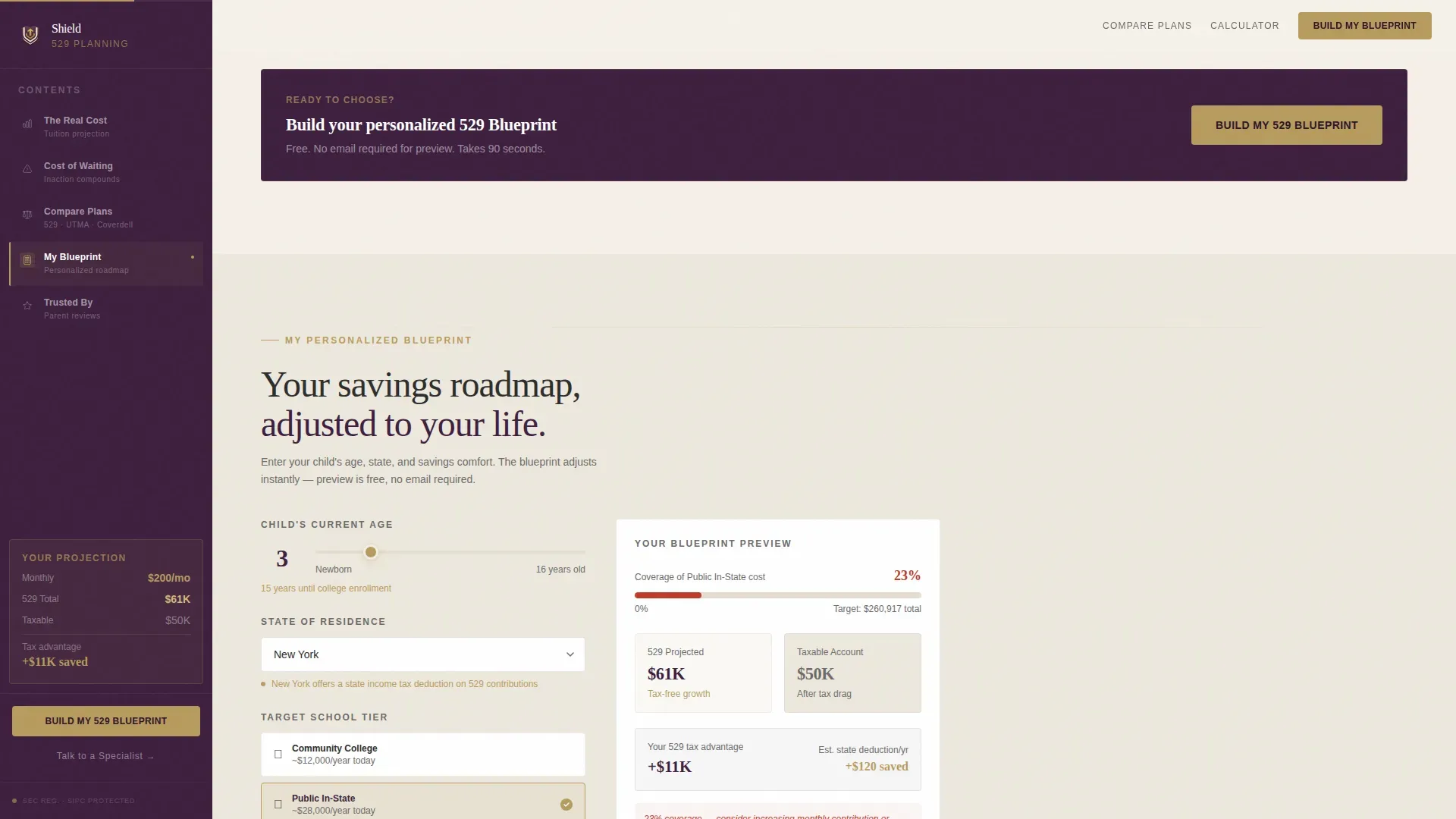
- A personalized savings roadmap calculator where visitors input their child's age, state of residence for state income tax deduction eligibility, and a monthly contributions slider, generating a downloadable PDF blueprint
Feature list
Shield's features are drawn directly from the template brief and reflect what the layout actually delivers to services in the millennial education savings space.
Animated Tuition Counter Hero
The hero opens with a live animated counter that calculates the projected cost of a four-year degree in the visitor's child's graduation year. Starting from today's figure and ticking upward using a 5.8% annual inflation rate, the counter makes education costs feel immediate. Below it, a second line shows how a $200 monthly contribution grows inside a tax-advantaged 529 plan account versus a standard savings account, two numbers diverging like splitting highways, one gold, one gray.
Evolving Sidebar Companion
The sidebar is not a static table of contents. It begins as navigation, transitions into a live calculator display, and ends as a summary of the visitor's selections. The sidebar tracks which account type the visitor hovers on longest during the comparison section, creating a sense that the plan is already responding to them. From the midpoint of the page onward, the primary call to action, "Build My 529 Blueprint", pins inside the sidebar in muted gold so it stays visible without interrupting the scroll.
Three-Way Account Type Comparison
The comparison section places the 529 plan, the Uniform Transfers to Minors Act account, and the Coverdell Education Savings Account side by side. Each account type gets exactly five plain-language bullets covering contribution rules, tax treatment, beneficiary flexibility, qualified expenses, and key limitations. Families can see at a glance which savings plan fits their situation without needing to consult a financial professional first.
Interactive 529 Savings Calculator
Visitors enter their child's age, their state of residence, and a monthly savings comfort range using a slider. The calculator produces a personalized savings roadmap that adjusts in real time. No email address is required to preview the output. Entering an email unlocks the full projection with school-specific cost modeling, making the email capture feel like a reward rather than a toll.
Freemium PDF Blueprint Flow
The primary conversion path generates a downloadable PDF roadmap. The free tier requires only the child's age, state, and monthly savings range. The full tier, unlocked by email, adds school-tier cost modeling. A secondary conversion path, a "Talk to a 529 Specialist" scheduling link, catches high-intent visitors who scroll past the calculator without engaging. Both paths respect where the visitor is in their decision process.
Social Proof and Credential Section
The template includes a dedicated section for parent testimonials with names and roles, advisor credential badges, and a compliance notice area for Financial Industry Regulatory Authority and Securities and Exchange Commission disclosures. This gives the service the legal authority aesthetic the brief calls for, the feeling of a letter from a competent professional who is already on your side.
Page sections overview
| Section | Purpose |
|---|---|
| Hero Counter | Animated tuition counter with diverging 529 versus. savings projection lines and sidebar table of contents |
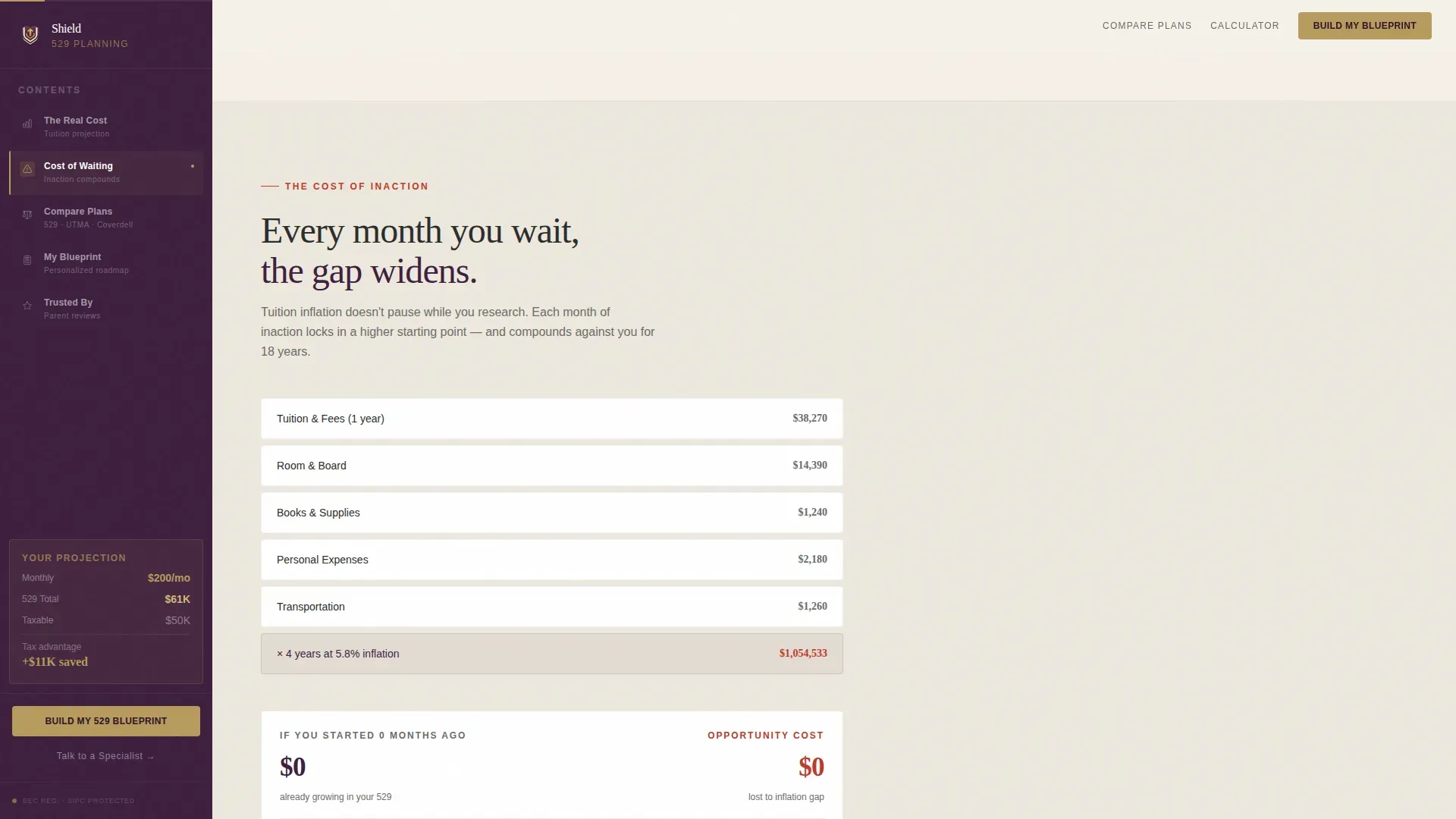
| Cost of Inaction | Problem section showing stacking dollar figures and anxiety-driven narrative around inaction |
| Account Type Comparison | Side-by-side 529 plan, Uniform Transfers to Minors Act, and Coverdell with five plain-language bullets each |
| Savings Roadmap Calculator | Interactive calculator for child's age, state of residence, and monthly slider; live output with PDF download |
| Social Proof | Parent testimonials, advisor credentials, and compliance notice |
| Footer | Linear single-row footer pattern |
Design & branding system
Shield uses the Plum Executive color system, a palette designed to feel like a leather portfolio left open on a mahogany desk. The visual language is authoritative without being cold, and expensive without being flashy. Every color has a specific role, and the system enforces that discipline throughout the layout.
- Deep plum (#3D1F3E) anchors the sidebar and all section headers; warm parchment (#F5F0E8) fills the main content canvas; muted gold (#B89B5E) appears exclusively on calls to action and progress indicators; charcoal ink (#2C2C2C) handles all body text
- Typography pairs Fraunces serif headlines with DM Sans body text, combining legal gravitas with the readable warmth that millennial audiences expect from a modern financial service
- The hero uses no stock photography and no smiling graduates, only two diverging numbers on a clean field, letting the data carry the emotional weight
Mobile & speed optimization
The template is designed desktop-first because the sidebar companion layout requires a viewport of at least 1024 pixels to function as intended. On smaller screens, the layout gracefully stacks into a single-column flow so mobile visitors still access every section in order.
- Static sections of the page use server-rendered components to keep initial load fast; interactive sections including the animated counter and the savings calculator use client-side components only where interactivity is required
- The sidebar pins and scrolls correctly on desktop, then collapses into contextual inline prompts on mobile so the "Build My 529 Blueprint" call to action remains accessible without occupying fixed screen space
How this template helps you convert
Shield is structured around a freemium conversion model that earns trust before it asks for anything. The layout moves visitors from anxiety to clarity in a deliberate arc, and every interactive element is designed to deepen engagement rather than interrupt it.
- The animated hero counter creates urgency by making future education costs tangible in the first five seconds; visitors who see the number ticking upward are primed to keep scrolling rather than bouncing
- The three-way comparison section earns enough trust that the "Build My 529 Blueprint" call to action feels like a logical next step rather than a sales push, because the visitor already understands which savings plan fits their goals
- The freemium PDF flow converts two types of visitors: those ready to engage immediately via the no-email preview, and high-intent but lower-confidence visitors who are caught by the scheduling link before they leave
Other information about this template
Shield is built specifically for the United States market, with English-language copy, United States dollar formatting, and logic that reflects federal 529 rules and state-level tax treatment. The template is designed for financial planning services, not individual investors, and is intended to be customized by the service deploying it.
- The 529 plan is authorized by Section 529 of the Internal Revenue Code. There are two types: Education Savings Plans and Prepaid Tuition Plans. Both allow the account owner to stay in control, even if the student defers college enrollment.
- Contributions to a 529 plan grow tax deferred, and withdrawals for qualified expenses are tax free at the federal level. Many states offer a state income tax deduction on contributions, and eligibility for that deduction depends on state residency. Residents of states like New Mexico can capitalize on strong state-level benefits; the Ohio 529 CollegeAdvantage plan allows gift contributions from grandparents and loved ones through a dedicated gifting feature.
- Families can choose from multiple state 529 plans regardless of residency. Each state 529 plan offers unique benefits like tax advantages and fee structures, so comparing plan descriptions before selecting is worthwhile. A tax advisor or tax professional can help residents evaluate which plan delivers the most favorable state income tax deduction alongside the best investment objectives for their situation.
- There are no income limitations for contributing to a 529 plan, and lifetime limits often exceed $300,000 to $500,000 per beneficiary. In 2026, the annual contribution limit reaches $19,000, which allows superfunding of up to $95,000 for individual account owners without triggering gift tax penalties. Contributions must be made in the same calendar year the deduction is claimed, so timing matters.
- Legislation has expanded the use of 529 plan benefits to include credentialing and skilled trade programs. Qualified Postsecondary Credentialing Expenses are now eligible, meaning families can use funds for career training beyond traditional four-year college programs. The beneficiary of a 529 plan can also be switched to another family member if plans change, preserving the account's value.
- Under the SECURE 2.0 Act, account owners can roll over up to $35,000 from a 529 plan to a Roth IRA if the account has been open for at least 15 years. This removes the sting from unused funds and connects education savings to long-term retirement planning. A 529 plan can also pay down qualified student loans up to a $10,000 lifetime maximum per beneficiary.
- Investment risk exists with 529 plans because they are not federally insured and can lose value based on market performance. Visitors should consult a financial professional before making investment decisions. The template includes a compliance notice section for Financial Industry Regulatory Authority and Securities and Exchange Commission disclosures so the service can display required regulatory language clearly.
- To open a 529 plan account, the account owner typically provides a social security number or individual taxpayer identification number for both the account owner and the beneficiary. The service can use this template's forms and instructions sections to guide visitors through what information they will need before they request a full projection or schedule a call.
- 529 assets are assessed at a lower rate of 5.64% on the Free Application for Federal Student Aid compared to student assets assessed at 20%. Many families also receive some form of financial aid that does not need to be repaid. The template's comparison section helps visitors understand how a 529 plan interacts with financial aid, scholarship funds, and other benefits so they can plan without unintended surprises.
- The shield tax advantaged college savings planning landing page template is available on the marketplace and is designed to be deployed by financial planning services that want a high-converting, legally authoritative presence for their 529 education savings offering.
Theme
Legal Shield
Creative direction
Problem→Solution Arc
Color system
Plum Executive
Style
Sidebar Companion
Direction
Freemium/Trial
Page Sections
Animated Tuition Counter Hero
Evolving Sidebar Companion
Three-way Account Comparison
Interactive 529 Savings Calculator
Freemium PDF Blueprint and Secondary Call to Action
Social Proof and Compliance Section
Related questions
Who controls the 529 plan account after it is opened?
Can loved ones outside the immediate family contribute to the account?
What happens to unused funds in a 529 plan?
Does this template handle state-specific 529 plan details?
Is a 529 plan only useful for four-year college tuition?



