Manufacturing Processes Portfolio Website Template
Kerf is a hub-and-spoke landing page template built for precision laser cutting service providers. It opens with a draggable before-and-after case study header, then routes visitors through spec-sheet-style sections covering materials, tolerances, quantities, and lead times. A drag-and-drop file upload form drives lead generation without requiring a phone call or account creation.
by Rocket studio
Quick summary
Kerf is a single-page, anchor-nav landing page template designed for laser cutting businesses. It combines an Industrial Raw visual identity with a Spec Sheet creative direction. Every section answers the questions engineers and designers ask in order. The result is a page that earns confidence through hard numbers, clean tables, and a frictionless file-upload quote flow.
Who this template is for
This template is built for laser cutting service providers who need a professional online presence that speaks directly to technical buyers. It works best for operations that handle a range of materials, run tight tolerances, and compete on turnaround speed.
- Fabrication shops managing overflow production runs or high-volume bracket orders
- Independent laser cutting studios serving product designers and prototyping clients
- Sign and display manufacturers cutting stainless, acrylic, or aluminum to tight specs
What problem this template solves
Most manufacturing service pages bury the information engineers need most. Visitors have to scroll through marketing copy just to find a material list or a lead time. That friction costs quotes.
- Potential clients leave before they find the spec data they need to make a decision
- No clear file-submission path means interested buyers default to calling or emailing instead
- Generic design fails to signal the precision and capability of a high-quality cutting operation
What you get with this template
This template gives you a complete, conversion-focused landing page structured around how technical buyers actually evaluate vendors. Every section is purposeful and sequenced.
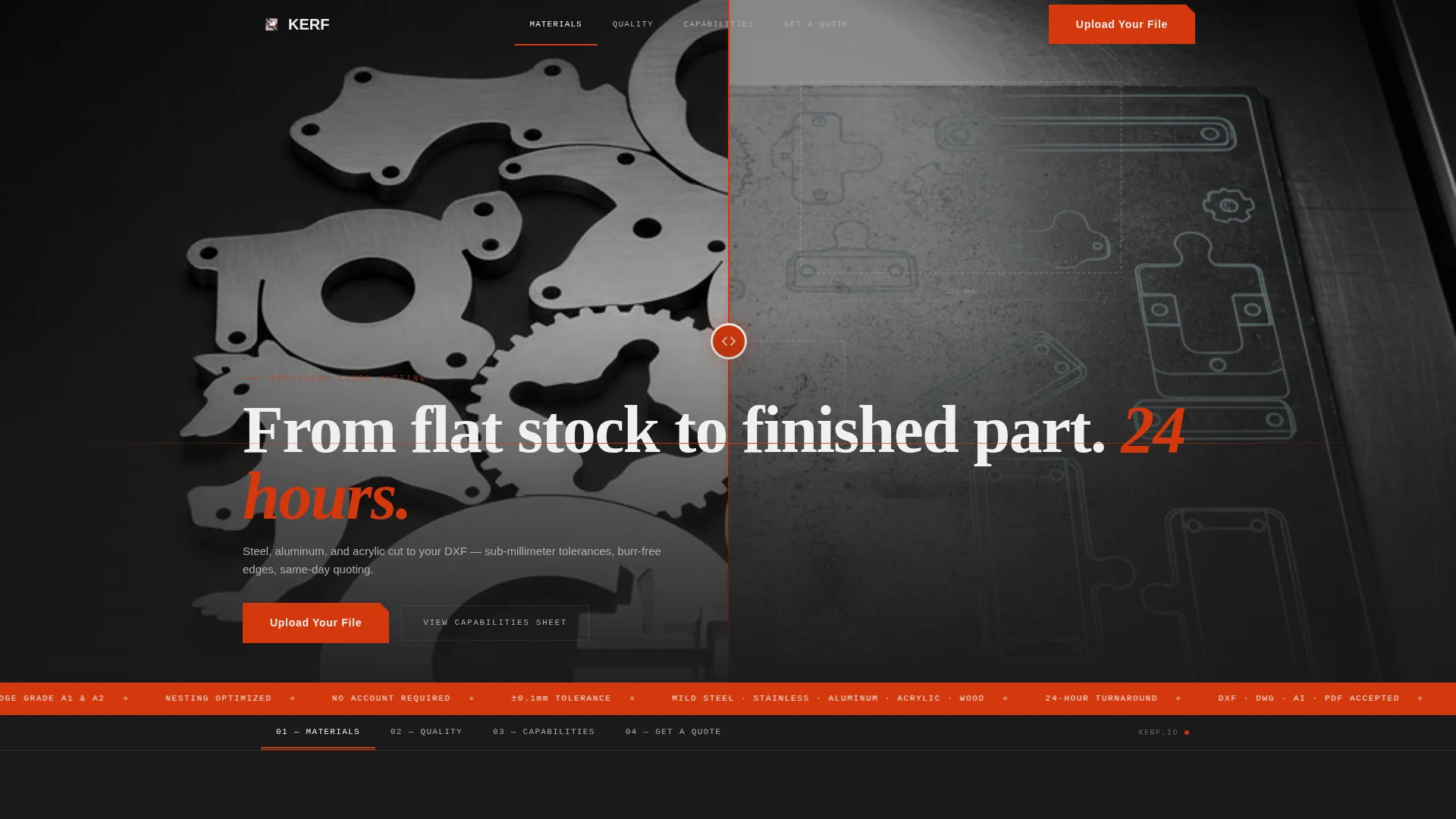
- A draggable before-and-after header slider showing raw stock versus finished parts
- Anchor navigation linking directly to material capabilities, tolerances, quantities, and lead time sections
- A drag-and-drop quote form accepting DXF, DWG, AI, and PDF files with material and deadline fields
Feature list
This template is built around a small set of high-impact components, each designed to move a serious buyer closer to submitting a file.
Draggable Before-and-After Header Slider
The header opens with a full-viewport case study. A draggable slider bisects the view between a raw material sheet annotated with DXF outlines and the finished nested parts photographed on matte black with a machinist's caliper for scale. The headline fades in after the visitor interacts: "From flat stock to finished part. 24 hours."
Hub-and-Spoke Anchor Navigation
The page uses a fixed anchor navigation bar that links to each spoke section. Visitors jump directly to the information they need, whether that is material specs, tolerances, quantity tiers, or turnaround times. No scrolling through irrelevant content.
Spec Sheet Section Architecture
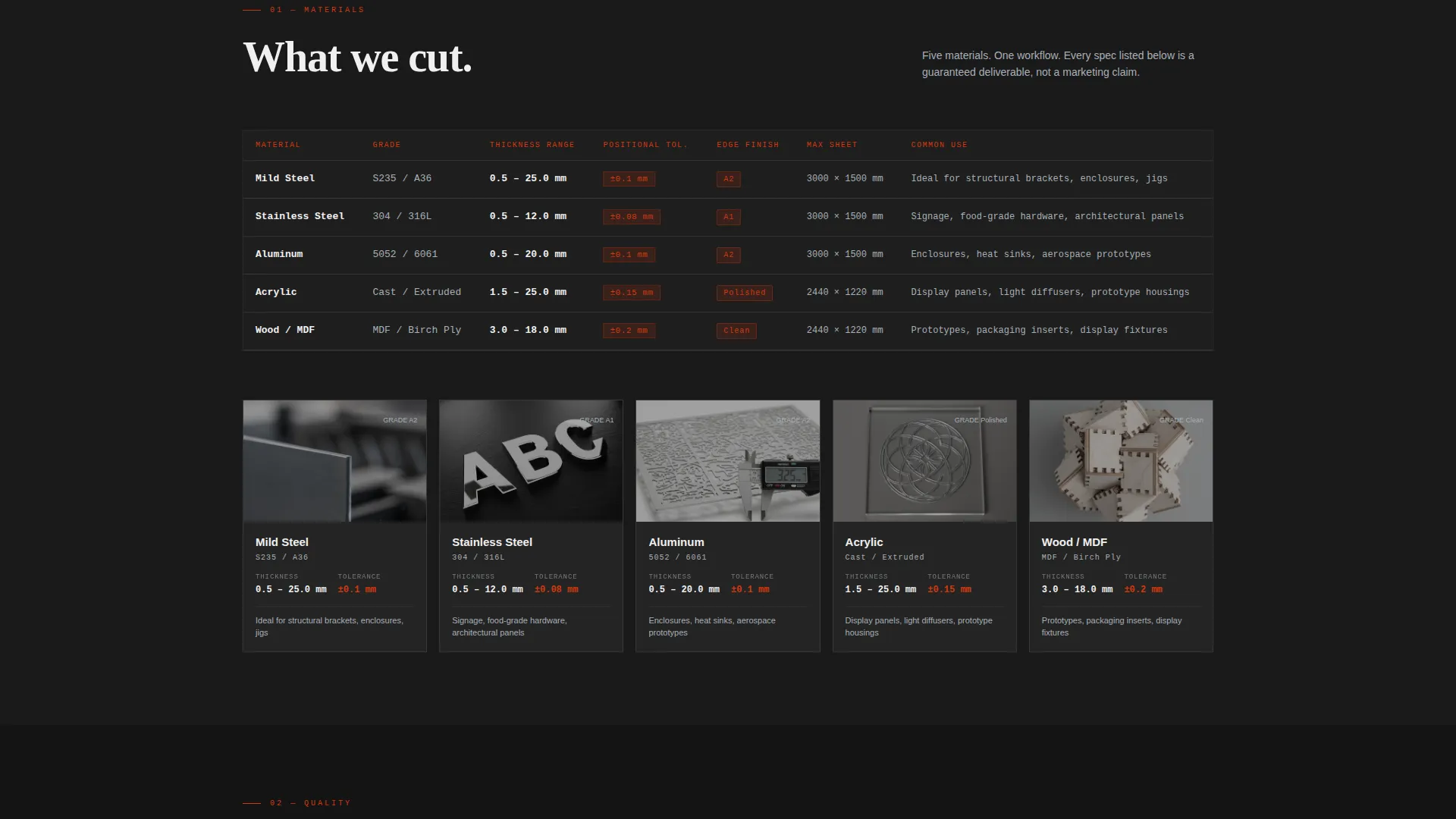
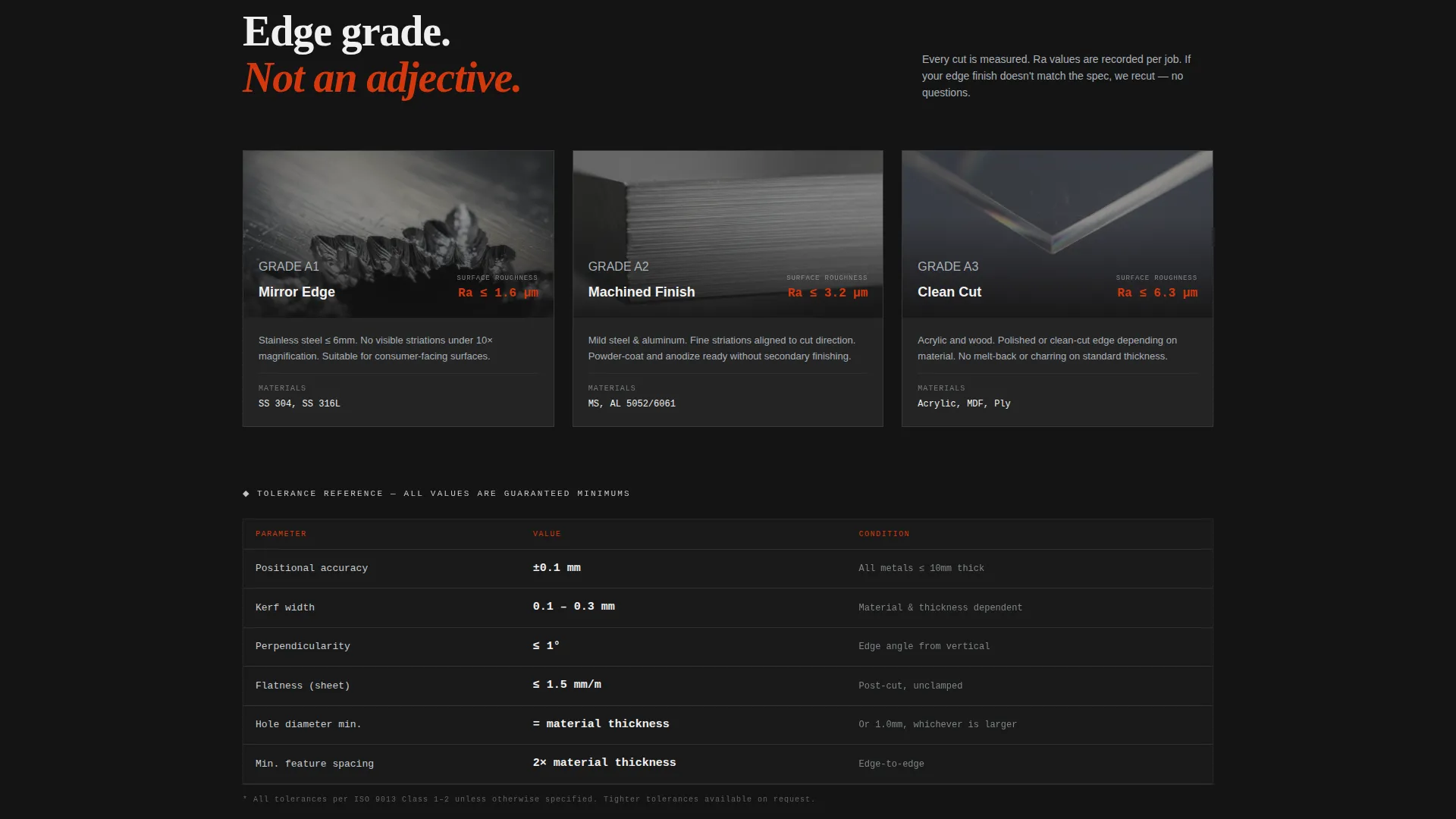
Each spoke section reads like a technical data sheet brought to life. Material capabilities include thickness tolerances and edge-finish grades beside macro photography of actual cut edges. Tables feel native. Decimal places feel intentional.
Drag-and-Drop Quote Upload Form
The primary lead generation component is a drag-and-drop upload zone. It accepts DXF, DWG, AI, and PDF files. Buyers then select material (mild steel, stainless, aluminum, acrylic, or wood), choose thickness, enter quantity, and pick a need-by date. No account creation required.
Secondary Capabilities Sheet call to action
A secondary call-to-action invites visitors still scoping vendors to request a capabilities sheet. This path captures early-stage leads who are not yet ready to upload a file but are actively evaluating suppliers.
Industrial Raw Carbon Fiber Visual Identity
The color system uses deep graphite black for backgrounds, machined aluminum for body text and dividers, laser-path red for all interactive elements and accents, and tolerance-callout white for spec data and callout numbers. The result is a machine-shop-after-hours atmosphere that signals precision without saying a word.
Page sections overview
| Section | Purpose |
|---|---|
| Before/After Header | Show raw material versus finished parts with draggable slider |
| Anchor Navigation Bar | Let visitors jump directly to the section they need |
| Material Capabilities | List supported materials with thickness tolerances and edge-finish grades |
| Tolerances and Finishes | Answer precision questions with hard numbers and macro cut-edge photography |
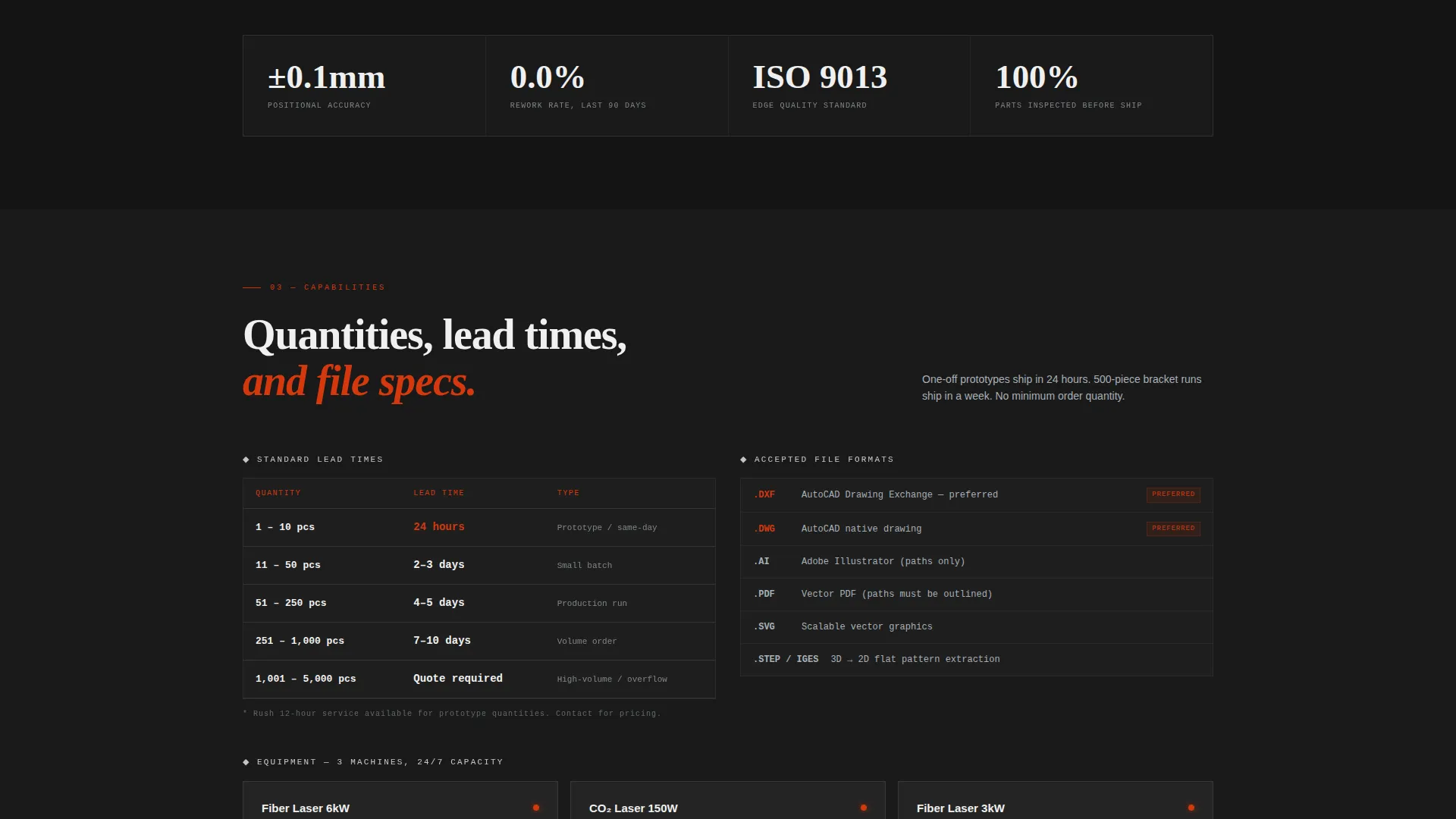
| Quantity and Pricing | Clarify volume tiers and order minimums for different buyer types |
| Lead Time Overview | Set turnaround expectations clearly with specific time data |
| Quote Upload Form | Capture leads via drag-and-drop file upload with job detail fields |
| Capabilities Sheet call to action | Convert early-stage visitors who are not yet ready to upload a file |
Design & branding system
The visual identity follows an Industrial Raw theme built on a Carbon Fiber color palette. Every design decision references the physical environment of a precision machine shop.
- Deep graphite black (#1A1A1A) dominates all backgrounds, creating a focused, high-contrast canvas
- Machined aluminum (#A8B0B8) carries body text and divider lines, mimicking brushed metal surfaces
- Laser-path red (#D4380D) marks every interactive element, button, and accent detail
- Tolerance-callout white (#F0F0F0) is reserved for spec data and callout numbers that need high visibility
Mobile & speed optimization
The template layout is designed to remain clear and functional across screen sizes. The spec-sheet structure translates well to narrower viewports because the content is already organized in scannable blocks.
- Anchor navigation collapses cleanly for mobile, keeping section-jumping accessible on small screens
- Tables and form fields are structured for touch-friendly interaction without horizontal scrolling
- The before-and-after slider is built to function on both pointer and touch input devices
How this template helps you convert
The page is structured around reducing the distance between a buyer's first question and a submitted quote request. Every layout decision serves that goal.
- The draggable header creates immediate engagement by making the visitor an active participant before any copy loads, which builds investment in the page before the sales pitch begins.
- The anchor navigation removes the friction of linear scrolling, so an engineer who only needs lead time data can reach that section in one click and leave with enough confidence to upload a file.
- The upload-first quote form eliminates the phone call step entirely. A buyer can drag a DXF file, fill in four fields, and submit a job request in under two minutes.
Other information about this template
This section covers additional context that helps you evaluate whether Kerf fits your workflow and production environment.
- The template is designed for a single-page, anchor-navigated layout and is not structured as a multi-page website
- File format support in the upload form covers the four most common formats used in laser cutting workflows: DXF, DWG, AI, and PDF
- The Spec Sheet creative direction means every section is written and laid out for engineers and technical buyers, not general consumers
- The secondary capabilities sheet request path makes this template suitable for businesses that sell to procurement teams and facility managers who need documentation before approving a vendor
Theme
Industrial Raw
Creative direction
Spec Sheet
Color system
Carbon Fiber
Style
Hub & Spoke (Anchor Nav)
Direction
Lead Generation
Page Sections
Draggable Before-and-after Header Slider
Hub-and-spoke Anchor Navigation
Spec Sheet Section Architecture
Drag-and-drop Quote Upload Form
Secondary Capabilities Sheet Request
Industrial Raw Carbon Fiber Color System
Related questions
What types of businesses is this template designed for?
What file formats does the upload form support?
Do visitors need to create an account to submit a quote request?
Can this template support visitors who are not ready to submit a file yet?
Is this a single landing page or a multi-page website?



