Pet Care Tech Consultant Landing Page Template
Kibble is a landing page template built for pet care technology consultants. It guides veterinary clinic owners, boarding facility managers, and independent groomers through an opinionated, structured software comparison experience. With interactive practice-type filtering, annotated comparison tables, and a progressive lead-capture form, it turns overwhelming demo fatigue into confident, shortlist-ready decisions.
by Rocket studio
Quick summary
Kibble is a comparison-focused landing page template for pet care technology consultants. It walks visitors through an interactive practice-type selector, opinionated software evaluation tables, and a three-step lead generation form. The design feels calm and credible, built to convert overwhelmed clinic owners and facility managers into booked consultations or guide downloads.
Who this template is for
This template is designed for independent consultants and boutique advisory firms operating in the pet care technology space. If your value is helping operators cut through vendor noise and choose the right software, this page speaks your language immediately.
- Consultants advising veterinary clinics on practice management and triage software
- Advisors helping pet boarding kennels and grooming studios replace manual reservation systems
- Specialists supporting multi-location pet care franchises whose platforms do not integrate
What problem this template solves
Clinic owners and facility managers face an exhausting number of competing software platforms. They sit through demo after demo without a trusted framework to compare them. A generic service page cannot hold that kind of attention or build that level of trust.
- Visitors arrive overwhelmed by platform options and leave without a clear path forward
- Standard consultant pages list services but never actually demonstrate expertise in action
- There is no structured way to capture leads at different readiness levels on a single page
What you get with this template
This template delivers a full single-page flow that mirrors the actual decision-making journey your clients go through. Every section earns its place by adding visible value before asking anything in return.
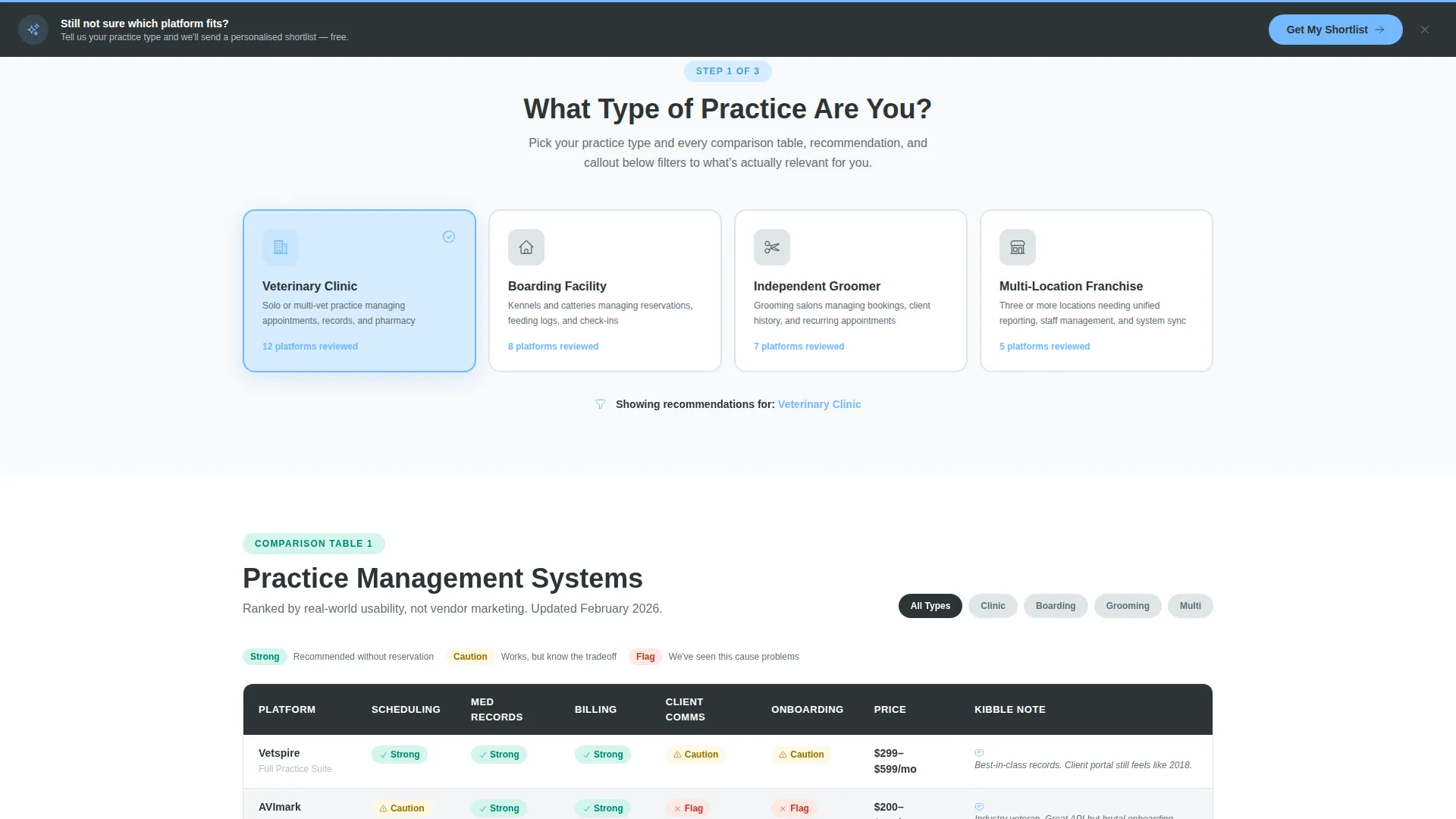
- An interactive "What Type of Practice Are You?" selector that filters all downstream comparison content
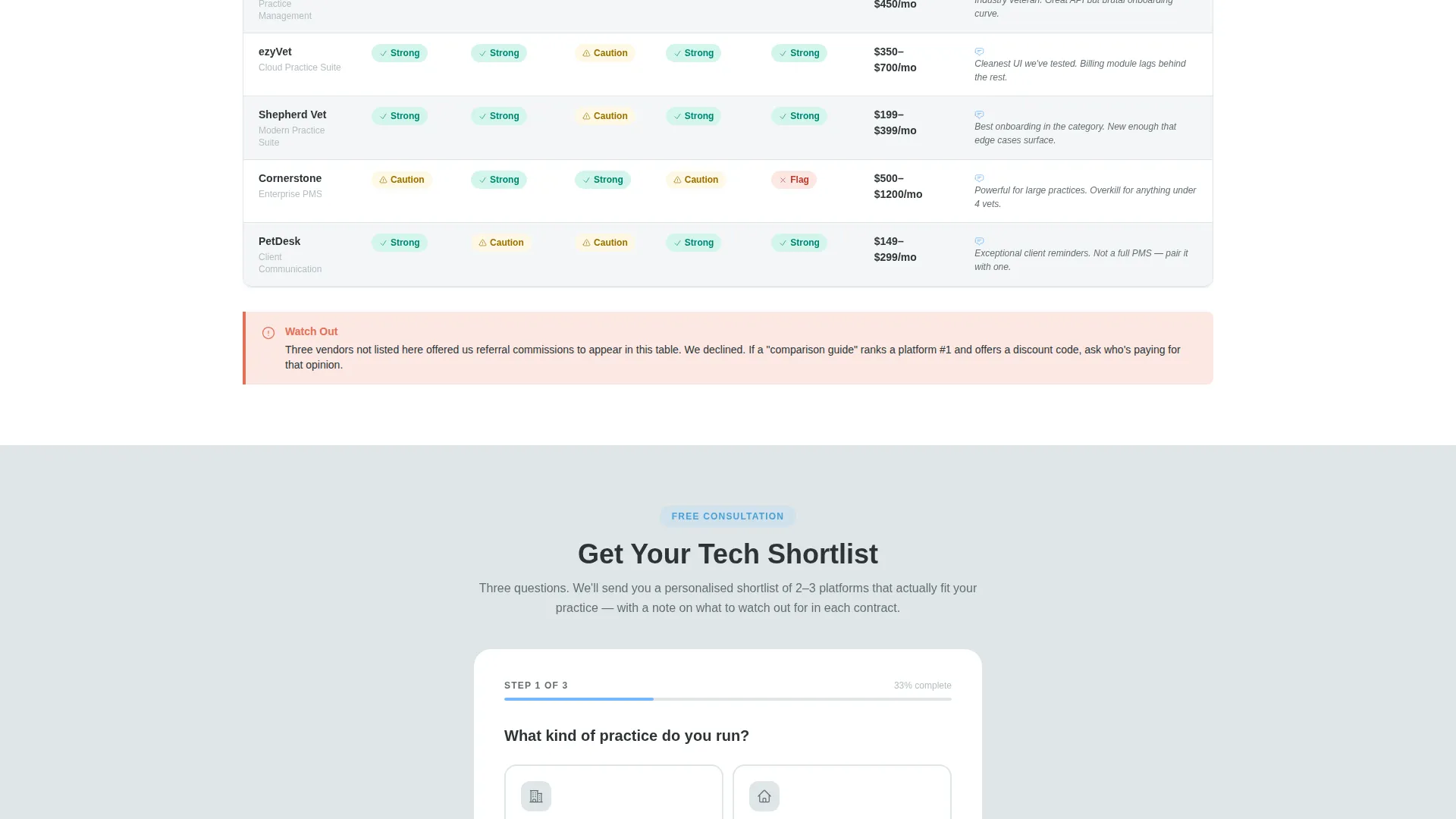
- Annotated comparison tables with green checkmarks, amber cautions, and red-flag indicators plus one-line consultant notes
- A three-step progressive lead form and a secondary email-gated PDF download path
Feature list
This template includes a set of purposefully designed components that work together to guide the visitor from confusion to commitment.
Interactive Practice-Type Selector
A clickable selector at the top of the comparison section lets visitors identify their practice type, such as clinic, boarding facility, grooming studio, or multi-location franchise. All downstream table content filters to match their selection, making every comparison feel personally relevant.
Opinionated Comparison Tables
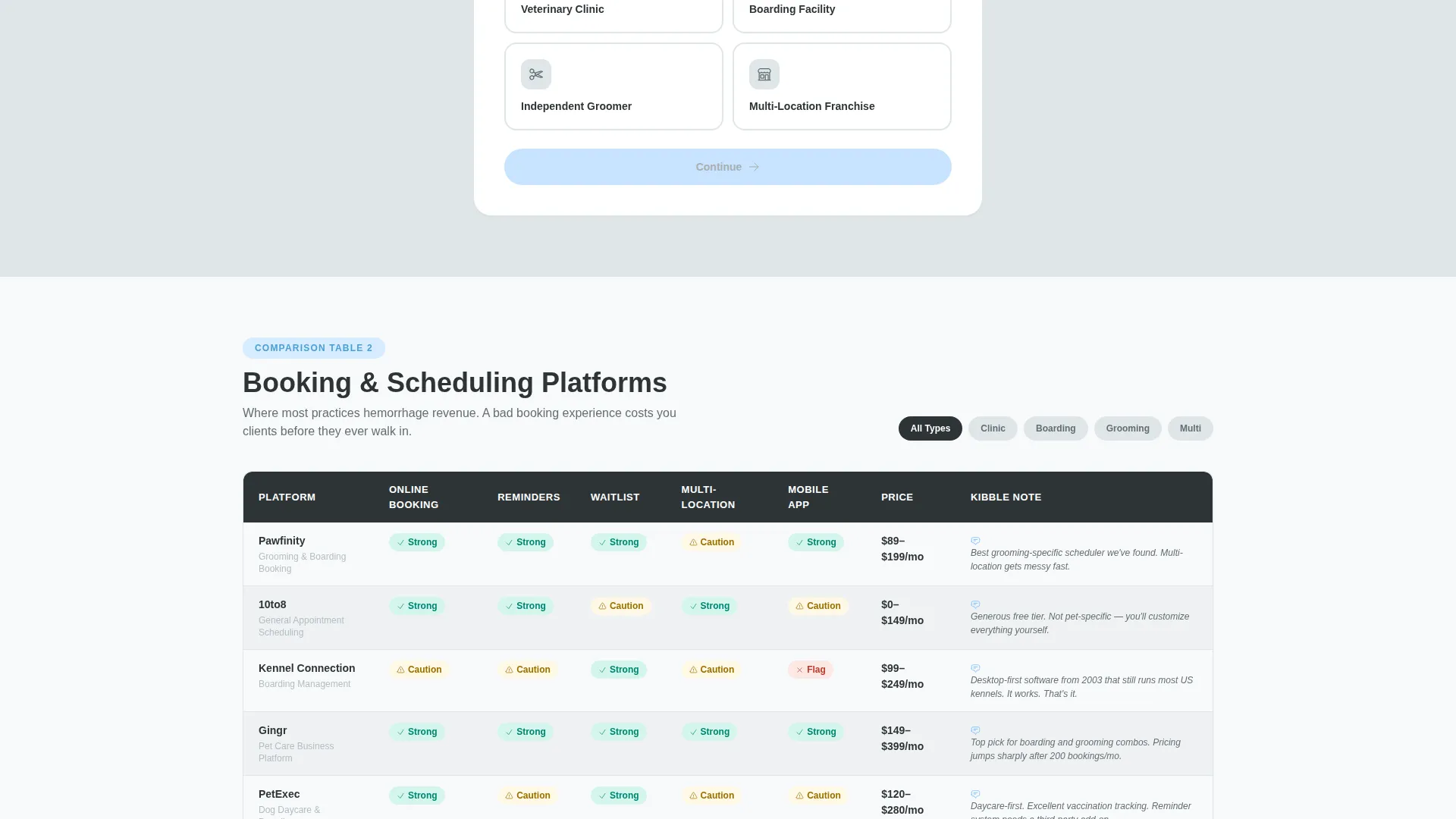
The template includes structured evaluation grids that go beyond feature checklists. Each row carries a consultant annotation, such as a caution about onboarding difficulty or a note about integration quality. Color-coded indicators use green for clear recommendations, amber for conditional fits, and terracotta red for elimination flags.
Progressive Three-Step Lead Form
The primary call to action is a staged form titled "Get Your Tech Shortlist." Step one asks for practice type, step two presents frustration checkboxes covering scheduling, no-show rates, integration, and cost, and step three collects name and email. This sequencing delivers value before requesting contact details.
Mid-Page and Sticky Form Placement
The lead form appears mid-page after the first comparison table has already delivered insight. It then repeats as a sticky bottom bar after the second table. This dual placement catches visitors at two different moments of readiness without interrupting the content flow.
Video Testimonial Quote Cards
Between comparison tables, short quote cards feature real clinic owner testimonials with play buttons. These break the data-dense table sections with human voices, reinforcing trust at the exact moment a visitor might feel overwhelmed by choices.
Secondary PDF Download Path
A separate conversion path offers a downloadable guide gated behind email only. This catches visitors who are not yet ready to book a consultation but are willing to exchange an email address for a practical resource.
Page sections overview
| Section | Purpose |
|---|---|
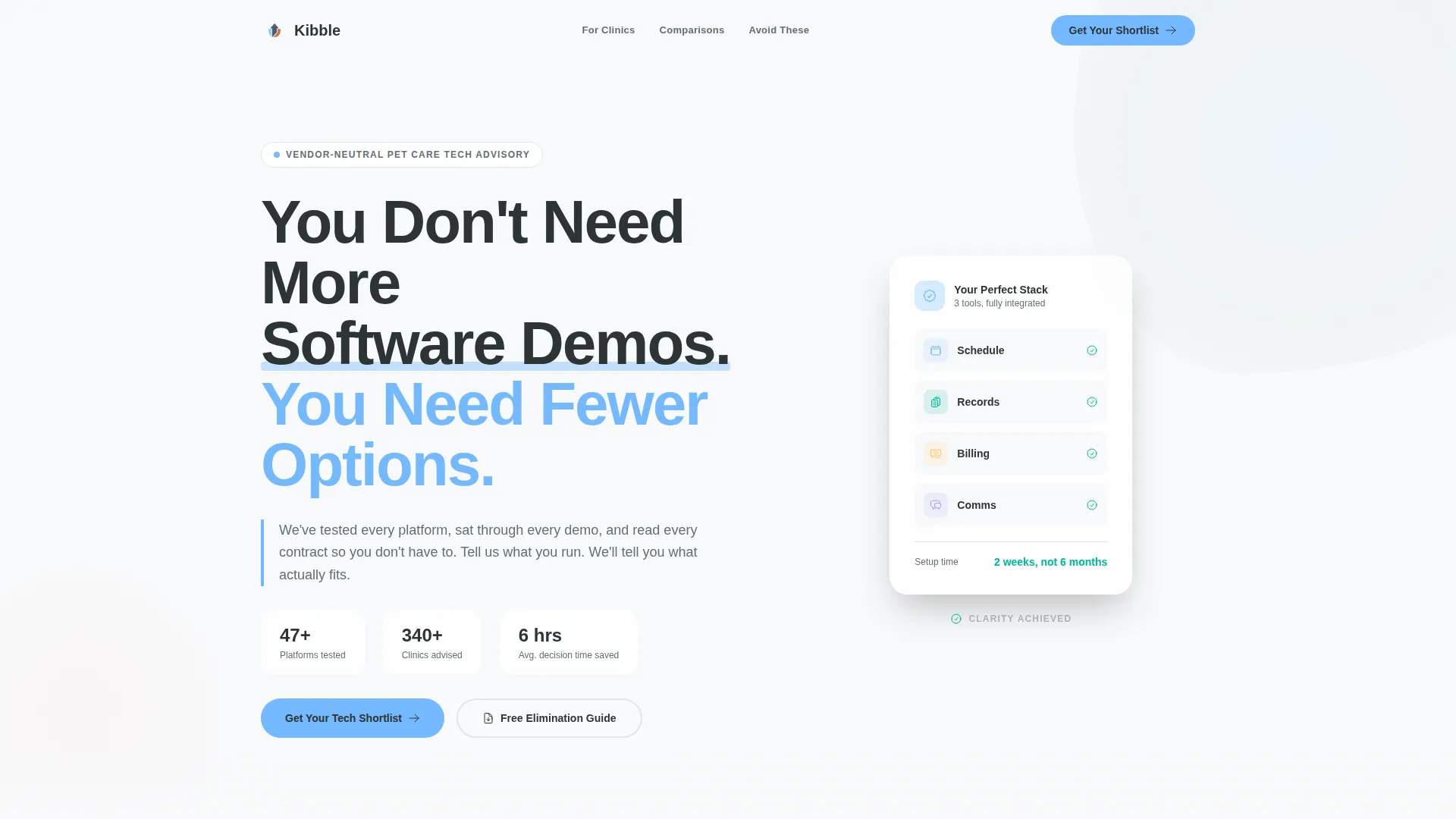
| Hero headline block | States the core value proposition and sets tone |
| Animated app illustration | Visual metaphor for clarity replacing software chaos |
| Practice-type selector | Filters all comparison content to visitor context |
| First comparison table | Delivers opinionated, annotated software evaluation |
| Mid-page lead form | Captures leads after first wave of delivered value |
| Testimonial quote cards | Adds human credibility between data-heavy tables |
| Second comparison table | Deepens evaluation with elimination-focused guidance |
| Sticky bottom bar | Repeats call to action for visitors who scrolled past the form |
| PDF download section | Secondary lead capture for lower-intent visitors |
Design & branding system
The visual identity follows an Educational Guide theme. The palette feels like a veterinary waiting room reimagined by a Scandinavian design studio, clean enough to signal expertise and warm enough to feel human.
- Deep charcoal slate (#2D3436) anchors primary text and table headers for confident readability
- Soft cloud gray (#DFE6E9) alternates table rows and section backgrounds to reduce visual fatigue
- Open sky blue (#74B9FF) highlights interactive elements and checkmarks, while warm terracotta (#E17055) marks caution callouts and elimination badges exclusively
Mobile & speed optimization
The template is structured as a single-column flow, which naturally adapts to smaller screens without requiring major layout shifts. The design keeps content scannable and interaction targets appropriately sized throughout the scroll journey.
- Single-column template style ensures comparison tables and form steps stack cleanly on mobile viewports
- Sticky bottom bar call to action stays visible throughout the scroll without obstructing content on any screen size
How this template helps you convert
The page is engineered to build trust first and ask second. Every structural choice moves a skeptical visitor closer to action without applying pressure.
- The interactive practice-type selector creates a personalized experience immediately, making the consultant feel like they already understand the visitor's specific situation before a word is exchanged.
- The progressive form design reduces friction by asking easy questions first, qualifying the lead through their own answers, and only requesting contact details after the visitor has already invested in the process.
Other information about this template
This template suits pet care technology advisory practices that position themselves as trusted guides rather than software resellers. It is built to support the full consultant funnel in one page.
- The "2024 Pet Care Software Elimination Guide" PDF download concept is built into the page structure as a secondary conversion asset
- The header headline "You Don't Need More Software Demos. You Need Fewer Options." is set as a giant left-aligned headline in heavy sans-serif against the charcoal slate background
- The right side of the hero section includes a softly animated illustration of tangled app icons untangling into a single clean dashboard, reinforcing the clarity-from-chaos message without using stock photography
- The template supports the full decision journey from "here is what exists" through "here is what fits you" to "here is what to avoid," building trust through elimination rather than promotion
Theme
Service Utility
Creative direction
Team & People
Color system
Charcoal & Amber
Style
Single Column Flow
Direction
Booking/Scheduling
Page Sections
Interactive Practice-type Selector
Annotated Comparison Tables
Three-step Progressive Lead Form
Dual Form Placement Strategy
Video Testimonial Quote Cards
Email-gated PDF Download Path
Related questions
Who is this landing page template built for?
Can I customize the comparison tables for my own software evaluations?
How does the three-step lead form work?
Does the template include the PDF download section?
Is this template suitable for consultants serving multi-location franchises?



