Kids Skateboarding Specialist Reviews Website Template
Kickflip is a warm, masonry-style landing page template built for kids skateboarding online classes. It guides cautious parents from curiosity to registration with a Day-in-the-Life scroll, an isometric illustrated header, skill progression cards, real parent testimonials, and a tangerine "Save Their Spot" registration form with a sticky bottom bar.
by Rocket studio
Quick summary
Kickflip is a single-page event registration template for a kids skateboarding online class. It uses a masonry card layout and a Day-in-the-Life scroll to walk parents through the full class experience before asking them to sign up. The design is warm, approachable, and built for mobile-first browsing.
Who this template is for
This template is made for anyone running a youth skateboarding program online and trying to convert cautious parents into registered students. It works especially well when your audience needs reassurance before they commit.
- Parents of kids aged 5 to 12 who are new to skateboarding
- Dads who skated in the past and want to share it with their kids
- Homeschool families looking for a physical education activity with real structure
What problem this template solves
Parents searching for beginner skateboarding classes face a trust gap. They want proof that the program is safe, age-appropriate, and actually fun before they hand over their child's information. A generic registration page cannot bridge that gap alone.
- No visible proof that real kids at every skill level succeed in the class
- No clear skill progression to show parents what their child will learn
- No low-friction registration path that answers hesitations before the form appears
What you get with this template
This template delivers a full single-page registration flow. Every section is designed to build confidence in the parent and excitement in the child, moving both toward the "Save Their Spot" form.
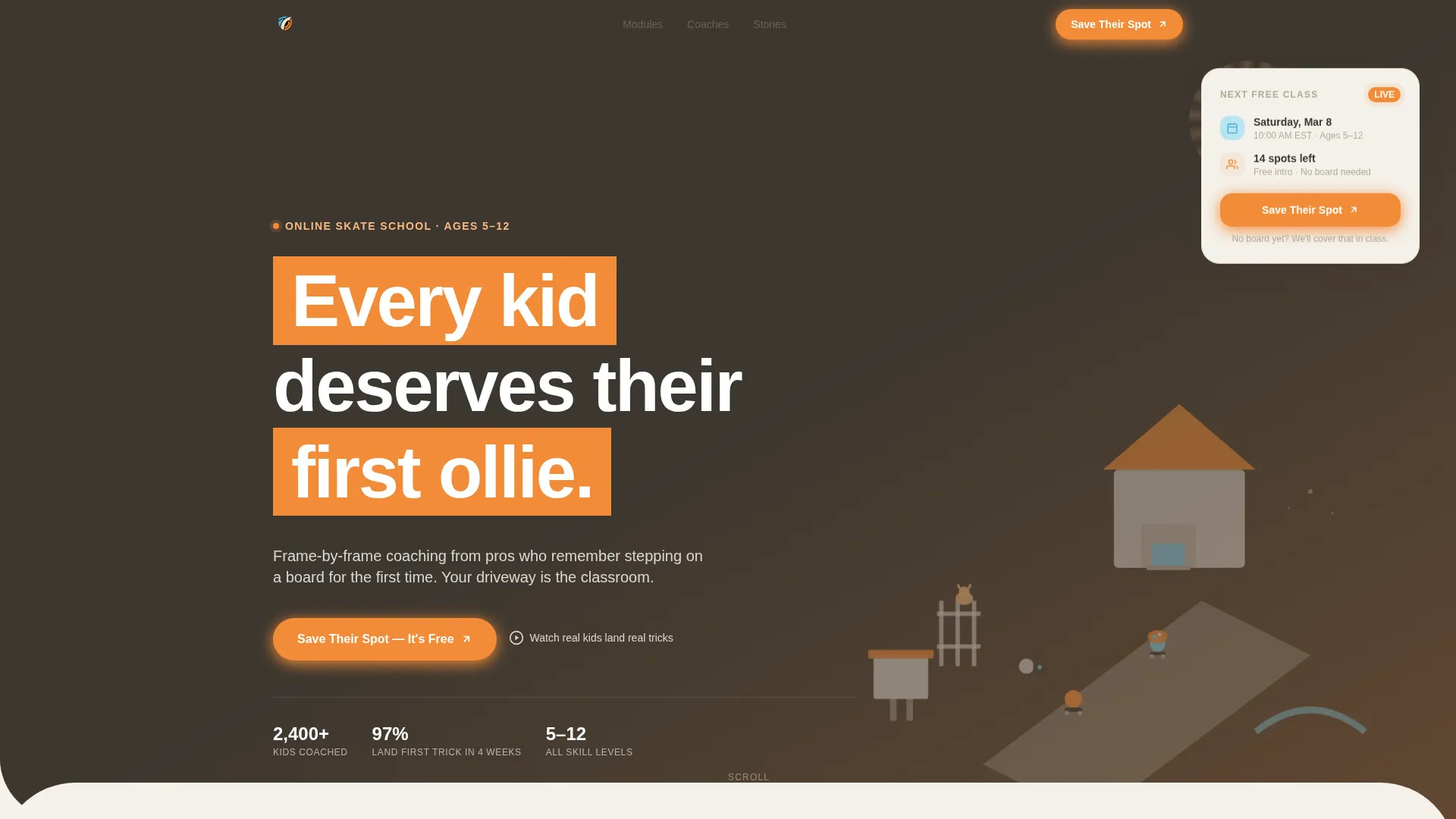
- An isometric illustrated hero header with a colorful cartoon neighborhood of tiny skaters
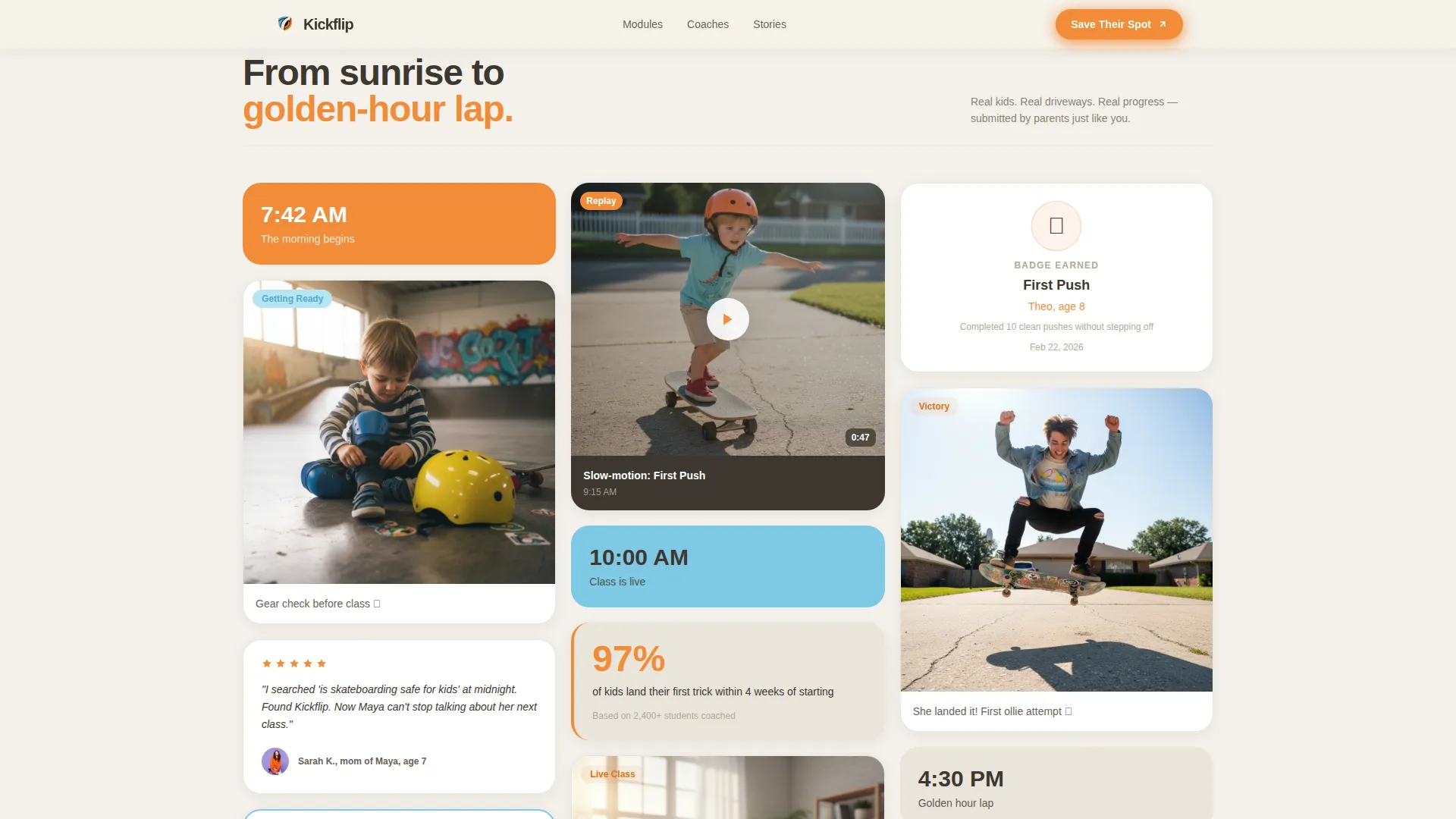
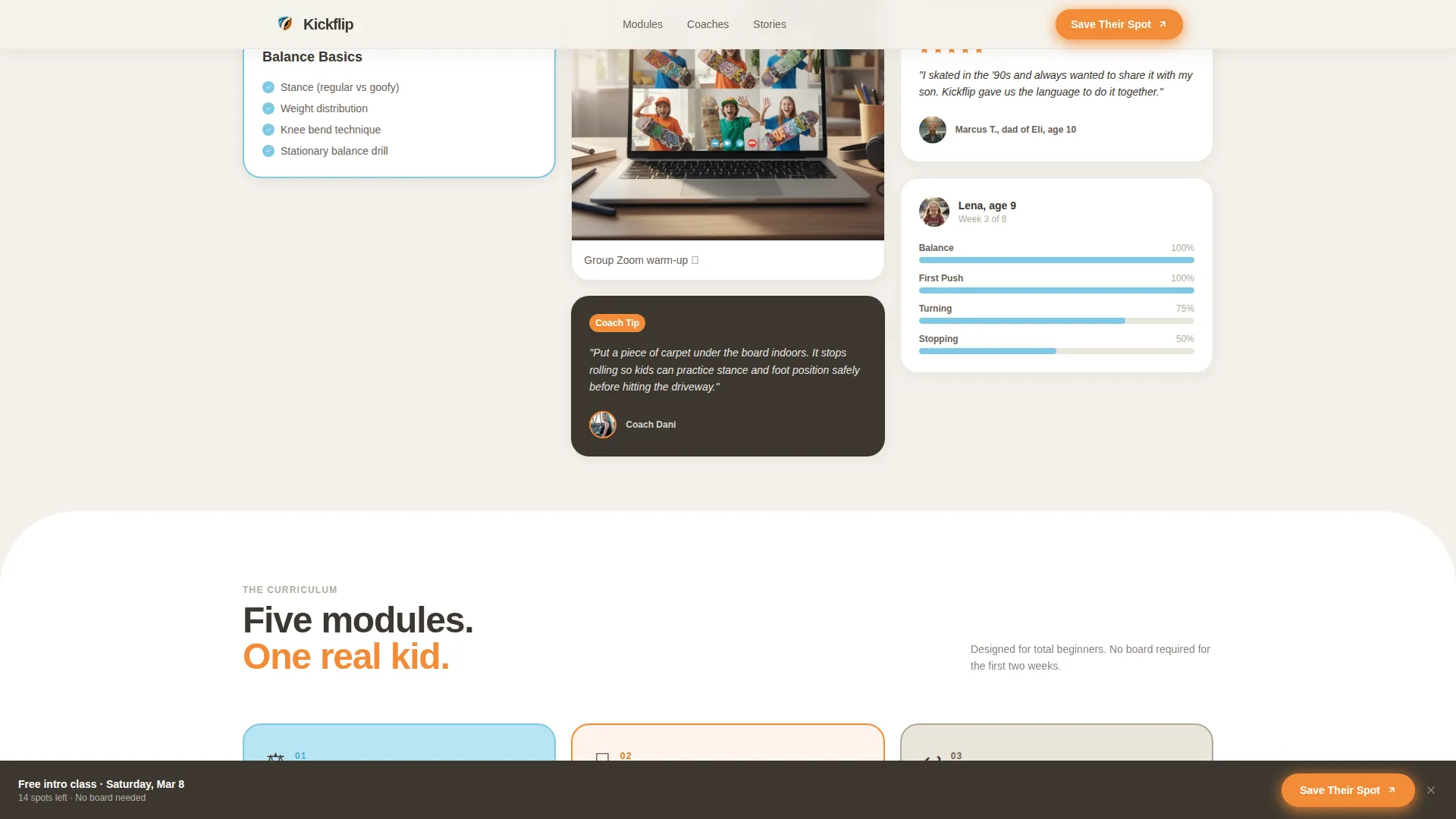
- A Day-in-the-Life masonry grid mixing video thumbnails, parent quotes, skill badges, and progress photos
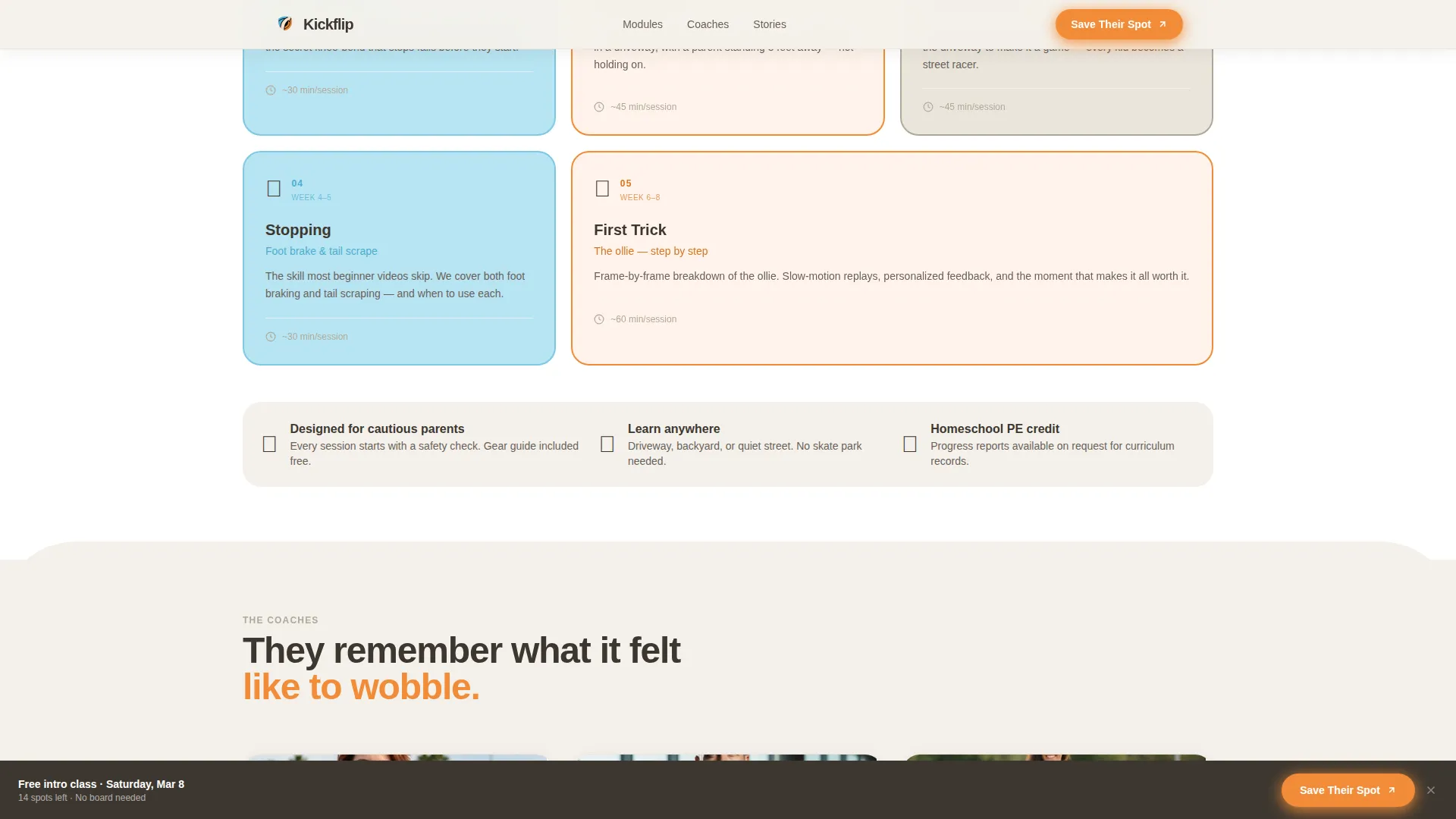
- Five class module cards covering balance, first push, turning, stopping, and a first trick
- A coaches and testimonials credibility wall with parent quotes and coach bios
- A sticky bottom registration bar that persists after the third scroll section
Feature list
This template is built around the specific conversion flow described below. Every feature serves the parent's decision-making process.
Isometric Illustrated Hero
A dense, bird's-eye neighborhood illustration sets the tone immediately. Micro-scenes show kids practicing on driveways, a garage classroom with a laptop on a toolbox, and a backyard mini-ramp. Discoverable details like a cat on a fence and sticker-covered helmets reward visitors who linger.
Day-in-the-Life Masonry Grid
The scroll unfolds like a timeline from morning to golden hour. Cards vary in size and format, mixing video clips, illustrated skill checklists, coach tip callouts, and parent-submitted photos. The layout creates the feeling of scrolling through a proud parent's camera roll.
Skill Progression Module Cards
Five sequential cards walk through the class curriculum step by step. Each card represents one module: balance basics, first push, turning, stopping, and a first trick. Parents see exactly what their child will learn before they register.
"Save Their Spot" Registration Form
The form collects the parent's first name, the child's age group, current skill level, and preferred class time. A short reassurance line below reads "No board yet? We'll cover that in class." The form also appears as a sticky bar after the third scroll section.
Coaches and Testimonials Wall
A dedicated section presents coach bios alongside real parent testimonials and progress photos. Social proof is shown at the moment parents are closest to committing, not buried at the bottom.
Sticky Bottom Call-to-Action Bar
After the visitor passes the third section, a fixed bottom bar with the tangerine "Save Their Spot" button stays visible throughout the rest of the scroll. It keeps the registration path accessible without interrupting the reading experience.
Page sections overview
| Section | Purpose |
|---|---|
| Hero Header | Introduces the school with an isometric neighborhood illustration and a floating registration card |
| Day-in-the-Life Masonry | Builds emotional connection through a timeline of mixed card formats and real content |
| Class Module Cards | Shows the five-step skill progression from balance to first trick |
| Coaches and Testimonials | Establishes credibility with coach bios and parent social proof |
| Registration Form | Captures parent details and drives free intro class sign-ups |
| Sticky Bottom Bar | Keeps the "Save Their Spot" call to action visible after the third scroll section |
| Footer | Closes the page with a horizontal flow layout |
Design & branding system
The visual system is built around a Cloud Canvas color palette that feels like a well-loved worksheet left on a driveway. Every color has a clear job so the page never feels cluttered or overwhelming.
- Chalk white (#F4F1EB) covers backgrounds to keep the page bright and readable
- Sidewalk gray (#B0A999) anchors body text and card borders for calm, legible contrast
- Knee-pad sky blue (#7EC8E3) marks progress indicators and section dividers
- Grip-tape tangerine (#F28C38) is used exclusively on buttons and interactive highlights so clicks are always obvious
- Plus Jakarta Sans handles headings in bold and black weight; DM Sans handles all body text for a warm, clean reading experience
Mobile & speed optimization
The template is designed with a mobile-first priority because the primary audience browses on phones, often late at night. Every layout decision supports a smooth experience on a small screen.
- The masonry grid staggers on scroll reveal so cards load into view progressively rather than all at once
- The sticky bottom call-to-action bar is sized and positioned for thumb reach on a phone screen
- The static isometric hero keeps the above-the-fold area fast by avoiding heavy client-side rendering at load
How this template helps you convert
Every section earns the next scroll and every scroll earns the registration click. The conversion logic is baked into the page structure, not added as an afterthought.
- The illustrated hero creates an emotional first impression before a single word is read, pulling parents into the world of the class immediately
- The masonry timeline shows real kids at every skill level landing real tricks, answering the safety and effectiveness question with proof instead of promises
- The sticky call-to-action bar and the registration form's reassurance line remove the last two hesitations: "when do I act?" and "what if my kid doesn't have a board yet?"
Other information about this template
This template is part of a broader lineup of education and youth program templates built around the Educational Guide theme. It pairs a Day-in-the-Life creative direction with an Event Registration landing page goal, a combination that suits any live class, workshop, or free intro session format.
- The template uses a Masonry/Pinterest layout, which works well for content-rich pages where variety in card size keeps parents engaged longer
- The isometric header concept is fully illustrated and dense with scene details, making it effective as a standalone visual storytelling tool
- The Cloud Canvas color system is designed to feel approachable to parents who might be unfamiliar with skate culture, keeping the tone educational rather than edgy
- The footer uses a Vercel Horizontal Flow pattern for a clean, organized close to the page
Theme
Educational Guide
Creative direction
Day-in-the-Life
Color system
Cloud Canvas
Style
Masonry/Pinterest
Direction
Event Registration
Page Sections
Isometric Illustrated Hero Header
Day-in-the-life Masonry Grid
Skill Progression Module Cards
Save Their Spot Registration Form
Sticky Bottom Call-to-action Bar
Coaches and Testimonials Wall
Related questions
Is this template designed for a free intro class registration?
Can the template work for kids at different skill levels?
How does this template address parent concerns about safety?
What if a child does not own a skateboard yet?
Is this template optimized for mobile browsing?



