STEM Lab Design Consultancy Landing Page Template
Labspace is a horizontal scroll landing page template for STEM lab design consultancies. It pairs a self-drawing SVG lab animation with editorial magazine spreads, guiding district facilities directors, school heads, and charter network operators from inspiring finished-lab photography straight into a guided room configurator and tiered pricing flow.
by Rocket studio
Quick summary
Labspace is a single-page horizontal scroll template built for a STEM lab design consultancy. It opens with an animated line-drawn lab, moves through full-bleed magazine spreads showcasing real completed labs, and closes with a persistent "Configure Your Lab" tab that opens a guided room-builder modal with transparent, tiered pricing.
Who this template is for
This template is built for design firms and consultancies that plan, specify, and deliver STEM learning environments for schools. The target buyer is someone with a capital budget, a board to answer to, and a deadline already in the calendar.
- District facilities directors managing bond allocations and building code compliance
- Private school heads who have committed to a new robotics or fabrication wing by a fixed date
- Charter network operators scaling a proven STEM model across multiple campuses
What problem this template solves
Most design consultancy pages ask visitors to trust a firm before showing them anything worth trusting. Labspace reverses that sequence. Visitors fall in love with finished work first, then reach the purchase flow already convinced.
- Decision-makers with large budgets need visual proof before any sales conversation starts
- The configurator arrives after the emotional case is already made, so commitment feels like a natural next step
- Horizontal scrolling keeps every completed lab spread focused, removing the distraction of a cluttered vertical page
What you get with this template
The template ships as a complete, design-ready single page. Every section is fully structured and ready to populate with your own photography, educator quotes, and pricing tiers.
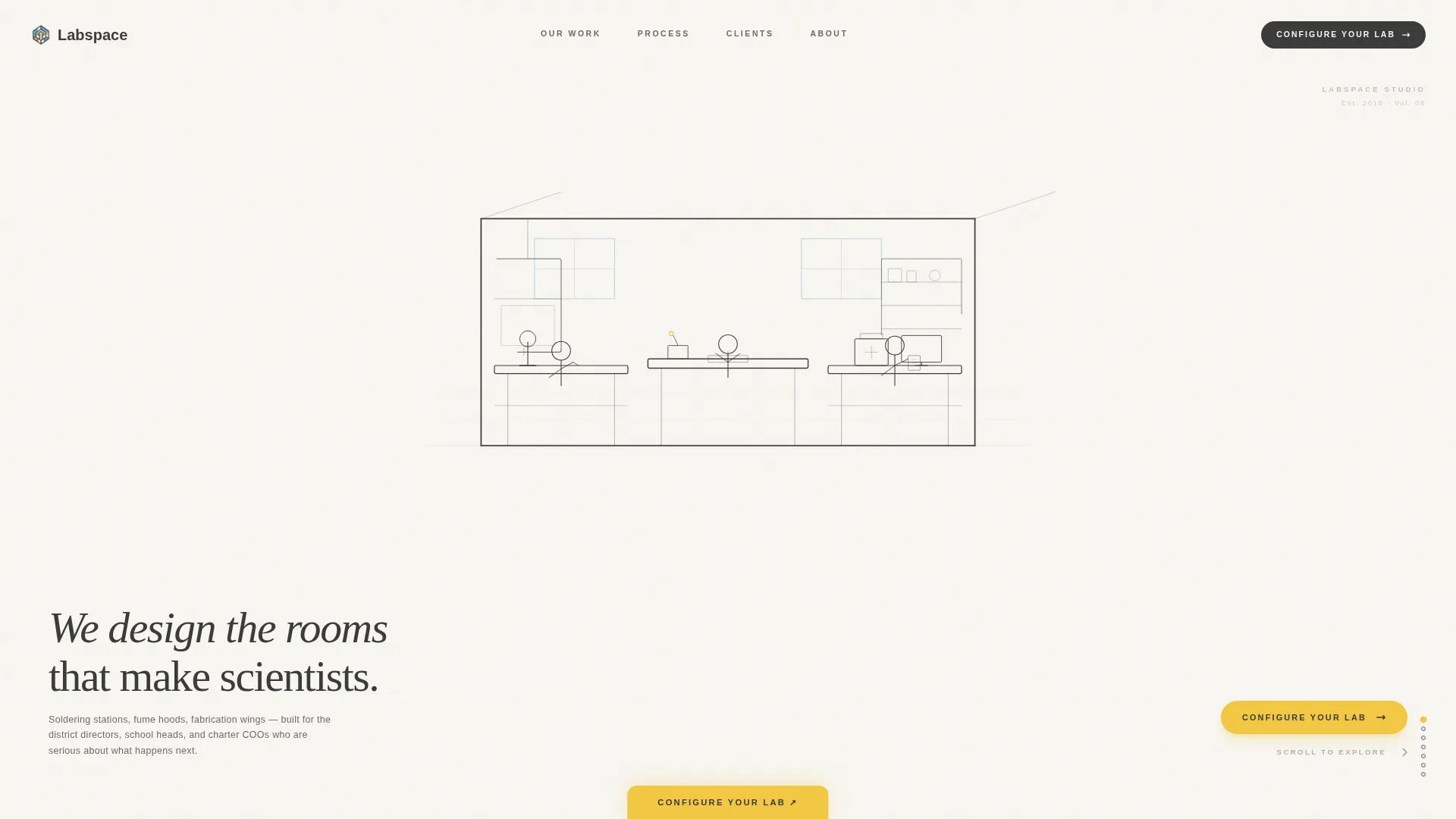
- An SVG animated hero that draws a STEM lab in real time over four seconds, then reveals a serif editorial headline
- Three escalating lab showcase spreads in horizontal magazine format, each pairing a hero photograph with an educator profile and margin spec callouts
- A persistent bottom-tab call to action and a guided modal configurator covering room dimensions, discipline focus, student capacity, and budget band, leading to three clearly priced design packages
Feature list
A paragraph introduction for this section: every feature below is drawn directly from the template brief and reflects a built, working component inside the Labspace page.
SVG Line-Draw Lab Animation
The hero opens with a thin-stroke, graphite-on-white animation that builds a complete STEM lab in four seconds. Walls rise, benchtops slide into place, equipment populates shelves, and student figures sketch into the scene using an SVG stroke-dashoffset technique driven by GSAP.
GSAP Horizontal Scroll Engine
The page moves left to right through a sequence of full-bleed magazine spreads. Each swipe transition is handled by GSAP, giving the experience the tactile feel of turning a printed page rather than scrolling a website.
Creator Spotlight Lab Spreads
Three completed lab showcases escalate in ambition from a single makerspace to a full fabrication wing. Each spread pairs a left-page hero photograph with a right-page editorial profile, a pull-quote from the commissioning educator, and margin-run spec captions.
Persistent Configure call to action Tab
A signal yellow "Configure Your Lab" tab sits pinned to the bottom edge throughout the entire horizontal scroll journey. It is always one click away without ever interrupting the editorial reading experience.
Guided Room Configurator Modal
Clicking the persistent tab opens a step-by-step modal. Visitors specify room dimensions, discipline focus (robotics, biology, or general STEM), student capacity, and budget band. A final step presents three tiered design packages with transparent pricing shown upfront.
Editorial Cloud Canvas Typography System
Headlines and pull-quotes use DM Serif Display, body text and spec captions use Plus Jakarta Sans. The combination sits on a warm white ground and reads like a printed architecture broadsheet rather than a generic agency website.
Page sections overview
| Section | Purpose |
|---|---|
| Animated Hero | Opens with a four-second SVG line-draw lab build and a serif editorial headline |
| Lab Showcase Spreads | Three horizontal magazine spreads showing completed labs in escalating scale |
| Educator Voice Profiles | Pull-quote editorial profiles with named educators, titles, and margin spec callouts |
| Configure call to action Tab | Persistent bottom tab that stays visible throughout the entire horizontal scroll |
| Room Builder Modal | Guided configurator collecting dimensions, discipline, capacity, and budget band |
| Tiered Pricing Step | Final modal step presenting three design packages with transparent pricing |
| Footer | Horizontal flow footer in the Vercel Horizontal Flow pattern |
Design & branding system
The visual identity follows an editorial architecture magazine aesthetic. Every color and type choice is intentional and restrained, so the photography and educator voices carry the page rather than the design shouting over them.
- Cloud Canvas palette: soft warm white (#F7F5F0) as the page ground, pencil graphite (#3B3B3B) for body text and structural lines, sky-washed blue (#A8C4D8) for section accents and hover states, and signal yellow (#F2C744) for calls to action and interactive callouts
- Typography pairing: DM Serif Display for headlines and pull-quotes, Plus Jakarta Sans for body copy and spec captions
- Broadsheet aesthetic: thin graphite strokes, generous white space, and margin-run captions that reference printed architectural publications
Mobile & speed optimization
The template is built desktop-first, with horizontal scroll as the primary experience. A vertical fallback layout ensures the content remains fully navigable on smaller screens.
- Desktop-first horizontal scroll powered by GSAP with stagger reveals on each section entry
- Mobile fallback converts horizontal spreads to a vertical stack so no content is hidden on phones or tablets
- Server Components handle the static layout shell, while Client Components manage scroll behavior and modal interactivity
How this template helps you convert
The page is structured so that purchase intent builds naturally before any pricing appears. By the time a visitor reaches the configurator, they have already seen three completed labs and read real educator testimony.
- The animated hero and escalating lab spreads build credibility and emotional connection before any sales language appears, so the visitor arrives at the configurator already engaged.
- The persistent "Configure Your Lab" tab stays within reach at every scroll position, shortening the path from interest to action without forcing the conversion before the visitor is ready.
- Transparent tiered pricing inside the modal removes the friction of a follow-up call, letting budget-conscious decision-makers self-qualify and move forward on their own timeline.
Other information about this template
This template is designed for the specific workflow of a STEM education infrastructure consultancy operating in the United States market, using USD pricing and English-language copy. A few additional details worth knowing before you build with it:
- The template uses the Vercel Horizontal Flow footer pattern, consistent with the overall horizontal editorial direction
- Animation complexity is rated high: the SVG build sequence, GSAP scroll engine, and modal transitions all layer together, so a modern browser and a reasonable device are expected for the full experience
- The educator profile sections are designed to hold named individuals with their title and school, reinforcing authenticity over generic testimonial blocks
- The configurator modal is structured for direct sales, not lead capture; the goal is a visitor completing a configuration and selecting a package, not filling in a contact form
- The template is categorized under Architecture and Design, specifically Education Facility Design, making it a focused tool for a niche with real capital at stake



Theme
Editorial Magazine
Creative direction
Creator Spotlight
Color system
Cloud Canvas
Style
Horizontal Scroll
Direction
Direct Sales
Page Sections
SVG Line-draw Lab Animation
GSAP Horizontal Scroll Engine
Creator Spotlight Lab Spreads
Persistent Configure Call to Action Tab
Guided Room Configurator Modal
Editorial Cloud Canvas Design System
Related questions
Who is the ideal buyer for this template?
Does the template include the room configurator logic?
Is the horizontal scroll experience available on mobile?
Can I replace the sample lab photography and educator quotes?
How does the tiered pricing step work inside the configurator?