Wedding Venue Complete Professional Website Template
Lakeside is a single-page wedding venue landing page built for stone-and-timber estates on the water. A full-screen drone video opens the experience, and overlapping gradient panels guide couples through an imagined wedding day, from morning prep to sparkler exit. Two clear conversion paths push visitors toward a date inquiry or a planning guide download.
by Rocket studio
Quick summary
Lakeside is a click-through landing page template for waterside wedding venues. It opens with a sixty-second drone video, then walks couples through a layered, scroll-driven journey that mirrors a full wedding day. Deep plum, dusty mauve, warm champagne, and antique gold give every section a rich, late-summer feel that earns the inquiry before asking for a single click.
Who this template is for
This template is built for lakeside and waterfront wedding venues that want their online presence to feel as atmospheric as the property itself. It suits venue owners and marketing teams who already have strong photography and video assets and want a page that converts newly engaged couples into booking inquiries.
- Lakeside and waterfront estate venues with ceremony and reception spaces
- Venue owners and coordinators who want a polished, emotion-led page without starting from scratch
- Marketing teams replacing a flat, feature-list site with something that actually moves people
What problem this template solves
Most wedding venue pages list amenities and post a gallery. They do not make a couple feel anything. Newly engaged visitors in active venue-search mode have already toured several properties and scrolled dozens of sites. A page that looks like every other venue page gets closed just as quickly.
- Couples leave before they connect emotionally, so inquiry rates stay low
- Static photo grids and bullet-point feature lists do not capture the sensory feeling of the venue
- There is no clear, low-friction path for couples who want more information before committing to a call
What you get with this template
You get a complete, ready-to-customise single-page layout designed specifically around the lakeside wedding venue experience. Every section is pre-built and ordered to guide a visitor from first impression through to a booking action.
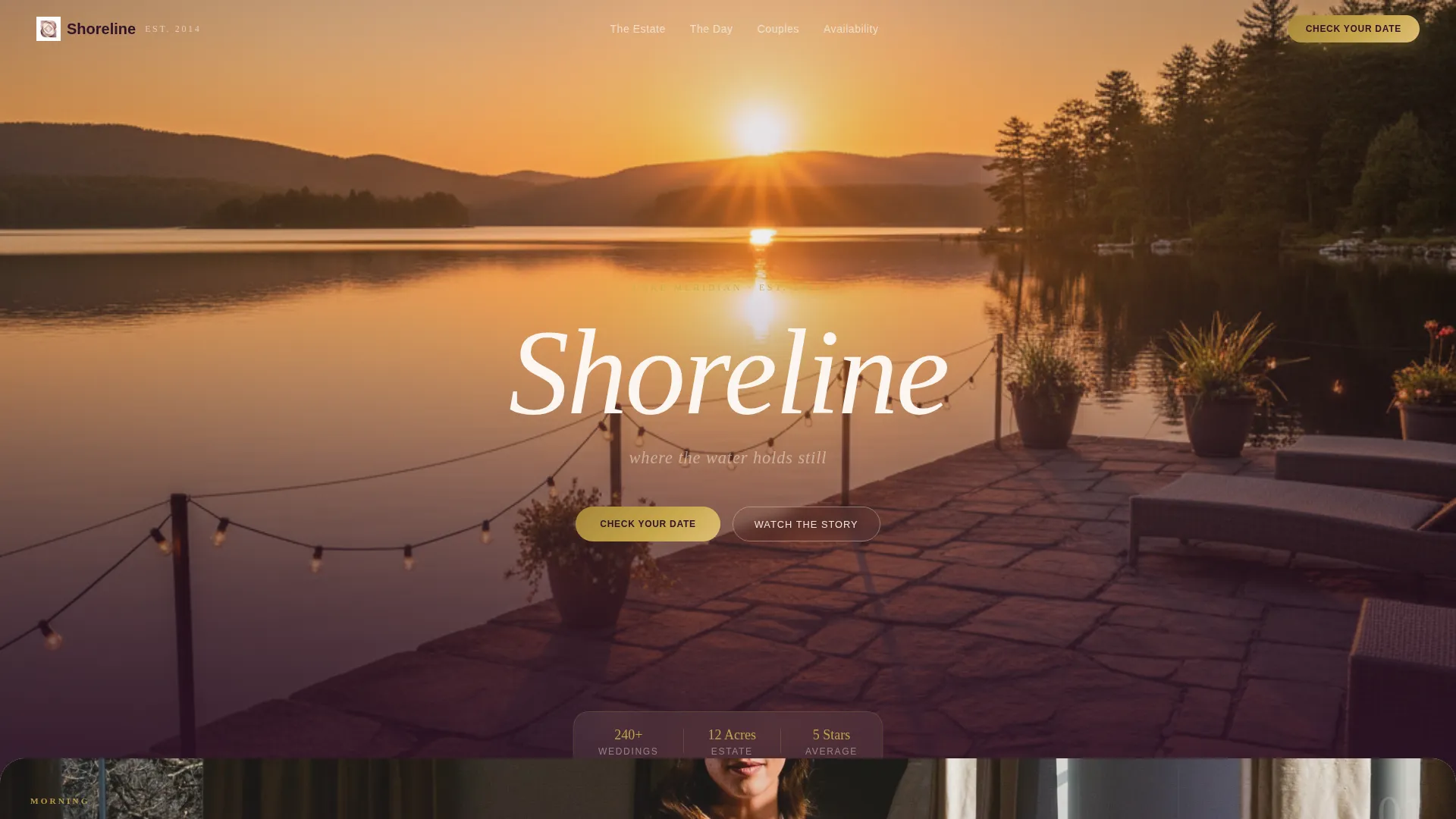
- A full-screen video header section with a timed venue name reveal in champagne serif typography
- A scroll-driven, overlapping panel layout that tells a wedding day story across five atmospheric scenes
- Two built-in conversion paths: a primary date-check call to action and a secondary planning guide email capture
Feature list
A single paragraph introduces the depth of what is included before each feature is described individually below.
Every feature in this template comes directly from the creative brief for Lakeside. Nothing here is speculative. Each element was chosen to serve the emotional journey that converts a browsing couple into an inquiring one.
Full-Screen Drone Video Header
The header plays a sixty-second drone-to-ground sequence. It opens two hundred feet above the lake at magic hour, glides toward the stone terrace as string lights flicker on, then dissolves to a handheld reception barn shot. The venue name fades in after four seconds in thin champagne serif, breathing slowly into opacity.
Overlapping Scroll Panels
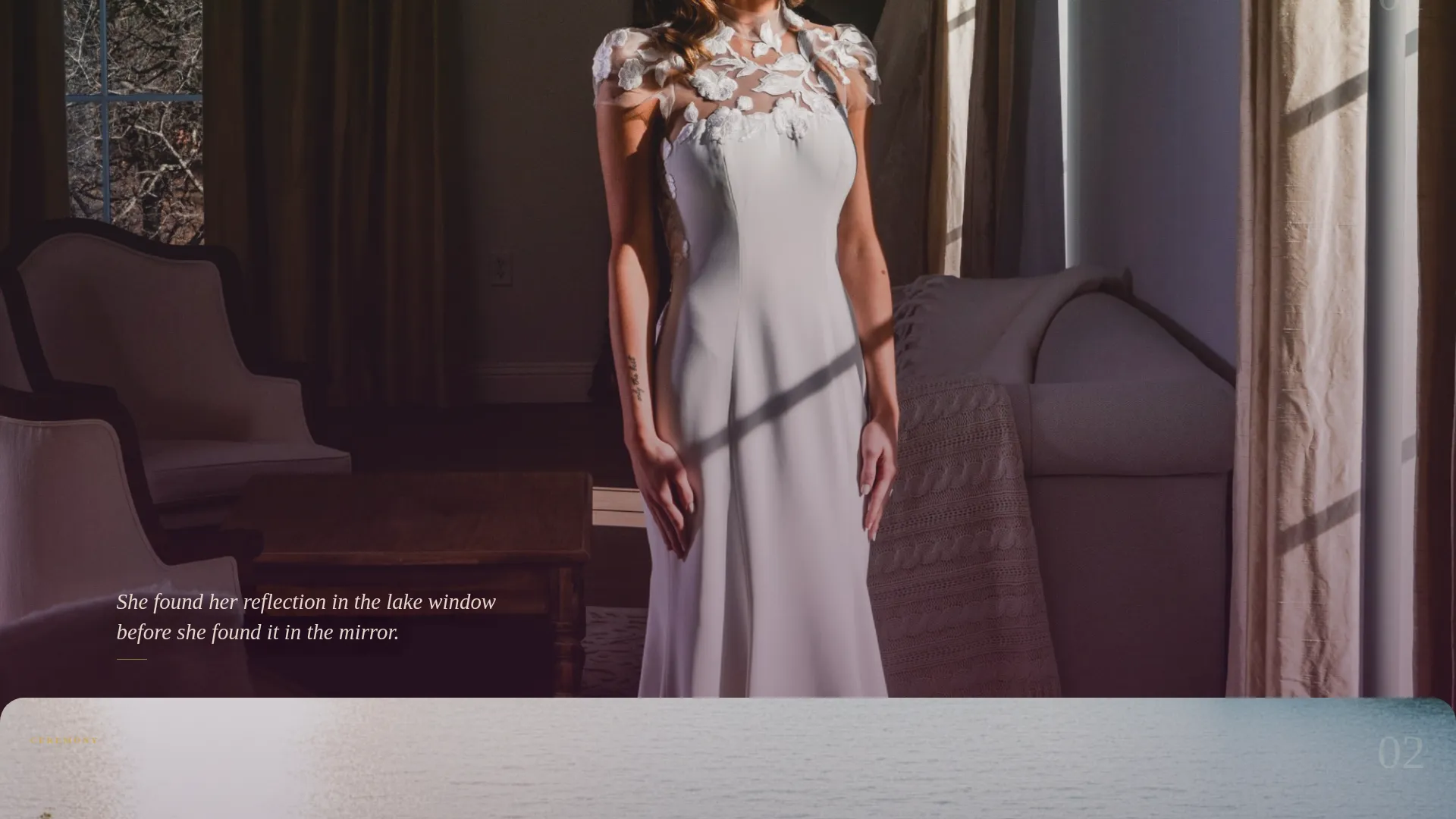
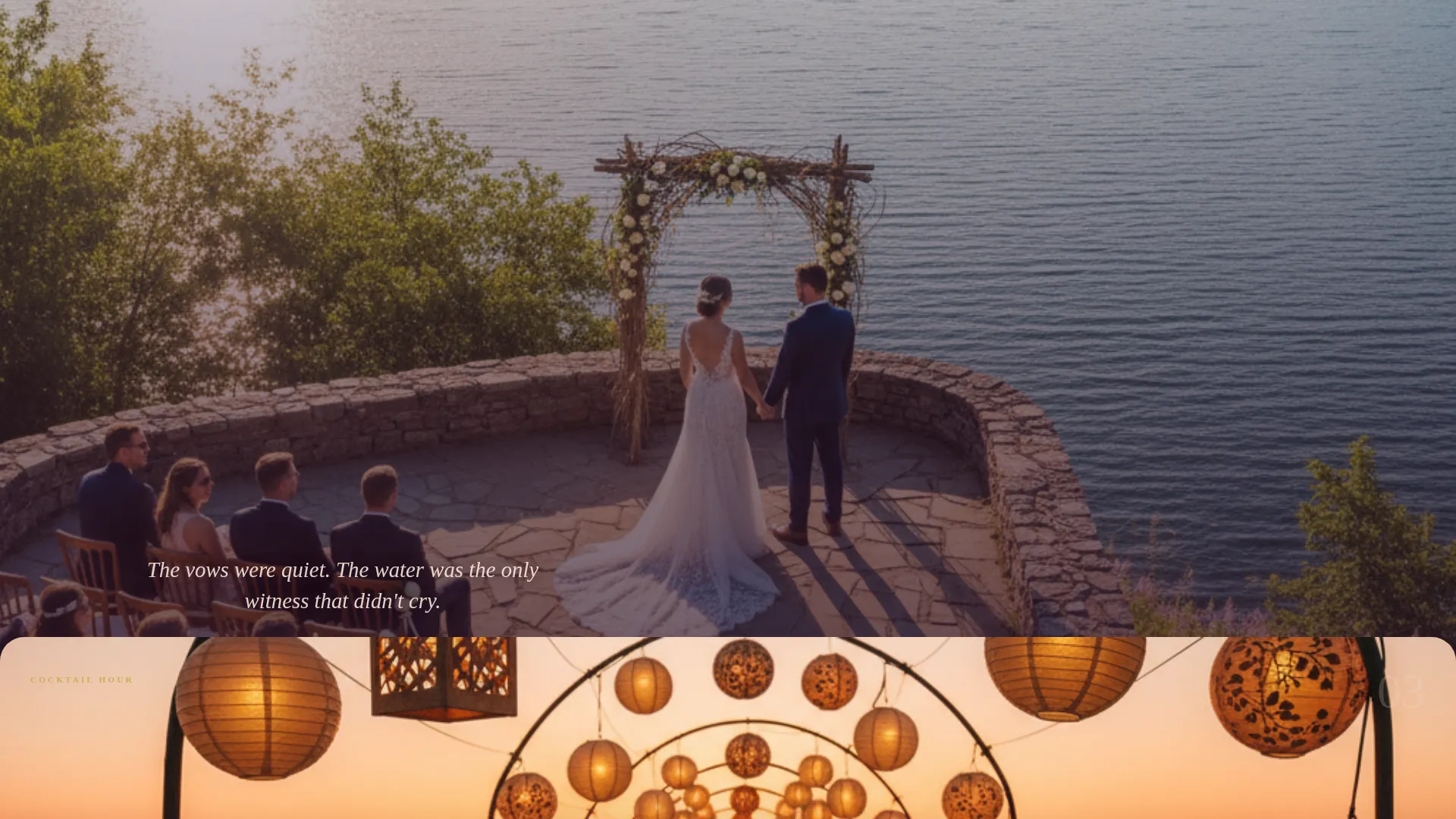
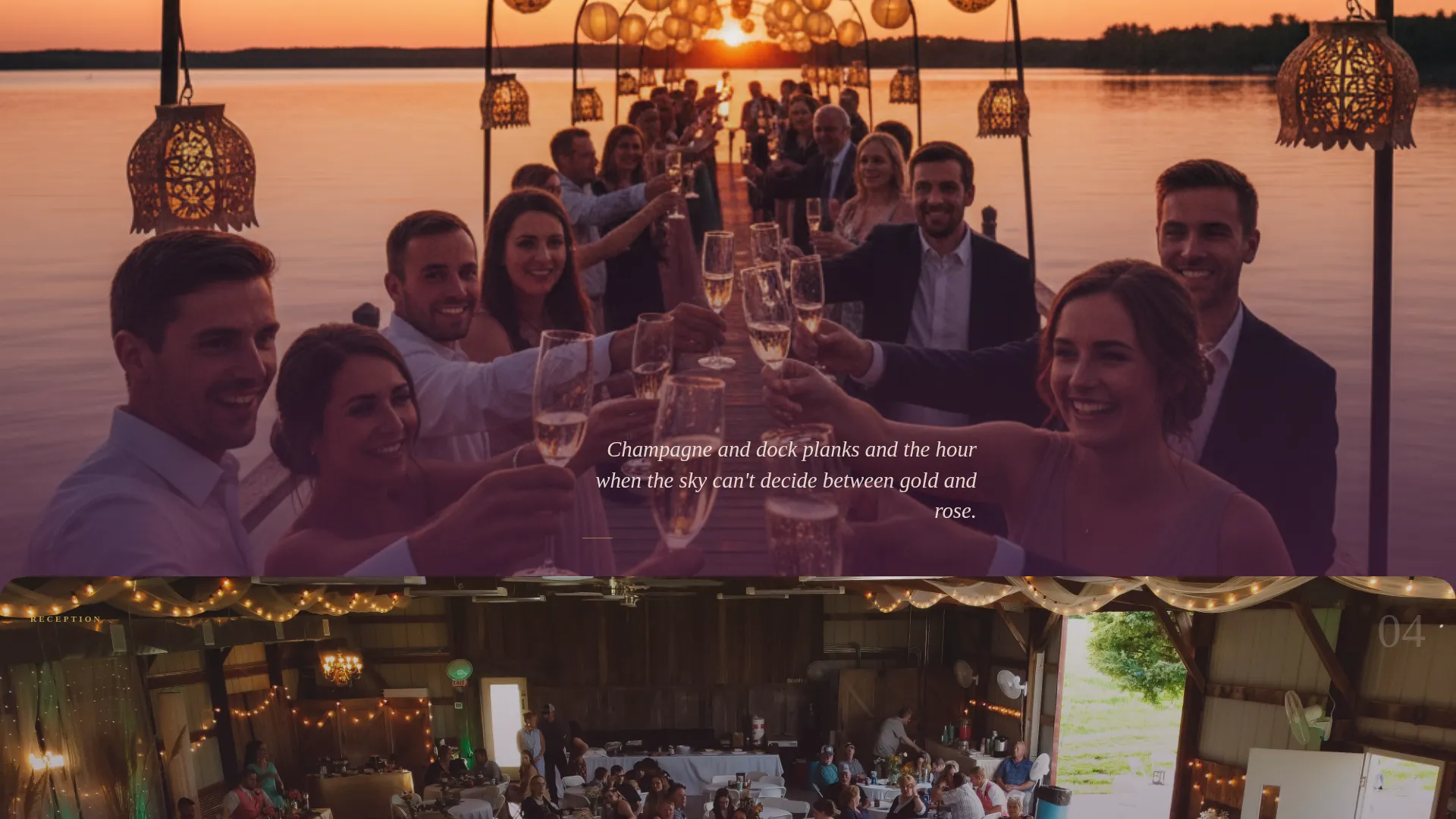
Each section slides up and partially covers the one before it, like pages turning in a linen photo album. Five scenes are pre-structured: bridal suite morning prep, waterside ceremony on the stone point, cocktail hour on the dock, reception under the timber frame, and sparkler exit along the gravel path. A single italic caption floats over each image.
Dual Conversion Path Layout
The primary call to action, "Check Your Date" in antique gold, appears as a floating button after the header and anchors at the bottom of every third section. A secondary path, "Download the Planning Guide," captures email addresses from couples who are not yet ready to inquire. Both paths are pre-positioned so no layout work is needed.
Soft Gradient Color System
Colors do not sit in hard containers. Deep plum, dusty mauve, warm champagne, and antique gold layer and bleed across panels through soft gradients. The effect mirrors watercolor bleeding on wet paper, giving the page a cohesive painterly quality that reinforces the venue's natural setting.
Mood-Driven Lighting Progression
The photo treatment across sections follows the arc of a real wedding day. Images shift from afternoon gold light in the early sections to candlelit amber in the later ones. This pulls the visitor emotionally through a full evening, making the venue feel lived-in and real before they ever visit.
Page sections overview
| Section | Purpose |
|---|---|
| Drone Video Header | Opens the venue experience with aerial and barn footage |
| Venue Name Reveal | Introduces the brand after a deliberate four-second pause |
| Bridal Suite Morning | Sets the opening emotional tone with lake-light imagery |
| Waterside Ceremony | Showcases the stone-point ceremony space surrounded by water |
| Dock Cocktail Hour | Captures the lantern-lit dock atmosphere at golden hour |
| Timber Frame Reception | Highlights the reception barn with warm candlelit framing |
| Sparkler Exit Path | Closes the story with the gravel-path sparkler send-off |
| Floating Date call to action | Anchors the primary conversion action after the header |
| Section Anchor calls to action | Repeats the date-check button every third section |
| Planning Guide Capture | Collects emails from couples at the research stage |
Design & branding system
The Plum Executive color system was chosen to feel like a late-summer evening at a stone-and-timber estate. Every color has a physical reference point rooted in the venue's real environment.
- Deep plum (#4A2040) grounds the page like velvet draped over a farmhouse table; dusty mauve (#B8889C) washes across gradient panels like the blush of a late sunset
- Warm champagne (#F2E6D9) creates breathing room the way candlelight softens a tent ceiling; antique gold (#C9A84C) traces interactive elements like the thin rim of a toasting flute
- Typography uses thin champagne-toned serif for the venue name reveal and floating italic captions over each scene image; no hard borders or sharp containers appear anywhere on the page
Mobile & speed optimization
The template is structured with a mobile visitor in mind. Video, gradient panels, and layered scroll effects are all arranged so the emotional impact holds on a smaller screen without requiring horizontal scrolling or pinch-zooming to read content.
- The full-screen video header scales cleanly to phone viewports, and the floating call-to-action button remains thumb-accessible throughout the scroll
- Overlapping section panels restack gracefully on narrow screens so the wedding day narrative stays in sequence
- Italic caption text and the champagne serif venue name are sized to remain legible on mobile without manual adjustment
How this template helps you convert
The page is designed around a single principle: earn the click by making the visitor feel their own wedding happening here before asking for any action. Conversion is built into the structure, not bolted on at the end.
- The video header and mood-driven photo progression create an emotional investment early. By the time a couple reaches the first call to action, they are already imagining the day, which lowers the barrier to clicking "Check Your Date."
- Two conversion paths serve two different readiness levels. Couples ready to inquire go straight to the interactive availability calendar. Couples still in the research phase download the planning guide, giving the venue a warm email lead to follow up with.
Other information about this template
This template sits at the intersection of lakeside wedding venue marketing and high-converting venue landing page design. It is a strong starting point for any stone-and-timber or waterfront estate that competes in a crowded local market.
- The template style is Overlap/Layered, using a Soft Gradient theme, which differentiates it visually from flat-card or grid-based venue templates
- The click-through landing page direction means the primary goal is a page-to-page handoff, not a form submission on the same page; the availability calendar lives on the next page
- The Atmosphere and Mood creative direction means copy is minimal by design; the template is intentionally photograph-heavy and caption-light to let imagery carry the emotional weight
- This template is listed under the Wedding and Events category, specifically the Wedding Venue Services subcategory, making it easy to find for venue owners browsing by category
Theme
Soft Gradient
Creative direction
Atmosphere & Mood
Color system
Plum Executive
Style
Overlap/Layered
Direction
Click-Through
Page Sections
Full-screen Drone Video Header
Overlapping Scroll Panel Layout
Dual Conversion Path Design
Soft Gradient Plum Color System
Mood-driven Lighting Progression
Floating and Anchored Call to Action Placement
Related questions
Does this template include the venue video footage?
Can I use a still image instead of a video in the header?
What happens when a visitor clicks the Check Your Date button?
Is the Download the Planning Guide button connected to an email tool?
How much copy do I need to write to launch this template?



