Smart 529 Savings Landing Page Template for Small Business Owners
Ledger is a split-screen landing page template built for financial planners serving small business owners who want to channel business revenue into tax-advantaged 529 college savings accounts. It pairs a live contribution calculator with data-first storytelling, turning hard tax and compounding numbers into a clear case for action on higher education savings.
by Rocket studio
Quick summary
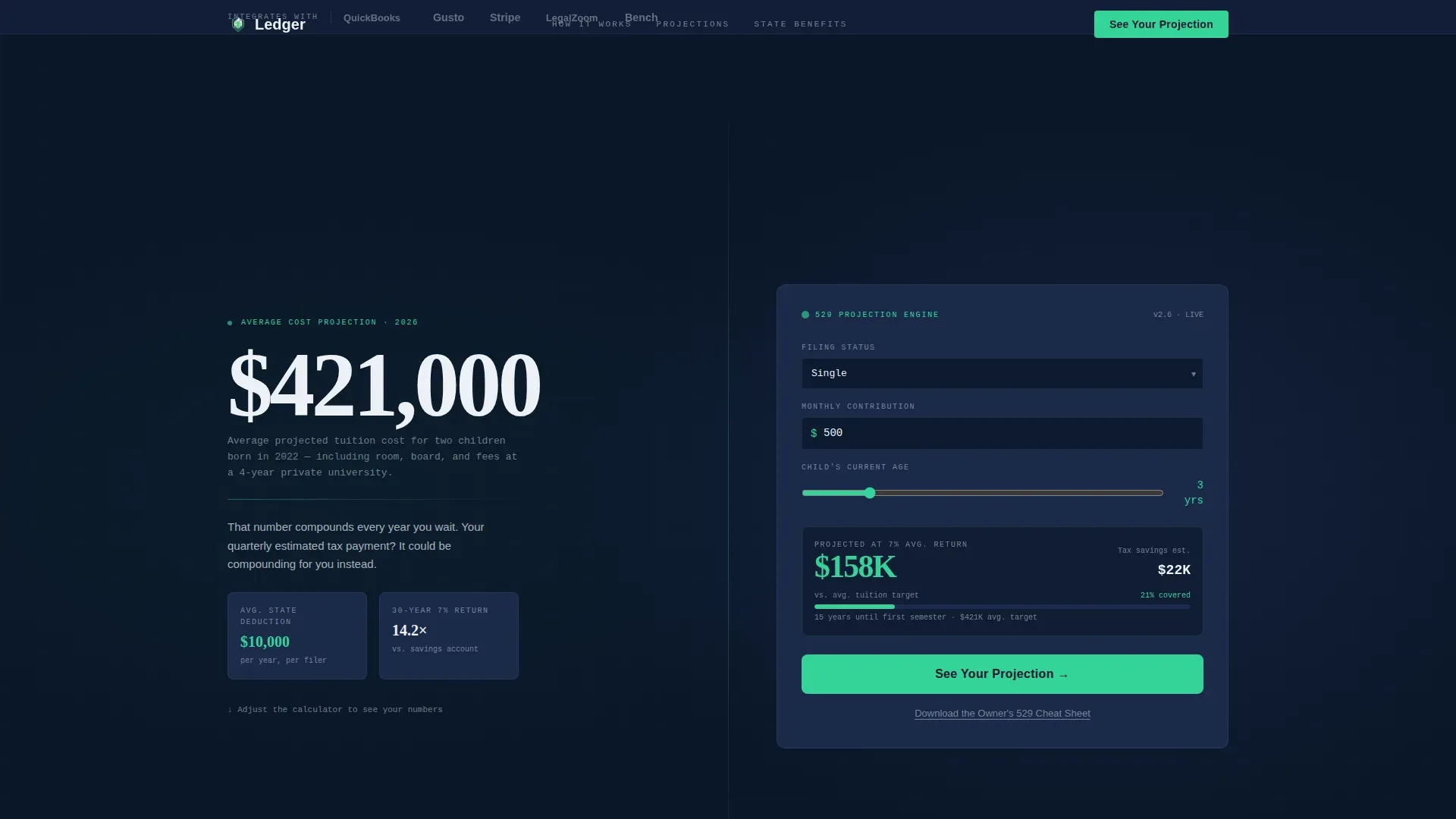
Ledger is a stats-first, click-through landing page template designed for small business education savings services. It opens with a trust bar, leads with a $421,000 tuition shock stat, and pairs every data section with a live contribution calculator. The template pushes visitors toward a partner 529 enrollment account using signal green call-to-action buttons throughout the page.
Who this template is for
This template is built for financial planners, advisors, and fintech services that help small business owners invest in tax-advantaged college savings accounts. The target visitor is an LLC founder, sole proprietor, or S-corp owner with children under twelve who has not yet started a formal savings plan for higher education.
- Financial planning services focused on small business owner education savings
- Advisors who help clients balance business revenue with long-term family finances
- Fintech products guiding parents through 529 plan enrollment and contribution decisions
What problem this template solves
Small business owners understand revenue and expenses. What they often miss is how much money quietly disappears to estimated taxes instead of being allocated toward a child's future education. This template makes inaction feel expensive. It translates tax bracket math and compounding projections into plain human sentences, so every scroll position reinforces why starting a college savings account today matters.
- Owners struggle to see how quarterly business income connects to a long-term savings plan
- The link between current tax liability and missed higher education savings is invisible without the right tools
- Generic landing page templates lack the data density and ledger-style authority this niche demands
What you get with this template
The Ledger template gives you a complete, ready-to-customize landing page structured around five core split-screen sections. Each section pairs a hard number on the left with a human translation on the right, creating a rhythm that builds urgency without losing clarity. Every visual detail supports the Data Command theme.
- A hero split panel with a $421,000 stat and a pre-populated live contribution calculator
- Four additional data-driven split sections covering tax savings, compounding projections, state benefit maps, and a full-width conversion strip
- A linear single-row footer and a trust bar featuring monochrome ecosystem logos
Feature list
A paragraph introduces the feature set here. This template packages financial storytelling, interactive tools, and a focused conversion path into one disciplined layout. Each feature below reflects a deliberate design and functional choice from the source brief.
Live Contribution Calculator
The right panel of the hero section holds a compact calculator pre-loaded with sample inputs: filing status, monthly contribution, and the child's age. Visitors can adjust the inputs and click through with those values passed as URL parameters, so the enrollment account page feels like a natural continuation rather than a hard restart.
Stats-First Split Screen Layout
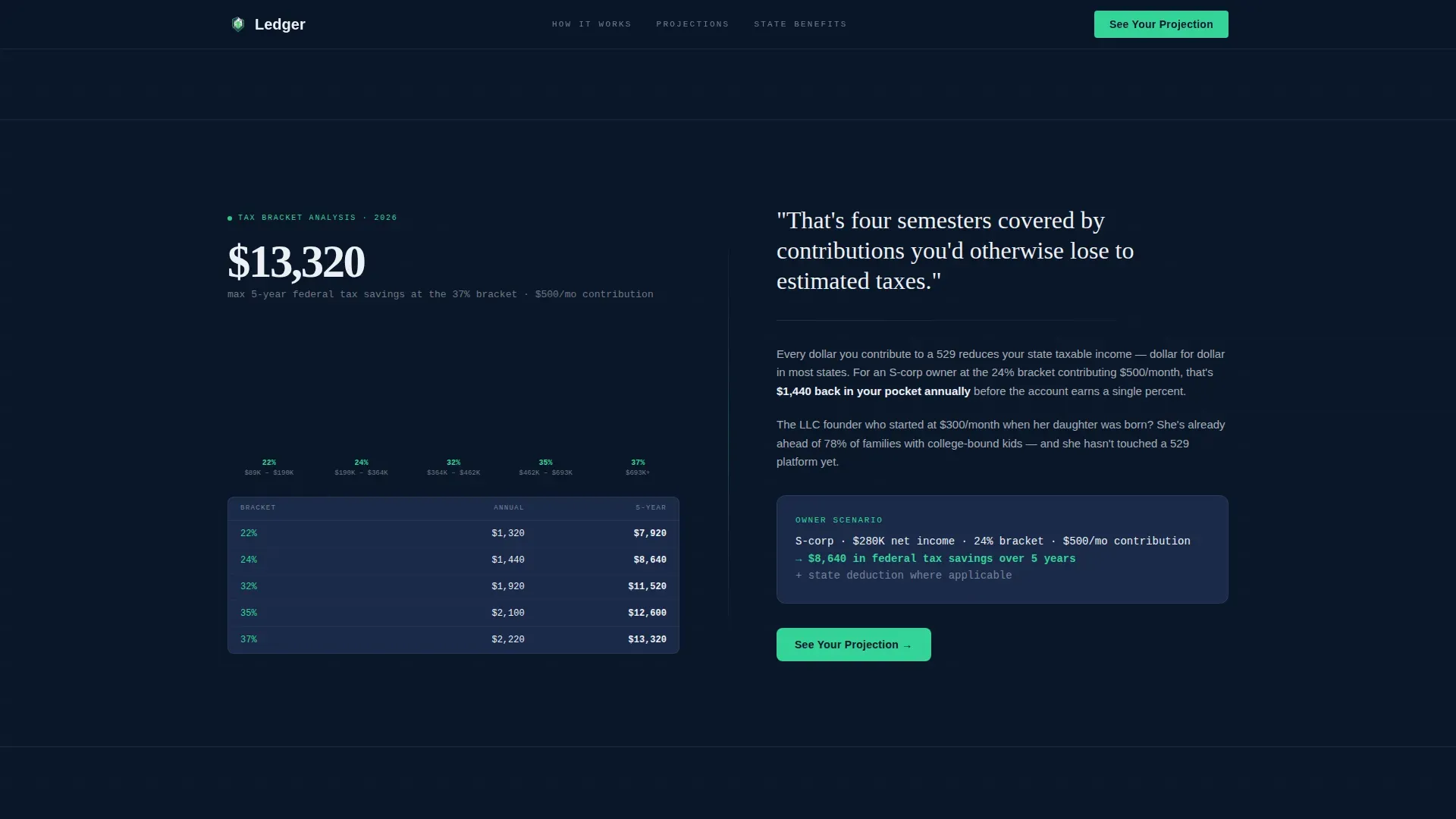
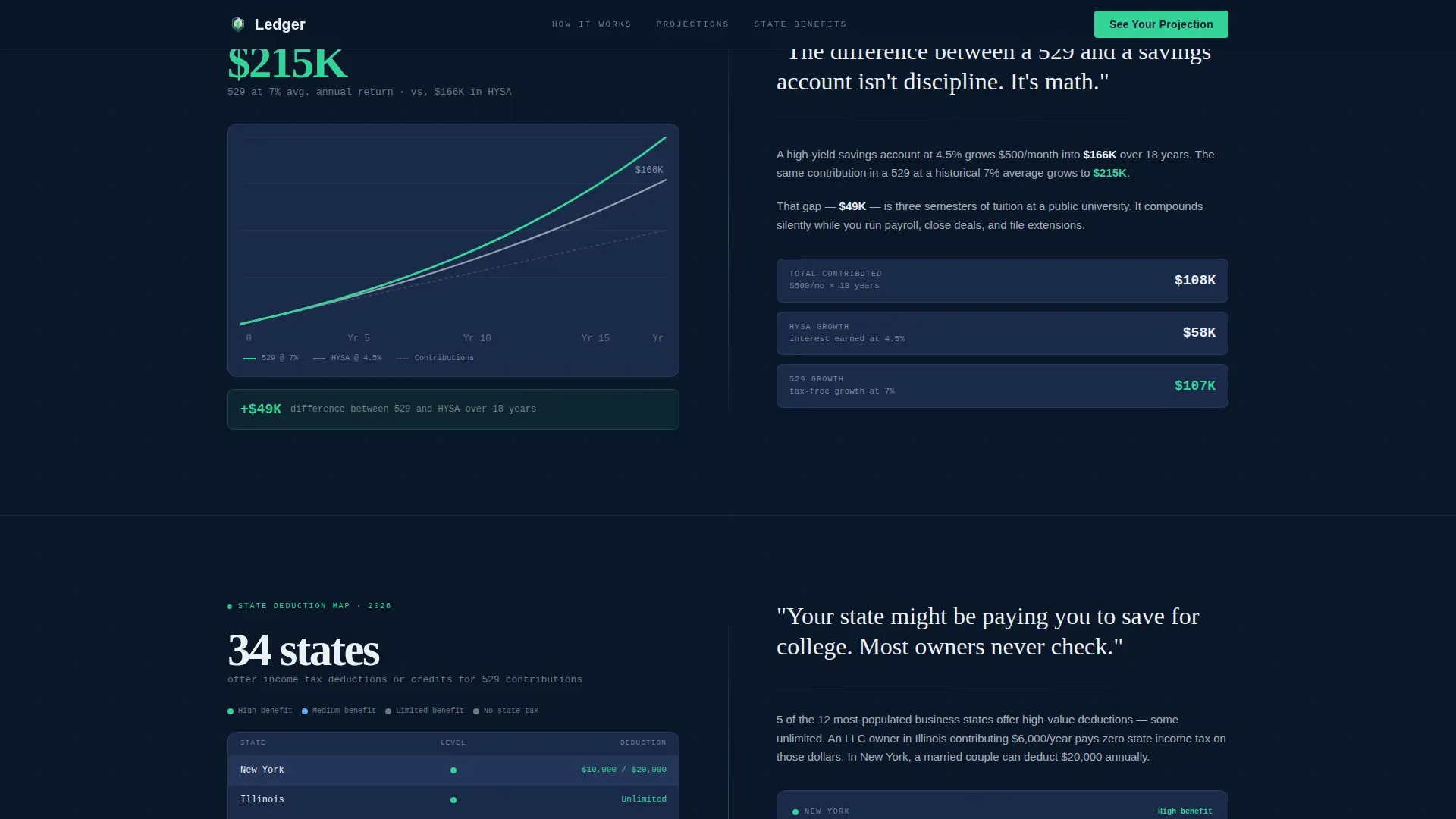
Every section of this landing page opens with a number before a narrative. The left panel carries the data: tax savings per bracket, compounding projections at seven percent versus a standard savings account rate, and state deduction maps color-coded by benefit level. The right panel gives that number a human sentence so the visitor understands its weight immediately.
Signal Green Call-to-Action System
The primary call-to-action reads "See Your Projection" in signal green and appears first inside the calculator, then recurs automatically after every second data section. A secondary text link captures email for nurture without pulling visitors away from the main conversion path. This keeps the page focused on a singular action while preserving a secondary lead capture option.
Trust Logo Bar Header
The header opens with a horizontal strip of small-business ecosystem logos rendered in monochrome against deep navy. This establishes credibility instantly by placing the service inside the tools owners already use to track their company's income, expenses, and debit activity every day.
State Deduction Map Section
One full split-screen section displays a state-level map or table color-coded by deduction benefit. Visitors can quickly review which states offer the strongest tax credit or deduction for 529 plan contributions, making the case for acting before the next tax period closes.
URL Parameter Pass-Through
When a visitor clicks the primary call-to-action, their calculator inputs, filing status, contribution amount, and child's age, travel to the enrollment platform as URL parameters. This removes the need to re-enter account information and makes the handoff feel seamless and intentional.
Page sections overview
| Section | Purpose |
|---|---|
| Logo Trust Bar | Establishes credibility with small-business ecosystem logos |
| Hero Split Panel | Delivers tuition stat shock and live calculator |
| Tax Savings Split | Pairs bracket savings numbers with plain-language context |
| Compounding Split | Contrasts 7% projection with savings account rate |
| State Benefits Split | Maps state deduction levels and explains the credit value |
| Full-Width call to action Strip | Final conversion push in signal green |
| Linear Footer Row | Closes page with minimal, single-row footer layout |
Design & branding system
The Ledger template uses a Data Command visual identity built around a Midnight Blue color system. The palette is deliberately restrained: deep terminal navy anchors every background, muted steel slate surfaces card panels, and crisp ledger white carries all typography and data labels. Signal green appears only where the numbers demand attention, reserving its authority for positive projections and active call-to-action elements.
- Color system: deep navy (#0A1628) base, steel slate (#1B2A4A) cards, ledger white (#EDF0F5) type, signal green (#34D399) for calls to action and upward chart lines
- Typography: DM Sans handles data labels and body copy; Fraunces is reserved for oversized editorial numbers and stat callouts
- Animations include scroll reveals, counter animations on key stats, a blinking cursor inside the calculator field, and chart line draw effects on the compounding section
Mobile & speed optimization
The template is designed desktop-first to honor the spreadsheet-at-midnight aesthetic, with a layout that adapts cleanly to mobile screens. The split-screen panels stack vertically on smaller viewports so the stat always appears before the calculator or narrative panel. Static sections use server-rendered components, while the interactive calculator runs as a client component to keep the initial load lean.
- Desktop-first layout with responsive stacking for mobile viewports
- Server components handle all static content sections to reduce client-side load
- Client component architecture isolates calculator interactivity without affecting the rest of the page render
How this template helps you convert
This template is engineered as a click-through page with one dominant goal: move the visitor to a partner 529 enrollment account. Every structural decision reduces friction and removes reasons to leave before clicking.
- The hero calculator pre-populates sample inputs so visitors engage immediately without having to research starting values; clicking through carries those inputs forward so account information does not need to be re-entered on the enrollment platform.
- The signal green call-to-action recurs after every second data section, so any scroll depth at which a visitor feels convinced is also a scroll depth at which they can convert without hunting for a button.
- The secondary "Download the Owner's 529 Cheat Sheet" text link captures email for nurture without adding a form that would interrupt the click-through momentum or raise the cognitive load of the page.
Other information about this template
The Ledger template sits at the intersection of general ledger discipline and college savings strategy. It is worth understanding a few broader context points that help both builders and their clients get full value from this layout.
- A general ledger is the centralized document covering a company's assets, liabilities, owner's equity, expenses, and revenue. The template's visual language borrows from this structure, making each data section feel like a well-kept journal entry in a trusted financial record.
- A general ledger template helps track debit and credit transactions and gives instant insight into whether a budget is balanced. To balance a general ledger, credits and debits must be equal. This principle of balance carries through the template's split-screen logic: every data point on the left must balance with a meaningful translation on the right.
- Budget planners who use structured ledger documents report that understanding where money flows makes it easier to allocate toward long-term goals. Digital budget planners can streamline the process of managing personal finances, and monthly budget templates help users track income and expenses over each period with clarity.
- Printable budget templates are available as supplementary documents and can support the "Download the Owner's 529 Cheat Sheet" nurture capture built into this page. Family budget templates help organize household finances, which is directly relevant to parents who are trying to balance business revenue with college savings contributions.
- Using budgeting templates can help cultivate better spending habits and improve savings discipline over time. Weekly budget templates allow users to forecast costs one week ahead, which supports the quarterly estimated-tax review cycle many sole proprietors follow.
- Earnings in a 529 plan grow tax-deferred, and withdrawals are federal tax-free for qualified higher education expenses. Non-qualified withdrawals are subject to a ten percent federal income tax penalty on earnings, so visitors should review the rules carefully before making strategic decisions about account type or contribution timing.
- As of January 1, 2026, the annual withdrawal limit for K-12 education expenses has doubled to $20,000. A married couple can also front-load up to $190,000 in a single year into a 529 plan beginning in 2026. These rule changes are significant, and this template supports the inclusion of downloadable guides to help establish educational authority around them.
- Saving for a future college education is a great advantage for a child at any age. The sooner parents start, the more compounding can do the heavy lifting across each investment period.
- 529 funds can now be used for professional certifications, vocational training, academic tutoring, standardized test fees, and homeschooling materials in addition to traditional college education expenses. This expands the value of the plan well beyond a four-year university scenario.
- Diversification can decrease investment risks by splitting holdings across multiple asset classes, and investing can protect savings from inflation over a long period. The primary goal of investing should be to optimize for the best possible return while maintaining a reasonable risk profile. Visitors are encouraged to seek professional financial advice before making final decisions about their savings plan or account type.
- The Ledger Smart 529 Savings Landing Page Template is also well-suited for financial planners who want to sell their services to small business owners in the e ink devices space or other digital-first industries where owners track company finances online and are already comfortable with data-dense interfaces.
- This template can print cleanly for presentation use. Builders who want to share a visual summary of the page layout with clients can print the design mockup directly from the browser without loss of fidelity. Several options exist for how planners can adapt the template for different account types or beneficiary relationships.
- The account owner and beneficiary details, including account number and account information fields, are handled on the enrollment platform after click-through, not on this landing page. This keeps the page lean and focused. The ability to send money or reconcile contribution totals sits within the partner enrollment experience.
- General ledger templates used alongside this page can help a company's financial team record each 529 contribution as a journal entry, keeping business finances and education savings clearly separated in the company's books.

Theme
Data Command
Creative direction
Stats-First Impact
Color system
Midnight Blue
Style
Split Screen (50/50)
Direction
Click-Through
Page Sections
Live Contribution Calculator
Stats-first Split Screen Sections
Signal Green Call-to-action System
Trust Logo Bar Header
State Deduction Map Section
URL Parameter Pass-through
Related questions
Can I customize the calculator inputs and projection numbers?
Does clicking the call-to-action button require visitors to re-enter their details?
What higher education expenses does a 529 plan typically cover?
Is this template suitable for financial advisors who work with business owner clients?
What happens if a visitor makes a non-qualified withdrawal from their 529 account?



