Smart Student HSA Savings Landing Page Template
The Ledger Smart Student HSA Savings landing page template is a single-column, calculator-first layout built for college students on high-deductible health plans. It leads with a live tax-savings estimator, then walks visitors through eligible expenses, an HSA versus FSA comparison, a compound-growth chart, and a five-question inline quiz that delivers a personalized savings snapshot to their student email.
by Rocket studio
Quick summary
Ledger is a polished, single-column landing page template designed for student health savings accounts. It opens with an interactive calculator that shows real-time tax savings before any sign-up prompt appears. Every section below deepens the financial case, making the quiz conversion feel earned rather than forced. The template is ready to deploy with minimal editing.
Who this template is for
This template is ideal for fintech products and student finance services targeting college students on high-deductible health plans. It suits first-generation students, grad students, and juniors or seniors who are just beginning to understand tax-advantaged accounts.
- College students on a parent high-deductible plan who want to track health spending and lower their tax bill
- First-gen and grad students who need simple, honest context before they decide to open an account
- Finance brands and student-focused services that choose to lead with utility rather than marketing copy
What problem this template solves
Most students never enter expenses into a benefits portal because the experience feels built for someone else. They close the tab, pay out of pocket, and lose money they could have saved. This template removes that barrier by leading with the math.
- Students do not understand what a health savings account is or how debit and credit transactions within one affect their budget
- Existing landing pages for financial services bury key details and ask for personal data before showing any value
- Students on low income need to see real dollar amounts for real expenses before they trust a product enough to share their email
What you get with this template
You get a complete, single-page layout with every section pre-built and ready to customize. The template includes interactive components, a polished visual system, and a structured conversion flow from first scroll to quiz completion.
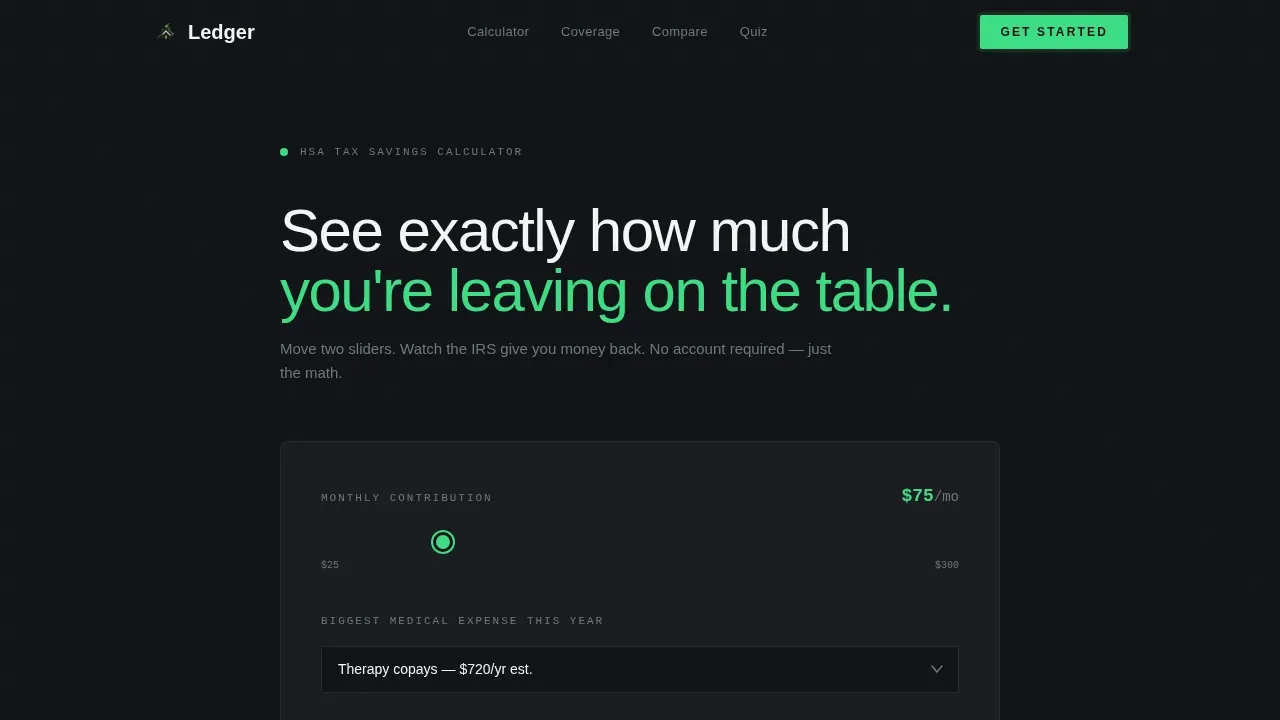
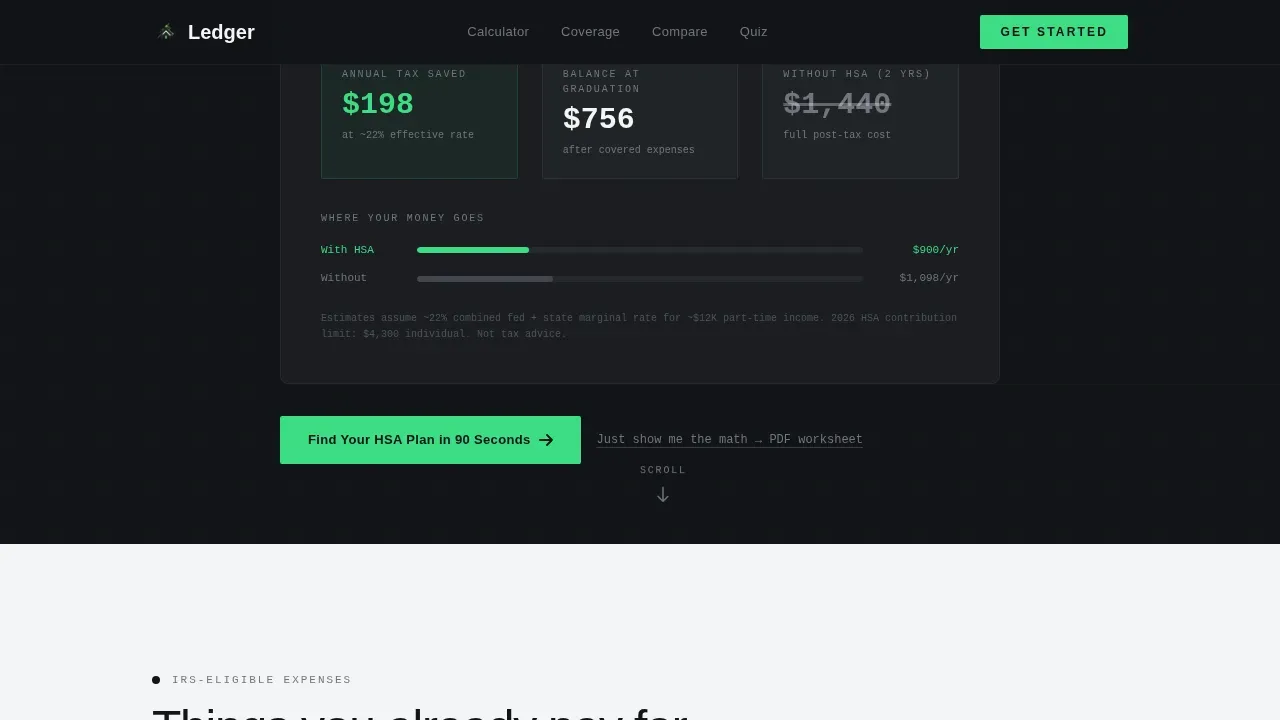
- A live two-slider calculator that animates annual tax savings, projected balance at graduation, and an out-of-pocket comparison
- A five-question inline quiz that generates a personalized savings snapshot and sends results to a student email address
- A secondary lead path, a one-page PDF tax worksheet download, for visitors who are not yet ready to complete the quiz
Feature list
This template ships with six purpose-built components that work together to build financial confidence and move visitors toward conversion.
Live Tax-Savings Calculator
Two draggable sliders let visitors set a monthly contribution amount and choose expected medical expenses from a dropdown. The readout below updates in real time, showing annual tax savings, a projected balance at graduation, and a side-by-side comparison of the same money spent without an account. Numbers animate in signal-green on carbon black, making the data feel immediate and credible.
Eligible Expense Visual Grid
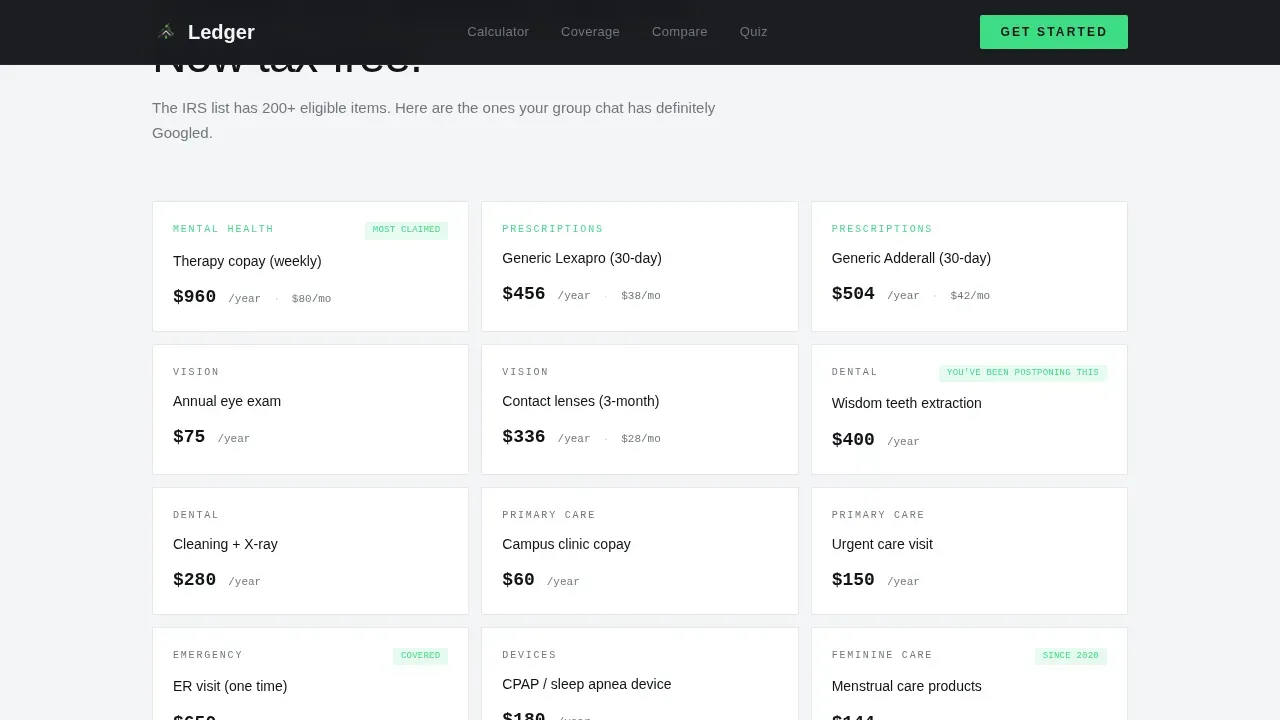
A scannable grid displays common student medical expenses with real dollar amounts alongside each entry. Examples include a prescription like Lexapro at $38 per month, an eye exam at $75, and a campus clinic copay at $20. Visitors can quickly understand what qualifies and how those expenses add up across a year.
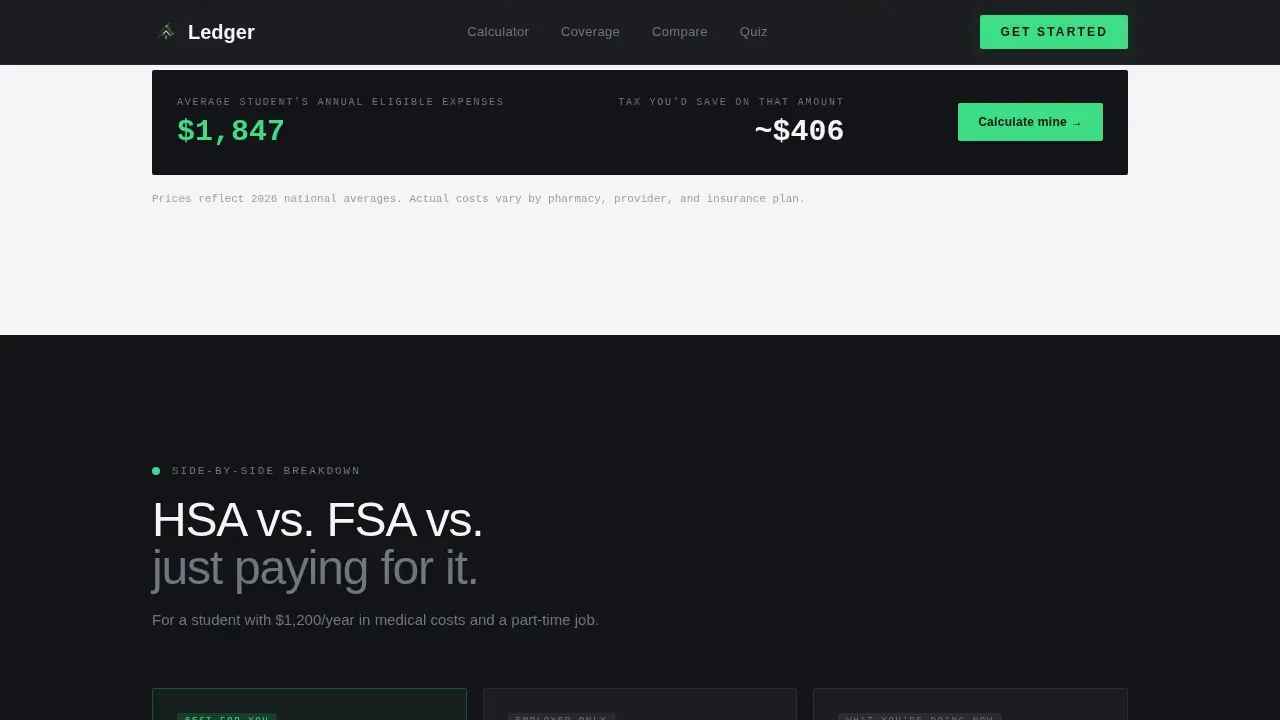
HSA versus. FSA versus. Out-of-Pocket Comparison Cards
Three side-by-side cards lay out the key differences between a health savings account, a flexible spending account (FSA), and paying out of pocket. Each card uses actual tax brackets for a $12,000 part-time income so students can determine exactly how each option affects their net spending.
Compound-Growth Projection Chart
A scrollable chart shows what happens to HSA assets if a student keeps contributing after graduation. Unlike FSA funds, HSA balances roll over every year with no use-it-or-lose-it rule, and this chart makes that long-term equity argument visual and easy to understand.
Five-Question Inline Quiz
The quiz asks about plan type, estimated monthly health spending, state of residence, enrollment status, and tax-filing situation. Results generate a recommended contribution amount and a personalized savings snapshot delivered to the visitor's.edu email address. The lead capture form stays at three fields or fewer to reduce friction.
PDF Tax Worksheet Download
A secondary call-to-action lets skeptics download a one-page tax savings worksheet without completing the quiz. This lighter path captures leads at a lower commitment level and keeps the page revenue-positive for visitors who are not yet ready to go all in.
Page sections overview
| Section | Purpose |
|---|---|
| Hero Calculator | Live sliders show real-time tax savings and projected balance |
| What Counts Grid | Eligible expense categories with real dollar amounts |
| HSA versus. FSA Cards | Three-card comparison using real income tax brackets |
| Compound Growth Chart | Post-graduation projection of account growth over a decade |
| Quiz Call to Action | Inline five-question assessment with personalized results |
| Footer | Linear single-row pattern with contact details and links |
Design & branding system
The visual identity follows a Monochrome Steel palette that feels like a matte-black debit card sitting on a dorm desk. Typography pairs DM Sans for body copy with JetBrains Mono for all numbers and data readouts, giving financial figures a terminal-precise look that students trust.
- Color system: carbon terminal black (#121417) as the primary background, brushed aluminum mid-gray (#71767F) for secondary text, soft ledger white (#F4F5F7) for content surfaces, and signal-green (#3DDC84) reserved for positive numbers, active states, and the primary call-to-action button
- No gradients and no decorative illustration; every visual element supports the quiet authority of money being handled correctly
Mobile & speed optimization
Over 80 percent of student traffic arrives on a phone, often late at night when someone is Googling a medical bill or comparing prescription prices. The template is built mobile-first so every interactive element is tappable and the calculator is pre-loaded before any marketing copy appears.
- Oversized tappable buttons, large slider handles, and a dropdown optimized for thumb use on small screens
- The calculator pre-hydrates on load so visitors get an interactive, ready experience from the first moment without waiting for scripts to settle
How this template helps you convert
The Ledger template earns trust through utility before asking for anything. Each scroll reveals a new layer of financial clarity, so by the time the quiz appears it feels like a natural next step rather than a gate.
- The hero calculator delivers instant, personalized value the moment a visitor lands, making the page feel like a product rather than a pitch
- The comparison cards and growth chart deepen the financial case section by section, giving students the context they need to decide with confidence
- The dual conversion path, quiz completion for engaged visitors and PDF download for skeptics, captures leads at two friction levels and maximizes the share of visitors who take action
Other information about this template
This template is part of a broader Dashboard Pro theme system using the Monochrome Steel color system. It is categorized under Finance and Insurance, with a Student Finance subcategory, and is built specifically around the student health savings account niche.
- A general ledger template is a record of the income and expenses that affect a business or personal budget. Using a general ledger provides insight into overall financial health by helping you track debit and credit transactions with accuracy. The balance of a general ledger template always reflects the difference of credits from debits, and a general ledger must stay equal on both sides.
- A strong general ledger template should include details such as transaction date, description, and amounts for accurate record-keeping. The information in the ledger is essential as this will be the basis for making informed decisions about assets, liabilities, equity, accounts payable, and accounts receivable.
- The ledger smart student hsa savings landing page template is signed with a clear conversion strategy: the general ledger logic behind HSA accounts (pre-tax contributions, tax-free withdrawals, compound revenue over time) is made visible to students through interactive data rather than static copy.
- A general ledger can help you record and monitor your financial data to ensure your debits and credits reflect your budget. Accountants generally use these same principles to enter expenses into structured categories, and this template teaches students to think the same way about their health spending.
- Trust and security signals should be clearly displayed on the page. Simple lead capture forms should stay at a maximum of three fields. Bold, high-contrast call-to-action buttons with action-oriented text support engagement and reduce drop-off. The landing page must balance financial credibility with a mobile-first, student-friendly experience. Contact details should be easy to find so visitors can send questions before they sign up.
- The HSA account is portable, meaning it stays with the student through job changes, school transfers, and insurance switches. Contributions are tax-deductible, growth is tax-free, and withdrawals for qualified medical expenses are also tax-free, providing a triple-tax advantage. The account carries no minimum balance requirement, making it personally accessible for students with low income. Students can pay for eligible purchases via debit card, smartphone apps, or digital wallets.
Theme
Dashboard Pro
Creative direction
Calculator/Tool First
Color system
Monochrome Steel
Style
Single Column Flow
Direction
Quiz/Assessment
Page Sections
Live Two-slider Tax Savings Calculator
Eligible Expense Visual Grid
HSA Versus. FSA Versus. Out-of-pocket Comparison
Compound Growth Projection Chart
Five-question Inline Quiz
PDF Tax Worksheet Secondary Path
Related questions
What sections are included in this template?
Is the calculator interactive out of the box?
Who is this landing page template best suited for?
How does the quiz conversion flow work?
Can visitors use the template to understand HSA versus FSA differences?



