Low Income Finance Comparison Website Template
Ledger is a tax-sheltered HSA savings comparison landing page template built for hourly workers, gig drivers, and single parents earning under $45,000. It uses bold comparison tables, a compound growth chart, a tax equity breakdown, and an inline three-question quiz to show visitors exactly how much they are leaving on the table each year by not using a Health Savings Account.
by Rocket studio
Quick summary
Ledger turns an unfamiliar benefits decision into a clear math problem. The template uses stacked typography, comparison tables, growth charts, and an inline quiz to help low-income workers see their real HSA opportunity in plain numbers. Every section answers a question a real worker would type at 11pm, and every answer is a table or a figure, never a paragraph of jargon.
Who this template is for
This template is designed for anyone helping hourly and gig workers understand health savings accounts (HSAs) during open enrollment. It works whether you are a benefits platform, a financial wellness brand, or a solo consultant serving working-class clients.
- Hourly warehouse workers and gig drivers choosing benefits on their phones
- Single parents comparing copay costs and looking for tax savings on a tight budget
- Benefits advisors and fintech teams serving workers earning under $45,000 annually
What problem this template solves
Most workers who qualify for an HSA never open one. They assume tax-sheltered accounts are for high earners. Ledger corrects that assumption with data, not persuasion.
- Visitors do not know they qualify or how much money they are losing each year
- Existing benefits pages bury the details in dense text that mobile users skip
- No clear comparison between HSA, FSA, and paying out of pocket exists in plain language
What you get with this template
This ledger template gives you a complete, conversion-focused landing page with five structured sections and a built-in quiz flow. Each section is a working piece of financial education designed to earn trust through numbers.
- A stacked hero that reads like a verdict: "YOU QUALIFY" in 120px compressed type with stagger fade-ins
- Three comparison tables covering HSA versus FSA versus out-of-pocket, tax equity at $38K versus $150K, and compound growth starting at $50 per month
- An inline three-question quiz with a slider, icon-based insurance selector, and instant on-page results showing personalized tax savings and a ten-year growth figure
Feature list
This ledger template is built around one idea: show the math, earn the trust, capture the lead.
Stacked Type Tower Hero
The hero fills the viewport with compressed bold type. "YOU QUALIFY." opens at 120px. Below it, three staggered lines confirm income range, plan type, and the annual dollar amount the visitor is currently missing. Each line fades in on a 400ms delay, creating a verdict-style reveal that stops the scroll.
HSA versus FSA versus Out-of-Pocket Comparison Table
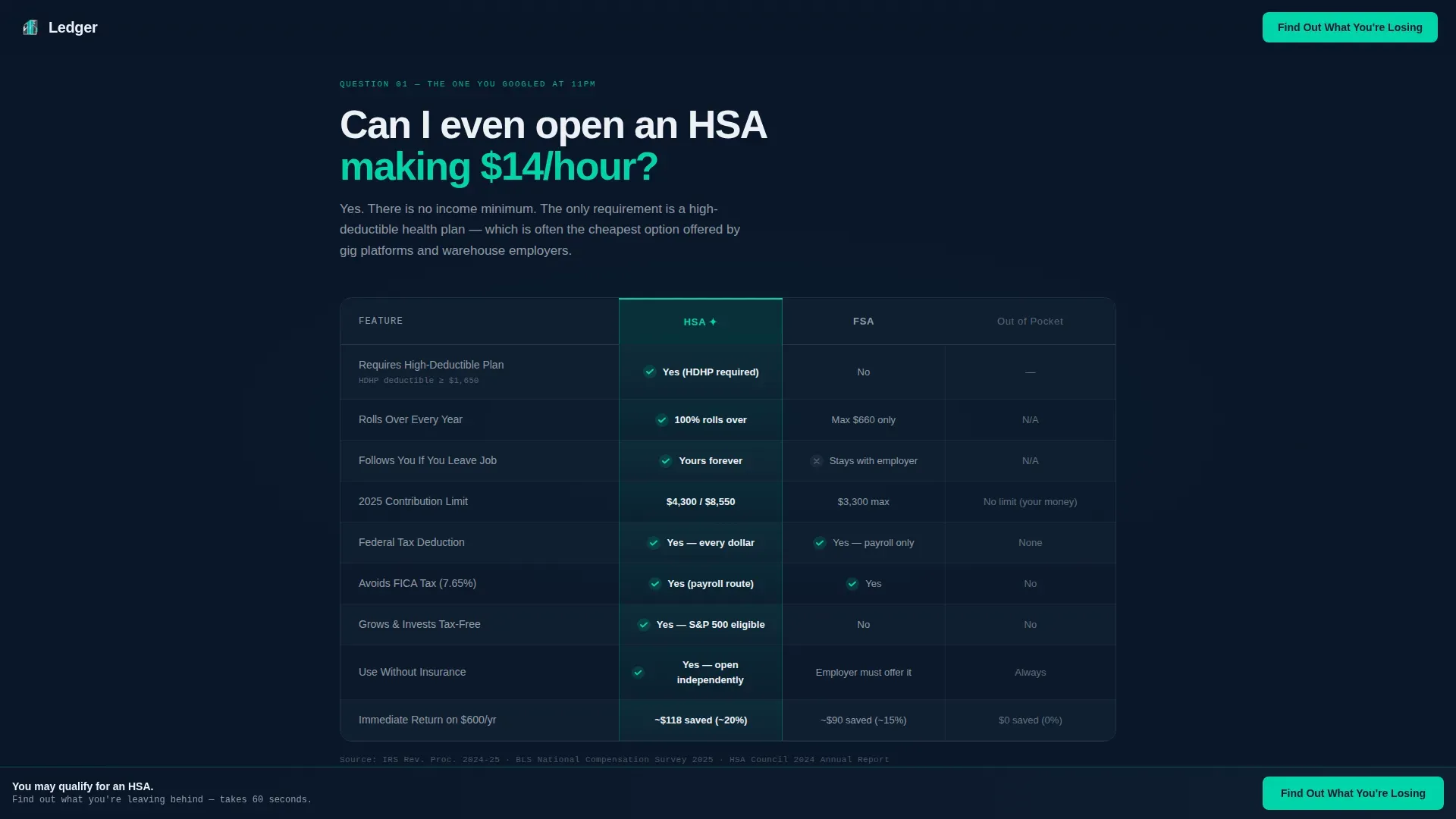
The first comparison table answers the question most workers actually search: "Can I even open an HSA making $14 an hour?" The HSA column glows in teal. Rows cover debits, credits, rollover rules, and account portability. HSA balances never expire and roll over indefinitely, unlike FSA funds, and the account belongs to the individual even after a job change.
Compound Growth Chart
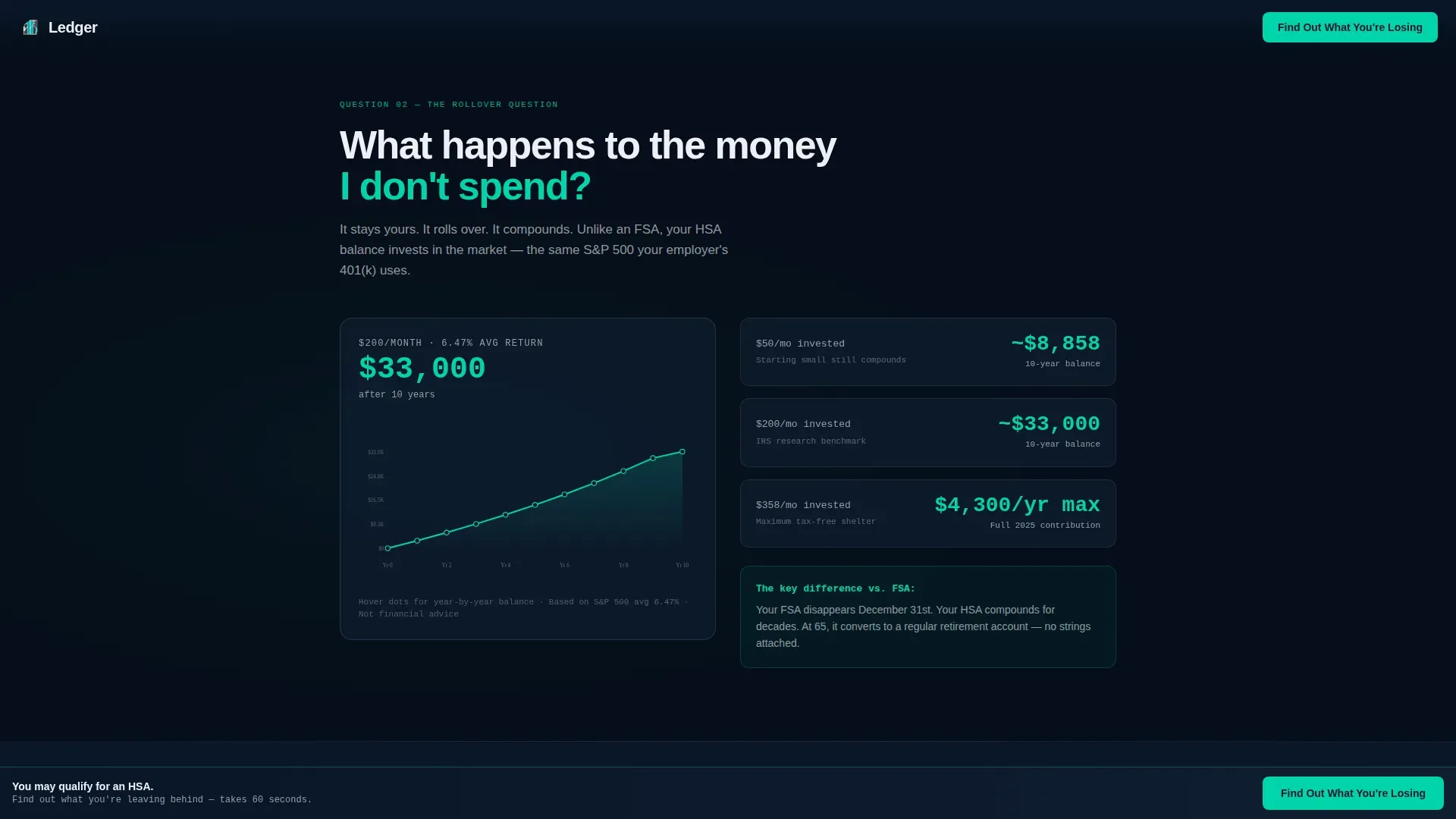
The second section reveals what happens to unspent money. A visual chart tracks a $50-per-month contribution over ten years, showing projected growth through tax-free investment in stocks or mutual funds. HSAs offer a triple-tax advantage: tax-deductible contributions, tax-free growth, and tax-free withdrawals for qualified medical expenses.
Tax Equity Side-by-Side
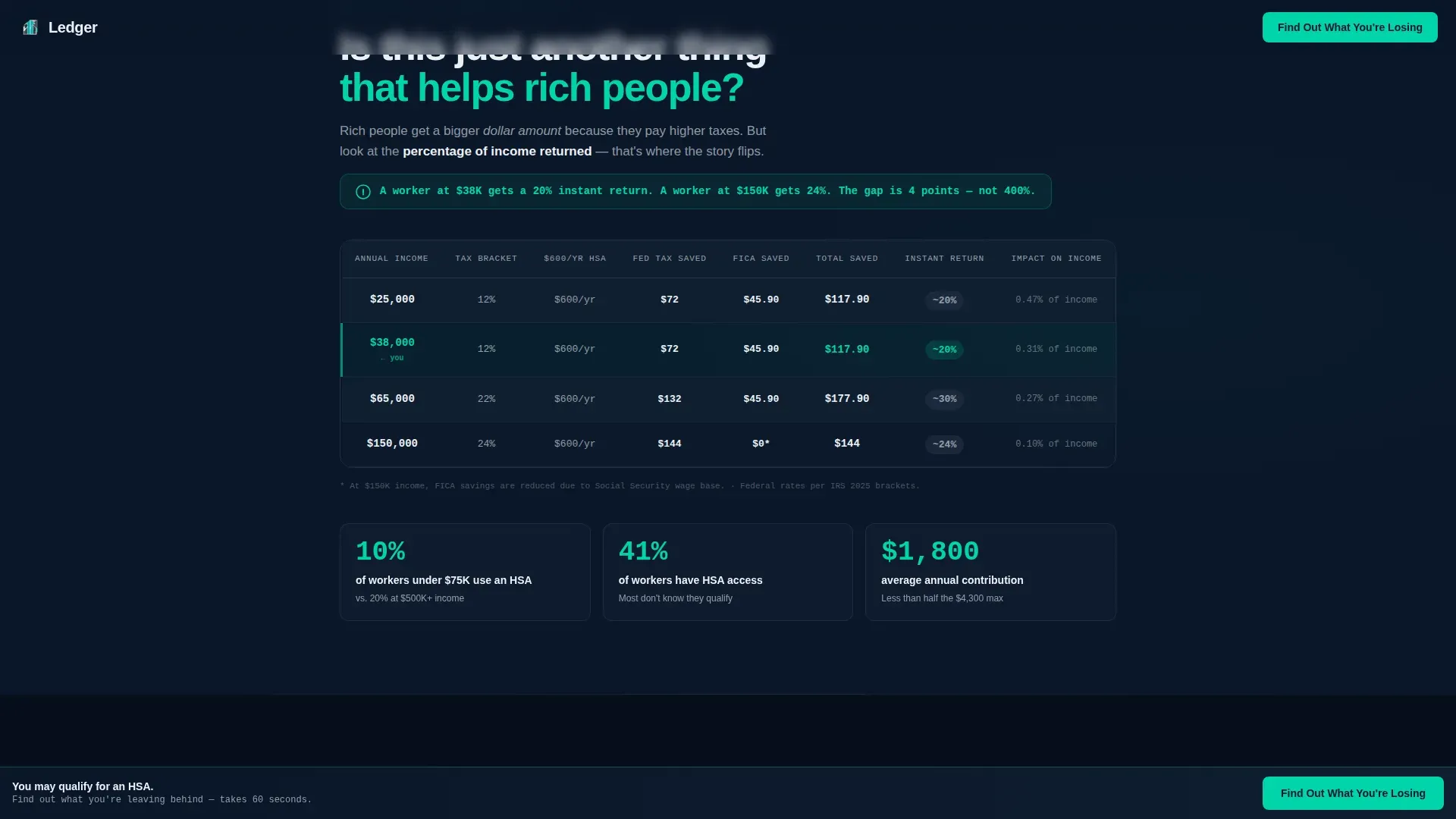
A dedicated section places a $38,000 income next to a $150,000 income and shows the percentage tax impact of HSA contributions on each. The proportional savings are larger for the lower earner. This section answers the question "Is this just another thing that helps rich people?" with a direct, data-driven answer.
Inline Quiz with Instant Results
The primary call to action is a three-question inline quiz. Visitors select their income range on a slider, choose their insurance type by icon, and estimate monthly medical spending. Results appear instantly on-page: a personalized annual tax savings figure in large teal type, a projected ten-year balance, and a "See Your Full HSA Plan" button that collects email and zip code.
Page sections overview
| Section | Purpose |
|---|---|
| Hero Type Tower | Declare visitor eligibility in bold stacked type with 400ms stagger fade-ins |
| HSA Comparison Table | Compare HSA, FSA, and out-of-pocket costs with a teal-highlighted HSA column |
| Compound Growth Chart | Show $50/month growing over ten years with tax-free investment projection |
| Tax Equity Breakdown | Prove proportional HSA savings are larger at $38K than at $150K income |
| Inline Quiz call to action | Three-question assessment returning personalized savings and growth figures |
| Sticky call to action Bar | Persistent "Find Out What You're Losing" bar anchored to the bottom of the screen |
| Linear Footer | Single-row footer with secondary PDF download lead capture |
Design & branding system
The visual identity follows a Data Command theme. It feels like a bank app built for mission control: deep, serious, and precise, with teal signal edges that guide every next action.
- Background is deep terminal navy (#0A1628); table borders and secondary surfaces use muted steel (#3A4A5C); cell text and figures use clinical white (#EDF0F5)
- High-voltage teal (#00D4AA) is reserved exclusively for the winning HSA column highlight, interactive elements, and every call-to-action button
- Typography uses DM Sans in compressed bold for the hero tower and IBM Plex Mono for all data figures, contribution amounts, and projected totals
Mobile & speed optimization
Over 60 percent of the target audience visits during open enrollment on their phones. The template is built mobile-first, so every table, chart, and quiz element is designed for a small screen before a large one.
- Comparison tables reflow for narrow viewports; the slider quiz input works cleanly on touch screens without dropdown friction
- Stagger animations use intersection observer so reveals trigger only when content enters the viewport, keeping the experience smooth on lower-powered devices
- Count-up number animations on results figures are handled client-side while static sections use server components to keep initial load lean
How this template helps you convert
Ledger is built around a single conversion path: quiz completion followed by email capture. Every design and content decision supports that path.
- The stacked hero creates an immediate personal stake by naming the visitor's income bracket and putting a dollar figure on what they are losing, pulling them directly into the first comparison table
- The inline quiz appears after the second comparison table, then again as a sticky bottom bar, giving visitors two natural moments to act without feeling pressured; quiz results deliver a personalized savings number that makes the "See Your Full HSA Plan" email capture feel like a logical next step rather than a form
Other information about this template
This template sits at the intersection of financial education and lead generation for the low-income health savings account niche. It draws on general ledger logic to make benefits data feel as structured and trustworthy as accounting records.
- The general ledger template structure behind the comparison tables mirrors how a general ledger account organizes debits and credits, assets, liabilities, equity, revenue, and expenses into clear rows and columns
- Builders can customize account name labels, contribution amounts, and date formats to match local plan details or specific open enrollment windows
- The secondary conversion path is a downloadable PDF guide requiring only a first name and email, giving visitors who are not ready for the quiz a lower-friction entry point
- The ledger tax sheltered hsa savings comparison landing page template is ready to copy, adapt, and publish without building comparison logic from scratch
- Teams working in spreadsheets can reference the same general ledger template logic used here to track financial transactions across accounts payable, accounts receivable, and other business transactions in Google Sheets or Excel
- Built-in formulas and automated calculations in the quiz results mirror the kind of bookkeeping accuracy that a well-maintained general ledger delivers for small businesses managing financial data across multiple accounts
- Real-time collaboration is supported through the platform, so multiple team members can review and update content, sharing edits without version-control errors
- The template helps decrease time spent on manual layout work and supports consistent workflows across benefits campaigns

Theme
Data Command
Creative direction
FAQ-Driven
Color system
Midnight Blue
Style
Comparison Table
Direction
Quiz/Assessment
Page Sections
Stacked Type Tower Hero
HSA Versus FSA Versus Out-of-pocket Table
Compound Growth Projection Chart
Tax Equity Side-by-side Section
Inline Three-question Quiz with Instant Results
Sticky Call to Action Bar and PDF Secondary Path
Related questions
Who is this landing page template designed for?
What makes the HSA comparison table different from a standard benefits page?
How does the inline quiz work?
Can HSA funds be invested for long-term growth?
Do I need accounting software to use this template?



